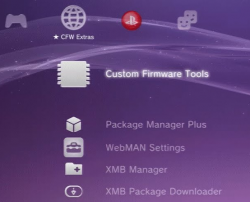
CFW Extras Category

PS3 "CFW Extras" XMB Category (v1.00) - See Video & Download of this new impressive mod by DeViL303 v1.0.1

DeViL303

Developer
PSX-Place Supporter
This is a new collection of mods all combined into one "new" category on REBUG 4.81 CFW, with all xmls and icons in one place on HDD. It allows for the user to choose exactly which components to install, and they can choose where to install them, and it also allows easy updating / modifying of each component of the XMB individually. All mods are translated into Spanish, French, Italian and German in this release so far (based on system's XMB settings)

The basic idea is that I moved the original network items over to PSN and renamed that to Network, I also cleaned some useless items out of the PSN category. The easiest way to understand how it works and what it changes is to watch the included video.

Please note, if you downloaded your addons before 28th of November 2017, that
there is a risk of brick if you try to enter FSM via this tool, it has been patched now,
So Please redownload CFW Tools if you already have it.


  • Below are the XMB items/Mods/Addons you can choose to install, each one (or all) can be installed into either the new CFW Extras Category, or into the game category, or both:
    • Soft Reboot
    • Hard Reboot
    • Shutdown
    • App Home
    • Configuration Manager
    • CFW Tools (Mod of Mod)
    • Homebrew Folder
    • Package Manager
    • Package Manager Plus (Mod)
    • webMAN Games
    • webMAN Mod Settings
    • XMB Manager (Mod , no "plus")
    • XMB Package Downloader
    In the users category you can choose to add some or all of the following items:
    • Soft Reboot
    • Hard Reboot
    • Shutdown

    CFW settings.png
    Most items don't need any explanation as they are self explanatory by the name, but the Homebrew Folder might, This is a new item that can be added to Game or CFW Extras, it will show any apps that have the category designation "CB" in the PARAM.SFO, So if for example you wanted to move some of your apps into this, you would edit the PARAM.SFO to "CB", then rebuild database and they will appear inside there, or just pack that PARAM.SFO into the pkg before install.

    This also installs the Whats New on PSX-Place Item, it will replace the original "Whats New" in the PSN category (the original was broken in Rebug anyway, links don't work).

    There are more features too, such as the ability to install mods into any category without modifying flash again, I have made 5 generic "extension slots" in each category, but they wont be used in this initial release.

  • Big thanks to all the developers/originators of those mods/plugins/hacks and everyone who has helped with translating, testing and ideas etc, there are too many to name, but here are some anyway,
    Special thanks to the translators - littlebalup (French), disyoko (Spanish), MHAF99 (Arabic), thehero (Italian) and to Berion for the icons, aldostools for webMAN mod, and bguerville/Mysis for the xai_plugin.

  • Important Notes:

    • This is ONLY for Rebug 4.81.
    • Do NOT activate FSM through this addon.
    • If you have any existing mods in any category this will wipe them out.
    • You are required to have a webMAN MOD plugin running for some features to work, such as webMAN games, webMAN mod settings, and XMBPD (full edition of wMM required for this).
    • Due to the amount of items this adds, your ingame XMB will struggle to show all of the icons more than usual, and some of the icons for the mods will never show.
    • This is the first release of a WIP so there are most likely some bugs.

    * I will add more to this description over time. (Resource Link)


Download & Source @: PSX-Place.com
 
Last edited:
BTW, If you dont have internet access on your PS3 for whatever reason, or you don't want to use the online updater to get the addons, you can get the current versions here and install them manually with pkg manager (or using the Local Addons option inside setup).

Here they are in 3 pkgs:
All Addons CFW Category
All Addons Game Category
All Addons User Category

You must have the main CFW Extras pkg from the above post installed for these addons to do anything.
 
Have not tried the latest version yet, but as you know @DeViL303 this was a great idea.aand loved the test versions :) .

I know DeViL notice's but does anyone else notice in the video of psx-place news feed scrolling on the clock as DeViL demo's his impressive project (that's part of the What's New psx-place mod). :)

(Also DeViL303, made some adjustments to the release notes for the news)
 
Update: @thehero has just completed a full Italian translation. Thanks. I have added it to v1.00, So if you want to use the Italian translation please redownload it now. (I wont be doing a resource update)

Thanks again to all the translators:
Italian = thehero
French = littlebalup
Spanish = disyoko

And there is an Arabic release coming soon translated by MHAF99, he has completed the translation, I just need to pack up the files.
 
BTW, If you dont have internet access on your PS3 for whatever reason, or you don't want to use the online updater to get the addons, you can get the current versions here and install them manually with pkg manager (or using the Local Addons option inside setup).

Here they are in 3 pkgs:
All Addons CFW Category
All Addons Game Category
All Addons User Category

You must have the main CFW Extras pkg from the above post installed for these addons to do anything.


Any way to add the stuff for ythe users category without removing any of my other mods. An easy power down and reboot (soft & hard) I have missed those there. Any help would be appreciated.
 
Any way to add the stuff for ythe users category without removing any of my other mods. An easy power down and reboot (soft & hard) I have missed those there. Any help would be appreciated.

There is , but you would basically have to write the whole thing from scratch as lots of things need to link up, (icons and xmls and titles in the rcos).

You will see in your category user xml this section
Code:
<View id="root">
 <Items>
 <Query
 class="type:x-xmb/folder-pixmap"
 key="seg_poweroff"
 src="#seg_poweroff"
 />
 <Query
 class="type:x-xmb/folder-pixmap"
 key="user_provider_0"
 src="user://localhost/create"
 />
 <Query
 class="type:x-xmb/folder-pixmap"
 key="user_provider_1"
 src="user://localhost/users"
 />
 </Items>
 </View>

If you change it to:
Code:
<View id="root">
 <Items>
<Query
 class="type:x-xmb/folder-pixmap"
 key="soft_reboot"
 src="#soft_reboot_item"
 />
 <Query
 class="type:x-xmb/folder-pixmap"
 key="hard_reboot"
 src="#hard_reboot_item"
 />
 <Query
 class="type:x-xmb/folder-pixmap"
 key="seg_poweroff"
 src="#seg_poweroff"
 />
 <Query
 class="type:x-xmb/folder-pixmap"
 key="user_provider_0"
 src="user://localhost/create"
 />
 <Query
 class="type:x-xmb/folder-pixmap"
 key="user_provider_1"
 src="user://localhost/users"
 />
 </Items>
 </View>

Then further down the xml somewhere like at the bottom before the last XMBML tag, put in this section:
Code:
<View id="soft_reboot_item">
 <Attributes>
 <Table key="soft">
 <Pair key="icon"><String>path to your icon here</String></Pair>
 <Pair key="title"><String>Soft Reboot</String></Pair>
 <Pair key="info"><String></String></Pair>
 <Pair key="module_name"><String>xai_plugin</String></Pair>
 <Pair key="module_action"><String>soft_reboot_action</String></Pair>
 <Pair key="ingame"><String>disable</String></Pair>
 <Pair key="bar_action"><String>none</String></Pair>
 <Pair key="lbl_half"><String>1</String></Pair>
 </Table>
 </Attributes>
 <Items>
 <Item class="type:x-xmb/module-action" key="soft" attr="soft"/>
 </Items>
 </View>

<View id="hard_reboot_item">
 <Attributes>
 <Table key="hard">
 <Pair key="icon"><String>path to your icon here</String></Pair>
 <Pair key="title"><String>Hard Reboot</String></Pair>
 <Pair key="info"><String></String></Pair>
 <Pair key="module_name"><String>xai_plugin</String></Pair>
 <Pair key="module_action"><String>hard_reboot_action</String></Pair>
 <Pair key="ingame"><String>disable</String></Pair>
 <Pair key="bar_action"><String>none</String></Pair>
 <Pair key="lbl_half"><String>1</String></Pair>
 </Table>
 </Attributes>
 <Items>
 <Item class="type:x-xmb/module-action" key="hard" attr="hard"/>
 </Items>
 </View>

You need to have CFW Settings/Tools enabled (really you just need xai_plugin enabled) for this feature to work.

* I think the above is right, not tested, just wrote off the top of my head. You need to put an icon on your hdd and enter the path for both items.
 
Last edited:
Launchpad Integration....possible ? ^^
Integration into what?
You mean changing the category in which the "what's new" feature is displayed? Or having a way to toggle the wMM launchpad feature?

Would you care to explain because quite frankly 3 words is not enough for us to guess what you have in mind...
 
Launchpad Integration....possible ? ^^

I think you mean can Launchpad be integrated into this, yes it could be, But I chose to integrate "Whats New on PSX-Place" instead.

In the future I will probably make a version of Launchpad that uses the PS store item from the Game Category instead, then it can be another optional addon. (the xml format is the same so webMAN MOD will not need any changes)
 
Last edited:
Maybe i was not clear in my question but @DeViL303 understood me. I mean integration of Launchpad within the WhatsNew MOD ! I love WMM Launchpad ! And i edited it to my likings with icons/covers and even custom Text.
But it would nice to have this new Functions in WN combined with Launchpad....

So I apologize for my vague language.....
 
Yes, the Launchpad could be integrated with the CFW Extras Category (or added to game), (not within the whats new mod). The reason you cant have both of them in their current form is that they both use the original Whats New item and they would over write each other, but it would be possible to have both if I use the Whats New item and the PS Store ads item, but there is a bit of work in that, so it will be a while before I get around to it.
 
New feature available in the Custom Firmware Tools Addon, Now you can toggle Rebugs built in webMAN Mod from the XMB.

3ubWxMe.png


XMqDd5x.png


kiePITi.png


If you already have this addon installed, Simply download the addon again to get the update. If you don't already have it, what are you waiting for! :D

This is another new feature that makes use of @bguervilles xai_plugin (like the new dev_blind toggle). Thanks!
 
Last edited:
New XMB item POC = Plugin Tool:


Allows unlimited amount of plugins to be toggled from the XMB, installs with the latest versions of all sprx files included, then it toggles them by renaming them.

Requires the 3 step initial setup like the video shows. Just pushing :but x: 3 times basically. I hope to slipstream that more before release.
 
Last edited:
@bguerville On second thoughts, if possible, can you allow up to 20 copy operations per command lol. Its actually really cool then, can basically install an app with xai.

Ah no Im joking, but 10 would be cool.
 
Last edited:
@bguerville On second thoughts, if possible, can you allow up to 20 copy operations per command lol. Its actually really cool then, can basically install an app with xai.
Sure in theory no problem, I rewrote the code so the maximum number of paths to be passed for each file operation type can be changed by modifying one single constant value in the source.
But 20 copy operations means 40 paths which would make the module_action string extremely long... And if the maximum number of paths per command is set to 40, it means you could potentially mix 20 copy ops + 20 move ops + 20 rename ops + 40 mkdir ops + 40 delete ops!!!
On course, it's unlikely anyone would use all of those in one go but even half or a third of this would be quite a few kb long!
The math is easy enough, for instance, a file/folder path is currently limited to 512 characters (512 bytes) so 40 paths is 20kb max, although 200 characters must be closer to the average being used....
In this case I need to double check if there's a limit to the size of module_action & if using such a long module_action string can have a negative impact somehow...

Your mention of app installation without pkg made me think that Zip/Unzip commands could also be a nice addition to the extended xai_plugin feature list...
What do you think?

Also, just a little note for users to avoid confusion..
... unlimited amount of plugins to be toggled from the xmb...
Keep in mind that out of over 50 existing slots, only 6 are freely available to load custom plugins into memory... The others are reserved for system plugins...
 
Last edited:
Back
Top