
You are using an out of date browser. It may not display this or other websites correctly.
You should upgrade or use an alternative browser.
You should upgrade or use an alternative browser.
PS3 Compatibility List - PS2 on PS3
- Thread starter STLcardsWS
- Start date

Naked_Snake1995
Senior Member
The freezes and slowdown in demos,might be possible by porting the GX Config for Gran Turismo 4, i am sure they are cross-compatible,but about the "Jumping" in the FMVs, the GX CECHC/E suffers from the same issue, must be something codec related FMVs,because is a hit or miss in some titles, some of them work fine,some of them will shake and have cut audio, but some of them like in Gran Turismo 3,will chop the audio for a few seconds and then playback as normal.Gran Turismo 4 (SCES_517.19).
Size 5660540928 bytes.
md5sum: "5b504676595dea8b32cb675993285fca".
ISO is not fully working.
After few seconds it freezes in into.
Some slowdowns in demos.
Weird "jumping" image in FMV, menu, race...
Launched through webMAN MOD v1.47.24 on Rebug 4.84.1 LITE.

kozarovv
Developer
By finding the same function in disassembler, or by pm'ing me executable (SCCS_400.01), and waiting patiently.Ape Escape 2 china ver SCCS_400.01
how to ported


jolek
Senior Member
but about the "Jumping" in the FMVs, the GX CECHC/E suffers from the same issue, must be something codec related FMVs,because is a hit or miss in some titles, some of them work fine
Unfortunately the same thing with FMV (GT4) is on PS2, when you enable 576p (for PAL) with GSM,
so it might be really hard to find fix for it.
Naked_Snake1995
Senior Member
So even happens on a legit hardware, but only when tampered with, perhaps its the C/E upscaler that creates these Buggy FMVs, although i cannot relate with GSM, but yes GSM when output a higher resolution, has a tendency to slowdown or chop the FMVs.Unfortunately the same thing with FMV (GT4) is on PS2, when you enable 576p (for PAL) with GSM,
so it might be really hard to find fix for it.
Sent from my G8341 using Tapatalk
jolek
Senior Member
So even happens on a legit hardware,
but only when tampered with, perhaps its the C/E upscaler that creates these Buggy FMVs,
although i cannot relate with GSM,
Yes, these problems are similar.
However to make it work with GSM on PS2 I've to enable Emulate FIELD flipping.
Without it FMV's will not play. Even FMV in main menu....
but yes GSM when output a higher resolution, has a tendency to slowdown or chop the FMVs.
Mostly is happens when you're selecting different Hz.
E.g. for NTSC (60 Hz) game you're using 576p @50 Hz
or for PAL (50 Hz) game you're using 480p @60 Hz or 720p @60 Hz...
kozarovv
Developer
You tell me.Theoretically GT4 should run at 50\60 FPS, depends on region (PAL or NTSC),
maybe losing few frames (e.g. max 5 FPS)... will not ruin it?!
http://www.mediafire.com/file/0th9298xrcra2bi/Gran+Turismo+4+(USA).iso.CONFIG
Config work on US/EU editions, not work on JP.
jolek
Senior Member
I'm not sure if something has been changed?!
I mean, FMV in main menu, sub menu will freeze after 10-20s.
There is still this Jumping screen issue even on race...
This time to load ISO I used ManaGunZ v1.35.
Here is how my ISO and config are named:
I mean, FMV in main menu, sub menu will freeze after 10-20s.
There is still this Jumping screen issue even on race...
This time to load ISO I used ManaGunZ v1.35.
Here is how my ISO and config are named:
Code:
SCES_517.19.Gran Turismo 4.iso.
SCES_517.19.Gran Turismo 4.iso.CONFIG
kozarovv
Developer
Are you sure that config loaded fine? Can you go to debug menu in ps2 emu, and check?I'm not sure if something has been changed?!
I mean, FMV in main menu, sub menu will freeze after 10-20s.
There is still this Jumping screen issue even on race...
This time to load ISO I used ManaGunZ v1.35.
Here is how my ISO and config are named:
Code:SCES_517.19.Gran Turismo 4.iso. SCES_517.19.Gran Turismo 4.iso.CONFIG

ChrisHighwind
Forum Noob
You should dual boot so you can still use windows applications. I do this on my primary box. Debian 9 + Win7 lmao. Wine / PlayOnLinux is pretty crappy for these Playstation app's. Not all of them have a Linux fork either (except for the resigner tools.)
My laptop only has about 314 GB, and both of my 1 TB hard drives are being used for my PS3 and PS4, so dual-booting's not exactly an option unless I want to have horribly tight storage space in both OS's.
Besides, the only Windows key I have is for 10.
jolek
Senior Member
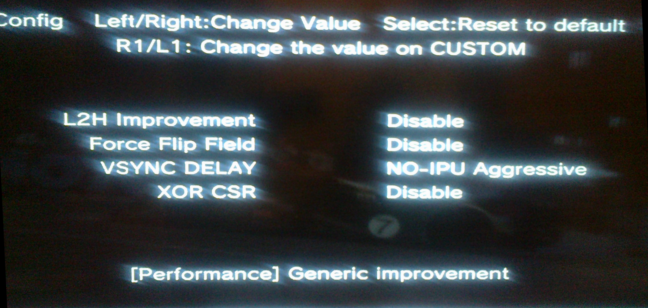
Are you sure that config loaded fine?
Can you go to debug menu in ps2 emu, and check?
Here is how it looks like when I entered debug menu (hit the home button, hold L1+R1+D-pad Left+Square for a few seconds (5-10 is nice), hit start):



Coldheart2236
Moderator
I don't know if a CONFIG file is available. On PS3DevWiki the compatibility list mentions "Small graphic issues, still very much playable". Aside from that, I don't know what else you can do besides play the game on original hardware.Mortal Kombat Shaolin Monks without buggy textures for ps3 iso? Is there a patched iso i can find that works for ps3
kozarovv
Developer
Whiplash (SLES_519.58)
Trick game to not produce mipmaps. Fix graphical issues. Ready CONFIG attached
Like all previous mipmap removing configs, this one can be ported to different game region.
Someone here asked about Ace Combat series. It is doable, but Project Aces did really good job at stripping their games from any trace that allow to find mipmap related function. But, who knows. Maybe someday..
Trick game to not produce mipmaps. Fix graphical issues. Ready CONFIG attached
Code:
3D 00 00 00 57 44 00 00 0A 00 00 00 01 00 00 00
84 D5 25 00 07 00 02 45 07 00 00 10 00 00 00 00
Like all previous mipmap removing configs, this one can be ported to different game region.
Someone here asked about Ace Combat series. It is doable, but Project Aces did really good job at stripping their games from any trace that allow to find mipmap related function. But, who knows. Maybe someday..
Attachments

 Keep up the good work.
Similar threads
-
-
-

-
PS2 SNESticle LBA Fixed-MC Mod -by hugostoso/almazCrystal
- Started by almazCrystal
- Replies: 0