PS3 Compatibility List - PS2 on PS3

Yeah since this is inherently a closed source emulator, there is not much we can do to fix games with mipmap issues. Other than hex editing certain games I don't really foresee any fix. Maybe you can disable some other effect that ties into it that might help fix, but unfortunately it seems unlikely.
 
It sucks I must say, I like to use custom wallpapers and have all my classics on PS3.. oh well, I should be glad I still got a working PS2 for those games that use mipmaps.
 
But the game ICO uses mipmaps, and works fine in PS3 right ?
There are mentions in pcsx2 wiki about changing the emulator settings related with mipmaps in the ICO game (because it seems the game uses them)
https://wiki.pcsx2.net/ICO

When i was playing it with a friend years ago we was doing some experiments traveling with the horse in the desert in a straight line in direction to the mountains to see how the textures was changing dependant of the distance (you know it happens in lot of games, when you get close to the texture it does a "pop" and is replaced by a different texture of better quality)
That day my friend and me was like "hmmm ok, so this is mipmaps, good stuff bro", lol
Since that day i made my mind thinking the mipmaps works in that way and ICO use them... but maybe im wrong ?
 
Been having such a headache trying to get that Minna no Golf no shadow config to work...I'm referencing the devwiki commands and Burnout 2 config that was converted from .pnach but no matter what I try it's not working on netemu. Maybe it handles this code differently from PCSX2?

And @sandungas maybe that's something other than mipmapping. I think mipmapping just blurs the textures but there's not necessarily a pop in when you get close. It's not exchanging picture files I don't think!
 
Been having such a headache trying to get that Minna no Golf no shadow config to work...I'm referencing the devwiki commands and Burnout 2 config that was converted from .pnach but no matter what I try it's not working on netemu. Maybe it handles this code differently from PCSX2?
Emu can't handle patches to EE in data region correctly. I released patched version of emu, but is not included in cfw so is not worth to use it. I looked into Minna no Golf 3, and that code should do the same, but work on PS3. Instead of patching value that is variable, i patch register that set it to $zero. Not tested as i don't have working ps3.

4 — kopia.png

Minna no Golf 3

Code:
3d 00 00 00 34 12 00 00 0a 00 00 00 02 00 00 00
64 16 22 00 80 81 82 a3 80 81 80 a3 74 16 22 00
80 81 83 a3 80 81 80 a3 00 00 00 00


But the game ICO uses mipmaps, and works fine in PS3 right ?
There are mentions in pcsx2 wiki about changing the emulator settings related with mipmaps in the ICO game (because it seems the game uses them)
https://wiki.pcsx2.net/ICO
There are few techniques for the same stuff, used interchangeable. Looks like in ICO mipmapping is only used here "lack of mipmapping means some lighting effects, mostly the god rays near windows, are missing."

So maybe you even didn't noticed lack of it.
 
The config works great! I'm curious to how you linked the address in EE memory to the register...in other terms, how do you find the register that is responsible for changing the memory address? Additionally, why is there two values to change instead of just one?

I want to find and patch the register/s in Minna no Golf 4 as well, and I tried using cheatengine to locate what controls the memory address. It led me to two different values: one is 00221668, the one register right after the first one in your config, and then a completely different one. I'm trying to understand this, but coming from no knowledge on this is hindering my progress completely. o_O
 
I'm curious to how you linked the address in EE memory to the register...in other terms, how do you find the register that is responsible for changing the memory address?
Is easy when you know data address (003415f0).

Just open ps2dis, open game executable.
Click Analyzer --> Invoke Analyzer
Go to data address you found earlier (press G, and type 003415f0, press enter)
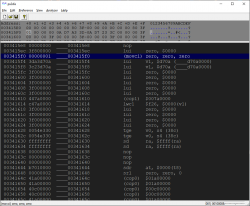
upload_2020-1-20_23-25-54.png
Note: ps2dis detect that part as code, but is wrong. You can fix that by pushing B,H,W,D,F on selected lines, depend on data there. But for now is not important.

Now push space bar to "mark" that address, it will change color.
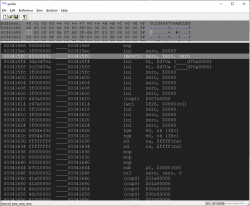
upload_2020-1-20_23-27-31.png

Since that address is now marked, you can press F3 to find its cross references.
In simpler words F3 button will now jump thru all places where that offset is used.
There are much more places that use that offset, but you are only interested into ones that store value there, not read from it. So "sb or sw" not lbu, lw.
In this game there are 3 place like that, but one originally store using $zero there , so we don't need to touch it
($zero is special register that always have 0 value).

Other 2 places store there something else that is based on previous operations.

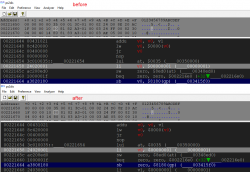
For example original code on one of places looks like that:
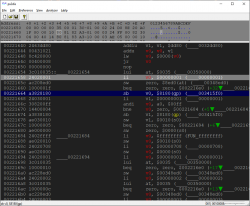
upload_2020-1-20_23-36-13.png

li few lines ago load value 1 to v0 register, later that value is stored on 003415f0 using sb v0, offset in delay slot.
So this naturally set offset to value 1, we break it by changing that is used as source to $zero instead of v0. This make it always write 0 there.
This can sounds little bit harder than it is, but when you will learn some basics, then codes like that are piece of cake. :D
 
Last edited:
Thanks for that detailed description! I understand it a bit more now, and I can replicate what you did now.

In Minna 4's case, it looks like the executable is split up from the main "SCPS" file. I assumed that file is just a launcher for the other ELF files. I found a folder called ZZBIN with different BIN files named MOVIE, MENU, SYSTEM, and GAME. I used the address I found in (posted on PCSX2 forums) in ps2dis with the GAME file, and it linked to 5 different v0 and v1 "sb" functions. I changed all to $zero and still no luck.

Is there a different method to access games that use different ELF files for different portions of the game? Hope that makes sense.
 
Is there a different method to access games that use different ELF files for different portions of the game? Hope that makes sense.
Yeah, sadly there is other method for them. You need to create config that replace that data directly on disc, 0x0B config. Configs like that are much harder to do, since you need real data, patch data, sector on disc, and offset in sector, and calculate last one -0x0C, plus those configs use big endian for patch data, little endian for rest. Don't want to discourage you, from doing that, but this will be much, much harder than 0x0A command.

I try to make one myself, if that really help those games.
Edit: You can try it.

Code:
3d 00 00 00 34 12 00 00 0b 00 00 00 06 00 00 00
b9 d8 16 00 18 03 00 00 04 00 00 00 a0 20 4c e0
a0 22 4c e0 ba d8 16 00 c8 01 00 00 04 00 00 00
a0 20 4c e0 a0 22 4c e0 6b d9 16 00 8c 07 00 00
04 00 00 00 a0 20 4c e0 a0 22 4c e0 59 d9 16 00
84 05 00 00 04 00 00 00 a0 20 4c e0 a0 23 4c e0
6b d9 16 00 a0 07 00 00 04 00 00 00 a0 20 4c e0
a0 23 4c e0 9b db 16 00 ec 01 00 00 04 00 00 00
a0 20 4c e0 a0 22 4c e0 00 00 00 00
 
Last edited:
The mix of big and little endian is a headache, but I understand what that 0x0B is for now. I was reading that on devwiki but didn't know the difference between that and 0x0A and what they were used for. Thanks a lot!

The config works great. I'm gonna add it to the compatibility list. I'll try my best to investigate fixable problems in other games.
 
@mrjaredbeta take a look at this program, is going to help you a lot to understand how the PS2 config commands works
https://github.com/Zarh/Get_CONFIG

Long story short... inside PS3 firmware there are 2 ps2 emulator types named ps2_gxemu.self and ps2_softmu.self... and inside them are "embedded" hundreds of configs
This program can extract them and convert them to the format used by ps2_netemu.self (the one that supports the external configs exactly like the ones you are playing with)
The most important thing from that program are the output files generated by it, are hosted in the git

This is the info extracted from ps2_gxemu.self
https://github.com/Zarh/Get_CONFIG/blob/master/log.txt

And this is the info extracted from ps2_softemu.self
https://github.com/Zarh/Get_CONFIG/blob/master/soft/log.txt


-------------
As you can see in those .txt files, there are some commands marked as either [GX] or [SOFT]
And inmediatly next to them you can see the info converted to the [Net] command, that info under the [Net] label is ready to build an external config with it (ready to be used in ps2_netemu.self)
 
guys help me i just installed ps2config pkg is there anything i should do to after that? do i just leave that and everything will be auto config on the fly? note: im playing tales of the abyss right now 4hours and then it freezes on some random battles (1 time only). do i still need ps2 launcher ?because when i press on the disc icon of ps2 it boot and i have no problem.. thanks
 
Last edited:
Silent Hill 2 (SLUS-20228GH)
Code:
3D 00 00 00 34 12 00 00 0F 00 00 00 00 50 17 00 00 60 17 00 00 00 00 00

This config fixes the missing polygons on characters and the inaccurate camera angles. It should now play closer to an actual PS2 (albeit possible frame drops/glitches elsewhere).
 
Last edited:
Silent Hill 2 (SLUS-20228GH)
Code:
3D 00 00 00 34 12 00 00 0F 00 00 00 00 50 17 00 00 60 17 00 00 00 00 00

This config fixes the missing polygons on characters and the inaccurate camera angles. It should now play closer to an actual PS2 (albeit possible frame drops/glitches elsewhere).
Thanks
 
Japanese version of Raiden 3 Doesn't boot at all (Unplayable)

Time crisis 3 has Speed issue and VMC Corrupt issue

All of Beatmania IIDX series work flawlessly
 
Last edited by a moderator:
Yeah I did have issues with the game, mainly ManaGunZ corrupted the ISO of Ace Combat: The Belkan War with the widesceen patch.

The current configs works for in game issues such as game crashing, invincilble ships etc. But the issues of it not rendering the graphics is a pain in the ass, its mainly the environment grpahics when you fly at high altitude they simple do not render correctly and the fact that at some points you can literaly fly throught the deck when really you should crash and burn.

I never bothered to look to see if I could get them to reneder correctly. Even though it should be simple rendering for the evironment as all the detail in this game is in the planes which for a PS2 game is pretty good.

Maybe this simple rendering is why it has the issue as from what I can tell the terrain is more or less just a texture over a flat mesh most of the time, even any building are basic textures with not much detail.

Also the Ace Combat Series is my my favourite "aviation combat" simulator, I have every game from the original "Air Combat" on PS1. Its simply is the best when it come's to this as its made in conjunction with BAE and Japanese aviation companies so the planes handle pretty realistic.... Was well p!ssed when the Ace Combat Infinity Servers shut down...... and now I have to pay for Ace Combat 7 on PS4 just to play Infinities single player campaign, not bothered about the online MP....... thats what I call BS, they should of released it as a seperate game for PS3...
ignore the flicking texeture,u can finished the game.
i finished 3 games on nobc-ps3
 

Similar threads

Back
Top