
PS3 Corrupted data on PS3, recovery?

Welp, turned on my PS3 after a long while and seemed like the data on the HDD was corrupted.
Sadly, the PS3 failed to restore it, so I thought I'd be smart to put the HDD in my PC.
Wrong: my PC changed the partition table to MBR, I can't see any data and on putting it back in the PS3 I had to format it.

Now it said it would "possibly" format just the system part of the disk, so I had good hopes.. but sadly, it's gone.
Should totally have backed it up before, but this was quite unprecedented.

Any way I can retrieve the files still? It's just a quick format so I bet I can do things with Linux, but I don't know if the newly installed system part will recognise these files. In case I have to dabble with CFW, I am on a CECH-2504B. Let me know which one to install if needed!

Any help greatly appreciated!

(and yes, backups are a thing, I had an old backup of ~5 years ago but I obviously should have done it more frequent)
 
Last edited:
Unfortunately no, you can not recover your files after a format of the HDD.

Here are some tutorials and tools to make backups:

In order to access your HDD from outside of the PS3, you will need its EID Root Key which unfortunately is only obtainable on CFW capable consoles.

If your PS3 is on CFW, then retrieve that key and use @Berion's script tool to mount your HDD.

Otherwise, follow the ultimate userdata backup tutorial (you will need your PS3 running with the HDD to be backed up for this).

https://www.psx-place.com/resources/ps3-hdd-decryption-helper.1293/
https://www.psx-place.com/resources/ps3-hdd-reader.1278/

ERK is of course mandatory. If Your PS3 is broken from which HDD came from, then consider it all data lost, because You will not be able to get decryption keys until You fix her, and another console will not be able to decrypt it because each unit using unique keys.
 
Thank you for your answer and the helpful links!

Ah, I thought per this post it could be possible to retrieve deleted data.
I can access the PS3 just fine with a different drive, so I am able to get the EID if I CFW it.
Obviously I mostly want the save data back, I luckily didn't have a lot of media on there.
Just need a list of steps to perform.

I've cloned the drive so, if it's indeed impossible as you say here's hoping for the future.
 
@TheLightningStrikes Actually, data can be recovered IF You did only quick format (on PC, and/or on PS3). However it is complicated because You need retrieve user partition start LBA to know sectors range for making virtual image in loop and some Linux basic knowledge. UFS2 is far enough to be untouched. If You did full format, then it is game over.

I can help You for a fee but You need some additional storage (larger than "original disk" to store its image there) and ERK.
 
Last edited:
@TheLightningStrikes Actually, data can be recovered IF You did only quick format (on PC, and/or on PS3). However it is complicated because You need retrieve user partition start LBA to know sectors range for making virtual image in loop and some Linux basic knowledge. UFS2 is far enough to be untouched. If You did full format, then it is game over.

I can help You for a fee but You need some additional storage (larger than "original disk" to store its image there) and ERK.

Wow, that's amazing news! It does sound complicated. I am willing to pay a fee, as it has some precious save data and memories on it. Please let me know how much we'd speak of (don't know if you can DM in this place? if you want to discuss that privately that is).

Yes, I have only done a quick format. As stated in my original post, I put the 320gb HDD in my PC, got my partition table MBR'd by Windows and then I put it back in my PS3 and had it quick format. Nothing else has happened to it since and I have made a sector by sector clone to a 1TB SSD. So I think, at most, it got some update files for the firmware updated on the HDD, but most should be intact?
Bare with me, because I know nothing about how PS3 stores data so that entire sentence might be wrong, but it's not like I started redownloading my games.

For ERK I need to use PS3Xploit and CFW like EvilNat I assume? And let me know how you'd help me, whether that is sending me what to do (instruction steps) or that I send the data to you in some form.

Any way yeah, let me know! Thanks for your response.
 
I can help You here, in public, so others can learn something from it (that's the idea behind message boards after all). Majority of people is lazy enough to not bother and/or to not learn new things, so I feels that it is ok to share. I'm just expecting a donation for my time (I'm collecting money for Affinity Designer license) and I have hope that You will not prey on my gullibility like some smart asses did in the past... ^^"

Yes, anyone can send me a private message, I'm not blocking anyone, yet not responding super quickly. I will send You a message later with my PayPal if this is ok (or with account number for normal bank if You living in any European Union country).

Update packages and data extracted from them are putting on cache partition (dev_hdd1), not main partition (dev_hdd0), and installed on VFLASH on NOR models (dev_flash*). So it didn't overwrite any data You want to restore (maybe except xRegistry.sys file but that's not big deal, those IDs from it can be retrieved from other files).

- - -

1. So first start from data securing for recovery. I mentioned about disk image creation and You said You have it. That's not enough information.
a. By what application was made and into what format? App doesn't matter but format should be literally sector by sector, without compression etc. Just simple raw.
b. Second thing is: are You pretty sure that drive on which You put PS3 HDD image is fully functional (no bad sectors etc. S.M.A.R.T report ok)? Obviously it must be. ;]
c. NTFS is fine for a space for this image (or any Linux fs like EXT4, XFS, BTRFS etc.), ReFS isn't. So be sure it is not any obscure filesystem because it must be supported out of the box by Linux without any magic tricks.
d. Set read only attribute for PS3 HDD image. Linux respecting it translating to -ro.

2. EID Root Key is mandatory for that task. So You must install (if not have yet) any CFW. Strongly recommending Rebug Rex/Lite (any) or Evilnat (also any). In Rebug Toolbox there will be option to dump it. On Evilant's CFW in somewhere in XMB. And of course we talking about different drive, not the one from image came (or can be if You are sure 1a-d points are fulfilled, however I strongly recommend to leave it intact as another backup, just in case).

3. You need a way to boot Linux. You don't need install it, You can use so called live environment (works from RAM). However if You are Windows user (10? 11?), those beyond 7 are very annoying in many things and one of them is Secure Boot along with Fast Boot (kind of hibernation).
a. So You need to be sure that Your SB allows You to boot eg. Linux Mint (don't remember now but keys has changed after so called Golden Keys leaking for UEFI) or just disable it (but I'm not sure if Win11 will boot it in such state). It is UEFI setting.
b. Also You must disable Fast Boot because it will prevent You from using partition for which fs table wasn't updated and dirty flag removed before turning off Windows. It is Windows setting.
c. If You did that, use Rufus to write Linux Mint into pendrive and boot it

4. What is Your PS3 model? It is important to determine what keygen to use and how to mount it.

To be continued... ;) After You confirmed steps 1-4.
 
Last edited:
Small note: as I am new on the forum, my posts are withheld by the system until a moderator improves it. Totally fair since this keeps spam out, just saying it so you know my responses can be delayed!

I can help You here, in public, so others can learn something from it (that's the idea behind message boards after all). Majority of people is lazy enough to not bother and/or to not learn new things, so I feels that it is ok to share. I'm just expecting a donation for my time (I'm collecting money for Affinity Designer license) and I have hope that You will not prey on my gullibility like some smart asses did in the past... ^^"

Yes, anyone can send me a private message, I'm not blocking anyone, yet not responding super quickly. I will send You a message later with my PayPal if this is ok (or with account number for normal bank if You living in any European Union country).

Oh yes I meant to talk private in terms of the money :) would love to give back to the community for helping me. I bet there will be another person like me with a similar issue and I'd want them to be helped too. Feel free to DM me with your PayPal for sure, lets help you with that license.
1. So first start from data securing for recovery. I mentioned about disk image creation and You said You have it. That's not enough information.
a. By what application was made and into what format? App doesn't matter but format should be literally sector by sector, without compression etc. Just simple raw.

1A: I did a sector by sector copy with AOMEI Partition Assistant 10.0.0. There is an option to just clone the disk quick or do it sector by sector. I assume this means it's uncompressed, raw. There are no other options I can select. I can see the disk partition pop up in Windows 10 Disk Management as unallocated. The partition style mentions MBR.

b. Second thing is: are You pretty sure that drive on which You put PS3 HDD image is fully functional (no bad sectors etc. S.M.A.R.T report ok)? Obviously it must be. ;]

1B: I'd hope so, I just bought it! It's a Samsung 870 EVO 1TB SSD. CrystalDiskInfo says it's all okay and it has 298 GB total host writes (confirming the clone?).

c. NTFS is fine for a space for this image (or any Linux fs like EXT4, XFS, BTRFS etc.), ReFS isn't. So be sure it is not any obscure filesystem because it must be supported out of the box by Linux without any magic tricks.

1C: Not sure how to see this in Windows 10. The partition turns up as unallocated. Is there a tool to see this, or should I prepare a Linux machine and then see?

d. Set read only attribute for PS3 HDD image. Linux respecting it translating to -ro.

1D: Since it's not showing up in Windows 10, I did it through this diskpart tutorial. Find out in Windows Disk Management which disk is your PS3 HDD clone and followed the tutorial to set it to read only.

Imgur link to information from Windows 10 Disk Management

2. EID Root Key is mandatory for that task. So You must install (if not have yet) any CFW. Strongly recommending Rebug Rex/Lite (any) or Evilnat (also any). In Rebug Toolbox there will be option to dump it. On Evilant's CFW in somewhere in XMB.

2. Alright, I will install this ASAP! Do you want me to dump the root key here?

3. You need a way to boot Linux. You don't need install it, You can use so called live environment (works from RAM). However if You are Windows user (10? 11?), those beyond 7 are very annoying in many things and one of them is Secure Boot along with Fast Boot (kind of hibernation).

3. Oh yes I use Windows 10. Would it be a good idea to just unplug all my other disk drives (so not Linux USB and PS3 HDD clone), including Windows 10 boot drive?

a. So You need to be sure that Your SB allows You to boot eg. Linux Mint (don't remember now but keys has changed after so called Golden Keys leaking for UEFI) or just disable it (but I'm not sure if Win11 will boot it in such state). It is UEFI setting.

3A: Should be in the BIOS, I'll disable it.

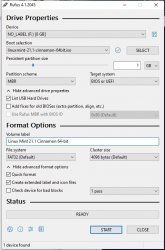
b. Also You must disable Fast Boot because it will prevent You from using partition for which fs table wasn't updated and dirty flag removed before turning off Windows. If You did that, use Rufus to write Linux Mint into pendrive and boot it. It is Windows setting.

3B: Fast Boot is off! I'll make myself a bootable USB with Rufus and Linux Mint Cinnamon.

4. What is Your PS3 model? It is important to determine what keygen to use and how to mount it.

4. It's a EU PS3 Slim CECH-2504B with date code 0C. I have done a MinVerCheck on it, and the earliest firmware it supports is 3.40.

Will post again when I have progress regarding the EID Root Key and whether I learn more about my cloned drive. Let me know if there are better tools to clone (maybe on Linux?) in case I did something wrong. I've not touched my PS3 HDD so I can clone again.

I put some links here and there for other people who don't know how to disable secure boot for example. Hope it helps :)
 
Last edited:
To clarify which disk is which, let's use this terminology:
  • disk from PS3 with overwritten/replaced partition table, be "PS3 HDD"
  • disk with image of above, be "backup disk"
  • disk with current usage in console be "PS3 HDD2"
By that way, we avoiding disastrous mistake. ;)

So You didn't made disk image but disk mirror/clone. That can be used but limiting usability of this, let's call it, backup disk. In addition, I don't know what AIOMEI did to it finding MBR and all the rest data (from his point of view, RAW data). Better would be if You re-step this and use something else. I know it is time consuming but give You more freedom. So:

1c. Connect backup disk and format it (it doesn't matter if MBR or GPT), create partition on it covering whole media and choose NTFS (cluster size aka allocation size doesn't matter but since it will be used for large file, choose eg 64K).

So after point 1ab from below, click right button mouse on image file, choose Properties and check checkbox read only.

1ab. Since You are Windows user You can consider three apps (free for that task): HDD RAW Copy Tool, DMDE and IsoBuster.
  • HDDRCT is flagged by many anti-virus engines as malicious (maybe false positive or maybe not :P) but it is very easy to use (remember to change default format in save dialog from *.imgc to *.img!).
  • DMDE. Ignore welcome wizard and choose Copy Sectors option. Source will be device: PS3 HDD and target will be file: backup drive. Start LBA must be 0, end LBA should be set automatically. Don't split image.
  • IsoBuster, best option here IMO because also easy and safe. Choose PS3 HDD from top list, then on hdd icon in tree view, click right mouse button and choose Extract HardDisk image (*.dsk).
All apps above producing sector by sector raw disk image (file name extension doesn't matter, don't be suggested by it to much).

3ab. If You planning to not use disk with Windows, You don't need change those settings. I assumed that You want it (eg. to copy there saves, trophies etc.), so I explained precautions needed for that.
 
Last edited:
Just some additional clarification:
so I thought I'd be smart to put the HDD in my PC.
Wrong: my PC changed the partition table to MBR
It is ok to connect it on Windows but You CANNOT agree for so called disk initialization. One user reported that Win10 did that without asking but I never reproduced this. Both aggressive bastards, I mean, Win10 and 11 ;) still asking about that.

Normally I would send You to this tutorial: https://www.psx-place.com/threads/tutorial-fixing-windows-disk-initalization.27599/
But You mentioned that PS3 couldn't read disk and fix it for some reason and on top of that, You format it on PS3. So there is zero sense doing transplantation from above tutorial.

Now it said it would "possibly" format just the system part of the disk, so I had good hopes.. but sadly, it's gone.
Should totally have backed it up before, but this was quite unprecedented.
And this is the step which truly make Your life hard (if You didn't make image before You formatted drive on PS3 but if You did, DO NOT format backup drive like I said in above 1c point! Because this will be the only one backup from which You can recover everything), because You've replaced old UFS2 fs table with your data by clean one. But let's hope there is backup one. If not, photos and films can be easily find by signature scan, in case of other data will be a problem.

(and yes, backups are a thing, I had an old backup of ~5 years ago but I obviously should have done it more frequent)
People splitting into those who making backups and those who will be making backups. :D
 
Last edited:
So You didn't made disk image but disk mirror/clone. That can be used but limiting usability of this, let's call it, backup disk. In addition, I don't know what AIOMEI did to it finding MBR and all the rest data (from his point of view, RAW data). Better would be if You re-step this and use something else. I know it is time consuming but give You more freedom.

Cool, I'll be doing this. Thank you for your thorough explanation and instructions, it's really appreciated.

3ab. If You planning to not use disk with Windows, You don't need change those settings. I assumed that You want it (eg. to copy there saves, trophies etc.), so I explained precautions needed for that.

I am savvy enough with Linux to make copies to another drive, but I think it will benefit a lot of people if we stick to Windows :) like I said, for putting in effort to help me I want to give back to the community as well

And this is the step which truly make Your life hard (if You didn't make image before You formatted drive on PS3 but if You did, DO NOT format backup drive like I said in above 1c point! Because this will be the only one backup from which You can recover everything), because You've replaced old UFS2 fs table with your data by clean one. But let's hope there is backup one. If not, photos and films can be easily find by signature scan, in case of other data will be a problem.

I should NOT have put my faith in Sony, that was the mistake I made and I should have just stayed calm and not panicked. I am paying that price now. Pretty dumb, but Sony didn't have to make it hard as hell to keep your precious files either. Nonetheless I am the one with the problems now.

Honestly it's not the worst loss for me, just the save files of ~3 games, my trophy information is synced with PSN. But I like the idea of making this a general tutorial for those that have lost everything regarding user saves and media.

Anyway, regarding my progress:
- Bootable USB with Linux Mint has been created using the settings I uploaded.
- I have read the guide by Thibobo on how to put CFW on my PS3. I see that there are some crucial steps you need to do, in order to not brick your console. Because of that, I want to be in the right mindset (not rushed) to do this. But like I said, I will do it ASAP because this is key to the whole process.
- I'm going to make a disk image of the PS3HDD with IsoBuster because that looks real easy!

I think I'll have this done either before the weekend or during the weekend (around 1st of July), I'll let you know :) thank you for all the information, love to learn more about this.
 

Attachments

  • rufus.jpg
    rufus.jpg
    78.6 KB · Views: 31
Alright, I managed to get myself some free time today and got to work on the CFW.
I can now say I am the proud owner of a ERK dump! :) and of a cool PS3 with new features.

I have created the disk image of the PS3HDD with IsoBuster.
And to not make the same mistake twice, I also created an NTFS partition on the backup disk and did a sector by sector clone of the PS3HDD on the backup disk using DMDE.
Small note, DMDE reported 0 bad sectors after the copy, I guess that bodes well for my data!

Bootable Linux Mint Cinnamon USB is lying in front of me.

These were all the prerequisites right?
 
Congratulations in installing CFW and getting ERK. ^^ So since today, You have access to any HDD came from this specific PS3. I.e when she dies, You will no longer need to fix her to get data back.

So You have now two disk images? One made by IB, and one by DMDE? Well, ok... ;} Both should be binary identical but I will not torture You to calculate checksums for them. :D And we talking about "PS3 HDD" image(s) put on "backup disk", not "PS3 HDD 2", right?

Yes, that's all.

So first sanity check (almost normal procedure for PS3 HDD mounting). If some steps will not be clear enough, look at screenshots of PS3HDDDH.
  1. Download this: https://www.psx-place.com/resources/ps3-hdd-decryption-helper.1293/ and unpack to "/home/mint/ps3/". And put "eid_root_key.bin" in keys folder.
  2. Run keygen script (by double click on it, *.sh is like *.bat in Windows) and generate keys from ERK. You must choose proper options (opt. no. 4 for Your PS3 model) or else generated ATA and VFLASH keys will be wrong for Your model.
  3. Run ko manager script and use options "4", then if compilation be succeed, then re run script and choose hidden "1-bs".
  4. Now in file manager (Nemo) open backup drive, it will be mounted automatically. Press "arrow with dot" in top right corner to reveal direct path to it (so called breadcumbs become text field, similar how it works in Explorer on Windows). Should be something like "/media/mint/blah blah blah". So Your path to PS3 HDD image will something like this "/media/mint/<GUID or label>/last_hope.dsk". ;)
  5. Open terminal and type "sudo losetup -f <path to image>". This will attach image file to virtual device, it become eg. "/dev/loop2".
  6. Run "PS3 HDD Mounter Micro.sh" and when You will be ask to choose device, choose Your loop (in live it probably be 2).
  7. Now mounting should be successful and You should see PS3 HDD contents under "/home/mint/ps3/storage/hdd/dev_hdd0/". Of course partition will be almost empty because you have formatted it.
  8. Run HDD Umounter script.
  9. In terminal run "sudo losetup -d /dev/loop2"
  10. In Nemo, click on arrow near Your backup disk on left panel to unmount it.
  11. That's all, You can turn off computer etc.
This will prove that everything works and You know how to do it. And that's how You would normally reading PS3 HDD (in case of real device, instead using image and loop, use /dev/sdx).

Next instructions batch will be more demanding.
 
Last edited:
Thanks for the instructions! They were great and clear and I was able to navigate the disk image a little when mounted.
Indeed not seeing much as you said :) all looked quite empty.

So You have now two disk images? One made by IB, and one by DMDE? Well, ok... ;} Both should be binary identical but I will not torture You to calculate checksums for them. :D And we talking about "PS3 HDD" image(s) put on "backup disk", not "PS3 HDD 2", right?

Haha yes, PS3HDD2 is sitting nice and comfy in their new CFW environment :)

I'll say, for some reason I couldn't mount the backup created by DMDE, but the IsoBuster worked fine.
Could be user error but IsoBuster was very easy to use anyway.

Also: Linux Mint is a sweet little OS! I'm used to CLI Linux and it's been a pleasure to use it.
 
If You tried image from DMDE without unmounting (which also removing mappers) image made by IB, then You will not be able to mount it. It is because scripts is dumb, it accepts only specific mapper names, so once they are used, cannot be used for different drive and also script will not find different mapper names than I chose. If You run umount script after "IB image", and then trying to use "DMDE image" then all shuld works. If not, You did something wrong in DMDE during dumping. ;]

It is my Linux of choice. Using it daily after my PC died with Windows 7, and I hates enough all newer to no longer have them as main OS (I have Windows 11 but without internet connection and only for gfx stuff like Photoshop and forensic stuff with IsoBuster).

I will write new batch of torments in upcoming week.
 
I tried to mount DMDE first, but like I said, probably user error ^^ as long as the IsoBuster one works it's fine.

Have a great weekend! Thank you again for your help so far.
 
Did some investigation myself and wanted to share my findings:
I've come across TestDisk and respectively PhotoRec.
Let them do their thing on the mounted PS3 HDD that I mounted through the shell script.
It found a lot of media! All the MP3's I had on my PS3 for example, and the screenshots I created in games.
Very good tools to recover such data with, so for anyone who is after their media, I recommend using those on Linux.

Didn't find any savegames though, so I will patiently await the next batch of instructions :)
 
I'm sunk by PS2 scene related stuff with XEB themes, GUIs for few plugins and XEB PUPPY. Once I will deal with them, I will go back to PS3. Sorry for keep You waiting.

Photorec is fine but he have some disadvantages like no support for loop, mappers and nbd, so to read anything by it, You need make SBS copy from "/dev/mapper/ps3hdd2" (this is the mapper with exposed decrypted and byte swapped UFS2 partition for NOR models, for NAND it will be ps3hdd1) and write it back to a real device, and only then scan. Quite annoying... Or maybe I don't know how to make mapper visible? :P

That way You can make image of so called gameos partition alone in decrypted form:
Code:
sudo dd if=/dev/mapper/ps3hdd2 of=/home/mint/example.img bs=64M status=progress

Anyway, signature scan cannot be used for saves from PS3 and PSP games because they don't have any signature. SFO and PFD alone are useless. You can however retrieve PS2 and PSX saves that way using my signatures for Photorec. Better is IsoBuster because have more advanced scripting (but needs paid license for that feature).

To get data in other way than based on signatures, You need to mess with UFS2. In assumption there is even backup table and in assumption that "recovery menu" doesn't replacing fs tables in creating regions. But this must wait for now, sorry. ^^
 
Last edited:

Similar threads

Back
Top