
You are using an out of date browser. It may not display this or other websites correctly.
You should upgrade or use an alternative browser.
You should upgrade or use an alternative browser.
PS2 Cutscene Slowdowns on FreeMcBoot games
- Thread starter Trashboat
- Start date
-
- Tags
- free mcboot lag softmod softmodding

atreyu187
Loathsome Dung Eater
That is the cost of playing via USB bud. It is the slowest method of playing PS2 games. MX4SIO has much better playback and is fairly cheap. SMB loading over network is not as fast as the MXSIO and requires hardware but is faster. Loading off an internal HDD is the fastest but not all have a capable system. Even disc loading is substantially faster than USB due to the limited bandwidth as it uses USB 1.1 I'm afraid.

Trashboat
Member
Ok how would I use or install a MX4SIO or SMB method?
That is the cost of playing via USB bud. It is the slowest method of playing PS2 games. MX4SIO has much better playback and is fairly cheap. SMB loading over network is not as fast as the MXSIO and requires hardware but is faster. Loading off an internal HDD is the fastest but not all have a capable system. Even disc loading is substantially faster than USB due to the limited bandwidth as it uses USB 1.1 I'm afraid.

...and how does that relate to the physical impossibility of overcoming the USB1.1 port's limitations??
We can do stuff like "read ahead" (before a sector is requested) or buffering and whatnot, but we can not OVERCOME physical limitations and hence USB have games, where FMVs will stutter although there IS still room for improvement!
We can do stuff like "read ahead" (before a sector is requested) or buffering and whatnot, but we can not OVERCOME physical limitations and hence USB have games, where FMVs will stutter although there IS still room for improvement!
atreyu187
Loathsome Dung Eater
Ok how would I use or install a MX4SIO or SMB method?
MS4SIO requires you to buy one as it uses memory card slot. SMB is easy enough but you will need the PC/NAS & the PS2 to use ethernet cables.
Sorry for butting in, does MX4SIO have any problems with deckard ps2? I have a deckard and I am fine with usb since I have edit the fmvs of games that stuttered with light downsamples just enough to be able to play them without problems via usb on the deckard. (already based on the deckard the fmvs stutter less than the other slim I have version 70004) I was just evaluating the purchase of an mx4sio adapter and a micro sd to gain more speed in loading times, will I encounter problems on the deckard?Show it in a game on the newest official OPL Betas... If it does, I BET that it is on DECKARD-PS2s!
...and it still doesn't invalidate what was written... MX4SIO performs WAY better in games as well as file transfers in wLE ISR than USB!
I disagree! You can DIY an MX4SIO quite easily!MS4SIO requires you to buy one as it uses memory card slot. SMB is easy enough but you will need the PC/NAS & the PS2 to use ethernet cables.
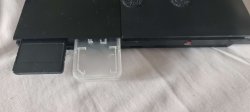
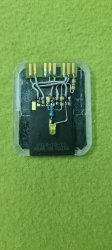
@moriljn1 tl;dr Get it!
Sorry for the stupid question, does that mx4sio also work for you as a normal memory card to normally save games? If not, is it possible to create/buy something like this? I'm a bit scared of vmc as the last time I used them all my saves were lost due to corruption, so I'm using 2 original memory cards, I don't want to burn a slot having so many games I always want 2 memory cards attached.I disagree! You can DIY an MX4SIO quite easily!
View attachment 40957
View attachment 40958
@moriljn1 tl;dr Get it!

Berion
Developer
No. MX4SIO isn't memory card emulator. It is like pendrive or sdxc but connected to SIO instead USB.Sorry for the stupid question, does that mx4sio also work for you as a normal memory card to normally save games?
No device available on the market which have multitap emulator and splitting its storage to virtual memory card and external mass. That's what you need to have both working at once. It cannot be done on one virtual device because MCFS is to slow and to limited to storing and reading fast enough such large files as disc images.If not, is it possible to create/buy something like this?
Use per game vmc, not global vmc for all. Once you run game first time, play short and save it, then quit, load run it again and load a save. It is fine, it probably all be fine. Don't use the same USB for other devices, especially TVs because they are often detaching mass storages in not safe way and/or often writing some meta data to them without informing about that user (like eg. thumbnails and descriptions, so it is easy to fs corruption because user don't know that something is writing when he unpluging device...). And make backups anyway from time to time. :PI'm a bit scared of vmc as the last time I used them all my saves were lost due to corruption
Trashboat
Member
Thanks. I'm currently looking into MX4SIO options now,would I have to update or change the versions of OPL that are currently on my FMCB if I choose to go with this option?MS4SIO requires you to buy one as it uses memory card slot. SMB is easy enough but you will need the PC/NAS & the PS2 to use ethernet cables.

Similar threads
-
PS2 PS2 FAT with an unusual problem. Refuses to load FMCB/elf/or any homebrew
- Started by shownomercyomer
- Replies: 9
-
-
PS2 How to clone or backup settings from Free McBoot PS2 Memory Card?
- Started by ps1cd
- Replies: 7
-
PS2 I NEED HELP PLAYING PS1 & PS2 ORIGINAL AND BACKUP DISCS USING MECHAPWN
- Started by theundertaker180
- Replies: 14