DESR-7500 Disc not spinning

niino

Member
I recently replaced a broken laser (Sanyo SF-DB11) in a DESR-7500.

Before replacing the laser, discs were not recognized (except in PS2-mode when booted with FMCB), but the motor was spinning. Reading discs in PS2 mode worked fine.

Now, the motor won't spin. In PSX-mode, the PSX-laser laser also does nothing and absolutely nothing happens. In PS2-mode, the PS2 laser will try to focus on the disc and is able to move around, but the disc won't spin, either.

There is some blinking red LED on the main board, that is normally not exposed to the outside. Since there are no service manuals available, I have no idea what that LED stands for.

I also fully disassembled and reassembled the console, checking every single connection (including inside the drive) and even replaced the 2 flex cables connecting the drive to the main board (minus the PS2-laser cable, since it is a non-generic part). This didn't fix the issue.

Also, what function does the daughterboard with the large FPGA and a free connector (for factory programming?) have in the console? When following the traces, it is connected to the data cable between the main board and the drive board.

Any advice?
 
I also reinstalled the original laser, but it still didn't spin. After that, I installed some brand new matching flex cables (for both, 50 pin 0.5mm data and 16 pin 1mm power/PS2-Laser), just to rule out damage to the old flex cables. All of this didn't change anything. Even the blinking red LED on the main board is still there (which can be seen from the sides through the vents, if the plastic covers aren't on).
 
Last edited:
I'm not really familiar with PSX, so all i can throw here is generic.. Check fuses. They are usually marked on sony consoles as PSxxx, rarely as Fxxx.
 
I actually DID find a blown fuse, but it's related to the USB port... which makes sense, because it didn't work, either, but I wasn't worried too much about this at first.

....But then I just found out that the drive pulls it's 5V from that exact fuse, located at a completely different place on the board (while the 12V fuses are located just at the connector).

I can't measure any short between the 5V pins and the GND pins on the connector now, so it should be safe to replace the fuse now.
 
I actually DID find a blown fuse, but it's related to the USB port... which makes sense, because it didn't work, either, but I wasn't worried too much about this at first.

....But then I just found out that the drive pulls it's 5V from that exact fuse, located at a completely different place on the board (while the 12V fuses are located just at the connector).

I can't measure any short between the 5V pins and the GND pins on the connector now, so it should be safe to replace the fuse now.

Hi, I have a similar issue with my PS2; here the thread https://www.psx-place.com/threads/ps2-slim-70000-dvd-cd-wont-spin.30857/#post-307820 (if you wanna check it).

After having read your comments, I'm particular interested in checking fuses around joypad/ USB ports; sometimes the joypad ports doesn't work. So it could affect the dvd drive motor.
Can you help me? There is the service manual around the internet which describes every trace/components on the motherboard. Could you tell me which components I have to check? What value should have a fuse to judge it "good"?
Thanks
 
Last edited:
Blown fuse (50) PS4023 in the photo you have the location. I hope only he, because in one of me, after replacement, the drive turns and the Led does not light but does not read discs, even in ps2 mode, I have no idea what went wrong. In the second after the exchange, everything started :) replace and check. I am struggling with installing hdd original sony 40gb to install xmb but don't recognize hdd any ideas? Enter your email and I will send you the location of the fuse, but it is on the left edge of the bottom.
 
I actually DID find a blown fuse, but it's related to the USB port... which makes sense, because it didn't work, either, but I wasn't worried too much about this at first.

....But then I just found out that the drive pulls it's 5V from that exact fuse, located at a completely different place on the board (while the 12V fuses are located just at the connector).

I can't measure any short between the 5V pins and the GND pins on the connector now, so it should be safe to replace the fuse now.

Totally forgot to mention that in the end this actually worked and the drive is working again now. Fuse blew due to an incompatible revision of the Sanyo SF-DB11 laser. Be careful about this!
 
Totally forgot to mention that in the end this actually worked and the drive is working again now. Fuse blew due to an incompatible revision of the Sanyo SF-DB11 laser. Be careful about this!

Hi, I am having the same issue with a psx 5700, I was wondering if you could show me or give me more details about the location of the fuse that blew and if you had a good source for the SF-DB11 laser. Thank you.
 
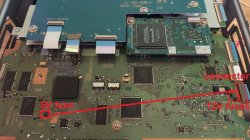
I marked the locations of the relevant fuses for the 5V and 12V that power the disc drive. Please note that a blown 5V fuse will also disable the USB port, as it is powered by the same 5V rail. The fuse is a KOA CCP2E50TE (datasheet), as is written on the board itself (how nice of sony!).

Also note that this is only for the XPD-005 motherboard that is found in DESR-x500 and DESR-x700 consoles. On the XPD-001 motherboard from DESR-x000 and DESR-x100 consoles, the 5V fuse is located next to the drive power connector, just like the 12V fuses.
DESR-7500.jpg

About the SF-DB11 laser; it is also found inside some Sony and LiteOn PC DVD burners from around that era, around 2004-2005.

Inside the PSX, I have seen 2 different revisions of the SF-DB11, T02 and T05. Others might work as well, but T14 definitely does NOT work, as it burned the laser flex cable and blew the fuse. Interestingly it destroyed neither the PSX drive board nor the laser itself; the board was still working fine inside the PSX afterwards, and the laser was working as well after being put back into its original drive. (I needed to buy a new flex cable and a new fuse for the PSX, of course). I got the incompatible SF-DB11 T14 from a sony DW-Q28A (which uses a Mediatek MT1828EAF chipset, unlike the PSX drive and the PC drives I found to be compatible, which all use a Mediatek MT1828E).

In my case, I got a compatible SF-DB11 from an old PowerMac G5 drive, a Sony DW-U21A. This drive also uses the Mediatek MT1828E chipset, just like the later (XPD-005) PSX does. Please note that several revisions of this drive MIGHT exist which MIGHT use the incompatible SF-DB11 revision(s). The incompatible revisions of the SF-DB11 have significantly different traces on the PFC coming from the connector. On the other hand, you really need to think twice about wether it's actually worth sacrificing a PowerMac G5 (which is a nice piece of technology in itself) disc drive for a PSX. Also, other drives from that era do exist which use the same laser, and possibly also some other devices like DVRs. But a complete list for this does not exist.
 
Last edited:
I have a quick question: is this that rainbow laser people have spoke about? My drive won't read audio CDs and video DVDs in the XMB but reads games fine. I was told a dead rainbow laser is the culprit.
 
I'm sorry, but I have never heard about a rainbow laser or something like that. Could you give me a link to further information? Anyways, the PSX basically has a 2 in 1 drive, where one half of the drive has just the standard PS2 laser. Since there are 2 completely independent lasers, one might break while the other still works.
 
Sadly I do not have a link, it was discussed on discord. I think I first heard it be called that by a member on the PS2 Scene Discord. I cannot find any more info on it either.

Then that means the non-PS2 laser is dead in my unit. Thanks for the info!
 
It still uses the non-PS2 laser for disc type detection, but then it immediately switches to the PS2-Laser, if it detects a PS2 disc. But probably the non-PS2 laser is still good enough to detect the disc type.

If you are already in PS2 mode (e.g. using FMCB), it will use the PS2 laser all the time and the non-PS2 part is completely disabled; so you could launch the PS2 DVD player using uLaunchELF/wLaunchELF and watch your DVD movies using the PS2 laser.
 
Last edited:
Hi, did you manage to solve the problem? Did you get the dvd laser replacement to work?
Thank you

I recently replaced a broken laser (Sanyo SF-DB11) in a DESR-7500.

Before replacing the laser, discs were not recognized (except in PS2-mode when booted with FMCB), but the motor was spinning. Reading discs in PS2 mode worked fine.

Now, the motor won't spin. In PSX-mode, the PSX-laser laser also does nothing and absolutely nothing happens. In PS2-mode, the PS2 laser will try to focus on the disc and is able to move around, but the disc won't spin, either.

There is some blinking red LED on the main board, that is normally not exposed to the outside. Since there are no service manuals available, I have no idea what that LED stands for.

I also fully disassembled and reassembled the console, checking every single connection (including inside the drive) and even replaced the 2 flex cables connecting the drive to the main board (minus the PS2-laser cable, since it is a non-generic part). This didn't fix the issue.

Also, what function does the daughterboard with the large FPGA and a free connector (for factory programming?) have in the console? When following the traces, it is connected to the data cable between the main board and the drive board.

Any advice?
 
Hi, I opened my 5700 yesterday and saw that mine is the revision of my laser is sf-db28 T14. Why didn't yours work? Here is a picture of my drive board

I marked the locations of the relevant fuses for the 5V and 12V that power the disc drive. Please note that a blown 5V fuse will also disable the USB port, as it is powered by the same 5V rail. The fuse is a KOA CCP2E50TE (datasheet), as is written on the board itself (how nice of sony!).

Also note that this is only for the XPD-005 motherboard that is found in DESR-x500 and DESR-x700 consoles. On the XPD-001 motherboard from DESR-x000 and DESR-x100 consoles, the 5V fuse is located next to the drive power connector, just like the 12V fuses.
View attachment 35021

About the SF-DB11 laser; it is also found inside some Sony and LiteOn PC DVD burners from around that era, around 2004-2005.

Inside the PSX, I have seen 2 different revisions of the SF-DB11, T02 and T05. Others might work as well, but T14 definitely does NOT work, as it burned the laser flex cable and blew the fuse. Interestingly it destroyed neither the PSX drive board nor the laser itself; the board was still working fine inside the PSX afterwards, and the laser was working as well after being put back into its original drive. (I needed to buy a new flex cable and a new fuse for the PSX, of course). I got the incompatible SF-DB11 T14 from a sony DW-Q28A (which uses a Mediatek MT1828EAF chipset, unlike the PSX drive and the PC drives I found to be compatible, which all use a Mediatek MT1828E).

In my case, I got a compatible SF-DB11 from an old PowerMac G5 drive, a Sony DW-U21A. This drive also uses the Mediatek MT1828E chipset, just like the later (XPD-005) PSX does. Please note that several revisions of this drive MIGHT exist which MIGHT use the incompatible SF-DB11 revision(s). The incompatible revisions of the SF-DB11 have significantly different traces on the PFC coming from the connector. On the other hand, you really need to think twice about wether it's actually worth sacrificing a PowerMac G5 (which is a nice piece of technology in itself) disc drive for a PSX. Also, other drives from that era do exist which use the same laser, and possibly also some other devices like DVRs. But a complete list for this does not exist.
 

Attachments

The drive board is just a normal PSX2 drive board. Never heard of a "SF-DB28" laser. Can you post a picture of the laser from several angles, including the stickers at the bottom?

About the lack of audio output: check the FFC connections between the main board and the video i/o board.
 

Similar threads

Back
Top