PS3 Fault finding YLOD with the SYSCON - First steps and Error reporting

This one is definitely RSX. 3034 is a dead giveaway. Not sure if the blueish color matters. Is there a correlation with the color of the die and the condition of the chip ?
If it get's really really hot it will discolor. Like how steel will change colors as it's heated, silicon will too. But it don't think it would happen unless there were some kind of catastrophic short within the die that the thermal monitor could not detect. Otherwise the SYSCON would shut down the console with a thermal error.
 
6th system this time a DIA-002 with these error codes:

===================================
ERR 00: 00000000 A0403034 0BDA9264
ERR 01: 00000000 A0404411 0BDA9264
ERR 02: 00000000 A0403034 0BDA9098
ERR 03: 00000000 A0404411 0BDA9098
ERR 04: 00000000 A0403034 0B922932
ERR 05: 00000000 A0404411 0B922932
ERR 06: 00000000 A0403034 0B92292B
ERR 07: 00000000 A0404411 0B92292B
ERR 08: 00000000 A0902120 0B915098
ERR 09: 00000000 A0403034 0B915098
ERR 10: 00000000 A0404411 0B91508B
ERR 11: 00000000 A0902120 0B915087
ERR 12: 00000000 A0403034 0B915087
ERR 13: 00000000 A0404411 0B915087
ERR 14: 00000000 A0403034 0B914DD3
ERR 15: 00000000 A0404411 0B914DD3
ERR 16: 00000000 A0902120 0B914DCF
ERR 17: 00000000 A0403034 0B914DCF
ERR 18: 00000000 A0404411 0B914DCF
ERR 19: 00000000 A0403034 0B914DC3
===================================
I am going to suspect a RSX issue but if I am lucky it could be something else as there is a lot of rust on the metal shields and it looks like it may have been either under water or at least in a very humid place for this to happen. On further inspection once again the RSX has been delided and the die is a blueish color. There is some very small nicks on the very edge of the RSX PCB that don't look to be impacting any traces but who knows. I guess I could try reflowing the RSX die but I don't have high hopes for this system either now.
Dia002 is likely to be fixed with reflow/reball.
Don't judge by colour, just add few measurements. Vdd line of rsx and cell.
Also try to tell delay of ylod comming 1 second or 3 seconds. Usually 3 seconds is going well but we need measurements before jumping to conclude.
Also not going to reply more further if people don't take measurements before coming with uart errors.
 
Last edited:
On further inspection once again the RSX has been delided and the die is a blueish color.
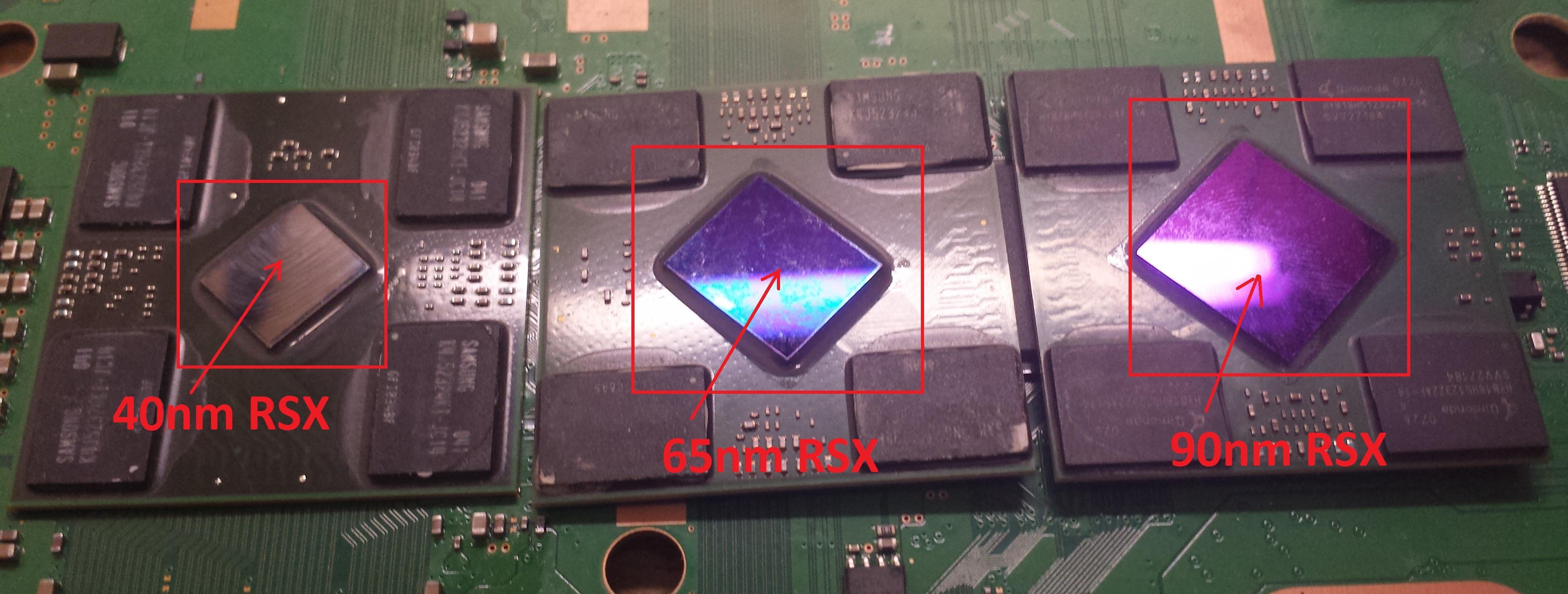
The 90nm RSX DIE is a blue color. That's normal. But a DIA-002 should have a 65nm RSX and...
PS3_-_RSX_-_40nm_65nm_90nm_-_die_sizes.jpg
 
Last edited:
Mine 65nm nm was violet /indigo and working fine last night reballed [emoji23]
Also vdd line was 3.5 ohms out of board, 4.2 ohms on board without any nec caps modified. Cell was 5,2 out of board and 5,6 on board, this was dyn001 but is kind same concept start from dia002, just cell suppose to be lower resistance on board like 4,2~4,4 ohms.
To be honest I did this board from 3 scratches, one water liquid board but considering good rsx, one donor board with dead rsx by hot gun and wrong flash, last board kind hoven rusted but had this strange cell 5,6 ohms, I had doubt that it would work, but without a reball I'm not convinced that it is lost. Error on that cell board 1200,3034,4402.
 
Last edited:
Since we're talking about the colors, might as well check the underfill condition as well then. If you see strong fracture on the 'glue' around the die, then it's probably not a good sign either...
That's an interesting point I hadn't considered.
 
Yes also 90nm have very often cracked epoxy on middle, not sure if I have examples from microscope but I don't pay much attention to those 90 rsx, just as usual measurements first can tell me exactly
 
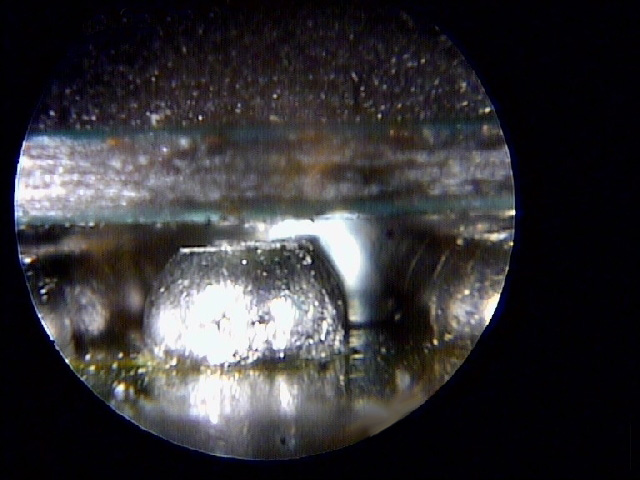
I just want people to see this, because when we talk about BGA "defects" people envision cracks. More often it looks like this...
BGA_crack1.jpg


The greatest tension forces are on the edge of the BGA. That's where the majority of the VDDIO and FlexIO lines are connected, which explains why they are the most common errors we see (when the BGA is actuall at fault. Bumpgate claims the rest).

The bond with the Copper pad is important to prevent this type of BGA failure. Yes a crack can occur, if the bond with the pads are strong enough to hold and actually deform the solderball (literally squash and pull it). In that case, yes you can form a solder "crack" over time. But that's not the most common type of failure, it's the one in the picture.

The ball litterally pulls away from the pad, or tears the pad off the board! That's due to imperfect reflow profiles, flux, contamination on the pad, solder chemistry, the ahesive used to ahdeare the pad to the FR4 interposer/substrate, even the adherance method used when placing the chip (modern BGA machines actually hover the chip over the pads until the balls go molten and then place them down).

Often what you see when you remove a GPU are dull or black pads. That because when this fault occurs, it exposes the copper pad to the air, which contain oxygen. Oxygen oxidizes. That's why you have to use flux, to prevent oxygen from coming into contact with the surfaces you're welding. The problem is that these pads are usually exposed for a long time before the reflow is performed. So the pads have a thick layer of oxides built up on the pad. Solder wont stick to the oxide layer. And flux doesn't remove it that well.

That's why reflows usually don't work. And if they do, they don't for long. It's why reballing is necessary. So you can literally scrape the oxide layer off and get shiny pads for a lasting bond. And the quality of the reballed bond is highly dependent upon the skill of the technition and equipment used.

 
@vyktormvmpay25 Sorry about not providing measurements, the CPU is at 4.4 ohms and the RSX is at 4.2 ohms. It does take about 3 seconds to go to the YLOD issue.
This can be saved with proper tools. Do you have any kind to perform reflow?
Reflow and if it gets glod or may work, then proper reball. I don't usually recommend reflow only to test. I admit not everyone must do it in my way unless you sell that unit after fix.
If you delid rsx put a bit of thermal paste on each ram and middle die ic then add ihs before running reflow. It is more likely to save it.
 
Last edited:
@vyktormvmpay25 I don't currently have the correct equipment for a proper reflow or reball. The RSX in this unit has been delided by previous tech and I do not have the ihs either (none of the units I have taken apart so far that have had either the CPU or RSX or both delided have had the ihs still inside them). I suspect who ever went through these units before me had some experience but not enough to properly fix them. I am going to guess that the equipment for properly reflowing and reballing would cost upwards of $300 making the repair most likely not worth it.
 
Well is true I'm not sure worth if you don't fix daily. Rsx ihs on all boards is same, on cell up to ver001 is same, can't remember right but it can be checked.
 
Before you connect to sb you need to write inside syscon different address:
w 1202 02 - for SW syscon type
w 4202 02 - for dia002 board, it is kind of mixed board and one only with this setup I believe for retail units.
w 7202 02 - for rest of mullion syscon.
Coincidentially i was talking about something related with this here: https://www.psx-place.com/threads/f...cecha-with-40nm-rsx.28069/page-69#post-317626

There is a displacement of 0x3000 bytes in some areas of the EEPROMs in between syscons CRX714 series (EEPROM size 0x8000) and CRX714 series (EEPROM size 0x5000). So you could tell:

w 7202 02 (Mullion CXR713 series)
w 4202 02 (Mullion CRX714 series)
w 1202 02 (All Sherwoods)
 
I think the command is there to see what is going on with the system. I believe "WaitResolution" means the system is literally waiting for the RSX to set the resolution, any resolution, which it is not able to do for some reason. There will be black screen until some kind of resolution is set. But this is for HDMI. I guess you could try AV composite cable to see if there's anything on screen and then switch it to HDMI from there.

Still, even if it's not 100% dead, it's on the way there, I would imagine. Of course, you should inspect the board to be sure there are no knocked off components just like Vyctor was trying to tell you. But yeah, don't hold your breath.
The other day i was trying to map the syscon pins to the HDMI and DVE chips (the MultiAV controller is codenamed DVE) and i started a couple of pinout tables in wiki
https://www.psdevwiki.com/ps3/MN8647091
https://www.psdevwiki.com/ps3/CXM4027R

Are not the same models used in the first PS3 fat models, and i didnt dedicated much time to it, but im mentioning it because i guess syscon "configures" them throught the "I2C bus" (a data channel using 2 lines)
Im mentioning it because that lines and pins are something that should be checked in some cases for trobuleshooting, because it could happen that syscon gets the correct info from RSX but it cant "send" it to the HDMI or the DVE chips
Also, with the I2C bus "broken" it could happen that the syscon HDMI related commands doesnt returns anything... lets say the HDMI and DVE controllers could be fine but syscon thinks that are damaged

In your screenshots of the syscon HDMI dedicated commands it can be seen some ID's related with the I2C data bus though in between HDMI<--->syscon
Im not sure if there is some HDMI command to check the ID of syscon, this would be a confirmation that the I2C bus is working fine

-------
Btw, i could not find the component responsible to power DVE, usually is syscon who powers the other chips throught a transistor, or the control pin of a voltage regulator, etc... but it looks like DVE is powered directly by RSX
So.. im wondering if a dead RSX could report errors in the DVE too (just because the DVE is unpowered so syscon is not able to "talk" with DVE)
 
I just want people to see this, because when we talk about BGA "defects" people envision cracks. More often it looks like this...
BGA_crack1.jpg


The greatest tension forces are on the edge of the BGA. That's where the majority of the VDDIO and FlexIO lines are connected, which explains why they are the most common errors we see (when the BGA is actuall at fault. Bumpgate claims the rest).

The bond with the Copper pad is important to prevent this type of BGA failure. Yes a crack can occur, if the bond with the pads are strong enough to hold and actually deform the solderball (literally squash and pull it). In that case, yes you can form a solder "crack" over time. But that's not the most common type of failure, it's the one in the picture.

The ball litterally pulls away from the pad, or tears the pad off the board! That's due to imperfect reflow profiles, flux, contamination on the pad, solder chemistry, the ahesive used to ahdeare the pad to the FR4 interposer/substrate, even the adherance method used when placing the chip (modern BGA machines actually hover the chip over the pads until the balls go molten and then place them down).

Often what you see when you remove a GPU are dull or black pads. That because when this fault occurs, it exposes the copper pad to the air, which contain oxygen. Oxygen oxidizes. That's why you have to use flux, to prevent oxygen from coming into contact with the surfaces you're welding. The problem is that these pads are usually exposed for a long time before the reflow is performed. So the pads have a thick layer of oxides built up on the pad. Solder wont stick to the oxide layer. And flux doesn't remove it that well.

That's why reflows usually don't work. And if they do, they don't for long. It's why reballing is necessary. So you can literally scrape the oxide layer off and get shiny pads for a lasting bond. And the quality of the reballed bond is highly dependent upon the skill of the technition and equipment used.
There is another effect that can be seen in that photo, but we need to use our imagination :)
If we do a solder with the correct temperature and amount of tin the result is a spherical surface very shiny (the reflections of the lights on the surface are well defined). This means the internal atomical structure of the tin have solidifyed well
But in that photo it can be seen the reflections are not well defined, in general the surface have lot of imperfections. If we would be able to take a look at that surface with a powerful microscope that imperfections would be like air bubbles and "microfractures" of the atomical structure... and yeah more oxidation

The reason why this kind of things happens is because the BGA ball was heated up many times to a "semi-solid" state... you know... not completly melted, but not completly solid either (the most we increase heat the most "vibrates" the atoms)
This kind of small defects doesnt uses to be the responsibles of the failure because happens at microscopical level, but ive seen some photos of BGA balls that was looking horrible (like a pudding cake)
Also, we can only see the BGA balls at the border (but there are more hundreds not visible), so something like this at the border means probably there are a lot more with random levels of the same damage... the balls we see at the border is just the tip of the iceberg :D
Also, another thing to consider if every BGA ball have a different sensitivy to this kind of damage... if the line is intended to send data at high frequencies is going to be very sensitive... also if is a voltage the damage could be higher (because the electrons does "jumps" and "micro sparks" that multiplyes the oxidation)

-----------
A detail i noticed in some PS3 motherboards (not sure if sony does in all them but i like it so much that i hope they are still doing it in the PS4 and PS5, lol)... is they solders 4 "dummy" SMD components at the corners of RSX/CELL
This way they can control the height of the BGA balls... you know... they heats them so the substrate can be "pushed" down to the height of the SMD "dummy" components

This is the kind of thing that would be better to do with a higher precission of micrometers... but the idea of the dummy SMD components at the corners is not so bad... nice for industrial usage... at least is better than nothing
If you dont use anything for height referene the result is the RSX/CELL is going to be located at a random distance from the motherboard surface because the BGA balls was "solidifyed" when the CELL/RSX was "floating" on top of them at a random height (dependant of the diameter of the BGA balls... but thats not much precise)
 
Last edited:
Yeah, I mean it gets super complicated when you get into the details of BGA reliability.

I do have to disagree on a couple of points. I wondered about arcing potentially welding the solder together or oxidizing pads too. I have since dismissed the idea. It would require a much higher voltage to overcome the air gap. Even at microscopic distances, 1 or 2 volts isn't enough potential.

The other is with the solder. The way alloys solidify is similar to rock. The slower they cool from molten to solid, the longer the crystals have to grow. So ideally they should transition from solid, to molten, and back to solid in as little time as possable. Small crystals dont have as many fault lines that can propagate a crack, like long crystals do. That's the grey surface you see in hard solder - long crystals.

The second part to that is oxidation, which further contributes to hard brittle solder. The higher the temp, the faster it oxidizes. So again, fast transitions, with good flux to prevent oxygen from getting at the joint when it's hot, leads to shiny strong bonds.

This is why reflow profiles reduce the time above refolw temps to 45s or less. And often these are done in a nitrogen atmosphere, to prevent oxidation.

Voids and inclusions inside the solder has to do with the flux chemistry. So yeah, it gets complicated. A lot of factors to get right, alot of oppritunaties for murphy to troll. BGA tech just sucks.
 
Can you clearify? When you say you 'heated the board to 100-120C,' do you mean you used a preheater at those temps before the reflow. Or do you mean you attempted to reflow with those temps?

Edit:
Wow, I've never seen a 50 3035 before! Happened during a pressure test? Can you explain in detail the chain of events? When did the error happen? When you released pressure?

I see the 503035 preceeded by 3034/4002. There is a random 80 1002 in there suggesting the console was on at some point. I'm guessing when you got it to boot with the GLOD it failed after some amount of time with that 1002. Upon the next boot it was 3034/4002. Then you tried another pressure test and it gave the 503035. But without the timestamps or a more detailed explanation of your specific tests, I'm just guessing.

Not that it matters. You clearly have a BGA defect and or bump failure. These errors and response to the pressure test prove it. You need a reball!
Yes, I tried a lower temperature, but it was clearly not enough.

I pressed the chip with my hand, bending the board slightly, without radiators, just to see if it would turn on.

Yes, the problem is BGA defect, which I can't fix.

And I think when I removed the heatsink, the chip shifted and started making YLOD instead GLOD.
 
Yes, I tried a lower temperature, but it was clearly not enough.

I pressed the chip with my hand, bending the board slightly, without radiators, just to see if it would turn on.

Yes, the problem is BGA defect, which I can't fix.

And I think when I removed the heatsink, the chip shifted and started making YLOD instead GLOD.

Just out of curiosity, what do you guys do with these boards after diagnosing and realizing it's not fixable at home ? I bet some people here would want to have them...
 
Just out of curiosity, what do you guys do with these boards after diagnosing and realizing it's not fixable at home ? I bet some people here would want to have them...
My guess based on e-bay listings...
  1. As is for parts/repair. Red Blinking light.
  2. Untested, as I don't have the cables.
In both cases the pictures will avoid an angle showing the voided/missing warranty seal.
 
My guess based on e-bay listings...
  1. As is for parts/repair. Red Blinking light.
  2. Untested, as I don't have the cables.
In both cases the pictures will avoid an angle showing the voided/missing warranty seal.
Are you sure about stickers? Mine seal never been touched [emoji16]
0198a4311dccaa82085af7a4694a652e.jpg
d424f78d95c4742a096a258909a5ff22.jpg

I just add my own seals so no doubt about refurbished units, also inside date of reball and name with phone number.
Kind of seal that can't be heat and desolder without destroy
ad5a381319199efb2e2f8bfe6df8ad01.jpg
 
Last edited:

Similar threads

Back
Top