
You are using an out of date browser. It may not display this or other websites correctly.
You should upgrade or use an alternative browser.
You should upgrade or use an alternative browser.
PS3 Fault finding YLOD with the SYSCON - First steps and Error reporting

vyktormvmpay25
Senior Member
It is comming when hdd isn't installed on unit, later I will come back with one video after rsx exchange. You will get images but vflash is kind of mirror to hdd, from that software side I'm lost.

SkaziChris
Member
Yikes, I had to go way back to refresh my memory. Looks like you started work on this console (VER-001) back on page 86.
Original errors were 80 2124 and 80 1002. Do you mind giving us a brief synopsis of the work you did? Just to refresh our memory?
VER-001
console starts and shuts down immediately.
Fan spinning like crazy. YLOD/RLOD.
Possibly overheating.
Errlog:
# A0802124 FFFFFFFF
# A0802124 FFFFFFFF
# A0801002 FFFFFFFF
CPU + RSX delid
New TC under IHS
Retest...
Fan is normalized.
Still instant YLOD/RLOD.
Errlog:
# A0802124 FFFFFFFF
# A0802124 FFFFFFFF
# A0801002 FFFFFFFF
HDMI IC removal...
Reading syscon errlog while HDMI IC is removed from mobo.
Errlog:
# A0802024 FFFFFFFF
# A0802024 FFFFFFFF
# A0802124 FFFFFFFF
# A0802024 FFFFFFFF
# A0112124 FFFFFFFF
# A0112124 FFFFFFFF
# A0112124 FFFFFFFF
[...]
Soldering another HDMI IC from doner board and reading syscon errlog.
The console stayed on (GLOD) for a looong time before shutdown.
Time from bringup to poweroff -> 30sec
Errlog:
# A0802124 FFFFFFFF
# A0802124 FFFFFFFF
# A0801002 FFFFFFFF
Assumption -> FAULTY HDMI IC is blocking startup procedure and may cause instant YLOD/RLOD.
Then I waited some time to get a decent oscilloscope for diagnosing NEC/Tokin waveform.
I finally got my hands on RIGOL oscilloscope.
I measured the CPU VDDC during the bringup sequence.
The amplitude is 170mV... which is way above 50mV.
RSX tokins had a bad waveform (page 109)
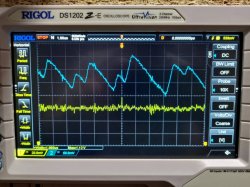
Some measurements:
Probes resistance: 0.3 Ohm
CPU NEC-GND resistance: 5 Ohm
RSX NEC-GND resistance: 3.5 Ohm
I replaced one RSX NEC/Tokin with 4x 470uF tantalum caps.
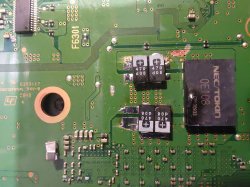
RSX Waveform was normalized (page 110)
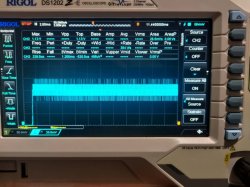
Console stays on green light and does not shutdown.
Errlog:
clean from errors
No output on HDMI port.
There is output on Component port.
Attached HDD and BD logic board.
Installed OFW 4.86
Console now works, but only on component port.
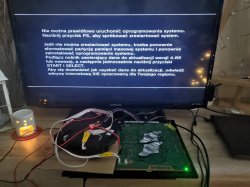
I replaced the hdmi port, as it was internally damaged.
Still no luck with hdmi output.
5V is present on pin 1.
HDMI filters are all checked and ok.
hdmi vbs command returns 0000000 (I assume that it is a checksum of all checks, and it means no errors).
I replaced the HDMI IC back to original one...
>$ errlog
00000000
# CODE CLOCK
# A0112024 FFFFFFFF
# A0112024 FFFFFFFF
# A0112024 FFFFFFFF
So with this original panasonic IC,
it is a constant GLOD (stays on, does not shut down, does not go into service menu, does not give any output neither on hdmi, nor on component).
So the original HDMI IC is faulty for 100%
What's the difference between A080 2024 and A011 2024?
I replaced the HDMI IC to the one taken from doner board.
-> Errlog clear from errors. Console starts.
Things to do:
1. I ordered the HDMI port tester to rule out connectivity issues, and I will do that before attempting the reballing process.
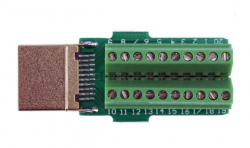
2. I have a simple endoscope camera, but it is not enough to inspect bga under the RSX.
The endoscope is 5,5mm...
In any case, It would be this corner and this side I would need to put into bga revision, right?
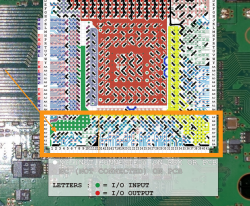
Attempting BGA inspection with microscope...
3. Any other ideas what else can be checked before reballing?
#-------------------------------------
Reballing...
I will need to remove tantals before reballing, as they will most likely fall off the board during the process.
Last edited:

RIP-Felix
Senior Member
I mean, it really feels like that HDMI transmitter should have been it. Are you sure all the ones you replaced it with were good? Could you take one from a donor board you know has a good one?
There are some SMDs on the VDDIO lines going to HDMI you can probe. And if you remove the HDMI chip you can measure each pads resistance. Data lines should have the same reading. If they dont it could indicate a weak solder joint or bad internal circuit (inside RSX). Open is a BGA/ bump failure.
The problem is the hdmi chip is custom and the pinout is unknown AFAIK. So itll be hard to know if the pad you are probing is a data line or voltage, and where its going. You might have to visually trace its path to the RSX trace. Then figure out its job. It's probably easier to just reball to rule the BGA out.
There are some SMDs on the VDDIO lines going to HDMI you can probe. And if you remove the HDMI chip you can measure each pads resistance. Data lines should have the same reading. If they dont it could indicate a weak solder joint or bad internal circuit (inside RSX). Open is a BGA/ bump failure.
The problem is the hdmi chip is custom and the pinout is unknown AFAIK. So itll be hard to know if the pad you are probing is a data line or voltage, and where its going. You might have to visually trace its path to the RSX trace. Then figure out its job. It's probably easier to just reball to rule the BGA out.
SkaziChris
Member
I mean, it really feels like that HDMI transmitter should have been it. Are you sure all the ones you replaced it with were good? Could you take one from a donor board you know has a good one?
There are some SMDs on the VDDIO lines going to HDMI you can probe. And if you remove the HDMI chip you can measure each pads resistance. Data lines should have the same reading. If they dont it could indicate a weak solder joint or bad internal circuit (inside RSX). Open is a BGA/ bump failure.
The problem is the hdmi chip is custom and the pinout is unknown AFAIK. So itll be hard to know if the pad you are probing is a data line or voltage, and where its going. You might have to visually trace its path to the RSX trace. Then figure out its job. It's probably easier to just reball to rule the BGA out.
Allright.
I just ordered a new chip.
https://allegro.pl/oferta/chip-hdmi...3MGEyOWY5YWI5ZDE4MDc5Y2U3MWMwNWJhYjMxZWI3M2I=
I will have it in 2-3 days.
I will get back to this console once I have it.
I like the little tray underneath! Looks great! I don't know where you put your 3d printer, but I found normal room temperature is usually not enough to prevent my printer from bending. An enclosure helps a lot and I almost had no bending afterwards.I modified mine a bit to make use of the space under the PSU. Nothing special, just added some ridges to guide a simple tray. The tray delaminated in the cold weather we've been having (couldn't get the enclosure temp high enough for ABS). So I had to super glue it. Looks bad but it just has to work.View attachment 35667 View attachment 35669 View attachment 35668
RIP-Felix
Senior Member
I did make an enclosure for it, but it's in the garage so I dont have to suck ABS fumes. It was cold out there. I tried to layer the enclosure with towels and insulate it. Got it up to 42C, which worked well on the mount, but the tray setting were too slow on outer layers. Each layer cooled too much before the next was laid on top. I need to increase the outer layer speed. Also the model walls should have been and set to a multiple of 0.4mm (my hotend nozzle ). I set it to 3mm, should have been 3.2mm. But I didnt think about it before printing and dont feel like wasting more filament. Super glue to the rescue.I like the little tray underneath! Looks great! I don't know where you put your 3d printer, but I found normal room temperature is usually not enough to prevent my printer from bending. An enclosure helps a lot and I almost had no bending afterwards.
RIP-Felix
Senior Member
This is interesting. Can the task command be combined with brigup to see what the Power Sequence is doing?Oh and here is the log pulled from my console with the task command that I thought may shed some limited insight, I'm not exactly sure what all this is but figured I'd post it anyways as I'm curious about it and would like to learn more about the inner workings of the syscon:
>$ task
task
TaskName ID PRI Stat EVT StkStrAddr Size CrntStkPtr Crnt Peak
SSM 1 21 WAI RDQ 0x02001c7c 1024 0x02002018 9% 57%
UISW 2 25 RDY ... 0x0200207c 512 0x02002228 16% 55%
UILED 3 26 WAI FLG 0x0200227c 512 0x02002418 19% 24%
COMMRECV 4 22 WAI FLG 0x0200247c 1024 0x020026d0 41% 66%
CONSOLE 5 24 RDY ... 0x0200287c 2560 0x02002d60 51% 74%
FIRMUD 6 27 WAI SLP 0x0200327c 512 0x02003400 24% 28%
SB 7 6 WAI FLG 0x0200347c 512 0x02003618 19% 53%
POWERSEQ 8 23 WAI RDQ 0x0200367c 1024 0x02003a20 8% 73%
SERV_DIAG 9 45 WAI RDQ 0x02003a7c 768 0x02003d08 15% 18%
SERV_HDMI 10 45 WAI RDQ 0x02003d7c 1024 0x02004108 11% 53%
SERV_SECU 11 45 WAI RDQ 0x0200417c 1024 0x02004508 11% 55%
HDMIINTR 12 4 WAI SLP 0x0200457c 512 0x02004718 19% 24%
HDMISM0 13 43 WAI FLG 0x0200477c 768 0x020049f8 17% 45%
IDLE 14 64 RDY ... 0x02004a7c 128 0x02004aa0 71% 87%
SERV_MISC2 15 45 WAI RDQ 0x02004afc 1024 0x02004e90 10% 50%
SERV_THERM 16 45 WAI RDQ 0x02004efc 768 0x02005188 15% 61%
........... 0 0 DMT ... 0x020051fc 768 0x00000000 0% 0%
SERV_MISC 18 45 WAI RDQ 0x020054fc 1024 0x02005890 10% 81%
WMM0 19 11 WAI FLG 0x020058fc 512 0x02005a90 21% 49%
........... 0 0 DMT ... 0x02005afc 768 0x00000000 0% 0%
WMM1 21 30 RDY ... 0x02005dfc 768 0x02006090 14% 48%
LOG_ERROR 22 62 WAI RDQ 0x020060fc 512 0x02006288 22% 58%
CC_CGMS 23 4 DMT ... 0x020062fc 512 0x02006498 19% 24%
INTRNOTIF 24 8 WAI RDQ 0x020064fc 256 0x020065a0 35% 45%
SIRCS 25 5 WAI RDQ 0x020065fc 512 0x02006768 28% 33%
Crnt Idle Rate : 66%[0x00013925]
Max Idle Rate : 66%[0x00013926]
Min Idle Rate : 11%[0x000037e6]
vyktormvmpay25
Senior Member
Yes it can be combined only for mullion working unit ,not tested on fatal error units
RIP-Felix
Senior Member
I came across this again while working on a SYSCON spreadsheet, similar to the one I made for the TOKIN thread. I think that fuse is strongly implicated in cases where you get a 2120 at step number 00. This errorlog is similar to one @lalocbzxy solved by replacing a TH2501 on IC2502 (HDMI transmitter protection Thermistor). The 00 step number suggests it's a fuse, as most fuses that blow cause a 00 or 01 step number. Resistance can be compared with TH2401, which is identical. On COK-001 it reads about 3 ohms.The power on states stages give an indication on how bad a component has gone bad.
Ironically i have recieved a DIA-002 board with the following:
ofst[ 84]:err_code:0xa0801002, clock:0x26d6f228 2020/08/24 21:48:24
ofst[ 88]:err_code:0xa0801001, clock:0xffffffff
ofst[ 92]:err_code:0xa0801002, clock:0xffffffff
ofst[ 96]:err_code:0xa0801002, clock:0xffffffff
ofst[100]:err_code:0xa0801002, clock:0xffffffff
ofst[104]:err_code:0xa0801002, clock:0xffffffff
ofst[108]:err_code:0xa0002120, clock:0xffffffff
$ lasterrlog
lasterrlog
Last Error Code:0xa0002120, Time:0xffffffff
[mullion]$
This is indicating i have two issues (possibly) - Faulty hdmi decoder or power components related? (power ic's, nec tokins...)
I believe you correct in saying that 1001 is a symptom and not a cause (related to the CELL power on process) 1002 is the RSX code.
I'm going to reorganise my error info and just label as possible issue for these codes.
I'll update on my findings and how i diagnosed the fault.
Note, in the ensuing discussion we were focused on RSX power issues. Either caused by tokins (thanks to the 1002 in the log) or BGA (because in cases with 3034/4XXX errors we often see 2120's that go away after a reball). This emphasizes the need to troubleshoot the board first! Double check fuses people! We can bark up the wrong tree otherwise. Eliminate the easy stuff first, so we know where not to look!
Using the hdmi commands, i've established the hdmi decoder is working and picking up edid reading.
Going down the voltage readings are all checking out, im currently looking at the sem-001 schematics, and a working dia-002 board.
IC2501 regulator on pin 6 hdmi int is not getting anything? mmmm
Yup!I have one of these hdmi test ports, 1002 is a power fail error code which is generic, 2120 code was pointing the finger on the hdmi encoder chip. When measuring the PTC thermistor fuses near by they are showing a 1.5 ohm resistance, meaning there is a fault somewhere on the hdmi encoder line.
PTC fuses should only read 0.2 ohms and increase in resistance if there is too much current to protect the circuit. This fuse is on the +5v line to the encoder - so more digging to find the offending fault.
Last edited:
RIP-Felix
Senior Member
Did you decide that these are dead RSX? After a reball, if a GLOD persists without any other errors, the RSX is hosed?@Pacorretaco had this test, did not forget. So slims really have 0.95 v. Got another strange situation with one sur001 that after reball both I have kind of glod. Board came with 3034 4402. In this glod I can hear recovery beeps, claiming errors, nothing found in UART. Took rsx reball to another sur001 well known working, same results, glod no av/Hdmi signals, can go in recovery.
Rsx resistance 1.8 ohms, ram resistance 435 ohms out of board.
So yes it can happen at one point we should create test boards with socket for rsx at least. Not a permanent socket that will run games and everything but just to place ic and get image on screen, from there reball to its board should work for sure.

EDIT: Looks like you connected to SB UART on that SUR and it gave the special GLOD...
now how do i access sb wart? on SW -sur001 board?i can see on putty but can not send commands.
Code:Boot Loader SE Version 4.7.0 (Build ID: 5271,50509, Build Date: 2015-02-04_21:00 :09) SDK Version: 470.000 Copyright(C) 2015 Sony Computer Entertainment Inc.All Rights Reserved. [INFO]: === eXtreme Data Rate Memory Subsystem === [INFO]: (Configured Memory Size per single XIO channel: 128 MBytes.) [INFO]: XIO channel[0] is available. [INFO]: XIO channel[1] is available. [INFO]: ---> Total 256 MBytes are now in use. [INFO]: SPU enable [0, 1, 2, 5, 6, 7] 11101111 [INFO]: BE:12S DD2.0, SB:ZX1.1 Cell OS SDK4.7.0 000 (release build: r50509 2015_02_04_203000) Copyright 2015 Sony Computer Entertainment Inc. revision: 50304 date: Wed Feb 4 21:02:03 JST 2015 lv2(0): total memory size: 249MB+640KB lv2(0): kern memory size: 12MB+640KB (heap:3492KB page pool:4736KB) lv2(0): user memory size: 237MB lv2(2): lv2(2): Cell OS Lv-2 32 bit version 4.7.0 lv2(2): Copyright 2011 Sony Computer Entertainment Inc. lv2(2): All Rights Reserved. lv2(2): lv2(2): revision: 50509 lv2(2): build date: 2015/02/04 21:08:16 lv2(2): processor: Broadband Engine Ver 0x0000 Rev 0x2100 lv2(2): PPU:0, Thread:0 is enabled. lv2(2): PPU:0, Thread:1 is enabled. lv2(2): rsx: rsx40 a01 500/650 vpe:ff shd:3f [NM9677-18:0:4:12:d:f:6:0:1][28:0:a:0:1:0:1][1:1:0] lv2(2): Available physical SPUs: 6/7 lv2(2): mounting the flash file system : ........... Failed (error code:0x8001002b) lv2(2): lv2(2): ### lv2(2): ### Vflash recovery mode lv2(2): ### lv2(2): lv2(2): creating the vflash recover process (emergency program) : OK
More details how should I send commands on SB uart to dump /read info ,what software do you use ?
Last edited:
vyktormvmpay25
Senior Member
It is same shit board sur001 I've had running test, now trying to figure out what was wrong with it and original rsx from it was sure dead. Doing same situation on different dyn001 /sur001 /jsd/jtp by exchange rsx was fine, not sure why this not going on but will find out if cpu internal problem.
About SB port after we write in usual syscon port "w 1202 02 " then we just connect usb uart adaptor to that secondary SB uart and that log is coming by itself out on putty screens nothing else just set right com port in putty. if you don't get it from first just swap rx with tx.
As you can see that error on end on SB uart becouse no hdd to boot further but recovery will auto swap/kick in.
About SB port after we write in usual syscon port "w 1202 02 " then we just connect usb uart adaptor to that secondary SB uart and that log is coming by itself out on putty screens nothing else just set right com port in putty. if you don't get it from first just swap rx with tx.
As you can see that error on end on SB uart becouse no hdd to boot further but recovery will auto swap/kick in.
Last edited:
RIP-Felix
Senior Member
So you ran into the same special GLOD, exchanged the RSX, and it was fine? Conflicting results?It is same shit board sur001 I've had running test, now trying to figure out what was wrong with it and original rsx from it was sure dead. Doing same situation on different dyn001 /sur001 /jsd/jtp by exchange rsx was fine, not sure why this not going on but will find out if cpu internal problem.
About SB port after we write in usual syscon port "w 1202 02 " then we just connect usb uart adaptor to that secondary SB uart and that log is coming by itself out on putty screens nothing else just set right com port in putty. if you don't get it from first just swap rx with tx.
In other words, we can't say for sure that your Special GLOD means a dead RSX?
vyktormvmpay25
Senior Member
In most cases is rsx ,just swap rsx and if does not work, problem is on another side.this board had rsx dead,ported on one working board and does exactly same.now with working rsx on sur001 board with problems didnt work so ill port all on one jsd board and if same problem, means all starting from cpu.We will see in few days
RIP-Felix
Senior Member
I'm having a real hard time following your translation man. Damn language barrier!
Okay, Special GLOD is when you reball both RSX and CPU, but SB debugging stops at some point and console stays in GLOD. It can be caused by a dead CPU or Dead RSX. Only way to know which is to replace RSX and see. If that doesn't work, it's a dead CPU and game over.
Is that correct?
Okay, Special GLOD is when you reball both RSX and CPU, but SB debugging stops at some point and console stays in GLOD. It can be caused by a dead CPU or Dead RSX. Only way to know which is to replace RSX and see. If that doesn't work, it's a dead CPU and game over.
Is that correct?
vyktormvmpay25
Senior Member
Yes thanks for your understanding.
I am focusing on this now


Just to be noticed those are very rare cases think found about 10 in about 200 unis in one year. It is not present in 3000 so something will not fail in kte001 and working to find what.
I am focusing on this now
Just to be noticed those are very rare cases think found about 10 in about 200 unis in one year. It is not present in 3000 so something will not fail in kte001 and working to find what.
Last edited:
vyktormvmpay25
Senior Member
That is fiberglass of 7mm created as jig that won't absorb temperature so fast.
Similar threads
-

-
PS3 CECHA00 with several SYSCON errors (3004, 1001,1002, 2120,3011)
- Started by LSL
- Replies: 7
-
 PS3 Interesting PS3 Errors (1802, 1701, 1601) and Capacitor Replacement
- Started by Cheshire UK
- Replies: 2
-