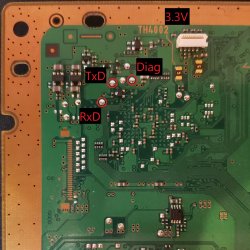
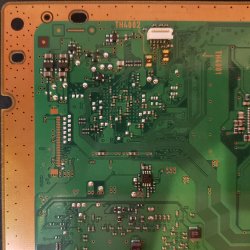
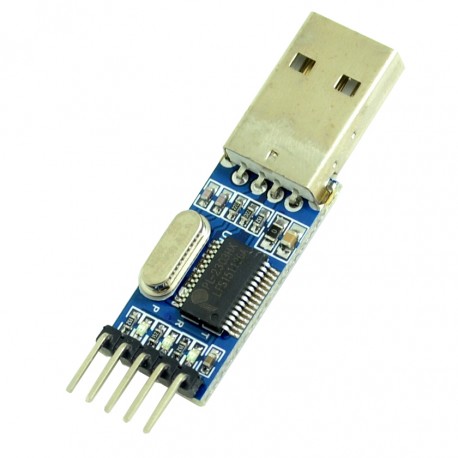
PS3 Fault finding YLOD with the SYSCON - First steps and Error reporting

Nice, well done!

Defiantly change that wire to a fuse, otherwise permanant damage will occur if some overvoltage occurs later.

You could replace with a resetable fuse so you dont have to keep replacing them.

Hello again, today I think I get finally fixed another ps3 fat (dia 002 motherboard), originally when I turn on I got ylod, thanks to this topic using syscon communication I can get the error log: 0xa0002120 for hdmi error & 0xa0801002 for rs power fail, so it took many hours checking what was the problem with the IC2502 for the 2120 hdmi error, i check all fuses but after read many datasheet of ptc thermistor positive, i have a measure of 1.5 ohm on both thermistors on the hdmi/av ports, but datasheet and another thermistors said that minimum value was 0.01 ohm (the first i did was check that on continuity and diode mode and i thought they was ok) so i remove both and replace with 2 pieces of 30awg cable (0.02 ohm on multimeter) and finally boot normally (screen saying hdmi port was detected and system didn't turn off correctly last time) so after 1 hour of test I just need order a new pair of thermistors in order to remove and replace the temporary cable. I don't know exactly if that is the best solution, I just need an osciloscope in order to check voltage and waveform and all the electronic stuff doing the comparison with sem-001 old board i have. I hope this would usefull for anyone here.
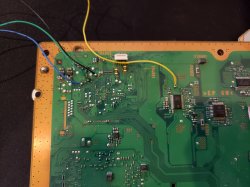
 
So, you need to switch off, switch on, but dont power on, just leave in standby mode (make sure the diag pin is NOT grounded!).

Then give it a minute to settle down, then try auth command, try a few times.

Then once you have that done, try the eep command

View attachment 28000

Hello gentlemen, last night i did the connection between motherboard and my windows laptop, my ps3 has a glod problem, still green light but no output video, when i try to go online on normal mode (rear swith on -> power on) i get auth1 invalid, then switch off the console but when i go on the fan test mode (switch on & eject disc button pressed) i can auth successful, but only have 10-20 seconds to obtain the image I upload, any ideas why cannot set 3961 01 to 00?
 
Nice, well done!

Defiantly change that wire to a fuse, otherwise permanant damage will occur if some overvoltage occurs later.

You could replace with a resetable fuse so you dont have to keep replacing them.

Sure, thanks for advice, I am waiting until my resetable fuse arrives that buy on ebay arrives (also a couple pack of tantalum capacitors), meanwhile I'll check 1 more fat motherboard of my friend.
 
Hi! the guide in git hub is too confusing, i have experience with soldering, and wring electronics, but no experience with python and putty, i have soldered RX, TX, Ground to 3.3v and Diag to Ground, but in the software side, i don't get enough information in the github guide, how do i run the script on putty, what should i be getting when i switch the PS3 on, the guide is very weak in showing how to do the software side step by step, please can you help me?
 
@db260179 I'm looking to create a video guide to help people along with this process but I'm a bit confused about the sequence of events for the wiring connections. If I'm reading the guide correctly the guide should go
1. solder 4 wires to the following points
Black to Ground (optional?)
Green to TxD
Blue to RxD
Yellow to Ground
2. Connect the RX, TX, and Ground wires but don't yet connect the Diag wire?
3. Connect the USB to your PC and run the script?
I've attached some higher res pictures that I think might make it easier to see whats going on in the written guide.
20201005_235024.jpg COK-001 Copy.jpg COK-001.jpg
 
1. solder 4 wires to the following points
Black to Ground - must be from motherboard GND, so to connect to the USB GND lead - must not optional
Green to TxD - yep this goes to usb TX
Blue to RxD - yep again to usb RX
Yellow to Ground - NO, this is soldered to the motherboard DIAG pin, then we connect this to the GND when we do the internal mode
2. Connect the RX, TX, and Ground wires but don't yet connect the Diag wire? - diag from motherboard to gnd (can be usb gnd or motherboard gnd, only in internal mode)
3. Connect the USB to your PC and run the script?

So the diag pin from the motherboard is only used once you do the first step - set the internal mode - EEP SET 3961 01 00 (in external mode)

@db260179 I'm looking to create a video guide to help people along with this process but I'm a bit confused about the sequence of events for the wiring connections. If I'm reading the guide correctly the guide should go
1. solder 4 wires to the following points
Black to Ground (optional?)
Green to TxD
Blue to RxD
Yellow to Ground
2. Connect the RX, TX, and Ground wires but don't yet connect the Diag wire?
3. Connect the USB to your PC and run the script?
I've attached some higher res pictures that I think might make it easier to see whats going on in the written guide.
View attachment 28162 View attachment 28163 View attachment 28164
 
1. solder 4 wires to the following points
Black to Ground - must be from motherboard GND, so to connect to the USB GND lead - must not optional
Green to TxD - yep this goes to usb TX
Blue to RxD - yep again to usb RX
Yellow to Ground - NO, this is soldered to the motherboard DIAG pin, then we connect this to the GND when we do the internal mode
2. Connect the RX, TX, and Ground wires but don't yet connect the Diag wire? - diag from motherboard to gnd (can be usb gnd or motherboard gnd, only in internal mode)
3. Connect the USB to your PC and run the script?

So the diag pin from the motherboard is only used once you do the first step - set the internal mode - EEP SET 3961 01 00 (in external mode)
Sorry I mis-wrote that when I originally posted it, the black wire is actually on the diag point and yellow is on the ground point.
So just to be doubly clear, the wire that should be "toggleable" or easy to disconnect is the Black wire aka the Diag point correct?
 
So once internal mode is active, then the diag lead to GND should be connected always, only disconnect if you want to go back to external mode

I think so, but even in those images both the Diag point and the ground point are both connected to the ground (of the USB) should it be like that at all times or just when internal mode is active?
 
What is everyone using for Linux and Python? I'm trying to get things as user friendly as possible before everything comes in the mail to finally test a few consoles I have laying around.
 
What is everyone using for Linux and Python? I'm trying to get things as user friendly as possible before everything comes in the mail to finally test a few consoles I have laying around.
I don't know how difficult this will be but I was thinking I might try using the Linux subsystem for windows since I think that's what most people will be using nowadays anyway
 
I'm going to be using a PL2303TA cable and will be trying to get Linux going on windows 10 pro. Part of my problem initially was that windows wasn't up to date even though ot said it was
 
Alright I could use some help..

I'm trying to get things going but I've run into a few issues.

I'm using Ubuntu 20.04 LTS and python 2.7.9.

I keep getting a either a command unrecognized message or syntax errors.

Sent from my SM-G965U using Tapatalk
 
When I type in lsusb it doesn't do anything, it just gives me another starting line with my user info with the :~$

Sent from my SM-G965U using Tapatalk
 
Did you install the python-serial & python-crypto modules?
Honestly at this point I don't even know anymore, the more I research and try to learn how to do simple things that I need to do this the more I want to pull my hair out. The internet is of little to no help and given that literally no one around me knows anything about computers or even what Linux or Ubuntu are I'm stuck on my own.

I've looked up beginner guides to command lists and yet nothing seems to work for me. As of now I've got Linux mint working on my laptop and python working at its base. Thats as far as I've gotten in HOURS of messing with this and I can't tell you how many times I've just wanted to say screw it and just not deal with it again. But I keep coming back because I want to fix the few consoles I've got that being able to mess with the syscon output would help me repair them much easier instead of just making wild guesses.

Sent from my SM-G965U using Tapatalk
 
Honestly at this point I don't even know anymore, the more I research and try to learn how to do simple things that I need to do this the more I want to pull my hair out. The internet is of little to no help and given that literally no one around me knows anything about computers or even what Linux or Ubuntu are I'm stuck on my own.

I've looked up beginner guides to command lists and yet nothing seems to work for me. As of now I've got Linux mint working on my laptop and python working at its base. Thats as far as I've gotten in HOURS of messing with this and I can't tell you how many times I've just wanted to say screw it and just not deal with it again. But I keep coming back because I want to fix the few consoles I've got that being able to mess with the syscon output would help me repair them much easier instead of just making wild guesses.

Sent from my SM-G965U using Tapatalk

I'm on Ubuntu 18.04 (Xubuntu). Post your commands and the response you are seeing.
 

Similar threads

Back
Top