PS3 Fault finding YLOD with the SYSCON - First steps and Error reporting

None of those are suitable IMO. I am prejudiced against the puke yellow AVX and Kemet caps because the ones sold on ebay for this purpose have way too high an ESR. The 2 labeled "136" are the...um, least unsutable from that haul. They are rated for 25v and the higher the voltage rating the higher the ESR usually is. So they almost certainly would be a bad choice. But less bad than the others. Might they allow the console to boot into XMB? Possibly. But it's not repair and won't last long. So manage your expectations.
View attachment 42154 View attachment 42153
I intend to get proper capacitors shipped from the US if I can confirm the capacitor's what's wrong.
Though, there's another option, which I slightly dislike since I think this motherboard is actually functional, but I have about four of these caps. Do you think they are a better bet at attempting to get it to boot (or maybe even doing a definitive repair)?
-2147483648_-212242.jpg
 
Hi, I've just aquired a PS3 CECHJ03 which wont boot up. I've got into the syscon & retrieved the details, if anyone could point me in the right direction I would be grateful. Cheers

Code:
errlog
ofst[ 32]:err_code:0xffffffff, clock:0x2c557d8c  2023/07/27 19:10:04
ofst[ 36]:err_code:0xa0202120, clock:0x2c557d8d  2023/07/27 19:10:05
ofst[ 40]:err_code:0xa0202120, clock:0x2c557d8e  2023/07/27 19:10:06
ofst[ 44]:err_code:0xa0202120, clock:0x2c557d8f  2023/07/27 19:10:07
ofst[ 48]:err_code:0xa0202120, clock:0x2c557d90  2023/07/27 19:10:08
ofst[ 52]:err_code:0xa0101002, clock:0x2c55831c  2023/07/27 19:33:48
ofst[ 56]:err_code:0xa0102113, clock:0x2c55831c  2023/07/27 19:33:48
ofst[ 60]:err_code:0xa0101002, clock:0x2c55862c  2023/07/27 19:46:52
ofst[ 64]:err_code:0xa0202120, clock:0x2c55862d  2023/07/27 19:46:53
ofst[ 68]:err_code:0xa0202120, clock:0x2c55862e  2023/07/27 19:46:54
ofst[ 72]:err_code:0xa0202120, clock:0x2c55862f  2023/07/27 19:46:55
ofst[ 76]:err_code:0xa0202120, clock:0x2c558630  2023/07/27 19:46:56
ofst[ 80]:err_code:0xa0202120, clock:0x2c558631  2023/07/27 19:46:57
ofst[ 84]:err_code:0xa0202120, clock:0x2c558632  2023/07/27 19:46:58
ofst[ 88]:err_code:0xa0202120, clock:0x2c558633  2023/07/27 19:46:59
ofst[ 92]:err_code:0xa0202120, clock:0x2c558634  2023/07/27 19:47:00
ofst[ 96]:err_code:0xa0202120, clock:0x2c558634  2023/07/27 19:47:00
ofst[100]:err_code:0xa0202120, clock:0x2c558635  2023/07/27 19:47:01
ofst[104]:err_code:0xa0091002, clock:0x2c558689  2023/07/27 19:48:25
ofst[108]:err_code:0xa0102014, clock:0x2c558689  2023/07/27 19:48:25
ofst[112]:err_code:0xa0101002, clock:0x2c5586bc  2023/07/27 19:49:16
ofst[116]:err_code:0xa0102113, clock:0x2c5586bc  2023/07/27 19:49:16
ofst[120]:err_code:0xa0101002, clock:0x2c5586e6  2023/07/27 19:49:58
ofst[124]:err_code:0xa0102014, clock:0x2c5586e6  2023/07/27 19:49:58
ofst[  0]:err_code:0xa0101002, clock:0x2c558721  2023/07/27 19:50:57
ofst[  4]:err_code:0xa0102113, clock:0x2c558721  2023/07/27 19:50:57
ofst[  8]:err_code:0xa0101002, clock:0x2d42ad60  2024/01/23 17:01:20
ofst[ 12]:err_code:0xa0102014, clock:0x2d42ad60  2024/01/23 17:01:20
ofst[ 16]:err_code:0xa0091002, clock:0x2d42ad6c  2024/01/23 17:01:32
ofst[ 20]:err_code:0xa0102014, clock:0x2d42ad6c  2024/01/23 17:01:32
ofst[ 24]:err_code:0xa0091002, clock:0x2d42ad7b  2024/01/23 17:01:47
ofst[ 28]:err_code:0xa0102014, clock:0x2d42ad7b  2024/01/23 17:01:47
[mullion]$
becount
Bringup : 2915 times
Shutdown: 2478 times
Power-on: 160day 13hour 00min 38sec
[mullion]$
bringup
[SSM] state: 0000 -> 0101
Bringup Mode #0 (0xFF)
[SSM] ssmCb_OnStartingBePowOn() called.
[SSM] First Boot.
[SSM] Bringup mode : syspm_stat=00000000/00000000
[POWSEQ] PowerSeq_Setup called.
[SSM] fatalreq delayed.
[SSM] state: 0101 -> 0301
[SSM] *** Power Fail RS ***
[SSM] state: 0301 -> 0700
[POWSEQ] AV Backend Letup
[SSM] Shutdown mode : syspm_stat=00000000/00000000
[ERROR]: 0xa0101002
[ERROR]: 0xa0102114

you have a never before reported code there. 2014 is undocumented in my notes anyway. But since all your error combos are occuring with the 1002s, I would still presume RSX NEC/Tokins. I've entered your case into my spreadsheet and would be curious if replacing the tokins resolves this for you, to confirm this was the fix. Thank you for the report.

What trips me up is the short uptime on that console. 160 days for the tokins to die is pretty short IME. was that console dusty?
 
I intend to get proper capacitors shipped from the US if I can confirm the capacitor's what's wrong.
Though, there's another option, which I slightly dislike since I think this motherboard is actually functional, but I have about four of these caps. Do you think they are a better bet at attempting to get it to boot (or maybe even doing a definitive repair)?View attachment 42155
Those would be ideal.

You can always pull them now and replace them when you get the caps shipped in.
 
Can someone help me? I bought a CECHE01 with YLOD to retrieve its disc drive and use it in my CECHA01. However, now I want to identify the issue with it and try to fix it.

The becount is considerably low, and it appears to be in excellent condition. I believe he can come back to life with a little help

Apparently the time for the 3 beeps is less than 1 second (I'm leaving a video demonstrating it)
https://youtube.com/shorts/CO2yDqmysPI

becount
Bringup : 924 times
Shutdown: 871 times
Power-on: 21day 08hour 04min 37sec

VDD_MEM = 17.35Ω
BE=VDDC = 2.70Ω
YC_RC_VDDIO = 13.50Ω
VDDR = 296.3Ω
RSX_VDDC = 2.75Ω
RSX_PLL = 3.7kΩ
FBVDDQ = 103.2Ω
RSX_VDDIO = 71.4Ω
VDDA = 4.6Ω
MC2_VDDIO = 36.7Ω
BE_PLL = 1.3 MΩ

ofst[ 16]:err_code:0xffffffff, clock:0xffffffff
ofst[ 20]:err_code:0xa0202120, clock:0xffffffff
ofst[ 24]:err_code:0xa0202120, clock:0xffffffff
ofst[ 28]:err_code:0xa0202120, clock:0xffffffff
ofst[ 32]:err_code:0xa0202120, clock:0xffffffff
ofst[ 36]:err_code:0xa0202120, clock:0xffffffff
ofst[ 40]:err_code:0xa0202120, clock:0xffffffff
ofst[ 44]:err_code:0xa0202120, clock:0xffffffff
ofst[ 48]:err_code:0xa0202120, clock:0xffffffff
ofst[ 52]:err_code:0xa0213013, clock:0xffffffff
ofst[ 56]:err_code:0xa0202120, clock:0xffffffff
ofst[ 60]:err_code:0xa0202120, clock:0xffffffff
ofst[ 64]:err_code:0xa0202120, clock:0xffffffff
ofst[ 68]:err_code:0xa0202120, clock:0xffffffff
ofst[ 72]:err_code:0xa0202120, clock:0xffffffff
ofst[ 76]:err_code:0xa0202120, clock:0xffffffff
ofst[ 80]:err_code:0xa0202120, clock:0xffffffff
ofst[ 84]:err_code:0xa0202120, clock:0xffffffff
ofst[ 88]:err_code:0xa0202120, clock:0xffffffff
ofst[ 92]:err_code:0xa0202120, clock:0xffffffff
ofst[ 96]:err_code:0xa0213013, clock:0xffffffff
ofst[100]:err_code:0xa0202120, clock:0xffffffff
ofst[104]:err_code:0xa0202120, clock:0xffffffff
ofst[108]:err_code:0xa0202120, clock:0xffffffff
ofst[112]:err_code:0xa0202120, clock:0xffffffff
ofst[116]:err_code:0xa0202120, clock:0xffffffff
ofst[120]:err_code:0xa0202120, clock:0xffffffff
ofst[124]:err_code:0xa0202120, clock:0xffffffff
ofst[ 0]:err_code:0xa0202120, clock:0xffffffff
ofst[ 4]:err_code:0xa0202120, clock:0xffffffff
ofst[ 8]:err_code:0xa0202120, clock:0xffffffff
ofst[ 12]:err_code:0xa0213013, clock:0xffffffff

>$ bringup
bringup
[SSM] state: 0000 -> 0101
Bringup Mode #0 (0xFF)
[SSM] ssmCb_OnStartingBePowOn() called.
[SSM] Bringup mode : syspm_stat=00000000/00000000
[POWSEQ] PowerSeq_Setup called.
[SSM] state: 0101 -> 0201
[POWSEQ] AV Backend Setup
[SSM] state: 0201 -> 0102
[SSM] state: 0102 -> 0302
[SSM] PowSeq Fail : Detected !
[SSM] state: 0302 -> 0700
[POWSEQ] AV Backend Letup
[SSM] Shutdown mode : syspm_stat=00000000/00000000
[ERROR]: 0xa0202120
[ERROR]: 0xa0202120
[ERROR]: 0xa0202120
[ERROR]: 0xa0202120
[ERROR]: 0xa0202120
[ERROR]: 0xa0202120
Press Ctrl+C to exit
>$
[ERROR]: 0xa0202120
[ERROR]: 0xa0202120
[ERROR]: 0xa0202120
[ERROR]: 0xa0202120
[ERROR]: 0xa0213013
[POWSEQ] PowerSeq_Letup called.
[SSM] state: 0700 -> 0600
(PowerOff State) (Fatal)
[mullion]$
Press Ctrl+C to exit
>$ shutdown
shutdown
[SSM] state: 0600 -> 0000
[SSM] Error state is cleared.
(PowerOff State)
Press Ctrl+C to exit

Edit¹: It seems that fuse F6302 is open; I believe simply replacing it may not solve the issue, as it may open again. Any suggestions?
 
Last edited:
Those would be ideal.

You can always pull them now and replace them when you get the caps shipped in.
well, my attempt was a complete failure. new solder wouldn't stick at all, they were in a tight space together and I couldn't take them out. One came out, but the pad broke.
View attachment 42159
View attachment 42158
oh well, we all learn from mistakes right?
I'll try and ask some friends whether they know a place where I could find those 470uF caps locally, scavenging isn't as much of a reliable solution as I thought
 
Can someone help me? I bought a CECHE01 with YLOD to retrieve its disc drive and use it in my CECHA01. However, now I want to identify the issue with it and try to fix it.

The becount is considerably low, and it appears to be in excellent condition. I believe he can come back to life with a little help

Apparently the time for the 3 beeps is less than 1 second (I'm leaving a video demonstrating it)
https://youtube.com/shorts/CO2yDqmysPI

becount
Bringup : 924 times
Shutdown: 871 times
Power-on: 21day 08hour 04min 37sec

VDD_MEM = 17.35Ω
BE=VDDC = 2.70Ω
YC_RC_VDDIO = 13.50Ω
VDDR = 296.3Ω
RSX_VDDC = 2.75Ω
RSX_PLL = 3.7kΩ
FBVDDQ = 103.2Ω
RSX_VDDIO = 71.4Ω
VDDA = 4.6Ω
MC2_VDDIO = 36.7Ω
BE_PLL = 1.3 MΩ

ofst[ 16]:err_code:0xffffffff, clock:0xffffffff
ofst[ 20]:err_code:0xa0202120, clock:0xffffffff
ofst[ 24]:err_code:0xa0202120, clock:0xffffffff
ofst[ 28]:err_code:0xa0202120, clock:0xffffffff
ofst[ 32]:err_code:0xa0202120, clock:0xffffffff
ofst[ 36]:err_code:0xa0202120, clock:0xffffffff
ofst[ 40]:err_code:0xa0202120, clock:0xffffffff
ofst[ 44]:err_code:0xa0202120, clock:0xffffffff
ofst[ 48]:err_code:0xa0202120, clock:0xffffffff
ofst[ 52]:err_code:0xa0213013, clock:0xffffffff
ofst[ 56]:err_code:0xa0202120, clock:0xffffffff
ofst[ 60]:err_code:0xa0202120, clock:0xffffffff
ofst[ 64]:err_code:0xa0202120, clock:0xffffffff
ofst[ 68]:err_code:0xa0202120, clock:0xffffffff
ofst[ 72]:err_code:0xa0202120, clock:0xffffffff
ofst[ 76]:err_code:0xa0202120, clock:0xffffffff
ofst[ 80]:err_code:0xa0202120, clock:0xffffffff
ofst[ 84]:err_code:0xa0202120, clock:0xffffffff
ofst[ 88]:err_code:0xa0202120, clock:0xffffffff
ofst[ 92]:err_code:0xa0202120, clock:0xffffffff
ofst[ 96]:err_code:0xa0213013, clock:0xffffffff
ofst[100]:err_code:0xa0202120, clock:0xffffffff
ofst[104]:err_code:0xa0202120, clock:0xffffffff
ofst[108]:err_code:0xa0202120, clock:0xffffffff
ofst[112]:err_code:0xa0202120, clock:0xffffffff
ofst[116]:err_code:0xa0202120, clock:0xffffffff
ofst[120]:err_code:0xa0202120, clock:0xffffffff
ofst[124]:err_code:0xa0202120, clock:0xffffffff
ofst[ 0]:err_code:0xa0202120, clock:0xffffffff
ofst[ 4]:err_code:0xa0202120, clock:0xffffffff
ofst[ 8]:err_code:0xa0202120, clock:0xffffffff
ofst[ 12]:err_code:0xa0213013, clock:0xffffffff

>$ bringup
bringup
[SSM] state: 0000 -> 0101
Bringup Mode #0 (0xFF)
[SSM] ssmCb_OnStartingBePowOn() called.
[SSM] Bringup mode : syspm_stat=00000000/00000000
[POWSEQ] PowerSeq_Setup called.
[SSM] state: 0101 -> 0201
[POWSEQ] AV Backend Setup
[SSM] state: 0201 -> 0102
[SSM] state: 0102 -> 0302
[SSM] PowSeq Fail : Detected !
[SSM] state: 0302 -> 0700
[POWSEQ] AV Backend Letup
[SSM] Shutdown mode : syspm_stat=00000000/00000000
[ERROR]: 0xa0202120
[ERROR]: 0xa0202120
[ERROR]: 0xa0202120
[ERROR]: 0xa0202120
[ERROR]: 0xa0202120
[ERROR]: 0xa0202120
Press Ctrl+C to exit
>$
[ERROR]: 0xa0202120
[ERROR]: 0xa0202120
[ERROR]: 0xa0202120
[ERROR]: 0xa0202120
[ERROR]: 0xa0213013
[POWSEQ] PowerSeq_Letup called.
[SSM] state: 0700 -> 0600
(PowerOff State) (Fatal)
[mullion]$
Press Ctrl+C to exit
>$ shutdown
shutdown
[SSM] state: 0600 -> 0000
[SSM] Error state is cleared.
(PowerOff State)
Press Ctrl+C to exit

Edit¹: It seems that fuse F6302 is open; I believe simply replacing it may not solve the issue, as it may open again. Any suggestions?
A number of people have fixed these 2120/3013 errors by finding shorts at or near C6320 and replacing Fuse F6302. But there are many other SMD nearby that might cause these fuses to blow. So you will need to track the source of the short and fix it, or the fuse will just blow again.
 
I have a super slim, it had a fault in the graphics, wifi module and I had to reball the ram and cpu, because they had worse quality thermal paste underneath. The problem is that it doesn't allow me to open any application and it stays on a black screen, multiman, apollo, webmanmod, etc. From what I have read, they are the renesas, I have another console working and I tried removing it. the renesas, and I verified that the applications do not start, they remain on a black screen.
I have compared measurements on one that works and everything is ok.
Can the blue ray controller of the super slim be changed? Or is there any way to get it back?
 
you have a never before reported code there. 2014 is undocumented in my notes anyway. But since all your error combos are occuring with the 1002s, I would still presume RSX NEC/Tokins. I've entered your case into my spreadsheet and would be curious if replacing the tokins resolves this for you, to confirm this was the fix. Thank you for the report.

What trips me up is the short uptime on that console. 160 days for the tokins to die is pretty short IME. was that console dusty?

Yes it was VERY dirty inside which I've now cleaned up, I've ordered the parts which have arrived today. I've also got a oscilloscope coming today so I can have a look at what the readings are.
 
well, my attempt was a complete failure. new solder wouldn't stick at all, they were in a tight space together and I couldn't take them out. One came out, but the pad broke.
View attachment 42159
View attachment 42158
oh well, we all learn from mistakes right?
I'll try and ask some friends whether they know a place where I could find those 470uF caps locally, scavenging isn't as much of a reliable solution as I thought
in the meantime, I came up with a somewhat crappy cap array for the sake of seeing if it will just boot and give me something else besides a 1002
upload_2024-1-30_21-37-37.png

the issue is, now I can't get in the SYSCON, neither through external or internal mode. Internal throws a 'scopen response invalid', and external 'Auth1 response invalid'. I have no idea what the issue could be, back when I was getting into the SYSCON for the first time, my PC w/ Linux would show the same issues, my mother's w/ Win 10 too, but my dad's w/ Win 11 was the only one that worked, although I doubt it's an issue with the OS, or my USB to Serial adapter, since I can read serial output from places like my Raspberry Pi just fine. Now my dad's doesn't work either, so I can't try my cap array until I get to authenticate in the SYSCON to bring the debug log w/ bringup to see if anything changes.
@db260179 Do you know of any other instances of people having this issue with your script? I tried poking around in the code a bit, I assume scopen is a command being sent to the SYSCON?

one last thing to add, I accidentally did some Ctrl + A combo while in the prompt, and the SYSCON seems to have replied somehow. Not really anything interesting, but judging from the [mullion]$ appearing, I guess that my solder points and actual connection is not the issue here? Unless the script has that hardcoded, though I doubt it.
Code:
Press Ctrl+C to exit
>$ ^[[A
[mullion]$ C
Press Ctrl+C to exit
>$ a
 
Can someone help me? I bought a CECHE01 with YLOD to retrieve its disc drive and use it in my CECHA01. However, now I want to identify the issue with it and try to fix it.

The becount is considerably low, and it appears to be in excellent condition. I believe he can come back to life with a little help

Apparently the time for the 3 beeps is less than 1 second (I'm leaving a video demonstrating it)
https://youtube.com/shorts/CO2yDqmysPI

becount
Bringup : 924 times
Shutdown: 871 times
Power-on: 21day 08hour 04min 37sec

VDD_MEM = 17.35Ω
BE=VDDC = 2.70Ω
YC_RC_VDDIO = 13.50Ω
VDDR = 296.3Ω
RSX_VDDC = 2.75Ω
RSX_PLL = 3.7kΩ
FBVDDQ = 103.2Ω
RSX_VDDIO = 71.4Ω
VDDA = 4.6Ω
MC2_VDDIO = 36.7Ω
BE_PLL = 1.3 MΩ

ofst[ 16]:err_code:0xffffffff, clock:0xffffffff
ofst[ 20]:err_code:0xa0202120, clock:0xffffffff
ofst[ 24]:err_code:0xa0202120, clock:0xffffffff
ofst[ 28]:err_code:0xa0202120, clock:0xffffffff
ofst[ 32]:err_code:0xa0202120, clock:0xffffffff
ofst[ 36]:err_code:0xa0202120, clock:0xffffffff
ofst[ 40]:err_code:0xa0202120, clock:0xffffffff
ofst[ 44]:err_code:0xa0202120, clock:0xffffffff
ofst[ 48]:err_code:0xa0202120, clock:0xffffffff
ofst[ 52]:err_code:0xa0213013, clock:0xffffffff
ofst[ 56]:err_code:0xa0202120, clock:0xffffffff
ofst[ 60]:err_code:0xa0202120, clock:0xffffffff
ofst[ 64]:err_code:0xa0202120, clock:0xffffffff
ofst[ 68]:err_code:0xa0202120, clock:0xffffffff
ofst[ 72]:err_code:0xa0202120, clock:0xffffffff
ofst[ 76]:err_code:0xa0202120, clock:0xffffffff
ofst[ 80]:err_code:0xa0202120, clock:0xffffffff
ofst[ 84]:err_code:0xa0202120, clock:0xffffffff
ofst[ 88]:err_code:0xa0202120, clock:0xffffffff
ofst[ 92]:err_code:0xa0202120, clock:0xffffffff
ofst[ 96]:err_code:0xa0213013, clock:0xffffffff
ofst[100]:err_code:0xa0202120, clock:0xffffffff
ofst[104]:err_code:0xa0202120, clock:0xffffffff
ofst[108]:err_code:0xa0202120, clock:0xffffffff
ofst[112]:err_code:0xa0202120, clock:0xffffffff
ofst[116]:err_code:0xa0202120, clock:0xffffffff
ofst[120]:err_code:0xa0202120, clock:0xffffffff
ofst[124]:err_code:0xa0202120, clock:0xffffffff
ofst[ 0]:err_code:0xa0202120, clock:0xffffffff
ofst[ 4]:err_code:0xa0202120, clock:0xffffffff
ofst[ 8]:err_code:0xa0202120, clock:0xffffffff
ofst[ 12]:err_code:0xa0213013, clock:0xffffffff

>$ bringup
bringup
[SSM] state: 0000 -> 0101
Bringup Mode #0 (0xFF)
[SSM] ssmCb_OnStartingBePowOn() called.
[SSM] Bringup mode : syspm_stat=00000000/00000000
[POWSEQ] PowerSeq_Setup called.
[SSM] state: 0101 -> 0201
[POWSEQ] AV Backend Setup
[SSM] state: 0201 -> 0102
[SSM] state: 0102 -> 0302
[SSM] PowSeq Fail : Detected !
[SSM] state: 0302 -> 0700
[POWSEQ] AV Backend Letup
[SSM] Shutdown mode : syspm_stat=00000000/00000000
[ERROR]: 0xa0202120
[ERROR]: 0xa0202120
[ERROR]: 0xa0202120
[ERROR]: 0xa0202120
[ERROR]: 0xa0202120
[ERROR]: 0xa0202120
Press Ctrl+C to exit
>$
[ERROR]: 0xa0202120
[ERROR]: 0xa0202120
[ERROR]: 0xa0202120
[ERROR]: 0xa0202120
[ERROR]: 0xa0213013
[POWSEQ] PowerSeq_Letup called.
[SSM] state: 0700 -> 0600
(PowerOff State) (Fatal)
[mullion]$
Press Ctrl+C to exit
>$ shutdown
shutdown
[SSM] state: 0600 -> 0000
[SSM] Error state is cleared.
(PowerOff State)
Press Ctrl+C to exit

Edit¹: It seems that fuse F6302 is open; I believe simply replacing it may not solve the issue, as it may open again. Any suggestions?
If it is a short you can find it with a thermal camera and voltage injection but if you don't have any of them there is another way around. Get an atomizer and some soldering rosin for it and a NiMh 1.2V battery. Solder leads to both ends of the battery. Check first if the short is to ground if it is thank you can proceed. Puf some powder around the possibly shorted area ( you can look at youtube how to use atomizer and than you can push some current with the battery ( short pulses, but not too short) so you can see which component is gone.
 
in the meantime, I came up with a somewhat crappy cap array for the sake of seeing if it will just boot and give me something else besides a 1002
View attachment 42172
the issue is, now I can't get in the SYSCON, neither through external or internal mode. Internal throws a 'scopen response invalid', and external 'Auth1 response invalid'. I have no idea what the issue could be, back when I was getting into the SYSCON for the first time, my PC w/ Linux would show the same issues, my mother's w/ Win 10 too, but my dad's w/ Win 11 was the only one that worked, although I doubt it's an issue with the OS, or my USB to Serial adapter, since I can read serial output from places like my Raspberry Pi just fine. Now my dad's doesn't work either, so I can't try my cap array until I get to authenticate in the SYSCON to bring the debug log w/ bringup to see if anything changes.
@db260179 Do you know of any other instances of people having this issue with your script? I tried poking around in the code a bit, I assume scopen is a command being sent to the SYSCON?

one last thing to add, I accidentally did some Ctrl + A combo while in the prompt, and the SYSCON seems to have replied somehow. Not really anything interesting, but judging from the [mullion]$ appearing, I guess that my solder points and actual connection is not the issue here? Unless the script has that hardcoded, though I doubt it.
Code:
Press Ctrl+C to exit
>$ ^[[A
[mullion]$ C
Press Ctrl+C to exit
>$ a
That paraste wont work. The leads are too long. Impeedance and inductance are so high that it's as if they aren't in circuit. I tested a similar idea.

About syscon.
  1. Start with power off (unplugged or switch at the back).
  2. Ground your uart adapter to the PS3 (not diag). Like the copper ring around the parimeter. This is so that PC and PS3 are sharing the same GND refrence and can communicate. Otherwise you can get those errors even if you have everything hooked up correctly.
  3. Try CXR with RX/TX.Flip them if one doesnt work.
  4. Try AUTH and auth
  5. Try CXRF with RX/TX/Diag. Diag is grounded this time. So both the uart adapter and Diag are grounded.
  6. Flip rx/tx if it doesnt work.
Repeat#1 between every attempt.
 
Yes it was VERY dirty inside which I've now cleaned up, I've ordered the parts which have arrived today. I've also got a oscilloscope coming today so I can have a look at what the readings are.
Then I suggest you read about PS3 #15. I go into detail about how to measure voltage ripple using a scope (Rigol DS1054z)
 
Hey all, new to forums and I apologize in advance if any of my etiquette is off.

Recently I got my hands on a CECHA01 and after a few days of use, I started noticing small blue artifacts on the XMB when the blur effect is enabled on the background (i.e. when viewing the status of a download). Shortly after this, it began freezing with audio still playing on games and homebrew apps, but with no accompanying yellow light or poweroff. The console was disassembled, cleaned, had its thermal paste replaced, had its power supply replaced with an APS-226, and I installed the ABS plastic brace from Studio Halabi's eBay store just for fun days before all of this started happening. It is running Evilnat 4.90 with a noBT patch, which was in an attempt to escape an update loop.

After rebooting, I checked the SYSCON via Evilnat's built in dumping tools, and found no new errors. Would accessing the SYSCON via a wired connection to a PC give me any more insight into what's happening when it crashes? If not, would anyone mind pointing me in the right direction for diagnostics?
 
So here's my ethical dilemma with wasting a 40nm or 65nm RSX on a G model.
  1. It's not a backwards compatible model. Meaning you can easily and cheaply replace it with another noBC model that is reliable.
  2. A leaded 90nm reball can last a good long time. So while yes, it's defective, that model isn't desirable or worth wasting good GPU on. So the SEM-001 and DIA-001 motherboards are the 2 revisions I would argue for a reball/90nm GPU replacment. Which require no special hacks. Replace GPU and pray it works. If it breaks again in a couple years...well, it's a 90nm nonBC model. Who cares?! It not any more defective than it was off the line. And just as undesirable. Which makes it a good candidate for practicing.
  3. The supply of 40nm and 65nm chips will shrink as more and more are harvested to salvage BC modles. There are 6M BC ps3s. And at many multuples more nonBC/slims to harvst from...BUT, that assumes we only need 1 GPU to fix a BC and we're finding it's taking 2 or 3 harvested chips to get 1 frankie working. The NOS chips were great while they lasted, but now we have to pull from the used old stock...which is aparently hit or miss. If it takes half the slims to save all the BC models, is that massacre worth it? Ethically? IDK.
  4. Now if we waste those 40nm or 65nm chips on pointless consoles it only dilutes the supply and means more living slims have to die. Which now is pushing my ethical buttons.

Okay, now you've convinced me. I'll wait until my CECHC dies before looking for a 40nm. In the meantime, I'll first try to properly harvest a 90nm RSX on a dead board.
 
Last edited:
Hello! In the last few months I'm having a problem in my PS3 (CECH2001A), where some specific games causes the errors:

Code:
Firmware Version: 4.89 (build 50740)
Platform ID: CokG11
Product Code: 00 84
Product Sub Code: 00 09
Hardware Config: 4E00FFFF0203BC3C
Syscon Fimware Version: 0832.00010002083E0832 (EEPROM: 00010002083E0832)

Bringup Count: 1266, Shutdown Count: 1209
Runtime: 118 Days, 16 Hours, 16 Minutes, 35 Seconds

Error Log
01: A0801002  Thu Feb  1 02:39:52 2024
02: A0801002  Wed Jan 31 06:24:24 2024
03: A0801002  Wed Jan 31 06:19:52 2024
04: A0801002  Wed Jan 31 05:40:34 2024
05: A0801002  Sat Jan 27 02:21:54 2024
06: A0801002  Fri Jan 19 09:32:19 2024
07: A0801002  Mon Jan 15 23:10:10 2024
08: A0801002  Mon Jan 15 02:44:32 2024
09: A0801002  Mon Jan 15 02:34:22 2024

The games was DIRT3, DIRT Showdown and GRID 2, howhever, I can play any other stressful game like Gran turismo 5/6, GTA, Watch Dogs... Somebody can help me?
 
Hello! In the last few months I'm having a problem in my PS3 (CECH2001A), where some specific games causes the errors:

Code:
Firmware Version: 4.89 (build 50740)
Platform ID: CokG11
Product Code: 00 84
Product Sub Code: 00 09
Hardware Config: 4E00FFFF0203BC3C
Syscon Fimware Version: 0832.00010002083E0832 (EEPROM: 00010002083E0832)

Bringup Count: 1266, Shutdown Count: 1209
Runtime: 118 Days, 16 Hours, 16 Minutes, 35 Seconds

Error Log
01: A0801002  Thu Feb  1 02:39:52 2024
02: A0801002  Wed Jan 31 06:24:24 2024
03: A0801002  Wed Jan 31 06:19:52 2024
04: A0801002  Wed Jan 31 05:40:34 2024
05: A0801002  Sat Jan 27 02:21:54 2024
06: A0801002  Fri Jan 19 09:32:19 2024
07: A0801002  Mon Jan 15 23:10:10 2024
08: A0801002  Mon Jan 15 02:44:32 2024
09: A0801002  Mon Jan 15 02:34:22 2024

The games was DIRT3, DIRT Showdown and GRID 2, howhever, I can play any other stressful game like Gran turismo 5/6, GTA, Watch Dogs... Somebody can help me?

I'd be replacing tokins
 
I have a dia-001 motherboard with 3003 error
Replaced tokins and didnt work and realized tokins werent getting any voltage but 12v comes to vrms what could be my issue?
 
Then I suggest you read about PS3 #15. I go into detail about how to measure voltage ripple using a scope (Rigol DS1054z)

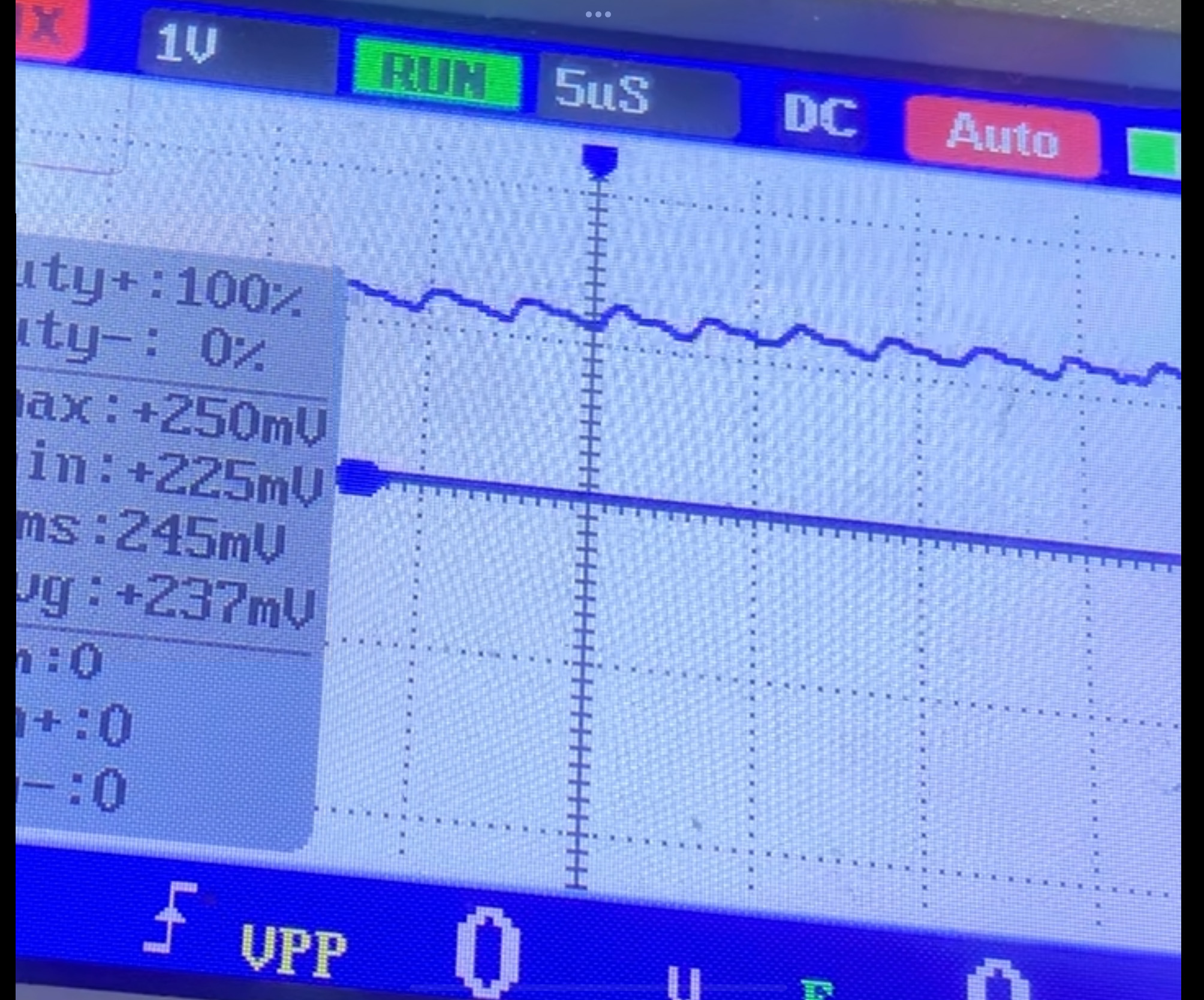
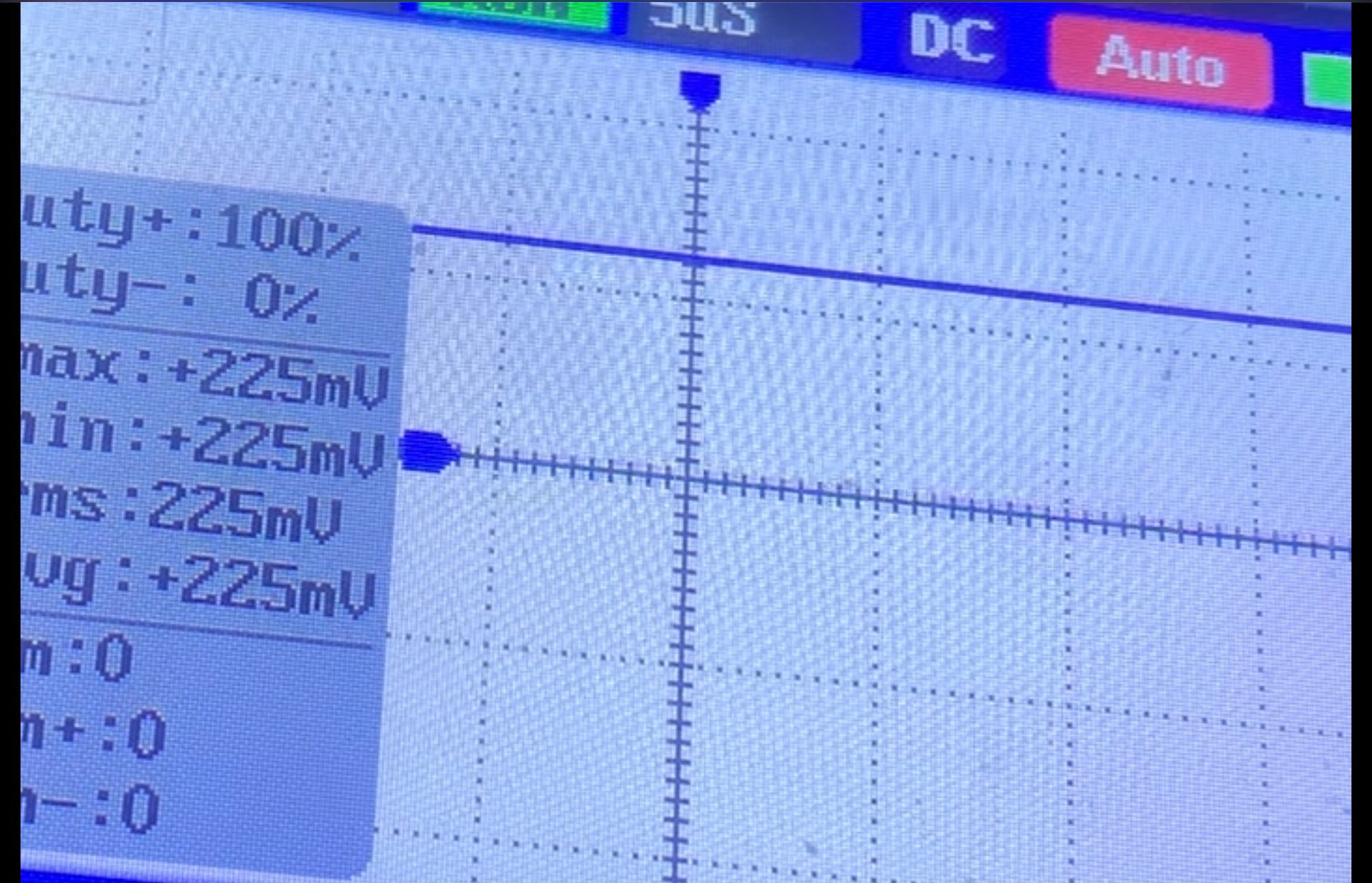
I've run a test with the scope, its not as detailed as yours lol, but this is what I saw

Test 1 was on the RSX side
test1.jpg


Test 2 on the Cell side

test2.jpg


I'm still learning how to use the scope ;)

Btw when I do replace the NEC's do I need to add a wire to make the bridge? As I watched Borderline OCD's video repairing the PS3 & he didnt use any wire for bridging, was that because of the NEC's on the other side ot the board?

Cheers for the help & advice !!
 
That paraste wont work. The leads are too long. Impeedance and inductance are so high that it's as if they aren't in circuit. I tested a similar idea.

About syscon.
  1. Start with power off (unplugged or switch at the back).
  2. Ground your uart adapter to the PS3 (not diag). Like the copper ring around the parimeter. This is so that PC and PS3 are sharing the same GND refrence and can communicate. Otherwise you can get those errors even if you have everything hooked up correctly.
  3. Try CXR with RX/TX.Flip them if one doesnt work.
  4. Try AUTH and auth
  5. Try CXRF with RX/TX/Diag. Diag is grounded this time. So both the uart adapter and Diag are grounded.
  6. Flip rx/tx if it doesnt work.
Repeat#1 between every attempt.
Okay, progress! I was able to get in external mode just fine by grounding it to the copper ring, but even after turning the switch off, and connecting DIAG to my UART's adapter GND pin, I still get a scopen error. Are you suggestion that I bridge DIAG to ground from somewhere like the copper ring and then connect DIAG to my GND pin in the adapter?
Appreciated.
 
I have a dia-001 motherboard with 3003 error
Replaced tokins and didnt work and realized tokins werent getting any voltage but 12v comes to vrms what could be my issue?
Quoting the PS Dev Wiki:
This error will occur in the case of a PWR failure on the main core voltage of the CPU (VDDC). For example, if the filtering capacitors (NEC/TOKIN's) are severely damaged. There are other SMD's in that filter, so it could be related to them as well.
A shorted Blu-Ray drive can cause this error as well. Be sure that your drive is going well before doing anything on your console.
Are you sure you replaced the cell's tokins and not the RSX's? Did you replace all of them? If so, could you send a picture of how they look and what caps you used?
Also, try taking the Blu-Ray drive out, the console won't launch any games, but if I'm not mistaken it should at least let you boot to the XMB (unless your issues occur mid game)
 

Similar threads

Back
Top