PS3 Fault finding YLOD with the SYSCON - First steps and Error reporting

Hey all, new to forums and I apologize in advance if any of my etiquette is off.

Recently I got my hands on a CECHA01 and after a few days of use, I started noticing small blue artifacts on the XMB when the blur effect is enabled on the background (i.e. when viewing the status of a download). Shortly after this, it began freezing with audio still playing on games and homebrew apps, but with no accompanying yellow light or poweroff. The console was disassembled, cleaned, had its thermal paste replaced, had its power supply replaced with an APS-226, and I installed the ABS plastic brace from Studio Halabi's eBay store just for fun days before all of this started happening. It is running Evilnat 4.90 with a noBT patch, which was in an attempt to escape an update loop.

After rebooting, I checked the SYSCON via Evilnat's built in dumping tools, and found no new errors. Would accessing the SYSCON via a wired connection to a PC give me any more insight into what's happening when it crashes? If not, would anyone mind pointing me in the right direction for diagnostics?

Eek, artifacts are the early stages of GPU failure (usually GPU...especially color splotches).

If the RSX was delided, the stress placed on the BGA could have popped a joint in the BGA. Otherwise, it's probably the old fashioned bumpgate YLOD.
 
Hello! In the last few months I'm having a problem in my PS3 (CECH2001A), where some specific games causes the errors:

Code:
Firmware Version: 4.89 (build 50740)
Platform ID: CokG11
Product Code: 00 84
Product Sub Code: 00 09
Hardware Config: 4E00FFFF0203BC3C
Syscon Fimware Version: 0832.00010002083E0832 (EEPROM: 00010002083E0832)

Bringup Count: 1266, Shutdown Count: 1209
Runtime: 118 Days, 16 Hours, 16 Minutes, 35 Seconds

Error Log
01: A0801002  Thu Feb  1 02:39:52 2024
02: A0801002  Wed Jan 31 06:24:24 2024
03: A0801002  Wed Jan 31 06:19:52 2024
04: A0801002  Wed Jan 31 05:40:34 2024
05: A0801002  Sat Jan 27 02:21:54 2024
06: A0801002  Fri Jan 19 09:32:19 2024
07: A0801002  Mon Jan 15 23:10:10 2024
08: A0801002  Mon Jan 15 02:44:32 2024
09: A0801002  Mon Jan 15 02:34:22 2024

The games was DIRT3, DIRT Showdown and GRID 2, howhever, I can play any other stressful game like Gran turismo 5/6, GTA, Watch Dogs... Somebody can help me?

RSX side tokins. 118 days is too young tho! Thing must have been asphyxiated by dust...or a sauna PS3!
 
Okay, progress! I was able to get in external mode just fine by grounding it to the copper ring, but even after turning the switch off, and connecting DIAG to my UART's adapter GND pin, I still get a scopen error. Are you suggestion that I bridge DIAG to ground from somewhere like the copper ring and then connect DIAG to my GND pin in the adapter?
Appreciated.
Connect both DIAG, UART GND, and PS3 GND together. You can do this any way you like. I use aligator clips on the copper ring. I pull out the Male to female pin connectors I use to attach to the uart just enough that I can clip the aligator jaws on the pin.

Code:
So uart GND --> ps3 DIAG
             |
             --> PS3 GND (copper ring)
 
.I have a dia-001 motherboard with 3003 error
Replaced tokins and didnt work and realized tokins werent getting any voltage but 12v comes to vrms what could be my issue?
First, be sure the tokin install was good. Most likely you didn't do it right.

Could be a buck converter or any SMD on the controller. You'll have to troubleshoot the voltage regulation module. Open the schematic and start tracking each voltage and enable signal, one by one. Following the voltage to each IC and function it should be performing. Move on after confirming it's good up to that point. Check every resistor, cap, fuse, and transistor.

It's a tedius and long process. You can shortcut it with a thermal cam if there's a short causing it.

But as mentioned before, double check everything elase is working fine before assuming VRM. If BD is plugged in, unplug it.
 
Hi, I'm new posting here and last night I posted a separate discussion but I don't know if I should post a reply here too, apologies in advance. The thing is that I just got a CECHA01 and when I plugged it in the PS3 immediately started beeping 3 times without even turning it on and it got stuck with a solid red light. I did a syscon diagnosis and the only error code I got was A0801200 which means a "CELL THERMAL" error. I find it weird since the thing won't even turn on.
 
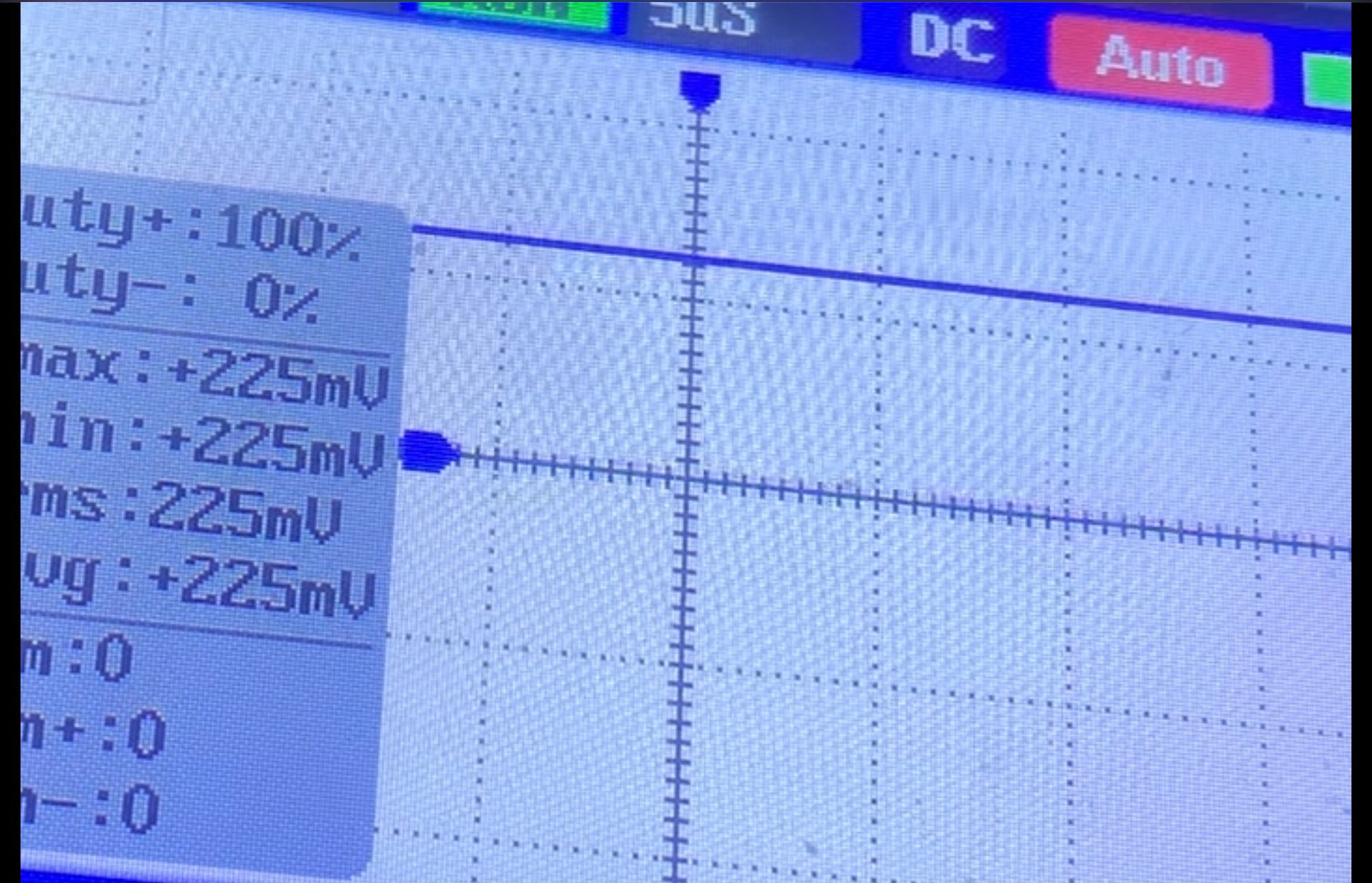
I've run a test with the scope, its not as detailed as yours lol, but this is what I saw

Test 1 was on the RSX side
test1.jpg


Test 2 on the Cell side

test2.jpg


I'm still learning how to use the scope ;)

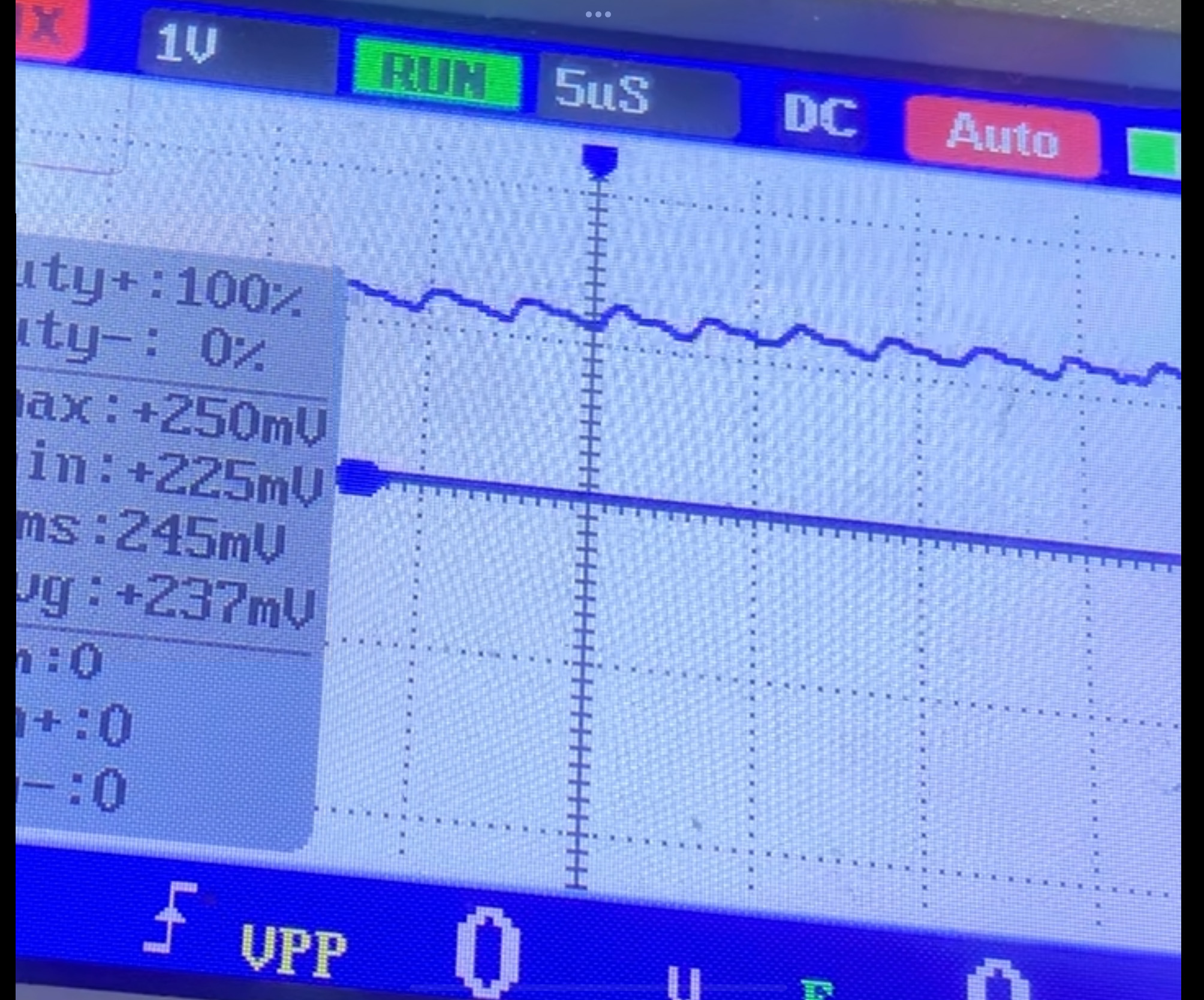
Ok, I assume that's 1v/division and 5uS/div (RSX)? If so that's so bad it's easy to see the ripple even so far zoomed out. Clearly bad. This is my standard tokins testing settings. Let's get better measurments, shall we? For posterity.
  • Set Horizontal axis 1uS/div
  • Set Vertical axis 50mV/div
  • Set to AC coupling. Yes, this is a DC voltage, but we're only interested in the AC component of the DC line. The ripple and noise. This will center the axis around 0v and make it easy to find the voltage. With DC coupling, you have to offset the voltage to find it somewhere between 1 and 1.3v. And zoomed in to 50mV/div that can be hard. AC coupling just makes it easy.
  • Use ground springs for a low impedance connection. Otherwise there will be too much noise to make out the ripple and any Vpp will not be accurate enough to make a determination.
upload_2024-2-2_9-18-49.jpeg
Btw when I do replace the NEC's do I need to add a wire to make the bridge? As I watched Borderline OCD's video repairing the PS3 & he didnt use any wire for bridging, was that because of the NEC's on the other side ot the board?
He didn't replace the tokins on Side A (processor side). Those tokins will still have a + rail bridge, but I don't recommend that as a repair, since mixing capacitor types can create anti-resonance peaks and be counterproductive. We've seen people do that and the console have the other tokins fail about a year or 2 later. So unless you want the YLOD to return in a couple of years, in the meantime place unnecessary stress on the Processors which can wear down their core voltages and permanently kill the console, I recommend you replace all the tokins at the same time. In which case, yes you will need bridge wires or tantalizers.
 
Connect both DIAG, UART GND, and PS3 GND together. You can do this any way you like. I use aligator clips on the copper ring. I pull out the Male to female pin connectors I use to attach to the uart just enough that I can clip the aligator jaws on the pin.

Code:
So uart GND --> ps3 DIAG
             |
             --> PS3 GND (copper ring)
Well, that worked... once. Then it didn't anymore.
I tried everything, soldering the PS3's GND directly to the DIAG in the board, getting GND from the PSU's metal casing and then wiring that in between the two wires of my uart adapter's, every way I could find to bridge GND to DIAG.
After that failure, I had a random thought to try to turn the console on as it is, and then I realized, now as soon as I turn the power switch on, the status LED starts blinking red. I cannot turn it on in any way now.
Here's a short video demonstrating my situation: https://files.catbox.moe/6n5tvr.mp4

I am genuinely surprised at how you've been doing this for years, while I, on the other hand, after about a month I'm already questioning my life choices :D
 
okay, what? I just came back from dinner, tried turning it on and it doesn't do the flashing LED anymore. And you know what's even better? I just got into internal mode. I literally touched nothing, wtf???
New error codes though:

Code:
ofst[ 96]:err_code:0xa0801002, clock:0xffffffff
ofst[100]:err_code:0xa0101002, clock:0xffffffff
ofst[104]:err_code:0xa0093004, clock:0xffffffff
ofst[108]:err_code:0xa0093004, clock:0xffffffff
ofst[112]:err_code:0xa0061002, clock:0xffffffff
ofst[116]:err_code:0xa0093004, clock:0xffffffff
Still related with the tokins though, but now I'm interested as to why, how, and specially why my PS3 went from connecting to internal mode, to not connecting to internal mode anymore, to staying in red flashing lights and nothing else, to connecting to internal mode again?
 
well, I honestly don't think I'm doing anything wrong now, I can't connect to the SYSCON now, just like before. this time I turned it off to take out the capacitor ladder, which came out really easily (i assume the negative side wasn't properly in? might explain the 3004. tried soldering it properly this time, and when I flipped the switch and tried to connect to the syscon, I came back to square 1. I did not touch anything about the SYSCON or the adapter at all.
 
Well, that worked... once. Then it didn't anymore.
I tried everything, soldering the PS3's GND directly to the DIAG in the board, getting GND from the PSU's metal casing and then wiring that in between the two wires of my uart adapter's, every way I could find to bridge GND to DIAG.
After that failure, I had a random thought to try to turn the console on as it is, and then I realized, now as soon as I turn the power switch on, the status LED starts blinking red. I cannot turn it on in any way now.
Here's a short video demonstrating my situation: https://files.catbox.moe/6n5tvr.mp4

I am genuinely surprised at how you've been doing this for years, while I, on the other hand, after about a month I'm already questioning my life choices :D
So be sure you read and follow the tutorial steps carefully. Its sounds like you changed the byte at address 3961 from 01 to 00 to enable internal access. The next step is to power off, connect DIAG, then back on. It will tripple beep because the checksum doen't match. That's normal. SYSCON in using CXRF this time and then you can fix the checksum.
 
So be sure you read and follow the tutorial steps carefully. Its sounds like you changed the byte at address 3961 from 01 to 00 to enable internal access. The next step is to power off, connect DIAG, then back on. It will tripple beep because the checksum doen't match. That's normal. SYSCON in using CXRF this time and then you can fix the checksum.
I did all those steps, I fixed the checksums already weeks ago, I was able to do bringup before and even now. When I now reported that I was getting those flashing red lights, it didn't even beep once.
The issue is not with the theory of connecting to the SYSCON, I was able to do that just fine and get access to the errlog, the bringup cmd, etc. The issue is that, right after I did so, and after shutting down the console and touching those NEC/TOKIN caps and the ladder, upon turning it on again, without moving a single cable of the connection between my PC and the PS3, it would start failing to connect again. I doubt (but please correct me) that there's any component around where I was soldering that could be messing it up this bad, so it's possibly something else that I am not aware of
 
Ok, I assume that's 1v/division and 5uS/div (RSX)? If so that's so bad it's easy to see the ripple even so far zoomed out. Clearly bad. This is my standard tokins testing settings. Let's get better measurments, shall we? For posterity.
  • Set Horizontal axis 1uS/div
  • Set Vertical axis 50mV/div
  • Set to AC coupling. Yes, this is a DC voltage, but we're only interested in the AC component of the DC line. The ripple and noise. This will center the axis around 0v and make it easy to find the voltage. With DC coupling, you have to offset the voltage to find it somewhere between 1 and 1.3v. And zoomed in to 50mV/div that can be hard. AC coupling just makes it easy.
  • Use ground springs for a low impedance connection. Otherwise there will be too much noise to make out the ripple and any Vpp will not be accurate enough to make a determination.
View attachment 42211

He didn't replace the tokins on Side A (processor side). Those tokins will still have a + rail bridge, but I don't recommend that as a repair, since mixing capacitor types can create anti-resonance peaks and be counterproductive. We've seen people do that and the console have the other tokins fail about a year or 2 later. So unless you want the YLOD to return in a couple of years, in the meantime place unnecessary stress on the Processors which can wear down their core voltages and permanently kill the console, I recommend you replace all the tokins at the same time. In which case, yes you will need bridge wires or tantalizers.

I may have been a little foolish lol, but decided to replace two of the NEC tokins on the RSX side. I hadnt gotten your message in time when I had changed them. But the console is now booting up.

Heres the syscon:

Code:
errlog
ofst[ 32]:err_code:0xffffffff, clock:0xffffffff
ofst[ 36]:err_code:0xa0102014, clock:0xffffffff
ofst[ 40]:err_code:0xa0091002, clock:0xffffffff
ofst[ 44]:err_code:0xa0102014, clock:0xffffffff
ofst[ 48]:err_code:0xa0091002, clock:0xffffffff
ofst[ 52]:err_code:0xa0102014, clock:0xffffffff
ofst[ 56]:err_code:0xa0101002, clock:0xffffffff
ofst[ 60]:err_code:0xa0102014, clock:0xffffffff
ofst[ 64]:err_code:0xa0101002, clock:0xffffffff
ofst[ 68]:err_code:0xa0102113, clock:0xffffffff
ofst[ 72]:err_code:0xa0091002, clock:0xffffffff
ofst[ 76]:err_code:0xa0102014, clock:0xffffffff
ofst[ 80]:err_code:0xa0081002, clock:0xffffffff
ofst[ 84]:err_code:0xa0093003, clock:0xffffffff
ofst[ 88]:err_code:0xa0091002, clock:0xffffffff
ofst[ 92]:err_code:0xa0102014, clock:0xffffffff
ofst[ 96]:err_code:0xa0101002, clock:0xffffffff
ofst[100]:err_code:0xa0102014, clock:0xffffffff
ofst[104]:err_code:0xa0101002, clock:0xffffffff
ofst[108]:err_code:0xa0102014, clock:0xffffffff
ofst[112]:err_code:0xa0101002, clock:0xffffffff
ofst[116]:err_code:0xa0102014, clock:0xffffffff
ofst[120]:err_code:0xa0091002, clock:0xffffffff
ofst[124]:err_code:0xa0102014, clock:0xffffffff
ofst[  0]:err_code:0xa0101002, clock:0xffffffff
ofst[  4]:err_code:0xa0102014, clock:0xffffffff
ofst[  8]:err_code:0xa0091002, clock:0xffffffff
ofst[ 12]:err_code:0xa0102014, clock:0xffffffff
ofst[ 16]:err_code:0xa0101002, clock:0xffffffff
ofst[ 20]:err_code:0xa0102014, clock:0xffffffff
ofst[ 24]:err_code:0xa0101002, clock:0xffffffff
ofst[ 28]:err_code:0xa0102014, clock:0xffffffff
[mullion]$
becount
Bringup : 3059 times
Shutdown: 2622 times
Power-on: 160day 13hour 03min 02sec
[mullion]$
bringup
[SSM] state: 0000 -> 0101
Bringup Mode #0 (0xFF)
[SSM] ssmCb_OnStartingBePowOn() called.
[SSM] First Boot.
[SSM] Bringup mode : syspm_stat=00000000/00000000
[POWSEQ] PowerSeq_Setup called.
[SSM] state: 0101 -> 0201
[POWSEQ] AV Backend Setup
[SSM] state: 0201 -> 0102
[SSM] state: 0102 -> 0202
[SSM] state: 0202 -> 0103
[SSM] state: 0103 -> 0203
[SSM] ssmCb_BeforeBeOn() called.
[SSM] state: 0203 -> 0104
Psbd_SbTransMode_Half:0x20e7
[SSM] state: 0104 -> 0204
[SSM] state: 0204 -> 0105
[SSM] state: 0105 -> 0400
(PowerOn State)
shutdown
[SSM] state: 0400 -> 0500
[POWSEQ] AV Backend Letup
[SSM] ssmCb_AfterBeOn() called.
[SSM] Shutdown mode ... req_wake_src = 000000F4, ctxt=00/00
[SSM] Shutdown mode : syspm_stat=00000000/00000000
[POWSEQ] PowerSeq_Letup called.
[SSM] state: 0500 -> 0000
(PowerOff State)

I plugged in the hdmi cable & saw it asking if I wanted to change to HDMI, so I turned it back off. I'll do the replacement what you've suggested. Don't suppose you've got a digikey / mouse / farnell part details have you of the ones I should get please? As the ones I've tested with are the same ones that boardline used 'PANASONIC EEFGX0E471L - Polymer Aluminium Electrolytic Capacitor, 470 µF, 2.5 V, 2917 [7343 Metric], 0.003 ohm' cheers
 
I did all those steps, I fixed the checksums already weeks ago, I was able to do bringup before and even now. When I now reported that I was getting those flashing red lights, it didn't even beep once.
The issue is not with the theory of connecting to the SYSCON, I was able to do that just fine and get access to the errlog, the bringup cmd, etc. The issue is that, right after I did so, and after shutting down the console and touching those NEC/TOKIN caps and the ladder, upon turning it on again, without moving a single cable of the connection between my PC and the PS3, it would start failing to connect again. I doubt (but please correct me) that there's any component around where I was soldering that could be messing it up this bad, so it's possibly something else that I am not aware of
If you fixed the checksum and It's flashing in standby then you have an issue with the standby circuit. First, what are you using to prevent the PSU from making contact and shorting against the MB? I have seen a similar issue be caused by a PSU short doing it the way it looks like you are. It shorted out a resistor that fed into the 5v/3.3v_Misc mosfet controller. And the SYSCON was inaccessible until that was fixed IIRC.
 
I may have been a little foolish lol, but decided to replace two of the NEC tokins on the RSX side. I hadnt gotten your message in time when I had changed them. But the console is now booting up.

Heres the syscon:

Code:
errlog
ofst[ 32]:err_code:0xffffffff, clock:0xffffffff
ofst[ 36]:err_code:0xa0102014, clock:0xffffffff
ofst[ 40]:err_code:0xa0091002, clock:0xffffffff
ofst[ 44]:err_code:0xa0102014, clock:0xffffffff
ofst[ 48]:err_code:0xa0091002, clock:0xffffffff
ofst[ 52]:err_code:0xa0102014, clock:0xffffffff
ofst[ 56]:err_code:0xa0101002, clock:0xffffffff
ofst[ 60]:err_code:0xa0102014, clock:0xffffffff
ofst[ 64]:err_code:0xa0101002, clock:0xffffffff
ofst[ 68]:err_code:0xa0102113, clock:0xffffffff
ofst[ 72]:err_code:0xa0091002, clock:0xffffffff
ofst[ 76]:err_code:0xa0102014, clock:0xffffffff
ofst[ 80]:err_code:0xa0081002, clock:0xffffffff
ofst[ 84]:err_code:0xa0093003, clock:0xffffffff
ofst[ 88]:err_code:0xa0091002, clock:0xffffffff
ofst[ 92]:err_code:0xa0102014, clock:0xffffffff
ofst[ 96]:err_code:0xa0101002, clock:0xffffffff
ofst[100]:err_code:0xa0102014, clock:0xffffffff
ofst[104]:err_code:0xa0101002, clock:0xffffffff
ofst[108]:err_code:0xa0102014, clock:0xffffffff
ofst[112]:err_code:0xa0101002, clock:0xffffffff
ofst[116]:err_code:0xa0102014, clock:0xffffffff
ofst[120]:err_code:0xa0091002, clock:0xffffffff
ofst[124]:err_code:0xa0102014, clock:0xffffffff
ofst[  0]:err_code:0xa0101002, clock:0xffffffff
ofst[  4]:err_code:0xa0102014, clock:0xffffffff
ofst[  8]:err_code:0xa0091002, clock:0xffffffff
ofst[ 12]:err_code:0xa0102014, clock:0xffffffff
ofst[ 16]:err_code:0xa0101002, clock:0xffffffff
ofst[ 20]:err_code:0xa0102014, clock:0xffffffff
ofst[ 24]:err_code:0xa0101002, clock:0xffffffff
ofst[ 28]:err_code:0xa0102014, clock:0xffffffff
[mullion]$
becount
Bringup : 3059 times
Shutdown: 2622 times
Power-on: 160day 13hour 03min 02sec
[mullion]$
bringup
[SSM] state: 0000 -> 0101
Bringup Mode #0 (0xFF)
[SSM] ssmCb_OnStartingBePowOn() called.
[SSM] First Boot.
[SSM] Bringup mode : syspm_stat=00000000/00000000
[POWSEQ] PowerSeq_Setup called.
[SSM] state: 0101 -> 0201
[POWSEQ] AV Backend Setup
[SSM] state: 0201 -> 0102
[SSM] state: 0102 -> 0202
[SSM] state: 0202 -> 0103
[SSM] state: 0103 -> 0203
[SSM] ssmCb_BeforeBeOn() called.
[SSM] state: 0203 -> 0104
Psbd_SbTransMode_Half:0x20e7
[SSM] state: 0104 -> 0204
[SSM] state: 0204 -> 0105
[SSM] state: 0105 -> 0400
(PowerOn State)
shutdown
[SSM] state: 0400 -> 0500
[POWSEQ] AV Backend Letup
[SSM] ssmCb_AfterBeOn() called.
[SSM] Shutdown mode ... req_wake_src = 000000F4, ctxt=00/00
[SSM] Shutdown mode : syspm_stat=00000000/00000000
[POWSEQ] PowerSeq_Letup called.
[SSM] state: 0500 -> 0000
(PowerOff State)
I plugged in the hdmi cable & saw it asking if I wanted to change to HDMI, so I turned it back off. I'll do the replacement what you've suggested. Don't suppose you've got a digikey / mouse / farnell part details have you of the ones I should get please? As the ones I've tested with are the same ones that boardline used 'PANASONIC EEFGX0E471L - Polymer Aluminium Electrolytic Capacitor, 470 µF, 2.5 V, 2917 [7343 Metric], 0.003 ohm' cheers
Those PANASONIC EEFGX0E471L are ideal if you can get a good price on them, pull the trigger.

Also, congrats on diagnosing and confirming the fix.
 
If you fixed the checksum and It's flashing in standby then you have an issue with the standby circuit. First, what are you using to prevent the PSU from making contact and shorting against the MB? I have seen a similar issue be caused by a PSU short doing it the way it looks like you are. It shorted out a resistor that fed into the 5v/3.3v_Misc mosfet controller. And the SYSCON was inaccessible until that was fixed IIRC.
well, the flashing red already disappeared. it was a momentary thing that I don't know the cause of. I have my PSU over a rag, I doubt that's what's making the syscon fail
EDIT: Just tried to connect, this time adding TWO rags below the PSU. There is no way it's casing is causing a short anywhere, yet it's still failing.
 
Last edited:
HELL YEAH IT WORKED!
The cap ladder I did was somehow broken, I guess some cap was dead. It was throwing 3004 errors when trying to start up.
Afterwards, I grabbed a 470uF electrolytic capacitor, 6.5v, one of the big ones, it finally got through far enough in the boot process for the CELL to overheat!
upload_2024-2-4_22-28-27.png

Code:
ofst[ 16]:err_code:0xa0101002, clock:0xffffffff
ofst[ 20]:err_code:0xa0071002, clock:0xffffffff
ofst[ 24]:err_code:0xa0801200, clock:0xffffffff
now my uncle is convinced, I might be getting the caps shipped via mail through an envelope. I hope customs doesn't F%$# me.
@RIP-Felix tysm! I still have no idea what makes the syscon connection hang itself randomly, it's still occurring. Oh well, I hope I don't have to use the syscon a lot more afterwards :^)))
 
Those PANASONIC EEFGX0E471L are ideal if you can get a good price on them, pull the trigger.

Also, congrats on diagnosing and confirming the fix.

got some more EEFGX0E471L's coming tomorrow & received the 16 AWG solid core wire from amazon today, so that should be a job for tomorrow to finish up.

once again, thanks for all your help !
 
Hello. I dumped syscon log via ps3 advanced tools . I have ps3 slim cech 2004A with cfw rebug 4.84.2. I want to know if it is anything wrong with my console or not. I worry very much because of ylod on first slims. Please help me if anything is wrong. I am about to change thermal paste and clean the console from the dust inside if any. Here is the log. Should I worry or there is nothing wrong ?

Code:
Firmware Version: 4.84 (build 50696)
Platform ID: CokG11
Product Code: 00 85
Product Sub Code: 00 09
Hardware Config: 4E00FFFF0203BC3C
Syscon Fimware Version: 0832.00010002083E0832 (EEPROM: 00010002083E0832)

Bringup Count: 3867, Shutdown Count: 3779
Runtime: 217 Days, 10 Hours, 18 Minutes, 29 Seconds

Error Log
01: A0802022  Fri Feb  2 08:39:52 2024
02: A0802022  Fri Feb  2 08:37:59 2024
03: A0802022  Wed Jan  3 20:16:29 2024
04: A0802022  Wed Jan  3 20:08:17 2024
05: A0802022  Wed Jan  3 20:07:03 2024
06: A0802022  Wed Jan  3 20:05:28 2024
07: A0802022  Mon Jan  1 21:20:45 2024
08: A0802022  Mon Jan  1 21:09:01 2024
09: A0802022  Mon Dec 18 23:04:59 2023
10: A0802022  Mon Dec 18 22:45:41 2023
11: A0802022  Sun Dec 17 08:12:41 2023
12: A0802022  Sun Dec 17 08:06:00 2023
13: A0802022  Wed Nov 22 06:37:03 2023
14: A0802022  Wed Nov 22 06:03:14 2023
15: A0802022  Mon Oct 30 22:25:36 2023
16: A0802022  Mon Oct 30 22:12:36 2023
17: A0802022  Sat Oct 28 05:55:55 2023
18: A0802022  Tue Oct 24 06:55:11 2023
19: A0802022  Tue Oct 24 06:02:55 2023
20: A0801200  Tue Oct 24 05:53:54 2023
21: A0802022  Tue Oct 24 05:34:56 2023
22: A0802022  Mon Oct 23 07:10:57 2023
23: A0802022  Mon Oct 23 05:44:34 2023
24: A0802022  Fri Oct 20 05:49:34 2023
25: A0802022  Fri Oct 20 04:39:25 2023
26: A0802022  Thu Oct 19 06:52:40 2023
27: A0802022  Thu Oct 19 04:29:01 2023
28: A0802022  Mon Oct 16 20:22:17 2023
29: A0802022  Mon Oct 16 18:28:33 2023
30: A0802022  Sun Oct 15 21:43:26 2023
31: A0802022  Sun Oct 15 21:13:33 2023
32: FFFFFFFF  Fri Dec 31 23:59:59 1999
 
Hello. I dumped syscon log via ps3 advanced tools . I have ps3 slim cech 2004A with cfw rebug 4.84.2. I want to know if it is anything wrong with my console or not. I worry very much because of ylod on first slims. Please help me if anything is wrong. I am about to change thermal paste and clean the console from the dust inside if any. Here is the log. Should I worry or there is nothing wrong ?

Code:
Firmware Version: 4.84 (build 50696)
Platform ID: CokG11
Product Code: 00 85
Product Sub Code: 00 09
Hardware Config: 4E00FFFF0203BC3C
Syscon Fimware Version: 0832.00010002083E0832 (EEPROM: 00010002083E0832)

Bringup Count: 3867, Shutdown Count: 3779
Runtime: 217 Days, 10 Hours, 18 Minutes, 29 Seconds

Error Log
01: A0802022  Fri Feb  2 08:39:52 2024
02: A0802022  Fri Feb  2 08:37:59 2024
03: A0802022  Wed Jan  3 20:16:29 2024
04: A0802022  Wed Jan  3 20:08:17 2024
05: A0802022  Wed Jan  3 20:07:03 2024
06: A0802022  Wed Jan  3 20:05:28 2024
07: A0802022  Mon Jan  1 21:20:45 2024
08: A0802022  Mon Jan  1 21:09:01 2024
09: A0802022  Mon Dec 18 23:04:59 2023
10: A0802022  Mon Dec 18 22:45:41 2023
11: A0802022  Sun Dec 17 08:12:41 2023
12: A0802022  Sun Dec 17 08:06:00 2023
13: A0802022  Wed Nov 22 06:37:03 2023
14: A0802022  Wed Nov 22 06:03:14 2023
15: A0802022  Mon Oct 30 22:25:36 2023
16: A0802022  Mon Oct 30 22:12:36 2023
17: A0802022  Sat Oct 28 05:55:55 2023
18: A0802022  Tue Oct 24 06:55:11 2023
19: A0802022  Tue Oct 24 06:02:55 2023
20: A0801200  Tue Oct 24 05:53:54 2023
21: A0802022  Tue Oct 24 05:34:56 2023
22: A0802022  Mon Oct 23 07:10:57 2023
23: A0802022  Mon Oct 23 05:44:34 2023
24: A0802022  Fri Oct 20 05:49:34 2023
25: A0802022  Fri Oct 20 04:39:25 2023
26: A0802022  Thu Oct 19 06:52:40 2023
27: A0802022  Thu Oct 19 04:29:01 2023
28: A0802022  Mon Oct 16 20:22:17 2023
29: A0802022  Mon Oct 16 18:28:33 2023
30: A0802022  Sun Oct 15 21:43:26 2023
31: A0802022  Sun Oct 15 21:13:33 2023
32: FFFFFFFF  Fri Dec 31 23:59:59 1999
https://www.psdevwiki.com/ps3/Syscon_Error_Codes#2022_(DVE)
do you know in which circumstances those 2022 errors happened?
there's a 1200 error, which means the CPU overheated. clean it up, replace the thermal paste, and you should be good to go on that. I still don't know what's causing your 2022
 

Similar threads

Back
Top