PS3 Fault finding YLOD with the SYSCON - First steps and Error reporting

Then maybe some more research on what this stuff is and what it does would be helpful. From a quick search on youtube (disclaimer, i haven't watched these videos), the following do come up. They're not directly related to the PS3, but the basic principles of what they are and what they do are the same

*
*
*

I just want to diagnose the issue with my PS3, what I need, how to do it. I'm not looking to have to research a million things. I don't give a crap about all the technical crap
 
The main guide says nothing about a serial adapter dongle, just a USB to TTS cable.
All this is doing is making me more and more confused.
I assume this is what you're fishing for (TTL to USB Serial Adapter). BTW, the guide says under "Required Equipment" to buy "1x USB to TTL v3.3 Serial converter cable." Put that into amazon or e-bay and they pop right up. The only thing is that he didn't make it super clear that you want the 3.3v version not the 5v version, but you can deduce that from the "v3.3" in the guide. No, he didn't provide a link to a specif one that'll work, like I just did, but products can change from batch to batch. So the one you receive from the same listing might not be the exact item I purchased 8 months ago. It's better he just give you the item description and let you decide what to buy. A guide will be read by people 10 years from now when all the links are dead. It shows forethought by the OP.

While the written guide is geared toward linux users, it's still pretty much the same on windows. Just the setup of python in windows and installing the right plugins is different. And there are windows tutorials posted already on this thread and the YLOD thread. I think I saw someone else kindly re-post that for you. They didn't have to take the time to do that for you.
...we are adults and this is a hobby for us. We're not SONY's paid product support team. You're asking us for shortcuts, which places the burden on us to find the previous posts and spoon feed everything to you. Simply put, that's not why we're here. If you're unwilling to avail yourself of the available information, then forgive us for not holding your hand.
 
I hate reflowing but, I've done it simply because someone before me tried to do it on this poor little board (there were two shorted caps and no 12V that were causing ylod, but we are talking about something like 7 years ago...lots of people had total ignorance about it) and In my opinion He really caused some damage under the CELL (I also found cell necs a little melted)... I hope I'll find a way...
If the tokins were melting, then the temps were way above the lead-free solder temp. That can certainly damage the tokins. 1004 is a critical power failure. I only had it when the tokins were severely damaged or many of them were missing. Or when the MOSFETs or PSU are bad. A short might cause it too. Given the history on the board, I would replace the tokins if another easier culprit isn't found (blown fuse or shorted MLCC).
 
Last edited:
I just want to diagnose the issue with my PS3, what I need, how to do it. I'm not looking to have to research a million things. I don't give a crap about all the technical crap
I feel your pain, but you're going to have to learn if you want to fix your PS3. I still would like to help...

How long is the YLOD? Instant = less than 1s, non-instant = 2-10s, delayed = longer, YLOD only occurs during intense games. This gives us an idea of the type of problems associated with the YLOD. For example, a short or blown fuse usually causes an instant YLOD. Bad tokins can range from only under intense stress to instant. BGA/RSX problem are usually in the 1.5-3s range.

Here are the ways to diagnose your issue.
Rules of troubleshooting are:
  1. Inspect board for damage! Look for corroded parts, scortch marks, physical damage, missing parts, delamination, etc.
  2. Multi-meter everything! Check every fuse for continuity. Replace with exact part if open. Check every cap for shorts. Replace with exact part if closed (verify resistance with known good board. Sometimes they read short when they are supposed to have low resistance).
  3. SYSCON (if 3034 reball and ignore other errors until then, BGA causes all kind of errors on other devices and you can't know they're bad until you know the BGA is fine).
  4. Verify voltages from MOSFETS, regulators and etc. Ofter requires power test as the voltages are switched on after PWR on. Trace PWR from the PSU to components on the board.
  5. Verify clock signals, oscillators, crystals (Oscilloscope).
  6. Verify CPU/GPU filter noise/ripple is acceptable (Oscilloscope).
  7. Touch up solder joints suspected of colds joints.
  8. Replace suspect ICs.
I think you guys are skipping to that last step WAY too soon,.
 
I assume this is what you're fishing for (TTL to USB Serial Adapter). BTW, the guide says under "Required Equipment" to buy "1x USB to TTL v3.3 Serial converter cable." Put that into amazon or e-bay and they pop right up. The only thing is that he didn't make it super clear that you want the 3.3v version not the 5v version, but you can deduce that from the "v3.3" in the guide. No, he didn't provide a link to a specif one that'll work, like I just did, but products can change from batch to batch. So the one you receive from the same listing might not be the exact item I purchased 8 months ago. It's better he just give you the item description and let you decide what to buy. A guide will be read by people 10 years from now when all the links are dead. It shows forethought by the OP.

While the written guide is geared toward linux users, it's still pretty much the same on windows. Just the setup of python in windows and installing the right plugins is different. And there are windows tutorials posted already on this thread and the YLOD thread. I think I saw someone else kindly re-post that for you. They didn't have to take the time to do that for you.
...we are adults and this is a hobby for us. We're not SONY's paid product support team. You're asking us for shortcuts, which places the burden on us to find the previous posts and spoon feed everything to you. Simply put, that's not why we're here. If you're unwilling to avail yourself of the available information, then forgive us for not holding your hand.
I feel your pain, but you're going to have to learn if you want to fix your PS3. I still would like to help...

How long is the YLOD? Instant = less than 1s, non-instant = 2-10s, delayed = longer, YLOD only occurs during intense games. This gives us an idea of the type of problems associated with the YLOD. For example, a short or blown fuse usually causes an instant YLOD. Bad tokins can range from only under intense stress to instant. BGA/RSX problem are usually in the 1.5-3s range.

Here are the ways to diagnose your issue.

I press the power button, it turns green, then yellow/3 beeps.
 
I press the power button, it turns green, then yellow/3 beeps.
Right, that's the YLOD. How long from when you press the PWR btn, does it take for the YLOD to occur? Does the fan spin up? Is it really loud or normal?

Have you ever disassembled a PS3 before? Do you know how to delid it? Are you comfortable working on electronics? If not, you probably don't want to continue.
 
I know to buy the 1x USB to TTL v3.3 Serial converter cable. But a few posts ago someone said I need to buy some dongle with it.
 
No, just the adapter and some breadboard wires to plug into it. The bradboard wires have a stiff wire on both ends that fits into a breadboard. One end I cut off, strip, and solder to the RX/TX/GND jumper pads on the motherboard. The other end with the remaining stiff wire fits into the connector on the USB adapter.
 
Right, that's the YLOD. How long from when you press the PWR btn, does it take for the YLOD to occur? Does the fan spin up? Is it really loud or normal?

Have you ever disassembled a PS3 before? Do you know how to delid it? Are you comfortable working on electronics? If not, you probably don't want to continue.

I've taken a PS3 apart before, and I'm getting more confident with electronics. I've yet to use a soldering iron but i've got one, which I bought to do my custom pc cables. I've seen how to delid but that seems waaaay to risky even for me. And I've been told its a last resort

I hit the button to turn it on, the fan kicks on, seemingly normal speed. It stays green for like, 2-3 seconds, then goes yellow/3 beeps/flashing red light/fan goes off.

And see, thats the thing, based on the main guide I just saw the USB plug, nothing about an adapter to buy.
 
Last edited:
I've taken a PS3 apart before, and I'm getting more confident with electronics. I've yet to use a soldering iron but i've got one, which I bought to do my custom pc cables. I've seen how to delid but that seems waaaay to risky even for me. And I've been told its a last resort

I hit the button to turn it on, it stays green for like, 2-3 seconds, then goes yellow/3 beeps/flashing red light.

And see, thats the thing, based on the main guide I just saw the USB plug, nothing about an adapter to buy. This is why this is all confusing the hell out of me.
They are the same thing. It "adapts" TTL serial connection to USB so your computer can communicate with an arduino, raspberry pi, or in this case the PS3's SYSCON. Never mind the jargon, we just need it to plug into the PS3's brain.

An RSX/CPU delid is absolutely necessary for every backwards compatible model. If you don't, it will just overheat and YLOD again. So watch videos, make a dlid tool, and work up the courage. There's no getting around it, it has to happen!

Okay, yeah you have a 2-3s YLOD. I immediately suspect an RSX issue, since that tends to be the leading cause of non-instant YLOD's. BTW the Tantalum fix was a originally reccomended for randon YLODs that only occured in intense gameplay (which are more likely to be due to the filtering caps)...but he wasn't very clear about that in the OG post. So your confusion and everyone else's is totally understandable. It got me too!

Go ahead and remove the top shell and blue ray drive. Under the blu ray is the leaf spring that applies pressure to the GPU (the little bastard accused). Press down firmly with your thumb on the middle of that spring. This will compress the motherboard into the fan assembly and against the bottom of the case. It'll apply more pressure to the RSX and possibly reconnect a BGA defect (cracked solder ball, detached ball from cold solder joint/pad, and other related issues). Flip the pwr rocker and try to power on, while keeping firm pressure on the RSX. If it boots (stays green for longer than 3 seconds), then you need a reball. This is know as the pressure test. There could still be a BGA defect if this doesn't work, but it definitely confirms one if it does. Anyway it's a free test, easy to try. Just don't put all your weight into the pressure. Maybe 10-20lbs of force is plenty. If you have a BGA defect, sorry! That's the end for you I'm afraid. The tools and skill needed are more expensive than a working console.

If it doesn't make any difference then we'll walk you through the SYSCON tutorial to get the error codes (once you get the USB adapter). That should give us more to go on. A 3034 error code is the one we don't want to see. That's an RSX issue requiring a reball. Other codes might give us a clue where you shopul;d probe with a multimeter to look for open fuses or shorting caps. If it's not that simple then you could be in more trouble. If you need to replace an IC (chip) then you'll need a hot air station and a donor board. If you need to replace an HDMI port, you'll need hot air + preheater + Good HDMI port. So you're going to need to figure out what's worth fixing and what isn't, based on how much time & money you are willing to spend.

 
They are the same thing. It "adapts" TTL serial connection to USB so your computer can communicate with an arduino, raspberry pi, or in this case the PS3's SYSCON. Never mind the jargon, we just need it to plug into the PS3's brain.

An RSX/CPU delid is absolutely necessary for every backwards compatible model. If you don't, it will just overheat and YLOD again. So watch videos, make a dlid tool, and work up the courage. There's no getting around it, it has to happen!

Okay, yeah you have a 2-3s YLOD. I immediately suspect an RSX issue, since that tends to be the leading cause of non-instant YLOD's. BTW the Tantalum fix was a originally reccomended for randon YLODs that only occured in intense gameplay (which are more likely to be due to the filtering caps)...but he wasn't very clear about that in the OG post. So your confusion and everyone else's is totally understandable. It got me too!

Go ahead and remove the top shell and blue ray drive. Under the blu ray is the leaf spring that applies pressure to the GPU (the little bastard accused). Press down firmly with your thumb on the middle of that spring. This will compress the motherboard into the fan assembly and against the bottom of the case. It'll apply more pressure to the RSX and possibly reconnect a BGA defect (cracked solder ball, detached ball from cold solder joint/pad, and other related issues). Flip the pwr rocker and try to power on, while keeping firm pressure on the RSX. If it boots (stays green for longer than 3 seconds), then you need a reball. This is know as the pressure test. There could still be a BGA defect if this doesn't work, but it definitely confirms one if it does. Anyway it's a free test, easy to try. Just don't put all your weight into the pressure. Maybe 10-20lbs of force is plenty. If you have a BGA defect, sorry! That's the end for you I'm afraid. The tools and skill needed are more expensive than a working console.

If it doesn't make any difference then we'll walk you through the SYSCON tutorial to get the error codes (once you get the USB adapter). That should give us more to go on. A 3034 error code is the one we don't want to see. That's an RSX issue requiring a reball. Other codes might give us a clue where you shopul;d probe with a multimeter to look for open fuses or shorting caps. If it's not that simple then you could be in more trouble. If you need to replace an IC (chip) then you'll need a hot air station and a donor board. If you need to replace an HDMI port, you'll need hot air + preheater + Good HDMI port. So you're going to need to figure out what's worth fixing and what isn't, based on how much time & money you are willing to spend.

I took out the drive completely, applied pressure, same deal.
 
I took out the drive completely, applied pressure, same deal.
Good! Let us know when you get the USB adapter and if you get stuck attempting the SYSCON tutorial. In the mean time you should completely disassemble the PS3, clean, inspect the board for damage, troubleshoot with a multimeter, delid the processors, and attach the SYSCON leads to the testpads..
 
Good! Let us know when you get the USB adapter and if you get stuck attempting the SYSCON tutorial. In the mean time you should completely disassemble the PS3, clean, inspect the board for damage, troubleshoot with a multimeter, delid the processors, and attach the SYSCON leads to the testpads..

The multimeter bit might be a problem lol. Only time I've used one is for continuity testing PSU cables for my custom pc cables. Outside of that, anything circuitry related is lost on me. How do I go about making an adequate de-lidding tool? I've seen people use screwdrivers, cardboard/painting knives, etc.

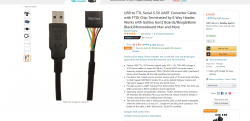
As for the USB adapter, is this sufficient? I'm not going to need to buy wire too, am I? Like the guide seemingly says. And what do you mean by attaching the syscon leads to the testpads?
 

Attachments

  • 2021-04-02 19.14.38 www.amazon.com 918f6e9cb945.png
    2021-04-02 19.14.38 www.amazon.com 918f6e9cb945.png
    335.4 KB · Views: 65
The multimeter bit might be a problem lol. Only time I've used one is for continuity testing PSU cables for my custom pc cables. Outside of that, anything circuitry related is lost on me. How do I go about making an adequate de-lidding tool? I've seen people use screwdrivers, cardboard/painting knives, etc.

As for the USB adapter, is this sufficient? I'm not going to need to buy wire too, am I? Like the guide seemingly says. And what do you mean by attaching the syscon leads to the testpads?
Well continuity testing is pretty much what you need to do...lol! Yeah, a fuse is supposed to be in continuity and blow open if too much current goes through it (like when a capacitor shorts). Fuses should buzz, that means they're good. Caps shouldn't (mostly). So that's what you'll use the continuity buzzer for.

The tokins and certain other bypass caps near the processor will buzz, because their resistance is small, but it's normal. That's why it's best to have working board around to see if it's normal or not. And a donor board to harvest parts from. That's what you're hoping for - that there's just a blown fuse or cap. Something simple to replace (compared to the tokins or RSX).

EDIT: about the materials you need:
If you want to continue on to DIY reballing, beyond the above I also recommend:
 
Last edited:
Well continuity testing is pretty much what you need to do...lol! Yeah, a fuse is supposed to be in continuity and blow open if too much current goes through it (like when a capacitor shorts). Fuses should buzz, that means they're good. Caps shouldn't (mostly). So that's what you'll use the continuity buzzer for.

The tokins and certain other bypass caps near the processor will buzz, because their resistance is small, but it's normal. That's why it's best to have working board around to see if it's normal or not. And a donor board to harvest parts from. That's what you're hoping for - that there's just a blown fuse or cap. Something simple to replace (compared to the tokins or RSX).

Well yeah, but I'm saying like, idk what 2 points to be testing between, and all that. Because circuit stuff is completely foreign to me.
As for the USB, is that picture good enough for what I should be buying? Am I going to need to buy wire too or no?
 
Well yeah, but I'm saying like, idk what 2 points to be testing between, and all that. Because circuit stuff is completely foreign to me.
As for the USB, is that picture good enough for what I should be buying? Am I going to need to buy wire too or no?
Edited my previous post with links to suggested materials. Once you see the total in your cart you may wish to buy a working PS3 instead.
 
Edited my previous post with links to suggested materials. Once you see the total in your cart you may wish to buy a working PS3 instead.

The only materials I was referring to was just the stuff to do the syscon, will I need wires with the USB thing or just the USB thing/strip those wires?
 
Last edited:
The only materials I was referring to was just the stuff to do the syscon..
I didn't know what you already have, so I listed everything you might need. You can decide what all you want to buy, but you need a soldering iron to attach the wires to the motherboard, the breadboard wires. solder, flux, and the adapter.

If you have a problem than can be fixed, you're going to want an iron/tip that you can use to repair the MB. If you want to try the Tokin fix, you need flush cuts, braid, and flux. Possable hot air. And if you intend to go all the way I included a few more goodies. Just trying to give you an idea of the tools needed to work on the PS3. You will have to decide what you need and how much to spend.
 
I didn't know what you already have, so I listed everything you might need. You can decide what all you want to buy, but you need a soldering iron to attach the wires to the motherboard, the breadboard wires. solder, flux, and the adapter.

If you have a problem than can be fixed, you're going to want an iron/tip that you can use to repair the MB. If you want to try the Tokin fix, you need flush cuts, braid, and flux. Possable hot air. And if you intend to go all the way I included a few more goodies. Just trying to give you an idea of the tools needed to work on the PS3. You will have to decide what you need and how much to spend.

Will regular 16 AWG wire work for the breadboard shit? I've got a ton from my custom PC cables. Other than that I just need the adapter.
Also, I've been watching videos on the de-lidding but is there a certain tool/etc I should be using for that to make it the easiest it can be? (Which is obviously not easy regardless)
 
Last edited:

Similar threads

Back
Top