PS3 Fault finding YLOD with the SYSCON - First steps and Error reporting

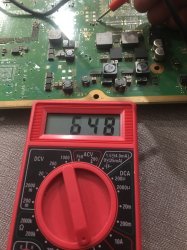
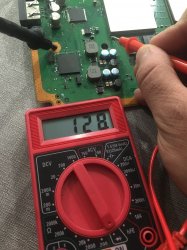
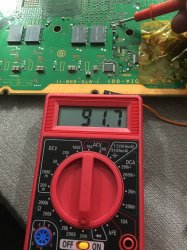
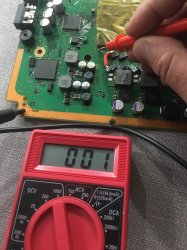
So here's what I got. I got a ylod untouched DIA-001. And I'm measuring the fuse I think. It gives abo 128.
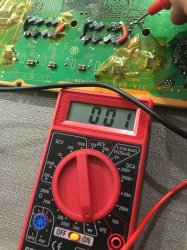
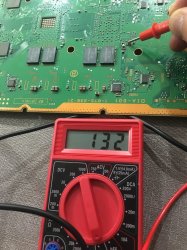
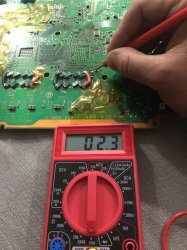
I have a DIA-001 where I replaced the tokins, bridged, reballed. And when the same fuse...I get 0.01 So I removed that fuse. Still the same without a fuse. I have a junk cok-001 with missing a bunch and yet same fuse (now removed) I get a high number which keeps climbing on the multimeter! I'm using th —->+ setting on the multimeter. I checked most fuses and they seem fine so for the (replaced tokins DIA-001) i fee like there is no flow of anything. What would y'all recommend? How come it's 0.01. What's that fuse responsible for and where does it connect? Also the pic with the bridging DIA-001 with the four litte fuses reading 0.01 is also weird because the other DIA-001 (ylod untouched I get an actually reading) Thanks.


All the fuses on the board have a comment alongside them (everyone starts with F and few numbers) check all them and see if they have continuity.
PS
I you find one of them blown, It usually means that there is a short around that is causing it.


Inviato dal mio iPhone utilizzando Tapatalk
 

Attachments
  • 44203D37-7FCD-439C-AE05-0F07C7065B23.jpeg
    44203D37-7FCD-439C-AE05-0F07C7065B23.jpeg
    2.1 MB · Views: 187
  • 3026F7CA-8464-4BBC-B700-D1445FCD65B6.jpeg
    3026F7CA-8464-4BBC-B700-D1445FCD65B6.jpeg
    1.9 MB · Views: 532
  • 6DCF6496-7032-4F31-B1D8-7E17EE516994.jpeg
    6DCF6496-7032-4F31-B1D8-7E17EE516994.jpeg
    1.9 MB · Views: 179
  • image.jpg
    image.jpg
    2.2 MB · Views: 527
  • image.jpg
    image.jpg
    2.2 MB · Views: 178
Last edited:
Here is a different comparison. Same mode board. Both DIA-001. One works. And one has been reballed and all the necs replaced with bridges. Where have I screwed up.is it a bad reball? Bad tokin caps job? Or maybe both.
 

Attachments

  • image.jpg
    image.jpg
    2.1 MB · Views: 110
  • image.jpg
    image.jpg
    2.1 MB · Views: 103
Last edited:
So here's what I got. I got a ylod untouched DIA-001. And I'm measuring the fuse I think. It gives abo 128.
I have a DIA-001 where I replaced the tokins, bridged, reballed. And when the same fuse...I get 0.01 So I removed that fuse. Still the same without a fuse. I have a junk cok-001 with missing a bunch and yet same fuse (now removed) I get a high number which keeps climbing on the multimeter! I'm using th —->+ setting on the multimeter. I checked most fuses and they seem fine so for the (replaced tokins DIA-001) i fee like there is no flow of anything. What would y'all recommend? How come it's 0.01. What's that fuse responsible for and where does it connect? Also the pic with the bridging DIA-001 with the four litte fuses reading 0.01 is also weird because the other DIA-001 (ylod untouched I get an actually reading) Thanks.

For testing the fuses you need to put both multimeter tips on the fuse sides (right and left) because If you attach one tip on the GND you're just measuring resistance near the fuse (that could be fine but It doesn't always work according to the fuse connection, positive or negative rail), so for checking them properly do as I said (0.00-00.1 readings are ok, something else need replacing).
ps
be sure that your multimeter battery is ok (It could give bad measurements or could not be able to test continuity).


Inviato dal mio iPhone utilizzando Tapatalk
 
I know to buy the 1x USB to TTL v3.3 Serial converter cable. But a few posts ago someone said I need to buy some dongle with it.
You mean you actually read my windows guide (even the last part that talks about the dongle) and got confused?

Maybe it's because I'm not native English speaker, or poor choice of words.
Isn't USB adapter/converter/dongle more or less the same?
I'm open to suggestions for improving it
I write this in addition to main guide (linux oriented and work in progress by db260179).
https://www.psx-place.com/threads/f...syscon-first-steps-and-error-reporting.30100/


I will try to explain step by step, as easy as I can explain it.
Really this can be done in 10 minutes.

First of all let's make clear what we are doing:
We are simply running a python script that will let us communicate with the PS3 SYSCON, using a 3.3v serial (COM) port.

We can thank guys like 'Major' and 'zecoxao' for making this possible in the first place. We are just running their script.

So, what do we need in order to run this script?

Python 2.7.18, with additional modules pycryptodome and pyserial

For Windows users (most people) this is what you can do:

-First install python 2.7.18 (you can get from python.org)
-When you run the installer, you can check the last box (it will make things easier; lets you run python commands from any location)
Once it's installed, you should already be able to run python commands and scripts. How? Directly from the windows command prompt (which you can open in many ways; I like shift+right click to open cmd window here), you can type: python script.py

But our particular script relies on two additional modules. (If you try without them, it will tell you the problem)
But don't worry,
-You can download and install them automatically by typing:
pip install pycryptodome
pip install pyserial

That's it. Now you should be able to run the magic script. Just specify the COM port and the syscon mode at the end.
-For example:

python uart_script.py COM4 CXR

What COM port?
This is where the USB to serial 3.3v adapter comes in handy.
When you plug it into your computer, it should show up in device manager as a COM port. If not, you need to install drivers for it.
This will depend on your particular computer and serial adapter.

What is CXR? This will depend on the syscon you are trying to communicate with. SW is for newer (SherWood) Syscons. CXR(F) for the older BGA models
Further details in the PDF

If all is correct, no errors will come up immediately. Even without anything physically connected.
You can then type AUTH, and will get
"Auth1 response invalid"

Of course, to get past this, everything has to be connected and working properly. Even then it may take a couple tries in a row. Eventually you should get:
Auth successful

Which means all is good and you can now run external commands such as
ERRLOG GET 00

(If you are still getting "Auth1 response invalid", first simply try again a couple times, turn the ps3 power off and on, if not, swap Rx and Tx wire around and repeat. Check the connections etc... It should work in the end)


That's it for now

*But what serial adapter should I get?

-This is the one I got and it works. 2$ worldwide.

US $1.14 | High Quality FT232RL FT232 FTDI USB 3.3V 5.5V to TTL Serial Adapter Module Mini Port
https://a.aliexpress.com/_vLbCPR

FT232RL is the name of the main IC.
But many others will work too. Get what's most available to you. These are widely used for many other applications. They are COMmon.
-Just make sure it's working at 3.3v. (Very important) (To make sure you can check 3.3v with a multimeter between Rx/Tx and GND) If it's 5v or more... It can damage the SYSCON so be careful... 3.3v only!
As a side note, soldering is optional if you just want to connect to the syscon. (If you wonder how, you can search here) And after reading your situation a little bit, it's probably better to touch that board as little as possible.

Your machine (~3s YLOD) has most probably RSX problems anyway (3034). No response from pressure test is pretty meaningless.

Cheers
 
Last edited:
So much conflicting information with people, ugh.
Well, realizing this is a good first step, especially while your machine is still un-destroyed.

This is why we give you the power to check for yourself. There's no need to guess anything, and certainly no need to follow anything blindly.

Lastly I understand it's not just your fault that you have to spin in circles so much before arriving at the conclusion.
You can blame those who (maybe even with good intentions) spread false things as truth just because it looks plausible enough and they have people's emotions on their side.

Cheers
 
Will regular 16 AWG wire work for the breadboard shit? I've got a ton from my custom PC cables. Other than that I just need the adapter.
Also, I've been watching videos on the de-lidding but is there a certain tool/etc I should be using for that to make it the easiest it can be? (Which is obviously not easy regardless)
So the USB adapter I linked has a connector on the end designed to be connected to the pins on a raspberry pi. It's the same square connector used for PC's HDD LED +/- , PWR btn +/GND, and front I/O. Since you've worked on PC's you'll know what I mean. So you just need to be able to connect to that. Breadboard wires are ideal, but you could hack something together using your own wires and a JST connector or something. You'll figure it out with a little ingenuity.

And for the delid tool...
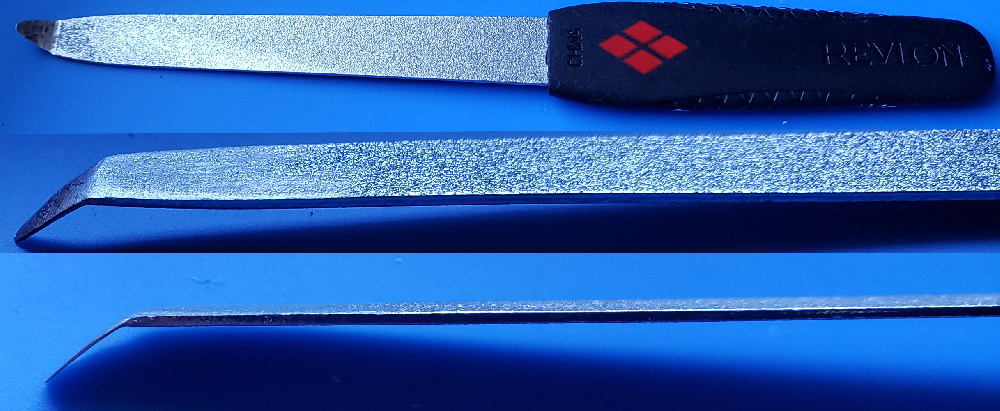
Make one of these to delid the CPU:

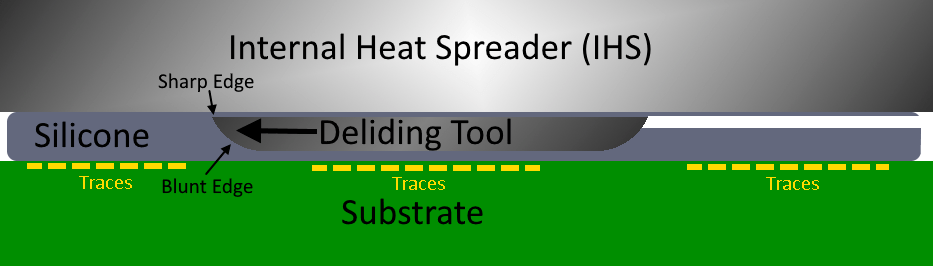
Heat up the end of a fingernail file (buy one from the store, don't grab one from the GF or Misses unless you have a death wish). Use a lighter to heat the tip up and make the metal malleable, then bend ~1cm of the tip to an angle with pliers. Now use a dremel with a sanding stone to grind away the bottom of the tip and make it very thin. It needs to be able to fit underneath the heat spreader on the CPU. Notice there is a gap in the silicone glue on one side:

Use sand paper to blunt the bottom edge of the tool so it can't dig into the substrate, where the traces are on the CPU. That'll destroy them. Just rub the tool along some paper and if it glides smooth you'll be fine. Now use some vasoline or grease to get the tool started. Place it under the edge of the heat spreader and use firm steady pressure. Brace with both hand so you don't slip. Once the tool begin cutting it will ride along a cushion of silicone and the blunt edge will force the sharp cutting edge against the Heat spreader. Now just cut along the edge of the chip, all the way around it. Be careful at the end, when you're about to cut through or you can slip and cut something you don't want to. Just watch this video and you'll have a good idea how to do it.
For the GPU, you need to use a different method:
NSC is pretty long winded, but he shows how to safely delid the RSX earlier in the video. His method is good for doing it cold, but I don't really like his method. It's longer and hard to get a good angle. And his hammer scares the sh!t out of me! I prefer to use hot air (hair drier works too) to warm the RSX for a minute or so (not directly on the chip, but in circular motions 4-5 inches above it just, to get the glue warm, not hot). This softens the thermal adhesive enough so you can pop off the RSX heat Spreader. I use a card and a thin butter knife. The side that faces the CPU, with traces going between them, doesn't have any SMD components like the other 3 sides do. So you can only do this on that side. Heat, insert the card, then use the butter knife to get under the edge of the heat spreader. Be sure you get under the heat spreader, not just on the edge of it. You actually need to get underneath it so you can gently add prying force. Slowly add pressure until the glue gives and the heat spreader pops off. The card protects the substrate from the blunt metal edge of the butter knife. Use something thinner if you can't get under the edge with your butter knife, but be sure it's blunt or it can ding into the substrate (even digging through the card first). It need to be thin enough to get under, but have enough girth to not bend when you pry up.

Sounds complicated but the process is actually quite easy, only takes a few minutes. The hardest par is making the proper CPU deliding tool. It took me about an hour shaving down the tip to get it thin enough to fit under the IHS. I'd shave it a bit, test. Shave away a bit more, then test. Sand, test. eventually I got it to work. I have delided about six consoles now and the CPU is the easiest because of that tool. Most people can delid their RSX pretty easily, but are deterred by the silicone on the CPU. The CPU really needs it or the console will suffer from overheating.

EDIT:
It is exceedingly rare that the RSX genuinely overheats. The paste used on the RSX die is good stuff. If you are having overheating problems it is usually the CPU, not the RSX. So you probably do not need to delid the RSX. That said you can achieve slightly better temps with new paste, especially if the RSX temps are higher than normal and you actually have an issue.

The problem with delidding the RSX is that the process of prying it off it places a lot of strain on the RSX balls. The IHS being glued to the VRAM actually stiffens the whole RSX package, helping to limit warping. We don't need to make things worse by removing a structural support that improves reliability! So if you do remove it, you need to glue it back on afterwards!

Gluing IHS back on:
  1. Delid the CELL. Notice that SONY left an air gap. This is the place you can slip your delidding tool under. The purpose for this gap is so that there isn't a trapped air pocket under the IHS. As the processor gets hot the air will expand, and if it's trapped under there with nowhere to go, it'll blow up like a balloon and stress the BGA, even more than if you left the IHS off! So when we glue it back on later, you must leave an air gap! We'll get back to that...
  2. You shouldn't need to delid the RSX, but if you do, be sure to remove the old thermal epoxy. Another IHS or a razor blade works. But be careful not to slip and cut yourself or the the RSX/MB.
  3. Clean off the old thermal paste and remove the old silicone on the CELL. A plastic Pry tool works pretty good. It doesn't take very long and the hardness of plastic won't scratch the solder mask. Don't use a razor blade or any metal tools. Your fingernail works too.
  4. Clean mating surfaces really well - the IHS, substrate, Die, VRAM...anything that will touch paste or glue needs to be clean. They should be squeaky clean!
  5. Before you apply paste and glues, you need to have a back-plate. The RF shield has back-plates with 4 plastic standoffs that contact the motherboard and brace it so that it doesn't deform/sag under the pressure of the heat-sink clamp. This could lead to BGA reliability issues and interfere with the Thermal Interface Material's bond-line thickness; the gap the paste fills, causing "pump-out"/ air infiltration, which reduces it's effectiveness and shortens it's lifespan. So place the motherboard on the that half of the RF shield and position it correctly.
  6. Place thermal paste on the cell and rsx die.
  7. Place a dot of thermal epoxy on each of the 4 VRAM modules.
  8. Run a thin bead of silicone along the raised edge of the CELL IHS, being sure to leave that air gap! Make sure it's wide enough so that it doesn't close when it's squished flat.
  9. With all the paste and glues ready place the IHS on the processor and give it a little twist motion so it sticks down and centers.
  10. Use a Wolfcraft MT Pointed Spring Clamp to place provide clamping force on the center of the die. The back-plate will ensure the clamping force is properly distributed. These clamps are just long enough to reach the center of the die. As long as it's centered directly over the die, the IHS will self level, flat over the die while the adhesive cures. If it's not centered over the die, it could cure at an angle and overheat. This is the issue with sticking the IHS to the heatsink and assembling. It's why I'm telling you not to do it that way. We need to be sure the IHS glue sets with the force directly in the center of the die, so the IHS sits flat on the die.
  11. Allow the adhesives 24 hours to fully cure before removing the clamps and assembling the console.
  12. You should not need to open the console again for many years, depending on your choice in paste.
NOTES:
  • Do not use the glue on the DIE in the center of the chip! Use a quality thermal paste like Arctic MX-4 (which I can vouch for lasting 8 years) or MX-6 (newer. IDK personally how long it'll last). Alternatively, if you want to get the longest time without needing to delid again, a super long lasting paste like Arctic Cermaque 2 is a very good option. It'll easily last 10 years without loosing performance, but that comes at the cost of not having the highest thermal conductivity. However, it doesn't perform significantly worse than the best pastes in the PS3. Perhaps 2-3C worse. The longevity tradeoff is often seen as worth it when you relid the IHS. There is also the Honeywell - PTM7950 Phase Change Thermal Pad that has excellent long term reliability and very good thermal conductivity, but is more difficult to install as it requires heating the IHS to get it to melt and sit flat against the die, before the adhesive sets. You can also use a 0.1mm graphite thermal pad, which will never degrade or need to be replaced. It performs on par with Arctic ceramique 2, but will never degrade. DO NOT USE Thermal Grizely Cryonaught! It breaks down and separates at higher temperatures. It's meant for Cryogenic (sub-zero) temperatures, not long term in a situation like this.
 
Last edited:
So much conflicting information with people, ugh.
That's translation my friend! I have many friends who are not initiated into this world (electronics). Don't sweat it. This forum is very diverse in terms of languages, so it's easy to get misinterpreted. The first trick is to put your thoughts into words, which can be hard when you don't speak electronics. The second is to get someone who's first language isn't English to understand what you mean. It get confusing at times...lol!

EDIT: And like paco said, there are a bunch of misinformed posts too.

I understand you just fine man! Well, except for one thing. It sounds like you don't want to spend a bunch of money and don't have much experience or interest in this kind of thing. So why do you even want the SYSCON errors? We already told you that most likely it's bad news and will be difficult to fix. You can't do it witout the tools and desiere to learn, so why even try? Stubbornness? Hey, if that motivates you to learn and get better at this stuff, we're willing to help. But if not, then let it go. Shit happens!
 
Last edited:
So here's what I got. I got a ylod untouched DIA-001. And I'm measuring the fuse I think. It gives abo 128.
I have a DIA-001 where I replaced the tokins, bridged, reballed. And when the same fuse...I get 0.01 So I removed that fuse. Still the same without a fuse. I have a junk cok-001 with missing a bunch and yet same fuse (now removed) I get a high number which keeps climbing on the multimeter! I'm using th —->+ setting on the multimeter. I checked most fuses and they seem fine so for the (replaced tokins DIA-001) i fee like there is no flow of anything. What would y'all recommend? How come it's 0.01. What's that fuse responsible for and where does it connect? Also the pic with the bridging DIA-001 with the four litte fuses reading 0.01 is also weird because the other DIA-001 (ylod untouched I get an actually reading) Thanks.
Just an FYI @Kleon1876 , when you drag pictures into the text box it attaches them to the post. You've figured that out, obviously! But you can place your cursor where you'd like to put the picture in line with your text. Then next to the picture under the text box is an option to place either the "thumbnail" or "full picture" in line with the text. That way we don't have to open them in a separate window to view them, and you can talk about each one specifically before moving on to the next. It flows better.
 
Well, realizing this is a good first step, especially while your machine is still un-destroyed.

This is why we give you the power to check for yourself. There's no need to guess anything, and certainly no need to follow anything blindly.

Lastly I understand it's not just your fault that you have to spin in circles so much before arriving at the conclusion.
You can blame those who (maybe even with good intentions) spread false things as truth just because it looks plausible enough and they have people's emotions on their side.

Cheers

...don't patronize me please. First I'm told to do one thing, then I'm told by someone else don't bother because that test is useless, and to not touch the system hardly at all. And based on whats being said, I'm wasting my time if it's an "RSX issue".
 
That's translation my friend! I have many friends who are not initiated into this world (electronics). Don't sweat it. This forum is very diverse in terms of languages, so it's easy to get misinterpreted. The first trick is to put your thoughts into words, which can be hard when you don't speak electronics. The second is to get someone who's first language isn't English to understand what you mean. It get confusing at times...lol!

EDIT: And like paco said, there are a bunch of misinformed posts too.

I understand you just fine man! Well, except for one thing. It sounds like you don't want to spend a bunch of money and don't have much experience or interest in this kind of thing. So why do you even want the SYSCON errors? We already told you that most likely it's bad news and will be difficult to fix. You can't do it witout the tools and desiere to learn, so why even try? Stubbornness? Hey, if that motivates you to learn and get better at this stuff, we're willing to help. But if not, then let it go. Shit happens!

I know shits not an easy fix...
I just wanted to attempt just fixing my BC one. I'm not interested in learning a ton of shit since I'm not going to be fixing PS3s regularly. I just wanted help and not be told, "you need to learn everything, we're not going to help you so figure everything out yourself".
 
Alright friends, here is a DIA-001 working console. It had the 3034 error, i did a reflow and it came back to life. Its working fine. I then removed one bottom RSX tokin and tried powering on. I got a 5 second YLOD and the following (refer below). It appears if you have a console with a delayed YLOD and the 1002 error then your bottom RSX Tokin isnt working. I wonder if I take the left bottom tokin if I will get the 1002 error or a different error. Then whether I can bring it to life by putting caps and bridging. So correct me if i'm wrong but this shows 1002 error is definetely bad tokin at least on the bottom RSX side. Thoughts?

C:\Python27\Scripts>python ps3_syscon_uart_script.py COM3 CXRF
>$ auth
Auth successful
>$ errlog
errlog
ofst[ 52]:err_code:0xffffffff, clock:0x1b5dc505 2014/07/20 00:08:37
ofst[ 56]:err_code:0xa0404322, clock:0x1b5dc7c9 2014/07/20 00:20:25
ofst[ 60]:err_code:0xa0403034, clock:0x1b5dc7c9 2014/07/20 00:20:25
ofst[ 64]:err_code:0xa0404322, clock:0x1b5dc82e 2014/07/20 00:22:06
ofst[ 68]:err_code:0xa0403034, clock:0x1b5dc82e 2014/07/20 00:22:06
ofst[ 72]:err_code:0xa0404322, clock:0x1b62f16d 2014/07/23 22:19:25
ofst[ 76]:err_code:0xa0403034, clock:0x1b62f16d 2014/07/23 22:19:25
ofst[ 80]:err_code:0xa0404322, clock:0x1b683b33 2014/07/27 22:35:31
ofst[ 84]:err_code:0xa0403034, clock:0x1b683b33 2014/07/27 22:35:31
ofst[ 88]:err_code:0xa0404322, clock:0x1b6c438d 2014/07/31 00:00:13
ofst[ 92]:err_code:0xa0403034, clock:0x1b6c438d 2014/07/31 00:00:13
ofst[ 96]:err_code:0xa0404322, clock:0x1cb45f18 2015/04/05 21:01:12
ofst[100]:err_code:0xa0403034, clock:0x1cb45f18 2015/04/05 21:01:12
ofst[104]:err_code:0xa0404322, clock:0x1cb45f41 2015/04/05 21:01:53
ofst[108]:err_code:0xa0403034, clock:0x1cb45f41 2015/04/05 21:01:53
ofst[112]:err_code:0xa0404322, clock:0x1cb45f5a 2015/04/05 21:02:18
ofst[116]:err_code:0xa0403034, clock:0x1cb45f5a 2015/04/05 21:02:18
ofst[120]:err_code:0xa0404322, clock:0x1cb45f65 2015/04/05 21:02:29
ofst[124]:err_code:0xa0403034, clock:0x1cb45f65 2015/04/05 21:02:29
ofst[ 0]:err_code:0xa0404322, clock:0x1cb46123 2015/04/05 21:09:55
ofst[ 4]:err_code:0xa0403034, clock:0x1cb46124 2015/04/05 21:09:56
ofst[ 8]:err_code:0xa0404322, clock:0x1cb46132 2015/04/05 21:10:10
ofst[ 12]:err_code:0xa0403034, clock:0x1cb46132 2015/04/05 21:10:10
ofst[ 16]:err_code:0xa0404322, clock:0x22920a9f 2018/05/18 22:05:19
ofst[ 20]:err_code:0xa0403034, clock:0x22920a9f 2018/05/18 22:05:19
ofst[ 24]:err_code:0xa0404322, clock:0x2641f92b 2020/05/03 21:50:35
ofst[ 28]:err_code:0xa0403034, clock:0x2641f92b 2020/05/03 21:50:35
ofst[ 32]:err_code:0xa0404322, clock:0x2641f959 2020/05/03 21:51:21
ofst[ 36]:err_code:0xa0403034, clock:0x2641f959 2020/05/03 21:51:21
ofst[ 40]:err_code:0xa0003001, clock:0x0b489982 2005/12/31 01:21:06
ofst[ 44]:err_code:0xa0003001, clock:0x0b489989 2005/12/31 01:21:13
ofst[ 48]:err_code:0xa0003001, clock:0x0b488adf 2005/12/31 00:18:39
[mullion]$
>$ lasterrlog
lasterrlog
Last Error Code:0xa0003001, Time:0x0b488adf 2005/12/31 00:18:39
[mullion]$
>$ bringup
bringup
[SSM] state: 0000 -> 0101
Bringup Mode #0 (0xFF)
[SSM] ssmCb_OnStartingBePowOn() called.
[SSM] First Boot.
[SSM] Bringup mode : syspm_stat=00000000/00000000
[POWSEQ] PowerSeq_Setup called.
[SSM] state: 0101 -> 0201
[POWSEQ] AV Backend Setup
[SSM] state: 0201 -> 0102
[SSM] state: 0102 -> 0202
[SSM] state: 0202 -> 0103
>$
[SSM] state: 0103 -> 0203
[SSM] ssmCb_BeforeBeOn() called.
[SSM] state: 0203 -> 0104
Psbd_SbTransMode_Half:0x20e7
[SSM] state: 0104 -> 0204
[SSM] state: 0204 -> 0105
[SSM] state: 0105 -> 0400
(PowerOn State)
[SERV NVS] READ CMD
Boot Loader SE Version 2.0.0 (Build ID: 2655,27256, Build Data: 2007-10-26_12:10
:58)
Copyright(C) 2007 Sony Computer Entertainment Inc.All Rights Reserved.
[SERV SETCFG] XDR (CH0,CH1) ASSERT
[SERV SETCFG] XDR (CH0,CH1) DEASSERT
[SERV NVS] READ CMD
[INFO]: Connecting to Debug Device (SB UART)
[SERV NVS] READ CMD
[SERV NVS] READ CMD
[SERV NVS] READ CMD
[SERV NVS] READ CMD
[SERV NVS] READ CMD
[SERV NVS] READ CMD
[SERV NVS] READ CMD
[SERV NVS] READ CMD
[SERV NVS] READ CMD
[SERV NVS] READ CMD
[SERV NVS] READ CMD
[SERV NVS] READ CMD
[SERV NVS] READ CMD
[SERV NVS] READ CMD
[SERV NVS] READ CMD
[SERV NVS] READ CMD
[SERV NVS] READ CMD
[SERV NVS] READ CMD
[SERV NVS] READ CMD
[SERV NVS] READ CMD
[SERV NVS] READ CMD
[SERV NVS] READ CMD
[SERV NVS] READ CMD
[SERV NVS] READ CMD
[SERV NVS] READ CMD
[SERV THERM] NOTIFY_MODE CMD
[SERV NOTIF] CONTROL_LED
[SERV NOTIF] RING_BUZZER
[SERV NOTIF] CONTROL_LED
[SERV NVS] READ CMD
[SERV NVS] READ CMD
[SERV NVS] READ CMD
[SERV NVS] READ CMD
[SERV NVS] READ CMD
[SSM] *** Power Fail RS ***
[SSM] state: 0400 -> 0700
[POWSEQ] AV Backend Letup
[SSM] ssmCb_AfterBeOn() called.
[SSM] Shutdown mode : syspm_stat=00000000/00000000
[ERROR]: 0xa0801002
[POWSEQ] PowerSeq_Letup called.
[SSM] state: 0700 -> 0600
(PowerOff State) (Fatal)
[mullion]$
>$ errlog
errlog
ofst[ 56]:err_code:0xffffffff, clock:0x1b5dc7c9 2014/07/20 00:20:25
ofst[ 60]:err_code:0xa0403034, clock:0x1b5dc7c9 2014/07/20 00:20:25
ofst[ 64]:err_code:0xa0404322, clock:0x1b5dc82e 2014/07/20 00:22:06
ofst[ 68]:err_code:0xa0403034, clock:0x1b5dc82e 2014/07/20 00:22:06
ofst[ 72]:err_code:0xa0404322, clock:0x1b62f16d 2014/07/23 22:19:25
ofst[ 76]:err_code:0xa0403034, clock:0x1b62f16d 2014/07/23 22:19:25
ofst[ 80]:err_code:0xa0404322, clock:0x1b683b33 2014/07/27 22:35:31
ofst[ 84]:err_code:0xa0403034, clock:0x1b683b33 2014/07/27 22:35:31
ofst[ 88]:err_code:0xa0404322, clock:0x1b6c438d 2014/07/31 00:00:13
ofst[ 92]:err_code:0xa0403034, clock:0x1b6c438d 2014/07/31 00:00:13
ofst[ 96]:err_code:0xa0404322, clock:0x1cb45f18 2015/04/05 21:01:12
ofst[100]:err_code:0xa0403034, clock:0x1cb45f18 2015/04/05 21:01:12
ofst[104]:err_code:0xa0404322, clock:0x1cb45f41 2015/04/05 21:01:53
ofst[108]:err_code:0xa0403034, clock:0x1cb45f41 2015/04/05 21:01:53
ofst[112]:err_code:0xa0404322, clock:0x1cb45f5a 2015/04/05 21:02:18
ofst[116]:err_code:0xa0403034, clock:0x1cb45f5a 2015/04/05 21:02:18
ofst[120]:err_code:0xa0404322, clock:0x1cb45f65 2015/04/05 21:02:29
ofst[124]:err_code:0xa0403034, clock:0x1cb45f65 2015/04/05 21:02:29
ofst[ 0]:err_code:0xa0404322, clock:0x1cb46123 2015/04/05 21:09:55
ofst[ 4]:err_code:0xa0403034, clock:0x1cb46124 2015/04/05 21:09:56
ofst[ 8]:err_code:0xa0404322, clock:0x1cb46132 2015/04/05 21:10:10
ofst[ 12]:err_code:0xa0403034, clock:0x1cb46132 2015/04/05 21:10:10
ofst[ 16]:err_code:0xa0404322, clock:0x22920a9f 2018/05/18 22:05:19
ofst[ 20]:err_code:0xa0403034, clock:0x22920a9f 2018/05/18 22:05:19
ofst[ 24]:err_code:0xa0404322, clock:0x2641f92b 2020/05/03 21:50:35
ofst[ 28]:err_code:0xa0403034, clock:0x2641f92b 2020/05/03 21:50:35
ofst[ 32]:err_code:0xa0404322, clock:0x2641f959 2020/05/03 21:51:21
ofst[ 36]:err_code:0xa0403034, clock:0x2641f959 2020/05/03 21:51:21
ofst[ 40]:err_code:0xa0003001, clock:0x0b489982 2005/12/31 01:21:06
ofst[ 44]:err_code:0xa0003001, clock:0x0b489989 2005/12/31 01:21:13
ofst[ 48]:err_code:0xa0003001, clock:0x0b488adf 2005/12/31 00:18:39
ofst[ 52]:err_code:0xa0801002, clock:0x0b488680 2005/12/31 00:00:00
[mullion]$
>$ shutdown
shutdown
[SSM] state: 0600 -> 0000
[SSM] Error state is cleared.
(PowerOff State)
>$ bringup
bringup
[SSM] state: 0000 -> 0101
Bringup Mode #0 (0xFF)
[SSM] ssmCb_OnStartingBePowOn() called.
[SSM] Bringup mode : syspm_stat=00000000/00000000
[POWSEQ] PowerSeq_Setup called.
[SSM] state: 0101 -> 0201
[POWSEQ] AV Backend Setup
[SSM] state: 0201 -> 0102
[SSM] state: 0102 -> 0202
[SSM] state: 0202 -> 0103
[SSM] state: 0103 -> 0203
[SSM] ssmCb_BeforeBeOn() called.
[SSM] state: 0203 -> 0104
Psbd_SbTransMode_Half:0x20e7
>$
[SSM] state: 0104 -> 0204
[SSM] state: 0204 -> 0105
[SSM] state: 0105 -> 0400
(PowerOn State)
[SERV NVS] READ CMD
Boot Loader SE Version 2.0.0 (Build ID: 2655,27256, Build Data: 2007-10-26_12:10
:58)
Copyright(C) 2007 Sony Computer Entertainment Inc.All Rights Reserved.
[SERV SETCFG] XDR (CH0,CH1) ASSERT
[SERV SETCFG] XDR (CH0,CH1) DEASSERT
[SERV NVS] READ CMD
[INFO]: Connecting to Debug Device (SB UART)
[SERV NVS] READ CMD
[SERV NVS] READ CMD
[SERV NVS] READ CMD
[SERV NVS] READ CMD
[SERV NVS] READ CMD
[SERV NVS] READ CMD
[SERV NVS] READ CMD
[SERV NVS] READ CMD
[SERV NVS] READ CMD
[SERV NVS] READ CMD
[SERV NVS] READ CMD
[SERV NVS] READ CMD
[SERV NVS] READ CMD
[SERV NVS] READ CMD
[SERV NVS] READ CMD
[SERV NVS] READ CMD
[SERV NVS] READ CMD
[SERV NVS] READ CMD
[SERV NVS] READ CMD
[SERV NVS] READ CMD
[SERV NVS] READ CMD
[SERV NVS] READ CMD
[SERV NVS] READ CMD
[SERV NVS] READ CMD
[SERV NVS] READ CMD
[SERV THERM] NOTIFY_MODE CMD
[SERV NOTIF] CONTROL_LED
[SERV NOTIF] RING_BUZZER
[SERV NOTIF] CONTROL_LED
[SERV NVS] READ CMD
[SERV NVS] READ CMD
[SERV NVS] READ CMD
[SERV NVS] READ CMD
[SERV NVS] READ CMD
[SSM] *** Power Fail RS ***
[SSM] state: 0400 -> 0700
[POWSEQ] AV Backend Letup
[SSM] ssmCb_AfterBeOn() called.
[SSM] Shutdown mode : syspm_stat=00000000/00000000
[ERROR]: 0xa0801002
[POWSEQ] PowerSeq_Letup called.
[SSM] state: 0700 -> 0600
(PowerOff State) (Fatal)
[mullion]$
>$ shutdown
shutdown
[SSM] state: 0600 -> 0000
[SSM] Error state is cleared.
(PowerOff State)
 
Ok... today I've discovered that my error 1004 was related to the fact that were not enough Watts (I was using a 450 w pc psu and It had only 18 Amperes at 12V ahah) so I've used another psu and She was alive...
Now the sad story begins, I added an hdd without its caddy and some short caused the f6001 to blow (ok, that's not a big deal) BUT... I have also destroyed IC 5001 (Error 2110) and I have no spares for replacing it (I tried one that was on another fat and It did not worked simply because they have different codes but same pins and scheme...), could It be another thing near this IC?
How can I buy this thing (my board is cok-002)? Thank you.


Inviato dal mio iPhone utilizzando Tapatalk
 
Ok... today I've discovered that my error 1004 was related to the fact that were not enough Watts (I was using a 450 w pc psu and It had only 18 Amperes at 12V ahah) so I've used another psu and She was alive...
Now the sad story begins, I added an hdd without its caddy and some short caused the f6001 to blow (ok, that's not a big deal) BUT... I have also destroyed IC 5001 (Error 2110) and I have no spares for replacing it (I tried one that was on another fat and It did not worked simply because they have different codes but same pins and scheme...), could It be another thing near this IC?
How can I buy this thing (my board is cok-002)? Thank you.


Inviato dal mio iPhone utilizzando Tapatalk
Hey ! Check PS6001. In my case when i got this error on COK-002 it was bad PS6001.
Reflowing a CPU didn't work on error 3032, so I have to search further ;)
So, at this moment I have 2 consoles with GLOD: CECHG with error 3040 (starship2), and CECHC with south bridge glod (2203). Is there any chance that if I will buy teensy ++ 2.0 I can repair problems with their flash memory ? I don't have any dumps from them. Or it is hard to tell and could be a waste of money ? But I am wondering with this CECHC how this could happen. Firstly it had 3034 error, and after reballing it shows GLOD with 2203. When somebody hypothethical did a bad flash shouldn't be a GLOD, but why it got 3034 error ? Hmm...
 
Last edited:
Hey ! Check PS6001. In my case when i got this error on COK-002 it was bad PS6001.
Reflowing a CPU didn't work on error 3032, so I have to search further ;)
So, at this moment I have 2 consoles with GLOD: CECHG with error 3040 (starship2), and CECHC with south bridge glod (2203). Is there any chance that if I will buy teensy ++ 2.0 I can repair problems with their flash memory ? I don't have any dumps from them. Or it is hard to tell and could be a waste of money ? But I am wondering with this CECHC how this could happen. Firstly it had 3034 error, and after reballing it shows GLOD with 2203. When somebody hypothethical did a bad flash shouldn't be a GLOD, but why it got 3034 error ? Hmm...

3034 is for sure BGA connections related with the RSX. Maybe reball the RSX and see if the error goes away. If u remove the RSX do bringup and see what error code u get. If it's different from 3034 then maybe you are on the right track. I have a SEM-001 which I removed the RSX and did bringup and it's an instant ylod with 3003 error. 3003 probably relates to missing RSX completely.
 
Does anyone understand the boot sequence? I mean like when hit the power on button, what communicates with what first. Reason I'm asking is because I removed one nec from the bottom of the RSX on a working DIA-001 and my console wanted to boot by then YLOD. Based on the bringup command, it appears it's going through its regular cycle for a little while before YLOD due to missing nec. I'm guessing that the nec communication comes later on in the boot sequence. I'm hoping this will help me figure out where the ylod occurs in the boot sequence. Any ideas?
 
I know shits not an easy fix...
Do you? Because it sounded like you were still hoping for one.

I just wanted to attempt just fixing my BC one.
Based on what you told us, you don't have the tools or experience to perform anything but a PSU replacement.

I'm not interested in learning a ton of shit since I'm not going to be fixing PS3s regularly.
Then you're not going to be fixing PS3's at all. You saw something you thought you could do because it looked easy. I told you it isn't and probably wouldn't help anyway. You were told about this thread and I was trying to help when I told you it might be more trouble than it's worth. You were confused by the terms and the disappointment. That's fine. We may have been a little annoyed by your questions, which have been answered at nauseam before, but we were just trying to help you!

I just wanted help and not be told, "you need to learn everything, we're not going to help you so figure everything out yourself".
Perhaps it's not unreasonable that we expect people to do their homework before attempting to modify an electrical appliance! Like I said before, we're not SONY! We're not here to hold your hand. No one is obligated to make it easy for you. If you don't have the patience to learn what's required to fix your console properly, we'll sleep well at night knowing we made it harder for you to burn your house down.

...don't patronize me please. First I'm told to do one thing, then I'm told by someone else don't bother because that test is useless, and to not touch the system hardly at all. And based on whats being said, I'm wasting my time if it's an "RSX issue".
Oh step off! You're on a public forum, where you should expect to receive conflicting information. You got treated like a child because you were acting like one! Only children don't do their homework before coming to class. Adults realize that it puts them behind and accept the consequences.

If you want treated like an adult then how's this? You're on your own now...
 
Do you? Because it sounded like you were still hoping for one.


Based on what you told us, you don't have the tools or experience to perform anything but a PSU replacement.

Then you're not going to be fixing PS3's at all. You saw something you thought you could do because it looked easy. I told you it isn't and probably wouldn't help anyway. You were told about this thread and I was trying to help when I told you it might be more trouble than it's worth. You were confused by the terms and the disappointment. That's fine. We may have been a little annoyed by your questions, which have been answered at nauseam before, but we were just trying to help you!


Perhaps it's not unreasonable that we expect people to do their homework before attempting to modify an electrical appliance! Like I said before, we're not SONY! We're not here to hold your hand. No one is obligated to make it easy for you. If you don't have the patience to learn what's required to fix your console properly, we'll sleep well at night knowing we made it harder for you to burn your house down.

Oh step off! You're on a public forum, where you should expect to receive conflicting information. You got treated like a child because you were acting like one! Only children don't do their homework before coming to class. Adults realize that it puts them behind and accept the consequences.

If you want treated like an adult then how's this? You're on your own now...

Yeah, no. I wasn't hoping for an "easy fix". There's no such thing. Delidding? I can handle learning to do that. I never said I wasn't going to learn how to do whatevers necessary to fix my shit. All researching and shit would do is make me more and more confused because I have absolutely no idea what the hell I'd even be trying to find. And I'm not "acting like a child". I'm just tired of people getting pissy when some newbie just wants help. Instead forcing them to go digging for information when they don't even know what information they're even supposed to be looking for.
 
Yeah, no. I wasn't hoping for an "easy fix". There's no such thing. Delidding? I can handle learning to do that. I never said I wasn't going to learn how to do whatevers necessary to fix my shit. All researching and shit would do is make me more and more confused because I have absolutely no idea what the hell I'd even be trying to find. And I'm not "acting like a child". I'm just tired of people getting pissy when some newbie just wants help. Instead forcing them to go digging for information when they don't even know what information they're even supposed to be looking for.

I'm with Felix on this one. I don't know much about electronics either but I'm deep in the rabbit hole and learning reading researching as I go. The goal here is to contribute so we can get closer to understanding what causes these machines to crap out and not so much for fixing a single system. I think you are just used to having a step by step explanation. No such thing here, we don't owe anything to one another. Let's all stay positive and keep working at it together. Best thing you can do is start and read about basics of working with a multimeter etc. that's what I did a month or two ago. I have asked a lot of dumb questions on here that the guys have had the patience to answer over and over. Felix is right. If u take the time and have the patience to read every page, your problem will most likely be addressed.
 
Hey ! Check PS6001. In my case when i got this error on COK-002 it was bad PS6001.
Reflowing a CPU didn't work on error 3032, so I have to search further ;)
So, at this moment I have 2 consoles with GLOD: CECHG with error 3040 (starship2), and CECHC with south bridge glod (2203). Is there any chance that if I will buy teensy ++ 2.0 I can repair problems with their flash memory ? I don't have any dumps from them. Or it is hard to tell and could be a waste of money ? But I am wondering with this CECHC how this could happen. Firstly it had 3034 error, and after reballing it shows GLOD with 2203. When somebody hypothethical did a bad flash shouldn't be a GLOD, but why it got 3034 error ? Hmm...

Thank you... unfortunately I have already checked and replaced all blown fuses... could anyone help me buying ic 5001 (its code is ICS 6320959 0650 1493G18LF) or checking for other issues related to 2120?


Inviato dal mio iPhone utilizzando Tapatalk
 

Similar threads

Back
Top