PS3 Fault finding YLOD with the SYSCON - First steps and Error reporting

Starting to make cost saving decisions like SONY huh?

A slippery slope, the path to the dark side is!

Haha it certainly can be a path to the darkside but if it gets the job done roughly on par as the more expensive stuff I will take that any day of the week. Had the same stuff in my own personal system for just over a year and it's holding up perfectly fine.

Though one thing I am curious about is on the CECH-M models which have 65nm CELL and 90nm RSX never had much luck getting the RSX to stay as cool as I do on any other motherboard revision. Going to assume it's to do with the all aluminium heatsinks ( without the heatpipes to move the heat around ) they use in them not being able to cool it correctly could be wrong though. Tried with multiple pastes all the way upto the really expensive stuff like thermal grizzly but doesn't seem to make a whole lot of difference.
 
Haha it certainly can be a path to the darkside but if it gets the job done roughly on par as the more expensive stuff I will take that any day of the week. Had the same stuff in my own personal system for just over a year and it's holding up perfectly fine.

Though one thing I am curious about is on the CECH-M models which have 65nm CELL and 90nm RSX never had much luck getting the RSX to stay as cool as I do on any other motherboard revision. Going to assume it's to do with the all aluminium heatsinks ( without the heatpipes to move the heat around ) they use in them not being able to cool it correctly could be wrong though. Tried with multiple pastes all the way upto the really expensive stuff like thermal grizzly but doesn't seem to make a whole lot of difference.
Don't worry. This is because they are just designed like that. It's interesting but it's the truth. The newer fat models (J and newer) are more reliable, but at the same time they are made to operate at higher temperatures, not less.
It's as if Sony thought they should not only let the temperatures like they were and not reduce them, but actually increase them. Knowing that heat alone wasn't the cause for the reliability problems of the old models. And they were right. They really are reliable even operating at 80c standard temperatures.

Whereas the old fat models are much cooler by design. Yes I've had my systems with similar temperatures. I think the cooling system is not bad really.
Although CPU RSX temperarures can increase 5 to 10 degrees just by closing the plastic housing.

Even the default fan curve is not that bad.
I still modify it of course.
30% 0x4d seems a nice operating fan speed for the most RSX intensive games.
0x54 acceptable too. That's where I draw the comfort limit on my fan curves.

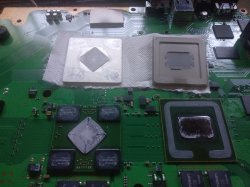
As a side note, I've noticed really that delidding the RSX is not even worth it in most cases. Most RSX are just fine, protected by their overheating neighbor the CELL CPU
For the sake of comparison I attach pictures from before and after delid.
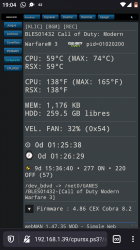
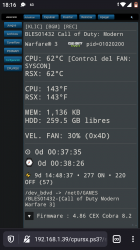
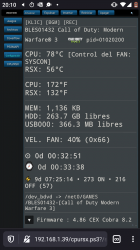
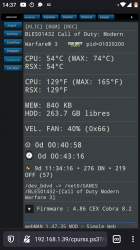
Over 25 degree difference CPU.
Just 2 or 3 difference RSX. Hell, I guess it's possible that some people could even get worse than factory temperatures on the RSX by delidding it. If using or doing things suboptimally which is very possible. Not ro mention the risk of breaking something. Which in my opinion is even more risky than the CPU.

(By the way this is almost summer in south of Spain. Ambient at least 25c. Winter should hopefully be cooler hehe)
 

Attachments

  • Screenshot_20210607-190432.png
    Screenshot_20210607-190432.png
    325 KB · Views: 97
  • Screenshot_20210607-181644.png
    Screenshot_20210607-181644.png
    310.4 KB · Views: 100
  • Screenshot_20210605-201035.png
    Screenshot_20210605-201035.png
    330.1 KB · Views: 102
  • Screenshot_20210607-143743.png
    Screenshot_20210607-143743.png
    324.4 KB · Views: 107
  • IMG_20210606_194528.jpg
    IMG_20210606_194528.jpg
    4.9 MB · Views: 636
  • IMG_20210609_110755~2.jpg
    IMG_20210609_110755~2.jpg
    2 MB · Views: 440
Last edited:
Haha it certainly can be a path to the darkside but if it gets the job done roughly on par as the more expensive stuff I will take that any day of the week. Had the same stuff in my own personal system for just over a year and it's holding up perfectly fine.

Though one thing I am curious about is on the CECH-M models which have 65nm CELL and 90nm RSX never had much luck getting the RSX to stay as cool as I do on any other motherboard revision. Going to assume it's to do with the all aluminium heatsinks ( without the heatpipes to move the heat around ) they use in them not being able to cool it correctly could be wrong though. Tried with multiple pastes all the way upto the really expensive stuff like thermal grizzly but doesn't seem to make a whole lot of difference.

The FAT models with the 90nm RSX do get hotter by design, you can shave off a few C's when delidding. The trick i found to improve overall heat reduction is using heatpads on the metal chassis that compresses down on the CELL and RSX.

This makes the chassis absorb the heat away from the CELL and RSX faster.

If this trick doesnt work then you have a 1. faulty IC buck (controls pwm to the cell and rsx) 2. CELL or RSX is faulty

When IC bucks go overvoltage they make the CELL or RSX overheat. Sony changed that design in the DIA-002 models onwards

https://www.ebay.co.uk/itm/293966360869?hash=item4471c2b125:g:Ug0AAOSwMgdXyoFa - silicone thermal pad
 
The FAT models with the 90nm RSX do get hotter by design, you can shave off a few C's when delidding. The trick i found to improve overall heat reduction is using heatpads on the metal chassis that compresses down on the CELL and RSX.

This makes the chassis absorb the heat away from the CELL and RSX faster.

If this trick doesnt work then you have a 1. faulty IC buck (controls pwm to the cell and rsx) 2. CELL or RSX is faulty

When IC bucks go overvoltage they make the CELL or RSX overheat. Sony changed that design in the DIA-002 models onwards

https://www.ebay.co.uk/itm/293966360869?hash=item4471c2b125:g:Ug0AAOSwMgdXyoFa - silicone thermal pad
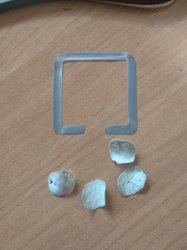
This also can help distribute the pressure. Not just because of being a thermal pad. But mainly because now the center will be pushing too instead of just the corners.
1mm is the same thickness as the 4 studs that are pushing on the 4 corners from behind the chips.
But maybe a bit thicker would work too, especially on CPU side. Like 1.2mm to compensate for the compression.

I might try that one day. Although I haven't really felt the need of course.
I wonder if the improvement can be measured.
 
Ok it didn't work.
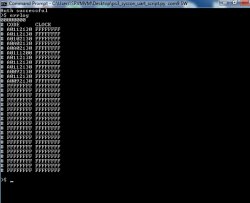
Before exchange thermal sensor ic got 1200 and 2130 with a state of glod, without delid.
Now after delid still did not work same glod and only 2 errors. After exchange thermal sensor ic of cpu it is ylod with 3 beeps but only with 2130 error, that 1200 is missing (errlog clear) so I think the real problem was under ic because heat was to near I've managed to get the real result of poor connection under ic. Now not sure how many of you can observe on cpu is more visible that board is curved in middle.
So was about to reball even if was working and have to exchange nec's on rsx anyway.
This was another simulation to convince miself start with reball, then complete with debugging after that. For me all ps3 will have to reballed. Then if is not fixed like that I will leave it for scraps. If I count tantal caps it worth price I've paid.
 

Attachments

  • dyn001.jpg
    dyn001.jpg
    73.3 KB · Views: 70
Last edited:
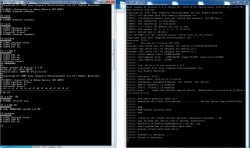
Putty log from working unit will look as this
Code:
Boot Loader SE Version 4.8.6 (Build ID: 5353,50715, Build Date: 2020-01-30_11:23:58)
SDK Version: 486.000
Copyright(C) 2020 Sony Computer Entertainment Inc.All Rights Reserved.
[INFO]: === eXtreme Data Rate Memory Subsystem ===
[INFO]: (Configured Memory Size per single XIO channel: 128 MBytes.)
[INFO]: XIO channel[0] is available.
[INFO]: XIO channel[1] is available.
[INFO]: ---> Total 256 MBytes are now in use.
[INFO]: SPU enable [0, 1, 2, 5, 6, 7] 11101111
[INFO]: BE:12S DD2.0, SB:ZX1.1
Cell OS SDK4.8.6 000 (release build: r50715 2020_01_30_110000)
Copyright 2020 Sony Computer Entertainment Inc.
revision: 50702
date:     Thu Jan 30 11:25:44 JST 2020
storage: ACL check will be skipped for device id ffffffffffffffff
storage: ACL check will be skipped for device id 0
storage: ACL check will be skipped for device id 1
lv2(0): total memory size: 249MB+640KB
lv2(0): kern memory size:   12MB+640KB (heap:3492KB  page pool:4736KB)
lv2(0): user memory size:  237MB
lv2(2):
lv2(2): Cell OS Lv-2 32 bit version 4.8.6
lv2(2): Copyright 2011 Sony Computer Entertainment Inc.
lv2(2): All Rights Reserved.
lv2(2):
lv2(2): revision: 50715
lv2(2): build date: 2020/01/30 11:30:24
lv2(2): processor: Broadband Engine  Ver 0x0000  Rev 0x2100
lv2(2): PPU:0, Thread:0 is enabled.
lv2(2): PPU:0, Thread:1 is enabled.
lv2(2): rsx:      rsx65 a06 500/650 vpe:ff shd:6f  [AP0011604:1:1:8:e:b:2:5:2][3d:0:3:0:1:2:0][2:1:0]
lv2(2): Available physical SPUs: 6/7
lv2(2): mounting the flash file system : ........... Failed (error code:0x8001002b)
lv2(2):
lv2(2): ###
lv2(2): ### Vflash recovery mode
lv2(2): ###
lv2(2):
lv2(2): creating the vflash recover process (emergency program) : OK
lv2(2): sys_storage_get_device_info() failed. 0x80010002.
lv2(2): RescueUtilityGetStorageCapacity() failed. 0x1.
lv2(2): this system has no available hard disk.
lv2(2): please attach hard disk drive.
lv2(2):
lv2(2): Prepare to shutdown ....
lv2(2): Going to shutdown.

This is another unit that have been reballed about 2 years ago and it came with artefacts on xmb .this has not been nec caps exchange and will be only think intend to repair or leave it for parts.
SB debbuging wont show without exchange of addres 1202 02 on SW .Secondary uart is required as on normal syscon uart will only get
Code:
# [SSM] PS2 ok.
# [SSM] PS3 ok.
# [SSM] PS4 ok.
# (PowerOn State)
OK 00000000
#!
#!Boot Loader SE Version 2.7.0
#!(Build ID: 3517,38879,
#!Build Date: 2009-03-24_23:51:55)
#!
#!Copyright(C) 2009 Sony Computer Entertainment Inc.All Rights Reserved.
#!
#![INFO]: Connecting to Debug Device (SB UART)
[CODE]
[SPOILER]
Second uart will be on puty screen
I didnt see noob explained so ppl must understend if cpu/rsx is failing on different situation that is fair ball connection this SB debugging wont load or if rsx fail as glod will load partialy.This is case of SW mullion is different situation it may load some commands on SB not surewhat at which points is stopping but as said SB debbuging will help others. For me is clear that all ps3 will have reball ,no matter abaut situation.
 

Attachments

  • dyn001SB.jpg
    dyn001SB.jpg
    348.1 KB · Views: 71
The trick i found to improve overall heat reduction is using heatpads on the metal chassis that compresses down on the CELL and RSX...

I think that's a bad idea for the CPU. You don't want to obstruct the hole in the MB that allows the multileg MLCC bypass caps on the CPU substrate to be passively air cooled.

Also, those square spacers are attached with 2 rivets that don't provide much contact area to transfer the heat to the rest of the RF shield. Soldering them might help, but I'm not convinced it's even a good idea to attempt to cool the MB beneath the RSX. Doing so could increase the temperature differential from the top/btm side of the MB and increase the warping strain on the BGA. That would be counter productive. IMO, cooling should be focused on the chips themselves and their, TIC, IHS, and HS.
 
I think that's a bad idea for the CPU. You don't want to obstruct the hole in the MB that allows the multileg MLCC bypass caps on the CPU substrate to be passively air cooled.

Also, those square spacers are attached with 2 rivets that don't provide much contact area to transfer the heat to the rest of the RF shield. Soldering them might help, but I'm not convinced it's even a good idea to attempt to cool the MB beneath the RSX. Doing so could increase the temperature differential from the top/btm side of the MB and increase the warping strain on the BGA. That would be counter productive. IMO, cooling should be focused on the chips themselves and their, TIC, IHS, and HS.
Hmm yes that's why I was mentioning that it's not exactly about transferring the heat as thermal pads normally do. You are not going to substract much heat as you say, but maybe they can help distribute the pressure in the middle too instead of just the 4 studs in the corners.

About "suffocating" the mlccs from the CPU hole, I think it might be OK because actually Sony sometimes put a plastic plug into that hole. Maybe it was just to add structural integrity to the board, or whatever totally unrelated with what we are doing. But that plug would also be impeding the passive airflow for those smds under the CPU too.
Still, I haven't found that plug in person either.
 
Hmm yes that's why I was mentioning that it's not exactly about transferring the heat as thermal pads normally do. You are not going to substract much heat as you say, but maybe they can help distribute the pressure in the middle too instead of just the 4 studs in the corners.

About "suffocating" the mlccs from the CPU hole, I think it might be OK because actually Sony sometimes put a plastic plug into that hole. Maybe it was just to add structural integrity to the board, or whatever totally unrelated with what we are doing. But that plug would also be impeding the passive airflow for those smds under the CPU too.
Still, I haven't found that plug in person either.
Haha...yeah, what was with that CPU butt plug anyway! Some very early models had excess stuff they obviously thought was pointless or removed as cost down measures. I would be curious if there was an engineering reason for it. Did it help? Hurt? Or was it just another thing that cost them 5 cents/unit? Same with the tape they placed over the NEC/TOKINs on some boards. It's interesting there is so many subtle differences between consoles, even during the same model revision. There certainly was alot going on behind the scenes we never heard about.

Kinda makes me wonder what they're doing to the PS5 now, that we'll only find out about 15 years from now.
 
I think that's a bad idea for the CPU. You don't want to obstruct the hole in the MB that allows the multileg MLCC bypass caps on the CPU substrate to be passively air cooled.

Also, those square spacers are attached with 2 rivets that don't provide much contact area to transfer the heat to the rest of the RF shield. Soldering them might help, but I'm not convinced it's even a good idea to attempt to cool the MB beneath the RSX. Doing so could increase the temperature differential from the top/btm side of the MB and increase the warping strain on the BGA. That would be counter productive. IMO, cooling should be focused on the chips themselves and their, TIC, IHS, and HS.

I did some basic tests, using my thermal camera before and after.

You can see the heat hot spots move across slowly, before it would just center on the chips themselves.

The silicone heat pad is only used on the plastic covers for the CELL and RSX on the top part metal chassis, which adds pressure to keep the maximum heat transfer going.

Ill take a photo for representation
 
I have decided after the PS3, I will never complain about fan noise ever again. If the PS5 requires LM to cool the APU, the fan can sing it's song and I'll just drown it out with more volume.But, if you can hear coil whine from the inductors in the PSU, from across the room, the fan must be pretty quiet!
 
Anyone able to help me with this, a bit stumped what I am looking for exactly. Got this off someone today was already set to internal mode but the eepcsum is very weird never seen one like this. Guessing they typed something in they shouldn't have? Or maybe I am just being blind.

eepcsum
Addr:0x000032fe should be 0x1596
Addr:0x000034fe should be 0x86d6
sum:0x8cd9
Addr:0x000039fe should be 0xffff735f
Addr:0x00003dfe should be 0x00ff
Addr:0x00003ffe should be 0x00ff
 
Anyone able to help me with this, a bit stumped what I am looking for exactly. Got this off someone today was already set to internal mode but the eepcsum is very weird never seen one like this. Guessing they typed something in they shouldn't have? Or maybe I am just being blind.

eepcsum
Addr:0x000032fe should be 0x1596
Addr:0x000034fe should be 0x86d6
sum:0x8cd9
Addr:0x000039fe should be 0xffff735f
Addr:0x00003dfe should be 0x00ff
Addr:0x00003ffe should be 0x00ff
You can ignore the ffff at the beginning, and pretend it's just 4 digits as it should be.
This happens sometimes. I don't know why. Maybe a small bug in the syscon I don't know.

Should be 0x735f
Now is something else. You can check with:
r 39fe 2
Then to fix it you can write to that address
5f 73

Though It sounds strange what you are saying. "Someone had already set internal mode"...
You mean somebody was tinkering with the syscon first and gave up so it ended in your hands?
Sounds strange.
The thermal config area seems to belong to a SEM-001 board (0x86d6)
But the broken area normally should be (0x7360). I guess somebody wrote some other tiny change.
Besides the byte that enables internal mode.
You can check this byte with
r 3961 1
And it should be 00

This is mostly curiosity.
 
You can ignore the ffff at the beginning, and pretend it's just 4 digits as it should be.
This happens sometimes. I don't know why. Maybe a small bug in the syscon I don't know.

Should be 0x735f
Now is something else. You can check with:
r 39fe 2
Then to fix it you can write to that address
5f 73

Though It sounds strange what you are saying. "Someone had already set internal mode"...
You mean somebody was tinkering with the syscon first and gave up so it ended in your hands?
Sounds strange.
The thermal config area seems to belong to a SEM-001 board (0x86d6)
But the broken area normally should be (0x7360). I guess somebody wrote some other tiny change.
Besides the byte that enables internal mode.
You can check this byte with
r 3961 1
And it should be 00

This is mostly curiosity.

Thanks for that I will throw that at it tomorrow, quite late over here and just plugged it in at the end of the day to see what was what with it and it just looked really odd at first glance and then you make it crystal clear and I feel like a fool lol.

Correct I received it from a person who lets just say bodges consoles into life again and calls it job done and doesn't actually try to diagnose the problem, so was a bit surprised when I plugged it in and it beeped with the constant flashing red light and punched in CXRF and it auth'ed.

You are correct it is a SEM-001, that looks like it's been through hell and back and probably sat in a damp garage or shed for about 10 years.
 
@db260179 @Pacorretaco @vyktormvmpay25 @RIP-Felix etc...
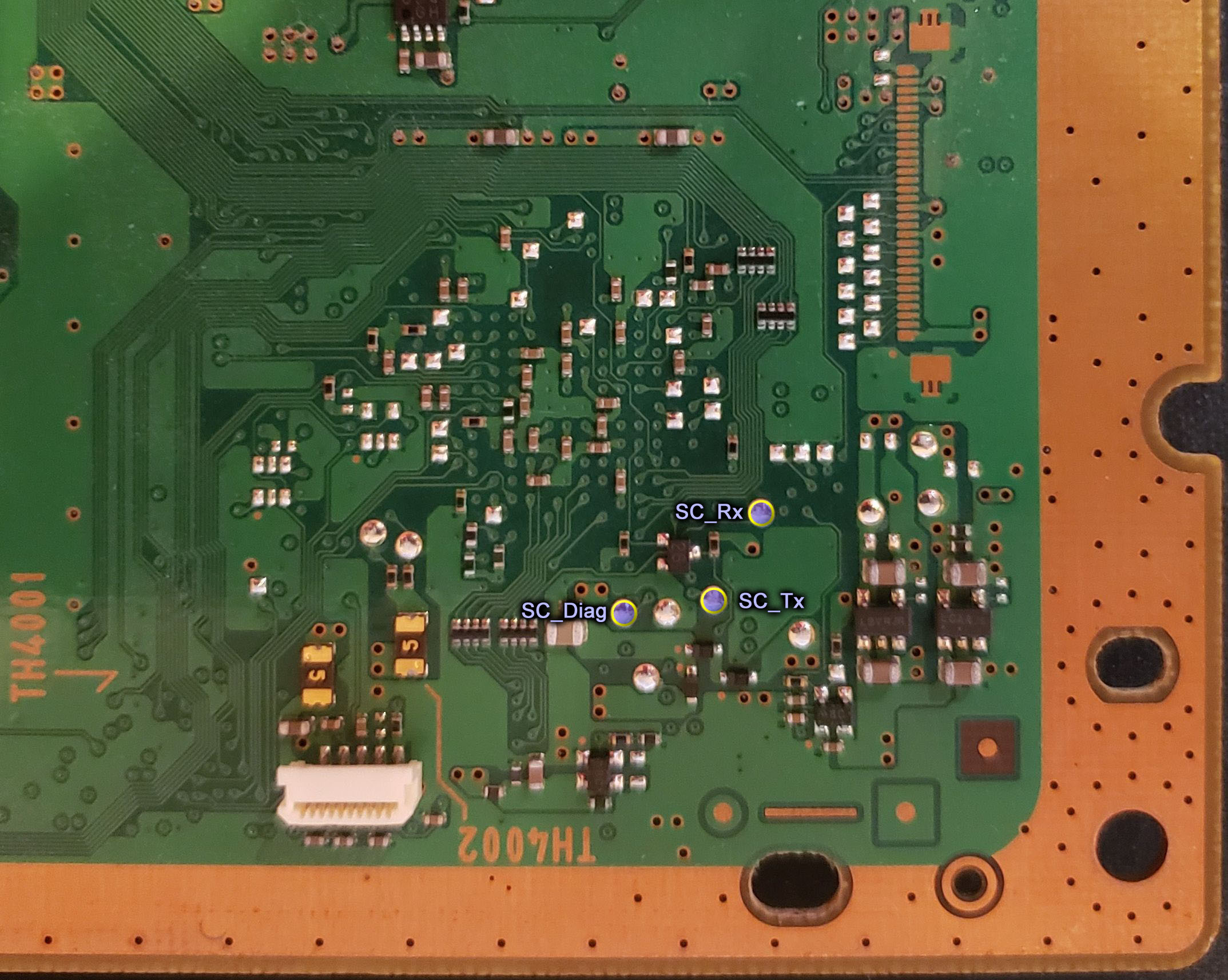
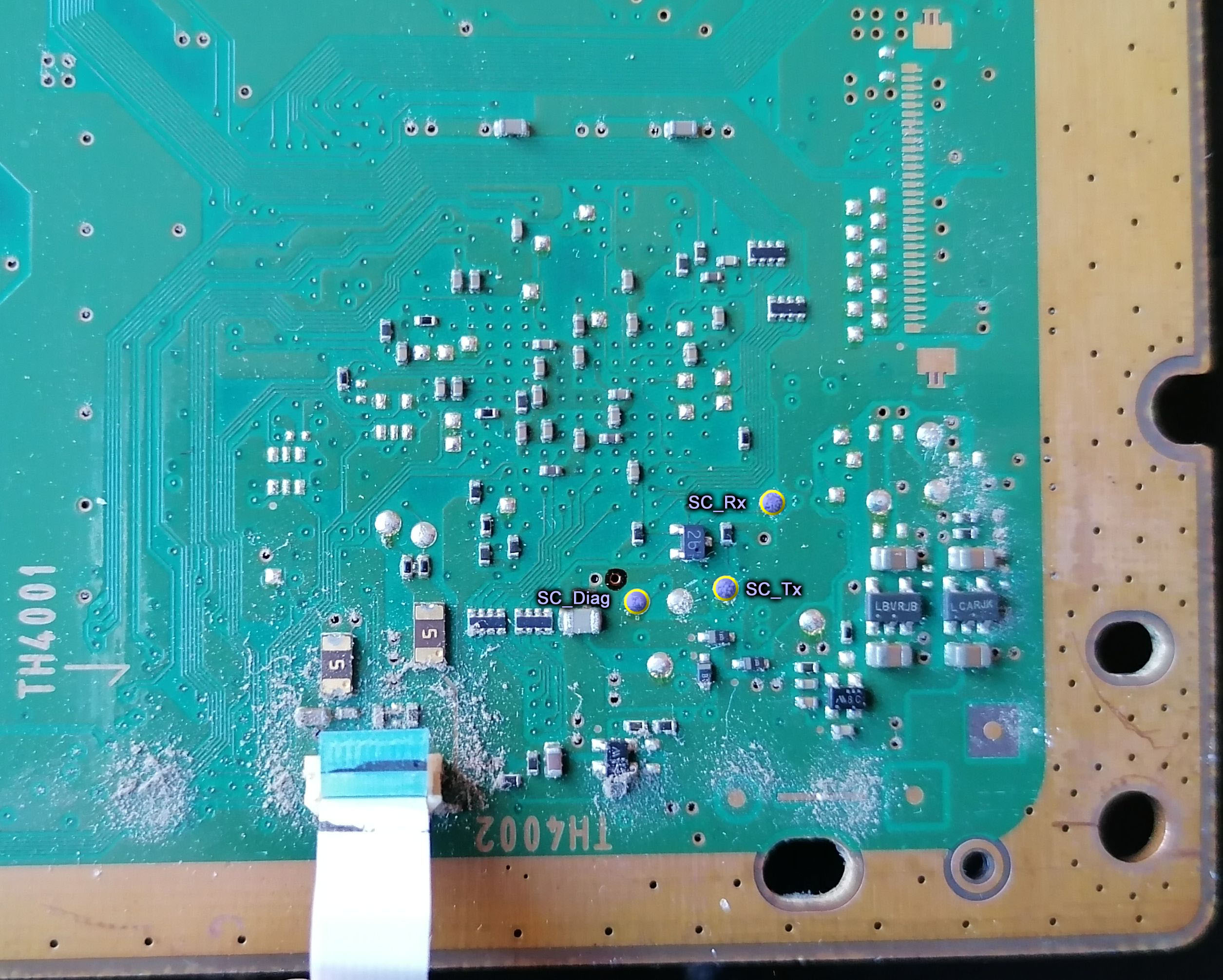
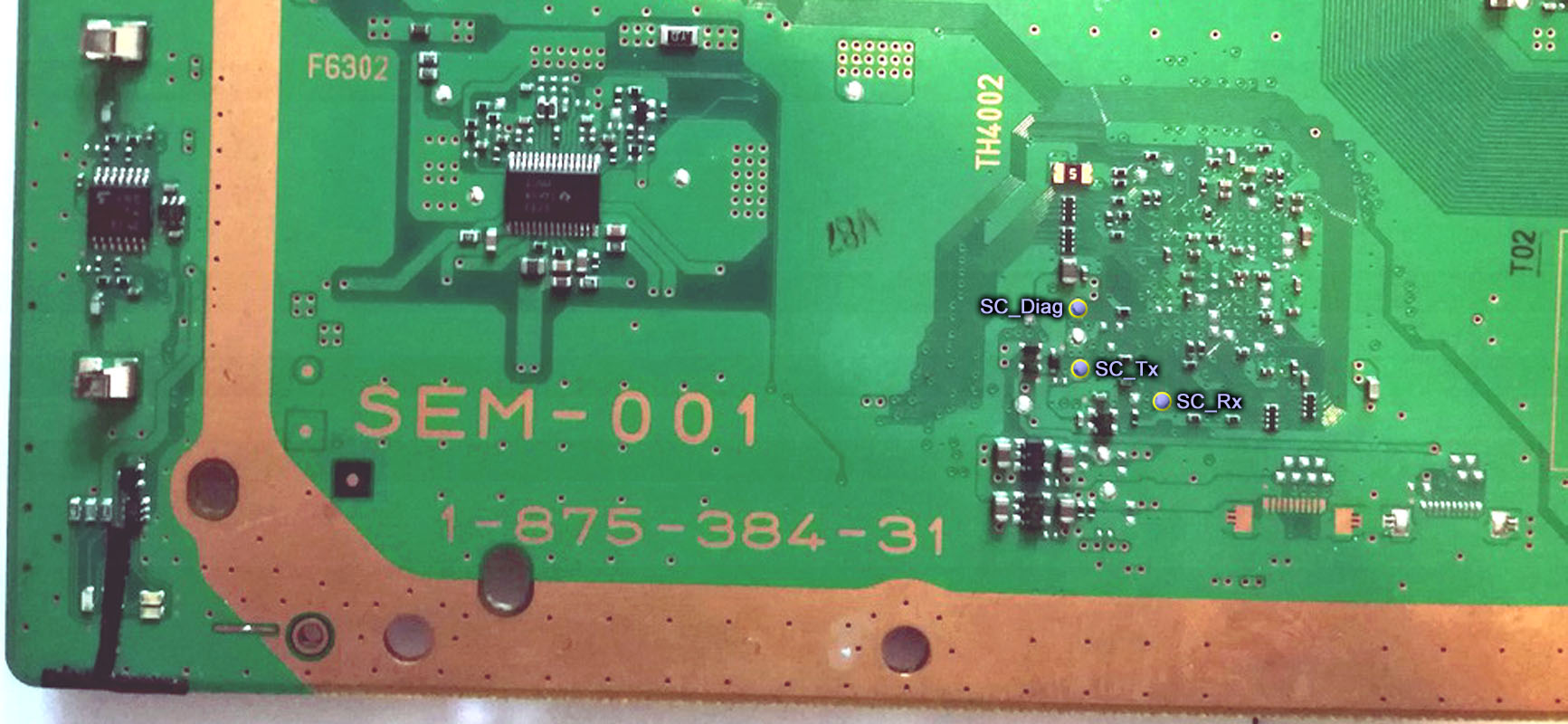
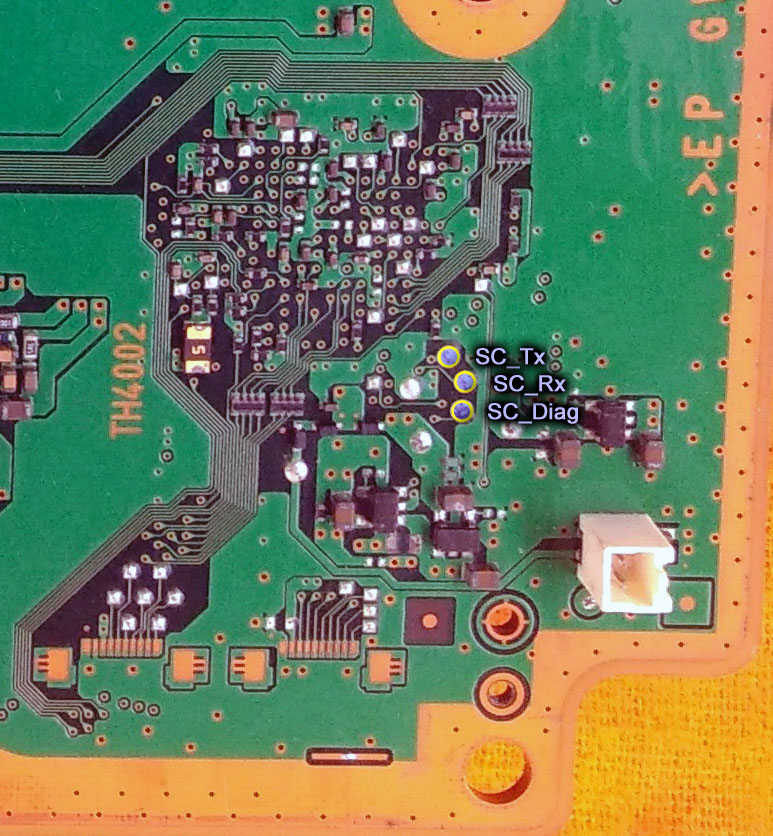
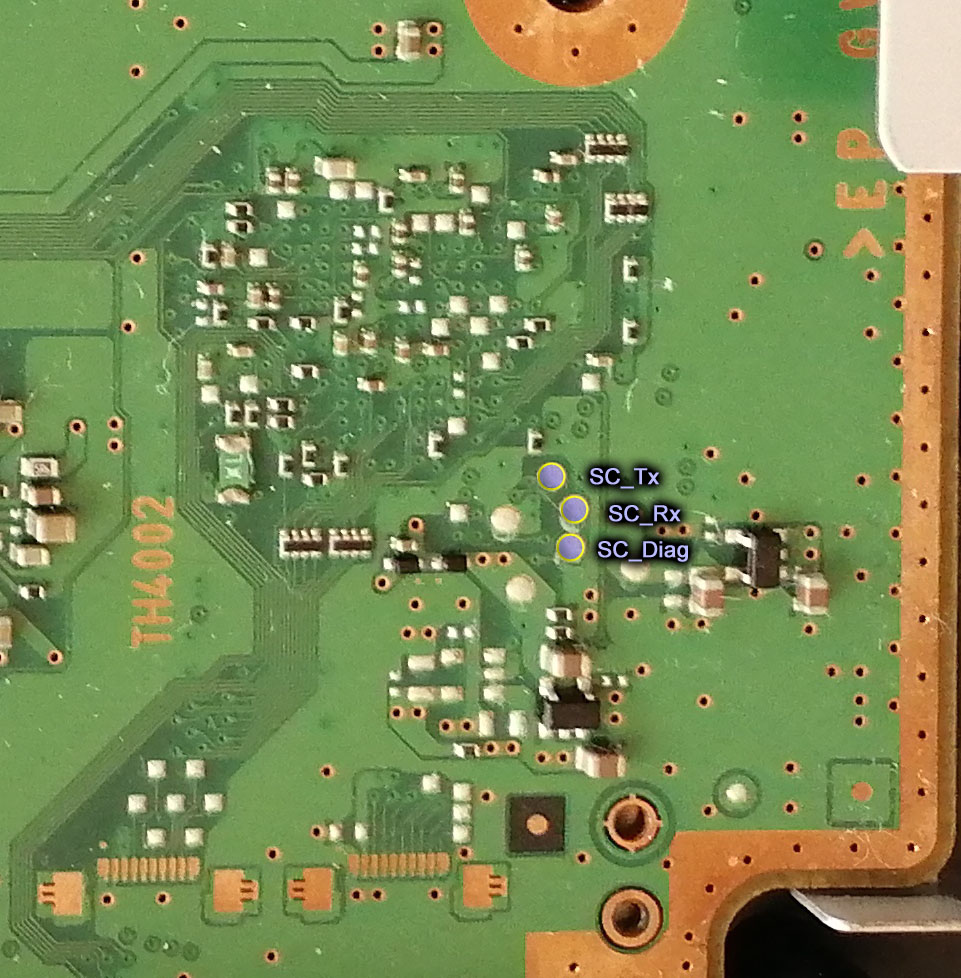
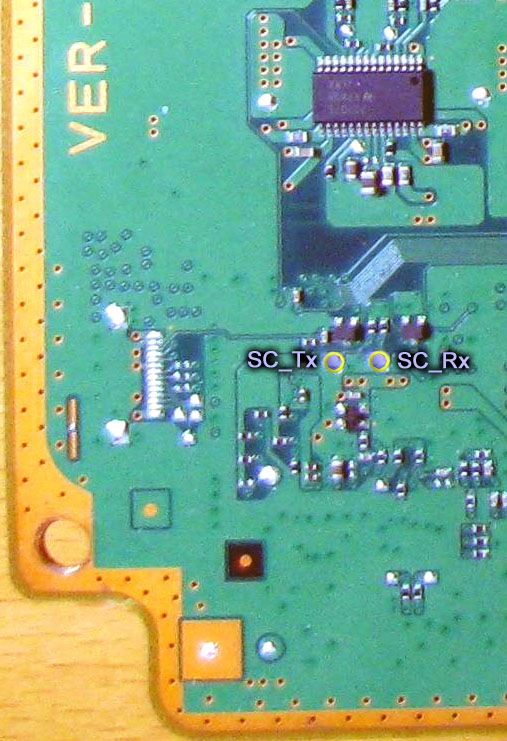
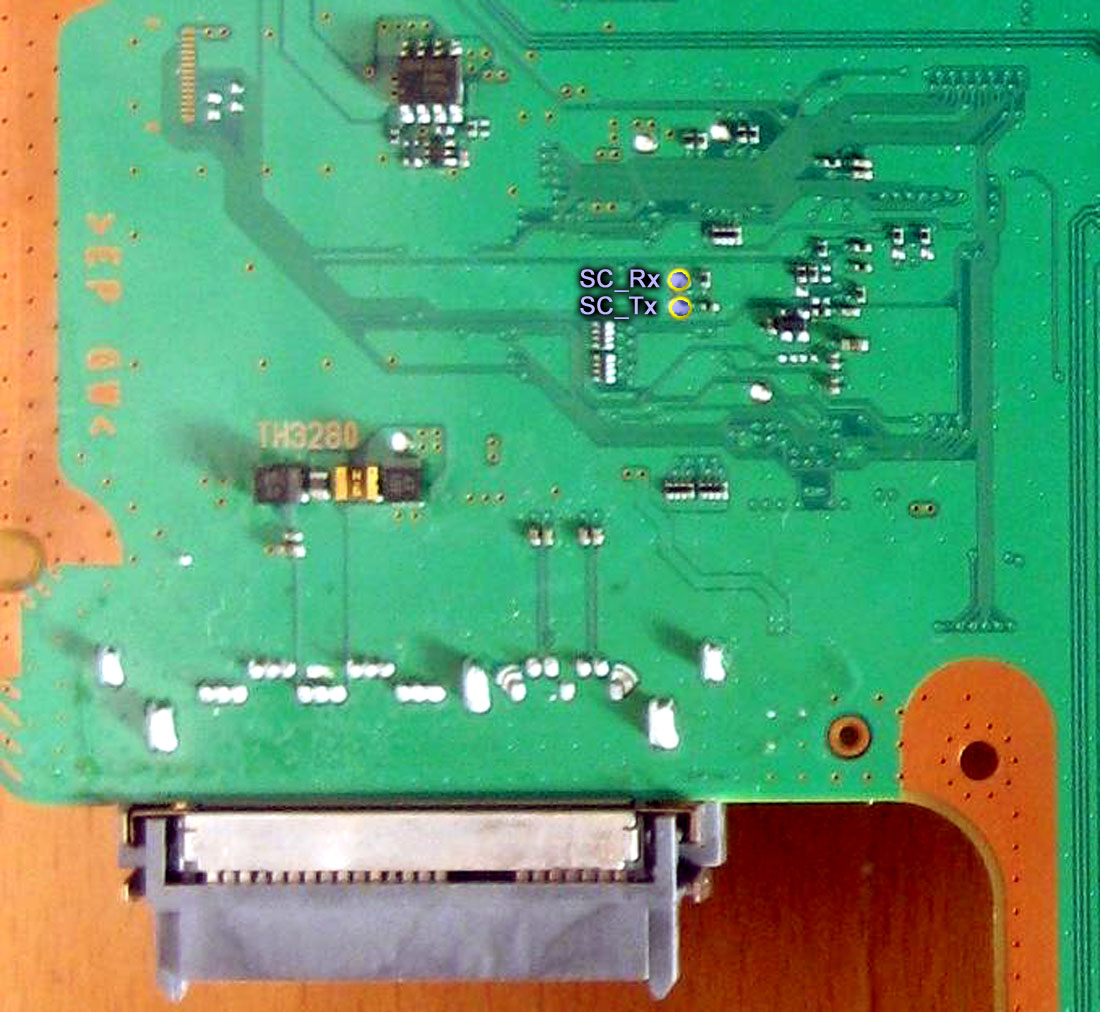
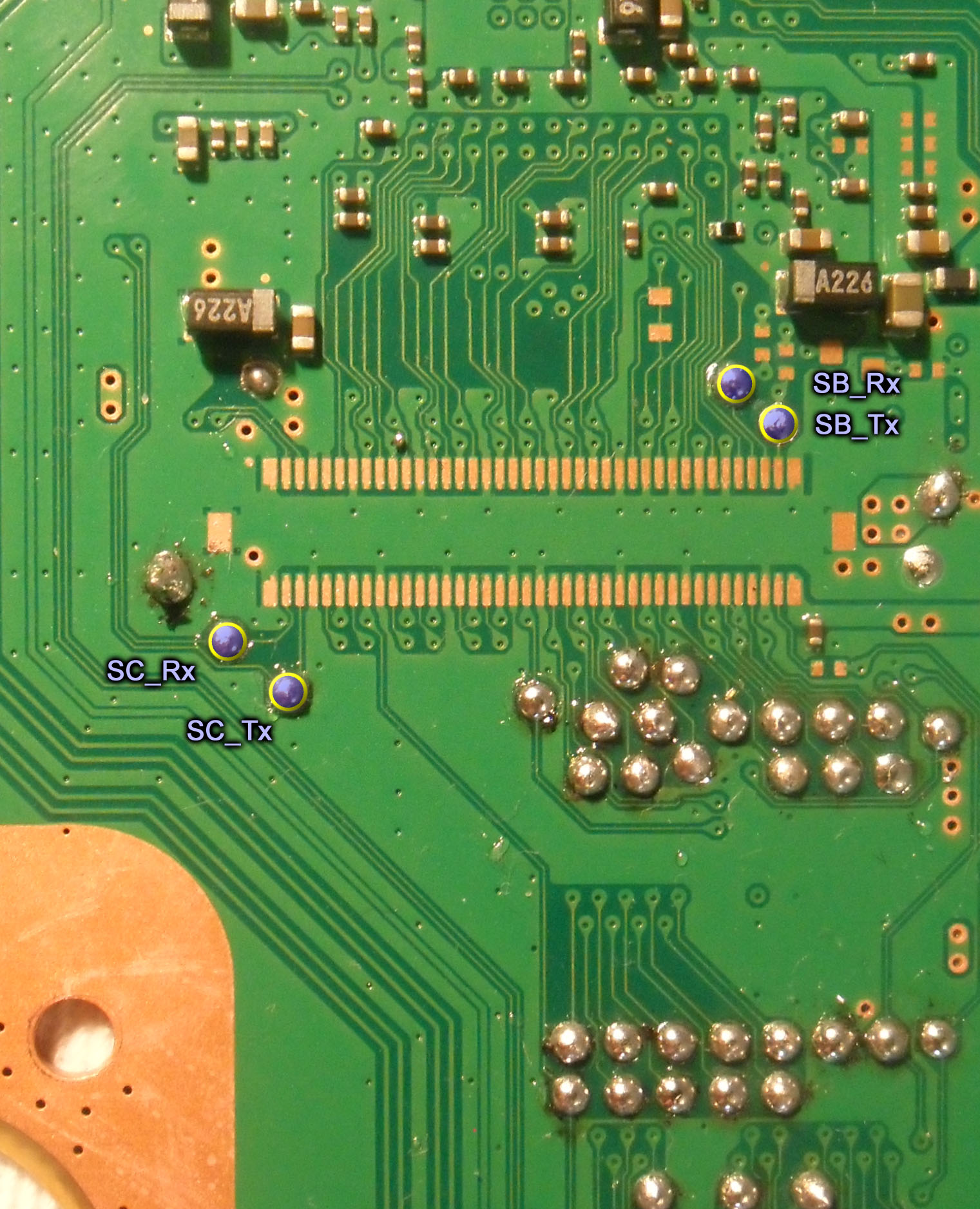
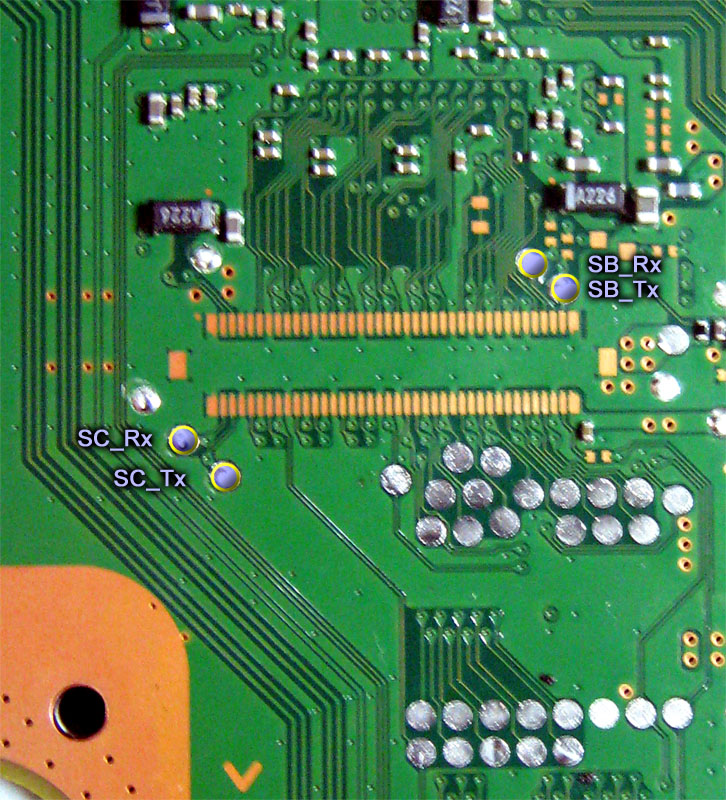
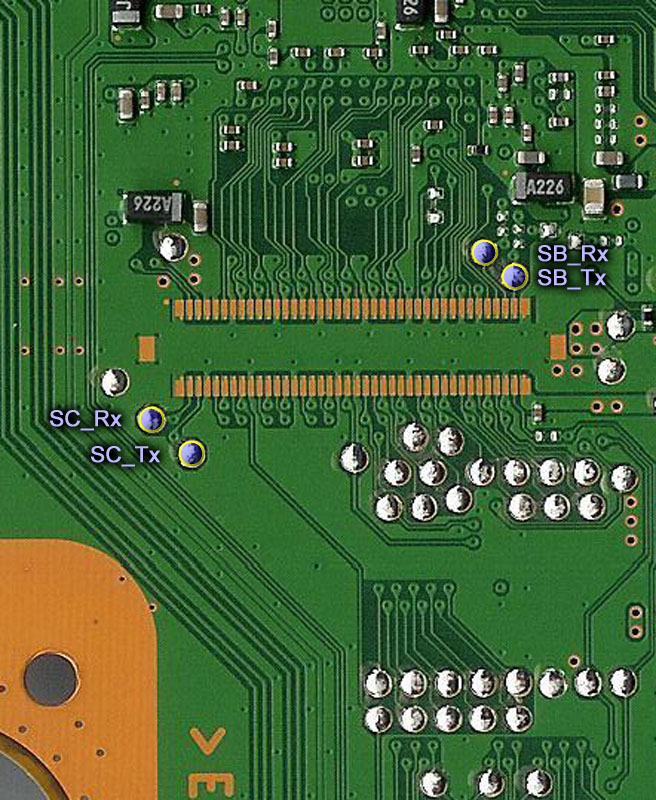
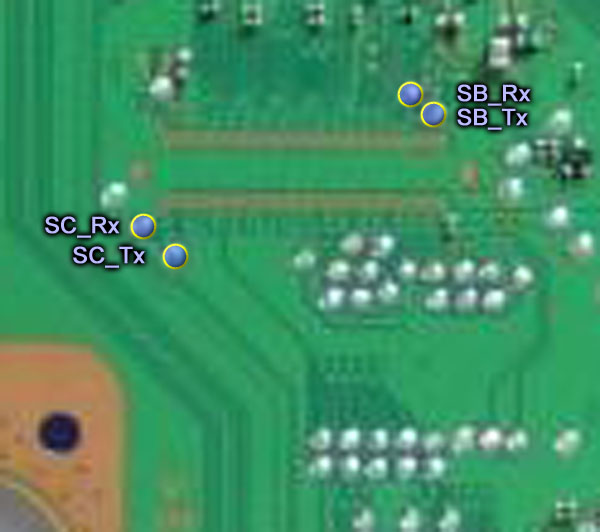
The other day i made some images of the syscon UART testpads and uploaded them to wiki here

Are intended to have the best quality posible, from photos taken from vertical, i included something as reference (usually a corner of the motherboard), i included also the (unpopulated) service connector if possible, all are made with the same style, etc...
Of course you can use them for tutorials or whatever, if made later in the future check the page in wiki because eventually could be replaced by better versions, there are a couple that are "just meh" but i included them to complete the collection, are 12 in total

Layout 1 (COK-001, COK-002)
COK-001_SC_UART_testpads.jpg

COK-002_SC_UART_testpads.jpg

Layout 2 (SEM-001)
SEM-001_SC_UART_testpads.jpg

Layout 3 (DIA-001, DIA-002)
DIA-001_SC_UART_testpads.jpg

DIA-002_SC_UART_testpads.jpg

Layout 4 (VER-001)
VER-001_SC_UART_testpads.jpg

Layout 5 (DYN-001)
DYN-001_SC_UART_testpads.jpg

Layout 6 (SUR-001, JTP-001, JSD-001, KTE-001)
SUR-001_SC_and_SB_UART_testpads.jpg

JTP-001_SC_and_SB_UART_testpads.jpg

JSD-001_SC_and_SB_UART_testpads.jpg

KTE-001_SC_and_SB_UART_testpads.jpg

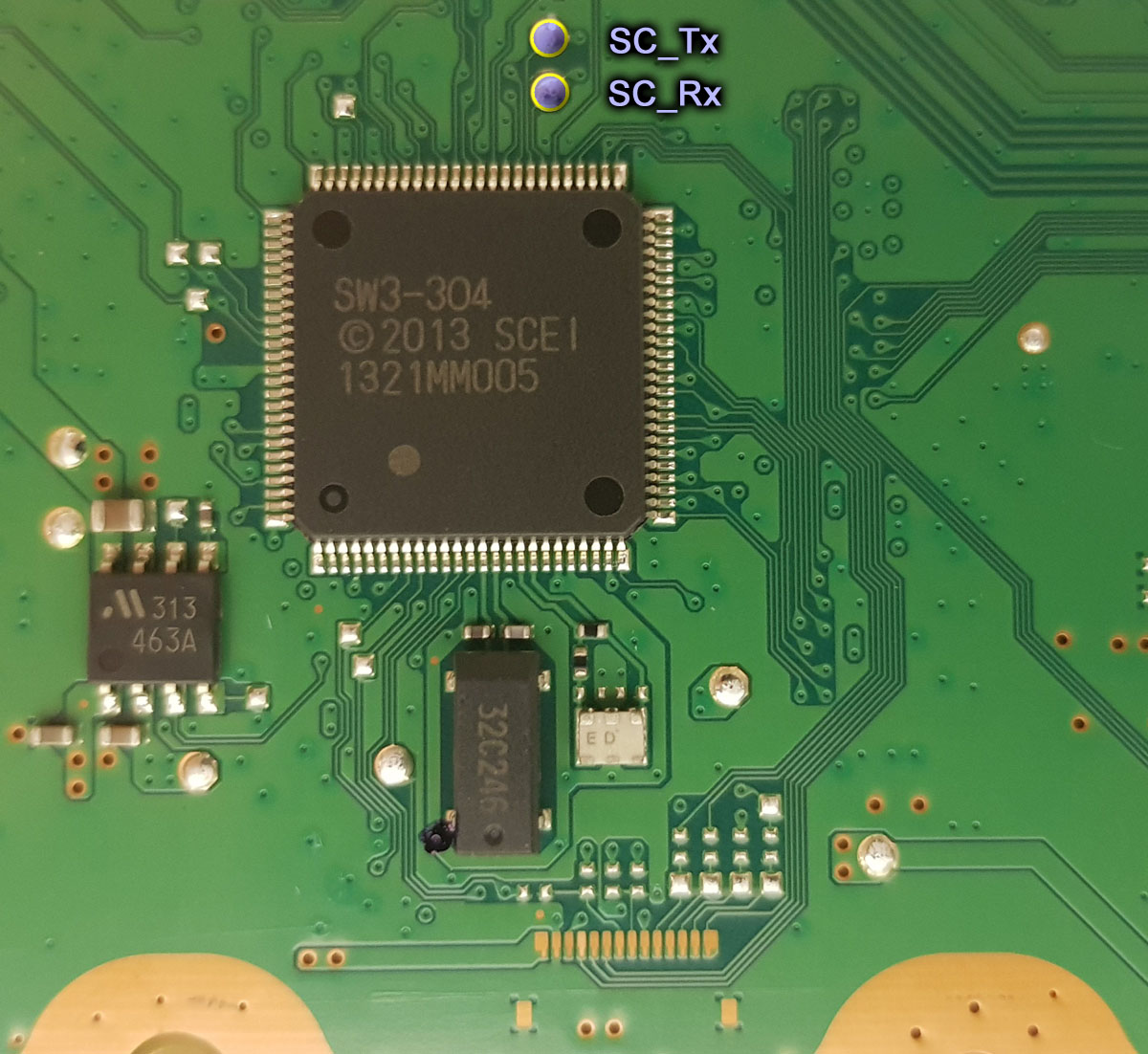
Layout 7 (MSX-001, MPX-001, NPX-001, PPX-001, PQX-001, RTX-001, REX-001)
SW3_SC_UART_testpads.jpg


Edit:
This table could be handy for tutorials too https://www.psdevwiki.com/ps3/Template:Syscon_checksums
There is an area for sherwoods marked as "unknown contents" because i dont know what is inside it, eventually that table could be modifyed a bit but in the meantime you can make an screenshot for tutorials like this:
a9pfdoR.jpg
 
Last edited:
@db260179 @Pacorretaco @vyktormvmpay25 @RIP-Felix etc...
The other day i made some images of the syscon UART testpads and uploaded them to wiki here

Are intended to have the best quality posible, from photos taken from vertical, i included something as reference (usually a corner of the motherboard), i included also the (unpopulated) service connector if possible, all are made with the same style, etc...
Of course you can use them for tutorials or whatever, if made later in the future check the page in wiki because eventually could be replaced by better versions, there are a couple that are "just meh" but i included them to complete the collection, are 12 in total

Layout 1 (COK-001, COK-002)
COK-001_SC_UART_testpads.jpg

COK-002_SC_UART_testpads.jpg

Layout 2 (SEM-001)
SEM-001_SC_UART_testpads.jpg

Layout 3 (DIA-001, DIA-002)
DIA-001_SC_UART_testpads.jpg

DIA-002_SC_UART_testpads.jpg

Layout 4 (VER-001)
VER-001_SC_UART_testpads.jpg

Layout 5 (DYN-001)
DYN-001_SC_UART_testpads.jpg

Layout 6 (SUR-001, JTP-001, JSD-001, KTE-001)
SUR-001_SC_and_SB_UART_testpads.jpg

JTP-001_SC_and_SB_UART_testpads.jpg

JSD-001_SC_and_SB_UART_testpads.jpg

KTE-001_SC_and_SB_UART_testpads.jpg

Layout 7 (MSX-001, MPX-001, NPX-001, PPX-001, PQX-001, RTX-001, REX-001)
SW3_SC_UART_testpads.jpg


Edit:
This table could be handy for tutorials too https://www.psdevwiki.com/ps3/Template:Syscon_checksums
There is an area for sherwoods marked as "unknown contents" because i dont know what is inside it, eventually that table could be modifyed a bit but in the meantime you can make an screenshot for tutorials like this:
a9pfdoR.jpg

Looks good, thanks for this. Will probably replacing mine with these in the guide.

See you have the Southbridge Uart pins aswell, just need to add the COK-001,002 and SEM-001 SB pin outs. The SEM-001 SB pins need a 0.1 ohm resistors to connect to the pins.
 
Looks good, thanks for this. Will probably replacing mine with these in the guide.

See you have the Southbridge Uart pins aswell, just need to add the COK-001,002 and SEM-001 SB pin outs. The SEM-001 SB pins need a 0.1 ohm resistors to connect to the pins.
I added the SB UART testpads only in the images from layout 6 (SUR-001, JTP-001, JSD-001, KTE-001) because are very close to the SC UART testpads so it was convenient to have both in the same image, also i was confident because we was discussing them before here

That long dual-line of solder pads in the images from layout 6 (SUR-001, JTP-001, JSD-001, KTE-001) is the PCI connector. In most of the other images for other motherboards appears the service connector/s and that service connectors handles the SB UART too

The problem is... if the SB UART testpads are located in the images i uploaded, please "paint" on top of them to indicate it to me and i will update the image in wiki
Otherway... if the SB UART tespads are located far away (in other words, outside of the images i uploaded) then we have a problem because it took me lot of time to find some of that images in google (in wiki we dont have good quality photos of a lot of the PS3 motherboards). With this i mean... i cant "expand" the image to show a bigger motherboard area. Also if the SB UART tespads are located far away from the SC UART testpads is better to make 2 different images for them

Btw, as curiosity sake, for alternative solder ponts... in the images where can be seen the service connectors the solder pads of the SB UART pins of that service connector is mapped in wiki
As example... if we take the photo i uploaded of the COK-001... the (unpopulated) service connector is at top-right corner, and the pins needs to be counted "from bottom to top"
Then compare with this pinout of the CN4009
Are pins #18 and #19 of the service connector. In other words... are the 2 lines that goes to the left, then dissapears out of the photo in diagonal north-west direction


Long story short... i dont know where are located the SB UART testpads of the other motherboard models, if can be added to the photos i uploaded advise me and i will update them in wiki
Incase cant be added to the photos i uploded we need to make another collection with different images

 
Last edited:

Similar threads

Back
Top