PS3 Fault finding YLOD with the SYSCON - First steps and Error reporting

@sandungas I wonder if you can use this to start a chart in the dev wiki for the RSX like what is available for the CELL here? It looks like alot of the pins are directly labeled. Also, be sure to credit "Kiaw" for it! Gotta pay our respects to THE MAN!
Is not so easy, there are a bunch of things to consider, but just to mention something that is like a dilemma for me...

I think for sony, the pin "A1" is located in this corner, they uses to add that "copper dot" as a mark always in a corner of all/many components and connectors, and i think we should use the same pin/pad names than sony
0STLcnR.jpg

kyhd8Af.jpg

fKLSH4s.jpg


That said...
Other of the things required to do what you want is to review the info we already have in wiki related with this to either collect it together, update it, replace it, or whatever...
There is a table with the pad layout descriptions here, and a couple of images here
But... the images doesnt matches with the other image posted by botakompong/kiaw (are rotated 180º)
And none of them matches with what i said about wich pad is considered "A1" by sony :rolleyes:
Maybe im wrong and that "copper dot" mark should not be considered A1, if some of you can convince me im open minded, but by now this detail is confusing me and doesnt makes me confident about what we should do

What im going to do by now is to convert the table (what you named a chart is a table in wiki slang) that appears in the RSX talk page to a template (a wiki template is like a "single object" that can be displayed in multiple wiki pages)... and then im going to display it in all the wiki pages for the RSX 90nm, 65nm, 40nm... i mean... if you click in the links for the RSX models here, right now most of that pages are almost empty... but after the change all them are going to display the same template with the pad layout table (a common chart for all them)
And yeah... that table needs to be improved, is needed to add more row cells at the right to add comments, etc...

But this wiki change means that we need to prepare another one for the RSX 28nm (or at least we need to figure how is going to be named, please give me some ideas, the only thing that comes to mind right now is to create one named "RSX pad layout gen 1" (for 90nm, 65nm, 40nm) and "RSX pad layout gen 2" (for 28nm only), but i dont like that names too much :/

It would be better to baptish them with something like "RSX 338 pads layout" and "RSX 314 pads layout" or something like that a bit more explicit
I dont know how many pads have each, that numbers are just an example
Otherway, with the names i suggested "gen 1" and "gen 2" there is going to be many people that is not going to get what means that "gen"
 
Last edited:
Is not so easy, there are a bunch of things to consider, but just to mention something that is like a dilemma for me...

I think for sony, the pin "A1" is located in this corner, they uses to add that "copper dot" as a mark always in a corner of all/many components and connectors, and i think we should use the same pin/pad names than sony
0STLcnR.jpg

kyhd8Af.jpg

fKLSH4s.jpg


That said...
Other of the things required to do what you want is to review the info we already have in wiki related with this to either collect it together, update it, replace it, or whatever...
There is a table with the pad layout descriptions here, and a couple of images here
But... the images doesnt matches with the other image posted by botakompong/kiaw (are rotated 180º)
And none of them matches with what i said about wich pad is considered "A1" by sony :rolleyes:
Maybe im wrong and that "copper dot" mark should not be considered A1, if some of you can convince me im open minded, but by now this detail is confusing me and doesnt makes me confident about what we should do

What im going to do by now is to convert the table (what you named a chart is a table in wiki slang) that appears in the RSX talk page to a template (a wiki template is like a "single object" that can be displayed in multiple wiki pages)... and then im going to display it in all the wiki pages for the RSX 90nm, 65nm, 40nm... i mean... if you click in the links for the RSX models here, right now most of that pages are almost empty... but after the change all them are going to display the same template with the pad layout table (a common chart for all them)
And yeah... that table needs to be improved, is needed to add more row cells at the right to add comments, etc...

But this wiki change means that we need to prepare another one for the RSX 28nm (or at least we need to figure how is going to be named, please give me some ideas, the only thing that comes to mind right now is to create one named "RSX pad layout gen 1" (for 90nm, 65nm, 40nm) and "RSX pad layout gen 2" (for 28nm only), but i dont like that names too much :/

It would be better to baptish them with something like "RSX 338 pads layout" and "RSX 314 pads layout" or something like that a bit more explicit
I dont know how many pads have each, that numbers are just an example
Otherway, with the names i suggested "gen 1" and "gen 2" there is going to be many people that is not going to get what means that "gen"
It looks like my older brother made it from a different angle...lol, sorry if it doesn't fit when rotated 180°, try to look in the mirror, maybe it will fit. at the time of making the schematic maybe my brother saw the reverse side of rsx
 
I think the orientation is this way (board view), with pad A1 located at bottom-left corner
And the tokins at left
Actually, i just realized the image in the service manual have another mark indicating it... note there is a big circle at bottom-left corner in this image
N58rNsn.jpg

And this photo is taken from the correct rotation
kyhd8Af.jpg


Of course... if you want to show the pads when looking at the bottom of RSX is needed to mirror horizontally this images
 
Last edited:
Yes mine as well is pcb layout, posting earlier, nobody realised until now, sorry my mistake. Both they match.
I meant looking at pcb when rsx is out and mirror for rsx.
Have not been working on service yet to give more help, did not manage to mark jtag pads. First I will look if any desoldered rsx is show some values on jtag part, if not won't bother to give any try to connect.
 
Last edited:
After spending lot of time trying to figure the solution of this puzzles (this was tricky) im happy to say all the pad names in wiki and the image made by kiaw are fine... is just all them needs to be rotated in different ways

So... i made 2 new versions of the 2 images in wiki, im going to replace them, prepare the template requested by rip-felix and i will show you the results... and from that point we will see
 
After spending lot of time trying to figure the solution of this puzzles (this was tricky) im happy to say all the pad names in wiki and the image made by kiaw are fine... is just all them needs to be rotated in different ways

So... i made 2 new versions of the 2 images in wiki, im going to replace them, prepare the template requested by rip-felix and i will show you the results... and from that point we will see
AU40 is extra for me.
Looking for jtag pins for any values atm
Probably you will need an rsx layer as well.
aa6a5089667443dca97c044abf34d6ae.jpg
Edit
Good to know all jtag pins on rsx are responsive on diode testing. Not sure on pcb now, wonder what those test points are for.
Tested with an defective 40nm rsx short of FBVDD. With time may check rest of these.
Atm got 2 ps4 for reball (blood)
I may open thread for those hardware problems as well.
Edit 2
Some are so easy ;wanted one to scramble uart for example purposes.
f104f23c716f16e60cb405e413d0e0b5.jpg
 
Last edited:
After spending lot of time trying to figure the solution of this puzzles (this was tricky) im happy to say all the pad names in wiki and the image made by kiaw are fine... is just all them needs to be rotated in different ways

So... i made 2 new versions of the 2 images in wiki, im going to replace them, prepare the template requested by rip-felix and i will show you the results... and from that point we will see
Looking good! That'll be a nice resource. It would be nice to be able to get the rest of the pins filled in with the level of detail the Cell has, but the RSX was never as mainstream or available as the Cell was. I wonder if Kiaw hand filled in those voltage lines with a multimeter one-by-one? How did he figure out the JTAG pin locations? Makes me wonder how he "found" that information. Regardless it gives us more to go on now.

Speaking of more to go on, I made this flowchart to make it easier to troubleshoot power. I only work on COK-001, so this is all you get!
COK-001 PWR FlowChart.png

This should help you conceptualize what's going where and why you really need to make sure each and every one of those voltages are good. You can't just hope the tokens are bad! You gotta check the main 12v, 5v, 3.3v volt rails (Not labeled above), You gotta check the 6 main voltage sources for the chipset (labeled above). I'm sure there's plenty I missed in the flowchart above, I was just going to label the RSX and CPU, but decided to add in the southbridge, HDD, LAN, HDMI, AV, etc. because they show how everything is connected and flows.

Needless to say it took me more than a few hours going back and forth with the schematics, so hopefully people find it useful.
 
It's kind all ps3 like that, just new won't have ic for ps2 games. This is the quickest way to test for shorts or voltage received for short period, uart diagnostic, etc..
 
This explains @squeepts failure to fix this console. He was focusing on the RSX when it was a Cell reball that's needed! And any subsequent frankenstine mod was doomed unless this problem was fixed first!

I was hoping beyond hope that I wouldn't have to start cataloging deep dives on the info from the full errlog, but I think you just broke me. Ugh.
 
Looking good! That'll be a nice resource. It would be nice to be able to get the rest of the pins filled in with the level of detail the Cell has, but the RSX was never as mainstream or available as the Cell was. I wonder if Kiaw hand filled in those voltage lines with a multimeter one-by-one? How did he figure out the JTAG pin locations? Makes me wonder how he "found" that information. Regardless it gives us more to go on now.
Take a look at the related wiki pages now, i think i finished with them by now, this has been mostly a manteinance because there was some problems. Now when you click in the RSX page names here (this is a template displayed in main PS3 page) every page displays the pinout with 4 photos at his right, and a "edit" link at top-right corner, if you click in it takes you to the pinout templates, i decided to name them:
https://www.psdevwiki.com/ps3/Template:RSX_pad_layout_41x41
https://www.psdevwiki.com/ps3/Template:RSX_pad_layout_34x34
As said, this was mostly a manteinance, the best thing of it is now everyone can edit that pinouts and all the other pages are going to display the changes, and there is no need to worry about any other thing, is more satisfactory to work that way for wiki newcomers and everyone in general, the way how is organized now should work good enought and is a re-start point incase someone wants to make more improvements to that pages in the future. In that sense... i wrote some anotations here explaining what i did, why i did, and what i think about that RSX related pages

Speaking of more to go on, I made this flowchart to make it easier to troubleshoot power. I only work on COK-001, so this is all you get!View attachment 33827
This should help you conceptualize what's going where and why you really need to make sure each and every one of those voltages are good. You can't just hope the tokens are bad! You gotta check the main 12v, 5v, 3.3v volt rails (Not labeled above), You gotta check the 6 main voltage sources for the chipset (labeled above). I'm sure there's plenty I missed in the flowchart above, I was just going to label the RSX and CPU, but decided to add in the southbridge, HDD, LAN, HDMI, AV, etc. because they show how everything is connected and flows.

Needless to say it took me more than a few hours going back and forth with the schematics, so hopefully people find it useful.
I added it here, in wiki we can display the same image in multiple pages, in this case im not sure in which others could be used, but the page for the COK-001 is a must (and also a safe bet for me while deciding in which page to display your photo), right now im not sure how many other pages are related to troubleshooting and/or power

Probably you will need an rsx layer as well.
I added it as a sample inside the pinout template, download it again from wiki because i modifyed it, changed color levels, removed distortion, cleaned up, etc... It looks nice :D
https://www.psdevwiki.com/ps3/File:RSX_pad_layout_41x41._RSX_view_Photo.jpg

Btw, do you have some motherboard without the RSX ready to make a good photo of the pad layout ?, i would love to replace the one in the template by other covering this area
uXQUJv1.jpg

- With pin A1 at bottom left

- I would like to include the 2 holes for the heatsink bolts as reference, and because this implyes that are included the data buses, the power lines to tokins, the thermal monitor chip, etc... all that components surrounding the RSX are very helpful

- The photo needs to be made from a vertical perspective... can you attach the camera to that standoff used for the microscope ?, this way the camrea will stay quiet and the autofocus and detail quality is going to be great
 
Last edited:
@sandungas, let's agree to use SONY's schematics as the standard for how to orient the MB. For example...
1600px-COK-001_PWR_FlowChart.png
Notice that's how Sony has the silk screening for "COK-001." This is how it's oriented in the schematics also. This is how all the wiki's have the boards oriented too. This is how the Cell BE is oriented in the wiki (board view)...
CELL-GRID-color-vcc-gnd-spi-pcbview.png
So for the RSX it should Same. You'll notice that the silkscreening in the IHS of the chips themselves is upside down, but that doesn't matter. We want to keep everything oriented by the board/schematic view.

The way you have them in there now they are rotated 90-degrees counter clockwise. So that needs fixed. Also, I suggest you upload Kiaw's pinout (Attached) for the 41x41 layout RSX as is. The 90nm Cell has it's pinout picture there. SO the RSX should have one too and Kiaw's is the most comprehensive! Call it "RSX, padlayout RSX view. Facing RSX A1 marker: Southwest/Bottomleft" This picture can be flipped along the vertical axis to appear as it would on the PCB padlayout (board view) if you're having trouble visualizing it.

I noticed 2 things easy to miss on Kiaw's pinout:
  1. Blue input/output dots are the YC_RC_VDDIO transmit/receive communication lines with the CPU. RX0/TX0, RX1/TX1, RX2/TX2, and RX3 pins are labeled with color matching the corresponding P1-7, N1-7, CP, and CN Pins. Curiously there's no TX3? IDK why. This is where the BitTraining error codes may come in handy. These still need to be entered into the wiki.
  2. He also color coded all other text red for (output) and green for (input). So for example the pin at AR14 labeled "JTAG TMS" this is an input and AY7 is "RSX INT" is an output. These also still need to be entered into the wiki. Perhaps whether it is an input or output should be in the description.
  3. Pins marked in white dots are not connected at all (neither on PCB or RSX) and pins marked with a grey dot are not connected on the PCB.
Lastly, does anyone know what Kiaw meant by "VDDIORW." @botakompong?
 

Attachments

Last edited:
Take a look at this list, scroll down while trying to imagine how every motherboard is rotated in relationsip with the plastic shell
https://www.psdevwiki.com/ps3/Motherboard_Revisions
The rotation of the photos from PS3 slims and superslims is intuitive because the video output connectors are always located at north, and USB connectors at south, this way you can make the mental image that you are located in front of the console while looking at it

But the photos of the fat motherboards are not intuitive because doesnt follows that rule, also the rotation of the DIA-001 and DIA-002 motherboards are specially confusing because there is a detail not much people realize at first sight, in that PS3 models the motherboard is a rectangle but only takes around half of the plastic case, and also the name DIA-001 or DIA-002 is printed "laterally", with this i mean... if you imagine you are located in front of the console you are going to have the names DIA-001 and DIA-002 aligned to a side

So the orientation of that name doesnt means much when we are talking about single components, also the orientation of the texts etched in the RSX and CELL IHS's are just aligned with each other for aestethics reasons, the IHS is symmetrical and can be rotated, but if you remove the IHS you lost that reference
Actually, the only reference at the bottom of the RSX is that triangle in a corner marking pad A1

For me the most intuitive way is to use that marks for the pad A1 reference, always located at bottom left (board view) or bottom-right (component view), not only in RSX but in all other chips, thats why i said is a moral dilemma for me, you are asking me to do something i dont like because is not intuitive for me and confuses me :D
 
Last edited:
Going to look what that VDDIORW is,atm started something https://www.psx-place.com/threads/ps4-hardware-repairs-and-research.34320/
Probably @botakompong wold like to contribute as well .
Edit
I have understend today steps in modification of dumps examples from sandungas . It is realy easy, I have only 2 dia002 boards without cpu/rsx in about 60 scrap boards ,will try test on those dumps.
Probably when i get a good rsx 65nm I will try to swap that syscon to a tested board cok002.
@RIP-Felix I've added a jpeg for edit reference and his page pdf in case someone need to add more referance .
http://s.go.ro/qspw1pl1
http://s.go.ro/2k58hu9v
http://s.go.ro/9qw2770u
http://s.go.ro/91hg0rc0
TX3 comes from BE to RX3? I've tried to follow traces and on rsx pdf it say it is from there.Look at Rsx pdf @ E 13 section of pdf.
Probably VDDIORW is control for Read/Write enable tied to +1,2V YC_RC_VDDIO.
TX3 from cpu is on group AF and AH for cpu pdf.Not sure if im right I get to dizzy looking :)
Ive figured,they come from BE. Start with RSX pdf ,search column of AL look at layout photo AL3 ,AL4 etc,see rsx pdf description they are from BE.
Look at it like this way
COK-001 view1.jpg

3bba86d6b01e0aea562484add5eb8cf2.jpg
 
Last edited:
@sandungas, I'm used to looking at the board view on page 29 of the COK-001 schematic, which has the board orientated with the tokins above the CPU/GPU. I misspoke about the wiki motherboard pics, they indeed have it upside down! I now remember I had to flip the image before making the flowchart.

I still recommend you keep the same orientation with the RSX as the CELL BE is documented in the Wiki. @vyktormvmpay25 is correct, pages 5, 9, and 13 of the COK-001 schematic detail the pinout of the CPU, RSX, and Southbridge respectively. Someone has painstakingly entered the data for the CELL BE, but not the RSX or southbridge yet. It's the more accurate way to do this however.
 
@sandungas, let's agree to use SONY's schematics as the standard for how to orient the MB. For example...
1600px-COK-001_PWR_FlowChart.png
Notice that's how Sony has the silk screening for "COK-001." This is how it's oriented in the schematics also. This is how all the wiki's have the boards oriented too. This is how the Cell BE is oriented in the wiki (board view)...
CELL-GRID-color-vcc-gnd-spi-pcbview.png
So for the RSX it should Same. You'll notice that the silkscreening in the IHS of the chips themselves is upside down, but that doesn't matter. We want to keep everything oriented by the board/schematic view.

The way you have them in there now they are rotated 90-degrees counter clockwise. So that needs fixed. Also, I suggest you upload Kiaw's pinout (Attached) for the 41x41 layout RSX as is. The 90nm Cell has it's pinout picture there. SO the RSX should have one too and Kiaw's is the most comprehensive! Call it "RSX, padlayout RSX view. Facing RSX A1 marker: Southwest/Bottomleft" This picture can be flipped along the vertical axis to appear as it would on the PCB padlayout (board view) if you're having trouble visualizing it.

I noticed 2 things easy to miss on Kiaw's pinout:
  1. Blue input/output dots are the YC_RC_VDDIO transmit/receive communication lines with the CPU. RX0/TX0, RX1/TX1, RX2/TX2, and RX3 pins are labeled with color matching the corresponding P1-7, N1-7, CP, and CN Pins. Curiously there's no TX3? IDK why. This is where the BitTraining error codes may come in handy. These still need to be entered into the wiki.
  2. He also color coded all other text red for (output) and green for (input). So for example the pin at AR14 labeled "JTAG TMS" this is an input and AY7 is "RSX INT" is an output. These also still need to be entered into the wiki. Perhaps whether it is an input or output should be in the description.
  3. Pins marked in white dots are not connected at all (neither on PCB or RSX) and pins marked with a grey dot are not connected on the PCB.
Lastly, does anyone know what Kiaw meant by "VDDIORW." @botakompong?
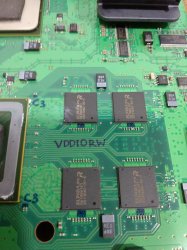
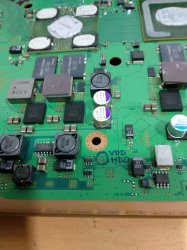
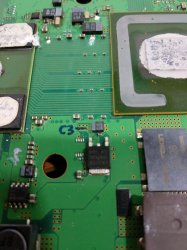
VDDIORW is connected with C3, see the marked picture
16242474026607359227054808250617.jpg
VDD HDD
16242474663846477975588507070187.jpg
voltage source C3
16242513227824600706044266717873.jpg
 
Last edited:
@vyktormvmpay25 is correct, pages 5, 9, and 13 of the COK-001 schematic detail the pinout of the CPU, RSX, and Southbridge respectively. Someone has painstakingly entered the data for the CELL BE, but not the RSX or southbridge yet. It's the more accurate way to do this however.
I see, i cant get the compromise to update all that pad layouts, we are talking around 1500+ pads each but eventually i will keep an eye at the info published and will try it a bit, im busy with other playstation adventures latelly and i would like to do another different things in wiki that i had in my "to do" list since many time ago

What i can do is the same i did with the RSX pad layouts, i mean... is needed to create a template for CELL, and display that template in all the pages of the components that uses the same exact layout
Btw, the CELL pages where appears his pad layouts have a problem, if you click in "edit" in them you are going to realize is duplicated, and thats very bad, because if someone edits one of the pages the other page is going to be outdated
https://www.psdevwiki.com/ps3/CXD2964GB
https://www.psdevwiki.com/ps3/CXD2964AGB

So... i need to do the same trick, a single template for this specific pad layout... but before "merging" them i need to compare them to see if someone edited one of them (but forgot to edit the other)

Also, im going to have the same problem when i was doing the pad layout templates for the RSX... the point is... i need to give them a name, and it should be explicit, and the better way to figure an intuitive name is to know in how many CELL models uses that pad layout
In other words... if we take the complete CELL familly including all the CELL models... how many pad layout templates we have ?, someone knows and can do a resume to help me take this decission about how to name them ?

@sandungas, I'm used to looking at the board view on page 29 of the COK-001 schematic, which has the board orientated with the tokins above the CPU/GPU. I misspoke about the wiki motherboard pics, they indeed have it upside down! I now remember I had to flip the image before making the flowchart.
But dont focus your attention only in the texts printed/etched in the COK-001 motherboard and the service manuals, the RSX pad layout we are discussing is used in lot of PS3 motherboards:
-All retail fats
-All retail slims
-All retail superslims... (except the latests REX-001 and i guess RTX-001 or so with a 28nm RSX)
-All reference tool models (DECR-100 and DECR-1400)
-Probably all the prototypes and non-retail PS3 models

This pad layout is so generic that we should not use as reference the motherboard name printed in it (e.g. the rotation of the name COK-001 doesnt matters)
And the rotation of this motherboard names is not dependant of the rotation of the CELL/RSX/SB/EEGS texts etched in the IHS
The service manual doesnt shows the texts etched in the metal, you need to imagine them to understand what im going to say, if you take a look at the service manual of the COK-001 and you compare it with a real photo you are going to realize all the names etched in the IHS's are inverted
Also, note the location of pad A1 in the image of the service manual in CELL/RSX/SB/EEGS is different, CELL and RSX have pad A1 at north-west corner, but SB and EEGS at north-east corner... but for some magical reason (aesthetics) all the texts in the IHS's are aligned with each others, because this way you can read all them from the same perspective view

In other words... they are rotating the texts etched in the IHS's just for readability reasons, but that rotation is not related with the location of pad A1

I still recommend you keep the same orientation with the RSX as the CELL BE is documented in the Wiki.
I know, this problem with rotations is taken to many other wiki pages, but thats because the PS3 scene started soon in the PS3 lifetime and everybody was documenting stuff from the COK-001, also the only service manuals leaked are for COK-001, COK,002, SEM-001 as far i know so people had a bigger tendence to follow whatever rotation rules sony used in COK-001
But dont worry, the rotation of the custom images doesnt changes the pad names, when i realized about that i was a bit "feeeew so the pad info in wiki is fine and the image made by Kiaw matches"
The only disagreement is the rotations and how confusing or intuitive could be to represent the custom images with different rotations, and i think the reason why i have a different oppinion is because im thinking in all the PS3 models, included superslims
In few words... in my oppinion the most intuitive way is to ignore the rotation of the motherboard names and ignore also the rotation of the names etched in the IHS because both are misleading

The other day i said that we should not use any other reference than the pad A1 marks that appears in the motherboard (and the IHS... or at a corner of the substrate in the superslims RSX models without IHS)
But later i realized there is a detail from the circuit design that can be used for reference, in this image RSX is at north and CELL at south
SqYBmpG.jpg

The data bus in between then is the in/famous FlexIO, related with the bittraining errors
This design is common for all the PS3 models because the bus needs to be very short and are pretty much straight lines
Note the texts rows for the pad names with A,B,C,D,E,F are aligned with each other and im rotating the image to make them readable (rotated in the same way than the texts when you are reading a book)

Now... what im going to say is just theoretical because sony never did it
Lets say... if they wanted to align the texts CELL and RSX with the pad names they would have made this
d2vBsCK.jpg


But they never did it because the rotation of the texts CELL/RSX is not derivated from the pad names, in this case what they did is to rotate the texts 90º in clockwise direction, this way
4iVB3h6.jpg

See how well it fits if we compare it with the photo of a PS3 slim motherboard taken from a perspective with the HDMI connector at north
https://www.psdevwiki.com/ps3/images/a/a0/JSD-001_(top_view).jpg

And for the superslims doesnt makes sense to use the rotation of the texts CELL/RSX as a reference for the pad layout because the RSX doesnt have a IHS and are in diagonal
The RSX text is rotated 45º in clockwise direction
The CELL text is rotated 90º in clockwise direction

rvYFOay.jpg

MSX-001-top.jpg
 
Last edited:
@botakompong, I don't mean to push, but I would still like to know where you are probing for the "Pulse CLK" using your method?

My digital multimeter died the other day (I suspect it's just a fuse), but without a multi-meter I can't test the fuse to be sure...lol. So I took the opportunity to get an analog/digital combo multimeter. Now I can try to use your method. I just need to know where that Pulse CLK is!
 
does anyone know what BE Error (IC1001) and BE or RSX Error (IC1001 or IC2001) mean and how do i fix this these were the errors i got from my syscon the codes ended in 3031 and 4401
 
does anyone know what BE Error (IC1001) and BE or RSX Error (IC1001 or IC2001) mean and how do i fix this these were the errors i got from my syscon the codes ended in 3031 and 4401
Without some more digging we can't be sure.
  1. What model?
  2. How long is the YLOD?
  3. Did you inspect the board for physical damage?
  4. Did you find any shorting caps, open fuses, etc?
  5. Did you confirm proper voltages on the CPU/GPU?
I'm not sure about a 3031, but a 3034 is usually an RSX<-->Cell RX/TX line. There is a break in the data line that connects the two processors. It could be the BGA on either chip (usually the RSX). And it could be the bumps on the die itself or the RSX RAM (although I suspect we'd get a different error if it were the RAM).

But yours is a 3031, which could be a bit different. If your model of PS3 has a mullion SYSCON you'll need to gain internal access, but I would like to see the bringup, errlog and lasterrlog commands. If there is a "BitTraining Error" it could tell us where the problem is. If your console has a Sherwood SYSCON, log in using "auth" (lowercase) and use the bringup and errlog commands.
 
Without some more digging we can't be sure.
  1. What model?
  2. How long is the YLOD?
  3. Did you inspect the board for physical damage?
  4. Did you find any shorting caps, open fuses, etc?
  5. Did you confirm proper voltages on the CPU/GPU?
I'm not sure about a 3031, but a 3034 is usually an RSX<-->Cell RX/TX line. There is a break in the data line that connects the two processors. It could be the BGA on either chip (usually the RSX). And it could be the bumps on the die itself or the RSX RAM (although I suspect we'd get a different error if it were the RAM).

But yours is a 3031, which could be a bit different. If your model of PS3 has a mullion SYSCON you'll need to gain internal access, but I would like to see the bringup, errlog and lasterrlog commands. If there is a "BitTraining Error" it could tell us where the problem is. If your console has a Sherwood SYSCON, log in using "auth" (lowercase) and use the bringup and errlog commands.
1 my ps3 is a CECHG and here is the logs
2 it starts and then turns yellow then beeps and starts blinking red
3 other than knocking a resister off the wifi/bluetooth board i assume i could just replace the board with a new one
4 nothing wrong there other than the wifi board but i don't think that's the issue
5 i don't have a voltmeter so i don't know
and here are the logs
unknown.png


unknown.png

unknown.png
 

Similar threads

Back
Top