PS3 Fault finding YLOD with the SYSCON - First steps and Error reporting

1 my ps3 is a CECHG and here is the logs
2 it starts and then turns yellow then beeps and starts blinking red
3 other than knocking a resister off the wifi/bluetooth board i assume i could just replace the board with a new one
4 nothing wrong there other than the wifi board but i don't think that's the issue
5 i don't have a voltmeter so i don't know
and here are the logs
unknown.png


unknown.png

unknown.png
Sorry, I meant how many seconds does it take from pressing PWR to go "Beep...beep...beep..." Judging by the error alone I would guess 1-2s.

Unfortunately that bringup log didn't capture the error. Turn off the console. Flip rocker to on. Use the bringup command to start the console. The console should start...then YLOD. Hit enter, it should display more information. If not then type lasterrlog. I'm hoping to find that BitTraining error.

Looks like you do have the dreaded 3034 :( This is by far the most common problem with early model PS3's. I'm afraid that means a reflow/reball is needed. A reball may not fix it, because it could be a dead chip, but the only way to know is to reball and see.
 
Sorry, I meant how many seconds does it take from pressing PWR to go "Beep...beep...beep..." Judging by the error alone I would guess 1-2s.

Unfortunately that bringup log didn't capture the error. Turn off the console. Flip rocker to on. Use the bringup command to start the console. The console should start...then YLOD. Hit enter, it should display more information. If not then type lasterrlog. I'm hoping to find that BitTraining error.

Looks like you do have the dreaded 3034 :( This is by far the most common problem with early model PS3's. I'm afraid that means a reflow/reball is needed. A reball may not fix it, because it could be a dead chip, but the only way to know is to reball and see.
about 1-2s before beep beep and here is the new log
unknown.png
 
Ok I've been away for a while, but I'm still alive hehe.
I think that blanket statement may be false. I'm asking you to consider the possability that the SYSCON can know under some circumstances, and that it might actually know what it's talking about when it tells you general area where the problem is coming from.

Imagine this scenario:

SYSCON: "Hey CPU! Ya dead?"
CPU: "Nope, I'm good here."

SYSCON: "Hey SB! Ya dead?"
SB: "Nope, I'm good here."

SYSCON: "Hey RSX! Ya dead?"
RSX: "Nope, I'm good here."

SYSCON: "Hey CPU! Can you hear RSX okay?"
CPU: "Hold on! Hey RSX! Ya dead?"
RSX: "Nope, I can hear you loud and clear."
CPU: "Okay, I'm back. Yup, RSX checked in loud and clear."

SYSCON: "Okay you guys clear to start the bootloader. GG!"

The SYSCON must have comm line with each chip individually and they have lines with each other. By cross referencing who can't communicate with who, the SYSCON is able to narrow the fault down to a general area. I'll wager that most of the time a BGA defect is not going to land in a spot where it can't narrow it down to either the RSX or CPU. That's the kind of information SONY's repair techs want to know. SO I'm sure they enginerred a solution to. Probably a super awesom jig that runs spring pins that run dignostics with a neat GUI that spits out, "replace CPU" or "Replace RSX" or "replace IC6102."

That's not really the point though. The point I was making is that the SYSCON is trying to tell us where the problem is and we are ignoring it and applying a blanket fix, "Reball the RSX anyway." Just like false positive occur from hair driers due to thermomechanical reconnection of BGA defects, I'm sure a reflow on the RSX could look like a success when the CPU is where the BGA defect was and still is! Perhaps this is why some of these reflows/reballs fail soon after! They didn't also reflow the CPU. We're ignoring the bittraing error that's trying to tells us where the problem is. Of course, in the case of RSX errors, that's harder since we don't have the same documentation we have for the Cell.
May or may not. In any case be careful. The CPU is the brain. Telling people to reflow CPUs is a good way to have boards destroyed beyond repair. Sometimes for nothing.
If you notice, I was actually proposing a new kind of test to probe further in these scenarios. Not really a blanket, but I still stand by what I said.
I don't think the "SYSCON" alone can pinpoint the root of the problem in these cases. Because 3034 bittraining is the stage already past the individual checks. It happens between the CPU and RSX (and SB). That's why we are here trying to figure out what to do. Our version of your hypothetical "jig" that probes lots of points of the board. (But notice that this is already going beyond the capabilities of the SYSCON)

Let's take your scenario because it's totally relevant. CPU<~~~>RSX
CPU: Hey RSX, wake up and say hello!
RSX: ....
CPU: I can't hear anyhing...
SYSCON:Ok boys that's enough, power off. (CPU ERR 3034/44xx) pipipi

Now consider this scenario:

CPU: Hey RSX, wake up and say hello!
RSX: Hello!
CPU: I can't hear anyhing...
SYSCON:Ok boys that's enough, power off. (CPU ERR 3034/44xx) pipipi

To the syscon, these 2 scenarios look exactly the same. CPU did not hear valid response from RSX. 3034.
In one case there was nothing to hear, but in the other case the "hello" wasn't heard by the CPU, even though the RSX did its job.
Let's say it was a flexIO ball under the CPU that's not making proper contact. So the "hello" signal was stuck between the board and the CPU. In theory it's possible.
But it's also possible for example that it was a flexIO ball under the RSX. In the same line.
This different scenario would look exactly the same because these 2 balls were supposed to be connected directly. With nothing else in between. So there would be no possible way to know. Nothing to probe.
Just guessing that it's probably the RSX based on statistics. So probably wise to look at it first, also because keeping the CPU alive is #1 priority.

In this hypothetical case, both chips were good inside. Both doing their job. Just a connection problem.
But we know that reality isn't always like this.

It can be that this same ball/trace/pad is actually shorted to GND... Or to a neighboring data line. In this scenario again the CPU cannot hear valid response from the RSX. But the balls are all fine. The data lines are shorted inside the RSX. Even if the core is fine and reads a "healthy" 3 ohms as you say...
Now the funniest thing is that this kind of problem also reacts to even a little heat. And very predictably. Probably more so than a BGA reconnection due to thermal warping. So this is still a never ending story.
Just ask @botakompong .

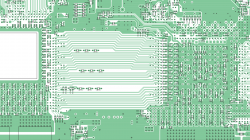
The difference is, that maybe we could test to find this... Without heat. Before reballing.
Beyond what the syscon can see.
Screenshot_20210612-134227~2.png
Take a multimeter and a knife, and scratch and probe those famous data lines for shorts to GND or to each other. There should be no shorts.
And the hypothesis is, that maybe as you say the Syscon can in fact help us narrow down the points with the BitTraining status, and the additional 44xx RSX error... But only with the vertical axis. Not horizontally. Maybe we could map 4421 for example to a specific point or line. Instead of the whole vertical.

 

Attachments

  • kakidatacxd2971~3.jpg
    kakidatacxd2971~3.jpg
    568.9 KB · Views: 148
about 1-2s before beep beep and here is the new log
unknown.png
So this is a good example of what was talking about. BitTraining is a process that checks that data is being sent and received by various I/O devices. If there is a problem it tells you where the problem originated. @AC1101, this is part of an ongoing discussion we've been having and your error is a good example. So the following my be TMI for you, but this me meant more as a response to @Pacorretaco.

Lets break down the BitTraining error. BE is referring to the CELL BE CPU and RRAC is referring to the RAMBUS RRAC FlexIO. The FlexIO is the interconnect between the CPU and GPU (Cell BE <--> RSX). These are the data lines you can see between the CPU and GPU in the picture below...
32549-25a3a41f8b09b58b7eb0f6f4212a3964.jpg

Those FlexIO lines connect to BGA pads on both the RSX and CPU. RX0 means there was a problem on the Receive line of the CPU's FlexIO, which is electrically identical to the RSX's TX0 pad and the trace itself. So @Pacorretaco, I agree that it's impossible to know if the break occurred on the trace, CPU RX0 Pad, or RSX TX0 Pad. I'm guessing "GLOBAL1:RX_STATUS" just means it couldn't verify the data it sent from the RSX to the CELL BE. So either a defect occurred on the BGA under the RX0 pads of the Cell (less likely), it occurred on the TX0 pads of the RSX (most likely), or there is a break in the traces connecting them (least likely, but easy to rule out).

Let's take your scenario because it's totally relevant. CPU<~~~>RSX
CPU: Hey RSX, wake up and say hello!
RSX: ....
CPU: I can't hear anyhing...
SYSCON:Ok boys that's enough, power off. (CPU ERR 3034/44xx) pipipi

Now consider this scenario:

CPU: Hey RSX, wake up and say hello!
RSX: Hello!
CPU: I can't hear anyhing...
SYSCON:Ok boys that's enough, power off. (CPU ERR 3034/44xx) pipipi

To the syscon, these 2 scenarios look exactly the same...
I'm pretty sure if there were a problem with the voltages you'd get another error entirely. In other words, in the first scenario where the RSX does not power up at all, it would most likely have triggered a different error and never proceeded to BitTraining.

In the second scenario, the Power Sequence checks all the voltages. If they pass, then it's safe to proceed to BitTraining. From here there are 2 possibilities.
  1. The RSX never receives the Data package from the CPU & reports this to the SYSCON (resulting in a RSX BitTraining error).
  2. The CPU never receives the Data package from the RSX & reports this to the SYSCON (resulting in a BE BitTraining error).
In either scenario, you cannot know if the break is on the RSX or CELL side, or the trace itself. Therefore, I would classify a 3034 as a I/O communication error, most likely caused by an open circuit in the Data lines connecting the ICs. The associated BitTraining error can pinpoint the general area where, but the solution is usually the same. Reball or replace the RSX, because it's more often the culprit. It that doesn't work, reball the CPU. And if that still doesn't work, then you start to wonder about the Bumps.

About reflows. When the chip is off the board during a reball, you can measure the resistance across all the pins to determine if the bumps are good. The problem is that doing so for about 1500 pins is not feasible. Not without a pogo pin testing jig, which are expensive to create. You can check the main voltage rails to get a sense of the electromigration damage and whether it's worth reballing, replacing, or calling it dead. With a reflow, you don't get that feedback. So if the RSX was on it's last leg anyway, you might get the console fail in 6 months simply because the chip was close to death, and it had nothing to do with a reflow being inferior to a reball. You won't know until you remove the RSX and ohm test it. On the other hand, it's easier. If you're just looking to retrieve your saves, I would say try the pressure test or heat test. That often works for a few boot ups.

A reflow is a lot more trouble to go through. So I question the motives. Is it really to enjoy the console for a lasting fix? If so Reball. If it's to sell on ebay to some unsuspecting sap, then a reflow makes diabolical sense. Let's be honest, that's what alot of reflows are! However, it's just possable to get a reflow special to last you 6 months to 1 year. That might be enough time to save up an buy another console. So I can understand why people are looking for a stop gap solution, instead of spending it on a dubious reballer, they can save up for a new console.
 
Last edited:
In the second scenario, the Power Sequence checks all the voltages. If they pass, then it's safe to proceed to BitTraining
That's an interesting thought... My original ps3 has a less than stellar recap job, but it actually does make it into the bit training stage. But according to this, then it's possible that it would have been good enough to at least start booting (if not for the 3034 error indicating the need for reballing also).
 
That's an interesting thought... My original ps3 has a less than stellar recap job, but it actually does make it into the bit training stage. But according to this, then it's possible that it would have been good enough to at least start booting (if not for the 3034 error indicating the need for reballing also).
I think it's just checking voltage reference pins to see if they are within voltage paramters. I doubt it can't tell if there's adequate decoupling/filtering. So long at the voltage is within parameters for as long as the POST check looks for it, then it'll pass. Of course if there's not adequate filtering/decoupling it'll trigger errors. I'm guessing this is the difference between the 1002 error and a 3004. 3004 is bad enough to get caught in POST, which would trigger an Instant YLOD. If it isn't caught in POST, but is bad enough to cause a Non-Instant, Delayed, Random, or Intense YLOD, it'll trigger a 1002 (for VDDC). Perhaps different errors trigger for voltages other than VDDC. I haven't intentionally sabotaged them to find out...

Actually that might be an interesting experiment - intentionally lifting various voltages going into the RSX/CELL just to see which SYSCON error it triggers (if any).
 
Actually that might be an interesting experiment - intentionally lifting various voltages going into the RSX/CELL just to see which SYSCON error it triggers
Yeah, that would be! I know I did something similar for the tokins a great many pages back, but only for tokins, and I didn't record the error codes, just the scope values. If I ever get my cecha01 out of storage again, I might give that a try...
 
So I've got a CECHC02 cok002 that is giving me error 3001
This board has no physical damage and is fairly clean inside
Now most posts point to it being a lack of 12v indicating bad supply right?

I've tested with a known good supply and changed nothing, I get 3.3v in standby, I get 12v when it attempts to turn on.
I believe I have tested all fuses and zero ohm resistors on the board, I cannot find any shorted caps, or shorted lines coming out of ICs so I am stuck as to where to move with it.

Anybody have a suggestion on this one?
 
So I've got a CECHC02 cok002 that is giving me error 3001
This board has no physical damage and is fairly clean inside
Now most posts point to it being a lack of 12v indicating bad supply right?

I've tested with a known good supply and changed nothing, I get 3.3v in standby, I get 12v when it attempts to turn on.
I believe I have tested all fuses and zero ohm resistors on the board, I cannot find any shorted caps, or shorted lines coming out of ICs so I am stuck as to where to move with it.

Anybody have a suggestion on this one?
Value for cpu and rsx for power line resistance right from nec tokins and gnd. Seems something like not power is supplied for cpu or short cpu not sure, check 5v line as well, something is not powered. Or se any voltage coming for cpu/rsx on nec as well.
 
So I've got a CECHC02 cok002 that is giving me error 3001
This board has no physical damage and is fairly clean inside
Now most posts point to it being a lack of 12v indicating bad supply right?

I've tested with a known good supply and changed nothing, I get 3.3v in standby, I get 12v when it attempts to turn on.
I believe I have tested all fuses and zero ohm resistors on the board, I cannot find any shorted caps, or shorted lines coming out of ICs so I am stuck as to where to move with it.

Anybody have a suggestion on this one?
Check the resistance between the 12v prongs.
Should rise to around 8 kohms.
If it reads megaohms or open circuit, then that would be the problem.

Missing 12v will always cause error 3001. I don't know what other scenarios can trigger this error. I assume this is an almost "instant" YLOD? (Under 1 second) and fan obviously is not spinning.

I found this error when the 12v relay inside the PSU isn't clicking on. Or when there is no PSU attached. But if you say you "are" getting 12v... I don't know. Sounds something strange. More readings are needed
 
So I've got a CECHC02 cok002 that is giving me error 3001
This board has no physical damage and is fairly clean inside
Now most posts point to it being a lack of 12v indicating bad supply right?

I've tested with a known good supply and changed nothing, I get 3.3v in standby, I get 12v when it attempts to turn on.
I believe I have tested all fuses and zero ohm resistors on the board, I cannot find any shorted caps, or shorted lines coming out of ICs so I am stuck as to where to move with it.

Anybody have a suggestion on this one?
What was the Power Sequence State of the error (the previous 2 numbers in the error code. Eg. 40 3001 or 01 3001)? Were there any other errors in the errorlog? Did you do a whole lot of power up/YLOD testing? In other words, would you have likely filled the 32 errorlog slots with new 3001 errors? I'm curious if there were any old errors that could give us some history on the console.
 
I would be under the assumption something isn't being powered somehow.
When I power it on I do get the fan briefly spin up.
I can confirm that 5v reaches the board.

CELL resistance is 2.9ohms and does not get power during powerup
RSX resistance is 3.1ohms and does not get power during powerup

The 12v pins have a rising resistance in the kohms

It's likely that I may have written over the log now, however there were many other entries of the same error A0003001 before I got this machine. On my first power up when I got it, I had the error A0603040 appear, but I have not got that again.

So to confirm my current error I'm getting is A0003001

Edit: I removed all the fuses to see if there would be a change in the error code, removing the fuses from the board results in A0022110, which is an error I would expect from a blown fuse, this is making me think that one of these lines may have an active short that only appears when powered, will check further.
 
Last edited:
Well it seems fine for now with cell/rsx.
Not home to look at this, one of mosfet is shorted somehow, either IOR, there should be a spike on any of these, short could be after power line when 12 v is reduced/controlled in first stages. Will have to look late in night if you don't find it.
Another advice is to compare values of parts with another board if you have any, if a broken part needed is faster to take from scrap boards.
Last resort would be to remove necs from board and exchange by tantal. Last test.
 
I would be under the assumption something isn't being powered somehow.
When I power it on I do get the fan briefly spin up.
I can confirm that 5v reaches the board.

CELL resistance is 2.9ohms and does not get power during powerup
RSX resistance is 3.1ohms and does not get power during powerup

The 12v pins have a rising resistance in the kohms

It's likely that I may have written over the log now, however there were many other entries of the same error A0003001 before I got this machine. On my first power up when I got it, I had the error A0603040 appear, but I have not got that again.

So to confirm my current error I'm getting is A0003001

Edit: I removed all the fuses to see if there would be a change in the error code, removing the fuses from the board results in A0022110, which is an error I would expect from a blown fuse, this is making me think that one of these lines may have an active short that only appears when powered, will check further.

You could have two possible issues:

1. Bad smd capacitor on the 12v line - With a multimeter do a short to ground test (continuity mode) on the caps on the 12v line, look at the motherboard schematics. Its time consuming but the easiest way to identify the fault area.
2. The motherboard voltage lines have shorted internally - I had a COK-002 board that had this fault, no fix for this im afraid.

But do my first suggestion, if no caps have a short work on the resistors etc. Also check the CELL and RSX values, especially the caps around them, will indicate a fault or shorted VRAMS.

As a tip, when doing the short test, if there is a short, the reading will get lesser as you move further away from it, so find the area with the least resistance on the gnd points on each smd component. Probing both sides of a cap will beep if shorted.

Your other error indicates a flash chip issue, check that area for missing components its possible a cap has fallen off causing your power fail message, compare with COK-002 schematics.
 
Last edited:
I just did a NEC/tokin recap on a COK-001 and now I'm getting 3001 as well. I'm looking at the schematic, but I can't seem to find the 12V line. Which page?

https://www.dexsilicium.com/Sony_Playstation3_Service_Manual.pdf

You could have two possible issues:

1. Bad smd capacitor on the 12v line - With a multimeter do a short to ground test (continuity mode) on the caps on the 12v line, look at the motherboard schematics. Its time consuming but the easiest way to identify the fault area.
2. The motherboard voltage lines have shorted internally - I had a COK-002 board that had this fault, no fix for this im afraid.

But do my first suggestion, if no caps have a short work on the resistors etc. Also check the CELL and RSX values, especially the caps around them, will indicate a fault or shorted VRAMS.

As a tip, when doing the short test, if there is a short, the reading will get lesser as you move further away from it, so find the area with the least resistance on the gnd points on each smd component. Probing both sides of a cap will beep if shorted.

Your other error indicates a flash chip issue, check that area for missing components its possible a cap has fallen off causing your power fail message, compare with COK-002 schematics.
 
Last edited:
Can't seem to edit a post so I have to post again. Turns out 3001 was happening because I just had the PSU beside the board while I was pulling errors off of it. 12V was not hooked up. DOH. Hope this helps the above 3001 person.

Now I'm getting 3004. Any test points for COK-001?
 
3004 is a NEC tokin error. When there is too little capacitance and the noise is too high, it triggers a 3004 power failure. Try double checking for cold solder joints and be sure the solder flowed correctly. That ground plane is a real heat sink, so if you're iron can't power through it and give you nice shiny round solder blobs, you may need to add hot air in the area to help.

Just keep in mind that the heat can hide BGA faults until the strain relaxes. So expect false positives.
 
Awesome thanks for the tips. I replaced all the capacitors before I got my UART reader so there are no NEC capacitors left. I just went through and resoldered both sides, but I'm still getting 3004. My understanding is 3004 is specifically for the RSX, correct?

3004 is a NEC tokin error. When there is too little capacitance and the noise is too high, it triggers a 3004 power failure. Try double checking for cold solder joints and be sure the solder flowed correctly. That ground plane is a real heat sink, so if you're iron can't power through it and give you nice shiny round solder blobs, you may need to add hot air in the area to help.

Just keep in mind that the heat can hide BGA faults until the strain relaxes. So expect false positives.
 
Last edited by a moderator:
Awesome thanks for the tips. I replaced all the capacitors before I got my UART reader so there are no NEC capacitors left. I just went through and resoldered both sides, but I'm still getting 3004. My understanding is 3004 is specifically for the RSX, correct?
No, this is the strange part. The CPU tokins have a great deal of influence on the Noise that bleeds over to the RSX side. So both sides are important, even though they are electrically independent.

If you're still getting 3004, then I the capacitors you chose might be sus. What are you using? Model number so I can lookup ESR would be helpful. Also, does you eerlog show any 1002's?
 
Not enough amps? Could you add photos or tell what wires are did you use to power both ic not sure if one or both, seems power fail.
About the bridge made to give power for ic.
 

Similar threads

Back
Top