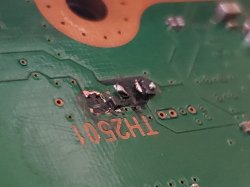
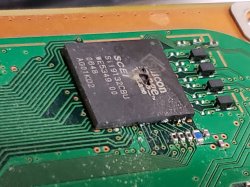
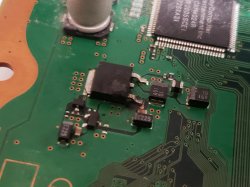
She died on Journey, she was under evilnat 4.88 with webman on fan control the picture froze up then she goes YLOD at 68°....
I put everything back together and she booted, u were right about cell, the PS3 was delided by NSC and I did not even tried with an IHS after my reflow, I was thinking that YLOD could not be due to overheat so quick from cold boot but then I put my finger on Cell to act like an IHS for checking the overheat u stated and ho boy this thing heat up quick !
I'm so glad she's back on track for now... Even if I don't know for how many time again, even if I don't have this console since a long time (1 month) I've learn so many thing thanks to her that I won't let her go... Should I look for someone about a reballing on my RSX then judging by the BGA err related ? I don't feel confident on my flux-reflow work...
So the error 00 is the most recent one, good to know for the future (still had 4 of them to repair)
Thanks again to all the PSX forum for sharing all of your knowledge, it really helped me a lot, even If I'm new here, I was reading all your stuff since the last month ^^
Hi everyone. I have a CECHE PS3 with YLOD, and the NEC/Tokins from the RSX on the back side of the board were changed, and after following this tutorial for reading the SysCon Chip I get all of this:
If I understand correctly the error code is A0093003, which means problem with Cell chip right?
This console hasn't been reflowed or rebailled yet, should I do that first? Or should I first try changing the NEC/Tokins from the Cell too?
As a clarification, the PSU (APS226) is currently not delivering the 12V, so instead I have the 12V rail connected to a Lab Power Supply, and the 5pin connector is connected to the original PS3 PSU since it delivers the 5V correctly and detects the Power On switch.
I hope that I was clear, beacuse english is not my main language.
Regards and thanks to anyone that at least read me
Hi everyone. I have a CECHE PS3 with YLOD, and the NEC/Tokins from the RSX on the back side of the board were changed, and after following this tutorial for reading the SysCon Chip I get all of this:
If I understand correctly the error code is A0093003, which means problem with Cell chip right?
This console hasn't been reflowed or rebailled yet, should I do that first? Or should I first try changing the NEC/Tokins from the Cell too?
As a clarification, the PSU (APS226) is currently not delivering the 12V, so instead I have the 12V rail connected to a Lab Power Supply, and the 5pin connector is connected to the original PS3 PSU since it delivers the 5V correctly and detects the Power On switch.
I hope that I was clear, beacuse english is not my main language.
Regards and thanks to anyone that at least read me
Yes, sounds like a CPU power issue. Check the voltages coming to it.
It is possible that your "lab psu" can't keep up. Remember the APS 227 is 32Amps.
It could be a short in the CPU vcore, check resistance there too. Anything from the PSU to the CPU could be responsible for this error.
And... yes this includes the NEC Tokin capacitors on the CPU side.
But it is rare to have this error as a result of a tokin fault if the tokins are untouched. Normally other errors appear first, instead of suddenly 3003.
So don't go straight to remove tokins yet, even if you have more excuses to do so than 99% of the newbies that do this hehehe.
Even if reballing is sometimes not enough... You need to be ready for these things, especially if you somehow are ending up with many boards instead of just one or two.
Unfortunately it's no secret that RSX problems are the most common issue with these machines by far. And it takes confident BGA rework to deal with them.
All would be fine if only people's expectations were realistic hehehe.
Thanks for your reply and the time you can give me.
But he, guess who got an GLOD right now with the same PS3?
sigh. Since this is not a "fatal error" does syscon register something ? I mean, I can boot her up & the controller can connect but no picture nor sound.I can even browse on XMB since I can shut her off with the controller
GLOD happened right after I clicked on "show temperature" on my basic tool folder on Evilnat 4.88 while webman was already displaying temperature... Any idea ? Already tried to reset 4 time the video config...
Hello everyone, first of all thanks a lot for this topic, I got some issue with my personal PS3 and I would like to confirm from you that I need an RSX reballing !
here's my syscon chip log :
> ERRLOG GET 01 00000000 A0801200 FFFFFFFF
> ERRLOG GET 02 00000000 A0801200 FFFFFFFF
> ERRLOG GET 03 00000000 A0801200 FFFFFFFF
> ERRLOG GET 04 00000000 A0801200 FFFFFFFF
> ERRLOG GET 05 00000000 A0801200 FFFFFFFF
> ERRLOG GET 06 00000000 A0801200 FFFFFFFF
> ERRLOG GET 07 00000000 A0801200 FFFFFFFF
> ERRLOG GET 08 00000000 A0801200 FFFFFFFF
> ERRLOG GET 09 00000000 A0902203 FFFFFFFF
> ERRLOG GET 10 00000000 A0404412 FFFFFFFF
> ERRLOG GET 11 00000000 A0403034 FFFFFFFF
> ERRLOG GET 12 00000000 A0404412 FFFFFFFF
> ERRLOG GET 13 00000000 A0403034 0B7E2866
> ERRLOG GET 14 00000000 A0404412 0B7E2866
> ERRLOG GET 15 00000000 A0403034 0B7E2036
> ERRLOG GET 16 00000000 A0404412 0B7E2036
> ERRLOG GET 17 00000000 A0403034 0B7E2024
> ERRLOG GET 18 00000000 A0404412 0B7E2024
> ERRLOG GET 19 00000000 A0403034 0B7E0D28
I tried to reflow at some point, please tell me I did not destroyed her ;_; (Shame on me if I did)
Thanks a lot for your reply, special thanks to Paco and NSC for showing me the way of how to do it
HO! Btw is the errlog 19 the most recent and the 00/01 the most older? Would make sence since this PS3 got delided because of overheating, that would mean my overheating cell is not some error due to my reflow! (which look like a fail to me since I got some bga error If I understood correctly)
It looks like your 1200's (CPU overheat) stop on the 9th code. We can't see 10-15, the most recent codes before the overheat. It jumps to the 16th-25th. Paco already pointed this out and posted the solution, but he didn't really explain it.
Basically, the SYSCON error log is hexidecimal. After 09 the tenth code is 0A, the eleventh is 0B, etc. 10 is actually the 16th code. If you copy and paste the following code into the terminal window, after you AUTH in of course, it will run automatically one by one:
Code:
ERRLOG GET 00
ERRLOG GET 01
ERRLOG GET 02
ERRLOG GET 03
ERRLOG GET 04
ERRLOG GET 05
ERRLOG GET 06
ERRLOG GET 07
ERRLOG GET 08
ERRLOG GET 09
ERRLOG GET 0A
ERRLOG GET 0B
ERRLOG GET 0C
ERRLOG GET 0D
ERRLOG GET 0E
ERRLOG GET 0F
ERRLOG GET 10
ERRLOG GET 11
ERRLOG GET 12
ERRLOG GET 13
ERRLOG GET 14
ERRLOG GET 15
ERRLOG GET 16
ERRLOG GET 17
ERRLOG GET 18
ERRLOG GET 19
ERRLOG GET 1A
ERRLOG GET 1B
ERRLOG GET 1C
ERRLOG GET 1D
ERRLOG GET 1E
ERRLOG GET 1F
That sounds like an issue with RSX soldering. I call it a "Cold Start YLOD." They start fine, but when they heat up thermal warping is enough to cause artifacting, freezing, and YLODs (80 3034/4xxx errors). That's your first clue.
I put everything back together and she booted, u were right about cell, the PS3 was delided by NSC and I did not even tried with an IHS after my reflow, I was thinking that YLOD could not be due to overheat so quick from cold boot but then I put my finger on Cell to act like an IHS for checking the overheat u stated and ho boy this thing heat up quick !
If the soldering were fine I wouldn't expect to see the freezing/artifacting. It should operate normally until thermal shutdown. Perhaps with an error message about the overheating. I've never let my system get that hot, so I haven't actually seen it myself.
But without a heatsink or IHS the die will overheat in less than 10s. Am I correct that the freezing/YLOD was the original symptom, before you had @NSC-Modz delid and performed a reflow yourself? It did not occur after that. Is that correct?
If so, then it's possible your overheat was the only current issue. The reflow was successful. You fixed it (for now)!
If not, then I suspect the reflow was unsucessful and you still have RSX issues. To be clear, you may not have actually flowed the BGA. It could have oxidized pads and need a reball. Or your may actually have reflowed the BGA proprly and the Bumps are bad! Or the die could be suffering the cumulative damage of electromigration and is worn to death. This is what we mean by "RSX issues."
...guess who got an GLOD right now with the same PS3?
sigh. Since this is not a "fatal error" does syscon register something ? I mean, I can boot her up & the controller can connect but no picture nor sound.I can even browse on XMB since I can shut her off with the controller
GLOD happened right after I clicked on "show temperature" on my basic tool folder on Evilnat 4.88 while webman was already displaying temperature... Any idea ? Already tried to reset 4 time the video config...
Try pressing down on the RSX (pressure test). If it works this confirms a BGA defect. If not it could still be a BGA defect or another problem. GLOD can be fixed with reballing and it may not be. There are no guarantees.
Depending on how you reflowed, and based on your latest post, it was probably pent up strain making a thermo-mechanical bond that allowed your console to boot. Thermal warping is physically holding the cracked solder ball in contact. Once the strain relaxes with use and thermal cycles over the next few weeks/months, that bond can break again. I call that a "false positive." I think that's what you just experianced.
People often think it's fixed when it's not. Only time tells.
This is why it's important to have competent equipment and skill. So that you can be sure you actually flowed the solder balls and made a solid joint. Then if something goes wrong, you can be sure it's not the BGA. A "heat gun special" doesn't afford you that kind of piece of mind. You'll always be wondering if it flowed, or if the balls are brittle from oxidation, if the board warped, if you damaged the DIE, thermal sensors, Tokins, and surrounding components. Too many if's!
You may want to take that into consideration before committing to PS3 repair. Especially the early models. Reballing simply comes with the territory. So competent equipment is needed if you plan to sell the consoles you "repair." Please don't be that guy who sells "false positives" on e-bay. It's a great way to kill your seller rating!
While reballing might fix your console, there are other things that can cause a GLOD. Perhaps your reflow went fine and something else is causing it. That's where @botakompong's method of troubleshooting is helpful. The problem is that he still hasn't shared with us the probing locations for the "Pulse CLK." He's on covid lock-down ATM and we've not heard from him in a while. I'm starting to worry!
First, you can tap 5v and 12v by splicing into the Blu-Ray power cable. The power to the BD drive is off until turned on, so it only powers the pump/fan when the console is powered up. No need to have a pico PSU or separate on switch. It will place a load on the PSU, but since you're replacing the system fan it should be fine. A couple of rad fans and a pump don't draw that much more power. Only a couple of watts. An APS-226 can handle it.
Second, the general "safe" rule is to use a single 120mm AIO per modern chip cooled (at stock clocks). I personally wouldn't use anything less than a single 140mm AIO on a 90nm PS3. A dual 80mm RAD has less surface area than a single 120mm! Also, you have to pay more for louder worse performing fans! 120mm fans are easier to find and quieter. Their static pressure performance/noise ratio is higher. 140mm is even better. Below 120mm is the point where fan price/performance drops off.
Lastly, you can't trust what manufacturers say! Even if they give you a number like, 'it can dissipate 300W,' or something similar, it's meaningless! It doesn't equate to the CPU/GPU Watt production like everyone wants it to. In an ideal world you would calculate Specific Dissipation, but It's governed by many variables. Everything from the static pressure of the fans, how close/far away from the rad they're mounted, ambient temperature of the air, TIC/TIM used, flow rate of the cooling loop, coolant used, and more. The numbers you need to calculate it aren't going to be provided by the manufacturer of the RAD, so it's futile. So sticking to general rules like 120mm/chip, or there about, is the best you can do.
But without a heatsink or IHS the die will overheat in less than 10s. Am I correct that the freezing/YLOD was the original symptom, before you had @NSC-Modz delid and performed a reflow yourself? It did not occur after that. Is that correct?
Well it's simple but I did not explained it clearly : this PS3 is one of the 9 I've bought with YLOD/Faulty BD etc...
This is what I did in order :
-She was YLOD'ing at first after some Nec-Tokin replacement (I was lacking a lot of info back then) I've must have sort of reflowed the RSX so she started ok after that
-After that "YLOD fix" I've noticed she was overheating,I learned about the Thermal paste under the IHS and I directly sended her to NSC for a delid, which fixed the overheating
-Applied some thermal paste and played Infamous 1, Metal Gear Solid 1 finished both and I was confident about her so I bough other game, she was alive for 3 weeks maybe more.
-Installed Evilnat 4.88 to monitor Fan with Webman
-Start playing Journey, 68° on RSX & Cell, froze up then YLOD
-Reflowed, did not put back the IHS for "quick test", YLOD
-Bough the adapter for SYSCON reading
-Came to the forum to explain my situation
-Met some God who told me I was a stupid idiot (Can only agree on that) for not putting back the IHS
-Reassemble my PS3 correctly, no more YLOD
-Finished Journey
-Was curious about a folder named "CFW tool" I goes on "Basic Tool" and clicked on "Display temp" WHILE WEBMAN WAS ON (this might be important)
-Instant loss of my screen & sound but PS3 was still running
-So far she is in some strange GLOD : HDD is working, controller can connect and XMB seem to load but no screen
You may want to take that into consideration before committing to PS3 repair. Especially the early models. Reballing simply comes with the territory. So competent equipment is needed if you plan to sell the consoles you "repair." Please don't be that guy who sells "false positives" on e-bay. It's a great way to kill your seller rating!
Don't worry, I'll sell some of them for part for basically nothing if I can't fix them for good (20$ the CECHC with fixable YLOD seem ok to me (all got code realted to BGA)
So far I'm keepin' them because I really want to learn BGA soldering, I've already a running business of console / computer repair, might come handy if BLOD got popular on PS4 ^^
Second, the general "safe" rule is to use a single 120mm AIO per modern chip cooled (at stock clocks). I personally wouldn't use anything less than a single 140mm AIO on a 90nm PS3. A dual 80mm RAD has less surface area than a single 120mm! Also, you have to pay more for louder worse performing fans! 120mm fans are easier to find and quieter. Their static pressure performance/noise ratio is higher. 140mm is even better. Below 120mm is the point where fan price/performance drops off.
Ye but I have to rethink my build then, 240 (120*2) won't fit nicely on the back of the PS3 :<
Thanks you so much for all those info, I'll try to pressure the RSX... I doubt those BGA will survive long again, this PS3 seem to have endure a lot of bad stuff... I've even found gold paint instead of thermal paste in one of them.
Like.Real paint.
If you can find someone that knows what they are doing and is trustworthy, then by all means do that instead. It's going to be much cheaper. The equipment I had to buy to gear up for a bare-bones reballing capable ghetto setup is $350 minimum! You can buy a new BC console for that!.
I got discouraged after sending some mails to repair services around there and went YOLO with the heat gun. While i definitelly like the BC Fat for convenience thing is I still have a slim and my old ps2 and ps1.
After my "reflow" the original error is gone and got a new culprit a0202120.
This is only half true.
You got new YLOD errors yes. 11 at once actually. 10x2120 +3010 CPU error as the last error.
Unfortunately it is not accurate to say that "the original error is gone"... The new errors are happening sooner in the boot sequence than before. (Prefix 20)
In other words your old errors aren't getting a chance to manifest themselves now.
The string of 10x 2120 errors is interesting. I wonder if it means something or is just noise. I've seen that before in different instances. I'm thinking it's mostly noise.
As a matter of fact I have a board like that, except with 3013 at the end, and a CPU that wasn't crushed then heatgunned (hmm, I hope)
I got discouraged after sending some mails to repair services around there and went YOLO with the heat gun. While i definitelly like the BC Fat for convenience thing is I still have a slim and my old ps2 and ps1.
After my "reflow" the original error is gone and got a new culprit a0202120.
Yikes, that'll fill your errorlog up quick. 11 codes for one YLOD! Haven't seen that before.
I don't think we have a clear picture of what the 2120 error is. We see it ALOT, usually associated with other errors like a 3034. Once the reball/reflow fixes the 3034, the 2120 tends to just disappear. So I always assume it's nothing unless it's by itself and/or remains afterwards.
Something interesting I just noticed is that there are 10 BE Errors. 3034 is just one of them. And yet 3034 is actually RSX issue most of the time. I also noticed that there are 10 voltages going to the CPU (3) and RSX (7). I wonder if that's coincidence. Again, no one has intentionally sabotaged the VRM to each one systematically to see what error it produces. So alot of this is guesswork ATM.
If the 3010+2120 works like a 3034+2120. Then a reflow/reball might fix it.
On a side note. Yeah, I still have my PS1 and PS2. The PS1 is still waiting for me to install the X-Station and as soon as I can get my hands on a PS1 digital, that too. My PS2 is awaiting it's HDD/FreeMCBoot. I put those projects on the back burner while I got caught up in PS3 repair. For me the appeal of the BC PS3's is the convenience of having everything in one console. And with the PS5 you can have all of Playstation in 2 consoles. It's a space saver. Also it's HDMI and the upscaling is good (not the best, but noting to complain about). No modding or upscalers required. But the biggest reason is the Dualshock 3! I hate wires and only put up with them to reduce lag, which I hate even more.
Oh i see, my original errors where several A0101001s and a A0313031, now it's several A0202120 on bringup and a A0203010 on shutdown so i'm now stuck in the 20s zone.
I'm checking TH2501 and TH2401 (blue circles in the image) and i'm getting readings of 3,6 and 4,1 respectively. While only the first one (TH2501) is related to HDMI didn't both have to have the same readings being the same component? Is 3,6 under tolerance?
And finally while cleaning that HDMI part a really small component (C2570, red circle in the spoiler image, a capacitor?) popped out and it's lost. Don't have spare pcbs, anyone knows where can it be sourced?
If nothing changed after crushing the chip then that's a good thing. If you don't believe it just read the earlier posts.
Normally a "GLOD" can be caused by a whole lot of things.
But in particular you know you had a "funny" RSX so it's very possible that the "GLOD" is just a different manifestation of the same problem. So not really "clueless".
However... Something is very strange. You are saying that you have no video and no audio but, the machine is actually booting and working properly?
HDD is blinking normally (not just 2 blinks) and controller is working as normal and you can even turn system off with it?
And also to make things more interesting, you say this happened when you were messing with some strange settings and that's it.
I don't think I ever saw that on a typical RSX/RSXVRAM related GLOD.
Normally the whole thing freezes and becomes unresponsive, with no more than 2 hdd blinks. And also tends to be something more or less intermittent, sometimes booting but with graphical artifacts etc.
Maybe it's something else entirely. Did you check other video output? Try A/V instead of HDMI. It could even be HDMI chip if it works.
Or even if it doesn't work it could still be A/V encoder chip.
For now I'm ignoring the firmware/software part. Let's pretend it was coincidence that setting you mention.
But who knows. (Remove hdd is easy though) (NANDs not so much)
If you really want to see what's going on, these late problems could perhaps be diagnosed by connecting to the Southbridge UART and seeing the output.
That's the way to go for GLOD.
But I've never done it myself.
Yep you got it all right, the console is acting like 100% working except for the screen.
I'm almost certain it's because I've put up some firmware tool together, might have broke something for good ><
When I tried to reset the video setting sometimes my screen goes on but black then put me a "No signal" like if for a fragment of second, display should have initalised.
A/V and HDMI chip are 2 different road ? Will try this out.
Already tried without HDD, imma try something bold, I'll change the HDD for a clean FAT32 one and put my usb, try to setup the PS3 with an OFW the blind way. Then I'll let u know
Edit : I'm truly a beta tester of stupid thing to mix...
I put an PS2 to HDMI adapter, look like the A/V is working so far.
Did not even knew that the PS2 and PS3 shared the same output system.
trying to launch webman result in a crash system.
I knew it was because of some stupid thing I did on the software
Hey guys so I have this CECH-G01 which turns on but will YLOD after a few seconds. Fan spins at 100% load while it's on. The motherboard has a blown thermistor with surrounding capacitors, a blown HDMI IC, and a blown 12v to 5v converter? The plan before even scanning syscon is replacing all of these blown components. Though i'm not sure where to find a reballing stencil for the HDMI IC. Looked all over ebay and aliexpress but most listings just have a bunch of random stencils from various consoles packed together. The only ones I'm able to clearly recognize are the Cell and RSX stencils.
I honestly am not sure how this happened exactly since i bought this system like this. Im guessing since i found tons of dust and a dead insect inside, perhaps something shorted? My guess is 12v got sent to the 5v pin on the HDMI port and killed various components in between.
Also I already desoldered and cleaned my new HDMI IC from a donor board, i just dont have a stencil to reball it. If anybody knows where i could buy one that'd be great... or if there's some other soldering method im unaware of that doesn't require a reballing stencil.
Edit:
I guess ill just place every individual ball by hand.
I was just about to suggest hand placing the balls. Sometimes you can find a stencil that matches the pin pitch, but you'll still have to hand place/remove balls. At least it's not that big a chip. So it shouldn't take too long.
As for what happened, I guess that something placed too high a load on the 5v pin of the HDMI. Anyway, it drew too much current. Looks like that VRM couldn't handle the load and failed short allowing 12 volts down the line. That blew out the HDMI encoder and fuse (thermistor). That fuse (thermistor) protected the TV or whatever device was connected! Otherwise that would have died too!
I know some devices are not safe to plug into. For example, you can safely use an RCA Y splitter on audio, but NOT video! The voltage isn't sufficient to drive 2 video signals. This is exactly the kind of thing that can happen if you try. If someone tried to capture gameplay they might want to try that, not knowing the danger. However, I would have expected it to take out the AV encoder, not the HDMI encoder. Who knows what they plugged the HDMI into. There are alot of devices out there. HDMI splitters, switches, and cheap TV's with unknown protection.
Another possability is that the HDMI connector itself bent and shorted to GND. DId you inspect it? Or they knocked the console while it was on and the cord got yanked, causing the connector to short. That was a problem with one of those GameCube HDMI adapters, I forget which.
Edit: Check R2471 and TH2401. They are connected to the same line on the AV side. If the HDMI side burned out they might have too. And the AV encoder possibly too.
EDIT2: just noticed some white powder. That could be liquid residue. Perhaps it's a short due to liquid damage.