
PS3 Fault finding YLOD with the SYSCON - First steps and Error reporting

Since a reball is not an option for me (or most of us), is there a guide that shows the proper reflow procedure? The things you mentioned above like using contact cleaner before and after and nudging the chip are things I've never heard or seen before during a reflow (but makes sense). I really have nothing to lose at this point since the PS3 is just sitting there collecting dust. Thanks
It's probably easier to start with the wrong way to do it:
What she did wrong:
  • You want to use AMTEC-NC559 Flux. This is designed with SAC (Lead Free alloy) only! It will not work for lead alloys! The AMTECH flux is to reflow the Lead Free solder or remove the chip only.
  • If you are reballing with leaded solder balls, you need a different flux to put the chip back on! I like the KINGBOW BGA flux for that. It came with a cheap BGA reballing kit I bought on ebay. It might be cheap, but it's great flux. However, if you're just doing a reflow, you want the AMTECH flux!
  • The MB needs to be thoroughly cleaned before and after the reflow. The area underneath the RSX is especially important to clean, as contamination will get into the BGA and reduce the durability of the reflow!
  • Als flux residues can actually be slightly conductive, which reduced resistance between VDD/GND on the BGA. And since thos resistance is alread very small for processors, it can be significant. I've measured 2.4 ohms after a reball, then 3.1 after cleaning the flux off. If your RSX isn't as healthy as mine and is closer to 2, then the flux residue could lower it to 1ish, and that may not be enough separation for it to work!
  • Preheating the board as she demonstrates is not going to work. Moisture from humidity in the air has seeped inside. It's trapped microscopic pores between motherboard layers, SMD components, underfill of GPU, CPU, RAM, everywhere. You MUST thorougly dry the motherboard or the steam will force it's way out explosively. This is called popcorning! Ive seen component pop and crack! I've seen streams of bubbling liquid escaping out from the underfill of the the RSX DIE! This can squeeze the solder bumps out!
  • The PS3 motherboard needs to be dried at 100C for 2-4 hours before a reflow! NO EXCEPTION!
  • A bottom heating element is essential to prevent the motherboard from warping. When you apply heat on one side of the motherboard it bows. In this case the topside expands, and since the bottom side isn't heated, it's cooler and expands less. So the motherboard literally warps! When it cools, it contracts and pulls on the freshly solidified BGA. So even if you achieve a good reflow, the stress of this bowing back can literally rip the BGA pads off the motherboard or break the solder from them! It can delaminate the layers of the board too.
  • You need a bottom heater to preheat the entire motherboard and control the cooldown so that both sides heat-up and cool-down together, preventing thermal warping. This will achieve a stress free bond.
  • She says to set the heat gun to a certain temperature and to heat for a set period of time. This is a terrible way to estimate temperature. Some boards may flow, some may not! There is no way to know for sure if you even melted the solder. And if you did, there's no way to know if you burned it to a crisp in the process!
  • You need temperature probes to help you reach the proper reflowing temperatures to melt SAC lead free alloy (218C). Reflow profiles, like the one pictured below, are designed to have a preheat ramp, reflow, and cooldown period that minimize crystal formation.
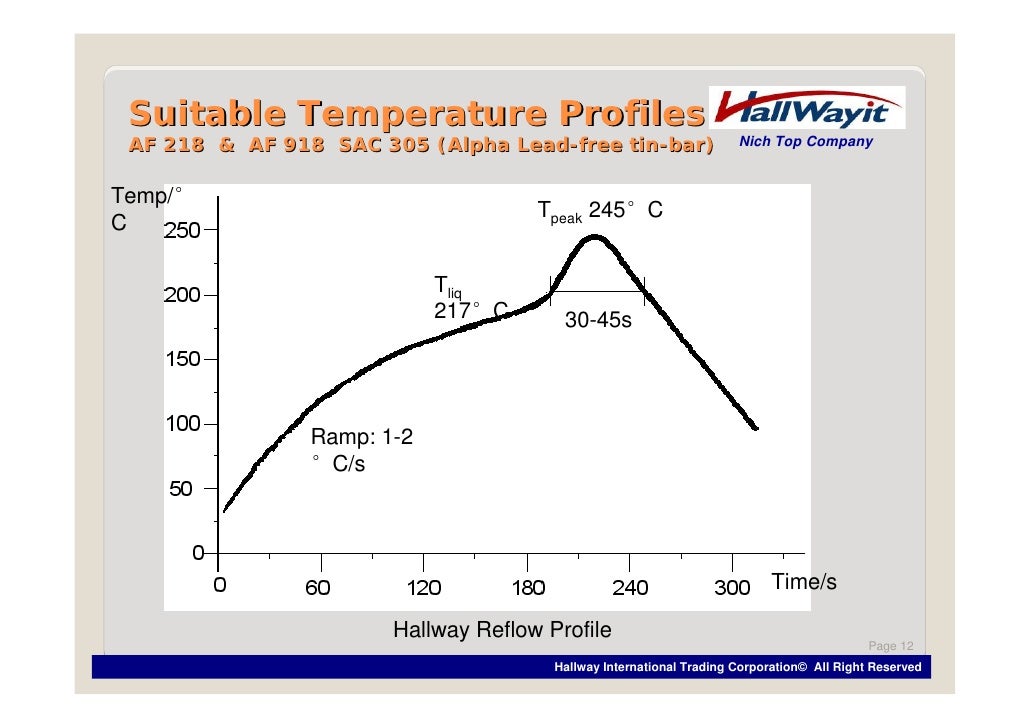
    tacky-assembly-flux-12-728.jpg
  • Profiles control the temperature carefully to achieve a strong joint. The way she did it was THE WORST way you could go about it. Even if it worked, the solder balls that formed will be full of long crystals that make it brittle and prone to cracks! Solder that is shiny has small crystals. If it appears matte, it has long crystals and is hard/brittle. They longer you hold the heat on the solder, the more time they have to grow, and the more time the solder has to oxidize, which further makes it hard/brittle. ESPECIALLY lead Free alowy! IFixIt's method will not last very long before the YLOD will return.


This is the guy/video that inspired my DIY ghetto setup. It's capable with practice...

A reflow is the same procedure, except instead of removing the chip you just begin the cooling cycles after nudging to ensure it has flowed. The setup cost me about $300, but it's not ideal, because I have to manually simulate the reflow profile. I'm currently looking into making my own automated system using an IR6500 top heater, relays, and PID controllers...

However, a complete BGA rework station is probably cheaper overall when I add up all the different pieces. So if you haven't already gone down the path of buying rework equipment, then a dedicated BGA rework station is the easier solution. The reason I've gone this route is that the different pieces in my setup are useful for other electrics projects, besides reballing.

I realize these tools are expensive and that no one wants to spend more on tools than another PS3! This is why reballing services actually aren't asking too high a price at $100-150. The problem is finding one you can trust, if you can find one at all!

So that is the proper way to do it.
 
Got another 2503 with same situation. Rsx probably dead. Board untouched (I don't even bother to desolder). Tomorrow I will add photos in 2 different links, one fixed,one dead rsx . Same before board jsd model with 1.8 ohms, same symptoms . Compared with previous jsd fixed rsx will show 2.9 ohms.
Will also add errlog on last jsd. Just reference so people may want to fix don't lose time as I've did.
 
Just an update, today I tried to get the system in safe mode but ended up with YLOD again, just 3 beeps, I am guessing next step will be Nec/Tokin replacement

Since a reball is not an option for me (or most of us), is there a guide that shows the proper reflow procedure? The things you mentioned above like using contact cleaner before and after and nudging the chip are things I've never heard or seen before during a reflow (but makes sense). I really have nothing to lose at this point since the PS3 is just sitting there collecting dust. Thanks
If confident BGA rework is not an option, the sad truth is that you should think twice before trying to be fixing these machines.

You may as well use a hairdryer. That way at least you'll not poison yourself with the fumes as well.

Lastly, heatgunning a CPU is the worst thing you can possibly think of doing. Even worse than removing the tokins when they clearly are not the issue at all.

You didn't make sure that either the RSX itself or its connections are fine. So it's not wise at all to blame the CPU yet.
In other words, the reflow took you nowhere. Naturally but hey, could be worse.

Then again, it all depends on what you are hoping to achieve. The board may have been collecting dust, but that's not as bad as becoming dust. Different roads go to different destinations.
 
You may as well use a hairdryer...

...The board may have been collecting dust, but that's not as bad as becoming dust.
To be clear, Paco's not saying you should use a hair drier. He's saying, 'that an ineffective reflow is more damaging than the useless hair drier trick.' If you're not going to do it right, or can't afford to, then don't do anything at all. And that if you do, you're going to make things harder to figure out.

That's all.
 
http://s.go.ro/sfhd90xz
I can not see any errors on syscon. Did not bother with further tests, just added references photos and one video.
Edit
As another working sem001 and rsx 90nm referance http://s.go.ro/bdltjy2k
CPU 4,1 ohms after both caps exchange, rsx still 2.5 on board, 2.3 out.
So from now what is less than 2 ohms on board I don't bother to desolder probably I will remove caps from its side and test resistance on his power side when 3034 and 44xx error in syscon.
 
Last edited:
No, your tokins are probably fine. You would only need to replace them if you get a 1002 syscon error.

Assuming your RSX reflow was successful, you've only ruled out the RSX's BGA. Your error history suggests the CPU's BGA could also be the issue (1200 = CPU overheat). The 1200's gave way to the 1601/1701's. Then the 3034/4xxx errors started. So its possible the overheating cpu lead to a BGA defect. We usually assume the RSX, because it occurs there more often, but the CPU isn't immune.

I would suggest a proper reball of both. A reflow can work too, but it's inferior. If that doesn't work, then an RSX replacment is in order. And if that still doesn't work, I think your out of options.

Before you do that, however. You need to troubleshoot the board. Confirm voltages, resistance of certain SMD components, check for blown fuses, clock generator frequencys, etc. If everything seems in order, the it's gotta be the RSX or CPU. I suspect RSX ram or bump failure or a CPU BGA.

Did you delid the cpu and if so, did you inspect for and damaged traces? Thats the only other thing that I can think of the we haven't checked yet.

I have inspected the CPU, seems to have a small scratch on one of the corners, not even a mm, is that enough to determine it was damaged? and if that is the case, am I out of options?
 
I have inspected the CPU, seems to have a small scratch on one of the corners, not even a mm, is that enough to determine it was damaged? and if that is the case, am I out of options?

If the scratch broke a trace then it could be the issue, yes. If you clean the scrtch, does it appear white or copper colored? If white it's probably just a light surface scratch of the solder mask. If you can see copper beneath it, then it could have gotten to the trace beneath. I do know the corners all have important traces. We would need to see a closeup of the damage to know for sure. A microscope really. They are too small to see clearly with most cameras, maybe with a macro lens, but probably not even then.

If it is broken, then it requires some difficult microsoldering to fix. @squeept comes to mind, as he's done that in the past for one or two users. So you're not entirely out of options.
 
I believe pin 7 (POWERGOOD) of IC6201 (RSX) and IC6103 (CELL) is an important tip. If you have a 3003 (CELL) or 3004 (RSX) check this pin and it is probably at 0V, in normal condition it should be at 3.3v. I will retest by injecting 3.3v when it is 0v to make sure the 3003/3004 error goes away. I took this test over 1 year ago but I don't remember

3001 - No 12v.

Seems like I've got the same problem here as well. I haven't touched the capacitors and my board used to show 3034 errors. But after experimenting with syscon a bit too much, the last syscon I soldered started giving me 3003 errors. I tracked it down to IC6103 like you said, where pin7 is 0v (no power good), and no Enable signal at pin 29. Pin22 (VCC) gets 12v.

Have you found a solution to this?
 
Last edited:
I believe pin 7 (POWERGOOD) of IC6201 (RSX) and IC6103 (CELL) is an important tip. If you have a 3003 (CELL) or 3004 (RSX) check this pin and it is probably at 0V, in normal condition it should be at 3.3v. I will retest by injecting 3.3v when it is 0v to make sure the 3003/3004 error goes away. I took this test over 1 year ago but I don't remember

I'm finally getting back around to this and had a look at the schematics. Yes indeed, that is a good tip. Thanks!

I believe you are more correct about these 3003/3004 errors than I was. I triggered a 3004 removing tokins, but it's a more general RSX VDDC Power failure that could occur litterally anywhere in the VRM circuit. It narrows the list down to that circuit, but there are many things there than can go wrong. I have updated my notes in my copy of the SYSCON error codes PDF.

I believe 3003 would be the same, but for the CPU side.
 
Just another assumption 3000, 3001, 3002, 3003, 3004 power fail errors aren't they related to PS0, Ps1, PS3, PS4 which are power supply's. Now which is one or another I can't figure.
So 3003 is PS 3 by looking on uart running "bringup" twice it will come with all those PS ok or fails to one of those.
 
Hi everyone !

After some research in the thread I've found that :


From RIP-Felix
  • 1601 = BE Livelock Detection. "A Livelock is a situation where a request for an exclusive lock is denied repeatedly, as many overlapping shared locks keep on interfering each other. The processes keep on changing their status, which further prevents them from completing the task. This further prevents them from completing the task."
  • 1701 = BE Attention

My syscon gave me this :

> ERRLOG GET 0E
00000000 A0801601 0B69C6F0
> ERRLOG GET 0F
00000000 A0801701 0B69C6F0


The thing is, the console booted up correctly after some of my repair.

Do I have to double check something or those error are just remnant from the past YLOD ?
 
My syscon gave me this :

> ERRLOG GET 0E
00000000 A0801601 0B69C6F0
> ERRLOG GET 0F
00000000 A0801701 0B69C6F0

The thing is, the console booted up correctly after some of my repair.

Do I have to double check something or those error are just remnant from the past YLOD ?
May I ask what repairs you made?

Yes, those should be remnant errors. Set the time/date and you'll see the timestamp (requires internal access). Or you can clear the errorlog so that any errors are new.
 
Last edited:
Friends, I would like some help.

I have a CECHE with glod, after checking syscon errors, it was with 1701 error.

I checked the NECTOKIN and they were visually burned, I swapped both the RSX and CELL (under the motherboard).
After that, there were no error codes in syscon. However, the ps3 doesn´t work. GLOD persists.
Apparently it doesn't boot.

I have no energy on USB ports

bringup
[SSM] state: 0000 -> 0101
Bringup Mode #0 (0xFF)
[SSM] ssmCb_OnStartingBePowOn() called.
[SSM] Bringup mode : syspm_stat=00000000/00000000
[POWSEQ] PowerSeq_Setup called.
[SSM] state: 0101 -> 0201
[POWSEQ] AV Backend Setup
[SSM] state: 0201 -> 0102
[SSM] state: 0102 -> 0202
[SSM] state: 0202 -> 0103
[SSM] state: 0103 -> 0203
[SSM] ssmCb_BeforeBeOn() called.
[SSM] state: 0203 -> 0104
Psbd_SbTransMode_Half:0x21e2
>
[SSM] state: 0104 -> 0204
[SSM] state: 0204 -> 0105
[SSM] state: 0105 -> 0400
(PowerOn State)
[SERV NVS] READ CMD
Boot Loader SE Version 2.1.0 (Build ID: 2709,28222, Build Data: 2007-12-05_13:32:28)
Copyright(C) 2007 Sony Computer Entertainment Inc.All Rights Reserved.
[SERV SETCFG] XDR (CH0,CH1) ASSERT
[SERV SETCFG] XDR (CH0,CH1) DEASSERT
[INFO]: Connecting to Debug Device (SB UART)
[SERV NVS] READ CMD
[SERV NVS] READ CMD
[SERV NVS] READ CMD
[SERV NVS] READ CMD
[SERV NVS] READ CMD
[SERV NVS] READ CMD
[SERV NVS] READ CMD
[SERV NVS] READ CMD
[SERV NVS] READ CMD
[SERV NVS] READ CMD
[SERV NVS] READ CMD
[SERV NVS] READ CMD
[SERV NVS] READ CMD
[SERV NVS] READ CMD
[SERV NVS] READ CMD
[SERV NVS] READ CMD
[SERV NVS] READ CMD
[SERV NVS] READ CMD
[SERV NVS] READ CMD
[SERV NVS] READ CMD
[SERV NVS] READ CMD
[SERV NVS] READ CMD
[SERV NVS] READ CMD
[SERV NVS] READ CMD
[SERV THERM] NOTIFY_MODE CMD
[SERV NOTIF] CONTROL_LED
[SERV NOTIF] RING_BUZZER
[SERV NOTIF] CONTROL_LED
[SERV NOTIF] CONTROL_LED
[SERV NOTIF] RING_BUZZER
[SERV NOTIF] CONTROL_LED
[SERV NVS] WRITE CMD
[SERV NVS] READ CMD
[SERV NVS] READ CMD
[mullion]$
> powerstate
powerstate
ATA Power : OFF
PCI Power : OFF
RSX Power : ON
XDR Power : ON
Eurus Power : ON
SB Power : ON
RSX Thermal Sensor : AVAILABLE
BE Thermal Sensor : AVAILABLE
[mullion]$

Any help would be welcome.

Thanks in advance
 
Last edited:
Friends, I would like some help.

I have a CECHE with glod, after checking syscon errors, it was with 1701 error.

I checked the NECTOKIN and they were visually burned, I swapped both the RSX and CELL (under the motherboard).
After that, there were no error codes in syscon. However, the ps3 doesn´t work. GLOD persists.
Apparently it doesn't boot.

I have no energy on USB ports

bringup
[SSM] state: 0000 -> 0101
Bringup Mode #0 (0xFF)
[SSM] ssmCb_OnStartingBePowOn() called.
[SSM] Bringup mode : syspm_stat=00000000/00000000
[POWSEQ] PowerSeq_Setup called.
[SSM] state: 0101 -> 0201
[POWSEQ] AV Backend Setup
[SSM] state: 0201 -> 0102
[SSM] state: 0102 -> 0202
[SSM] state: 0202 -> 0103
[SSM] state: 0103 -> 0203
[SSM] ssmCb_BeforeBeOn() called.
[SSM] state: 0203 -> 0104
Psbd_SbTransMode_Half:0x21e2
>
[SSM] state: 0104 -> 0204
[SSM] state: 0204 -> 0105
[SSM] state: 0105 -> 0400
(PowerOn State)
[SERV NVS] READ CMD
Boot Loader SE Version 2.1.0 (Build ID: 2709,28222, Build Data: 2007-12-05_13:32:28)
Copyright(C) 2007 Sony Computer Entertainment Inc.All Rights Reserved.
[SERV SETCFG] XDR (CH0,CH1) ASSERT
[SERV SETCFG] XDR (CH0,CH1) DEASSERT
[INFO]: Connecting to Debug Device (SB UART)
[SERV NVS] READ CMD
[SERV NVS] READ CMD
[SERV NVS] READ CMD
[SERV NVS] READ CMD
[SERV NVS] READ CMD
[SERV NVS] READ CMD
[SERV NVS] READ CMD
[SERV NVS] READ CMD
[SERV NVS] READ CMD
[SERV NVS] READ CMD
[SERV NVS] READ CMD
[SERV NVS] READ CMD
[SERV NVS] READ CMD
[SERV NVS] READ CMD
[SERV NVS] READ CMD
[SERV NVS] READ CMD
[SERV NVS] READ CMD
[SERV NVS] READ CMD
[SERV NVS] READ CMD
[SERV NVS] READ CMD
[SERV NVS] READ CMD
[SERV NVS] READ CMD
[SERV NVS] READ CMD
[SERV NVS] READ CMD
[SERV THERM] NOTIFY_MODE CMD
[SERV NOTIF] CONTROL_LED
[SERV NOTIF] RING_BUZZER
[SERV NOTIF] CONTROL_LED
[SERV NOTIF] CONTROL_LED
[SERV NOTIF] RING_BUZZER
[SERV NOTIF] CONTROL_LED
[SERV NVS] WRITE CMD
[SERV NVS] READ CMD
[SERV NVS] READ CMD
[mullion]$
> powerstate
powerstate
ATA Power : OFF
PCI Power : OFF
RSX Power : ON
XDR Power : ON
Eurus Power : ON
SB Power : ON
RSX Thermal Sensor : AVAILABLE
BE Thermal Sensor : AVAILABLE
[mullion]$

Any help would be welcome.

Thanks in advance

Easy stuff first:
  1. Is the HDD plugged in? Seems like a stupid question, but your ATA power is off. That's your HDD. PCI is the BluRay drive, which I figured you didn't have plugged in for the test. Maybe you forgot to put the HDD back in? Like I said, let's make sure the easy things are covered before we start assuming the worst.
  2. Did you try plugging in the console VIA AV (composite - Yellow, red, and white RCA cables)? Sometimes people think they have a GLOD when it's set to output to the analog video out, but they are using HDMI.
  3. Have you tried safe mode and rebuilding the database? With the console off and in standby, press and hold the power button until the console starts and then shuts down, then press and hold again until you hear 2 beeps, and let go. Sometimes rebuiliding the database can fix a GLOD, if a corrupted HDD is the cause. Alternatively, try another HDD. Maybe it died!
If the HDD is attached, working, not corrupted, then it's stalling after the bootloader when the OS is supposed to start. But for some reason ATA power is off, which mean's the OS can't load. If a voltage isn't making it there, like a fuse blew out, I would expect a YLOD. But since you have a GLOD, it could be a corrupted NAND or dead RAM. Both of which are hard to fix.

If you had a YLOD turn into a GLOD after reball then we think 1601 (with or without 1701) means the RSX RAM was damaged and the chip needs replaced. If it occured after a reflow then it could be that you didn't get a good reflow. If it occured after a tokin mod, that probably means very little. You need a reball to rule out the BGA. If the GLOD persists, and so too does that 1701/1601 then we think RSX RAM. This is a loose association based on user reports. We're still unsure about the 1701/1601 errors.

So if it's not any of the easy stuff, your going to need to troubleshoot the board (voltage and resistance measuring, potentially tracking down a short, etc.) You might need to replace the RSX if the RAM is dead. Worest case, the system RAM is dead or NAND corrupted. Both of those are pretty much not worth repairing

So lets hope it's easy!.
 
Last edited:
The 1601/1701 errors themselves mean very little. Check stop. They are kind of like a BSOD on a Windows PC (It can be just software, or any hardware error that interrupts the system while it's working (Prefix 80). I've seen these errors after freezing because of corrupt hard drive data.

The catch is when they come together with the 3034/44XX hehehe. And yeah, if a reballed RSX gives these... It's another candidate for a keyring.

If it's only a dodgy reflow, you are more or less where you started, which is good because you didn't completely kill it yet, so you are in time to stop.
A proper reball may fix the problem... Or maybe not.

What does it mean when 1601/1701 come together with 3034? System has never been reflowed or reballed.
 
Easy stuff first:
  1. Is the HDD plugged in? Seems like a stupid question, but your ATA power is off. That's your HDD. PCI is the BluRay drive, which I figured you didn't have plugged in for the test. Maybe you forgot to put the HDD back in? Like I said, let's make sure the easy things are covered before we start assuming the worst.
  2. Did you try plugging in the console VIA AV (composite - Yellow, red, and white RCA cables)? Sometimes people think they have a GLOD when it's set to output to the analog video out, but they are using HDMI.
  3. Have you tried safe mode and rebuilding the database? With the console off and in standby, press and hold the power button until the console starts and then shuts down, then press and hold again until you hear 2 beeps, and let go. Sometimes rebuiliding the database can fix a GLOD, if a corrupted HDD is the cause. Alternatively, try another HDD. Maybe it died!
If the HDD is attached, working, not corrupted, then it's stalling after the bootloader when the OS is supposed to start. But for some reason ATA power is off, which mean's the OS can't load. If a voltage isn't making it there, like a fuse blew out, I would expect a YLOD. But since you have a GLOD, it could be a corrupted NAND or dead RAM. Both of which are hard to fix.

If you had a YLOD turn into a GLOD after reball then we think 1601 (with or without 1701) means the RSX RAM was damaged and the chip needs replaced. If it occured after a reflow then it could be that you didn't get a good reflow. If it occured after a tokin mod, that probably means very little. You need a reball to rule out the BGA. If the GLOD persists, and so too does that 1701/1601 then we think RSX RAM. This is a loose association based on user reports. We're still unsure about the 1701/1601 errors.

So if it's not any of the easy stuff, your going to need to troubleshoot the board (voltage and resistance measuring, potentially tracking down a short, etc.) You might need to replace the RSX if the RAM is dead. Worest case, the system RAM is dead or NAND corrupted. Both of those are pretty much not worth repairing

So lets hope it's easy!.


1- Yes, HD connected. New and tested hard drive on PC.

2- Tested with HDMI and AV cable.

3- Yes, I tried the recovery mode, the console emits the beeps but there is no image and neither the Joysticks sync (usb cable)

Apparently there is no power on HD, Bluray drive and usb. I tried to put a cd in the bluray drive and it doesn't pull the cd. In syscon it detects that I tried to put the cd, but the drive doesn't pull the cd.

Could the power source be a problem?

System has never been reflowed or reballed.

My friend who gave me this ps3 said that the console initially turned off with ylod about 5 minutes after turning it on. After a while it stopped working via HDMI, sometimes connecting via AV.
 
1- Yes, HD connected. New and tested hard drive on PC.

2- Tested with HDMI and AV cable.

3- Yes, I tried the recovery mode, the console emits the beeps but there is no image and neither the Joysticks sync (usb cable)

Apparently there is no power on HD, Bluray drive and usb. I tried to put a cd in the bluray drive and it doesn't pull the cd. In syscon it detects that I tried to put the cd, but the drive doesn't pull the cd.

Could the power source be a problem?

System has never been reflowed or reballed.

My friend who gave me this ps3 said that the console initially turned off with ylod about 5 minutes after turning it on. After a while it stopped working via HDMI, sometimes connecting via AV.

No, if there were an issue with the power supply or fuses leading upto any of the IC's (RSX, CPU, SB, etc.) then you would have a YLOD. Except perhaps the HDD, I'm not sure. I had a quick look at the schematics and didn't see any fuses that would be the first place to check. However, you should try probing the voltages to be sure they are available.

Unfortunately the way you describe that GLOD sounds like a RAM issue. No controller sync is the usual bad sign. I would wager the RSX needs replaced. But it could also be that the CPU needs reflowed/reballed or the OS is corrupted. @botakompong's troubleshooting method can tell you which.

Do you know the repair history of the console? Has anyone tried reflowing/reballing? If so, how (what equipment)? That could help narrow it down too.
 
Last edited:
So I think i'm gonna jump into the syscon probing club soon. Just looking for a good recommendation on a solid syscon reader. If anyone can link to one they use or have had good results using, i'd greatly appreciate it.

Edit: I found this one on ebay. Do you think this will work okay?

Edit again: Ended up getting this one instead since i've seen some video's of NSC using it. Figured should be a safe bet.
 
Last edited:
No, if there were an issue with the power supply or fuses leading upto any of the IC's (RSX, CPU, SB, etc.) then you would have a YLOD. Except perhaps the HDD, I'm not sure. I had a quick look at the schematics and didn't see any fuses that would be the first place to check. However, you should try probing the voltages to be sure they are available.

Unfortunately the way you describe that GLOD sounds like a RAM issue. No controller sync is the usual bad sign. I would wager the RSX needs replaced. But it could also be that the CPU needs reflowed/reballed or the OS is corrupted. @botakompong's troubleshooting method can tell you which.

Do you know the repair history of the console? Has anyone tried reflowing/reballing? If so, how (what equipment)? That could help narrow it down too.

Could an error in the command to correct the checksum cause the problem?
Due to an error I executed EEP SET 3901 01 00 and the correct one was EEP SET 3961 01 00.

No reflow or reballing in this console.

Sorry for bad english!
Thanks in advance!
 

Similar threads

Back
Top