PS3 Fault finding YLOD with the SYSCON - First steps and Error reporting

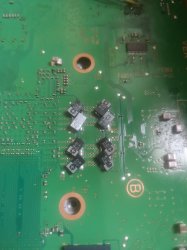
I've found a some SMD componets that are showing as open circuit. Both in the AV and HDMI area, highlighted as red and one in orange as it wasnt fully open but was pretty much there at 0.22 and my meter was buzzing. What are the best steps to take now. Am i able to source off the shelf components for replacements at all. I assume this may be difficult as there is no datasheet for this motherboard. Is my only option to source them off a donor board?
zflop6E.jpg
f7COh1f.jpg
You said open line, but if your meter was buzzing that's low resistance or impeedance (below the threshold for your meter, which is normal for fuses, ferrite beads, and low impeedance circuits like the core voltage for processors - tokins will buzz, for example, and be totally fine).

Any component marked TH, F, or PS should buzz. The ones in the photo look like ferrite beads or fuses. So that's normal.

It's best to have another board to check readings against. Get a spreadsheet out and begin measuring an recording every reading on pins and then look for differences. It's a PITA process.
 
You said open line, but if your meter was buzzing that's low resistance or impeedance (below the threshold for your meter, which is normal for fuses, ferrite beads, and low impeedance circuits like the core voltage for processors - tokins will buzz, for example, and be totally fine).

Any component marked TH, F, or PS should buzz. The ones in the photo look like ferrite beads or fuses. So that's normal.

It's best to have another board to check readings against. Get a spreadsheet out and begin measuring an recording every reading on pins and then look for differences. It's a PITA process.

Yh i dont have another board so that aint happening. Doesnt look like anyone has put up any resources about what the normal figures should look like so im just gonna quit here and get another console at some point. It still works its just PS2 games that dont work for whatever reason... Thanks anyway.
 
Hi All,

I have managed to use the python script and have obtained the following dump file. From what I can tell from the guides is that I have an issue with RSX power, probably Tokins. Is this others conclusions or am I missing something?

I have included the becount, bringup, powerstate and errlog outputs.

I have had the console its whole life, had no issues with it its whole life until this issue occurred. No work has been done on it except soldering the diagnostic wires onto it.

Based on this error log what would my next steps be?

Cheers

Code:

Code:
>$ AUTH
Auth successful
Press Ctrl+C to exit
>$ becount
becount
Bringup : 3500 times
Shutdown: 3466 times
Power-on: 366day 05hour 52min 00sec
[mullion]$
Press Ctrl+C to exit
>$ bringup
bringup
[SSM] state: 0000 -> 0101
Bringup Mode #0 (0xFF)
[SSM] ssmCb_OnStartingBePowOn() called.
[SSM] First Boot.
[SSM] Bringup mode : syspm_stat=00000000/00000000
[POWSEQ] PowerSeq_Setup called.
[SSM] state: 0101 -> 0201
[POWSEQ] AV Backend Setup
[SSM] state: 0201 -> 0102
[SSM] state: 0102 -> 0202
[SSM] state: 0202 -> 0103
[SSM] state: 0103 -> 0203
[SSM] ssmCb_BeforeBeOn() called.
[SSM] state: 0203 -> 0104
Psbd_SbTransMode_Half:0x20e7
[SSM] state: 0104 -> 0204
[SSM] state: 0204 -> 0105
[SSM] state: 0105 -> 0400
(PowerOn State)
Press Ctrl+C to exit
>$ powerstate
[SERV NVS] READ CMD

Boot Loader SE Version 2.3.5 (Build ID: 3034,32025, Build Data: 2008-05-12_15:29:27)
Copyright(C) 2007 Sony Computer Entertainment Inc.All Rights Reserved.
[SERV SETCFG] XDR (CH0,CH1) ASSERT
[SERV SETCFG] XDR (CH0,CH1) DEASSERT
[SERV NVS] READ CMD
[INFO]: Connecting to Debug Device (SB UART)
[SERV NVS] READ CMD
[SERV NVS] READ CMD
[SERV NVS] READ CMD
[SERV NVS] READ CMD
[SERV NVS] READ CMD
[SERV NVS] READ CMD
[SERV NVS] READ CMD
[SERV NVS] READ CMD
[SERV NVS] READ CMD
[SERV NVS] READ CMD
[SERV NVS] READ CMD
[SERV NVS] READ CMD
[SERV NVS] READ CMD
[SERV NVS] READ CMD
[SERV NVS] READ CMD
[SERV NVS] READ CMD
[SERV NVS] READ CMD
[SERV NVS] READ CMD
[SERV NVS] READ CMD
[SERV NVS] READ CMD
[SERV NVS] READ CMD
[SERV NVS] READ CMD
[SERV NVS] READ CMD
[SERV NVS] READ CMD
[SERV NVS] READ CMD
[SERV THERM] NOTIFY_MODE CMD
[SERV NOTIF] CONTROL_LED
[SERV NOTIF] RING_BUZZER
[SERV NOTIF] CONTROL_LED
[SERV NVS] READ CMD
powerstate
ATA Power          : ON
PCI Power          : OFF
RSX Power          : ON
XDR Power          : ON
Eurus Power        : ON
SB Power           : ON
RSX Thermal Sensor : AVAILABLE
BE Thermal Sensor  : AVAILABLE
[mullion]$
Press Ctrl+C to exit
>$ errlog                                    *//system crashed at the same time as I input this code.
[SERV NVS] READ CMD                  
[SERV NVS] READ CMD
[SSM] *** Power Fail RS ***
[SSM] state: 0400 -> 0700
[POWSEQ] AV Backend Letup
[SSM] ssmCb_AfterBeOn() called.
[SSM] Shutdown mode : syspm_stat=00000000/00000000
[ERROR]: 0xa0801002
errlog
ofst[ 76]:err_code:0xffffffff, clock:0x22e5de52  2018/07/21 12:06:42
ofst[ 80]:err_code:0xa0801002, clock:0x22e5dfcf  2018/07/21 12:13:03
ofst[ 84]:err_code:0xa0801002, clock:0x23399a21  2018/09/23 00:26:09
ofst[ 88]:err_code:0xa0801002, clock:0x236c80f3  2018/10/31 15:04:19
ofst[ 92]:err_code:0xa0902120, clock:0x236c80f3  2018/10/31 15:04:19
ofst[ 96]:err_code:0xa0801002, clock:0x23b875bd  2018/12/28 05:48:45
ofst[100]:err_code:0xa0801002, clock:0x240c0ef2  2019/03/01 15:40:34
ofst[104]:err_code:0xa0801002, clock:0x2466e38c  2019/05/09 13:11:40
ofst[108]:err_code:0xa0801002, clock:0x246acf47  2019/05/12 12:34:15
ofst[112]:err_code:0xa0801002, clock:0x246acfb4  2019/05/12 12:36:04
ofst[116]:err_code:0xa0801002, clock:0x246ad078  2019/05/12 12:39:20
ofst[120]:err_code:0xa0801002, clock:0x24a9e468  2019/06/29 08:57:12
ofst[124]:err_code:0xa0801002, clock:0x24a9e634  2019/06/29 09:04:52
ofst[  0]:err_code:0xa0801002, clock:0x255308f4  2019/11/04 16:06:12
ofst[  4]:err_code:0xa0801002, clock:0x255309cb  2019/11/04 16:09:47
ofst[  8]:err_code:0xa0801002, clock:0x25540e56  2019/11/05 10:41:26
ofst[ 12]:err_code:0xa0801002, clock:0x25540ec3  2019/11/05 10:43:15
ofst[ 16]:err_code:0xa0801002, clock:0x25540f57  2019/11/05 10:45:43
ofst[ 20]:err_code:0xa0801002, clock:0x25542249  2019/11/05 12:06:33
ofst[ 24]:err_code:0xa0801002, clock:0x272858d5  2020/10/25 15:40:05
ofst[ 28]:err_code:0xa0801002, clock:0x272858e1  2020/10/25 15:40:17
ofst[ 32]:err_code:0xa0801002, clock:0x2bc3e36b  2023/04/08 08:33:47
ofst[ 36]:err_code:0xa0801002, clock:0x2bc3e393  2023/04/08 08:34:27
ofst[ 40]:err_code:0xa0801002, clock:0x2bc3e406  2023/04/08 08:36:22
ofst[ 44]:err_code:0xa0801002, clock:0x2bc3e44a  2023/04/08 08:37:30
ofst[ 48]:err_code:0xa0801002, clock:0x2bc92452  2023/04/12 08:12:02
ofst[ 52]:err_code:0xa0801002, clock:0x2bc928b8  2023/04/12 08:30:48
ofst[ 56]:err_code:0xa0801002, clock:0x2bc92b21  2023/04/12 08:41:05
ofst[ 60]:err_code:0xa0801002, clock:0x2c033eeb[POWSEQ] PowerSeq_Letup called.
[SSM] state: 0700 -> 0600
  2023/05/26 09:56:59
ofst[ 64]:err_code:0xa0002120, clock:0x2c033eec  2023/05/26 09:57:00
ofst[ 68]:err_code:0xa0801001, clock:0x2c033f14  2023/05/26 09:57:40
(PowerOff State) (Fatal)
ofst[ 72]:err_code:0xa0801002, clock:0x2c034086  2023/05/26 10:03:50
[mullion]$ [ERROR]: 0xa0002120
Press Ctrl+C to exit
>$ errlog
errlog
ofst[ 80]:err_code:0xffffffff, clock:0x22e5dfcf  2018/07/21 12:13:03
ofst[ 84]:err_code:0xa0801002, clock:0x23399a21  2018/09/23 00:26:09
ofst[ 88]:err_code:0xa0801002, clock:0x236c80f3  2018/10/31 15:04:19
ofst[ 92]:err_code:0xa0902120, clock:0x236c80f3  2018/10/31 15:04:19
ofst[ 96]:err_code:0xa0801002, clock:0x23b875bd  2018/12/28 05:48:45
ofst[100]:err_code:0xa0801002, clock:0x240c0ef2  2019/03/01 15:40:34
ofst[104]:err_code:0xa0801002, clock:0x2466e38c  2019/05/09 13:11:40
ofst[108]:err_code:0xa0801002, clock:0x246acf47  2019/05/12 12:34:15
ofst[112]:err_code:0xa0801002, clock:0x246acfb4  2019/05/12 12:36:04
ofst[116]:err_code:0xa0801002, clock:0x246ad078  2019/05/12 12:39:20
ofst[120]:err_code:0xa0801002, clock:0x24a9e468  2019/06/29 08:57:12
ofst[124]:err_code:0xa0801002, clock:0x24a9e634  2019/06/29 09:04:52
ofst[  0]:err_code:0xa0801002, clock:0x255308f4  2019/11/04 16:06:12
ofst[  4]:err_code:0xa0801002, clock:0x255309cb  2019/11/04 16:09:47
ofst[  8]:err_code:0xa0801002, clock:0x25540e56  2019/11/05 10:41:26
ofst[ 12]:err_code:0xa0801002, clock:0x25540ec3  2019/11/05 10:43:15
ofst[ 16]:err_code:0xa0801002, clock:0x25540f57  2019/11/05 10:45:43
ofst[ 20]:err_code:0xa0801002, clock:0x25542249  2019/11/05 12:06:33
ofst[ 24]:err_code:0xa0801002, clock:0x272858d5  2020/10/25 15:40:05
ofst[ 28]:err_code:0xa0801002, clock:0x272858e1  2020/10/25 15:40:17
ofst[ 32]:err_code:0xa0801002, clock:0x2bc3e36b  2023/04/08 08:33:47
ofst[ 36]:err_code:0xa0801002, clock:0x2bc3e393  2023/04/08 08:34:27
ofst[ 40]:err_code:0xa0801002, clock:0x2bc3e406  2023/04/08 08:36:22
ofst[ 44]:err_code:0xa0801002, clock:0x2bc3e44a  2023/04/08 08:37:30
ofst[ 48]:err_code:0xa0801002, clock:0x2bc92452  2023/04/12 08:12:02
ofst[ 52]:err_code:0xa0801002, clock:0x2bc928b8  2023/04/12 08:30:48
ofst[ 56]:err_code:0xa0801002, clock:0x2bc92b21  2023/04/12 08:41:05
ofst[ 60]:err_code:0xa0801002, clock:0x2c033eeb  2023/05/26 09:56:59
ofst[ 64]:err_code:0xa0002120, clock:0x2c033eec  2023/05/26 09:57:00
ofst[ 68]:err_code:0xa0801001, clock:0x2c033f14  2023/05/26 09:57:40
ofst[ 72]:err_code:0xa0801002, clock:0x2c034086  2023/05/26 10:03:50
ofst[ 76]:err_code:0xa0002120, clock:0x2c034087  2023/05/26 10:03:51
[mullion]$
Press Ctrl+C to exit
>$

Hello All,

Apologies for bumping my own message but would someone be able to take a look and let me know if they agree with my conclusions about a potential RSX power issue related to the NEC TOKINS?

It would be greatly appreciated as I'm not very tech savy but would love to fix my old PS3 console.

Thanks for your time.

Cheers,
 
Hello All,

Apologies for bumping my own message but would someone be able to take a look and let me know if they agree with my conclusions about a potential RSX power issue related to the NEC TOKINS?

It would be greatly appreciated as I'm not very tech savy but would love to fix my old PS3 console.

Thanks for your time.

Cheers,
Yes, most likely. What model console is it? Was it opened before and is there any signs of damage?
 
PS3 superslim.
I was diagnosing some WiFi issues with only the standby power connected.
The main 12V was not connected.
I got the following syscon error codes: 0xA0003001
So a defective PSU, or missing/shorted 12V rail gives this error.
 
PS3 superslim.
I was diagnosing some WiFi issues with only the standby power connected.
The main 12V was not connected.
I got the following syscon error codes: 0xA0003001
So a defective PSU, or missing/shorted 12V rail gives this error.
Correct. You can see what we already know here.
 
Yes, most likely. What model console is it? Was it opened before and is there any signs of damage?

Hi Felix,

Thanks for the response. It is a model CECHJ02. It has never been opened until now and there are no signs of damage.

If your conclusion is that it is an issue with the tokins would you be able to point me in the direction of a guide or tutorial that can take me through replacing?

Thanks so much for your helpfulness!

Cheers
 
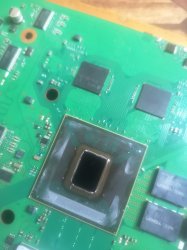
Thanks for the reply. I`ve delidded the CPU now, and its heavily discolored. And i mean heavily, it`s deep purple. I`ve never seen a cell discolored so much in the 5 CECHC consoles I`ve owned and delidded. Is that bad or doesn`t that matter much?

Edit: Did a bunch more research on the console today. If it's cold, it will throw a YLOD within a random amount of time. The XMB slows down and will eventually freeze, with a YLOD and 1601 and 1701 code following. The console will try to boot up every time tho. As soon as the console is up to temp, the ylod won't return. You can do anything with it and it won't ylod. So it has a problem somewhere not significant enough to prevent booting, but enough to throw a YLOD. And when it warms up, it expands just enough to fix the issues. After 15+ cycles the symptoms don't seem to change.

I'm adding one new hypothesis now, and that's a issue related to the southbridge. I've seen the 0802203 code a few times now, but the sd card reader, usb ports, wifi, Bluetooth and Ethernet all seem to work just fine. Are there any other known symptoms of a failing southbridge? It doesn't seem likely that it's the problem, but Syscon doesn't throw that error for fun I imagine.

This PS3 finally died yesterday. Got it to boot one more time today. This is the errorlog as of now:

Bringup Count: 3495, Shutdown Count: 2567
Runtime: 97 Days, 14 Hours, 40 Minutes, 51 Seconds
Error Log
01: A0801601 Thu Jan 12 00:28:06 2006
02: A0801701 Thu Jan 12 00:28:06 2006
03: A0801601 Thu Jan 12 00:27:33 2006
04: A0801701 Thu Jan 12 00:27:33 2006
05: A0403034 Thu Jan 12 00:27:01 2006
06: A0404402 Thu Jan 12 00:27:01 2006
07: A0403034 Thu Jan 12 00:26:56 2006
08: A0404402 Thu Jan 12 00:26:56 2006
09: A0403034 Thu Jan 12 00:26:52 2006
10: A0404402 Thu Jan 12 00:26:52 2006
11: A0403034 Thu Jan 12 00:26:49 2006
12: A0404402 Thu Jan 12 00:26:49 2006
13: A0403034 Thu Jan 12 00:26:45 2006
14: A0404402 Thu Jan 12 00:26:45 2006
15: A0801001 Thu Jan 12 00:26:41 2006
16: A0801802 Thu Jan 12 00:24:55 2006
17: A0403034 Thu Jan 12 00:24:52 2006
18: A0404402 Thu Jan 12 00:24:52 2006
19: A0801601 Thu Jan 12 00:24:48 2006
20: A0801701 Thu Jan 12 00:24:48 2006
21: A0801601 Thu Jan 12 00:21:57 2006
22: A0801701 Thu Jan 12 00:21:57 2006
23: A0801802 Thu Jan 12 00:21:24 2006
24: A0801601 Thu Jan 12 00:08:48 2006
25: A0801701 Thu Jan 12 00:08:48 2006
26: A0801802 Thu Jan 12 00:08:16 2006
27: A0801601 Thu Jan 12 00:08:05 2006
28: A0801701 Thu Jan 12 00:08:05 2006
29: A0801802 Thu Jan 12 00:07:33 2006
30: A0801802 Thu Jan 12 00:07:29 2006
31: A0801802 Thu Jan 12 00:07:24 2006
32: FFFFFFFF Thu Jan 12 00:06:55 2006

Now it is really confirmed to be a bad RSX right? I think we can also safely say that code A0801802 is an early warning of a dying console that isn`t dead just yet.
 
Hello, i'm reporting here some errors : A0501802/A0801802 :

Code:
ofst[120]:err_code:0xa0404411, clock:0x13a30d4f  2010/06/10 02:41:19
ofst[124]:err_code:0xa0403034, clock:0x13a30d4f  2010/06/10 02:41:19
------> ofst[  0]:err_code:0xa0501802, clock:0x13a30d56  2010/06/10 02:41:26
ofst[  4]:err_code:0xa0801701, clock:0x13a30dd9  2010/06/10 02:43:37
ofst[  8]:err_code:0xa08014ff, clock:0x13a30dd9  2010/06/10 02:43:37
------> ofst[ 12]:err_code:0xa0801802, clock:0x13a30dd9  2010/06/10 02:43:37
ofst[ 16]:err_code:0xa0404411, clock:0x13a30ddf  2010/06/10 02:43:43
ofst[ 20]:err_code:0xa0403034, clock:0x13a30ddf  2010/06/10 02:43:43
ofst[ 24]:err_code:0xa0404411, clock:0x13a30de7  2010/06/10 02:43:51
ofst[ 28]:err_code:0xa0403034, clock:0x13a30de7  2010/06/10 02:43:51
ofst[ 32]:err_code:0xa0801701, clock:0x13a30f55  2010/06/10 02:49:57
ofst[ 36]:err_code:0xa0801601, clock:0x13a30f55  2010/06/10 02:49:57
ofst[ 40]:err_code:0xa0801701, clock:0x13a310cb  2010/06/10 02:56:11
ofst[ 44]:err_code:0xa0801601, clock:0x13a310cb  2010/06/10 02:56:11

Here's the bringup code :

Bringup for A0801802
Code:
Boot Loader SE Version 1.9.7 (Build ID: 2588,26593, Build Data: 2007-10-01_16:19:11)
Copyright(C) 2007 Sony Computer Entertainment Inc.All Rights Reserved.
[SERV SETCFG] XDR (CH0,CH1) ASSERT
[SERV SETCFG] XDR (CH0,CH1) DEASSERT
[INFO]: Connecting to Debug Device (SB UART)
[SERV NVS] READ CMD
[SERV NVS] READ CMD
[SERV NVS] READ CMD
[SERV NVS] READ CMD
[SERV NVS] READ CMD
[SERV NVS] READ CMD
[SERV NVS] READ CMD
[SSM] Attention BE : Detected !
[SSM] BE Attention signal is detected !!
[SSM] state: 0400 -> 0700
[POWSEQ] AV Backend Letup
[SSM] ssmCb_AfterBeOn() called.
[SSM] Shutdown mode : syspm_stat=00000000/00000000
[SSM] *** NON-FATAL EVENT received while fataldown/fataloff, ignored. ***
[SSM] *** NON-FATAL EVENT received while fataldown/fataloff, ignored. ***
[ERROR]: 0xa0801701
[ERROR]: 0xa08014ff
[ERROR]: 0xa0801802
[POWSEQ] PowerSeq_Letup called.
[SSM] state: 0700 -> 0600
(PowerOff State) (Fatal)

And Bringup for A0501802
NB : When I've got the 0xa0501802 error, it was 1 second YLOD instead of the 2 second YLOD 3034.
Code:
> bringup
bringup
[SSM] state: 0000 -> 0101
Bringup Mode #0 (0xFF)
[SSM] ssmCb_OnStartingBePowOn() called.
[SSM] Bringup mode : syspm_stat=00000000/00000000
[POWSEQ] PowerSeq_Setup called.
[SSM] state: 0101 -> 0201
[POWSEQ] AV Backend Setup
[SSM] state: 0201 -> 0102
[SSM] state: 0102 -> 0202
[SSM] state: 0202 -> 0103
[SSM] state: 0103 -> 0203
[SSM] ssmCb_BeforeBeOn() called.
[SSM] state: 0203 -> 0104
Psbd_SbTransMode_Half:0x20e7
> errlog
[SSM] nonfatalreq delayed.
[ERROR]: 0xa0501802
[SSM] state: 0104 -> 0204
[SSM] RSX Interrupt : Detected !
RSX SY_IES register (0x0008) = 0xc0000000
[SSM] state: 0204 -> 0700
[POWSEQ] AV Backend Letup
[SSM] ssmCb_AfterBeOn2() called.
[SSM] Shutdown mode : syspm_stat=00000000/00000000
[POWSEQ] PowerSeq_Letup called.
[SSM] state: 0700 -> 0600
(PowerOff State) (Fatal)

And sometimes the consoles just boots, accessing to XMB menu, then glitched screen, then YLOD.

Becount stats :
Code:
> becount
becount
Bringup : 2160 times
Shutdown: 1984 times
Power-on: 142day 03hour 23min 55sec

About the PS3:
This is a CECHG model. I highly think that this PS3 had been reflowed by a previous owner, I bought it on a store for parts and had overheating problems. When I opened the PS3, first I "errlog" syscon, and it had A0403034 error with 44xx, before the 1200 and 1201 overheating errors. When I completely opened the PS3, the thermal paste was already replaced previously but the consoles still overheats, after turn it on for 1 minute max.
So I delided both IHS RSX and CELL on one PS3, repaste, and it fixed the overheating problem. I use some hot air to make the delid easier on the RSX. Low air flow, 150°C only on each corner on the IHS for the thermal glue, and to avoid too much pressure on the RSX. The console was working before and after delid (Except for overheating issue) I played TLOU for 1 hour, without any problems after delid.
The console never had drop damage except maybe for the earthquake that we've got last week, but the console was stacked on a cardboard box.
The console was never cleaned from dust, but not too dirty to work.
Fun fact, the console seems to work again, It restarts without YLOD, I used it for1 hours after this reporting, and it didn't YLOD again.

Hope this report will help the community !
 
Hi I have a Ver-001 phat ps3 with ylod. I did the syscon diagnostic and it has 3003, 2130 and 1200 errors. 2130 and 1200 are just thermal problems so I skipped them. For Cell power failure I tried changing nec tokins with original ones on the cpu side. That didnt work so I tried changing the ones on the back with normal capacitors. It didn't work either. For a little backstory Console was fixed by another person before me and when I tested it it had Hdmi and overheating problems. I tried replacing the thermal paste then boom it has ylod now.

I'm also gonna try tantalums but I thinks the issu is elsewhere so if y'all could help me I'll be so appreciated.(Sorry for the bad English it isnt my first language)
 
Hello people. Could you help with my PS3 CECHL04 please? I have the error 3001(the 12v fault) and my power supply works perfectly and gives the 12v, the 5v too. I have measured resistance on the 2 legs of the 12v and it gives me between 2-4 komhs and in theory the 12v line would not be shorted. So what should I do because it is neither shorted nor the power supply fails as I have 2 and I have tested them. I hope you can help me.
 
Hello guys, I have a cech eo1 that is showing the following error log:


Firmware Version: 4.90 (build 50696)
Platform ID: CokB10
Product Code: 00 82
Product Sub Code: 00 03
Hardware Config: 20000000FFFFFEFF
Syscon Fimware Version: 0DBF.0001000300030002 (EEPROM: 0001000300030002)
Bringup Count: 2275, Shutdown Count: 2173
Runtime: 131 Days, 9 Hours, 14 Minutes, 12 Seconds
Error Log
01: A0801002 Thu Mar 27 02:40:53 2008
02: A0801002 Thu Mar 27 01:24:35 2008
03: A0801002 Tue Mar 25 06:48:43 2008
04: A0801002 Fri Mar 14 00:41:29 2008
05: A0801002 Tue Mar 4 20:34:39 2008
06: A0801002 Thu Feb 14 06:47:36 2008
07: A0801002 Wed Feb 13 02:50:10 2008
08: A0093003 Wed Feb 13 02:46:34 2008
09: A0093003 Wed Feb 13 02:46:24 2008
10: A0093003 Wed Feb 13 02:46:21 2008
11: A0093003 Wed Feb 13 02:45:35 2008
12: A0093003 Wed Feb 13 02:45:29 2008
13: A0093003 Wed Feb 13 02:45:24 2008
14: A0093003 Wed Feb 13 02:45:05 2008
15: A0093003 Wed Feb 13 02:45:02 2008
16: A0093003 Wed Feb 13 02:44:57 2008
17: A0093003 Wed Feb 13 02:44:38 2008
18: A0093003 Wed Feb 13 02:44:30 2008
19: A0093003 Wed Feb 13 02:44:27 2008
20: A0093003 Wed Feb 13 02:44:25 2008
21: A0093003 Wed Feb 13 02:44:12 2008
22: A0801002 Tue Feb 12 15:01:14 2008
23: A0801002 Thu Feb 7 07:44:06 2008
24: A0801002 Wed Feb 6 21:51:34 2008
25: A0801002 Wed Feb 6 21:51:24 2008
26: A0801002 Wed Feb 6 21:51:16 2008
27: A0801002 Wed Feb 6 21:51:07 2008
28: A0801002 Wed Feb 6 20:01:21 2008
29: A0801002 Wed Feb 6 20:00:54 2008
30: A0801002 Wed Feb 6 20:00:44 2008
31: A0801002 Wed Feb 6 01:17:48 2008
32: FFFFFFFF Wed Feb 6 01:09:53 2008


I added 4 capacitors in the nec but only on the b side of the board but I keep having the disconnections, in heavy games(tlus...),
ps1 games ( dino crisis 2, at the beginning of the final scene, resident evil director's cut, at the capcom logo screen...)
I don't know if this doubt would be from this post but should I remove the nec completely or add caps on the A side of the board or even look for the cause in a component other than the nec tokin?


[FONT=Lato, Helvetica, sans-serif]
[/FONT]
 
Hello guys, I have a cech eo1 that is showing the following error log:


Firmware Version: 4.90 (build 50696)
Platform ID: CokB10
Product Code: 00 82
Product Sub Code: 00 03
Hardware Config: 20000000FFFFFEFF
Syscon Fimware Version: 0DBF.0001000300030002 (EEPROM: 0001000300030002)
Bringup Count: 2275, Shutdown Count: 2173
Runtime: 131 Days, 9 Hours, 14 Minutes, 12 Seconds
Error Log
01: A0801002 Thu Mar 27 02:40:53 2008
02: A0801002 Thu Mar 27 01:24:35 2008
03: A0801002 Tue Mar 25 06:48:43 2008
04: A0801002 Fri Mar 14 00:41:29 2008
05: A0801002 Tue Mar 4 20:34:39 2008
06: A0801002 Thu Feb 14 06:47:36 2008
07: A0801002 Wed Feb 13 02:50:10 2008
08: A0093003 Wed Feb 13 02:46:34 2008
09: A0093003 Wed Feb 13 02:46:24 2008
10: A0093003 Wed Feb 13 02:46:21 2008
11: A0093003 Wed Feb 13 02:45:35 2008
12: A0093003 Wed Feb 13 02:45:29 2008
13: A0093003 Wed Feb 13 02:45:24 2008
14: A0093003 Wed Feb 13 02:45:05 2008
15: A0093003 Wed Feb 13 02:45:02 2008
16: A0093003 Wed Feb 13 02:44:57 2008
17: A0093003 Wed Feb 13 02:44:38 2008
18: A0093003 Wed Feb 13 02:44:30 2008
19: A0093003 Wed Feb 13 02:44:27 2008
20: A0093003 Wed Feb 13 02:44:25 2008
21: A0093003 Wed Feb 13 02:44:12 2008
22: A0801002 Tue Feb 12 15:01:14 2008
23: A0801002 Thu Feb 7 07:44:06 2008
24: A0801002 Wed Feb 6 21:51:34 2008
25: A0801002 Wed Feb 6 21:51:24 2008
26: A0801002 Wed Feb 6 21:51:16 2008
27: A0801002 Wed Feb 6 21:51:07 2008
28: A0801002 Wed Feb 6 20:01:21 2008
29: A0801002 Wed Feb 6 20:00:54 2008
30: A0801002 Wed Feb 6 20:00:44 2008
31: A0801002 Wed Feb 6 01:17:48 2008
32: FFFFFFFF Wed Feb 6 01:09:53 2008


I added 4 capacitors in the nec but only on the b side of the board but I keep having the disconnections, in heavy games(tlus...),
ps1 games ( dino crisis 2, at the beginning of the final scene, resident evil director's cut, at the capcom logo screen...)
I don't know if this doubt would be from this post but should I remove the nec completely or add caps on the A side of the board or even look for the cause in a component other than the nec tokin?


[FONT=Lato, Helvetica, sans-serif]
[/FONT]
Change all the NEC/TOKIN capacitors and be sure that the tantalum capacitors are being well solded. Error 3003 is CELL power failure, then when you have heavy charge the cpu can't get enough energy and the ps3 turns off. It can be a shorted bluray too. Error 1002 are the NEC/TOKIN capacitors, try to change them all then tell us if it works.
 
This PS3 finally died yesterday. Got it to boot one more time today. This is the errorlog as of now: ...

I got the frankenstein mod done on that console now, and its working fine. Those errors are a true sign of a dying console. Now the fan doesn`t go above 25% even on the most intense gaming sessions!

The mod cost me 350 euro`s including a 40nm RSX. It even came with a 1 year warranty! Is there a place where i can leave the contact information of the shop that did the service? It`s based in the Netherlands and should be a good option for someone who is looking to get the frankenstein mod done to their console.
 
I got the frankenstein mod done on that console now, and its working fine. Those errors are a true sign of a dying console. Now the fan doesn`t go above 25% even on the most intense gaming sessions!

The mod cost me 350 euro`s including a 40nm RSX. It even came with a 1 year warranty! Is there a place where i can leave the contact information of the shop that did the service? It`s based in the Netherlands and should be a good option for someone who is looking to get the frankenstein mod done to their console.

Amazing! i live in brazil and unfortunately there is no one who is interested in learning this mod so i'm trying to learn the process by myself, i pulled an rsx from a slim but i ended up damaging 2 pad of the rsx... i would like to send it out to the fees that my country would charge for him to re-enter the country are immensely abusive
 
Update to my old post when I gave up on repairing and now decided to give a try again.
https://www.psx-place.com/threads/f...and-error-reporting.30100/page-90#post-311888
TL;DR from my old posts
- CECHL03, VER-001
- Would work up to 10mins, shut offs. And the time would go lower or be completely random.
- Tried to jailbreak - shut off mid process and NOR got corrupted.
- Restored NOR, would shut off almost instantly, sometimes would get display for a second.
In all cases would give these errors:
# A0802124 2B97C16D
# A0802124 2B97C16D
# A0801002 2B97C16C

End of TL;DR
Before trying to do anything, tried to turn on and almost instantly would shut off. Reconnected syscon to check for errors and its the same as was before.
I was unsure what to do. Do I swap AV chip since I have few older PS3 donors or order HDMI chip and try to replace. Also had 330uf caps for replacing tokins but never did it. But decided to replace tokins since I had them and thought it would be easier (Took good 2-3hrs..). Also I wanted to replace tokins because of A0801002 error and at first PS3 would turn on for some time, but gradually it would almost instantly power offs. So I thought maybe tokins degraded or something.

Replaced only RSX bottom tokins and now console boots up! I get display too! Success!
However.. Fans quickly ramps up and becomes jet engines. Powers off due to overheating. Thermal paste is fresh, yet it still quickly turns off. And gives single A0801200 error. No more A0802124 and A08010.

So now I'm thinking about CELL deliding and planning to do some day soon hopefully.

But Im also wondering if replacing RSX tokins (8 caps, 4x330uf per tokin) was really the case for fixing those errors? Maybe due to extensive heating something else "revived"? Was heating board for really long time and was really hard to get off tokins and struggled to solder new caps.. (Wondering because of A0802124 error, unless A0801002 was causing that error)
Should I also replace 2 CELL tokins with 330uf? (Same way as RSX, dont have 470uf)
Maybe it now gives higher voltage and causes CELL to overheat? (at first when I got this PS3 it would just turn off, fans would not go 100%.) But also console was collecting dust for 1-2 years and now requires deliding?
Maybe anyone got some advice or should just go for deliding? Because thats the plan for now.
 
Last edited:
It's likely it was RSX tokins. However, the fan ramp-up will make it impossible to test, so you will need to resolve this first. This does indeed require a CELL de-lid. You can also resolve the issue by placing three 2mm thermal pads in the indentation on the back of the CELL processor. This works because the thermal paste stops making contact with the die and sticks to the underside of the IHS. The pads push the die towards the underside of the IHS where the thermal paste is.

Once this is resolved, you will need to test the console using a resourceful game like TLOU. If you get another shutdown, it's likely the console will boot again. Use PS3 Advanced Tools to dump the Syscon error log to a USB. If you see more 1002 errors, then it's likely you will need to replace another RSX tokin. However, if you see 1001, then you will end to replace a CPU tokin. It's not unusual to see dying CPU tokins if the RSX ones were dying and vice versa.

Sent from my SM-F936B using Tapatalk
 
It's likely it was RSX tokins. However, the fan ramp-up will make it impossible to test, so you will need to resolve this first. This does indeed require a CELL de-lid. You can also resolve the issue by placing three 2mm thermal pads in the indentation on the back of the CELL processor. This works because the thermal paste stops making contact with the die and sticks to the underside of the IHS. The pads push the die towards the underside of the IHS where the thermal paste is.

Once this is resolved, you will need to test the console using a resourceful game like TLOU. If you get another shutdown, it's likely the console will boot again. Use PS3 Advanced Tools to dump the Syscon error log to a USB. If you see more 1002 errors, then it's likely you will need to replace another RSX tokin. However, if you see 1001, then you will end to replace a CPU tokin. It's not unusual to see dying CPU tokins if the RSX ones were dying and vice versa.

Sent from my SM-F936B using Tapatalk
Thank you for your reply.
Good idea for thermal pad trick but went with deliding. I will need to do it anyways and its a way better solution anyway, even if its includes high risk. This time had better tools and iFixit Jimmy tool worked really well! Very clean delid. Now need to test it.
Now its working silent and fine so far. Reinstalling system went without problems.
Photos of replaced caps and delid:


--EDIT 2023-07-18--
Installed 4.90 CEX Cobra 8.4 firmware.
Tested for a bit with TLOU, played until reached city. Working fine. Temps staying close to 60C, CELL and RSX, fan speed around 33%~. Same with Demon Souls after playing for a bit, temps are a bit lower though. So far looks good. only time will show if something else will fail.

And the mentioning of static image from my very old post, it is caused by my VGA to HDMI adapter hooked to old monitor and also causes some other minor visual issues. Hooking PS3 to a proper TV, no problems.
 

Attachments

  • IMG_20230717_134813.jpg
    IMG_20230717_134813.jpg
    1.6 MB · Views: 58
  • IMG_20230717_132329 - Copy.jpg
    IMG_20230717_132329 - Copy.jpg
    1.2 MB · Views: 53
Last edited:
hi im having trouble with a COK-001 board, i changed all the tokins on the cpu because a 1001 error it showed 1001 and 1017, after i changed all, and put the bridges now it just goes 1017, i checked and in psdevwiki says that it should be with another error, but it only shows 1017, i enabled internal mode on it and i got this boot sequence


[SSM] Attention BE : Detected !
[SSM] BE Attention signal is detected !!
[SSM] state: 0400 -> 0700
[POWSEQ] AV Backend Letup
[SSM] ssmCb_AfterBeOn() called.
[SSM] Shutdown mode : syspm_stat=00000000/00000000
[ERROR]: 0xa0801701
[POWSEQ] PowerSeq_Letup called.
[SSM] state: 0700 -> 0600
(PowerOff State) (Fatal)


becount its this:

> becount
becount
Bringup : 740 times
Shutdown: 649 times
Power-on: 24day 14hour 33min 09sec
[mullion]$

any suggestions? thanks
 
hi im having trouble with a COK-001 board, i changed all the tokins on the cpu because a 1001 error it showed 1001 and 1017, after i changed all, and put the bridges now it just goes 1017, i checked and in psdevwiki says that it should be with another error, but it only shows 1017, i enabled internal mode on it and i got this boot sequence


[SSM] Attention BE : Detected !
[SSM] BE Attention signal is detected !!
[SSM] state: 0400 -> 0700
[POWSEQ] AV Backend Letup
[SSM] ssmCb_AfterBeOn() called.
[SSM] Shutdown mode : syspm_stat=00000000/00000000
[ERROR]: 0xa0801701
[POWSEQ] PowerSeq_Letup called.
[SSM] state: 0700 -> 0600
(PowerOff State) (Fatal)


becount its this:

> becount
becount
Bringup : 740 times
Shutdown: 649 times
Power-on: 24day 14hour 33min 09sec
[mullion]$

any suggestions? thanks
Im hoping youre mistyping error code, since bringup shows 1701.
Have you tried replacing HDD and/or restoring OS? From psdevwiki, 1701 (CELL BE ATTENTION), at the end:
A user get this error code with a damaged hard drive. He was transfering some games via FTP, and his console turned off with Ylod. When he tried to turn on again, he get a Glod. Problem was fixed just by changing the HDD.

1701 has been reported from using homebrew apps that caused a software conflict. Uninstalling the software can resolve the issue. It that's not possible because the system is locked up, it may be necessary to restore the operating system (OS).
If you havent missed this part, you will need to wait for someone else more knowledge or who had same issue and fixed, to help you out.
 

Similar threads

Back
Top