PS3 Fault finding YLOD with the SYSCON - First steps and Error reporting

More like twarted.

Here's what you need to do. Resolder all the caps. Remove and resolder all the bridge wires. Be sure there are no shorts. And if it still gives the same error (3003/3004) your cheap, high esr, puke caps could be the cause. Or another SMD in the circuit.
I'll give it a go tomorrow and report back. Cheers
 
Last edited:
I made these to make replacing caps easier (and less stressful on the board) BTW.

I think this is a very clever idea indeed. Less stressful on the board and surrounding components when adding, and then during running afterwards. Very clever. Do you use eight of these then (4 per chip)? Four up, four down, total between both chips? They fit OK top and bottom of the board?
 
Do you use eight of these then (4 per chip)? Four up, four down, total between both chips? They fit OK top and bottom of the board?
If you follow my ordering instructions, they fit in the tokins footprint. Yes, designed to completly replace all tonkins. No bridge wires needed.
 
More like twarted.

Here's what you need to do. Resolder all the caps. Remove and resolder all the bridge wires. Be sure there are no shorts. And if it still gives the same error (3003/3004) your cheap, high esr, puke caps could be the cause. Or another SMD in the circuit.

btw could bad tokins near the RSX chip also be the cause of 3003 codes? I haven't replaced the RSX tokins on the underside yet because I've been focusing my attention on the CPU.

The resistance of the cap replacements near the RSX is about 2.9 ohms whereas the resistance on the cell side is around 4.9. I chalked it up to it being due to having more capacitors on the cell side but I could definitely be wrong about that lol.

Edit: Redid everything as you suggested, and the console was throwing a 1002 so I figured maybe I damaged the tokins on the underside near the RSX. So I replaced them and now I'm getting a 3004 :frown new: I'm sure there's a short somewhere on the RSX side because I've been testing the resistance with each capacitor I install and the top rails just keep reading 01.8-02.0.

Either you're spot on about these capacitors being complete shit, or I'm just doing a terrible job of installing them. (It's 100% a combination of both)
 
Last edited:
If you follow my ordering instructions, they fit in the tokins footprint. Yes, designed to completly replace all tonkins. No bridge wires needed.
I really like this idea indeed, and encourage other people to follow suit. If 8 of these little cards carries and indeed fits all the necessaries on both sides of the board without fouling on the heat shield or casing, then this is defnitely the way to go in my opinion.
 
Good morning RIP-Felix. I chose not to post my Syscon details here, but instead start my own thread, as it's quite large in size and I didn't want to pollute these nice folks hardware modification posts in this thread.

bguerville actually primarily suggested I start my own thread when I asked him where I should post my own results.

https://www.psx-place.com/threads/o...release-4-91-support.43211/page-3#post-386185

Anyway now you have the logs I suggest you create your own thread and post your findings and issues description there, alternatively you could also post in the huge YLOD fault finding thread.

So in case you miss it, here is a link to my thread. I hope you enjoy it, and I hope you find the information there useful for your suvery. I very much hope also that you'll be able to assist me in diagnosing the results from the reading. There's already been quite a lot of views over night, but nobody has offered up any response (probably still reading it! :sfun zipit: - it's quite long so that I could be as thorough as possible for your information).

Thread Link:
https://www.psx-place.com/threads/red-light-green-light.43486/

Looking forward to your reply. :cower::wink:
 
I prefer if people keep it in this thread, since it's one of the 2 or 3 places I collate data from and mark down where I left off last.
 
I prefer if people keep it in this thread, since it's one of the 2 or 3 places I collate data from and mark down where I left off last.
Do you want me to move it then? (Copy it here instead?)

The other thing is, that I've now bought a further 4 consoles, so I'll be reading the Syscon of those too, so if you want that information too, then I can provide.

I don't know much on the history of the other machines, so it'll most just be whatever evidence is given on the Syscons.
 
Last edited:
Just an FYI. I'll see the link when I scour the thread next. It's just that I only mark the page I left off at in the syscon and tokins threads. I'm not going to search each and every other thread on the forum. So I prefer people keep them on these 2, where they have better visibility. You do too, if you want an answer.
 
Just an FYI. I'll see the link when I scour the thread next. It's just that I only mark the page I left off at in the syscon and tokins threads. I'm not going to search each and every other thread on the forum. So I prefer people keep them on these 2, where they have better visibility. You do too, if you want an answer.

Fair play. I didn't know. I was just going on advice from bguerville. This thread seems to be much more leaning towards people soldering and hardware type stuff (it IS under the "Hardware Mods" afterall), so that made me consider perhaps more appropriate elsewhere. I'll post here next instead. :positive:
 
Interesting times afoot, as I've now got another four PS3s in the house as of last night. I ran the PS3Toolset on all of them last night to see what I'd bought, and I have to say, I'm quite happy. This is the results from these machines:

CECH2103A (OFW 4.91)
Statistics: Boot Count 688 - Shutdown Count 633 - Runtime 58d 22h 16mn 20s
3 instances of 0xA0802022 in 2014 (All in Dec at the exact same time)

CECH2503A Date Code 0C (OFW 4.91)
Statistics: Boot Count 2013 - Shutdown Count 1999 - Runtime 124d 8h 25mn 3s
2 instances of 0xA0802130 in 2011 (Jan and Feb)

CECH2503A Date Code 0D (OFW 4.82)
Statistics: Boot Count 1385 - Shutdown Count 1197 - Runtime 112d 17h 42mn 13s
NO ERRORS

CECH4303A (OFW 4.75)
Statistics: Boot Count 18 - Shutdown Count 16 - Runtime 0d 5h 17mn 35s (OMG)
NO ERRORS


For the following displayed error codes, can someone please explain to me what these are indications of?

0xA0802130

I believe now from RIP-Felix that 0xA0802022 is typically from video outputting errors relating to a missing TV or ill-plugged HDMI lead etc, and can normally be ignored.

In addition to this, I have a friend who's crazy on PS3s, especially Phat ones. He's not very tech savvy, and was unaware of the PS3Toolset until I told him about it last week. He's now gone through that exercise, and is asking me if I can find out from you guys what his error codes mean. He has a pretty much dead 60GB Backwards compatible machine in his collection, as well as still working ones. This is one of the error codes from more than one of his machines (Which I've no knowledge of and haven't seen before). Can someone advise what this is an indication of too please?

0xA0801004

If you want more knowledge of each of my friends PS3s, you need only ask, and I'll get this information from him, and match up the error codes to model numbers etc. Right now I don't have all that, just error codes.

Thanks in advance.
 
Banging my head against the wall at this point. The CPU issue is worked out, but this 3004 is driving me nuts. For whatever reason the resistance on the RSX caps will not go above 02.0ohms no matter how many caps I use... Surely all these caps aren't dead/bad and I magically picked the perfect ones for the CPU right? Is there another component on the board that could be causing this? I can't see any obvious short.

Measuring without the bridge shows 43ish ohms, then it tanks to 02.0 when the bridge is connected. Will post pics of the pads when I get the console disassembled.
 
I need help ive tried to get my ps3 to give me error codes so i did the syscon diagnosis and tried to go internal but now it's not letting me in, I've asked on Reddit and other sites but no luck, I've resoldered 3 times and still not fixed, here's the information from command prompt

C:\Users\pc\Downloads\ps3syscon-master\ps3syscon-master\Linux>ps3_syscon_uart_script.py COM8 XCRF
Traceback (most recent call last):
File "C:\Users\pc\Downloads\ps3syscon-master\ps3syscon-master\Linux\ps3_syscon_uart_script.py", line 217, in <module>
main(len(sys.argv), sys.argv)
File "C:\Users\pc\Downloads\ps3syscon-master\ps3syscon-master\Linux\ps3_syscon_uart_script.py", line 179, in main
ps3 = PS3UART(argv[1], argv[2])
^^^^^^^^^^^^^^^^^^^^^^^^^
File "C:\Users\pc\Downloads\ps3syscon-master\ps3syscon-master\Linux\ps3_syscon_uart_script.py", line 44, in __init__
assert(False)
^^^^^

Any help would be greatly appreciated
 
I need help ive tried to get my ps3 to give me error codes so i did the syscon diagnosis and tried to go internal but now it's not letting me in, I've asked on Reddit and other sites but no luck, I've resoldered 3 times and still not fixed, here's the information from command prompt

C:\Users\pc\Downloads\ps3syscon-master\ps3syscon-master\Linux>ps3_syscon_uart_script.py COM8 XCRF
Traceback (most recent call last):
File "C:\Users\pc\Downloads\ps3syscon-master\ps3syscon-master\Linux\ps3_syscon_uart_script.py", line 217, in <module>
main(len(sys.argv), sys.argv)
File "C:\Users\pc\Downloads\ps3syscon-master\ps3syscon-master\Linux\ps3_syscon_uart_script.py", line 179, in main
ps3 = PS3UART(argv[1], argv[2])
^^^^^^^^^^^^^^^^^^^^^^^^^
File "C:\Users\pc\Downloads\ps3syscon-master\ps3syscon-master\Linux\ps3_syscon_uart_script.py", line 44, in __init__
assert(False)
^^^^^

Any help would be greatly appreciated
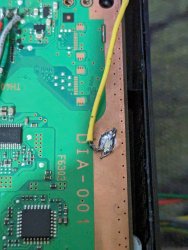
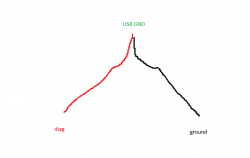
For starters you typed the command wrong. It's supposed to be CXRF. Second: for me, I had to solder the diag wire to the ground wire (which is soldered to the ground plane on the board) and that then goes to GND on my USB (Please note this was exclusively for internal mode, otherwise just using ground without diag to GND works). Try using the proper command first before attempting this.
 
For starters you typed the command wrong. It's supposed to be CXRF. Second: for me, I had to solder the diag wire to the ground wire (which is soldered to the ground plane on the board) and that then goes to GND on my USB (Please note this was exclusively for internal mode, otherwise just using ground without diag to GND works). Try using the proper command first before attempting this.
So just to be sure, 2 wires connected to diag, one going to GND and the other going to the USB?
 
So just to be sure, 2 wires connected to diag, one going to GND and the other going to the USB?
Nope. Could work as well, but what I did was connect one wire on diag, one wire on the motherboard's ground plane (The bronze colored surface that runs around the edge of the motherboard) and then bridged the ends of the wires together and connect that bundle to GND on the USB.

You don't have to solder the wire onto the ground plane, if you have alligator clamps you can just use those to clip the wire to the board. If you do decide to solder it direction to the ground plane, it'll take quite a bit of heat, also be sure to use flux.

Don't bother doing this unless you've already tried entering the CORRECT command like I mentioned and it didn't work.

Gimme 5 minutes and I'll post pics

Edit: Pics
. ps3.jpg
Untitled.png
 
Last edited:
Nope. Could work as well, but what I did was connect one wire on diag, one wire on the motherboard's ground plane (The bronze colored surface that runs around the edge of the motherboard) and then bridged the ends of the wires together and connect that bundle to GND on the USB.

You don't have to solder the wire onto the ground plane, if you have alligator clamps you can just use those to clip the wire to the board. If you do decide to solder it direction to the ground plane, it'll take quite a bit of heat, also be sure to use flux.

Don't bother doing this unless you've already tried entering the CORRECT command like I mentioned and it didn't work.

Gimme 5 minutes and I'll post pics

Edit: Pics
.View attachment 42799
View attachment 42800

That has really helped thank you, I'll try it later, thanks for the pictures
 

Similar threads

Back
Top