PS2 Having this color block pattern glitch

SolidMetal

Forum Noob
Hello folks!
AD_4nXcwcRybakI6yYOlFGVs6RtwRY0IPxL0edVQ2HhuKRLttuBmfCdFrGYob0OncHwvmXtmQHISVaHrqpgfESaFLaiF-fRt1V9m8KsFEHEJwcbJhuAN55pDikVPr8rbHMMh6yOIfTS2SQ


Recently I've decided to revisit my PS2 to reminisce about good old memories but there is this graphical glitch on the screen I've been wondering about its cause.

My PS2 specs and environment:

Model: SCPH 75004 (Slim and PAL region as the code suggest)
Date code: 5C
Modchip: Installed (Mars Action A752)
FMCB: v1.966
Memory Card: Legit Sony 8MB MagicGate
Output: Via legit composite cable
TV: Samsung 4K UE40KU7000

My PS2 is in quite mint condition both cosmetically and the use condition. I'm its first owner from back in 2006 and I've been very cautious with hardwares and never used it intensively due to school and hadn't had a TV in my possession to play everyday or all day long.

Highlights from the glitch issue:
  • The glitch is not a constant burnt to screen and varies in shape, color and position on the screen based on the light condition and game resolution I suspect.
  • PS1 games seem to be unaffected by it. It's either the fact that PS1 games have lower resolution and thus the glitch behaves/displays in a way that it can't be noticeable or it is only affecting PS2 games for a reason.
Highlights of my attempts to see if the glitch goes away with no avail:
  • Legit DVD game media from PAL region.
  • Plenty of backup DVD copy of different games from PAL and NTSC regions.
  • Legit DVD movie media.
  • Running PS2 games from OPL via USB from PAL and NTSC regions.
  • Running legit Sony game demo DVDs for PAL region
  • Disabling modchip for each scenario.
  • Tried some of 8-bit and 16-bit era system games via emulators and the glitch still persist.
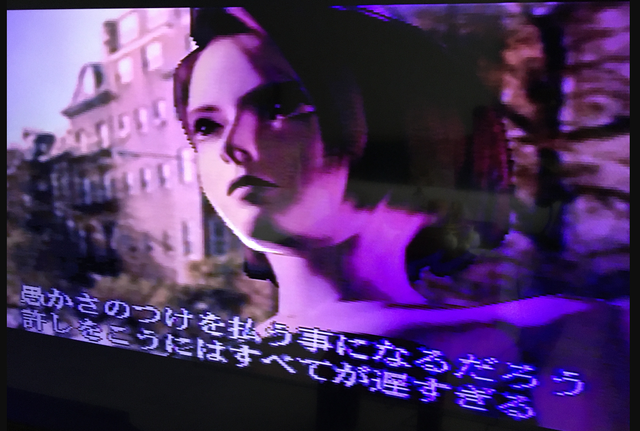
However, to my surprise when I boot up a PS1 game the glitch is nowhere to be seen. Tried backup CD copy of Biohazard 3 NTSC region and tried very hard to detect the glitch pattern but couldn't spot anywhere. Also tried a couple of more PS1 games through OPL via USB from both PAL and NTSC regions and none had the glitch.

Here are some images and a video to demonstrate the issue better:

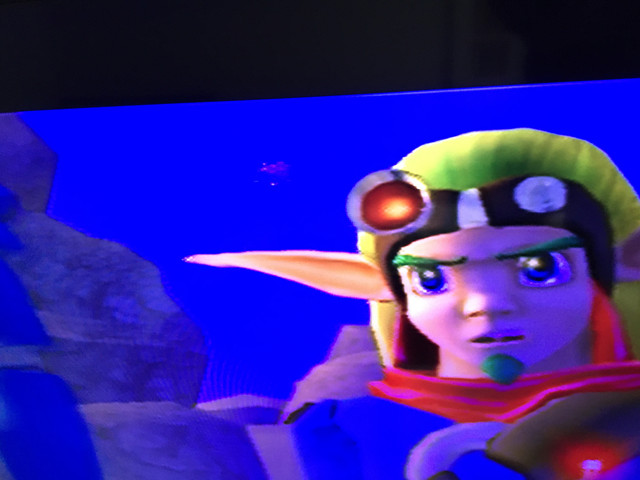
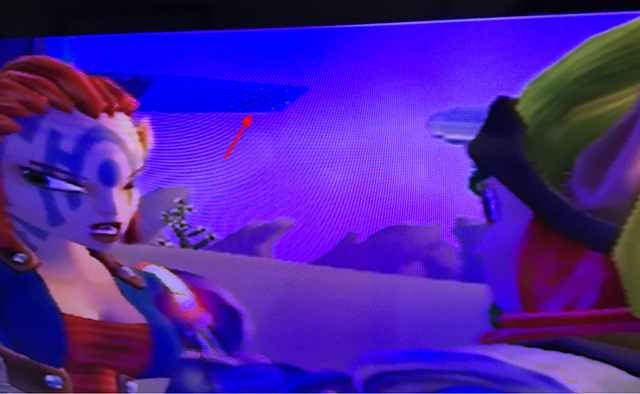
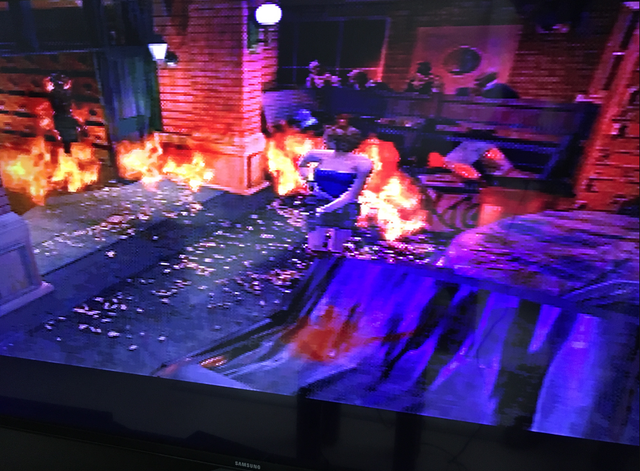
Jak 3 (Legit copy-PAL-DVD) (Cutscene/in-game doesn't matter)


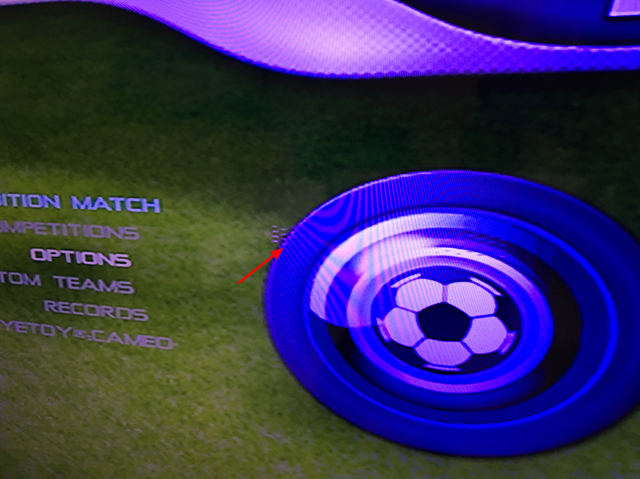
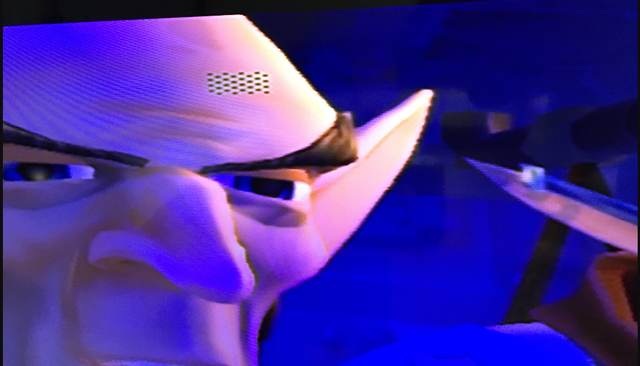
This is Football 2005 (Legit Sony game demo-PAL-DVD) (Cutscene/in-game doesn't matter)

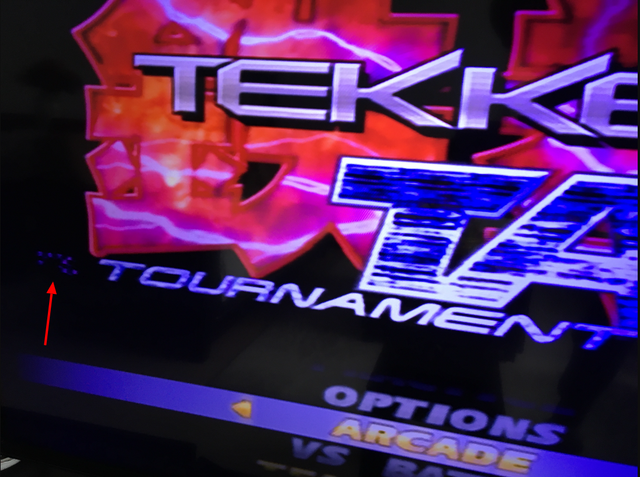
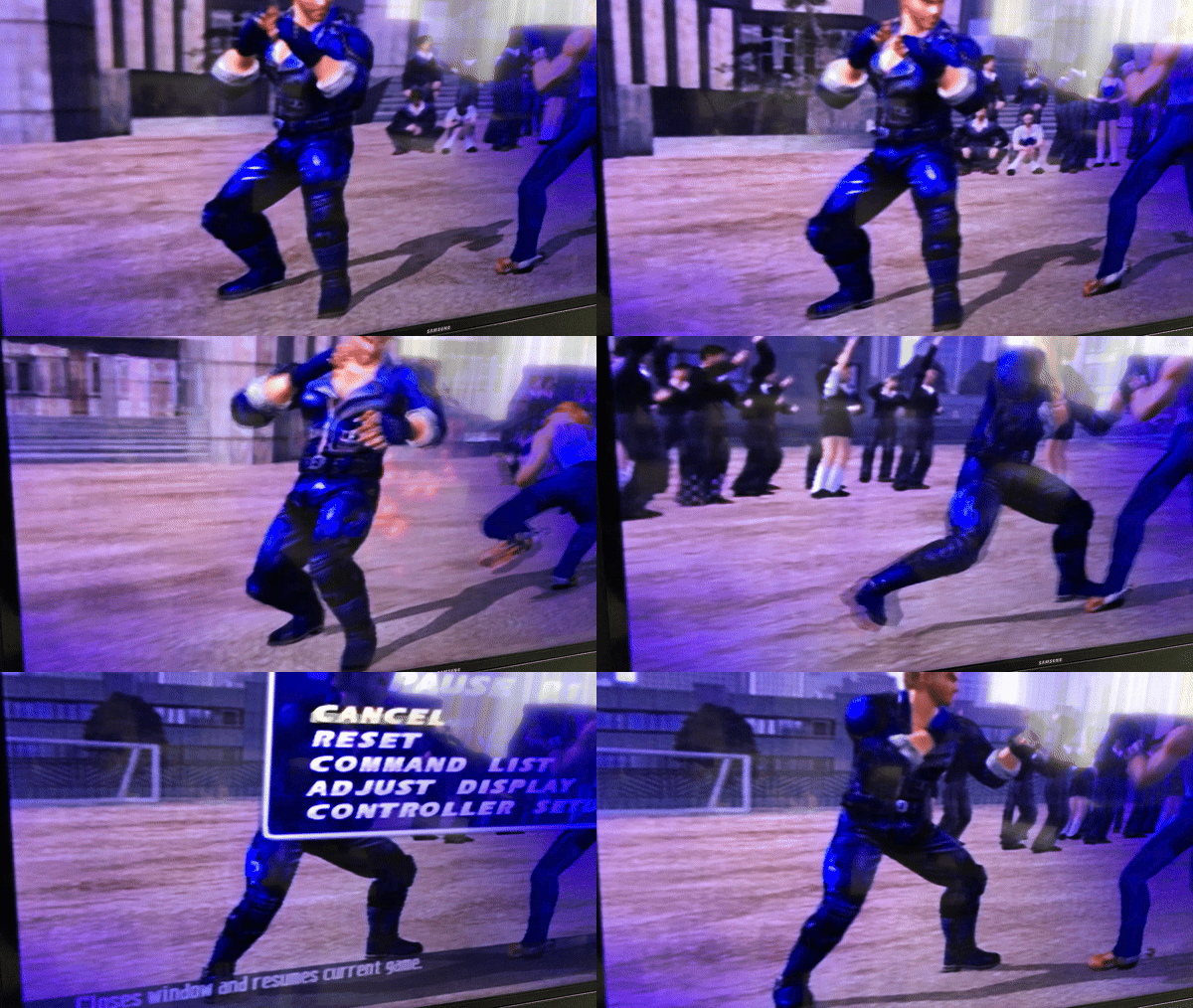
Tekken Tag Tournament (Backup copy-NTSC-OPL via USB) (Cutscene/in-game doesn't matter)


You can see it in action here.

Biohazard 3 (Backup copy-NTSC-CD) (The glitch is absent)


My deduction so far based on my testings:
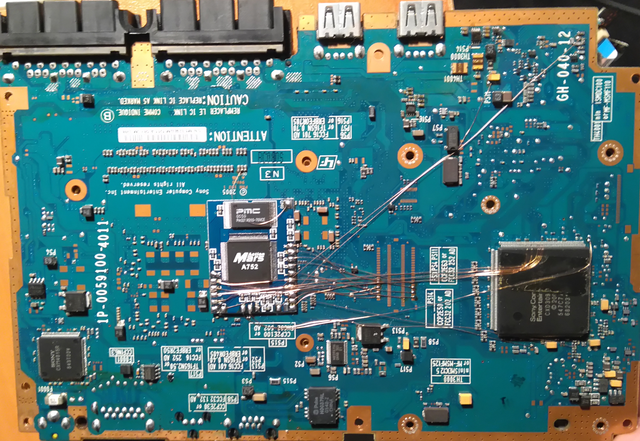
  • A failing hardware part. Potentially GPU/CPU
  • RCA Composite cable
  • Bad and poorly installed modchip having its toll (Mars Action A752)
I said poorly installed and you may just need to see it to belive it.


I've ordered a component cable to improve the viewing pleasure and in case the issue is related to my composite cable for some reason. Will see how it goes.

I would have been more keen to give the credit to PS1 CPU hardware that lies within prior SCPH 7500X models resulting in bypassing the issue but alas, my model is SCPH 75004 with date code 5C, the initial revision that Sony removed PS1 CPU hardware from the board. Still, there is a chance that the PS1 CPU that has been replaced by the PowerPC CPU to emulate the PS1 CPU might actually be the reason the glitch is absent on PS1 games.

AD_4nXfz-JmN_4WNIDKuuioAhesSkkBqiF-GUnX3bbw92vORGAGtRgXmTtU0NYLKIPA3RsV59ST2lXmMcNBq67mB-Y8gjkO7-CsXBheQuo9HtnzdcN6kMew9lty5KzphTlnLuWlhher_PQ


I'll appreciate any input, thanks.
AD_4nXdoxFZsXFkX1yq28w8EHv-DqjfSBQVHCclJ9J9pCKx1ccclHdjH98HSgG2lbf6TpW6IxqxTNqBKS6IlRdrbw5TrqU8VghN9j55RF0ul7VGnR3Jz2Hju293xGRh1v_o2IL1vQesQEA
 
Update: Component cable has arrived and unfortunately the issue is still persist. Only change now the glicth is more noticable due to the nature of component output providing much more clear image quality.

Now that image quality more sharp and clearer, I can confidently say it's confirmed that PS1 games are remains unaffected by the issue.

What potential culprit left there I wonder?
- Modchip (is it even possible?)
- Part of PS2 hardware failing
- Corrosion (can corrosion at some certain part of hardware even cause in such effect?)

I'm really lost here and would like to know what you guys think and suggest.

Thanks.
 
that looks somewhat similar to the checkered board pattern on an xbox 360, when its gpu is failing. that's about all the advice I can offer. it could get worse over time. I don't think I've seen that happen with the modchip I used to have, so I don't know if that's a possible cause.
 
Thanks for the input... Failing GPU would be an unfortunate but yeah it wouldn't surprise at this point based on the pattern. What would surprise me is how it end up happening. I mean, I've never played on it excessively. The record would be 5h straight playtime that happens twice or trice a week when I first got my hands on it in 2006. Could be as well a faulty unit that its hardware failed that easy...

I also suspected corrosion or any type of hardware damage that humidity may cause. So maybe cleaning off the board with an IPA could help but wanted it to be a last resort because the way the modchip installed with all its exposed strings, it's almost impossible not to damage modchip and cause irreversible hardware damage in the process I think. Unless I decide to get rid of the modchip entirely off the board first.

The reason I had my suspicions for modchip is because all the strings there being exposed. So my conspiracy theory would be maybe exposed strings of the modchip somehow got contacting somewhere along the board that causing the glitch.

After getting the component cable and experiencing the huge boost in visual it makes it even harder to let go of the console and attempt drastic troubleshooting unless am certain what I'm doing :distrust:
 
I dunno. I've never installed a modchip, but I think generally, people put electrical or gaffer's tape over the wires to prevent shorts probably.
 
If I ever remove that darn modchip I won't be reinstalling it at all :) Not that I have any experience to do so. The image of the open case of PS2 showcasing the modchip is taken back in 2016. I was in shock to think that hardware still operating at all under the circumstance. That was when I first noticed this glitch for the first time and had my suspicion and decided to open the case only to get myself shocked to what lies in front of me.

Then again, PS1 games being unaffected is still somewhat appears interesting.
 
If I ever remove that darn modchip I won't be reinstalling it at all :) Not that I have any experience to do so. The image of the open case of PS2 showcasing the modchip is taken back in 2016. I was in shock to think that hardware still operating at all under the circumstance. That was when I first noticed this glitch for the first time and had my suspicion and decided to open the case only to get myself shocked to what lies in front of me.

Then again, PS1 games being unaffected is still somewhat appears interesting.

I think fmcb or maybe it's software mods in general do not work with modchips installed, so I remember having to disable mine, which was a pita having to do it every time. there's no longer a real need for a modchip afaik, especially if you don't have a working disc drive. I sold my new/old ps2 a year or two ago. it didn't have a modchip, but it had a working dvd player, so I could play discs fine. I should've kept it, because I was going to go legit, maybe buy shadow hearts 2 and 3. I remember loving those games when I had them like 20 years ago or so. good times.
 
Yes modchips can conflict with softmods. I have to press power/restart button three times in order to "disable" the chip (Mars Action A752) and I believe it isn't complete failsafe as long as the chip resides on the system. The darn modchip doesn't even have a config manu all I know and it is supposed to be a DMS clone afaik. The combination of a cheap clone modchip and bad installation might have been the worst to happen to my PS2. I still have the box in a good shape, manuals and everything with compete package. I really mean it when I say I look after my PS2 :D

My disc drive is still operational although it has its own ups and downs with my nearly two decades old backup games but that can go into another forum thread. However, there are no problem with legit games and DVD videos I must say. It's one of the few reasons I'm still keeping the modchip to be honest. Just for conveniency of placing DVD and jump stright into the game.
 
Last edited:
I don't know what it is with playstation, but they do have some of the shittiest optical drives, even going as far back as the ps1. I remember reading that the most likely places any of the big three will try to save money on are the optical drive and the cooling system. the latter really bit microsoft in the ass, and I'm sure someone got fired for it.
 
Yes, they are quite annoyingly picky piece of devices. Partly because the DRM protection being cumbersome I believe and getting in the way every time disc read in progress. Hell, at one point I even suspected the glitch being present because of disc unit but that hardly makes any sense. I was just desperate to deem any odd that can be even remotely culprit.
 
I don't remember if it's the ps1 or 2, but there are like four sensors that detect backups, and I think you can cover them with tape instead of using a modchip.
 
I don't know about this. Honestly, I'm not even sure if this would solve anything about the glitch.

I've already digged into a lot of homebrew and softmod topics to convince myself that modchip won't matter as much. In the end, I ended up spending days only to find out there is no one perfect solution that works out of the box because of quite bunch of diffirent hardware revisions out there and whatnot.

I believe the best practise, at least from my experience based on what I've seen around PS2 scene is to focus on only the games I'm interested to make a playthrough and find what compatibility of available soultion would suit best for that particular game then make the setup accoridngly and beat the game. Then repeat the progress for the next game I'm interested to do a playthrough.

From my observation I gathered through, there are really no one solution that rule them all and let you build a vast library of PS1 and PS2 games and play them at full compatibility. So I'll just focus just a few games at a time to avoid the tear and wear. It can be really time consuming to seek for ultimate solution because it's just an illusion.
 
Thanks for the input. Is it possible to roughly estimate how long would system last if it's Emotion Engine failure. The "glitch" is been around since well back around 2016. Before that there were only CRT tv that I was occasionally pluging my PS2 into. So it could be well present even that time around but because of small screen size (55 inch) and scanlines with combination of composite output I may have not noticed the issue back in the day.

Guess it also helps that I didn't use the PS2 alot whole to shorten its lifespan. Either way now I'm more lean towards the possibility of a hardware fail which is a bad news :dispirited:

Btw, If I were to be certain it's EE failure then would it be logical to expect the glitch to be constant in shape, position and color throughout different games? Also worth to mentin that I've ran PS2RDRamTest and all went 'OK'. I wish there were other tools like this one to identify specific hardware failures like GS and EE too if that is even technically possible.
 
Last edited:

Similar threads

Back
Top