HDD Not working

Bosgas

Forum Noob
Hello,

Yesterday i was stupid and tried to change the hdd to an ssd without backing up my data, and i had a Persona 5 95+Hours save game that i was completing, that i would like to recover.
When i try put the original hard drive it justs says that it cant boot and i have to format it, the new ssd already boots and has a cfw. Right now i have the ps3 key, but i can't decrypt the hdd to restore my save data.
Does anyone have any tips or suggestions on what i could do?
on the original hdd i had Evilnat CFW.

Thanks in advance.
 
If you have the EID root key then you should be able to access the HDD contents on your PC. I've not had to do it, but I believe PS3 Tools Collection will do the trick. You can make a backup of what you want, and transfer it to the SSD. Others who have done this should be able to provide more specific information, but so long as you have the ERK you should have no problem being able to read the HDD's contents on PC. Unfortunately I can't be any more specific than that, as I've never done it myself.
 
If you have the EID root key then you should be able to access the HDD contents on your PC. I've not had to do it, but I believe PS3 Tools Collection will do the trick. You can make a backup of what you want, and transfer it to the SSD. Others who have done this should be able to provide more specific information, but so long as you have the ERK you should have no problem being able to read the HDD's contents on PC. Unfortunately I can't be any more specific than that, as I've never done it myself.
There's a faster way: https://github.com/jhonathanc/PS3-HDD-Reader

Edit: Compiled version by me if you don't know how to compile: https://github.com/Izofeu/PS3-HDD-Reader-compiled/releases
 
Last edited:
If you have the EID root key then you should be able to access the HDD contents on your PC. I've not had to do it, but I believe PS3 Tools Collection will do the trick. You can make a backup of what you want, and transfer it to the SSD. Others who have done this should be able to provide more specific information, but so long as you have the ERK you should have no problem being able to read the HDD's contents on PC. Unfortunately I can't be any more specific than that, as I've never done it myself.

Thanks i'll try this tool.

There's a faster way: https://github.com/jhonathanc/PS3-HDD-Reader

Edit: Compiled version by me if you don't know how to compile: https://github.com/Izofeu/PS3-HDD-Reader-compiled/releases


As for this, i tried to use it yesterday, and it gave me an error, saying that either could not read the drive or ERk is not valid.
 
@Bosgas https://www.psx-place.com/threads/h...on-3-hdd-on-pc-tutorials-tools-hub-faq.36261/

Did You initialize HDD by Windows? If yes, it will not be read until You fix it. :P

And of course ERK must came from exactly this console... and be placed in the same dir as HDD Reader.

@Izofeu This is the official site of HDD Reader and latest versions for both Windows and Linux: https://3141card.jimdofree.com/downloads/
upload_2022-4-13_14-34-10.png
 
Ok, so i have e few questions.

I shouldn't initialize the disk right?

Is it best to run on Linux or Windows( which works best)?

Im at work at the moment, but as soon as i get home i'll try some of the solutions, starting with the GUI one, but if by any case Linux works best i'll make a VM to test it also.

(I have copy of course ;]):

Can you provide the program?

Thanks.
 
Not only You should not but You cannot. "Initializing" means overwriting "PS3PT" by MBR or GPT. Some user said that current Windows 10 build doing it without asking. I don't know if this is true.

Doesn't matter, both works the same.
 

Attachments

Not only You should not but You cannot. "Initializing" means overwriting "PS3PT" by MBR or GPT. Some user said that current Windows 10 build doing it without asking. I don't know if this is true.

Doesn't matter, both works the same.

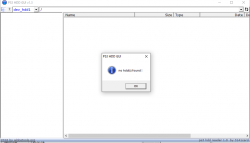
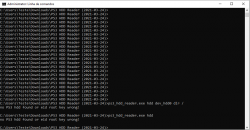
Just tried and no dice, i get a no hdd found error.

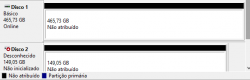
As you can see the 149GB is the ps3 one, and the other is a clone i made just to be a bit safe.

Anything that pops into mind of what i could do?
 

Attachments

  • disks.PNG
    disks.PNG
    8 KB · Views: 33
  • ps3hdd.PNG
    ps3hdd.PNG
    20.2 KB · Views: 34
Use HDD Reader from attached in my earlier post, not HDD Reader GUI which contains even 5 years old HDD Reader build.

There is another way, on Linux side not involving HDD Reader, 100% reliable method but 1000% more complicated. :P
 

Attachments

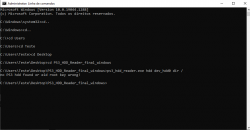
  • hddnogui.PNG
    hddnogui.PNG
    18.2 KB · Views: 32
You still didn't use version from my attachment. The reason to not use old builds is mainly because they don't properly detecting if HDD comes from fat model or slim model, which both using different encryption method.

In addition, file name of ERK for HDD Reader (all versions) must be "eid_root_key", not i.e "eid_root_key.bin" or "erk" or whatever.
 
You still didn't use version from my attachment. The reason to not use old builds is mainly because they don't properly detecting if HDD comes from fat model or slim model, which both using different encryption method.

In addition, file name of ERK for HDD Reader (all versions) must be "eid_root_key", not i.e "eid_root_key.bin" or "erk" or whatever.

i get the same error

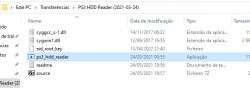
yes the key does not have the ".bin" extension.
 

Attachments

  • folder.PNG
    folder.PNG
    15.5 KB · Views: 33
  • pshdd.PNG
    pshdd.PNG
    50.7 KB · Views: 35
So the situation start to complicating. :) Oh, forgot to mention, app needs Administrator rights because it reads HDD on low level, so he needs rights to straight talk with HDD.
Also based on screen, You have turned on option to hide file extensions, so You don't really know how it is named looking only just in Explorer. ;)
 
So the situation start to complicating. :) Oh, forgot to mention, app needs Administrator rights because it reads HDD on low level, so he needs rights to straight talk with HDD.

Yes im starting cmd with elevated Admin rights, should be enough right?
 
Yes.

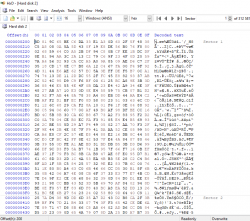
Ok, how first sector looks like? Run HxD, open this specific HDD with admin rights but in read only mode. First sector means first 512KiB. Should looks similar as below (all data encrypted, no empty spaces and ascii words etc. etc.):

ps3hdd.png
 

Similar threads

Back
Top