PS2 HDLGameInstaller

:) I thought it may possibly be of some use but very much understand its an old tool for an old console.
Just a console that lets me play a lot of great lightgun games properly, no nasty IR tracking, so I love it.

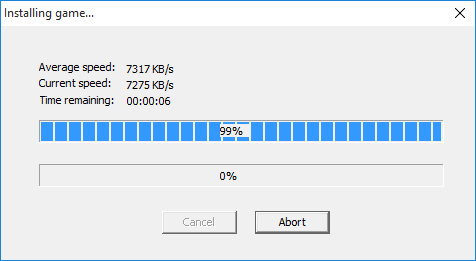
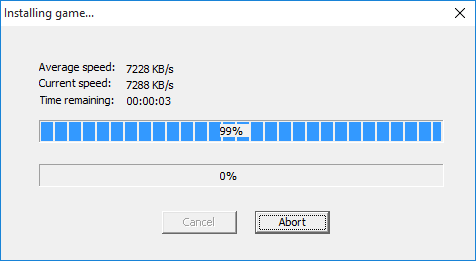
Another 6 games transferred using 0817 and my netbook, no '99% issues' so far.

I should have noted that when uploading games using my desktop that it was otherwise idle, I was watching task manager and CPU was in the single digits, next to no network traffic other than from HDLGI etc. Disabled wifi on the router and wasnt doing anything else on wired network at the time.
When testing on the netbook I was RDPd into it from my main PC, but I dont think the bandwidth RDP uses would have too much impact. Other than that the netbook was idle also.

Using latest FHDB and the wLE version that it comes with, launching HDLGameInstaller from usb drive via wLE.
The 99% error with 0817 occurred both before and after I modified my official network adaptor for SATA.
 
Last edited:
Naaah... It's not so old! In fact, it's one of the newest tools and still updated once in a while! ;)

Interesting, that it seems to be related to the PC-Setup, where it is running on...
 
Naaah... It's not so old! In fact, it's one of the newest tools and still updated once in a while! ;)

Interesting, that it seems to be related to the PC-Setup, where it is running on...

I'm very thankful for sp193 and other devs continued work on PS2. I was very late to the party and dont think I would have been able to get it up and running without the more recent tools. Running OPL games on a PS2 slim from an SMB share hosted on a raspberry pi was nice and self contained, but internal HDD on a PS2 fat is even better :)

Yeah it's quite odd, especially given that where the PC client is run from appears to determine if the PS2 side hard locks or not.
 
I am also having the same issue as jolek when using HDLGameInstaller-0817. Installation gets to 99%, stays there for about a minute then gives the 'connection to the console has been lost' error.

Intel(R) 82579V NIC through an old netgear N750 modem/router.

Could you please open the network status screen and check that flow control is enabled?
If it isn't enabled, then it becomes impossible to ensure that the PS2 can be properly communicated with. While I also provide an option to "enable" flow control, it probably cannot be actually enabled if it wasn't automatically enabled via auto-negotiation.

For modern-day network equipment, not having support for flow control is not really an issue because they're fast. But the PS2 was from 1999, while its IOP is nearly as slow as the 80486 from 1989.

After this I've tested with the older HDLGameInstaller-0813, installed 20 games without any problems.

HDLGameInstaller is a very complicated piece of software. A lot of bugs don't even occur within HDLGameInstaller itself, but within the PS2SDK and even the PS2's hardware.

Over the last 7 versions or so, the network software parts were being revamped. At some point, the protocol used by HDLGameInstaller was also changed to work like FTP, whereby the file is transferred via its own socket, so that there is no additional overhead.
So it is very difficult to quantify "bugs" that appear between releases due to the large number of changes and the large number of bugs that HDLGameInstaller already had, since 2011.

Ever since we managed to hit 6MB/s or so, the SMAP has been showing signs of instability. If it is an actual hardware issue, then there is nothing much that can be done.
It seems like the MAL can become unresponsive, if the IOP tries to access a Buffer Descriptor (BD) that is marked as ready. Perhaps because it isn't actually completely transferred. We're working around it by first checking against the frame count register. But who knows what other problems the network adaptor has, since we're still occasionally hearing of people who find HDLGameInstaller downright unusable, but yet I cannot ever make it fail...
Or even if it fails, I don't know how to debug it since there are too many parts to check, with inadequate controls. I've done various tests to prove that the mechanism within NETMAN that transfers frames is sane, and it seems quite convincing that it is the hardware that is losing frames...

Due to a lack of progress over the past 7 years, I have more or less given up and the software is effectively discontinued.

The 'network status' page lists 100mbit full duplex and no errors.

The Rx frame overrun status is not known to work, so no errors will be registered by the hardware. However, frame losses can still take place.

I think someone was working on an even lighter UDP protocol, but progress on it has been stopped.
Wouldn't that be HDLDump, specifically the v0.9.0 variant?

 
Last edited:
Could you please open the network status screen and check that flow control is enabled?

Yes it is enabled:
Link mode:100Mbps FDX
Flow-control: Enabled

It's odd that the issue always (for me) occurs at 99%, where it would normally pause for a second or two then succeed. As though the transfer was successful for the several GB of data but it is then having a problem performing or confirming an action at the end of the process.

Due to a lack of progress over the past 7 years, I have more or less given up and the software is effectively discontinued.

I can understand, thank you for all your work on it. I've almost finished copying games over using 0817 from my windows 7 machine, but am always happy to test any changes :)
 
Last edited:
I also think, that it is VERY odd, that this issue happens at 99% every time...

That seems to indicate, that the issue might be somewhere else...

Could there be a buffer-underrun, due to more lost packets in a specific time?
I mean: How much time-dependent is the wait&transfer of a packet/frame?
 
In my config it ('99% issues') happens not every time, let "say" it happens very often.
The same frequency I've when I'm trying to connect PC with PS2.
Although, transfer never stops e.g at 20 or 40%.
 
Transferring pops games with radhostclient makes me long for 7MB/sec from HDLGameInstaller, even with its quirks :)
 
Okay, so here is something we can try: https://www.sendspace.com/file/7oxjym
Replace HDLGameInstaller.elf with this version. The other files and folders (lang folder etc) are still necessary.
  • Game list is no longer refreshed when the game is being closed, but when the connection is closed.
  • Data socket is deleted, once the data connection is broken.
I am guessing it has got to do with how few games I usually have on my HDD. Perhaps you guys have 200 games or something, causing the software to take more than 30s to send a response after the game is closed. Since it is impossible for the HDD to scan through all partitions within 30s, all attempts (30s x 3 = 150s) will fail.

If not refreshing the game list after a game is closed is the answer, then here is my guess as to why it wasn't an issue before: HDLGameInstaller now uses a dedicated socket for file transfers. However, the data connection can be closed before the other end actually completely receives all data and stores it, allowing the close game command to be sent over the command socket, even earlier than before.
 
Recently my motherboard died, so I've bought another, newer.
This motherboard have Realtek RTL8111F LAN card, previously I've RTL8111B

With HDLGameInstaller-0817A.elf, my transfers are quite impressive:
dd2.png

Installing God of War (SCUS_973.99) takes ~20 minutes (7.93 GB)!

image.png


With new Realtek RTL8111F, I do not have '99% issues'.
In PS2:
Link Mode 100Mbps FDX
Flow-Control Enabled.

The only problem I've, is that when I disconnect link in PC client,
on PS2 I still have warning about not to turn off the console.
When I press "select" to see more info, program freeze\crash (after disconnecting).
 
Recently my motherboard died, so I've bought another, newer.
This motherboard have Realtek RTL8111F LAN card, previously I've RTL8111B

Sorry about your loss.... but welcome to the 7MB/s club! :D
This probably also means that you no longer have the problem with a lack of flow control.

The only problem I've, is that when I disconnect link in PC client,
on PS2 I still have warning about not to turn off the console.
When I press "select" to see more info, program freeze\crash (after disconnecting).
I haven't changed the code there recently, although I have made changes over the past 2 releases or so.

It may take a while to update the connection status, about 10s.
If you booted HDLGameInstaller from a USB disk, do not remove the USB disk because HDLGameInstaller depends on the font files there. If you remove the USB disk, then it will crash when it tries to read the font files.[/QUOTE]
 
Okay, so here is something we can try: https://www.sendspace.com/file/7oxjym

Thank you for the new version :)

I tested with 0817A from my desktop PC. Sorry to say that the first game I attempted to install got to 99% then gave the following error. There was no ~90 second delay between hitting 99% and the error being given as there is with the 'connection lost' error, it pops up pretty much straight away.
The PS2 was frozen
o3NiMEA.png


This is at least different to 0817. Under 0817 the PS2 would still be responsive when this particular error was given by the PC client. It was only frozen when the 'connection lost' error occurred.

I then installed the same game using 0817A from my netbook which succeeded:
i6WqYlQ.png


I have about 70 games installed on the HDD now, but the '99% issue' happened with the very first game I attempted to install on this HDD using my desktop PC (after moving to a SATA drive).

I have not had any errors when using either 0813 on my desktop PC, or 0817 from my netbook.
With speed like that, I'm more than happy to stick with 0817 from the netbook :)

EDIT:
Disconnecting from the (netbook) PC client also leaves my PS2 frozen on the 'remote administration mode' page, as it did for jolek. Under 0817 this disconnected successfully.
 
Last edited:
Sorry about your loss...

Theoretically I've another old PC, which need some moderation, maybe when I can find the same AM2(+) motherboard,
I'll resume my tests and "complains".
8d2ad9671de3.jpg


but welcome to the 7MB/s club! :D

Thanks.
image.gif

Now installing 4 GB game takes less that 10 min, so it's quite impressive!

This probably also means that you no longer have the problem with a lack of flow control.

Yes, Flow-Control is Enabled.

I haven't changed the code there recently, although I have made changes over the past 2 releases or so.

It may take a while to update the connection status, about 10s.
If you booted HDLGameInstaller from a USB disk, do not remove the USB disk because HDLGameInstaller depends on the font files there. If you remove the USB disk, then it will crash when it tries to read the font files.

I've waited even longer than 10s (~1 min).

It happens only with HDLGameInstaller-0817A.elf, with HDLGameInstaller v0.817 (09/09/2018) everything is fine.
After disconnecting link, HDLGameInstaller v0.817 is showing games list.

Let's say that this is "PS2 USB flash-drive", so I only unplug it, when I need to add something (e.g new version of an app).
Normally it's "permanently" sticked into my PS2.

BTW I recently installated windows 10 because of a new hardware.

Windows firewall seems to blocks transfer at 0%, when I run this app (PC client) for the 1st time.
Even when I add permission, transfer will not resume, although restarting PC helps.

When I run app for the 2nd time, everything is fine.

PS: with HDLGameInstaller v0.817 (09/09/2018) transfer occasionally drops to ~3500\3600 KB\s.
With HDLGameInstaller-0817A.elf these drops, happens less often.
 
Last edited:
Windows firewall seems to blocks transfer at 0%, when I run this app (PC client) for the 1st time.
Even when I add permission, transfer will not resume, although restarting PC helps.

When I run app for the 2nd time, everything is fine.

I had that same issue so disabled windows firewall to rule it out. Win10 notifications are still whinging at me about it :)
 
Hello, I have been trying HDLGameInstaller but haven't had complete success yet. I don't use HDDOSD, but instead OPL 0.9.2 - that should work to load the games that have been transferred with HDLGameInstaller, yes?

I thought I initially had success with version 0.817. This transferred a game, got to 100%, said success, and all seemed well. However, when loading the game with OPL it froze on a black screen. I deleted and tried to retransfer the game, but it kept getting stuck at 99%.

I changed to 0.817A and that didn't freeze at 99%, however the game still froze in OPL with a black screen.

I tried transferring a different game, one that I already knew worked with OPL, and this one froze in OPL too, only this time on an orange screen!

Any ideas if I'm doing something wrong? I must say the transfer speeds (using an Ethernet lead directly between laptop and PS2) are very impressive, 7MB/sec, but so far I haven't actually got a game to load!

Thanks in any case for making this software.
 
Last edited:
I've figured out why it sometimes crashes when you have the Ethernet link mode set to anything other than Auto.
If you change the setting, it will try to set the new link mode/duplex/pause frame setting. However, there is a design flaw in NETMAN that allows functions NetManSetLinkMode() to be called before NetManInit() is called. And indeed, I forgot to call NetManInit() before NetManSetLinkMode(), which allowed the RPC call to take place with a unbound & invalid RPC server information.

I have not, however, looked into why HDLGameInstaller has issues after a game is closed. Since it cannot locate the game partition (hence the "game is not installed properly" message), it cannot complete the installation by writing the HDLoader game title information. Hence the game is not bootable and will not be recognized as valid data by any software (not OPL, not HDLoader and not the HDD browser).

Hello, I have been trying HDLGameInstaller but haven't had complete success yet. I don't use HDDOSD, but instead OPL 0.9.2 - that should work to load the games that have been transferred with HDLGameInstaller, yes?

Yes. But if you can, please upgrade your version of OPL. v0.9.2 is old, and has many other issues.

I thought I initially had success with version 0.817. This transferred a game, got to 100%, said success, and all seemed well. However, when loading the game with OPL it froze on a black screen. I deleted and tried to retransfer the game, but it kept getting stuck at 99%.

I changed to 0.817A and that didn't freeze at 99%, however the game still froze in OPL with a black screen.

I tried transferring a different game, one that I already knew worked with OPL, and this one froze in OPL too, only this time on an orange screen!

Are you using good rips?
If you are installing a CD-ROM game from a disc image, you can also try to mount the disc with Daemon tools (or something similar) and get HDLGameInstaller to install from the virtual drive instead. The PC client is known to have issues with certain formats, usually those that represent CD-ROM games.

Thanks in any case for making this software.

Thanks for trying it out, even though it's not so good.
 
Yes. But if you can, please upgrade your version of OPL. v0.9.2 is old, and has many other issues.


Are you using good rips?
If you are installing a CD-ROM game from a disc image, you can also try to mount the disc with Daemon tools (or something similar) and get HDLGameInstaller to install from the virtual drive instead. The PC client is known to have issues with certain formats, usually those that represent CD-ROM games.


Thanks for trying it out, even though it's not so good.
Thanks for the reply. I was trying a few different games, including some that I had previously transferred using hdl_dump, and which were already working with my OPL 0.9.2 setup. Including the NTSC-U version of Rez, with checksums verified from redump.org, and which is nice and small so quick to transfer. Actually, it's only 200MB-ish, so presumably a CD game, so maybe that's a problem, although it came as a single .iso file, which I would imagine was OK?

In any case I'll try updating OPL first. 0.9.3 from https://github.com/ifcaro/Open-PS2-Loader/releases/tag/0.9.3 right?
 
Last edited:
As long as you convert the bin/cue from a CD game to .iso correctly (opl manager works well) they should load fine, I've added a bunch.
 
In any case I'll try updating OPL first. 0.9.3 from https://github.com/ifcaro/Open-PS2-Loader/releases/tag/0.9.3 right?

Yes.

There is also script\bot that creates once a day daily build (beta):
http://www.psx-place.com/resources/automated-daily-build-system-for-opl-wle.702/

Here is also simple & Portable WinBin2Iso for converting BIN into ISO to be used with OPL:
https://www.softwareok.com/?Download=WinBin2Iso,
http://www.psx-place.com/resources/winbin2iso.671/.
 
Back
Top