help please can't install any fw

Freesty

Forum Noob
i was on cfw when my kid accidentally install ofw 4.88. after that i downgrade to rogero downgrader and rogero v3.7. then i try to install evilnat 4.88.2 but installation stuck on about 40% and get error to restart console to install. then i restart, console start automatically installation but stuck again.
i try different usb pens, different fw but nothing help. then i load patched nor again with e3 but now i can't install fw. i try rogero downgrader, ofw 3.55, ofw 4.88, evilnat 4.88 but always get error 8002F225.
i try another hdd but same error. any help?

it was long time that i last downgrade console. i use PS3 Flash Tool v4.50 for patch bios. dont know if something change on scene
 
Last edited:
Error 8002F225 means "Error with installing Firmware update. The PUP is not recognised as valid update.".

So, if you were on Rebug REX I would suggest you to try with that PUP and see what happens.
 
You can't jump from that low of a firmware. Just use the ps3xploit tools by @bguerville from 4.88 OFW then you can just install over top once done. Rogero hasn't been needed in 8+ years.
 
You can't jump from that low of a firmware. Just use the ps3xploit tools by @bguerville from 4.88 OFW then you can just install over top once done. Rogero hasn't been needed in 8+ years.
i cant find this tools and i dont understand nothig about that.
i am generation that jailbreak ps3 console with dongles on fw 3.14 and after this with e3 flasher.
 
i cant find this tools and i dont understand nothig about that.
i am generation that jailbreak ps3 console with dongles on fw 3.14 and after this with e3 flasher.

In order to try out what @atreyu187 said, you need to go to ** www.** ** www.ps3xploit.net > D... (NEW URL = http://ps3toolset.com)/bgtoolset/ from your PS3 web browser. Here is a full tutorial on how to use it: https://www.psx-place.com/threads/guide-jailbreaking-with-bgtoolset.33461/

You didn't mention your console model, but I assume is CFW-capable. Good luck!.
 
In order to try out what @atreyu187 said, you need to go to ** www.** ** www.ps3xploit.net > D... (NEW URL = http://ps3toolset.com)/bgtoolset/ from your PS3 web browser. Here is a full tutorial on how to use it: https://www.psx-place.com/threads/guide-jailbreaking-with-bgtoolset.33461/

You didn't mention your console model, but I assume is CFW-capable. Good luck!.

console is 25xx and minimum fw is 3.40. i cant do this because my console is empty, i dont have instaled fw and i cant use this tools from ps3. i just want to install any fw on it. hdd is formatted
 
console is 25xx and minimum fw is 3.40. i cant do this because my console is empty, i dont have instaled fw and i cant use this tools from ps3. i just want to install any fw on it. hdd is formatted
I believe he is telling you to install ofw 4.88 on your hdd then use the PS3 Toolset from the ps3 browser to jailbreak the console & install CFW again.

And if you can't install ofw 4.88 either, the most common causes for ofw 4.88 pup installation failure would be
1. User error: check the usb device & pup file path, make sure not to use usb hubs.
2. Hardware failure: it could be many things, BD failure, BT/Wifi failure, hdd failure etc.. You could try to install a noBD/noBT pup, not for a long term solution but to confirm.
3. Kernel mode: the console was previously on Rebug REX & converted to DEX mode in which only PUPs of DEX firmware will install. Rebug D-REX 4.84.2 is the latest DEX CFW available.
 
Last edited:
It fusses up going from Rogero. If it won't allow you to install 4.88 grab 4.30 OFW install then install 4.88 OFW then you can use the tools just fine.
 
It fusses up going from Rogero. If it won't allow you to install 4.88 grab 4.30 OFW install then install 4.88 OFW then you can use the tools just fine.
Oh well there could be that as well.
I have not used a Rogero CFW in years, I could not say about specific issues that may be caused by his custom patches.
 
I'm starting to think that it could be one of these issues:
  1. Bad USB drive (those that the PS3 can't recognize from recovery mode).
  2. Bad PUP version (what @bguerville said).
  3. Bad PUP MD5 checksum.
 
Nothing help
I try ofw 4.3, ofw 4.88, rebug cex, dex. Allways same error. Only when in recovery use restore ps3 system then got error 8002f2c5
 
Please, try to check the MD5 checksum of your PUP file in your USB drive. Error 8002F2C5 means that the PUP data is corrupted, so something happened during the copy process of your PUP file. It could also be that your USB drive is broken.

Here is an online tool to check the MD5 hash: http://onlinemd5.com/

And here are some of the MD5 hashes of valid PUPs:

4.88 RETAIL/CEX | MD5: A0B63A3E4AE92ED176D6B9A67CE447F0

4.88.2 EVILNAT/CEX | MD5: 3202971E05140F24E52B36D5C443AD35
 
Please, try to check the MD5 checksum of your PUP file in your USB drive. Error 8002F2C5 means that the PUP data is corrupted, so something happened during the copy process of your PUP file. It could also be that your USB drive is broken.

Here is an online tool to check the MD5 hash: http://onlinemd5.com/

And here are some of the MD5 hashes of valid PUPs:

4.88 RETAIL/CEX | MD5: A0B63A3E4AE92ED176D6B9A67CE447F0

4.88.2 EVILNAT/CEX | MD5: 3202971E05140F24E52B36D5C443AD35
I just try this with both fw, and no help. I try another hdd and nothing.
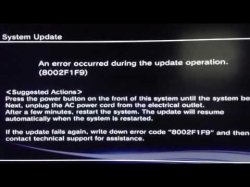
The problem started when i try to install evilnat fw over rogero. Console stuck on about 40% and get this screen:
Not sure in error code, but get this message. After few atempts without help i flash nor dump again and from then i cant install any fw.
 

Attachments

  • dc56cb782fadef2bd7a85ae3a3fce800.jpg
    dc56cb782fadef2bd7a85ae3a3fce800.jpg
    16.4 KB · Views: 58
I just try this with both fw, and no help. I try another hdd and nothing.
The problem started when i try to install evilnat fw over rogero. Console stuck on about 40% and get this screen:
Not sure in error code, but get this message. After few atempts without help i flash nor dump again and from then i cant install any fw.

Well, that's another error you got there. I believe error 8002F1F9 is related to a hardware failure (possibly the BD drive, the BT or WiFi board).

The only options you have available are to replace the faulty parts or to use one of the CFW versions that don't check said parts.
 
tried evilnat no bd bo bt, same error.
i think i losing contact somewhere.
before when this happens console freeze when try install in recovery mode and need more time to get picture on tv . then i put something under hdd and console boot faster , no freeze.
btw my problem start just few minutes after i install rogero, so i think bd, bt boards and usb pen must be ok.
i using usb pen with led indicator and always use md5
 
hello again
today i research dumps from my others consoles and i notice something strange.
in dump from my console that i have problem, in ps checker stay this:
******* Checking CoreOS_region *******
009.01 ROS0 Header : OK
009.02 ROS0 Hash : OK
Size = 0x6FFFE0
MD5 = 36A0D80FB18E9D6FD7635217D59FA726
Version = 4.88 CEX/SEX OFW/HFW
009.03 ROS0 unused 0xFF Filled Area : OK
009.04 ROS1 Header : OK
009.05 ROS1 Hash : OK
Size = 0x6FFFE0
MD5 = 4853885368E6A601BF11945EE5E3F944
Version = 4.80.1 REBUG REX

so my question is, how can be HFW if console was updated directly from console menu
 
so my question is, how can be HFW if console was updated directly from console menu
I am not sure I understand your question.
There is no obvious problem with the pyps3checker results.
This is a dump from a console that was running Rebug REX 4.80, on top of which someone installed OFW or HFW 4.88 from the XMB menu or recovery mode. OFW & HFW have an identical CoreOS as only the silk_webkit.sprx file deployed on /dev_flash partition is different.
According to the dump check, at the time the dump was obtained, the console had never been patched to be able to reinstall CFW, any CFW installation would have failed, only a OFW/HFW 4.88 reinstallation from recovery mode should have been possible.
 
Back
Top