4.90.1 HFW (Hybrid FirmWare)

PS3 HFW 4.90.1 (Hybrid Firmware) -

Hey guys, I have a question. Do your bluray media work and can you still connect to the psn? The readme file:

Code:
// Required restoration (Bluray media won't play because HFW 4.90.1 does not include these 3 files, this was needed to bring the old webkit back)
        bdj.self                (4.90)
        bdp_BDMV.self   (4.90)
        bdp_BDVD.self   (4.90)

// Recommended restoration (Small changes were introduced which might break game updating feature and PSN store)
        gameupdate_plugin
                13,002 (4.90) vs 12,986 (4.82)

        newstore_plugin.sprx
                467,286 (4.90) vs 467,356 (4.82)

// Optional restoration (Not really needed since decrypted binaries are pretty much identical unless you have OCD)
        x3_mdimp11
        vmclib
        user_plugin
        photoviewer_plugin
        nas_plugin
        mms_minimdimp_media_gamedisc
        gamelib_plugin
        custom_render_plugin
        avc_plugin
        autodownload_plugin


Enjoy!
 
Hey guys, I have a question. Do your bluray media work and can you still connect to the psn? The readme file:

Code:
// Required restoration (Bluray media won't play because HFW 4.90.1 does not include these 3 files, this was needed to bring the old webkit back)
        bdj.self                (4.90)
        bdp_BDMV.self   (4.90)
        bdp_BDVD.self   (4.90)

// Recommended restoration (Small changes were introduced which might break game updating feature and PSN store)
        gameupdate_plugin
                13,002 (4.90) vs 12,986 (4.82)

        newstore_plugin.sprx
                467,286 (4.90) vs 467,356 (4.82)

// Optional restoration (Not really needed since decrypted binaries are pretty much identical unless you have OCD)
        x3_mdimp11
        vmclib
        user_plugin
        photoviewer_plugin
        nas_plugin
        mms_minimdimp_media_gamedisc
        gamelib_plugin
        custom_render_plugin
        avc_plugin
        autodownload_plugin


Enjoy!
those files are replaced with correct 4.90 versions when hen is installed.
 
Curiously if the DPA yields success I'd be shocked, but if it fails hate to say it but impressive security $ony has there
HFW will still forever be in our minds as one of the biggest success in history either way.
 
Fala pessoal, alguém poderia me ajudar. Meu PS3 slim não aceita CFW esta com erro 8002f147. Não ler Bluray. Sabem me dizer se tem uma firmware no DB na última versão pra eu conseguir pular a verificação do Bluray!?
Desde já agradeço !!!

como encontro 4,90 HFW NO BD?
Tbm estou a procura

Moderator note: This is an English language forum. Use Google translation:
Hey guys, could someone help me? My PS3 slim does not accept CFW and has error 8002f147. Do not read Bluray. Can you tell me if there is a firmware in the DB in the latest version so I can skip the Bluray check!?
Thank you very much in advance !!!
 
Last edited by a moderator:
16 tabs to dig through information.. I'm having issue, this HEN update isn't working, can't install it on PS3.
1 - PS3 os is 4.90
2 - USB flash drive is fat32 mbr (32GB)
3 - pathway (PS3\UPDATE) is correct
4 - when plugging usb drive in PS3 and trying to install the file from storage, PS3 says ''NO APPLICABLE UPDATE DATA WAS FOUND''
Edit 1: Also, my PS3 isn't CFW compatible. I followed one tutorial on YT to check this.
Edit 2: I tried to boot into safe mode to install update from usb storage there, but it gave also some bla bla text and wouldn't let me do it. Plus I got stuck into safe mode and had to take out hard drive itself and boot up PS3 for a minute without hard drive, then power off and add back in hard drive just to get out of safe mode stuck loop.

Has anyone found solution to this? I recently bought used PS3 specifically in hopes to install retroarch on it, but F%$# me..
 
Last edited:
16 tabs to dig through information.. I'm having issue, this HEN update isn't working, can't install it on PS3.
1 - PS3 os is 4.90
2 - USB flash drive is fat32 mbr (32GB)
3 - pathway (PS3\UPDATE) is correct
4 - when plugging usb drive in PS3 and trying to install the file from storage, PS3 says ''NO APPLICABLE UPDATE DATA WAS FOUND''

Has anyone found solution to this? I recently bought used PS3 specifically in hopes to install retroarch on it, but F%$# me..

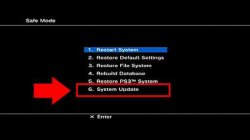
Eject any PS3 disc inserted in the Bluray drive, disconnect all USB storage devices except your USB pendrive with PS3UPDAT.PUP in PS3\UPDATE, update from recovery menu.
Safe Mode.jpg
  1. Remove any disc and USB device and turn off your PS3.
  2. Hold down the power button and wait for your PS3 to turn on and back off. Release the power button.
  3. Hold the power button again until you hear a quick double beep. Release the power button.
  4. Plug in your controller and press the PS button.
 
Eject any PS3 disc inserted in the Bluray drive, disconnect all USB storage devices except your USB pendrive with PS3UPDAT.PUP in PS3\UPDATE, update from recovery menu.
View attachment 41818
  1. Remove any disc and USB device and turn off your PS3.
  2. Hold down the power button and wait for your PS3 to turn on and back off. Release the power button.
  3. Hold the power button again until you hear a quick double beep. Release the power button.
  4. Plug in your controller and press the PS button.
No CD was inside. USB flash drive was (I think) unplugged when i booted into recovery mode. Can't remember anymore
Edit: so I understand that USB flash drive needs to be plugged into PS3 before booting into recovery mode? Will try that now.
 
Eject any PS3 disc inserted in the Bluray drive, disconnect all USB storage devices except your USB pendrive with PS3UPDAT.PUP in PS3\UPDATE, update from recovery menu.
View attachment 41818
  1. Remove any disc and USB device and turn off your PS3.
  2. Hold down the power button and wait for your PS3 to turn on and back off. Release the power button.
  3. Hold the power button again until you hear a quick double beep. Release the power button.
  4. Plug in your controller and press the PS button.

This time it worked. I left PLUGGED IN usb drive and controller, and then starting to boot PS3 into recovery mode (on/of -> on thing). Thank you for the pointer to leave USB drive plugged in. HEN could be installed this time while in recovery mode.

EDIT: I spoke too soon. It installed something while in recovery mode, but when in PS3 normal mode, I don't see HEN icon under GAMES tab... Will try to see if PS3 now recognizes HEN update in USB drive while PS3 is now booted in normal mode.
 
Last edited:
New issue - after HEN update was installed from recovery mode, HEN icon didn't show up in PS3 normal mode.
So I checked if i can install HEN while inside normal mode this time, and indeed this time PS3 detected HEN update while in normal mode.
PS3 system said smth like ''same patch version detected'' but I proceeded to install it. HEN update successfully fully installed. HEN icon still not showing up in GAMES tab. I powered off and on console, HEN icon still not showing up in GAMES tab.

Issue - HEN icon not showing up in GAMES tab, even tho youtube tutorials show it should be showing there and telling HEN needs to be activated there. So.. wth is HEN icon if HEN update was installed??
 
This time it worked. I left PLUGGED IN usb drive and controller, and then starting to boot PS3 into recovery mode (on/of -> on thing). Thank you for the pointer to leave USB drive plugged in. HEN could be installed this time while in recovery mode.

EDIT: I spoke too soon. It installed something while in recovery mode, but when in PS3 normal mode, I don't see HEN icon under GAMES tab... Will try to see if PS3 now recognizes HEN update in USB drive while PS3 is now booted in normal mode.

HFW is not HEN. HFW is a modified OFW that allows installation of HEN.

After install HFW you *must* install HEN from https://www.ps3xploit.me/

NOTE: If you don't install HEN, the firmware will not work correctly.
 
HFW is not HEN. HFW is a modified OFW that allows installation of HEN.

After install HFW you *must* install HEN from https://www.ps3xploit.me/

NOTE: If you don't install HEN, the firmware will not work correctly.
Oh i see. As someone who just recently bought used PS3 and was looking through ''how to install retroarch on PS3'' tutorials, this important detail was NOWHERE said. Which is sad since tutorial makers shouldn't assume ''everyone knows this''. The vital part about
HFW->HEN->Retroarch progression should be pinned in all tutorials *curses at youtube ''tutorials''*
 
I have a Super Slim model, can I run HEN on system 4.90

Help
Can someone tell me if it has been verified that the HFW 4.90 system can be installed on the Super Slim model and that the HEN installation can be started
 
Last edited by a moderator:
I've got an unprecedented (I searched) problem: I installed HFW and HEN, it all worked, even after restarts, but the next day HEN icon in XMB vanished.
On start of PS3 HEN logo is still shown, and all the apps are still encrypted, but in XMB where *HEN app should have been there's just a blank space that freezes screen for a moment and does nothing. Neither of reinstalling HEN from Web Browser or plugging in a flash drive with boot_plugin.txt works.
The only suspicious things that I have done were trying to access PSN via game, to be sure that both game and console version are up-to-date, got a CID ban message to ensure that magic doesn't exist, and after some time turned the console off and took the flash drive out for personal use. Next console boot was in absence of flash drive, but plugging it in doesn't help.
What may be the problem, and how safe it is to try installing other CFW/reinstalling the same HFW?
 
if you installed homebrew not found or discussed on this site or brewology, it may have broken your Enabke HEN icon.
I used all official, following the tutorial by Blaine Locklair, and it worked immediately, but broke afterwards. I'm leaving reinstalling firmware as a last resort since it can appear again but if there's no other measures I'll try.
 
reinstall hfw and hen. use official hen from official site or autohen.

if you installed homebrew not found or discussed on this site or brewology, it may have broken your Enabke HEN icon.
This would mean that the HEN is not stable at startup and the console would have to be shut down and the system restarted, I give up on this, replace the console or sell it for an older console model with a lower system, I mean the Super Slim Model with the 4.90 system
 
that needs ported but you can easily inject cert via ftp once HEN is loaded.

Sorry for replying to this older post, but would an FTP injection also work on Evilnat? And if so, would you mind telling me what I would have to do? Even in layman's terms?

Thank you kindly.
 
Back
Top