
You are using an out of date browser. It may not display this or other websites correctly.
You should upgrade or use an alternative browser.
You should upgrade or use an alternative browser.
PS3 How do I downgrade my PS3
- Thread starter PanMann
- Start date

1. Install CFW CEX (Rebug 4.84, 4.86 or Evilnat 4.90 are recommended)
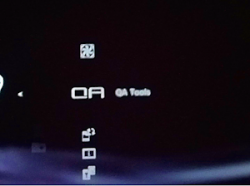
2. Enable QA Flags through Rebug Toolbox or Custom Firmware Tools in the case of Evilnat 4.90
 =>
=>

3. Install any OFW or CFW with higher or lower version.
(if OFW is higher than 3.55, you will need to patch again the PS3 with ps3toolset or flash writer 4.90)
2. Enable QA Flags through Rebug Toolbox or Custom Firmware Tools in the case of Evilnat 4.90
=> 3. Install any OFW or CFW with higher or lower version.
(if OFW is higher than 3.55, you will need to patch again the PS3 with ps3toolset or flash writer 4.90)
Last edited:

PanMann
Member
Whenever I try to install 2.30 using system update it says "No applicable update data was found."1. Install CFW CEX (Rebug 4.84, 4.86 or Evilnat 4.90 are recommended)
2. Enable QA Flags through Rebug Toolbox or Custom Firmware Tools in the case of Evilnat 4.90
View attachment 40895 => View attachment 40896
3. Install any OFW or CFW with higher or lower version.
(if OFW is higher than 3.55, you will need to patch again the PS3 with ps3toolset or flash writer 4.90)
I have evilnat 4.90 cex
Do you have the QA flag enabled?Whenever I try to install 2.30 using system update it says "No applicable update data was found."
I have evilnat 4.90 cex
Also sometimes it won't let you downgrade too far back in one go. Try installing an older CFW (3.55 would be a solid choice), then set the QA flag again and downgrade further. If you want to end up on an old OFW then only install OFW on the last downgrade.
PanMann
Member
Yeah, i had the QA Tag enabled, can you send me the link for the 3.55 CFW if you have one?Do you have the QA flag enabled?
Also sometimes it won't let you downgrade too far back in one go. Try installing an older CFW (3.55 would be a solid choice), then set the QA flag again and downgrade further. If you want to end up on an old OFW then only install OFW on the last downgrade.
PlayStation Firmware - RETAIL/CEX (midnightchannel.net)Yeah, i had the QA Tag enabled, can you send me the link for the 3.55 CFW if you have one?
Use the top menu to download virtually every firmware ever released (OFW and CFW).
PanMann
Member
Okay, hold on, ill tell you if it worked or notPlayStation Firmware - RETAIL/CEX (midnightchannel.net)
Use the top menu to download virtually every firmware ever released (OFW and CFW).
PlayStation Firmware - RETAIL/CEX (midnightchannel.net)
Use the top menu to download virtually every firmware ever released (OFW and CFW).
Okay, i was able to downgrade to REBUG 3.55, but i still cannot get 2.30 installed, says "No applicable update data was found."
Last edited by a moderator:
You need to QA flag it again after each downgrade.Okay, i was able to downgrade to REBUG 3.55, but i still cannot get 2.30 installed, says "No applicable update data was found."
Also make sure your console can take 2.30 firmware (use MinVerChk). Theoretically should be OK on a CECHH but if it's been serviced its motherboard may have been replaced.
Also make sure you're not using DEX firmware.
Also make sure the file name is PS3/UPDATE/PS3UPDAT.PUP, and that it's in all caps.
PanMann
Member
Woah. This is surprisingYou need to QA flag it again after each downgrade.
Also make sure your console can take 2.30 firmware (use MinVerChk). Theoretically should be OK on a CECHH but if it's been serviced its motherboard may have been replaced.
Also make sure you're not using DEX firmware.
Also make sure the file name is PS3/UPDATE/PS3UPDAT.PUP, and that it's in all caps.
I just used MinVerChk and it said this:

Also yes, the QA Flag is on and i tried to enable it using the combo, no dice, i also noticed Debug Settings is still present.

Edit: Figured out the problem, for some odd reason i got REX firmware.
PanMann
Member
You need to QA flag it again after each downgrade.
Also make sure your console can take 2.30 firmware (use MinVerChk). Theoretically should be OK on a CECHH but if it's been serviced its motherboard may have been replaced.
Also make sure you're not using DEX firmware.
Also make sure the file name is PS3/UPDATE/PS3UPDAT.PUP, and that it's in all caps.
Hey, maybe a debug update would work?
Never install OFW DEX firmware on a retail console - it will brick it and you will need a hardware flasher to rescue it. Flashing Rebug D-REX is possible if you've previously converted to DEX mode.Hey, maybe a debug update would work?
PanMann
Member
I meant installing CFW 2.30 using Debug Update functionNever install OFW DEX firmware on a retail console - it will brick it and you will need a hardware flasher to rescue it. Flashing Rebug D-REX is possible if you've previously converted to DEX mode.
https://www.psx-place.com/threads/how-to-use-debug-update-tutorial-by-pinky.158/

cha0shacker
Member
Try it from the recovery mode. That worked for me when i tried to go down to 2.80
PanMann
Member
That did the trick, thanks!Try it from the recovery mode. That worked for me when i tried to go down to 2.80
Similar threads
-
 PS3 Parts compatibility between CECHH and CECHL and some mods
- Started by NightLess
- Replies: 0
-
-
 PSP RE: How to downgrade from 6.61 ARK down to 1.50
- Started by Metroid_Hybrid
- Replies: 0
-