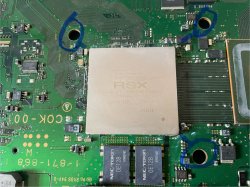
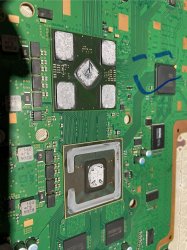
PS3 How do I gingerly delid an RSX from a ps3 slim?

RRUTTER81

Member
I've successfully removed RSX chips from ps3 boards without ripping up pads 100% of the time, but I cant seem to find a method that doesnt feel like a crap-shoot when i remove the heat sink from the RSX chip. Too much heat and i risk removing pads from the RSX to the board. Too little heat and I risk pulling the top layer of the ram chips off.

Is there a method of delidding that doesnt feel like it is a roll of the dice?

Thanks!
-r
 
I second this. I am trying to learn as much as I can about PS3, and I am tempted to attempt to delid my PS3 Slim. I want them to last for a very long time. I have no problem spending some money and resources to make that possible.

I caught this video on how this guy got his temps down via a delid. BUT he did it on a PS3 FAT.


I, like the original poster, have a slim.
 
You can do the 65nm slim like the 90nm phat but the 40nm is a tough job even with the RSX off the board. I wouldnt bother delidding the 40nm RSX unless its gone through multiple rework cycles. Buy double edge safety razor and a good set of gloves so you dont mame yoursrelf.
RSX IHS only needs to be 80-100c
 
The only reason to do it is paranoia, which is unreasonable given the likely hood of it killing the console.

The RSX almost never needs delidded. No matter the model. The only reason to do so is if you for sure have an overheating issue. And if you do, I want to see the errorcode proving it! I have maybe seen 1 legit overheating RSX error code. The rest were caused by the delid!

So my advice is not to. Especially for a 40nm, as it doesn't suffer from any temperature related defect. Maybe you can eek 2-3c lower tems out of it, buy why? There's no point! A 90nm you're trying to keep alive for as long as possable is one thing, but a 65nm or 40nm will not benefit.
 
The only reason to do it is paranoia, which is unreasonable given the likely hood of it killing the console.

The RSX almost never needs delidded. No matter the model. The only reason to do so is if you for sure have an overheating issue. And if you do, I want to see the errorcode proving it! I have maybe seen 1 legit overheating RSX error code. The rest were caused by the delid!

So my advice is not to. Especially for a 40nm, as it doesn't suffer from any temperature related defect. Maybe you can eek 2-3c lower tems out of it, buy why? There's no point! A 90nm you're trying to keep alive for as long as possable is one thing, but a 65nm or 40nm will not benefit.
What's the safe limit for a Slim 25xx RSX? On idle, with a full repaste, I'm getting 65C. Ingame it can go to the mid 70s with the fan blaring. The CPU is cooler.
 
What's the safe limit for a Slim 25xx RSX? On idle, with a full repaste, I'm getting 65C. Ingame it can go to the mid 70s with the fan blaring. The CPU is cooler.
Just set the fan to 65C (or 60C) and forget about it. That temperature won't harm the rsx or cpu.
 
The glue of 40nm rsx is still very strong. What I do is heat the IHS with a hair dryer. It doesn't need to be heated for too long. I usually heat it about 10 seconds, which will soften the glue on the RAM. Then I will insert a plastic rod into the hole of the heatsink, and then insert a thin utility blade into the gap of the IHS. Take a wooden stick of similar length to the distance between the plastic plate and the blade, and use the lever principle to push the IHS open. Pay attention to the SMD component in the middle of the wooden stick. Yes, you will push it open accidentally. In the last corner where there is no heatsink hole, I will use a wooden stick with a rubber hammer to heat it insert blade and gently tap it to remove the IHS. The whole process is very dangerous, but fortunately I completed two Slims without failure.
 

Attachments

  • IMG_5562.jpeg
    IMG_5562.jpeg
    900.7 KB · Views: 117
  • IMG_5518.jpeg
    IMG_5518.jpeg
    861.5 KB · Views: 123
Last edited:
I don't like any of the methods to delid the 40nm. They all have issues.

  1. Lever method: Risks VRAM delam or BGA cracks. Depending on your tool, can mar the substrate and cut traces.
  2. Razor (on-board): Hard to get the right angle and even if you do it's hard on the BGA.
  3. Razor (off-board): Safest method, but requires desoldering from the MB first. Clearly not ideal! Really only practical if you are replacing the RSX anyway.
What we need is a tool that can cut the VRAM off 1-by-1 by bracing against the IHS and lining a chisel blade razor up with the adhesive. The shape of the blade will force the cutting edge up against the IHS, preventing it from cutting into the VRAM.

I envision a custom set of pliers, that you place on the IHS and squeeze to cut/pop each corner open with. This would use the IHS as the lever, so you don't transfer the pressure to the BGA, like hammering a blade in from the side does.
 
Back
Top