I just had a very good idea on what
@ISAK.M wanted to achieve, and i see one problem with this, raise in the top part of the shell and you also alter the height and which the BD Disc's go in the drive. The drive itself would remain at the same height but the entry slot in the shell would be raised, raise it too much and the disc's will get scratched to hell as on the plastic shell as the drive ejects the disc.
You are not going to believe it now, but after writing my last post i took a look at the PS3 and realized about the disalignment of the bluray drive slot, heheh
You are right, if the top shell is going to be raised (not much just 1 or 2 milimeters) then the bluray drive needs to be raised in the same amount too, right now i dont remember well how is the bluray at bottom (i never took a look at that with interest) so i cant imagine how is the best way to do it, but it should not be much hard
BUT it should be perfectly possible to raise it just enough to get a gap to give a good effect with the LEDs. Plus as he wants an all round effect there's a simple way to get the LEDs > Use 5v LED strip lights, they are used for all sorts, I have some on the back of my TV's, that's what is shining down in the pic's I put up of one of my PS3's. All the LEDs are there plus the circuits, they would just need powering and grounding > solder to a 5v rail and ground point. Plus create some mount point in side the case to keep them away from the shell edge and the effect would be very good. If you can mange to get the remote sensor to be at the back of the console out side the case (out of sight) then they would also be custom colours instead of just one colour.
Another thing i thought is the PS3 slims has squared "air vents" all along the sides (aiming to down), this is an alternative way to do it more simple, it will not be a "ring of light all around" like you was mentioning thought
Yep, exactly. Everything expands and's and contracts with heat and cool, depending on the material depends how heat and how much it expands. I know we had a very good discussion on this kind of thing on the PS3's shell possible manufacturing methods.
I hate that "popcorn" noises, lol, it happens at the first hour after turning ON the PS3 (because the plastics are expanding), and in the first half an hour after you turn OFF the PS3 (are contracting)
I removed the 6 screws at bottom (that holds the top shell in position thight) and was playing without the screws for lot of time (months), and the noises was reduced a lot
After that i thought in lubing the edges of the shells with a bit of "vaseline paste" (you can buy in a drugstore btw, moms uses to buy it for babies, no homo), this would allow the shells to "slide" with each other and i think the "popcorn" noises should be reduced to zero
I never did it because i thought the vaseline could cummulate lot of dust internally, is needed to cleanup the excess well to avoid that... but anyway i still like the idea and eventually i will do it
The problem I noticed with what I wanted to do when I quickly took the top half of the shell off yesterday for a quick look at the switch board and the shell was that there are 2 supporting spine running through the PS3 that go from one side of the shell to the other, at first my initial thought was "FFS" lol.. then I realised that these are a perfect depth the glue a clear sheet to and create a "light box" of the logo adding more depth to it and giving a very good effect.
Good word "spine", sometimes i dont know which word to use in english, but that one is perfect

If you stay in front of a PS3 slim with the PS3 in horizontal position
The big spine goes from front to back, it has 2 purposes, is structural because makes the top shell more robust (incase you place a weight on top of the PS3), and also it "pushes" the bluray drive to bottom, note the bluray drive have a line of "foam tape" on top that matches exactly with the spine
There are another 2 spines horizontally of smaller height, this ones doesnt touches any other part, are just structural
I removed them with a razor knife to improve the airflow inside the top of the shell

The point is that "work" cutting plastic looks bad, but is inside the shell so it doesnt matters how good or bad it looks because it cant be seen from outside
But for your mod can come in handy, you can drill holes in them and use screws+bolts to attach a sheet of aluminium to make a frame all around the PS3 logo... and use that frame to mount the custom parts... either leds, or a piece of resine like i mentioned, or methacrylate, whatever
Btw, i been thinking in what i said initially of using a very transparent plastic like glass... and is not a good idea
Imagine you place a led behind a glass and look at it... you are going to see the led perfectly with lot of intensity and it will be annoying
What you need is to use some material that "difuses" the light (or softness)... it can be made by sandpapering it... or you can use a semitransparent sticker (sticked at the inner of the shell)
How big? my phone takes pics at 720p... which is about 3000+ pixels across per photo image size, the problem being they are 7.7mb in size, I will find a way to decrease the file size as am sure the sites size limit for uploads is 7mb?? If iirc what STL was telling me. I will take a pic of my DSW-001 board sometime today. The pics i put up before I had to alter before posting them lol.
Take them at max quality, and dont resample or resize them please, is better if you compress them inside a .zip and upload to an external hosting like mega, sendspace, etc...
Probably i will not resample them either to preserve max quality, the biggest is the better because the people are going to zoom them to huge values to see the small details
Look at this image, i made it by joining two photos i found somewhere (and i was lucky that overall both photos was matching)
https://www.psdevwiki.com/ps3/File:Power_Eject_board_HSW-001_(PCB_top_view).jpg
Btw, try to take the photos from a perfect vertical to avoid perspective deformations, this way maybe i can overlap/flip/mirror one side on top of the other side to see the whole circuit in a single side, like i did with this
http://www.psx-place.com/threads/teensy2ps3-pcb-linker-teensy-2-0-ps3.1728/page-3#post-158300
Initially i dont want to do it, but just incase, im not sure, maybe i will need to do it to understand the circuit
2000, 2100 & 2500 for the hidden LED light that are already there on the switchboard. But you can always do your own by using the MB's 5v rails and grounding points and using the right resistor in the wiring to the LEDs and putting them in the right places. Or go full custom lighting in the PS3 as I am thinking.
Thats the spirit, heheh
Some of the things we are talking about can be made in other PS3 models, actually from the videos luanteles posted the most complicated mod is the one that deals with 2 lighting modes and 2 colors... but that one is made by connecting the wires to the dual led (red + green originally) located in the power ON/OFF button
All PS3 models have that 2 leds... are needed to show the YLOD so even PS3 superslims have them
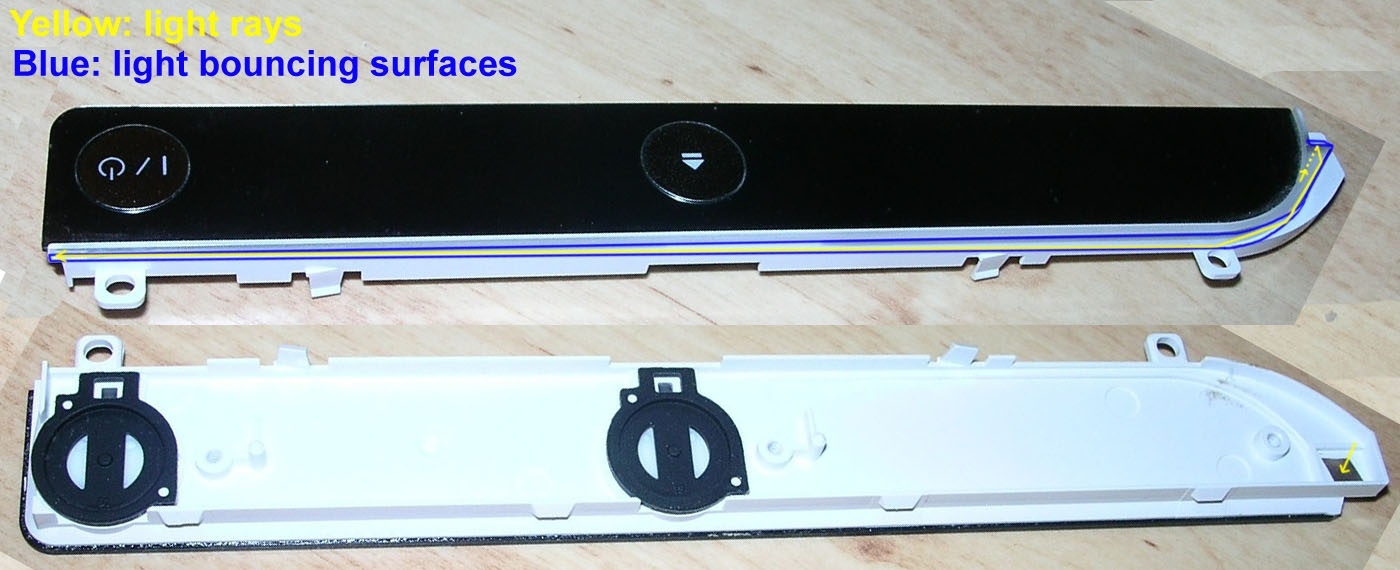
The real problem to make the mod that initiated this thread originally is that only the CECH-20xx, CECH-21xx, and CECH-25xx have this plastic part made with transparent materials
I painted some arrows in it to try to show how the light rays "bounces" inside the transparent line
Is a bit like the optical fiber cables... the difference is the optical fiber cables doesnt allows the light to "leak"
But we are having a lot of leak, lol... look at the photos, the light only fills 1/6 of the bar
One of the things i tryed to improve that is to use a very thin "metalic" sticker i cutted and placed all along the light bar
For some reason it didnt improved the "bouncings" of the light.... but looks fine because it can be seen a bit of the "metalic" effect externally, not specially awesome, but an small detail
I tryed it too with stickers of other colors (yellow was looking cool), try it
Edit:
I also tryed with a sheet of paper (so it was a pure white) and was looking cool too because what you see from outise is not exactly a pure white, the best adjetive that describes is a "difused" white, the transparent plastic bar "soften" it a bit


its copyrighted and patented....