PS3HEN Making an American PS3 display PAL through registry editing - is this possible?

I'm planning to use both RGB SCART and Composite (for RF Televisions). I bought a SCART cable from eBay, and was using it, but it only outputted either black and white composite, or just a green image when I set the TV to RGB (I'm not calling it a faulty cable just yet).

I think that the console region change is what I need to go for, though I have no clue how to do that debug buisness. I need some help with that.

Be careful guys it's easy to spread disinformation…

It doesn't matter how old is your Tv, if it has SCART input, it perfectly support both PAL and NTSC resolutions ( 480i/576i) and refresh rates (50hz/60hz).

There's just a note about colors:

On many old PAL Tvs, the software which decode colors from a composite signal, only recognizes PAL color range (so in case of NTSC signal you'll perfectly see the image at 480i @60hz but in black & white).

Be careful though, THIS PROBLEM IS ONLY USING A COMPOSITE CABLE. As I said is related to color decoding from composite (CVBS compression).
Using a SCART-RGB cable (thus outputting a RGB signal) completely solve the problem, 'cause PAL and NTSC support through RGB signal is incorporated into the SCART standard itself (since it's first release in '80s).

There are SCART cable that are actually composite (even having all the pins, only CVBS ones are connected to the cables).

However the fact that you see a DVD in shades of green lead me to think your is an actual RGB cable, so you must see games in colors using it.

About DVDs it may be that stupid SONY protection that Ps2 too use. Pratically it output colors in Y-Pb-Pr to avoid film recording via SCART.
The SCART-RGB cable can't display a Y-Pb-Pr signal if it's not converted to RGB afaik.

It's the same on Ps2, you have to set the console output to RGB in the Ps2 configuration menu. DVDs however automatically output Y-Pb-Pr. I use a homebrew program for solving it (MCLoader), there's a option about DVD region.

Maybe the setting for changing DVD region @Coro mentioned do the same as MCLoader, have you tried it??

And about RGB quality, it's actually a true direct RGB signal, it deliver a quality as good as HDMI. Obviously you're limited to SD resolutions, so you have to compare a SD signal through HDMI. You'll see that sharpness and color fidelity is the same as RGB through HDMI, better than Component.
 
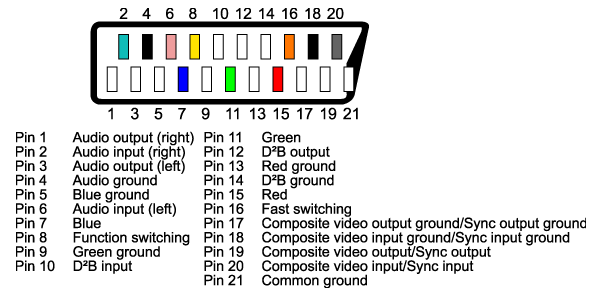
Btw, if you have doubts about if your SCART cable really supports RGB signals, the most accurate way to know it is by opening it (at the SCART connector, is like a box, not sealed or anything, is easy to open it), and compare where are soldered the cables with a image of the pinout (search in google images for SCART pinout)
scart-pinout.png


Basically, it needs to have 1 wire dedicated to every color (so 3 wires in total soldered to the R,G,B pins). Are the pins 7, 11, and 15
If your SCART cable doesnt have that just forget about using RGB, you have been scammed
The only thing you can use in that cable is composhite (nice name btw, lol), is the pin 20 where you have all the video "in a single wire" (and the image quality sucks a bit)
 
Last edited:
I've made progress, as after setting it again to RGB SCART, the image has full color and displays well. However, I still need a way to fix the composite possibly. Thank you everyone for the help so far!
 
Btw, if you have doubts about if your SCART cable really supports RGB signals, the most accurate way to know it is by opening it (at the SCART connector, is like a box, not sealed or anything, is easy to open it), and compare where are soldered the cables with a image of the pinout (search in google images for SCART pinout)
scart-pinout.png


Basically, it needs to have 1 wire dedicated to every color (so 3 wires in total soldered to the R,G,B pins). Are the pins 7, 11, and 15
If your SCART cable doesnt have that just forget about using RGB, you have been scammed
The only thing you can use in that cable is composhite (nice name btw, lol), is the pin 20 where you have all the video "in a single wire" (and the image quality sucks a bit)
I've made progress, as after setting it again to RGB SCART, the image has full color and displays well. However, I still need a way to fix the composite possibly. Thank you everyone for the help so far!

If you see DVDs in shades of green your cable must be delivering a RGB signal. If it was outputting in composite you wouldn't see a grey picture. It is so:

Composite cable: Console set to RGB = CVBS colors; Console set to Y-Pb-Pr = CVBS colors
SCART-RGB cable: Console set to RGB = RGB colors; Console set to Y-Pb-Pr = Shades of green
Component cable: Console set to RGB = Black screen; Console set to Y-Pb-Pr = Y-Pb-Pr colors

AfaIk if your cable was a fake one (only composite wires) you'll get either a colored picture or a black & white one (if the signal is NTSC). Never a green screen.

You can verify it if your TV has another SCART input. Most probably it doesn't have RGB support, so connecting the console to it you'll see the image in colors (with PAL signal) or B&W (with NTSC), obviously with crappy CVBS quality.
 

Similar threads

Back
Top