
MechaPwn by MechaResearch

PS2 MechaPwn by MechaResearch 2.00

If You chose Force option during installation then it is normal. Or You didn't patched PSX games to be "debug discs" which is also normal. Or You trying none-supported region (does Your console is Japan region? those have more restrictions). I hope You have read the readme file with understanding.

If You will flash NVM by none-matched or broken dump, You will permanently kill ODD. I don't know if there are any foolproof checks on MechaPwn side but You shouldn't take such risk.
 
If You chose Force option during installation then it is normal. Or You didn't patched PSX games to be "debug discs" which is also normal. Or You trying none-supported region (does Your console is Japan region? those have more restrictions). I hope You have read the readme file with understanding.

If You will flash NVM by none-matched or broken dump, You will permanently kill ODD. I don't know if there are any foolproof checks on MechaPwn side but You shouldn't take such risk.
i have a pal ps2 ( scph-50004) . i' m on mechapwn 2.0 . ps1 compatibility is off , even with force unlock disabled
 
:Di tried MechaPwn 1.00 and everything is working fine . ps2 original and backup all regions 5/5 . ps1 original and backup all region 5/5 . i have a pal scph-50004 with mobdo 4.0 . when its enabled ps1 backups are shown as playstation blue discs and work fine . and when i disable the mobdo 4.0 chip . ps1 backups are shown as playstation black discs and dont boot only a black screen .
 
Last edited:
Did You patched them? Did DVD-Videos also doesn't boot? Because that's the symptoms of "Force PS2" option.
nn i didnt patch them . ordinary ps1 and ps2 backups are working fine . all regions
i dont have a dvd-video disc to try
 
I am not sure if I understand.
But you have lost your backup of NVM...
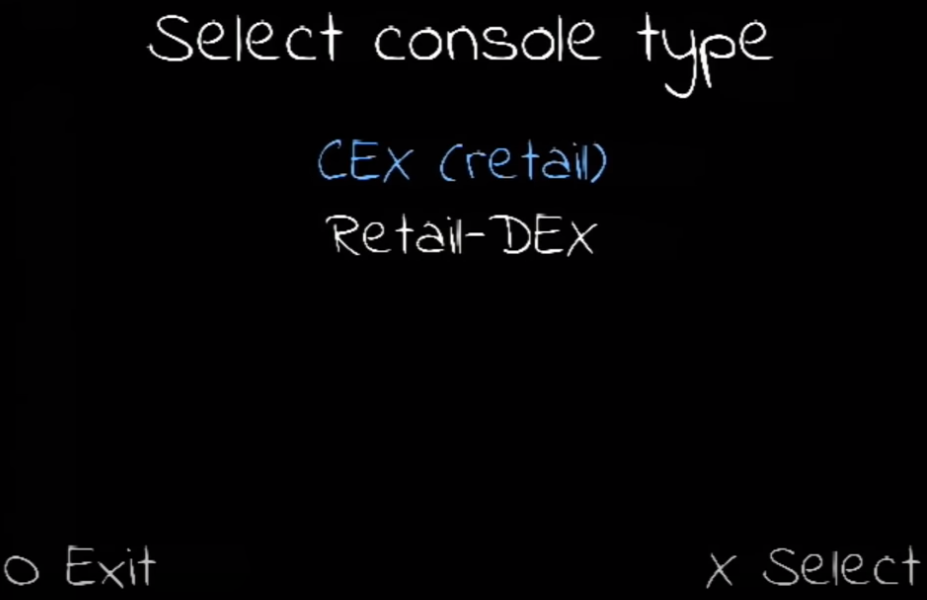
What will happen when you choose CEX once again (of course the right model):
Mecha-Pwn-2.png


And now you will backup up your NVM.
It is only a theory... so I am not advising it.
Something may gone wrong, so use it at your own risk.

Anyway since you have mobdo 4.0 why on earth did you use MechaPwn?
 
Last edited:
I am not sure if I understand.
But you have lost your backup of NVM...
What will happen when you choose CEX once again (of course the right model):
Mecha-Pwn-2.png


And now you will backup up your NVM.
It is only a theory... so I am not advising it.
Something may gone wrong, so use it at your own risk.

Anyway since you have mobdo 4.0 why on earth did you use MechaPwn?
mobdo 4.0 don't support ps1 backups .
but now with MechaPwn + mobdo 4.0 i can play ps1 backups all regions
 
So I installed MechaPWN on my SCPH-90002 and converted it to a DTL-H90002 & it no longer plays DVD's (used a DVD to burn MechaPWN onto).

I'm yet to see if this is because of the conversion, or another reason.
 
So I installed MechaPWN on my SCPH-90002 and converted it to a DTL-H90002 & it no longer plays DVD's (used a DVD to burn MechaPWN onto).

Did you select "force unlock".
If yes, read this:
https://github.com/MechaResearch/MechaPwn#what-is-force-unlock.

Additionally, I know that you haven't changed the region, but this "hint" may be helpful:
https://github.com/MechaResearch/Me...lay-dvds-anymore--freedvdboot-stopped-working.
PS2 DVD Player modifications:
https://www.psx-place.com/threads/ps2-dvd-player-modifications.25039/.
 
Did you select "force unlock".
If yes, read this:
https://github.com/MechaResearch/MechaPwn#what-is-force-unlock.

Additionally, I know that you haven't changed the region, but this "hint" may be helpful:
https://github.com/MechaResearch/Me...lay-dvds-anymore--freedvdboot-stopped-working.
PS2 DVD Player modifications:
https://www.psx-place.com/threads/ps2-dvd-player-modifications.25039/.
TBH, I can't really remember.
I read the tutorial and am not a noob when it comes to FMCB or Hacking the PS2, so I probably did.

I'll check out those links. Thanks heaps for your help.
 
Last edited:
I recently found an SCPH-90004 with BOOT-ROM 2.30 (along 2 original and a 3rd-party controller and all cables) and converted it to a (pseudo) DTL-H90001 WITHOUT "force unlock".
The FreeDVDBoot-Disc still boots on it and I can try a region-free DVD later on.
 
I'm going to end up burning a CD with uLaunch on it, and reset it back to factory, and start again.

I was just having a play around, (like I usually do), and just figured it was to do with turning it into a DEX console, (The DTL-H30002 doesn't play DVD's).
 
Mine does (at least FDVDB and probably a region free disc)!
I can upload a short video on YT!
 
I'm going to end up burning a CD with uLaunch on it, and reset it back to factory, and start again.

I was just having a play around, (like I usually do), and just figured it was to do with turning it into a DEX console, (The DTL-H30002 doesn't play DVD's).

Change it to DTL-H90001, so FDVDB discs should work. Also USA DVDs.

@TnA I never had a free region DVD, didn't thought they even exist. Please let me know if you manage to play a not-USA DVD video on your Ps2.
 

Similar threads

Back
Top