PS3 HAN [OBSOLETE] [Tutorial] The Great PS3Xploit 3.0 HAN All In One Guide


Please don't double post.

I had this with one of my games. But its with an Iso that's got some 3xtra stuff in it. So I assumed it was just the extra stuff that was put in there...

Now I am uncertain. I have Gran Turismo so I will do a quick test and see what happens
 
Please don't double post.

I had this with one of my games. But its with an Iso that's got some 3xtra stuff in it. So I assumed it was just the extra stuff that was put in there...

Now I am uncertain. I have Gran Turismo so I will do a quick test and see what happens
sorry wanted to write .cue instead of .bin ended up double posting
 
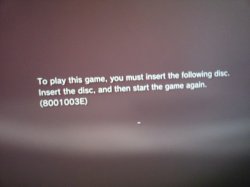
Hi, Thx a lot for the tut. I'm having a problem with a backup of a game:
The game concerned is BLES02250. Did all successfully but that's where it stucked.
 

Attachments

  • 20180324_165809.jpg
    20180324_165809.jpg
    2.3 MB · Views: 331
Has someone run a psp game? I have 6 games and they all end up in black screen
Some solution or is totally normal​
 
This has been an amazing tutorial, keep up the good work!

Also I have a question. I used ***PlayStation Store*** to download a psx game, saved the rap, and then resigned both things with the tools provided. But when I copy the game pkg to my usb and try to install it, it freezes on the "Please Wait" screen and I can't do anything besides turning the console off with the controller. Not sure what I'm doing wrong here. :(
 
This has been an amazing tutorial, keep up the good work!

Also I have a question. I used ***PlayStation Store*** to download a psx game, saved the rap, and then resigned both things with the tools provided. But when I copy the game pkg to my usb and try to install it, it freezes on the "Please Wait" screen and I can't do anything besides turning the console off with the controller. Not sure what I'm doing wrong here. :(

  1. Boot PS3
  2. ENABLE HAN!
  3. Navigate XMB to "Game/Package Manager/Install Package Files/Standard"
  4. Select your PKG and it will start the process of copying the PKG.
  5. WAIT!! Please be patient, the "Please Wait" screen will take some time.
  6. KEEP WAITING!! I know you think it hasn't worked but it is working
  7. Once the "Please Wait" has gone, navigate the XMB to "Game/Package Manager/Playstation Network Content"
  8. Here you will find the install for your PKG. Select it.
  9. Wait for install process to finish.
 
Hey i have a problem. I just converted some backups and two out of three work fine. the third just starts and then stays at a blackscreen and the ps3 system seems to be crashed. What could be the problem? Nothing works anymore until i force the ps3 to shutdown by holding the powerbutton.
 
This is a GREAT tutorial! Exploit is awesome too.... but I'm pretty sure that all of this is "out of reach" for 99% of the end users out there.
 
This is a GREAT tutorial! Exploit is awesome too.... but I'm pretty sure that all of this is "out of reach" for 99% of the end users out there.

What are heck are you smoking ?

I installed almost all the games I threw at my PS3 except NFS HP.

And yes, this is a wee bit complicated, but this is what you get when you want things for free. Don't expect people to spoon feed you. You need to work on it, read the tutorials and get an understanding of how it works.

At the end of the day, it just works. For Slim and Super Slim models, there was no hope. These guys made it happen. It was difficuilt, but they did it. So, if they put in so much effort, can't we do our bit ?

Hey i have a problem. I just converted some backups and two out of three work fine. the third just starts and then stays at a blackscreen and the ps3 system seems to be crashed. What could be the problem? Nothing works anymore until i force the ps3 to shutdown by holding the powerbutton.

A Word of Advise : Use .pkg/.rap file method of installing games most of the time. ISOs and converted game have been reported to give black screen. Each and every .pkg game that I have installed (except NFS HP) have worked flawlessly.

XD . I've passed this method and i got a black screen on cod ghost XD.

Get your copy of COD Ghost as a PSN store .pkg file type. Get it's .rap file. Follow the tutorial and install the game. Activate it and then play.

I have done this and it works.

On a side note : The game is kinda shitty. Get COD MW3 instead. Campaign and frame rates are excellent

Has someone run a psp game? I have 6 games and they all end up in black screen
Some solution or is totally normal​

Most people who did install a PSP game did indeed report black screen problem.
 
Last edited:
anyone here can install god of War Ascension. I did installed it (include DLC/patch downloaded by CFW2OFW helper), but when I started the game (HAN enabled), my PS3 seems to be soft reboot, and the game cannot be started.

Please let me know if you have information.

Thanks.
 
A Word of Advise : Use .pkg/.rap file method of installing games most of the time. ISOs and converted game have been reported to give black screen. Each and every .pkg game that I have installed (except NFS HP) have worked flawlessly.
I used the PKG method. So got all the needed conent and went through the whole CFW2OFW, Make Backup PKG, Resigner, Linker process like I did with the rest of my games. I tried a fourth one too and it worked again .. only at one specific game i get a crash/blackscreen
 
Back
Top