thomy_orke
Forum Noob
always got problem with dns when i try this trick, can u help me aldo?


Crossover cable will not make any difference, all gigabit devices have the auto crossover feature. Only 1 device needs to support it for it to work.This would be a lot easier with a crossover cable.
Or, even easier (what I do) would be to use a router with an Ethernet to both the PS3 and the PC.
The crossover cable will make it so you do not need to change any settings on the PC. It will be like you are using a router with both the PS3 and the PC attached.
Nice tutorial though, good stuff here!
Ah! Gothca. I had no idea. I'm used to old and outdated techniques, aha.Crossover cable will not make any difference, all gigabit devices have the auto crossover feature.

This would be a lot easier with a crossover cable.
Or, even easier (what I do) would be to use a router with an Ethernet to both the PS3 and the PC.
The crossover cable will make it so you do not need to change any settings on the PC. It will be like you are using a router with both the PS3 and the PC attached.
Nice tutorial though, good stuff here!

Step 1: First make sure u have internet connection enabled in ps3.
Step 2: Go to Internet Connection settings in ps3
Custom > Wired Connection > Auto Detect > Automatic > Do Not Set > Automatic > Automatic > Do not use > Enable.
Step 3: Save and Test The Connection.
Step 4: Now go and connect ps3 to pc via ethernet cable RJ45
Step 5: Now go to pc and click the start button then go to settings.
Step 6: After u go to settings now go to Network & Internet.
Step 7: Go to Change Adapter Options.
Step 8: Now share the internet with Ethernet.
Step 9: Go to Wi-Fi click with the right of mouse, go to properties.
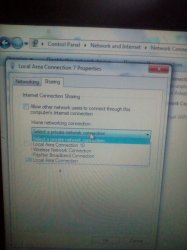
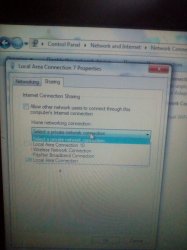
Step 10: When u go to properties then, go to sharing and allow other network users to connect through it.
Step 11: Then u will have option select a private network connection, and u should choose the ethernet that is directly linked from ur ps3 to pc. There u have the image.
View attachment 11158
Step 12: Go to Ethernet Network in pc, click right of mouse go to Status and then go to details.
Step 13: U Will see IPv4 Address its the ip, so now u need to test pkg Linker.
Step 14: Go to PKG Linker dont put any pkg file game on it we are just testing it.
Step 15: Click with the left of mouse in pkg linker, Export Files and Start serving packages now? Go Yes.
Step 16: Then Go Ok, it will create the bin file, Continue the apache installer go Ok, then install the apache.
Step 17: After installing the apache server, then dont run it just go for Finish.
Step 18: Resign with PS3Xploit-Resigner for OFW go for No.
Step 19: After u press no, the package_list.pkg will be created, in the folder of PKG Linker.
Step 20: Now it will say, Server is running on xxx.xxx.xxx.x:80(Example) Press ok to continue.
Step 21: Now it will show u a tabel
View attachment 11157
Step 22: u Need to go stop server for changing the local ip.
Step 23: Now go to pc and click the start button then go to settings and again go to change adapter options.
Step 24: Go to Ethernet Network in pc, click right of mouse go to Status and then go to details again as i said.
Step 25: Copy the IPv4 Address and paste it to the pkg linker here u need to paste the ip like in the image.
View attachment 11159
Step 26: Now u go and Start Server and dont forget disable firewall & antivirus
Step 27: Now make package_list with the new ip, that u copyed and pasted it.
View attachment 11160
Step 28: If it says if u want to resign it go Yes, then press Ok.
Step 29: Now time to copy the package_list.pkg in ur usb, test the connection again in ps3 at network settings, if it says both obtain ip address and internet connection succeeded then its working.
Step 30: Now enable the HAN Enabler to install the .pkg files, if u dont enable it will show error.
Step 31: Now go and install Package_list.pkg in ps3 at the package manager > Install packages files > Standard.
Step 32: Now u need to go and refresh the package list, and reboot is required after refreshing the list.
Step 33: Now u can go and install ur Large .pkg games 4gb+ !!
It taked me time to do this, so hope u all enjoy it !!


After all that i got error 8071053D
That is likely a port issue, maybe firewall/defender/antivirus blocking it.After all that i got error 8071053D
Hard boot the PS3, turn off the PS3 to stand-by, flip off the back swtich and remove the power cord. Then shut off your modem/router, for about 5 mintues, then turn the modem back up first and let it sync, then turn the router back on(if using one) and let it syncAfter all that i got error 8071053D
You don't need the internet to work for pkg linker to work, don't bother testing the connection. Just skip it. Try install a pkg instead..Anyone has a fix for the DNS problem?
I tried letting it set the IP and everything automatically,tried writing the IP that's in properties when doing this method,
in the end I even tried writing some random IP and DNS like suggested in this thread http://www.psx-place.com/threads/very-simple-way-to-direct-connect-ps3-to-pc.17052/ ,
but all that to no avail,every time I test the connection it obtains the IP but on the "internet" warns me about a DNS error
* Is step 13 pkg linker to be done in PS3ahah :p i tryed to make my best cuz some dont know how to connect the cable on it and how to allow it to pc.
Step 13 needs to be done in PC first then from pc u need to install the file that u get from pkg linker.* Is step 13 pkg linker to be done in PS3
* Can I use this method to install multiman and games in PS3 super slim CECH 4301A firmware 4.81 ( don't know cfw or ofw)
Note: I had 20games and a multiman folder untill I removed external harddisk
Thank you so much for the ReplyStep 13 needs to be done in PC first then from pc u need to install the file that u get from pkg linker.
No u cant install Multiman in superslim and u can install games with this method but not multiman.
u cant login in ps3 because u have 4.81 u need to have the newest version 4.83 to do that dont try to login because it will be updated to 4.83.Thank you so much for the Reply
I'm totally new to all these
So can you just let me know while doing this method
* What are the chances of bricking my console
What are the steps I should carryout to be on safer side
* Once doing this copying games can I still go to PSN , can I download and watch Netflix, etc in the PS3
* I don't have an PSN account can I create it with this console
So nice of you a great replyu cant login in ps3 because u have 4.81 u need to have the newest version 4.83 to do that dont try to login because it will be updated to 4.83.
U have good tutorials in youtube for PKG linker just type How to install large PKG games with ps3 HAN and it will show you.
I dont think u can brick your console even if you dont know how but follow some tutorials in youtube and u will learn how to install games, its not hard believe me.