STLcardsWS
Administrator
.
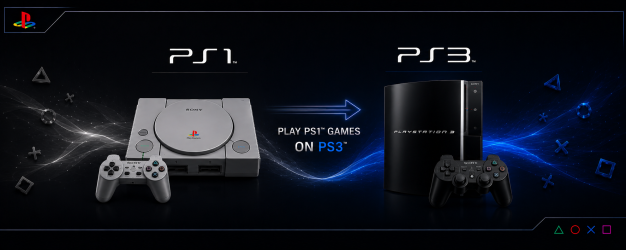
The PS3 has PlayStation 1 backwards compatibility on all PS3 Models by inserting a retail PlayStation 1 disc, however if you want to play your preserved backup's from HDD / USB / CD-R or even stream from your local Network, you will need a PS3 Console running a CFW, PS3HEN or qCFW. The best way to emulate PS1 on the PS3 is via the included firmware emulators.
- ps1_emu - Emulator to play PlayStation 1 Disc Games.
- ps1_netemu - Emulator to play PS1 Classic format Games.
When mounting PS1 backup, you can choose emu by pressing and holding
 +
+ for ps1_emu
 + for ps1_netemu can also be set in webMAN settings
Supported Format's
- ISO/CUE, BIN/CUE, IMG/CCD, MDF/CUE.
- PS1 games always require a cuesheet file for the music track information. If the CUE file is not present, the game can fail to load or will play without background music.
- Multi-track BIN files are not supported. They must be merged in a single image file. (**see tutorial tab)
Supported Location's (for Storage/Mounting)
- Place your PS1 ISO images in the /PSXISO folder on the PS3's internal HDD or External Storage Device
- USB Storage device formatted in FAT32, NTFS or exFAT are supported
- Remote HDD storage via ps3netsrv.
- dev_sd, dev_ms, dev_cf (memory card's are also supported on early phat models with reader's.
- PS1 can be burnt to CD-R disc, and played with Cobra/Mamba activated
Additional Note's:
- PS1 Classics are also supported with CDDA and multi-disc. They can be played directly from XMB.
- multiMAN and IRISMAN can play PS1 games with or without Cobra/Mamba enabled.
- Mamba 8.4+ & Cobra 8.4+ have add support for PAL games with protected LibCrypt., Also the PS1 audio speed was fixed when a PAL game is played on NTSC.
- Multi-track BIN files are not supported. They must be >merged in a single image file<.
- Although the PS1 compatibility is very high, some games require a PPF patch to be playable.
- "You cannot play this game at the current video output setting (80028F10)" is a common error when a PAL game is played on NTSC and vice versa. It usually can be fixed just entering to Settings > Display Settings and saving without making changes.
- IRISMAN supports change the disc image in multi-disc games inserting a pendrive.
In webMAN MOD, the disc can be changed mounting the game via web from a PC or tablet. (see tutorial) - webMAN MOD you can mount PSX games with CD sector sizes: 2352, 2048, 2336, 2448, 2328, 2340, 2368
- PS1 BIOS (Homescreen) can be accessed (Memory Card Manager/ CD player) - (***See Tutorial Tab)
Compatibility List
PS1 Emulator Info (PS3Dev Wiki)
ps1_netemu - External Configs and Ad Hoc Params
Modded Emulators by kozarovv - Release Thread
- PS1 Netemu Features
-
PS1 Netemu Features:
- Automatic GTE Widescreen Patch
- Work only on 3D elements. Compatibility differs per game but should be on par with Duckstation "Widescreen Rendering".
- You need to select the Full Screen Display option to enable.
- Compatible with ISO, real discs, EBOOTS, and Official Classics.
- While fully working, code under the hood is a little bit janky due to lack of space in elf. Sorry!
Features not implemented in this release:
- Dithering removal patch. Because many people prefer it enabled as on the original PS1.
- Forced bilinear filtering removal. Because many people prefer it enabled, and I had no good way to make a menu separator for that.
- Automatic GTE Widescreen Patch
- PS1 Emu Features
-
PS1 Emu Features: COMPLETELY UNTESTED!!!
- Automatic GTE Widescreen Patch
- Work only on 3D elements. Compatibility differs per game.
- You need to select the Full Screen Display option to enable.
- Compatible with ISO and real discs.
- While fully working, code under the hood is a little bit janky due to lack of space in elf. Sorry!
- Dithering removal patch. Because many people prefer it enabled as on the original PS1.
- Automatic GTE Widescreen Patch
Tutorials
- How to Access PlayStation Bios (Home-screen)
-
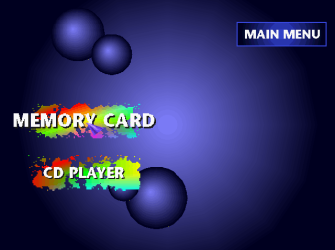
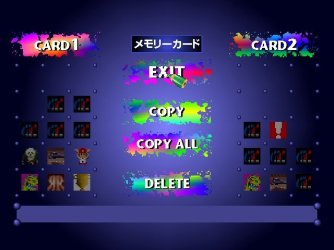
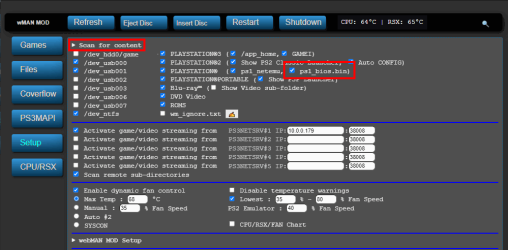
- Renaming your acquired PS1 Bios SCPH1001.BIN (or other ps1 bios) to "ps1_bios.bin" and placing in /dev_hdd0/tmp/wm_res/ and checking the option in webMAN MOD in /setup.ps3 as shown in the image below via @aldostools (posted on X)
- Now, when you unmount/eject a PS1 game during the Sony Computer Entertainment logo after replaced BIOS. Full access to BIOS, including the memory card utility and CD player are available. (via @mrjaredbeta psx-place forum discussion)
- Renaming your acquired PS1 Bios SCPH1001.BIN (or other ps1 bios) to "ps1_bios.bin" and placing in /dev_hdd0/tmp/wm_res/ and checking the option in webMAN MOD in /setup.ps3 as shown in the image below via @aldostools (posted on X)
- How to Swap Disc for multi disc PS1 Games with webMAN MOD / IRISMAN
-
-
webMAN MOD
-
via Aldostools forum post
.If you use webMAN MOD, the easier method to swap discs is this:
1- Mount the CUE/BIN of one the multi disc PS1 game (e.g. disc 1)
2- Start the game and play until the point it asks to swap the disc (e.g. disc 2).
3- Use a tablet, laptop or smartphone to mount the disc 2 from Chrome, Safari or any Internet browser: http://IP-address-of-your-PS3/mount_ps3/dev_hdd0/PSXISO/name_of_game_disc_2.BIN
Replace the URL with the correct IP address and path of the 2nd disc.
/mount_ps3 is used instead of /mount.ps3 to skip the warning and force the game to be mounted.
-
With your multi-disc PS1 games (such as Resident Evil 2 or FInal Fantasy VII), IRISMAN can switch to the next disc when needed by a simple method of unplugging or plugging-in any USB storage device. The console/irisman will automatically detect the simple USB change of plugged/unplugged and with that signal, it then cycle's to the next disc of the game, when you games follow the format below in the title..
game_disc1.bin
game_disc1.cue
game_disc2.bin
game_disc2.cue
-
-
webMAN MOD
- How to Create PS1 PKG Backups for PS3 with PoP-fe (CFW/HEN)
-
- How to Easily Play PS1 ISOs on a Jailbroken PS3
-
- How to Combine Multi-Track BIN Files for PS1 Games
-
-
Text Tutorial
-
Text Tutorial (by @Berion ): PS1- Merging multiple tracks into one disc image: https://www.psx-place.com/threads/merging-multiple-tracks-into-onedisc-image.33591/
-
-
Video Tutorial
-
-
Text Tutorial
https://www.psx-place.com/threads/playing-playstation-ps1-games-on-your-ps3.39037/
Last edited:


 thanks Aldo much appreciated