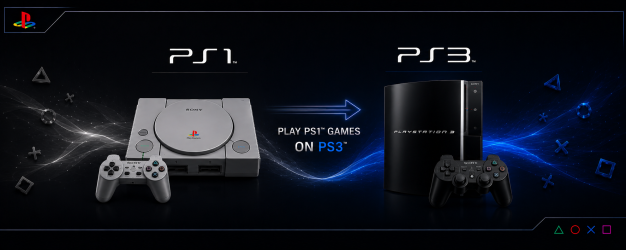
PS3 Playing PlayStation (PS1) games on your PS3

STLcardsWS

Administrator
PS1onPS3.png

.
The PS3 has PlayStation 1 backwards compatibility on all PS3 Models by inserting a retail PlayStation 1 disc, however if you want to play your preserved backup's from HDD / USB / CD-R or even stream from your local Network, you will need a PS3 Console running a CFW, PS3HEN or qCFW. The best way to emulate PS1 on the PS3 is via the included firmware emulators.


Emulator Types (via firmware)
  • ps1_emu - Emulator to play PlayStation 1 Disc Games.
  • ps1_netemu - Emulator to play PS1 Classic format Games.
Switching between the two emulator's (using webMAN MOD)
When mounting PS1 backup, you can choose emu by pressing and holding
  • :but l2:+:but x: for ps1_emu
  • :but r2:+:but x: for ps1_netemu can also be set in webMAN settings

Supported Format's
  • ISO/CUE, BIN/CUE, IMG/CCD, MDF/CUE.
  • PS1 games always require a cuesheet file for the music track information. If the CUE file is not present, the game can fail to load or will play without background music.
  • Multi-track BIN files are not supported. They must be merged in a single image file. (**see tutorial tab)

Supported Location's (for Storage/Mounting)
  • Place your PS1 ISO images in the /PSXISO folder on the PS3's internal HDD or External Storage Device
  • USB Storage device formatted in FAT32, NTFS or exFAT are supported
  • Remote HDD storage via ps3netsrv.
  • dev_sd, dev_ms, dev_cf (memory card's are also supported on early phat models with reader's.
  • PS1 can be burnt to CD-R disc, and played with Cobra/Mamba activated

Additional Note's:
  • PS1 Classics are also supported with CDDA and multi-disc. They can be played directly from XMB.
  • multiMAN and IRISMAN can play PS1 games with or without Cobra/Mamba enabled.
  • Mamba 8.4+ & Cobra 8.4+ have add support for PAL games with protected LibCrypt., Also the PS1 audio speed was fixed when a PAL game is played on NTSC.
  • Multi-track BIN files are not supported. They must be >merged in a single image file<.
  • Although the PS1 compatibility is very high, some games require a PPF patch to be playable.
  • "You cannot play this game at the current video output setting (80028F10)" is a common error when a PAL game is played on NTSC and vice versa. It usually can be fixed just entering to Settings > Display Settings and saving without making changes.
  • IRISMAN supports change the disc image in multi-disc games inserting a pendrive.
    In webMAN MOD, the disc can be changed mounting the game via web from a PC or tablet. (see tutorial)
  • webMAN MOD you can mount PSX games with CD sector sizes: 2352, 2048, 2336, 2448, 2328, 2340, 2368
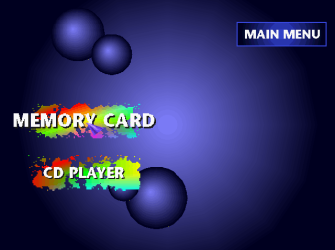
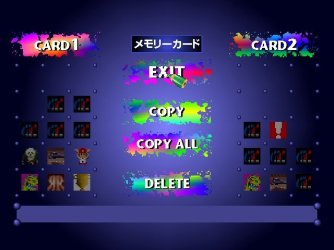
  • PS1 BIOS (Homescreen) can be accessed (Memory Card Manager/ CD player) - (***See Tutorial Tab)

Compatibility List

PS1 Emulator Info (PS3Dev Wiki)
ps1_netemu - External Configs and Ad Hoc Params


Modded Emulators by kozarovv - Release Thread
PS1 Netemu Features
PS1 Netemu Features:
  • Automatic GTE Widescreen Patch
    • Work only on 3D elements. Compatibility differs per game but should be on par with Duckstation "Widescreen Rendering".
    • You need to select the Full Screen Display option to enable.
    • Compatible with ISO, real discs, EBOOTS, and Official Classics.
    • While fully working, code under the hood is a little bit janky due to lack of space in elf. Sorry!

Features not implemented in this release:
  • Dithering removal patch. Because many people prefer it enabled as on the original PS1.
  • Forced bilinear filtering removal. Because many people prefer it enabled, and I had no good way to make a menu separator for that.
PS1 Emu Features
PS1 Emu Features: COMPLETELY UNTESTED!!!
  • Automatic GTE Widescreen Patch
    • Work only on 3D elements. Compatibility differs per game.
    • You need to select the Full Screen Display option to enable.
    • Compatible with ISO and real discs.
    • While fully working, code under the hood is a little bit janky due to lack of space in elf. Sorry!
Features not implemented in this release:
  • Dithering removal patch. Because many people prefer it enabled as on the original PS1.


Tutorials
How to Access PlayStation Bios (Home-screen)


PS1 Bios Screen.pngezgif-7d737e4aa2d8ee.jpg

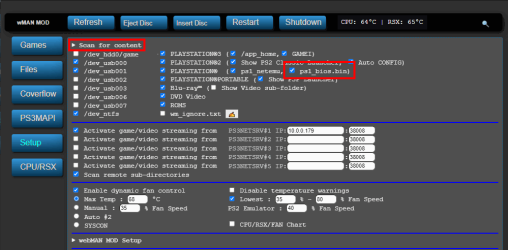
  • Renaming your acquired PS1 Bios SCPH1001.BIN (or other ps1 bios) to "ps1_bios.bin" and placing in /dev_hdd0/tmp/wm_res/ and checking the option in webMAN MOD in /setup.ps3 as shown in the image below via @aldostools (posted on X)
    • GjSv0rTXcAEfHjY.png
  • Now, when you unmount/eject a PS1 game during the Sony Computer Entertainment logo after replaced BIOS. Full access to BIOS, including the memory card utility and CD player are available. (via @mrjaredbeta psx-place forum discussion)

How to Swap Disc for multi disc PS1 Games with webMAN MOD / IRISMAN

  • webMAN MOD
    • via Aldostools forum post

      .If you use webMAN MOD, the easier method to swap discs is this:

      1- Mount the CUE/BIN of one the multi disc PS1 game (e.g. disc 1)
      2- Start the game and play until the point it asks to swap the disc (e.g. disc 2).
      3- Use a tablet, laptop or smartphone to mount the disc 2 from Chrome, Safari or any Internet browser: http://IP-address-of-your-PS3/mount_ps3/dev_hdd0/PSXISO/name_of_game_disc_2.BIN

      Replace the URL with the correct IP address and path of the 2nd disc.

      /mount_ps3 is used instead of /mount.ps3 to skip the warning and force the game to be mounted.
    IRISMAN
    • With your multi-disc PS1 games (such as Resident Evil 2 or FInal Fantasy VII), IRISMAN can switch to the next disc when needed by a simple method of unplugging or plugging-in any USB storage device. The console/irisman will automatically detect the simple USB change of plugged/unplugged and with that signal, it then cycle's to the next disc of the game, when you games follow the format below in the title..
      game_disc1.bin
      game_disc1.cue
      game_disc2.bin
      game_disc2.cue


How to Create PS1 PKG Backups for PS3 with PoP-fe (CFW/HEN)


How to Easily Play PS1 ISOs on a Jailbroken PS3

How to Combine Multi-Track BIN Files for PS1 Games


https://www.psx-place.com/threads/playing-playstation-ps1-games-on-your-ps3.39037/
 
Last edited:
Mobile Friendly Version
s (Not as upto date yet as first post)
The PS3 has Backward's Compatibility on all PS3 Models by inserting a PlayStation 1 Retail disc, but if you want to play your digital backup's from HDD / USB or your local Network you will need a PS3 Console running a CFW or PS3HEN, The PS3's internal firmware includes two emulator's that the community has unlocked and also added various features and functionality with the addition of other apps or tricks developer's have used. Learn more about playing PS1 on your PS3

Two available emulator's (within the firmware)
ps1_emu - Included emulator on every PS3 to play PlayStation 1 Disc.
ps1_netemu - Official PSone Classic's emulator from the PS Store


How to Switch between emulator's

webMAN MOD (Cobra) - can choose when mounting PS1 backup
:but l2:+:but x: for ps1_emu
:but r2:+:but x: for ps1_netemu and can also be set in webMAN settings)

Supported Format's
  • ISO/CUE, BIN/CUE, IMG/CCD, MDF/CUE.
  • PS1 games always require a cuesheet file for the music track information. If the CUE file is not present, the game can fail to load or will play without background music.
  • Multi-track BIN files are not supported. They must be merged in a single image file.

Supported Location's (for Storage/Mounting)
  • Place your PS1 ISO images in the folder /PSXISO on the PS3's internal HDD
  • or A USB Storage device formatted in FAT32, NTFS or exFAT
  • Remote HDD storage via ps3netsrv.
  • dev_sd, dev_ms, dev_cf (memory card) are also supported of phat models.

Additional Note's:
  • PS1 Classics are also supported with CDDA and multi-disc. They can be played directly from XMB.
  • multiMAN and IRISMAN can play PS1 games with or without Cobra/Mamba enabled.
  • Mamba 8.4 & Cobra 8.4 have add support for PAL games with protected LibCrypt., Also the PS1 audio speed was fixed when a PAL game is played on NTSC.
  • Multi-track BIN files are not supported. They must be merged in a single image file.
  • Although the PS1 compatibility is very high, some games require a PPF patch to be playable.
  • "You cannot play this game at the current video output setting (80028F10)" is a common error when a PAL game is played on NTSC and vice versa. It usually can be fixed just entering to Settings > Display Settings and saving without making changes.
  • IRISMAN supports change the disc image in multi-disc games inserting a pendrive.
    In webMAN MOD, the disc can be changed mounting the game via web from a PC or tablet.
  • with webMAN MOD you can mount PSX games with CD sector sizes: 2352, 2048, 2336, 2448, 2328, 2340, 2368

Compatibility List

https://www.psdevwiki.com/ps3/PS1_Classics_Emulator_Compatibility_List
PS1 Emulator Information (PS3 Dev Wiki)
https://www.psdevwiki.com/ps3/PS1_Emulation
 
Last edited:
Also the emulator allows CCD files. Was super happy when @aldostools added support for that container. Ripped all my games years ago using CloneCD and had to mount it via daemon tools to covert the BIN/CUE

Will add soon, also will mention:
wMM feature:
Support for multiCD PSXISO games stored as ISO in HDD0 / USB FAT32. Eject/Insert a USB0 device to mount the next CD

It can mount PSX games with CD sector sizes: 2352, 2048, 2336, 2448, 2328, 2340, 2368


Edit all added
 
Last edited:
Will add soon, also will mention:
wMM feature:
Support for multiCD PSXISO games stored as ISO in HDD0 / USB FAT32. Eject/Insert a USB0 device to mount the next CD​

I know you will flesh it out. Just came to mind after reading it. EvilNat has me playing around with my PS3 again. Such a wonderful system and the latest advancements are pretty awesome.
 
Anything seen missing is welcome, so do not hesitate.

The proper supported formats are: ISO/CUE, BIN/CUE, IMG/CCD, MDF/CUE.
PS1 games always require a cuesheet file for the music track information. If the CUE file is not present, the game can fail to load or will play without background music.

Multi-track BIN files are not supported. They must be merged in a single image file.

PS1 Classics are also supported with CDDA and multi-disc. They can be played directly from XMB.

multiMAN and IRISMAN can play PS1 games with or without Cobra/Mamba enabled.

Mamba 8.4 & Cobra 8.4 add support for PAL games with protected LibCrypt.
Also the PS1 audio speed was fixed when a PAL game is played on NTSC.

Although the PS1 compatibility is very high, some games require a PPF patch to be playable.

"You cannot play this game at the current video output setting (80028F10)" is a common error when a PAL game is played on NTSC and vice versa. It usually can be fixed just entering to Settings > Display Settings and saving without making changes.

PS1 games can be played from remote HDD storage via ps3netsrv.
dev_sd, dev_ms, dev_cf are also supported of phat models.

IRISMAN supports change the disc image in multi-disc games inserting a pendrive.
In webMAN MOD, the disc can be changed mounting the game via web from a PC or tablet.
 
Ok the addition of libcrypt is pretty cool but the PAL audio issue I need to check out. Had issues with my copy of Hellnight as the PAL is the only English version. Have to check it out and see as it's one of my favorite Atlus games.
 
Hi, I wholly apologize if this has been asked before as I'm new around here.

Is it already possible to run the ps1_emu emulators on higher clock speeds i.e overclocking? I'm not talking about overclocking the PS3's RSX, but the emulated PSX CPU.

We were developing an internal 60FPS mod for a PSX game, and I got quite disappointed that I can't utilize our creation when I finally get hands on a PS3 console. I was hoping that it'd be nice to actually play enhanced versions of these games in an official Sony console rather than emulating it on PC

I've heard that Popstarter Emu just recently been able to do it, so I'm hoping test it soon on a PSP. Please don't take this as a request, I completely understand if it is not a priority yet.

Thank you for your answer.
 
A few changes to OP:
-Added Tutorials
-Vaguely added CD-R support (via Cobra/Mamba) was missing before.
-Added recent ps1emu & ps1netemu changes from modded versions
-Various other tweaks / additions in all tabs.

Additional tutorials / Tips are welcome
Suggestions and Corrections also welcomed. Still not what i would call complete but a good starting point for information.
 
Last edited:
There is something wrong with the page\tab layout\formatting.
At least on the phone:
IMG_20250212_223831.jpg
 
There is something wrong with the page\tab layout\formatting.
At least on the phone:
View attachment 45455

That is normal on mobile, unfortunately Anything that use's tables will be like this.

Try desktop mode, it sucks but better with some zooming,
Edit: charles suggestion above is much better

will try and do a mobile friendly version and insert into post #2

edit:
Added in post #2 just does not have all details., yet
 
IRISMAN supports change the disc image in multi-disc games inserting a pendrive.
In webMAN MOD, the disc can be changed mounting the game via web from a PC or tablet.

I found using webman web controls from my phone the easiest way to change to the 2nd disc. So nice that it just works. Put your ps3 ip address into your phones browser and it pops up. Thanks Aldo.
 

Similar threads

Back
Top