


Massive thanks to @Evilnat and @esc0rtd3w (Ps3Xploit team) for restoring the Home icon to the XMB for us.

Now with Home Laboratory trying Home out is as simple as it was originally:
To see where other Home Lab players are: https://pshomeologylab.net/players/
To add / Remove items from Inventory visit this url while in game to link your account: http://psho.me/?List=MyInventory
To install the Home Lab pkg manually via package manager on other PS3 CFW or older HEN: https://pshomeologylab.net/release/1.86/qa/ps3/HOMEOLOGYLAB_QA_JBPS3_1.86_LATEST.pkg
To install on RPCS3 use: https://pshomeologylab.net/release/1.86/qa/rpcs3/HOMEOLOGYLAB_QA_RPCS3_1.86_LATEST.pkg
Important: if you have Home already installed from back when it was live you might have important cache data that can help us to restore more spaces and items.
More info at https://discord.gg/hWNpXE65TG
Now with Home Laboratory trying Home out is as simple as it was originally:
- Enable HEN if you are on HEN - CFW users can skip this step
- Browse to the PSN category
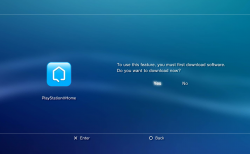
- Click on the PlayStation Home icon
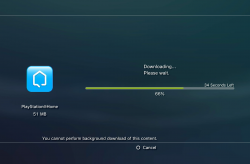
- It will download and install automatically, then boot automatically.
- Note: A PSN account is required to play Home online.
To see where other Home Lab players are: https://pshomeologylab.net/players/
To add / Remove items from Inventory visit this url while in game to link your account: http://psho.me/?List=MyInventory
To install the Home Lab pkg manually via package manager on other PS3 CFW or older HEN: https://pshomeologylab.net/release/1.86/qa/ps3/HOMEOLOGYLAB_QA_JBPS3_1.86_LATEST.pkg
To install on RPCS3 use: https://pshomeologylab.net/release/1.86/qa/rpcs3/HOMEOLOGYLAB_QA_RPCS3_1.86_LATEST.pkg
Important: if you have Home already installed from back when it was live you might have important cache data that can help us to restore more spaces and items.
More info at https://discord.gg/hWNpXE65TG
Attachments
Last edited:


