POPSLoader

PS2 POPSLoader v1.0.0 - rev5

Now it shows written in red color:
Enceladus ERROR!
[string "?"]:70: Cant access POPSLDR/system.lua

current_bootpath: mass:/

Press [start] to restart

Pressing [start] wont do anything either.


Im trying to use it and got the same error, but, if i start the elf by the mass, it runs, but it dont find __.POPS partitions.
 
Im trying to use it and got the same error, but, if i start the elf by the mass, it runs, but it dont find __.POPS partitions.
For some odd reason, the program cannot check partitions existence when booting from HDD. will check this in a few days
 
Ciao!
C'è qualche altro file oltre a POPSLoader-v1.0.0-rev2.7z che dovrei usare?
Ho copiato il contenuto all'interno della cartella bin sulla mia chiavetta USB, seguendo le istruzioni. Ho anche aggiunto una copia di PATCH_5.BIN alla cartella POPS come indicato in un video di HARD LEVEL. Giusto per aggiungere sto caricando il POPSLoader usando "wLaunchELF 4.43X_isr".

POPSLOADER.png
POPSLOADER.png
[/CITAZIONE] [/CITAZIONE]
El_isra inviato una nuova risorsa:

POPSLoader - Launcher POPStarter standalone altamente personalizzabile e flessibile

1) You are told to paste the BIN folder (and all files/folders inside it) to any location at mass:/ (formatted in fat32 or exfat). So it will be: mass:/BIN/ correct?
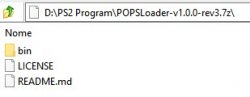
Where should the two files "license" and "readme" (see screenshot) be placed outside the BIN folder?

2) What program should PS1 games be converted with? Starting directly from CD? Is there a guide on how to properly prepare PS1 game files to work with the POPSLoader program?
Thank you


Attachments

  • POPSLoader.jpg
    POPSLoader.jpg
    9.2 KB · Views: 88
I think I'm missing something with POPSLoader. Got it set up on my USB, it loads fine and it shows my games in the list but when I select a game to load it kicks me back to wLE with a "No Disc" message at the top.

20240126_105053.jpg
20240126_105057.jpg
20240126_105104.jpg
20240126_105112.jpg
 
I think I'm missing something with POPSLoader. Got it set up on my USB, it loads fine and it shows my games in the list but when I select a game to load it kicks me back to wLE with a "No Disc" message at the top.

View attachment 42143 View attachment 42144 View attachment 42145 View attachment 42146

It happened to me with the first and second version of POPSLoader. All the time it happened when I used a USB stick or a USB drive. I have another USB stick that works flawlessly since the first version of POPSLoader. Using the older OPL all the USB devices worked fine.
 
I think I'm missing something with POPSLoader. Got it set up on my USB, it loads fine and it shows my games in the list but when I select a game to load it kicks me back to wLE with a "No Disc" message at the top.

View attachment 42143 View attachment 42144 View attachment 42145 View attachment 42146

1) In the guide it says to copy everything in the BIN/..... folder just the contents or the BIN folder plus its contents? Where should the two files that are downloaded in the BIN (license and readme) folder be placed?
2) How do you convert CD to VCD for PS1 games?
 
1) In the guide it says to copy everything in the BIN/..... folder just the contents or the BIN folder plus its contents? Where should the two files that are downloaded in the BIN (license and readme) folder be placed?
2) How do you convert CD to VCD for PS1 games?

1) "Instructions:
Paste the contents of the bin/ folder from the download package into a location of your preference inside a FAT32/EXFAT USB storage device or any PFS partition of internal HDD (pro tip: while loading games from USB, if POPSLoader is placed on mass:/BOOT.ELF, POPStarter will automatically load it after performing an IGR)

The POPSLDR/ folder must always be on the same location than the POPSLoader ELF."

Just the contents of the folder minus the license and readme files (those are not necessary for POPSLoader). Paste the POPSLDR folder and the POPSLOADER.ELF file to the root of your USB device. Paste a copy of the PATCH_5.BIN file to the POPS folder.

2) https://www.psx-place.com/threads/psxvcd-by-englishl1989.19063/
 
1) "Instructions:
Paste the contents of the bin/ folder from the download package into a location of your preference inside a FAT32/EXFAT USB storage device or any PFS partition of internal HDD (pro tip: while loading games from USB, if POPSLoader is placed on mass:/BOOT.ELF, POPStarter will automatically load it after performing an IGR)

The POPSLDR/ folder must always be on the same location than the POPSLoader ELF."

Just the contents of the folder minus the license and readme files (those are not necessary for POPSLoader). Paste the POPSLDR folder and the POPSLOADER.ELF file to the root of your USB device. Paste a copy of the PATCH_5.BIN file to the POPS folder.

For example
x:/POPSLDR/patch_5.bin (and other files)
x:/POPSLOADER.ELF
x:/POPS/patch_5.bin

The POPS folder is the one that contains all the VCD files of the games, correct? x:/POPS/file.VCD
Or since PSXvcd converts bin+cue files into the APPS folder by default, should I copy the converted file into the APPS folder created via OPL?

 
Last edited:
I did this:

x:/POPSLDR/patch_5.bin (and other files)
x:/POPSLOADER.ELF
x:/POPS/patch_5.bin (and games.vcd)
x:/PS2SMB/ART (and other folder of OPL ver.1.2.0)

Starting OPL, no game file appears on the APPS screen....what did I do wrong?
 
It happened to me with the first and second version of POPSLoader. All the time it happened when I used a USB stick or a USB drive. I have another USB stick that works flawlessly since the first version of POPSLoader. Using the older OPL all the USB devices worked fine.
I had to drop down to Rev2 and it then worked for me.
 
I had to drop down to Rev2 and it then worked for me.

I noticed that in your POPSLDR folder there are not only the files that are found with the download. There is a pops_iox.pak, there is a popstarter.elf, pops.elf....and inside the POPS folder there is again popstarter.elf, pops.elf, pops_iox.pak and trojan_7.bin.. ....can you explain to me please?
 
I did this:

x:/POPSLDR/patch_5.bin (and other files)
x:/POPSLOADER.ELF
x:/POPS/patch_5.bin (and games.vcd)
x:/PS2SMB/ART (and other folder of OPL ver.1.2.0)

Starting OPL, no game file appears on the APPS screen....what did I do wrong?
It WILL NOT show on OPL. You should start POPSLOADER.ELF and then the games will show inside POPSLOADER. You can use OPL to run POPSLOADER. If using OPL-DB (the one that list PS1 games) you had no problems or need an EXFAT partition, keep using OPL-DB.
 
This is right?
x:/POPSLDR/patch_5.bin (and other files)
x:/POPSLOADER.ELF
x:/POPS/patch_5.bin (and games.vcd)
x:/PS2SMB/ART (and other folder of OPL ver.1.2.0)

Sorry, I'm not following you...not because you didn't explain yourself well...but I'm a bit "retrò" with these things...

OPL-DB ? Meaning what ? Please explain me.....now my OPL is 1.2.0
 
Last edited:

Similar threads

Back
Top