POPSLoader

PS2 POPSLoader v1.0.0 - rev5

It WILL NOT show on OPL. You should start POPSLOADER.ELF and then the games will show inside POPSLOADER. You can use OPL to run POPSLOADER. If using OPL-DB (the one that list PS1 games) you had no problems or need an EXFAT partition, keep using OPL-DB.
It is not advised to ever use OPL-DB.
Much better to set up the official OPL properly and not take shortcuts that lead to problems.
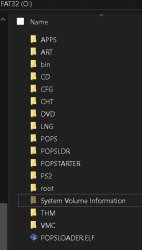
 
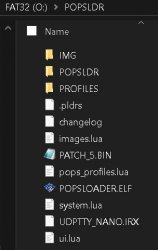
This is right?
x:/POPSLDR/patch_5.bin (and other files)
x:/POPSLOADER.ELF
x:/POPS/patch_5.bin (and games.vcd)
x:/PS2SMB/ART (and other folder of OPL ver.1.2.0)

Sorry, I'm not following you...not because you didn't explain yourself well...but I'm a bit "retrò" with these things...

OPL-DB ? Meaning what ? Please explain me.....now my OPL is 1.2.0
Do not switch to OPL-DB, stay on 1.2.0 Official.
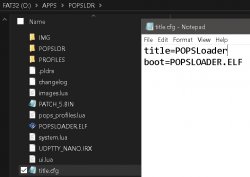
Here are screenshots of USB set up:
Screenshot 2024-01-28 083636.jpg
Screenshot 2024-01-28 083716.jpg
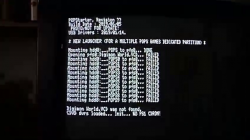
Screenshot 2024-01-28 083906.jpg

How to manually add PS1 Games to OPL Apps page via USB:
CrashBandicoot.VCD example:
  • mass:/APPS/Crash Bandicoot/XX.CrashBandicoot.ELF
(this is POPSTARTER.ELF renamed as XX.CrashBandicoot.ELF to match its corresponding .VCD file.)
  • mass:/APPS/Crash Bandicoot/title.cfg
(title.cfg can be created in notepad.) title.cfg should read the following in notepad:
title=PS1:Crash Bandicoot
boot=XX.CrashBandicoot.ELF
  • mass:/POPS/CrashBandicoot.VCD
  • mass:/POPS/POPS_IOX.PAK
  • mass:/POPS/POPSTARTER.ELF
  • For iHDD/iSSD remove XX. from the beginning of the renamed POPSTARTER.ELF.
  • For SMB replace XX. with SB. at the beginning of the renamed POPSTARTER.ELF.

 
Last edited:
This is right?
x:/POPSLDR/patch_5.bin (and other files)
x:/POPSLOADER.ELF
x:/POPS/patch_5.bin (and games.vcd)
x:/PS2SMB/ART (and other folder of OPL ver.1.2.0)

Sorry, I'm not following you...not because you didn't explain yourself well...but I'm a bit "retrò" with these things...

OPL-DB ? Meaning what ? Please explain me.....now my OPL is 1.2.0
OPL-DB is the Open PS2 Loader downloaded from PS2 Home. I think it was discontinued (last update was in december 2022). This version can list PS1 games and uses POPSTARTER to run the selected .VCD .

POPSLOADER can list PS1 games and run POPSTARTER without OPL. It seems that you are missing POPS_IOX.PAK inside POPS folder. Google it to find this file as it can't be listed here (forum rules).
 
popsloader destroys hard drive when run from __Common, in my case popsloader appears and then disappears and cannot display VCD on __.POPS and __.POPS1 partitions.
 
I was think the future of POPSLoader.

@El_isra is it possible to add a game settings screen where the user can adjust the compatibility settings, patches, 480p, nodither, etc. This screen would need to create or write to the CHEATS.TXT inside the game folder.
Also it would be interesting to set VMCs and Multidisc games.
Maybe also apply @hugopocked and @El_Patas patches?

The idea would be more independent from the PC to configure PS1 POPs games. It would be the definitive PS1 Loader as OPL is for PS2.
 
My games via internal HD do not appear in the internal HD tab. My PS1 games are in the partition called .POPS created via PFS BatKitManager. Can you help me with a solution?
 
Someone know how to fix this error?

The POPS directory exists in the USB
KkfMHEw.jpeg
I changed the USB stick to another (Cruzer Blade 128gb) and it worked. Tried with 2 USB discs and a DataTraveler stick (all worked fine with OPL) but none worked on POPStarter.
 
Last edited:
Hi, I'm using a SATA-modded official adapter with an SSD but when I select HDD POPSloader keeps saying "Could not find any __.POPS partitions".
I formatted the SSD using HddManager, created a __.POPS partition where I keep all my VCD games, and my common folder structure is like this:
common
  • POPS
(proprietary files)
  • POPSLDR
(POPSloader files)
  • POPLOADER.ELF
 
Hi, I'm using a SATA-modded official adapter with an SSD but when I select HDD POPSloader keeps saying "Could not find any __.POPS partitions".
I formatted the SSD using HddManager, created a __.POPS partition where I keep all my VCD games, and my common folder structure is like this:
common
  • POPS
(proprietary files)
  • POPSLDR
(POPSloader files)
  • POPLOADER.ELF
yeah. there were some issues with that. I havent found the issue yet tho...

Will take a look when I have time.
 
Hi, I'm using a SATA-modded official adapter with an SSD but when I select HDD POPSloader keeps saying "Could not find any __.POPS partitions".
I formatted the SSD using HddManager, created a __.POPS partition where I keep all my VCD games, and my common folder structure is like this:
common
  • POPS
(proprietary files)
  • POPSLDR
(POPSloader files)
  • POPLOADER.ELF
bugfix done and implemented.
Awaiting psx-place moderator to aprove the update
 
bugfix done and implemented.
Awaiting psx-place moderator to aprove the update
Thank you so much for being so quick and accurate. The partition is now being recognized properly and so do the games.
Sadly though, I tried a couple of games (Digimon World 1 (with and without a mod) and Final Fantasy VII) and they all boot me back to the Memory Cards menu. They all work fine when I try to open them with wLaunch.
Could it be a compatibility issue or are there other fixes needed? Also, the revision number still says 3 instead of 4 (yes, I deleted all the previous files and copied POPSlauncher anew).
 
Thank you so much for being so quick and accurate. The partition is now being recognized properly and so do the games.
Sadly though, I tried a couple of games (Digimon World 1 (with and without a mod) and Final Fantasy VII) and they all boot me back to the Memory Cards menu. They all work fine when I try to open them with wLaunch.
Could it be a compatibility issue or are there other fixes needed? Also, the revision number still says 3 instead of 4 (yes, I deleted all the previous files and copied POPSlauncher anew).
Could you try launching them with the debug profile of POPStarter? (You can select it from the POPSLoader main menu)
It will tell you why POPStarter aborted it's execution
 
Could you try launching them with the debug profile of POPStarter? (You can select it from the POPSLoader main menu)
It will tell you why POPStarter aborted it's execution
Every other operation before this screenshot was saying "DONE" so I didn't include them. And after this one it boots out. I even tried with a name file for the game without spaces or symbols, but nothing.

EDIT. Ok, I actually managed to get any game started, I just had to both have the USB not inserted (I had a backup of all the POPSloader files and some games) and the name file of the game to not have any spaces. I previously tried one and the other but they were both at fault and now everything works as intended.
Thank you so much.
 

Attachments

  • vlcsnap-2024-05-29-12h16m12s393.png
    vlcsnap-2024-05-29-12h16m12s393.png
    246.6 KB · Views: 93
Last edited:

Similar threads

Back
Top