PS3 Possibility of a Life With Playstation Revival? (Request) (sans folding@home)

At least now we can tell if we come across something new.
That's Cool.


BTW @WailkyS5M5 @Mystyqblaze347 @Joe Robertson or anyone else, If you want to get involved and to help. You could help us map out what all the setting parameters do in the various layout files.

Loads of interesting things to be discovered here and knowing what all of these do will help us to rebuild the missing channels that use the globe UI.


If anyone wants to help:

1. Install the offline test 1 pkg
2. Get familiar with how the globe or any UI element looks normally.
3. Edit the data/world/layout.xml (or any other layout.xml) parameters
4. Start up/Restart the app and look for changes.
5. Try to find out the maximum/minimum values accepted if its not obvious.
6. Document your findings by adding a comment to the xml and resharing it here

I find it can be good to make extreme changes at first, so any differences will be more noticeable, and just change one or two things at a time or you wont be able to to know is changing what. A few of them have comments already too.

I did the first few.
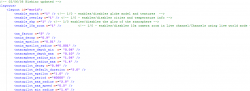
upload_2025-8-27_18-37-4.png

<enable_earth n="1" /> - Changing this to 0 removes the globe model and textures, the city dots and new headlines remain.
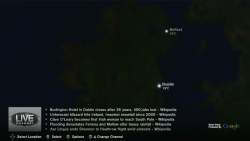
upload_2025-8-27_17-55-23.png


enable_overlay n="1" /> - Changing this to 0 removes the cities and the temperature info from the globe. Also it no longer shows the news headlines. It looks nice and clean.
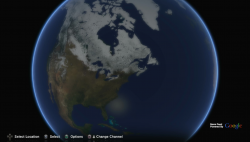
upload_2025-8-27_18-22-39.png

<enable_sky n="1" /> - Changing this to 0 disables the blue glow of the atmosphere.
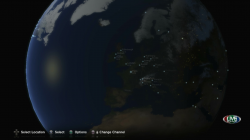
upload_2025-8-27_18-32-4.png

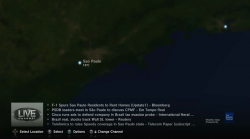
enable_10x_zoom n="1" /> already has a comment " <!-- Enable 10x zoom in Live channel/Channels using live world mode -->"

This setting applies to autopilot and manual zooming and allow you to zoom in way further. it is disabled by default, This setting could be useful especially if someone wanted to do a mod with way more cities.
upload_2025-8-27_18-38-57.png

There is another related setting lower down autopilot_min_radius_live_10x_zoom. I have not tried much with that yet.
 

Attachments

Last edited:
That's Cool.


BTW @WailkyS5M5 @Mystyqblaze347 @Joe Robertson or anyone else, If you want to get involved and to help. You could help us map out what all the setting parameters do in the various layout files.

Loads of interesting things to be discovered here and knowing what all of these do will help us to rebuild the missing channels that use the globe UI.


If anyone wants to help:

1. Install the offline test 1 pkg
2. Get familiar with how the globe or any UI element looks normally.
3. Edit the data/world/layout.xml (or any other layout.xml) parameters
4. Start up/Restart the app and look for changes.
5. Try to find out the maximum/minimum values accepted if its not obvious.
6. Document your findings by adding a comment to the xml and resharing it here

I find it can be good to make extreme changes at first, so any differences will be more noticeable, and just change one or two things at a time or you wont be able to to know is changing what. A few of them have comments already too.

I did the first few.

View attachment 46522

<enable_earth n="1" /> - Changing this to 0 removes the globe model and textures, the city dots and new headlines remain.

View attachment 46517


enable_overlay n="1" /> - Changing this to 0 removes the cities and the temperature info from the globe. Also it no longer shows the news headlines. It looks nice and clean.

View attachment 46520

<enable_sky n="1" /> - Changing this to 0 disables the blue glow of the atmosphere.
View attachment 46521

enable_10x_zoom n="1" /> already has a comment " <!-- Enable 10x zoom in Live channel/Channels using live world mode -->"

This setting applies to autopilot and manual zooming and allow you to zoom in way further. it is disabled by default, This setting could be useful especially if someone wanted to do a mod with way more cities.

View attachment 46524

There is another related setting lower down autopilot_min_radius_live_10x_zoom. I have not tried much with that yet.
Awesome! I will experiment on this and make sure to share my results in the file tomorrow [emoji106]
7210533405dbfc2191bdb4ecda20cde1.jpg
 
That's Cool.


BTW @WailkyS5M5 @Mystyqblaze347 @Joe Robertson or anyone else, If you want to get involved and to help. You could help us map out what all the setting parameters do in the various layout files.

Loads of interesting things to be discovered here and knowing what all of these do will help us to rebuild the missing channels that use the globe UI.


If anyone wants to help:

1. Install the offline test 1 pkg
2. Get familiar with how the globe or any UI element looks normally.
3. Edit the data/world/layout.xml (or any other layout.xml) parameters
4. Start up/Restart the app and look for changes.
5. Try to find out the maximum/minimum values accepted if its not obvious.
6. Document your findings by adding a comment to the xml and resharing it here

I find it can be good to make extreme changes at first, so any differences will be more noticeable, and just change one or two things at a time or you wont be able to to know is changing what. A few of them have comments already too.

I did the first few.

View attachment 46522

<enable_earth n="1" /> - Changing this to 0 removes the globe model and textures, the city dots and new headlines remain.

View attachment 46517


enable_overlay n="1" /> - Changing this to 0 removes the cities and the temperature info from the globe. Also it no longer shows the news headlines. It looks nice and clean.

View attachment 46520

<enable_sky n="1" /> - Changing this to 0 disables the blue glow of the atmosphere.
View attachment 46521

enable_10x_zoom n="1" /> already has a comment " <!-- Enable 10x zoom in Live channel/Channels using live world mode -->"

This setting applies to autopilot and manual zooming and allow you to zoom in way further. it is disabled by default, This setting could be useful especially if someone wanted to do a mod with way more cities.

View attachment 46524

There is another related setting lower down autopilot_min_radius_live_10x_zoom. I have not tried much with that yet.
Can the xml be edited without having to to re-pkg? I have never made a pkg is why I ask. I have done tons of xml edits/ development on Android (not apk development, just edits/mods) so if not much different (at least from what I seen), should be doable to help. I will do what I can, things are kinda hectic atm

Edit: from .xml it look like we might be able to try to push a native 1080p for a few things instead of 720p, change some coloring in areas, and adjust copyright size. If I am reading right that is.
 
Last edited:
Yeah, no need to make a pkg. You can just drop the xml into place with FTP, or any file manager, whatever you want. If you have webman mod or some other FTP server running on PS3.

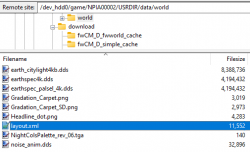
Then using a FTP client on PC, like Filezilla, browse to /dev_hdd0/game/NPIA00002/USRDIR/data/world


upload_2025-8-27_23-4-8.png

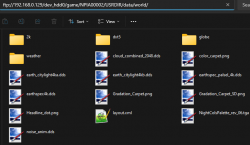
Windows explorer even has FTP client built in so you can just put your ps3 ip into the file explorer bar like this

ftp://PS3_IP_HERE/dev_hdd0/game/NPIA00002/USRDIR/data/world/

upload_2025-8-27_23-9-40.png
 
ok, so I've been playing with the files, and I've determined that these two files are the same. It might have been mentioned before, but now I know for sure :)

upload_2025-8-27_18-6-57.png


The other thing I was tinkering with is the idea of comparing all the files from package to package. I extracted all the packages we have, and renamed the folders after the packages

upload_2025-8-27_18-9-0.png


So then, after some powershell work, this is what I got back

upload_2025-8-27_18-13-18.png


Each row represents a file, and each 2-column set shows the file size and hash. It's a little hard to navigate because there's so much data, but this should help us figure out where each file lives, if it exists in multiple packages, and if it's different (based on the hash). If the file is not in a certain column, then it doesn't exist in that package.

I'm going to play with it some more to see if I can make it easier to navigate (maybe we don't need size if we have hash? Maybe a computed column that shows where it exists instead of all those numbers?)

But at any rate, here's the current version of the file
 

Attachments

I was just thinking, if urls can be edited, can maybe a url from linux fah working client be implemented in this? Also be way faster to edit if there was a ps3 file manager that had a text editor. But at least still doable via manual swap or ftp.
 
I don't know much about the folding at home side of it tbh, maybe someone does.

For the faster way to edit, you will find FTP is the fastest way. There are ways to edit a text file on PS3, but if you have to open another app, use on screen keyboard, close that other app, its all way too slow vs instant transfer of files in the background with FTP.
 
I looked at the folding stuff a little bit... the project is still alive, and they still release new clients for windows, etc. I've identified at least two steps to get started:
  • The client does authenticate against stanford servers, so that's one more layer to figure out
  • we'll have to reverse the format of the data that we'd get from stanford, and then send it back
To be honest, I find this portion of the project somewhat unlikely -- I don't know that they'd want just anyone messing with their data, even with an old client. Maybe what we can do is still reverse the format and then feed the f@h client with fake data, so then the client will run and generate some neat looking proteins, but without sending any data to stanford. Not really unlike what @DeViL303 has done with the news feed.... so it'll look pretty and all that, but it won't actually be doing the work.
 
I looked at the folding stuff a little bit... the project is still alive, and they still release new clients for windows, etc. I've identified at least two steps to get started:
  • The client does authenticate against stanford servers, so that's one more layer to figure out
  • we'll have to reverse the format of the data that we'd get from stanford, and then send it back
To be honest, I find this portion of the project somewhat unlikely -- I don't know that they'd want just anyone messing with their data, even with an old client. Maybe what we can do is still reverse the format and then feed the f@h client with fake data, so then the client will run and generate some neat looking proteins, but without sending any data to stanford. Not really unlike what @DeViL303 has done with the news feed.... so it'll look pretty and all that, but it won't actually be doing the work.
Could send anywhere that it is actually working, Don't have to be Stanford persay. If doable that is.
 
This has updated temperature info and headlines if anyone wants to apply it to the offline version. Also all the articles now have urls linked.

This also updates the temperatures to show a decimal place.

upload_2025-8-28_22-2-8.png


The issue is that between SSL certs and everything else, the PS3 web browser will basically not load any news sites in 2025, we will need to come up with a solution to that.
 

Attachments

Last edited:
This has updated temperature info and headlines if anyone wants to apply it to the offline version. Also all the articles now have urls linked.

This also updates the temperatures to show a decimal place.

View attachment 46541

The issue is that between SSL certs and everything else, the PS3 web browser will basically not load any news sites in 2025, we will need to come up with a solution to that.
Maybe bouncing off of a server that converts to http such as webone ( https://github.com/atauenis/webone )

A flat out new web browser for ps3 would be even better, but thats a whole new project.
 
Last edited:
Hi, i have been adding some comments to the layout.xml, here is all i have for today :D

There are some things that really didnt give any noticable changes, its why i excluded them in the comments such as
<aa_factor n="5" /> I dont know what this does, may be a Anti-aliasing factor?
<atmosphere_radius_min n= "1.06" />
<atmosphere_radius_max n= "1.4" /> both absolutely do nothing (visually atleast)
<autopilot_period n="6000" /> ??? tried different values nothing changed
<autopilot_max_speed n="1.0" /> thought it would make the moving animation faster/slower but nope
<autopilot_min_radius n="1.4" /> no visual change
<autopilot_min_radius_live n="1.4" /> this too
<autopilot_max_speed n="0.6" /> same parameter like above?
<autopilot_max_radius_speed n="0.1" />

apart from that im stuck at the browser things like

<browser_carpet_decay n="0.9" />
<browser_carpet_gradient_h n="120" n720="80" n480="53" />
<browser_carpet_h n="420" n720="280" n480="186" />

because if i change any of these values the carpet size doesnt change at all + same animation lenght, i suppose n720 is for 720p output and n480 is for 480p, so the browser is scaled right and not too large or too small

I will continue tomorrow if someone has more clues to these id be very happy to hear them! :deank:
 

Attachments

Last edited:
The v1.10 NPIA00007 beta is kinda interesting. It's very different and seems to be dedicated to testing new music features.

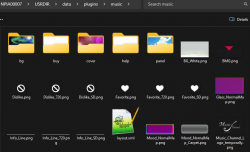
  • It has a music.sprx plugin referenced in plugins.xml that the others do not have
  • plus these related resources in the plugins folder.
upload_2025-8-30_12-3-35.png

It also has a much larger EchoPlayer.sprx at 12.6MB vs ~5.20MB normally.

This is what the normal v1.10 new_features.txt shows

Update Information
Version 1.1
- Added support for adding and removing channels dynamically.
- Added a local time display in the LIVE CHANNEL.
- Updated Mood categories for automatic music selection.
- Added support to enable Folding@home Expert Mode which disables all other
channels and features that may impact simulation performance.
Folding@home Expert Mode can be activated by navigating to:
Options Menu > [Configuration] > [Folding@home].
Version 1.0
- The Folding@home™ feature under [Network] has been updated and
renamed as "Life with PlayStation®". You can still watch
the protein-folding simulation in real time from the Folding@home channel.
- Folding@home
PS3™ system rankings are now available for the Folding@home channel
when you have signed in to PlayStation®Network.

This is what the beta new_features.txt shows.

New Feature
Network Environment Analysis -
After the update, when running the Music Beta for the first time,
the effective speed of your network environment will be automatically
detected. If bandwidth appears to be insufficient for normal
operation, the application will display a notice to inform you of
the issue.
Please make note of this information when submitting feedback.
Known Issues
Instability -
Please be aware that as this application is still undergoing development,
the application's stability cannot be guaranteed. The quality of this
beta is not representative of the quality that can be expected from
a final product.
Standard Definition Support Limitation -
Standard definition resolutions (480 and 576) are not fully supported
with this beta release. Some images and screen layouts have not been
optimized for use with standard definition resolutions. Because of this
limitation, it is recommended that a resolution of 720p or higher is
used when viewing the application.
No PSP® Remote Play Support -
PSP® Remote Play is currently unsupported for this release.
Single User Support -
Only one PlayStation®Network Sign-In ID is supported per PLAYSTATION®3
system for this application.

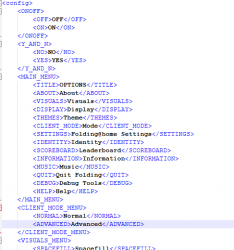
Also I notice all versions have a ui.xml with entries for debug tools, There might be a button combo or file flag to enable the Debug Tools menu option.

upload_2025-8-30_12-11-21.png
 
The v1.10 NPIA00007 beta is kinda interesting. It's very different and seems to be dedicated to testing new music features.

  • It has a music.sprx plugin referenced in plugins.xml that the others do not have
  • plus these related resources in the plugins folder.
View attachment 46550

It also has a much larger EchoPlayer.sprx at 12.6MB vs ~5.20MB normally.

This is what the normal v1.10 new_features.txt shows


This is what the beta new_features.txt shows.


Also I notice all versions have a ui.xml with entries for debug tools, There might be a button combo or file flag to enable the Debug Tools menu option.

View attachment 46551
Yo whats good!
What could be possible if we enable the debug mode?
 
Back
Top