PS3 ps2_netemu.self with CELL/RSX temperature display by 3141card

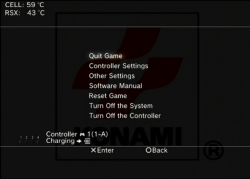
Not so long time ago developer @zecoxao released @3141card modified version of ps2_netemu.self (PS2 emulator used for classics and for PS2 ISO on most PS3 consoles). What's new? Actually something very useful. With this emulator you can check your CELL/RSX temperatures while playing PS2 titles. I reencrypted elf to use with 4.81 CFW, but this was only tested by one person. So use with caution. Don't forget to check other improvements to ps2_netemu by 3141card here.
JSyVAqQr.png


How to use:
  • To do that just simply push :psbutton: button while you are in PS2 game.

How to install:

  • Download and unrar ready to use self file
  • Enable dev_blind
  • Copy (with overwrite) ps2_netemu.self file to dev_blind/ps2emu folder using prefered method
  • Restart PS3

Tested with Rebug 4.81.2 on Slim PS3, remember that you are messing with your dev_flash! Is dangerous!

Download (self file, ready to use after unrar): http://www.mediafire.com/file/5dpm8pq3pt67qaa/testemu.rar
Download (Originaly released elf file, need to be encrypted before use): https://www.sendspace.com/file/mx1kjx
Source: https://playstationhax.xyz/forums/topic/3670-release-ps2_netemu-with-fan-temps-display/
 
Last edited:
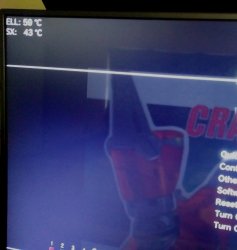
Alright I tested this on both reference tool consoles, DECR-1000A/DECR-1400 with 4.81.1 Rebug LE With Ty The Tasmanian Tiger 3 as the game, everything seems to be functional minus a simple scaling issue that im sure could be easily addressed this is when playing with 1080p settings/1080i from my personal experiance. Overall nice improvement, useful information would love to see how this further progresses, great work guys. :) To recap this IS working fine on DECR Reference Tool Consoles.
Also I would love to test any further updates to this, hopefully CTRL Fan implementation if possible. ;) If you guys need me to test anything dont hesitate to ask, always looking to help in whatever way I can.
 
I forgot to mention that this was only with 1080p. I only have a 720p tv, and I haven't transferred the net emu ps2 file...yet. not 'til I replace my failing hdd or it maybe webman mod is causing the instability. anyway, I'm not sure if they make a native 1080p tv at my size - 28". lol
 
Yes give me a few minutes and ill do this for you.
Like I said only a minor scaling issue you could move it just a little bit and that would more than solve the problem, I did check and confirm it is not my tv's scaling settings and that had no impact. So its just a little to far to the upper left moving just a hair to the right would be perfect. Again thank you very much for the effort you have put into this. :)

*Edit. - This was tested on my DECR-1000A but im sure the same is true to all systems.
 

Attachments

  • 20170701_091754_HDR.jpg
    20170701_091754_HDR.jpg
    1.1 MB · Views: 413
I'm not sure if they make a native 1080p tv at my size - 28".
Im sure they do, even my phone is 1080p. And My brother has a 22" 1080P TV.
it is not my tv's scaling settings and that had no impact.

The screenshot in the release post is from my system and it was ok, I think yours is scaled by the TV, as yours is widescreen, or is that a setting/patch? Just wondering..Regardless moving it in a bit would be a good solution for all.
 
Im sure they do, even my phone is 1080p. And My brother has a 22" 1080P TV.


The screenshot in the release post is from my system and it was ok, I think yours is scaled by the TV, as yours is widescreen, or is that a setting/patch? Just wondering..Regardless moving it in a bit would be a good solution for all.
The tv is a 4k samsung 16:9 when in 1080p/i , it does offer scaling options though iv tried all the settings for it myself. I had the ps3 set to 1080p with monster hdmi, and tried with the monster hd output cables @ 1080i, with and without my capturecard hooked up, Im not 100% if this is just an issue with my particular system, or with certain tvs but nonetheless a very minor issue :).
 
Im sure they do, even my phone is 1080p. And My brother has a 22" 1080P TV.


The screenshot in the release post is from my system and it was ok, I think yours is scaled by the TV, as yours is widescreen, or is that a setting/patch? Just wondering..Regardless moving it in a bit would be a good solution for all.

now that I think about it - I did change the resolution of the vga input to 1080p since my native resolution 1366x768 was not available with my video card. the tv can't output 240p though which is what psx games seem to run as. that's the reason for the upscaler.
 
@pinky
1080p is the resolution dubbed Full HD so unless you buy a TV which is not Full HD (common 10 years ago but rare today), a device should support 1080p, no matter its screen size..
Like DeViL303 already said, the more recent decent smartphones (from Galaxy S4 & iPhone 6+) with 4/5 inch screens use 1080p! Older smartphones (2013/2014 & older) usually use lower resolutions such as1280x720 (Galaxy S3) or 1334x750 (iPhone 6).

In VGA mode on TVs however the situation is different & many Full HD TVs offering VGA cannot deliver the 1920x1080 equivalent for 16/9 HD or 1440x1080 for 1080p 4/3 SD in that mode. Most often manufacturers downplay the fact that their devices are Full HD but not in VGA!
 
Last edited:
I don't see any confusion, I was replying to this post:
I forgot to mention that this was only with 1080p. I only have a 720p tv, and I haven't transferred the net emu ps2 file...yet. not 'til I replace my failing hdd or it maybe webman mod is causing the instability. anyway, I'm not sure if they make a native 1080p tv at my size - 28". lol
If the TV is full HD, it supports 1080p natively because full HD is 1080p! Screen size is irrelevant.
And like I said, VGA mode on a full HD TV rarely supports full HD! It is important to check the specs before buying a specific TV model for VGA.
Also VGA mode has been evolving a lot, from its original 640x480 4/3 SD format to today's standards.
The move to 16/9 on VGA is more recent than on TVs because 10 years ago 16/10 resolutions such as WXGA (1280x800) were still favoured over 16/9. Since 2008/2011, the PC industry has finally decided to adopt 16/9 resolutions including full HD (1920x1080) minimum & a HDMI socket as standard...
However when it comes to VGA on a TV, the feature is usually offered for legacy purposes because newer PCs with HD support usually have DVI and/or HDMI sockets which supersedes VGA.
Consequently, as the majority of legacy PCs use VGA adapters that don't support full HD natively (1920x1080), TV manufacturers include only minimum resolution support, usually closer to 720p.

In short, it's better not to rely on VGA for HD use on a TV. In most cases, users simply replace the legacy PC's video adapter with one that features HDMI..
On laptops, of course, it's not really possible although there are some USB video adapters out there that might offer a solution...
Personally I would not invest in this kind of things when it's possible to replace a legacy laptop by a good second hand one with HDMI support for 150/200 bucks...
 
Last edited:
... usb-support ...
You can be sure, nobody will add USB support.

The fs API into netemu use hardcoded /dev_hdd0 gameOS partition as blockdevice. Say we you change, quick and dirty, the device to the first region of the first removable HDD and it is working, than you run into the next problem. If the emu use ufs_open() to open a file, he search for the UFS superplock, but the now mounted blockdevice is FAT32 or NTFS. So you need to write and to add a FAT32 and/or NTFS driver based fs API, with at least the small functionality like the original UFS driver had; open/close/read/write/get_stat()... only existing files and only in size of this files.

And this is only theoretical, be sure there are many many other probs on this way.
 
Improvements might be made on individual games using ps2 config files. For those games that don't already have one setup, some testing may yield results. The latest Managunz release by Zar is currently the best backup manager if you wanna benefit from ps2 config files improvements easily..

But beyond that, I doubt that we will find a magic patch of the ps2_netemu emulator which somehow noticeably improves its overall performance..
Maybe 3141card will prove me wrong though... [emoji6]

Maybe parts of it can yet be optimised further by implementing more efficient asm code but remember that there's no source code & patching is all that is available to us.
It makes any task much more complicated..
 
Last edited:

Featured content

Trending content

Back
Top