
You are using an out of date browser. It may not display this or other websites correctly.
You should upgrade or use an alternative browser.
You should upgrade or use an alternative browser.
PS3 PS3 don't recognize usb in any format
- Thread starter Pesker5
- Start date


There could be a number of reasons for this, either you have busted usb port or you did'nt format the drive properly
And as berion pointed out make sure it is MBR Partition
use this free software https://rufus.ie/en/
Sent from my iPhone using Tapatalk
And as berion pointed out make sure it is MBR Partition
use this free software https://rufus.ie/en/
Sent from my iPhone using Tapatalk
Last edited:
all usb ports in ps3 working, they read different pendrive's
I formatted my pendrive many times, on windows, rufus. i try but it's not working
Did you use MBR Partition Scheme?
Sent from my iPhone using Tapatalk
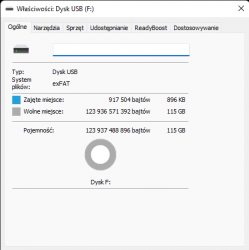
Can you take a screenshot of the USB Disk properties in Device manager using the PC like this?
Press Windows Key+X to open the Run dialog, type "diskmgmt.msc" into the box, and press Enter.
View attachment 38006
Sent from my iPhone using Tapatalk
Last edited:

amirzaim
Member
Also, make sure that you are using USB 2.0 drive only. Note that some of USB 3.0 drives aren't play nice with legacy USB ports which sometimes the USB 3.0 drives keeps blinking rapidly even though inserting it properly.
Then, look for possible loose connection of these USB ports. If occurs, you may want to adjust it or do whatever it takes to make sure that the USB port making contact with the drive.
Then, look for possible loose connection of these USB ports. If occurs, you may want to adjust it or do whatever it takes to make sure that the USB port making contact with the drive.
Microsoft Windows [Version 10.0.22000.739]
(c) Microsoft Corporation. All rights reserved.
C:\Windows\system32>diskpart
Microsoft DiskPart version 10.0.22000.653
Copyright (C) Microsoft Corporation.
On computer: KOMPUTERPIOTRA
DISKPART> list disk
Disk ### Status Size Free Dyn Gpt
-------- ------------- ------- ------- --- ---
Disk 0 Online 1863 GB 7168 KB *
Disk 1 Online 476 GB 1024 KB *
Disk 2 No Media 0 B 0 B
Disk 3 Online 115 GB 0 B
DISKPART>
(c) Microsoft Corporation. All rights reserved.
C:\Windows\system32>diskpart
Microsoft DiskPart version 10.0.22000.653
Copyright (C) Microsoft Corporation.
On computer: KOMPUTERPIOTRA
DISKPART> list disk
Disk ### Status Size Free Dyn Gpt
-------- ------------- ------- ------- --- ---
Disk 0 Online 1863 GB 7168 KB *
Disk 1 Online 476 GB 1024 KB *
Disk 2 No Media 0 B 0 B
Disk 3 Online 115 GB 0 B
DISKPART>
My disk is 3
My disk is 3
Yes so you need to use Fat32 not exFat because they're not the same
Sent from my iPhone using Tapatalk
Similar threads
-
PS3 No HEN installers working, what now?
- Started by CarriageReturnLinefeed
- Replies: 5
-
PS2 Help needed getting PS2 udpbd-server running
- Started by BlasterM1ke
- Replies: 0
-
 PS3 PS3 Firmware 4.93 - Update is Live! (CFW and HFW Released)
- Started by LuanTeles
- Replies: 38
-
