
You are using an out of date browser. It may not display this or other websites correctly.
You should upgrade or use an alternative browser.
You should upgrade or use an alternative browser.
PS3 PS3 don't recognize usb in any format
- Thread starter Pesker5
- Start date

Berion
Developer
That's why I asked about what exactly not see this pendrive. Because CellOS doesn't support exFAT, while e.g WMM does.
If partition table is MBR, and if filesystem on first partition in a table is FAT32, then XMB, recovery etc. will see the pendrive. They simply must. If not, it is hardware issue.
Also definition see/not see is not clear. Proper environment which w.g XMB will see, doesn't guarantee to list e.g in Photo category if user will not make folders on specific names. In such case, users often says: "it doesn't work" while it is enough to invoke context menu (by triangle? I forgot) and choose show all option. AND. Besides that, we have homebrew applications which not must use system stuff but their own like e.g WMM or IrisMAN and in those case, exFAT and NTFS will be recognized while e.g XMB will reject it.
If partition table is MBR, and if filesystem on first partition in a table is FAT32, then XMB, recovery etc. will see the pendrive. They simply must. If not, it is hardware issue.
Also definition see/not see is not clear. Proper environment which w.g XMB will see, doesn't guarantee to list e.g in Photo category if user will not make folders on specific names. In such case, users often says: "it doesn't work" while it is enough to invoke context menu (by triangle? I forgot) and choose show all option. AND. Besides that, we have homebrew applications which not must use system stuff but their own like e.g WMM or IrisMAN and in those case, exFAT and NTFS will be recognized while e.g XMB will reject it.
Last edited:
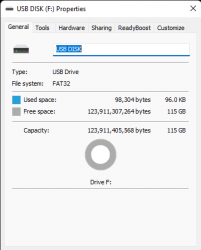

my ps3 stopped recognizing usb
What do you mean by "does not detect" and "stopped recognizing" ? We need more information. If you are trying to play a mp3 from a FAT32 drive, it's a lot different than trying to play a game folder rip from a NTFS drive.I mean ps3 doesn't detect pendrive when is plugged in
ONLY FAT32 usb drives will be detected/recognized on the XMB/Firmware. The firmware has no support for NTFS or exFAT, this means you can not install firmware from NTFS/exFAT, you can not install packages from NTFS/exFAT etc etc.
NTFS and exFAT will only work in some homebrew, mainly NTFS/exFAT is used for PS3/PSX ISOs.
(there are some exceptions to the above rules with specific homebrew)
Post your results now, is it working?
Also better to use Rufus instead of Windows Formatting Tool to specify MBR/Master Boot Record-whichever shows in the tool as partition scheme
Sent from my iPhone using Tapatalk
Still not working
Wysłane z mojego SM-M215F przy użyciu Tapatalka
use Rufus not Windows tool to format
Sent from my iPhone using Tapatalk
That should work, if not then it's probably the pendrive or the port,. Try other USBs to narrow down the problem
Sent from my iPhone using Tapatalk
in other usb it's not working, other pendrive's working on all usb
We can try this last tool
Wii Backup Manager
1. Open WBM, Select "Tools" and then "Format Drives"
2. Select your drive, choose FAT32 and leave cluster size as 32Kb
Sent from my iPhone using Tapatalk

amirzaim
Member
Ok...Let me tell you something about the USB flash drives since he's already scratching his head...:
1. It is best to use windows own disk formatter to do the formatting job.
2. USB flash drive up to 32GB can be used on PS3 console with MBR stuff in it. If you're using 64GB and above, you won't see FAT32 formatting options on the windows disk formatter. Force formatting to FAT32 actually giving much problems.
3. Use USB 2.0 flash drive for maximum compatibility just like I said before.
4. Also use smaller capacity of USB drive only for purpose of installing homebrew PKG stuff.
5. Check for USB ports, make sure that PS3 USB ports is still functional by connecting the PS3 controller with mini USB cable.
1. It is best to use windows own disk formatter to do the formatting job.
2. USB flash drive up to 32GB can be used on PS3 console with MBR stuff in it. If you're using 64GB and above, you won't see FAT32 formatting options on the windows disk formatter. Force formatting to FAT32 actually giving much problems.
3. Use USB 2.0 flash drive for maximum compatibility just like I said before.
4. Also use smaller capacity of USB drive only for purpose of installing homebrew PKG stuff.
5. Check for USB ports, make sure that PS3 USB ports is still functional by connecting the PS3 controller with mini USB cable.

tungatung
Member
Shouldnt be a problem, as he has said that webMAN MOD is installed and it takes care of exFAT & NTFSYes so you need to use Fat32 not exFat because they're not the same View attachment 38010
Sent from my iPhone using Tapatalk
Not working on xmb and homebrew apps
did you try the last tool as well?
Sent from my iPhone using Tapatalk
tungatung
Member
You said that you switched from HEN to CFW did you properly uninstall HEN and did you properly install CFW as not doing so can also cause such issues.Not working on xmb and homebrew apps
I recommended you to do a clean install of the Fw.
Similar threads
-
PS3 No HEN installers working, what now?
- Started by CarriageReturnLinefeed
- Replies: 5
-
PS2 Help needed getting PS2 udpbd-server running
- Started by BlasterM1ke
- Replies: 0
-
 PS3 PS3 Firmware 4.93 - Update is Live! (CFW and HFW Released)
- Started by LuanTeles
- Replies: 38
-
