PS3 PS3 FAT delid and thermal paste question

xspartantt

Member
Hi, i have recently bought a CECHB-01 model, i have changed the thermal paste with Arctic X4 , and delidded the RSX chip only, now the RSX IHS was almost impossible to clean! I have manged to clean the spot where the gpu goes, but each vram module had a layer of white thermal paste on the IHS simpy unremovable without scratching too much and risking damage on the IHS, so i have decided to apply a small drop of my paste on each vram module and a peasize drop on the GPU, is this enough or not ? Should i try some stronger alcohol to remove everything ? (Altough it could damage the IHS).
Also , i have applied a 4MM thermal pad under the CELL processor as many people said it could help, and it did, temps have dropped by 5-6 C, not much but i'll take it.
Keep in mind that the paste has just applied, if i want to repaste it , i guess i'm going to need a lot of heat on it somehow otherwise it will simply be stuck, how can i heat it up on these old fat models ?
So far, the CPU temps have dropped from 72c and 34% fan speed to 65c and 34% fan speed during games, while RSX is always around 67-70c regardless of delid or not (its summer here, and 30+ c , also the console doesn't really have much space to breathe, and it has the old PSU running kinda hot).
 
Hi, i have recently bought a CECHB-01 model, i have changed the thermal paste with Arctic X4 , and delidded the RSX chip only, now the RSX IHS was almost impossible to clean! I have manged to clean the spot where the gpu goes, but each vram module had a layer of white thermal paste on the IHS simpy unremovable without scratching too much and risking damage on the IHS, so i have decided to apply a small drop of my paste on each vram module and a peasize drop on the GPU, is this enough or not ? Should i try some stronger alcohol to remove everything ? (Altough it could damage the IHS).
Also , i have applied a 4MM thermal pad under the CELL processor as many people said it could help, and it did, temps have dropped by 5-6 C, not much but i'll take it.
Keep in mind that the paste has just applied, if i want to repaste it , i guess i'm going to need a lot of heat on it somehow otherwise it will simply be stuck, how can i heat it up on these old fat models ?
So far, the CPU temps have dropped from 72c and 34% fan speed to 65c and 34% fan speed during games, while RSX is always around 67-70c regardless of delid or not (its summer here, and 30+ c , also the console doesn't really have much space to breathe, and it has the old PSU running kinda hot).

Hi, in most cases the RSX die will still have a good coverage of thermal paste on it. So by doing a de-lid its unlikely you will see any significant drop in temptatures. The only way to get better temps is to apply liquid metal. You will need to put clear lacquer over the resistors around the RSX die and apply the liquid metal to the die and the underside of the RSX heat spreader. The reason why you saw a drop in temps on the CPU is because the CPU heat spreader loses contact with the die and thermal paste. By applying a small amount of pressure to the underside of the CPU die pushes it towards the heat spreader which will have all the thermal paste on the underside.

In the following YouTube tutorial I apply liquid metal to both the RSX and CPU, don't attempt a CPU de-lid unless you have some scrap motherboards to practice on.

 
Hi, in most cases the RSX die will still have a good coverage of thermal paste on it. So by doing a de-lid its unlikely you will see any significant drop in temptatures. The only way to get better temps is to apply liquid metal. You will need to put clear lacquer over the resistors around the RSX die and apply the liquid metal to the die and the underside of the RSX heat spreader. The reason why you saw a drop in temps on the CPU is because the CPU heat spreader loses contact with the die and thermal paste. By applying a small amount of pressure to the underside of the CPU die pushes it towards the heat spreader which will have all the thermal paste on the underside.

In the following YouTube tutorial I apply liquid metal to both the RSX and CPU, don't attempt a CPU de-lid unless you have some scrap motherboards to practice on.

Hi thanks, but it turned out that temps is not the issue here.
Somehow i can play PS2 games or MGS4 or MGS Rising for hours not a single issue, either temp or anything.
But as soon as i play Resistance 3 for 5 minutes, the console will shut off wit 3 BEEPS, but temps are always under 68c, so i have no clue.
 
Hi thanks, but it turned out that temps is not the issue here.
Somehow i can play PS2 games or MGS4 or MGS Rising for hours not a single issue, either temp or anything.
But as soon as i play Resistance 3 for 5 minutes, the console will shut off wit 3 BEEPS, but temps are always under 68c, so i have no clue.

I know what that is, rather than me explain it just watch my YouTube tutorial below

 
I know what that is, rather than me explain it just watch my YouTube tutorial below

Wow that was quite the insightful video although it cuts at the end but i guess the issue was fixed, i was thinking the issue might be the PSU (since it is a japanese unit and i'm using it in EU) but it's got to be those NEC capacitors on the back, now i sadly don't have the skills to accomplish this, but could you tell me where you've got those tantalum capacitors and which exact model ?
I have a friend that does repair computer boards, i want to try and give him the board with the new capacitors and this video to follow, maybe it's going to work out.
 
Wow that was quite the insightful video although it cuts at the end but i guess the issue was fixed, i was thinking the issue might be the PSU (since it is a japanese unit and i'm using it in EU) but it's got to be those NEC capacitors on the back, now i sadly don't have the skills to accomplish this, but could you tell me where you've got those tantalum capacitors ?
I have a friend that does repair computer boards, i want to try and give him the board with the new capacitors and this video to follow, maybe it's going to work out.

 
I got those from RS Components, as long as they are either 470uf or 330uf, 6.3 or 2.5v and have a low ESR, 9 is preferable then you can simply tag them on. This resolves the issue, I don't like to remove the tokins as it requires lots of heat and this can transfer to other Components causing a false positive. Tagging them on requires very little heat and certainly not enough to cause a false
Positive. The issue is the CPU tokins failing and the two extra added is enough to resolve the issue
 
I think it might be a little easier, since your console boots, to get the syscon error codes via one of the available tools (ultimate toolset, I think?). No soldering required, and you can get a much better idea if whats actually going on. I changed my tokins before we had this method available, and boy do I wish i'd never done it.
 
I don't think it's a good idea to remove the tokins unless syscon indicates its nesasery. No, what I'm saying is tag on the tantalums to the existing tokins. This means no heat or hacking off of the tokins.

Anyway how do to get the error codes without using syscon on a system that boots?
 
I don't think it's a good idea to remove the tokins unless syscon indicates its nesasery. No, what I'm saying is tag on the tantalums to the existing tokins. This means no heat or hacking off of the tokins.

Anyway how do to get the error codes without using syscon on a system that boots?
Yeah my system boots and plays fine, so its AN issue when High Power Is requested by the CPU , i Will definitely look into adding these capacitors since they seem cheap too , i Just have to explain this to whoever Is going to work on It :D
 
I think it might be a little easier, since your console boots, to get the syscon error codes via one of the available tools (ultimate toolset, I think?). No soldering required, and you can get a much better idea if whats actually going on. I changed my tokins before we had this method available, and boy do I wish i'd never done it.
How do you enable this error check?
 

Attachments

  • 19A9D469-FD1E-49F1-9A20-2E2E4C43A102.jpeg
    19A9D469-FD1E-49F1-9A20-2E2E4C43A102.jpeg
    1 MB · Views: 54
Last edited:
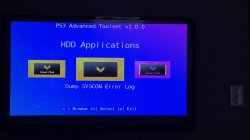
Through this tool -- https://www.psx-place.com/threads/release-ps3-advanced-tools.34104/ (You do need to have your system on either HEN or CFW, however). Once you have it installed, plug a usb drive in and then run the tool (as seen in the attachment). Your screen will go blank for a minute and then return to XMB. You should have a file in the USB with the syscon dump.
Thanks, i Will use this and read the logs, anyway the capacitors indicated were very cheap so i bought four, we'll see if thats the issue i Will have the motherboard serviced
 
Thanks, i Will use this and read the logs, anyway the capacitors indicated were very cheap so i bought four, we'll see if thats the issue i Will have the motherboard serviced
Yeah, piggy-tail (if that's what you'll need) is a lot easier than full replacement, that's for sure. good luck!
 
Many thanks
Here is a sample of the .txt file generated at the root of USB https://github.com/bucanero/psl1ghtv2_ports/blob/master/sm_error_log/log.txt
Dont be afraid of publishing that file in public, it doesnt contains any private info and eventually could help other people like me interested in research, we are still trying to identify a couple of unknown "Syscon Fimware Version" and some more unknown "Platform ID" from superslim PS3 models

And as a reminder... after dumping the syscon error codes you can crosscheck them here for an initial description of some of them https://www.psdevwiki.com/ps3/Syscon_Error_Codes

Thats the first thing you should do @xspartantt before messing around with hardware/tokins, the point is... everytime your PS3 was shutting down probably it generated an error code, and syscon stores up to 32 error codes
The timestamps associated with each error code depends of the battery and the date/time configured in the XMB, but im guessing both things was fine in your PS3, so you are going to have a long list of the same error code/s repeated 32 times (but with different timestamps)
 
Here is a sample of the .txt file generated at the root of USB https://github.com/bucanero/psl1ghtv2_ports/blob/master/sm_error_log/log.txt
Dont be afraid of publishing that file in public, it doesnt contains any private info and eventually could help other people like me interested in research, we are still trying to identify a couple of unknown "Syscon Fimware Version" and some more unknown "Platform ID" from superslim PS3 models

And as a reminder... after dumping the syscon error codes you can crosscheck them here for an initial description of some of them https://www.psdevwiki.com/ps3/Syscon_Error_Codes

Thats the first thing you should do @xspartantt before messing around with hardware/tokins, the point is... everytime your PS3 was shutting down probably it generated an error code, and syscon stores up to 32 error codes
The timestamps associated with each error code depends of the battery and the date/time configured in the XMB, but im guessing both things was fine in your PS3, so you are going to have a long list of the same error code/s repeated 32 times (but with different timestamps)
I will try in these days to reconnect this PS3 model, i had it unplugged after testing, and will try to create some logs files to upload on my gitHub.

Also random question, i have another FAT PS3 , CECHL01 and this console (never opened, never serviced, almost clean from dust) doesn't give a single issue, Resistance 3 works perfectly for hours... BUT i did get a random 3 BEEPS at start (NO YELLOW), so far it has happened one time while the HDMI was unplugged and after the console was unplugged from the wall for a long time.
Can the NEC/TOKIN fail to start the console if the console has been away from electricity for a long time?
Also, i have a SLIM 20XXX series, this was my original console, used for 10 years or so and quite a bit, i did change paste and pads and temperatures were amazing, up until eventually it refused to start, again with 3 BEEPS and NO YELLOW, sometimes it did start and work for hours and hours, but now it will only do 3 BEEPS.
Can these issues be fixed (the starting issues) by soldering the additional tantalum capacitors the we are discussing about here?
 

Similar threads

Back
Top