
You are using an out of date browser. It may not display this or other websites correctly.
You should upgrade or use an alternative browser.
You should upgrade or use an alternative browser.
PS3 PS3 fat turning off blinking red light
- Thread starter Kazama
- Start date

Jager Andres
Forum Noob
you need to take it to a pc repair place ine is doing te same thing its the rlod look it up on yt
Check temps.... could be shutdown due to high thermals...
64-70 degree only
Using webman fan mod
Last edited:
Is the changing of thermal paste do the work ?Check temps.... could be shutdown due to high thermals...
It is shutting down only playing backup games from hard disc , when I play games with the Game CD the PS3 is not shutting down
Last edited:

It's advisable to check your temps...because thermal paste might not be doing its job properly, whether already replaced or not.Is the changing of thermal paste do the work ?
It is shutting down only playing backup games from hard disc , when I play games with the Game CD the PS3 is not shutting down
Thermal paste is a fine line situation, where too much or too little can create drastically different results than proper application.
There are also situations where the thermal paste isn't the problem, but rather the TIM under the IHS of either CELL or RSX.
Webman-mod does an amazing job of showing temps with start+select.
It could also be if your backup games are ps2 or ps1, because that disables fan control down to a set fan speed that is set in webman.
First place usually to check is temps, because if it's software, the easiest solution usually is to reinstall cfw and see if that fixes the situation or alternatively re-rip the game backup and verify the ird.
It's advisable to check your temps...because thermal paste might not be doing its job properly, whether already replaced or not.
Thermal paste is a fine line situation, where too much or too little can create drastically different results than proper application.
There are also situations where the thermal paste isn't the problem, but rather the TIM under the IHS of either CELL or RSX.
Webman-mod does an amazing job of showing temps with start+select.
It could also be if your backup games are ps2 or ps1, because that disables fan control down to a set fan speed that is set in webman.
First place usually to check is temps, because if it's software, the easiest solution usually is to reinstall cfw and see if that fixes the situation or alternatively re-rip the game backup and verify the ird.
I have used the webman mod and it says high cpu temp 84 degree warning message to me with popup message.
By the way i'm playing only PS3 backup games via webmod/multiman.
I shut down the PS3 because I was afraid that it would get harm to the board. Now please tell me the next procedure since I think it is a problem with high temps.
I have used the webman mod and it says high cpu temp 84 degree warning message to me with popup message.
By the way i'm playing only PS3 backup games via webmod/multiman.
I shut down the PS3 because I was afraid that it would get harm to the board. Now please tell me the next procedure since I think it is a problem with high temps.
anything over 80 degrees on ANY chip in the ps3 is ACTIVELY doing damage to that chip.
Your ps3 is turning off to protect itself from you. Fix your thermals, before you have a brick.


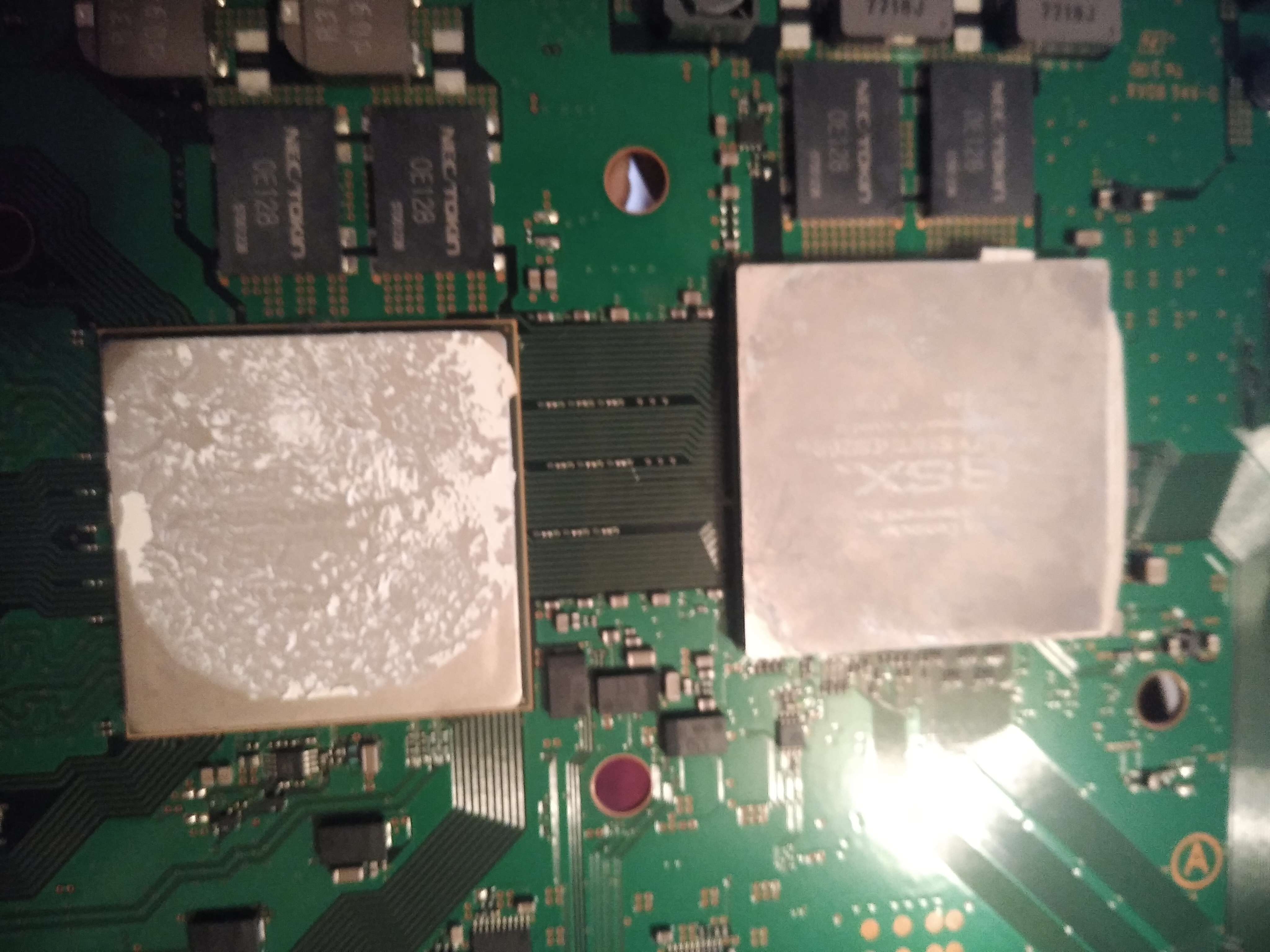


I can't speak for some unnamed thermal paste.
AS5, MX-4, Gelid GC Extreme are all popular options to use.
Using unknown paste, too much, too little will cause thermal issues.
You're probably also dealing with under IHS TIM issues, which means delidding and applying TIM, something I would rather just buy another unit than mess with personally.
That also looks excessive for paste. The paste is only there to mate the microscopic imperfections in the surfaces so they mate together with the most surface area. If it oozed out the sides, you used too much.
AS5, MX-4, Gelid GC Extreme are all popular options to use.
Using unknown paste, too much, too little will cause thermal issues.
You're probably also dealing with under IHS TIM issues, which means delidding and applying TIM, something I would rather just buy another unit than mess with personally.
That also looks excessive for paste. The paste is only there to mate the microscopic imperfections in the surfaces so they mate together with the most surface area. If it oozed out the sides, you used too much.
i will remove the excess and reapply the thermal pasteI can't speak for some unnamed thermal paste.
AS5, MX-4, Gelid GC Extreme are all popular options to use.
Using unknown paste, too much, too little will cause thermal issues.
You're probably also dealing with under IHS TIM issues, which means delidding and applying TIM, something I would rather just buy another unit than mess with personally.
That also looks excessive for paste. The paste is only there to mate the microscopic imperfections in the surfaces so they mate together with the most surface area. If it oozed out the sides, you used too much.
and i will try to do Under IHS TIM , will that work ?
Might want to sacrifice a virgin goat to the god of your favor, because you're missing important enough details that you've got a snowballs chance in hades.i will remove the excess and reapply the thermal paste
and i will try to do Under IHS TIM , will that work ?
1st: Thermal compound choice is VITAL. Arctic Silver 5, Arctic MX-4, Gelid GC Extreme are used SPECIFICALLY for a reason. If you're using anything else, you're not following any guide, you're just doing it on your own, and that's fine. It MIGHT work. I don't know, and don't care to know.
2nd: Under IHS TIM is a TOTALLY DIFFERENT MATERIAL and replacement is an extremely complicated task to complete. It involves heat guns, and other various tools to basically TEAR OFF the metal lid on the chip and reapply paste. Even steady hands have managed to destroy consoles in this process
3rd: As i stated, IMO it's not worth it if under IHS is shot. I'd rather buy a new unit than deal with that nonsense
4th: If the system is in a state where the under IHS is shot, there is probably some damage that has been done to the chips due to excessive heat. This will be a cancerous problem that can be random, and make no sense whatsoever. This additional heat, and lack of care of the unit would be problematic to other areas, and would cause concern for what other parts are worn to almost death.
5th: There are guides, videos, everything available on all the tasks you are wanting to complete. READ THEM ALL, WATCH THEM ALL. they all have some forms, tidbits of information. THEY ALL have some helpful advice, sometimes that other sources do not have. Even in the forums here are several people that have well documented a lot of these procedures.
6th: If you're feeling froggy enough to go through all that, good luck.
Might want to sacrifice a virgin goat to the god of your favor, because you're missing important enough details that you've got a snowballs chance in hades.
1st: Thermal compound choice is VITAL. Arctic Silver 5, Arctic MX-4, Gelid GC Extreme are used SPECIFICALLY for a reason. If you're using anything else, you're not following any guide, you're just doing it on your own, and that's fine. It MIGHT work. I don't know, and don't care to know.
2nd: Under IHS TIM is a TOTALLY DIFFERENT MATERIAL and replacement is an extremely complicated task to complete. It involves heat guns, and other various tools to basically TEAR OFF the metal lid on the chip and reapply paste. Even steady hands have managed to destroy consoles in this process
3rd: As i stated, IMO it's not worth it if under IHS is shot. I'd rather buy a new unit than deal with that nonsense
4th: If the system is in a state where the under IHS is shot, there is probably some damage that has been done to the chips due to excessive heat. This will be a cancerous problem that can be random, and make no sense whatsoever. This additional heat, and lack of care of the unit would be problematic to other areas, and would cause concern for what other parts are worn to almost death.
5th: There are guides, videos, everything available on all the tasks you are wanting to complete. READ THEM ALL, WATCH THEM ALL. they all have some forms, tidbits of information. THEY ALL have some helpful advice, sometimes that other sources do not have. Even in the forums here are several people that have well documented a lot of these procedures.
6th: If you're feeling froggy enough to go through all that, good luck.
I got your point ! Thank you.
Please clear this doubt ,
The issue of shutting down and blinking red light only happens when I play backups from internal hard disc. (Checked with 3 different hard drives)
When I play any game from Bluray disc drive I can play game without any issues and there is no blinking red light and no unfortunate shutdown. The temps are 60-61 degree showing in webman mod (start+select in xmb)
Last edited:

What kind of errors on ros0/ros1?I have dumped my flash and checked with dump checker and there were 2 errors , ROS0 and ROS1 , can it be the reason for unfortunate shutdown? Its a fat PS3 NAND console bytheway.
Hashing errors ie the ros regions are not recognised?
If you used an old (ie not the latest update) dump validator & your console is on 4.86, the errors you got might be false positives.
I recommend downloading the latest pyps3checker from github.com/littlebalup/PyPS3tools & try validating your dump again..
What kind of errors on ros0/ros1?
Hashing errors ie the ros regions are not recognised?
If you used an old (ie not the latest update) dump validator & your console is on 4.86, the errors you got might be false positives.
I recommend downloading the latest pyps3checker from github.com/littlebalup/PyPS3tools & try validating your dump again..
sorry , i did check with the updated dump validator and it gives me 0 errors and 0 warning. So which mean my NAND console CoreOS files are not curropted and flash is fine i think.
But i am still cant understand that i am only aable to play games from Bluray drive. if i play backups from Hard disc it shutsdown with 3 beeps and RLOD error
IF the problem is temp related & your console is overheating, that's a problem you must take care of as the priority anyway.sorry , i did check with the updated dump validator and it gives me 0 errors and 0 warning. So which mean my NAND console CoreOS files are not curropted and flash is fine i think.
But i am still cant understand that i am only aable to play games from Bluray drive. if i play backups from Hard disc it shutsdown with 3 beeps and RLOD error
It could also be that the kernel panics & the console shuts down.
That could be caused by a number of things such as (but not limited to):
1. Hdd failure (try another hdd)
2. Hdd errors (scan disk for error in recovery mode)
3. Mounted game issue, whether it's ISO or legacy JB folder format, dump from disc again using a different tool & a different storage device for destination.
You might also try mounting it from an external USB drive, big iso files will need to be stored on a ntfs partition.
It's better to mount your games from USB storage anyway, it means less work/stress for your internal hdd when you play a mounted a game.
Last edited:
Similar threads
-
-
-
PS3 Red blinking on start, constant
- Started by Rapurimanka
- Replies: 1
-
PS3 Help/advice needed for fixing PS3 - think is overheating
- Started by PS3_Help_Needed
- Replies: 3