PS3 update loop - 8002f0c1

Defconnl1

Forum Noob
Hi, i'm new here. Joined the forum cause i need some help with my ps3 60GB (CHECHC04, backwards compatible) that i bought last week with what i tought was a minor problem...

Hope anyone can help me with this problem, i have been trying everything but nothing seems to work. . When you boot the system up it needs to update but crashes at 4% of the update and gives the 8002f0c1 error, then it restarts and give the same error again and again. Can't really find much help or information about this error on the Internet.

Things I tried:
- Booting up in Safe Mode and trying to install an update through an USB (fat32) with update file. (still gives the same error) Tried the latest update file, but also some older versions. (Also tried a different USB flashdrive)

- I tried formatting the disk drive, but gives the error: "no acces to hard drive ps3". Don't know why?

- So I tought it must be a faulty hard drive, so swapped the hard drive for a known working ps3 60gb drive, but it gives me the same problems as above, also needs to update and the 8002f0c1 error.

- Also replaced the CMOD battery, didnt work aswell.

So I can't really think of any other things to do? Could it be a hardware problem instead of a software problem, like something wrong with the NAND chip? If so, is there a way to fix this? These systems are kinda rare so hope someone can help me fix this beauty... ? it would be really appreciated!
 
Last edited:
So going over the wiki here is what I came up with as I keep a log of what fixed what for some folks. So what firmware are you on right now? I would install 4.88 OFW via recovery then use BGtoolset to get CFW installed.


Update error0x8002F0C1"An error occurred during the update operation. (8002F0C1)" -> Download error. Manual download the update with PC, put on /PS3/UPDATE/PS3UPDAT.PUP and install in recovery instead
 
Hi atreyu187,

Thanks for your reply and your help. Unfortunately i don't know on which firmware the system is, since i bought the system with this problem and i havent been able to boot it up ever since. So i'm not sure if there is any CFW on there. My guess is that there is some really old OFW on there, because it looks like the ps3 has never been used... i opened up the ps3 (it was still sealed) and never seen one as clean as this one, no dust nothing. (and i have seen quite a few)

I tried installing OFW 4.88, via recovery, but still is giving me the same error on 4%.
 
Hello Defconnl1,

try connecting the HDD to a PC and formatting there, then insert back into the PS3 and power it on normally, not in safe mode, it may take a while to show something on the screen, and then it will ask to format the HDD.
This way you may be able to boot into the XMB, also if you can access the safe mode then PS3 have a FW >= 2.50.
I had a similar problem with my PS3, but the error code was 8002F14E when trying to update and also failing at 3~4%.
 
Last edited:
Hi atreyu187,

Thanks for your reply and your help. Unfortunately i don't know on which firmware the system is, since i bought the system with this problem and i havent been able to boot it up ever since. So i'm not sure if there is any CFW on there. My guess is that there is some really old OFW on there, because it looks like the ps3 has never been used... i opened up the ps3 (it was still sealed) and never seen one as clean as this one, no dust nothing. (and i have seen quite a few)

I tried installing OFW 4.88, via recovery, but still is giving me the same error on 4%.

One thing to have in mind: if your console is indeed in a very low FW version, you may have issues trying to update from the older FW to 4.88. I've read that you may need to do the updates by stages. For example: first version 2.50, then 3.40, then 3.60, then 4.21, and finally 4.88 (I don't have the specific versions that are blockers at hand, you may have to do some research here on the forums).

Good luck!.
 
One thing to have in mind: if your console is indeed in a very low FW version, you may have issues trying to update from the older FW to 4.88. I've read that you may need to do the updates by stages. For example: first version 2.50, then 3.40, then 3.60, then 4.21, and finally 4.88 (I don't have the specific versions that are blockers at hand, you may have to do some research here on the forums).

Good luck!.

That's true, mine was with 2.35, trying to update to 4.88 didn't work, nor even 3.55, only 2.50 updated without a problem.

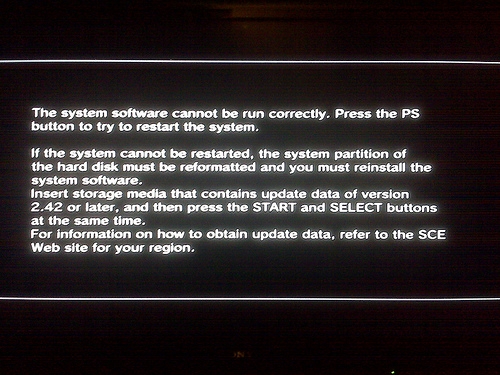
I'm not sure, but if you enter safe mode and select the option to update it will say the FW you need, something like "update data version x.xx or later" where x.xx is your current version.
 
That's true, mine was with 2.35, trying to update to 4.88 didn't work, nor even 3.55, only 2.50 updated without a problem.

I'm not sure, but if you enter safe mode and select the option to update it will say the FW you need, something like "update data version x.xx or later" where x.xx is your current version.

That's right, you will get a screen like this with your current installed FW version:

error+fix+the+system+software+cannot+be+run+correctly.jpg


Now, we need to figure out the right version installation order so you can bypass that loop error.
 
Hi guy's,

Thanks alot for your time and help. I have formatted the hard drive on pc in (FAT32), but still wont let me back in the XMB, it just turns off after a few seconds.

When i boot up in safemode and press update, I do get the message i need update data 3.40 or higher, so i just downloaded the 3.40 OFW... but unfortunantly i still get the same error (image below, text is in dutch language).
qkQswJC


YcB1Dtm
 
Hi guy's,

Thanks alot for your time and help. I have formatted the hard drive on pc in (FAT32), but still wont let me back in the XMB, it just turns off after a few seconds.

When i boot up in safemode and press update, I do get the message i need update data 3.40 or higher, so i just downloaded the 3.40 OFW... but unfortunantly i still get the same error (image below, text is in dutch language).
qkQswJC


YcB1Dtm

Try without the HDD and see if something shows up.
 
Hi lugh22,

Nothing show up without hdd, it justs turns off after 30 seconds (from green to red light)
When trying to boot up in safemode without hdd it gives the message:"Could not start, no correct hdd found."
 
So i have been trying other stuff:

- I have formatted the hard drive and tried to install an update from a disk. Same error at 3/4 %
- I read a post somewere on the internet were someone suggested to remove the hdd when it reaches the 3% , remarkable it now was installing until 86%, but then the installing just stops. When inserting the hdd again it gives the same 8002f0C1 error code.

I think the latest firmware on there is 3.40, so now i downloaded firmware 3.41. I read on different forums that back in the days firmware 3.41 bricked playstations, especially the 60gb fats. After this problem with firmware 3.41, sony released a new "fixed" version of 3.41.

Unfortonutaly i still can't find anything about a fix, and nothing seems to work. Does anyone have any other suggestions to do? I'm now more tending to think it is a problem with a corrupted nand chip, is this possible?
 
So i have been trying other stuff:

- I have formatted the hard drive and tried to install an update from a disk. Same error at 3/4 %
- I read a post somewere on the internet were someone suggested to remove the hdd when it reaches the 3% , remarkable it now was installing until 86%, but then the installing just stops. When inserting the hdd again it gives the same 8002f0C1 error code.

I think the latest firmware on there is 3.40, so now i downloaded firmware 3.41. I read on different forums that back in the days firmware 3.41 bricked playstations, especially the 60gb fats. After this problem with firmware 3.41, sony released a new "fixed" version of 3.41.

Unfortonutaly i still can't find anything about a fix, and nothing seems to work. Does anyone have any other suggestions to do? I'm now more tending to think it is a problem with a corrupted nand chip, is this possible?

Regarding the FW version, you could now install version 3.55 (the golden FW) which is known to be issue free.

On the HDD matter, have you tried making a small partition on a PC and unallocate the rest of the disk?. Check this post from @Checkity_CheckYoSelf:

SoOoO i'm completely beside myself right now. I can't believe this actually worked, but it did.

I've been fighting error code 8002F281 the last few weeks after an incident occurred on my CECHA model while trying to upgrade to a 1.5 tb internal HDD on 4.46, then trying to go back to 4.88 CFW. It basically had rendered my ps3 an apparent brick for several weeks and flat out refused to see my HDD and I couldn't even enter the XMB. I had tried multiple hard drives after that in recovery, doing full formats every time, you name it. Every logical thing one of us would try to do to bring our ps3 back to life. I was actually getting prepared to dump the flash and re-flash a backup with a teensy thinking the NANDS were soft-bricked or something since no other option was working.

I was doing some googling earlier on the error code and stumbled across a video about the error code. The video itself wasn't really informative, but the guy that posted it put my golden answer in the video description.

He said to basically just take the drive that the ps3 is refusing to read, pop it into your pc, and partition a 30 gb FAT32 partition onto it leaving the rest of the drive unallocated. Something to the effect, that the ps3 will see the small partition, recognize it as an error and prompt formatting.

I decided to give a go since I didn't really have anything to lose, and sure fucking enough, the son of a bitch, prompted the format finally, allowed me to install CFW, and I and I now have my fully de-lidded beautifully running A model back to life and in business!!! Today is a good day, friends!! :))))

I hope this may help someone in the future so I decided to post this since I've never heard this suggestion anywhere, but it flippin' worked!!! Happy gaming friends!!

Video for reference:
 
Regarding the FW version, you could now install version 3.55 (the golden FW) which is known to be issue free.

On the HDD matter, have you tried making a small partition on a PC and unallocate the rest of the disk?. Check this post from @Checkity_CheckYoSelf:

Hi GuilloteTesla,

I've tried making a small partition on the HDD. When updating in safe mode i get the message that the hard drive needs to be formatted and i need to press start+select for 5 seconds. When i do this it starts formatting, after the format it will start the update, but then it stops at 3 or 4% again. I tried this method with installing 3.41 and 3.55, but just didn't work :(

Any other ideas?
 
I had this problem where the PS3 turn off itself after 30 seconds without beeps and blinking light to the solid red light when I had a bad NAND flash, so before trying a downgrade you should check if your nand is corrupted in some way.
 
Last edited:
I had this problem where the PS3 turn off itself after 30 seconds without beeps and blinking light to the solid red light when I had a bad NAND flash, so before trying a downgrade you should check if your nand is corrupted in some way.

How do i check if it is corrupted?
Buying a Teensy++ 2.0 isn't an option, since its hard to find one atm, also the costs and the work is to much (i dont have any soldering skills).
Is it possible to replace the NAND chip from another CHECHC04 board? Or is the chip married with the board?
So much questions :)
 
How do i check if it is corrupted?
Buying a Teensy++ 2.0 isn't an option, since its hard to find one atm, also the costs and the work is to much (i dont have any soldering skills).
Is it possible to replace the NAND chip from another CHECHC04 board? Or is the chip married with the board?
So much questions :)

Working with NAND consoles can be a pain, you can replace the NAND chips(if one of them, or both, happens to be bad), but you need to read the old ones first and flash the contents to the new ones, there are console specific information that can't be swap between consoles.
If you are interested about the contents of the NAND's you can read this.
So you will need some kind of hardware flasher to do the job(more information here about hardware flasher), also be able to solder wires to the test points on the board or directly to the NAND legs, you can buy a NAND clip to avoid soldering, but the clips can be expensive and not so easy to find.
After dumping the NAND's, there are 2 NAND chips, you need to unify them(I used flow rebuilder), then you can use PyPS3checker to verify if something is wrong.

EDIT:
You have the original HDD right? I did some research and looks like you need the original HDD to install the FW 3.41, check if the original HDD is good, and if it is, try formatting it with a PC and install the FW 3.41 using it.
 
Last edited:

Similar threads

Back
Top