PS3 Rebugification - A PS3 Theme By Berion

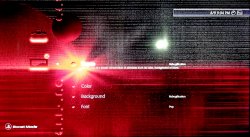
As many of us like to do with any device from time to time is to spice things up a bit with some visual candy. That is why most of us enjoy a custom firmware PS3. This release is for any PlayStation 3 owner because any consoles running official firmware or custom firmware can install themes. Although judging by the name we can see where it draws it inspiration from. Rebugification is the name of this awesome theme, which I already installed on my PS3, and created by Berion.

rebugification_ps3_preview_3.jpg


  • Rebugification v1.0 (PS3-P3T). I hope You will enjoy it. This cost me many hours and nerves fighting with broken export plugins and broken GIM format.

    (CRC32:9EA401AA)

    • Save to a USB Device (FAT32 formatted)
    • Create a folder called PS3
    • Create a folder called THEME (ALL CAPS)
    • Add the Rebugification (by Berion) v1.0.p3t file into the THEME folder
    • Plug USB into your PS3
    • Go to themes
    • Select install
    • Select USB device
    • Select Rebugification


Download: Rebugification (by Berion) v1.0

Source: PSX-Place
 
Last edited by a moderator:
Well I noticed in multiman there's a folder in hdd0 named "theme" and the few themes I installed manually from the xmb were there. So naturally I went ahead and copied over all my themes (like 300+ themes) to see if they would show in xmb and what do you know, they did! Thanks for the quick reply though, cheers!
 
I love this theme.

Is there a newer version?
Is this compatible with EvilNat latest CFW (4.88.2)? Do all icons become red (even the new ones in the CFW menu in Network category)?
I like to categorize my games using albums, the folder albums in 4.87 were not red. Is there a way to fix this?

Another thing, the user that activates this theme would have all icons in red but others that use the default ps3 theme wouldn't have a mix of original + rebug red icons? I ask this because some of the them overwrite in wmm subfolder inside tmp in dev_hdd0\tmp
 
Last edited:
Latest is version 1.0a (difference between 1.0 and 1.0a is better network icon if I remember correctly).

This is P3T theme so it works on all firmwares from past, today and future, because it using Sony theming system (yeah, Sony on PS3 and PSP allows users to create their own themes, instead of buying from store). It will stop works only if they disabled custom themes support in some crappy firmware update. But I don't think so it ever happens. ^^

And since it is custom theme, it means that replacing icons only allowed by Sony to be replaced. In example, it will not change SEN icons. So it also doesn't replace any icons CFW related (if author using custom filenames or custom paths in XML).

There is/was extended set for homebrew but I didn't finish it. For sure, we need some standard on PS3 for theming which covering up P3T+RCO+PNG on HDD. I tried but nearly finishing, drop it for another things which took my attention. I will back to it one day if I still be alive. ^^ Also we have now XForge which rebuilding those archives, so maybe, just maybe is possible to replace forbidden icons, editing XML and add them in GIM by hand (because compiler ignoring not supported XML strings). @DeViL303 [?]

WebMAN MOD have it's set for Rebugification which comes from it, also XMBM+ (not tested above Rebug 4.84.2 but I'm sure it will break XMB in Evilnat for Game and Network categories). So You can take the icons on Your own from above set, and replace them by hand.

And thanks. ^^

- - -
If You like my work, I have also created themes for PSV/PSTV:
https://psv.altervista.org/index.php?s=Berion

And PSP:
https://www.psx-place.com/threads/phalaris-suite.12825/#post-85994

If You have special request in skin/gui manner, You can also donate me (PayPal). ^^"
 
Last edited:
@Berion On my TV the default wallpaper shows some white dots that are not present if I use the PS3 screenshot. See the attachment.

I think it could be related to the compression library that you used.
My TV is a smartTV TCL LED @1080p model 2018.

This issue doesn't happen with other p3t themes.

BTW The issue disappears when the background gets blur pressing â–ł to show the side menu.
 

Attachments

  • Screenshot.jpg
    Screenshot.jpg
    563.3 KB · Views: 75
Last edited:
That's... strange. Never happen to me. On both HDMI range full/limited.

Maybe Your TV doing some colours spectrum transitions? Those dots exist in wallpaper but have different colours and are part of background.

For test, I'll attach here tomorrow original JPG from which Sony tools has created GIM. If You set it as wallpaper on the same environment (theme can be any), You should see the same artefacts.

And thanks for issue report! ^^
 
On my TV the default wallpaper shows some white dots that are not present if I use the PS3 screenshot. See the attachment.

I have the same problem:
https://www.psx-place.com/threads/rebugification-a-ps3-theme-by-berion.12198/page-3#post-195987.

Could you try this wallpaper:
https://www.psx-place.com/threads/rebugification-a-ps3-theme-by-berion.12198/page-3#post-196034.
I've changed sharpness from 8 to 0.
It looks horrible, but at least I do not have white dots with it.
 
Oh, I completely forgot about this!

@aldostools Could You try PNG wallpaper from post no.56? It is original, in theory the same used as in theme. So You should experience the same problem. If not, it points to some problems with image conversion by Sony tool. Thanks. ^^
 
Oh, I completely forgot about this!

@aldostools Could You try PNG wallpaper from post no.56? It is original, in theory the same used as in theme. So You should experience the same problem. If not, it points to some problems with image conversion by Sony tool. Thanks. ^^

Thank you for the link. Unfortunately the original PNG still shows the same artefacts.

@jolek 's image shows fine on my TV. It also shows fine if the image is slightly blurred (average blur radius 3).
 
Last edited:
Back
Top