PS3 (Research/Experimental) - NEC/TOKIN Capacitors Replacement - YLOD

SYSCON TUTORIAL
(WINDOWS)
Disclaimer:
While it's a relatively safe and easy process, this tutorial involves some risk of harm to you and your console. If you proceed, you do so at your own risk. Please read the entire tutorial thoroughly before attempting.

This is a preliminary Tutorial. I will EDIT it as needed to correct information as time goes on. So please let me know if I made any mistakes and I'll correct them.

If your console turns on:

You can use an app to retrieve the SYSCON errorlog using PS3 Advanced tools.
If your console is having a random YLOD and has not been jailbroken previously, DO NOT JAILBREAK! If the YLOD occurs during the jail breaking process you can brick your PS3! So the console needs to be stable enough to jailbreak. Of course, if you can't turn on your PS3, you're going to skip this part and continue onto the UART portion of the tutorial to directly communicate with the SYSCON chip.

@M4j0r made an application that can access some of the SYSCON information from within @bucanero's PS3 Advanced tools app. You'll need a console with custom firmware (jailbroken). Place the PKG onto the USB and install it. Run the Advanced Tool and choose the option on the left at the end of the list. The one to dump SYSCON errlog. The console screen will go blank and restart. The errorlog will be saved to your USB drive.

This is useful to those who have CFW and who's console only has a YLOD during intense games. Or for anyone who would like to retrieve the errlog and becount from their working console, just out of curiosity.

If your console doesn't turn on:
You'll have to continue onto the UART diagnosis by connecting directly with the SYSCON chip.
  1. $2-10 - Buy a USB to TTL Serial Cable. It must be 3.3v or be set to 3.3v! Note: the adapter I linked here is what I use and did not require special drivers. It was automatically recognized and setup correctly after plugging in. Other adapters may require special drivers and manual setup.
    • I recommend male to female jumper wires. One end has male pin connectors that are great for the USB adapter I linked above. The other end has female connectors great for other popular USB adapters that have male pins instead. You can just cut the end off the side you don't need and solder that end to the RX, TX, and DIAG pads. You might need to get longer wires for that type of adapter, or just use a USB extension cable to reach your computer.
    • I recommend this Soldering iron. If you are going to get into repairing your own consoles, especially the PS3, then you NEED a good temperature controlled soldering iron. I recommend the one linked above, but you can decide for yourself. If you decide to get this iron, then I also recommend the following tips... T12-C4 has the thermal mass and area needed to power through the thick ground plane on the PS3. I set it to 340C and use it with solder braid to clean solder from the NEC/TOKIN rails. It's the only tip that can drive the heat into the board there. DO NOT EXCEED 350C or the copper pad can alloy with the solder and be destroyed. 350C is safe, and you can go higher for brief periods of time if you really need the extra heat, just don't linger there too long or it can destroy the pad and your tip! T12-JL02 is great for drag soldering fine pitch pins of ICs and microsoldering tiny SMD components. It won't work near ground planes or thick copper pads that don't have thermal relief. For them, and the best general purpose tip, get a T12-D24. That's the one I use the most, bar none.
  2. Solder a wire to the RX, TX, and DIAG test pads on your motherboard.
    • Models A-E (COK-00X).jpg
    • Model G (SEM-001).jpg
    • Models H-K (DIA-00X).jpg
    • Note, you do not need a DIAG wire for these models.
      Models L-Q (VER-001).jpg
    • Note, you do not need a DIAG wire for this model.
      Model 20xx (DYN-001).jpg
    • Note, you do not need a DIAG wire for these models. Also, in the picture below SC = SYSCON and SB = South Bridge. You can connect to the south bridge UART using those pins. But that's a more advanced process I won't cover in this tutorial. SC_RX and SC_TX are the pins you need.
      Models 21xx-40xx (SUR-001, JTP-001, JSD-001, & KTE-001).jpg
    • MSX-001, MPX-001, NPX-001, PPX-001, PQX-001, RTX-001, and REX-001. Note, you do not need a DIAG wire for these models.
      All SS Models (MSX-001, MPX-001, NPX-001, PPX-001, PQX-001, RTX-001, & REX-001).jpg
  3. Download current SYSCON script.
  4. Download Python and install it as follows...
    • In the setup CHECK THE BOX "Add PYTHON to PATH." This will allow you to use a windows CMD terminal to access the SYSCON.
      AddtoPATH.png
  5. Plug the USB UART adapter into your computer.
    • Be sure your adapter is set to 3.3v. Some adapters are selectable between 3.3v and 5v. Consult you adapters documentation to be sure it's set to 3.3v! Otherwise it could destroy the SYSCON chip and your console!
  6. Navigate to Device Manager and find which COM PORT windows assigned the USB adapter.
    • On windows 10 you can just search for "device manager." Then look under Ports for the USB adapter. Mine was given the name "Prolific USB-to-Serial Comm Port (COM4)." The information I need is the "COM4", that's what I'll need to put into the command line to gain acces to my SYSCON. Yours may be different. If you don't recognize the name it was given and are not sure which one it is, just unplug the adapter and watch to see which one disappears, then plug it back in and it should appear. Remember which USB port you plug the adapter into and use the same one from now on. It may assign a different COM port if you use a different USB port.
      Device Manager 1.png
      Device Manager 2.png
  7. Now open a Command terminal as an Administrator.
    • On windows 10 you can just search for "cmd", then right click on the app and choose "run as administrator" in the dropdown box.
      CMD.png
    • You need to install some needed dependencies now. First, type in the following command.
      Code:
      pip install pyserial
      Follow the prompts if there are any. Next, type in this command:
      Code:
      pip install pycryptodomex
      Follow the prompts if there are any. When I first did this it prompted me for an update and explained how to do it. So just follow instructions. You should get a message confirming a successful install after each command. These dependencies must be installed or the SYSCON script won't work! Also, you will get errors about PYTHON not being recognized if you didn't check the Box to add PYTHON to path when you installed it.
  8. Now you are ready to gain access to the SYSCON.

Mullion SYSCON's (A - K Models, COK-001 to DIA-002)
External Access Mode: Easier to access, less you can do.
  1. Connect RX & TX wires. DO NOT CONNECT DIAG.
  2. Connect GND on your USB UART adapter to a GND on the PS3
    • DO NOT ground DIAG! Leave it unconnected for now.
    • We are just grounding the USB adapter to the console. The RF shield is the most convenient place to ground the USB adapter to. Or the copper ring around the perimeter of the motherboard will work. Alligator clips work great. You do not need to solder a connection! This is just to be sure the computer and PS3 are sharing the same GND reference. It's not strictly necessary, but good practice.
  3. Be sure that the PSU is plugged in. To both the 5v and 12v connectors. Technically, the 2 prong 12v connector is not needed to power and access the SYSCON, but you will get an error without the 12v connector if you attempt to power on. Just be aware of that.
  4. Flip the PWR rocker if your PS3 has one, or plug it in so that the standby LED illuminates.
  5. Open the folder containing the SYSCON python script you downloaded earlier. At the top of the window there is a filepath box. Click on the file path and it'll highlight. If you type CMD into this bar, it will open a terminal with that folder already mounted. This saves you the trouble of manually changing the directory.
    • Now you are ready to enter the command string needed to run the SYSCON script. You can do that using the following formula. "python ps3_syscon_uart_script.py [COM port of your adapter] [CXR or SW]. Note if your console is an A - K model (COK-001/2/2W, SEM-001, or DIA-001/2) then you must use the CXR command. For example, this is the command I use for my A model PS3:
      Code:
      python ps3_syscon_uart_script.py COM4 CXR
      If everything worked you will see >$ greet you!
      CMD2.PNG

    • Now type in AUTH or auth. It is case sensitive, so if one doesn't work try the other. If you get Auth1 response invalid, after trying it both ways, then you got the RX and TX wires reversed. Turn off the console and switch the wires around. It's important you close the terminal and reset the console back to standby. Repeat step 1-5. This time it should say Auth Successful.
  6. Now you can use External commands. The one you're most interested in is ERRLOG, which returns the last 32 codes stored. Luckily you don't have to retrieve them 1 at a time. You can copy the code below and press CTRL+V to paste them into the CMD terminal! It will automatically run all of them at one after the other. ERRLOG GET 00 returns the most recent error code. ERRLOG GET 01, returns the second most recent, and so on. This is Hexadecimal format, so after 09, the tenth error code is 0A!:
    Code:
    ERRLOG GET 00
    ERRLOG GET 01
    ERRLOG GET 02
    ERRLOG GET 03
    ERRLOG GET 04
    ERRLOG GET 05
    ERRLOG GET 06
    ERRLOG GET 07
    ERRLOG GET 08
    ERRLOG GET 09
    ERRLOG GET 0A
    ERRLOG GET 0B
    ERRLOG GET 0C
    ERRLOG GET 0D
    ERRLOG GET 0E
    ERRLOG GET 0F
    ERRLOG GET 10
    ERRLOG GET 11
    ERRLOG GET 12
    ERRLOG GET 13
    ERRLOG GET 14
    ERRLOG GET 15
    ERRLOG GET 16
    ERRLOG GET 17
    ERRLOG GET 18
    ERRLOG GET 19
    ERRLOG GET 1A
    ERRLOG GET 1B
    ERRLOG GET 1C
    ERRLOG GET 1D
    ERRLOG GET 1E
    ERRLOG GET 1F
  7. Hold SHIFT+UP to highlight the text in the CMD terminal. Then press CTRL+C to copy it. Open notepad and paste the code there. Then save it so you have a record of the console's errorlog.
    • Note: The errorlog only holds 32 errors. So if you do a bunch of testing, each new error will force the oldest error off the end of the log. This errorlog is a record of the console's history and can be useful to piece together a story about what happened. So it's best not to test the console a bunch of times. Instead retrieve the errorlog first thing after experiencing a YLOD, to avoid loosing important clues.
    • Don't take a picture of your errorlog. It takes about 10 posts or so before you can directly attach it to the forum. So you'll have to upload it to Imagur before you can insert it using the "image" button in the toolbar. It's easier to use the "insert" --> "code" option instead! Just copy your errorlog from the TXT file you created in notepad. Side note: You can also find the spoiler quote in the insert button as well. That's sometimes useful to keep long posts manageable. I used them a bunch in this post, for example.
The error codes are followed by a timestamp. However, timestamps are in a wierd format when retrieved using EXTERNAL access mode (CXR), so you don't know when the errors occured! You can tell if they occured at the same time if the characters match, tho. That can be helpful. Timestamps a big piece to the console's history. If you gain INTERNAL access (CXRF), they will show the date/time each error occurred. So that's one good reason to continue on.

Internal Access Mode - Unlocks more commands and controls
Okay, internal mode is pretty easy. However it's only for A - K models (COK-001/2/2W, SEM-001, DIA-001/DIA-002).
  1. AUTH in external CXR mode as normal.
  2. EEP GET 3961 01 --> should return "00000000 FF"
  3. EEP SET 3961 01 00 (changes the bit to allow internal access mode).
    • be very careful that you are only changing address 3961. Double check that you didn't accidentally type in the wrong numbers! This will have to be fixed if you do, but you will need to know what it was before we can set it back!
  4. EEP GET 3961 01 (verify the change) --> Should now return "00000000 00".
  5. Shut off console & close the CMD prompt/terminal. Connect the Diag wire to GND and turn console back on. It will beep 3 times and start flashing because the checksum doesn't match anymore. This is normal! We're going to fix that next...
  6. You need to use internal command CXRF now. Here's an example of the commands I have to use every time I gain access for a test, but you'll have to change the "COM4" to whichever comm port your usb to serial device was assigned. You can find it under usb devices in the device manager.:
    Code:
    CD C:\Users\HTPC\Desktop\PS3\SYSCON
    python ps3_syscon_uart_script.py COM4 CXRF
  7. AUTH (Uppercase). It should say "AUTH successful." If so, you're in!
  8. eepcsum --> will return addresses that "should be" somthing like "0x0038". The address you need to change is the line after the "sum:0x0100" line. The sum indicates the mismatch. Ignore the line before of after, the address you want to change is the one immediately following the sum line. So for example if the that line reads "Addr:0x000039fe should be 0x0038" then you do the following...
  9. w 39fe 38 00 (don't just copy this command. yours could be different! Just put it in like this example, based on your actual checksum mismatch. For example, if your address should be "0xff38" then your command should be "w 39fe 38 ff". Hit enter...
    • --> should just go to the next line or say write successful, I don't remember (you only have to do this once per console. Notice that the 00 and 38 are swapped? That is endian byte swapping. Be sure you enter this in correctly, or you'll have to do another write to fix it. But you can get it wrong and fix it. Just don't shut off the console until it's correct!
  10. r 39fe 02 (validate the change) --> If you did it right the byte swapped number you changed will show 38 00 below the dashed line. Alternatively, you can type in the command eepcsum again. If the checksums match now, then the "sum:0x0100" line will not be there anymore and the console will start normally now. Everything is as it should be. Please note that this process only changes one byte. If you have 2 checksum mismatches, that means you accidentally changed something else during step 3. That's why you need to be very careful that you are only changing address 3961.
  11. Here is an example of me doing the above process on a COK-002...
    Code:
    Microsoft Windows [Version 10.0.19042.1165]
    (c) Microsoft Corporation. All rights reserved.
    
    C:\Users\HTPC\Desktop\PS3\SYSCON>python ps3_syscon_uart_script.py COM4 CXRF
    >$ AUTH
    Auth successful
    >$ eepcsum
    eepcsum
    Addr:0x000032fe should be 0x528c
    Addr:0x000034fe should be 0x7115
    sum:0x0100
    Addr:0x000039fe should be 0x0038
    Addr:0x00003dfe should be 0x00ff
    Addr:0x00003ffe should be 0x00ff
    >$ w 39fe 38 00
    w 39fe 38 00
    w complete!
    [mullion]$
    >$ r 39fe 02
    r 39fe 02
    +0 +1 +2 +3 +4 +5 +6 +7 +8 +9 +A +B +C +D +E +F
    -----------------------------------------------
    38 00
    >$ eepcsum
    eepcsum
    Addr:0x000032fe should be 0x528c
    Addr:0x000034fe should be 0x7115
    Addr:0x000039fe should be 0x0038
    Addr:0x00003dfe should be 0x00ff
    Addr:0x00003ffe should be 0x00ff

  12. Turn off the console and turn it on again. The standby led will be solid red and stop flashing. That's because the checksum matches and you successfully gained internal access.
From now on you will connect RX, TX, and DIAG. Then use CXRF mode to AUTH in (Uppercase). Example code):
Code:
Microsoft Windows [Version 10.0.19044.1466]
(c) Microsoft Corporation. All rights reserved.

C:\Users\HTPC>CD C:\Users\HTPC\Desktop\PS3\SYSCON

C:\Users\HTPC\Desktop\PS3\SYSCON>python ps3_syscon_uart_script.py COM5 CXRF
>$ AUTH
Auth successful
>$
Just be sure to check the COM port your serial adapter was assigned in windows. The last time I used mine it was COM4, but today it was COM5. Annoying, but if you're having trouble double check that. Also you want to "AUTH" in (uppercase). You can actually "auth" in (lowercase), but it'll only let you retrieve the errlog. If you try to use the other commands it'll say "unknown command." So be sure to "AUTH" in

Here are the internal commands I recommend using...

bringup
starts the console and displays a log of the power sequence. That's very useful for diagnosing. It allows you to see "when" an error occurred during the power sequence and can sometimes give you clues about the error, such as the BitTraining error in the following example from an A0403034 (BGA/Bump defect)...
Code:
>$ bringup
bringup
[SSM] state: 0000 -> 0101
Bringup Mode #0 (0xFF)
[SSM] ssmCb_OnStartingBePowOn() called.
[SSM] First Boot.
[SSM] Bringup mode : syspm_stat=00000000/00000000
[POWSEQ] PowerSeq_Setup called.
[SSM] state: 0101 -> 0201
[POWSEQ] AV Backend Setup
[SSM] state: 0201 -> 0102
[SSM] state: 0102 -> 0202
[SSM] state: 0202 -> 0103
[SSM] state: 0103 -> 0203
[SSM] ssmCb_BeforeBeOn() called.
[SSM] state: 0203 -> 0104
Psbd_SbTransMode_Half:0x20e2
>$
[POWERSEQ] Error : BitTraining RSX:RRAC:RX0:GLOBAL1:RX_STATUS
[SSM] state: 0104 -> 0304
[SSM] ssmCb_AfterBeOn2() called.
[SSM] PowSeq Fail : Detected !
[SSM] state: 0304 -> 0700
[POWSEQ] AV Backend Letup
[SSM] Shutdown mode : syspm_stat=00000000/00000000
[ERROR]: 0xa0403034
[POWSEQ] PowerSeq_Letup called.
[SSM] state: 0700 -> 0600
(PowerOff State) (Fatal)

[mullion]$
>$
Another useful internal only command is becount. It displays the consoles usage history:
Code:
>$ becount
becount
Bringup : 1651 times
Shutdown: 760 times
Power-on: 80day 21hour 09min 20sec

It would help out the community alot if you post the becount and bringup with your errlog.
Sherwood SYSCON's (All PS3's from L models onward, VER-001...)
Note: Beginning with L models (VER-001) SONY began using a different SYSCON Firmware called "Sherwood" (SW for short). These models do not have internal/external modes. You do not need a DIAG wire and you don't have to mess around with EEPROM to enable internal access mode, since it's enabled by default!
  1. Connect RX & TX wires. Sherwood SYSCON's DO NOT NEED A DIAG WIRE.
  2. Connect GND on your USB UART adapter to a GND on the PS3
    • We are just grounding the USB adapter to the console. The RF shield is the most convenient place to ground the USB adapter to. Or the copper ring around the perimeter of the motherboard will work. Alligator clips work great. You do not need to solder a connection! This is just to be sure the computer and PS3 are sharing the same GND reference. It's not strictly necessary, but good practice.
  3. Be sure that the PSU is plugged in. To both the 5v and 12v connectors. Technically, the 2 prong 12v connector is not needed to power and access the SYSCON, but you will get an error without the 12v connector if you attempt to power on. Just be aware of that.
  4. Plug in the PS3 so that the standby LED illuminates.
  5. Open the folder containing the SYSCON python script you downloaded earlier. At the top of the window there is a filepath box. Click on the file path and it'll highlight. If you type CMD into this bar, it will open a terminal with that folder already mounted. This saves you the trouble of manually changing the directory.
    • Now you are ready to enter the command string needed to run the SYSCON script. You can do that using the following formula. "python ps3_syscon_uart_script.py [COM port of your adapter] [SW]. For example...
      Code:
      python ps3_syscon_uart_script.py COM4 SW
      If everything worked you will see >$ greet you!
      CMD2.PNG
    • Now type in AUTH or auth. It has been reported that "AUTH" in uppercase enables external commands and "auth" in lower case enables internal commands. I have not tried this myself, since I mainly work on Mullion SYSCON's. So try it out if the commands you want to use aren't working.
    • If you get Auth1 response invalid, after trying it both ways, then you got the RX and TX wires reversed. Turn off the console and switch the wires around. It's important you close the terminal and reset the console back to standby. Repeat step 1-5. This time it should say Auth Successful.
  6. If you AUTH in uppercase, you can use External commands. The one you're most interested in is ERRLOG, which returns the error codes. Luckily you don't have to retrieve them 1 at a time. You can copy the code below and press CTRL+V to paste them into the CMD terminal! It will automatically run all of them at one after the other. ERRLOG GET 00 returns the most recent error code. ERRLOG GET 01, returns the second most recent, and so on. This is Hexadecimal format, so after 09, the tenth error code is 0A!:
    Code:
    ERRLOG GET 00
    ERRLOG GET 01
    ERRLOG GET 02
    ERRLOG GET 03
    ERRLOG GET 04
    ERRLOG GET 05
    ERRLOG GET 06
    ERRLOG GET 07
    ERRLOG GET 08
    ERRLOG GET 09
    ERRLOG GET 0A
    ERRLOG GET 0B
    ERRLOG GET 0C
    ERRLOG GET 0D
    ERRLOG GET 0E
    ERRLOG GET 0F
    ERRLOG GET 10
    ERRLOG GET 11
    ERRLOG GET 12
    ERRLOG GET 13
    ERRLOG GET 14
    ERRLOG GET 15
    ERRLOG GET 16
    ERRLOG GET 17
    ERRLOG GET 18
    ERRLOG GET 19
    ERRLOG GET 1A
    ERRLOG GET 1B
    ERRLOG GET 1C
    ERRLOG GET 1D
    ERRLOG GET 1E
    ERRLOG GET 1F
  7. Hold SHIFT+UP to highlight the text in the CMD terminal. Then press CTRL+C to copy it. Open notepad and paste the code there. Then save it so you have a record of the console's errorlog.
    • Note: The errorlog only holds 32 errors. So if you do a bunch of testing, each new error will force the oldest error off the end of the log. This errorlog is a record of the console's history and can be useful to piece together a story about what happened. So it's best not to test the console a bunch of times. Instead retrieve the errorlog first thing after experiencing a YLOD, to avoid loosing important clues.
    • Don't take a picture of your errorlog. It takes about 10 posts or so before you can directly attach it to the forum. So you'll have to upload it to Imagur before you can insert it using the "image" button in the toolbar. It's easier to use the "insert" --> "code" option instead! Just copy your errorlog from the TXT file you created in notepad. Side note: You can also find the spoiler quote in the insert button as well. That's sometimes useful to keep long posts manageable. I used them a bunch in this post, for example.
  8. If you auth in lowercase, you can use most of the internal commands. The most useful is errlog. This will retrieve all 32 error codes with their timestamps. This is more useful to figure out the sequence of events! I suggest you always auth in. It's more useful.

SYSCON Commands:
Now you can now use internal commands like "lasterrlog," "bringup," "powerstate," "errlog," and more. You can also adjust fan curves without custom firmware!

becount
shows a total count of startups, shutdowns, and PWR on time. That can give you an idea of how the console was used and how much wear and tear it has. Maybe it'll help you decide if the console is worth repairing. For example, a console with less usage time might be worth saving, because it's likely to last a long time. Also error codes 40 3034 are known to be associated with RSX issues only a reflow/reball might fix. That's a time consuming and difficult procedure only experienced technicians should attempt. Many repair shops consider these consoles not worth repairing. So this error code can save them alot of time and expense diagnosing the problem.

bringup will start the console and show a log of the power on sequence. If there is an error it can provide useful information about when/where the error occurred. You should be sure that the power supply is fully connected to avoid errors about the 12v not being connected.

powerstate lists the major power systems and whether they are on or off, or available. Run this after bringup, so that the console is on. Otherwise, of course they would be off.

errlog will list all 32 errors in the log with their timestamps. I suggest you run this after the above 3 commands in the order presented. Then copy the CMD lines into notepad. Post that on the forum using the Insert --> code button in the top toolbar of the reply box. That'll be helpful for us to help you. Also, please give us a complete history of your console. Was it sealed when you got it? What work have you don on it since? Did you notice any damage? Maybe post a picture of the Motherboard front and back. Please don't be ashamed to admit you accidentally damaged something. It happens! We just don't want to spin our wheels guessing at what's wrong when you scratched a trace deliding the CPU, or shorted a wire attempting a NEC/TOKIN replacement. Whatever work has been done on the console is relevant! The error codes are just part of the story.

tmp get 0 and tmp get 1 are useful. Temperature zone 0 is the CPU and 1 is the RSX. So by typing those in while the console is running you can record temperatures in real time without soft moding! Also, duty get 0 will show the current fan percentage!

With internal access mode you can even adjust the fan curves! You can dial them in to be more aggressive and keep the console cooler. Or you can lower the thermal shutdown temperature so the console will overheat at a lower temperature, thus improving reliability. Check out, "Syscon fan settings (Coordinate Graphs)" if you'd like to learn more.

For Example, here's the default COK-001/2 fan curve. The following code could be copied and pasted into the CMD terminal to write these to the fan table. Upon reboot they will become permanant. So you can change these to tighten the curve as you like. And you can use this default code to revert it back.
Code:
fantbl setini 0 p0 00.00 74.00 0x33
fantbl setini 0 p1 60.00 75.00 0x40
fantbl setini 0 p2 61.00 76.00 0x48
fantbl setini 0 p3 67.00 77.00 0x4d
fantbl setini 0 p4 68.00 78.00 0x5a
fantbl setini 0 p5 71.00 79.00 0x66
fantbl setini 0 p6 71.50 80.00 0x73
fantbl setini 0 p7 72.00 81.00 0x80
fantbl setini 0 p8 72.50 82.00 0x99
fantbl setini 0 p9 73.00 85.00 0xff
tshutdown setini 0 85
fantbl setini 1 p0 00.00 83.00 0x33
fantbl setini 1 p1 48.00 84.00 0x40
fantbl setini 1 p2 71.00 85.00 0x48
fantbl setini 1 p3 77.00 86.00 0x4d
fantbl setini 1 p4 78.00 87.00 0x5a
fantbl setini 1 p5 80.00 88.00 0x66
fantbl setini 1 p6 80.50 89.00 0x73
fantbl setini 1 p7 81.00 90.00 0x80
fantbl setini 1 p8 81.50 91.00 0x99
fantbl setini 1 p9 82.00 95.00 0xff
tshutdown setini 1 95
r 34fe 2
eepcsum
w 34fe 15 71
List of SYSCON Error Codes:
For a list of the codes and their meaning (what we know so far), please refer to the SYSCON Error Codes section of the PS3 Developer WIKI.
 
Last edited:
Gnd copper edge of motherboard or soldering to a point where you find parts with metal shield, apart from net socket I think is only part with different kind of isolation in some cases. Use an multimeter on continuous test(beep check).
For motherboard safety you can use white spots on right side.
3d7b5650316b98f1853d1b550e19f654.jpg

thank you. Let me try.
 
so i think i screwed up. I have a cok001. Had the error 3034. Which i know to be bad solder joints. Before i reflowed using preheater, i decided to delid the CPU. I think i dropped the ball big time and slightly cut into the chip. I am getting error 2001 which corresponds with a bad CPU. here is the log.

how do i replace the CPU? i know that the cpu is married to the mobo. Do i need to replace the correspoding southbridge? I know its possible but i forgot how. Damn im pissed off for cutting into the cpu. I had a lot of games on this ps3. any advice? i want to bring it back to life. I have a stencil to reball the cpu. what else i need.?

Microsoft Windows [Version 6.1.7601]
Copyright (c) 2009 Microsoft Corporation. All rights reserved.
C:\UsersXXXXXXX>cd c:\python27\scripts
c:\Python27\Scripts>python ps3_syscon_uart_script.py COM3 CXRF
>$ AUTh
Auth successful
>$ bringup
bringup
[SSM] state: 0000 -> 0101
Bringup Mode #0 (0xFF)
[SSM] ssmCb_OnStartingBePowOn() called.
[SSM] Bringup mode : syspm_stat=00000000/00000000
[POWSEQ] PowerSeq_Setup called.
[SSM] state: 0101 -> 0201
[POWSEQ] AV Backend Setup
[SSM] state: 0201 -> 0102
[SSM] state: 0102 -> 0202
[SSM] state: 0202 -> 0103
[SSM] state: 0103 -> 0203
[SSM] ssmCb_BeforeBeOn() called.
[SSM] state: 0203 -> 0104
Psbd_SbTransMode_Half:0x20e2
>$
[SSM] state: 0104 -> 0204
[SSM] state: 0204 -> 0105
[SSM] state: 0105 -> 0400
(PowerOn State)
[SERV NVS] READ CMD
Boot Loader SE Version 1.0.0 (Build ID: 1673,16934, Build Data: 2006-10-30_12:39
:57)
Copyright(C) 2006 Sony Computer Entertainment Inc.All Rights Reserved.
[SERV SETCFG] XDR (CH0,CH1) ASSERT
[SERV SETCFG] XDR (CH0,CH1) DEASSERT
[ERROR]: 0xb0002001 (FATAL) XDR Link not initilized.
ITC_DUMP000000000000000000000000000000000000000000000000000000000000000000000000
00000000000000000000000000000000000000000000000000000000000000000000000000000000
00000000000000000000000000000000000000000000000000000000000000000000000000000000
00000000000000000000000000000000000000000000000000000000000000000000000000000000
00000000000000000000000000000000000000000000000000000000000000000000000000000000
00000000000000000000000000000000000000000000000000000000000000000000000000000000
00000000000000000000000000000000000000000000000000000000000000000000000000000000
00000000000000000000000000000000000000000000000000000000000000000000000000000000
00000000000000000000000000000000000000000000000000000000000000000000000000000000
00000000000000000000000000000000000000000000000000000000000000000000000000000000
00000000000000000000000000000000000000000000000000000000000000000000000000000000
00000000000000000000000000000000000000000000000000000000000000000000000000000000
00000000000000000000000000000000000000000000000000000000000000000000000000000000
00000000000000000000000000000000000000000000000000000000000000000000000000000000
0000000000000000000000000000000000000000
PTC_DUMP0000000009cf0a30000000000a5e0ac0000000000a710ae0000000000a690ace00000000
09cb0a290000000009d60a340000000009cf0a30000000000a6b0ace000000000000000000000000
0a4e0ab4000000000a3d0aa900000000099109f3000000000a380aa200000000099a0a0200000000
000000000000000000000000000000000a4d0aaf00000000000000000000000009aa0a0700000000
098c09ef000000000a100a7400000000098909f200000000097a09e300000000098209e600000000
09a40a06000000000a010a6700000000000000000000000009ff0a61000000000a090a6f00000000
09b40a12000000000a2a0a900000000009a90a08000000000a280a89000000000a260a8200000000
0a2d0a9600000000000000000000000009ad0a0f000000000a2e0a8e0000000009fb0a6300000000
098109eb000000000a140a7c000000000a120a7d00000000099e0a05000000000a240a8b00000000
00000000000000000a090a70000000000a020a690000000009af0a12000000000a100a7b00000000
099609fc0000000009a70a0a00000000098f09ef00000000098009e7000000000000000000000000
09cf0a310000000009a30a07000000000a5b0ac6000000000a4f0abd00000000098d09f300000000
099809fb00000000099309fa000000000a5b0ac60000000000000000000000000a7b0add00000000
0a4d0ab20000000009ce0a2f000000000a720adb0000000009e50a450000000009d00a3000000000
0a690acb000000000a7e0ae0000000000000
0000[mullion]$
MIC_DUMP000000000000000000000000000000000000000000000000320000000000000000000000
0000000000000000000000000000000fffffff800000000000012000000000000010000080000000
00000000000000000000000008000000000000000800000000000000000000000000000000000000
00000000ffc0000000000000502000000000000000e00000000000006284055ad6b000005d700000
0000000071800210000000000a963d6000000000edd61229594ba6b400000000000000001b870000
00000000140002000000000004810000000000000100000000000000c80000000000000000000000
00000000000010000000000000000000000000001b87000000000000140002000000000004810000
000000000100000000000000c8000000000000000000000000000000000010000000000000000000
00000000502000000000000000e00000000000006284055ad6b000005d7000000000000071800210
000000000a963d6000000000edd61229594ba6b40000000000000000800000000000000000000000
000000000800000000000000080000000000000000000000000000000000000000000000ffc00000
00000000061101700000000040000000000000007cfe000000000000e1c000000000000000000000
0000000000000000000000000000fd40000000000000028000000000000000000000000000000000
00000000000000000000000000000000000000000000000000000000000000000000001300000000
00000000
XIO_DUMP000100020009000002110000036c0000000000160000000000000210000710e109410000
000f000f00200000a08000080001e10f000008540c540000000000010bad00000000000000000000
0000000c000c000c000c00580058005800580000000000000000007f007f
>$ shutfown
007f007f44384438443844389309930d9311930b0000006000000000000000000000000000000bad
00000bad002a0bad002c0bad00000000000000000bad3f000bad3f39000000000000000000000000
00000000000000000000000000000000000000000000000000000000000000000000000000000000
000000000000000000000000000000000000000000000000000000000000000000000000000009ff
0a8f0aa80a9b09fa0a0509ff0a9c000009cf0a5e0a710a6909cb09d609cf0a6b00000a300ac00ae0
0ace0a290a340a300ace000006030603060306030603060306030603060800000000000000000000
00000000000000020000000000000000000000000000000000000000000000000000000000000000
00000000000000000000000000000000000000000000000000000000000000000000000000000000
00000000000000000000000000000000000000000000000000000000000000000000000000000000
00000000000000000000000000000000000000000000000000000000000000000000000000000000
00000000000000000000000000000000000000000000000000000000000000000000000000000000
0000000000000a810a7309c20a6d09ce000000000a7e00000a4e0a3d09910a38099a000000000a4d
00000ab40aa909f30aa20a02000000000aaf00000603060306030603060306080608060306080000
00000000000000000002000200000002000000000000000000000000000000000000000000000000
00000000000000000000000000000000000000000000000000000000000000000000000000000000
00000000000000000000000000000000000000000000000000000000000000000000000000000000
00000000000000000000000000000000000000000000000000000000000000000000000000000000
00000000000000000000000000000000000000000000000000000000000000000000000000000000
000000000000000000000000000009d809bd0a4209bd09ae09b409d50a34000009aa098c0a100989
097a098209a40a0100000a0709ef0a7409f209e309e60a060a670000060306030603060306030603
06030603060800000000000000000000000000000000000200000000000000000000000000000000
00000000000000000000000000000000000000000000000000000000000000000000000000000000
00000000000000000000000000000000000000000000000000000000000000000000000000000000
00000000000000000000000000000000000000000000000000000000000000000000000000000000
00000000000000000000000000000000000000000000000000000000000000000000000000000000
000000000000000000000000000000000000000000000a300a3c09e30a5d09d80a580a540a610000
09ff0a0909b40a2a09a90a280a260a2d00000a610a6f0a120a900a080a890a820a96000006030603
06030603060306030603060306080000000000000000000000000000000000020000000000000000
00000000000000000000000000000000shutfown
*** Unknown Command ***
0000[mullion]$ 00000000000000000000000000000000000000000000000000000000000000000
00000000000000000000000000000000000000000000000000000000000000000000000000000000
00000000000000000000001000200090000020c0000036c000000000016000000000000020c00071
0e109410000000f000f00200000a08000080001e00f000008540c540000000000010bad000000000
000000000000000000c000c000c000c00580058005800580000000000000000007f007f007f007f4
4384438443844389309930d9317930d0000000000000000000000000000000000000bad00000bad0
02c0bad002c0bad00000000000000000bad3f000bad3f00000000000000000000000000000000000
0000000000000000000000000000000000000000000000000000000000000000000000000000000
>$ shutdown
0000000000000000000000000000000000000000000000000000000000000000000009de0a5e0a2f
09b60a480a4709d10a57000009ad0a2e09fb09810a140a12099e0a2400000a0f0a8e0a6309eb0a7c
0a7d0a050a8b00000603060306030603060306030603060306080000000000000000000000000000
00000002000000000000000000000000000000000000000000000000000000000000000000000000
00000000000000000000000000000000000000000000000000000000000000000000000000000000
00000000000000000000000000000000000000000000000000000000000000000000000000000000
00000000000000000000000000000000000000000000000000000000000000000000000000000000
00000000000000000000000000000000000000000000000000000000000000000000000000000000
00000a3c0a3509e00a4509c909d809bf09b300000a090a0209af0a10099609a7098f098000000a70
0a690a120a7b09fc0a0a09ef09e70000060306030603060306030603060306030608000000000000
00000000000000000000000200000000000000000000000000000000000000000000000000000000
00000000000000000000000000000000000000000000000000000000000000000000000000000000
00000000000000000000000000000000000000000000000000000000000000000000000000000000
00000000000000000000000000000000000000000000000000000000000000000000000000000000
00000000000000000000000000000000000000000000000000000000000000000000000000000000
000000000000000000000a0009d50a900a8609c009c909c60a90000009cf09a30a5b0a4f098d0998
09930a5b00000a310a070ac60abd09f309fb09fa0ac6000006030603060306030603060306030603
06080000000000000000000000000000000000020000000000000000000000000000000000000000
00000000000000000000000000000000000000000000000000000000000000000000000000000000
00000000000000000000000000000000000000000000000000000000000000000000000000000000
00000000000000000000000000000000000000000000000000000000000000000000000000000000
00000000000000000000000000000000000000000000000000000000000000000000000000000000
000000000000000000000000000000000000shutdown
[SSM] state: 0400 -> 0500
[POWSEQ] AV Backend Letup
[SSM] ssmCb_AfterBeOn() called.
[SSM] Shutdown mode ... req_wake_src = 000000F4, ctxt=00/00
[SSM] Shutdown mode : syspm_stat=00000000/00000000
0aac[ERR_PRINT] serv_cons.c, line 132
[SERV CONSOLE] *** sending error ***
[POWSEQ] PowerSeq_Letup called.
[SSM] state: 0500 -> 0000
(PowerOff State)
>$
 
so i think i screwed up. I have a cok001. Had the error 3034. Which i know to be bad solder joints. Before i reflowed using preheater, i decided to delid the CPU. I think i dropped the ball big time and slightly cut into the chip. I am getting error 2001 which corresponds with a bad CPU. here is the log.

how do i replace the CPU? i know that the cpu is married to the mobo. Do i need to replace the correspoding southbridge? I know its possible but i forgot how. Damn im pissed off for cutting into the cpu. I had a lot of games on this ps3. any advice? i want to bring it back to life. I have a stencil to reball the cpu. what else i need.?

Microsoft Windows [Version 6.1.7601]
Copyright (c) 2009 Microsoft Corporation. All rights reserved.
C:\UsersXXXXXXX>cd c:\python27\scripts
c:\Python27\Scripts>python ps3_syscon_uart_script.py COM3 CXRF
>$ AUTh
Auth successful
>$ bringup
bringup
[SSM] state: 0000 -> 0101
Bringup Mode #0 (0xFF)
[SSM] ssmCb_OnStartingBePowOn() called.
[SSM] Bringup mode : syspm_stat=00000000/00000000
[POWSEQ] PowerSeq_Setup called.
[SSM] state: 0101 -> 0201
[POWSEQ] AV Backend Setup
[SSM] state: 0201 -> 0102
[SSM] state: 0102 -> 0202
[SSM] state: 0202 -> 0103
[SSM] state: 0103 -> 0203
[SSM] ssmCb_BeforeBeOn() called.
[SSM] state: 0203 -> 0104
Psbd_SbTransMode_Half:0x20e2
>$
[SSM] state: 0104 -> 0204
[SSM] state: 0204 -> 0105
[SSM] state: 0105 -> 0400
(PowerOn State)
[SERV NVS] READ CMD
Boot Loader SE Version 1.0.0 (Build ID: 1673,16934, Build Data: 2006-10-30_12:39
:57)
Copyright(C) 2006 Sony Computer Entertainment Inc.All Rights Reserved.
[SERV SETCFG] XDR (CH0,CH1) ASSERT
[SERV SETCFG] XDR (CH0,CH1) DEASSERT
[ERROR]: 0xb0002001 (FATAL) XDR Link not initilized.
ITC_DUMP000000000000000000000000000000000000000000000000000000000000000000000000
00000000000000000000000000000000000000000000000000000000000000000000000000000000
00000000000000000000000000000000000000000000000000000000000000000000000000000000
00000000000000000000000000000000000000000000000000000000000000000000000000000000
00000000000000000000000000000000000000000000000000000000000000000000000000000000
00000000000000000000000000000000000000000000000000000000000000000000000000000000
00000000000000000000000000000000000000000000000000000000000000000000000000000000
00000000000000000000000000000000000000000000000000000000000000000000000000000000
00000000000000000000000000000000000000000000000000000000000000000000000000000000
00000000000000000000000000000000000000000000000000000000000000000000000000000000
00000000000000000000000000000000000000000000000000000000000000000000000000000000
00000000000000000000000000000000000000000000000000000000000000000000000000000000
00000000000000000000000000000000000000000000000000000000000000000000000000000000
00000000000000000000000000000000000000000000000000000000000000000000000000000000
0000000000000000000000000000000000000000
PTC_DUMP0000000009cf0a30000000000a5e0ac0000000000a710ae0000000000a690ace00000000
09cb0a290000000009d60a340000000009cf0a30000000000a6b0ace000000000000000000000000
0a4e0ab4000000000a3d0aa900000000099109f3000000000a380aa200000000099a0a0200000000
000000000000000000000000000000000a4d0aaf00000000000000000000000009aa0a0700000000
098c09ef000000000a100a7400000000098909f200000000097a09e300000000098209e600000000
09a40a06000000000a010a6700000000000000000000000009ff0a61000000000a090a6f00000000
09b40a12000000000a2a0a900000000009a90a08000000000a280a89000000000a260a8200000000
0a2d0a9600000000000000000000000009ad0a0f000000000a2e0a8e0000000009fb0a6300000000
098109eb000000000a140a7c000000000a120a7d00000000099e0a05000000000a240a8b00000000
00000000000000000a090a70000000000a020a690000000009af0a12000000000a100a7b00000000
099609fc0000000009a70a0a00000000098f09ef00000000098009e7000000000000000000000000
09cf0a310000000009a30a07000000000a5b0ac6000000000a4f0abd00000000098d09f300000000
099809fb00000000099309fa000000000a5b0ac60000000000000000000000000a7b0add00000000
0a4d0ab20000000009ce0a2f000000000a720adb0000000009e50a450000000009d00a3000000000
0a690acb000000000a7e0ae0000000000000
0000[mullion]$
MIC_DUMP000000000000000000000000000000000000000000000000320000000000000000000000
0000000000000000000000000000000fffffff800000000000012000000000000010000080000000
00000000000000000000000008000000000000000800000000000000000000000000000000000000
00000000ffc0000000000000502000000000000000e00000000000006284055ad6b000005d700000
0000000071800210000000000a963d6000000000edd61229594ba6b400000000000000001b870000
00000000140002000000000004810000000000000100000000000000c80000000000000000000000
00000000000010000000000000000000000000001b87000000000000140002000000000004810000
000000000100000000000000c8000000000000000000000000000000000010000000000000000000
00000000502000000000000000e00000000000006284055ad6b000005d7000000000000071800210
000000000a963d6000000000edd61229594ba6b40000000000000000800000000000000000000000
000000000800000000000000080000000000000000000000000000000000000000000000ffc00000
00000000061101700000000040000000000000007cfe000000000000e1c000000000000000000000
0000000000000000000000000000fd40000000000000028000000000000000000000000000000000
00000000000000000000000000000000000000000000000000000000000000000000001300000000
00000000
XIO_DUMP000100020009000002110000036c0000000000160000000000000210000710e109410000
000f000f00200000a08000080001e10f000008540c540000000000010bad00000000000000000000
0000000c000c000c000c00580058005800580000000000000000007f007f
>$ shutfown
007f007f44384438443844389309930d9311930b0000006000000000000000000000000000000bad
00000bad002a0bad002c0bad00000000000000000bad3f000bad3f39000000000000000000000000
00000000000000000000000000000000000000000000000000000000000000000000000000000000
000000000000000000000000000000000000000000000000000000000000000000000000000009ff
0a8f0aa80a9b09fa0a0509ff0a9c000009cf0a5e0a710a6909cb09d609cf0a6b00000a300ac00ae0
0ace0a290a340a300ace000006030603060306030603060306030603060800000000000000000000
00000000000000020000000000000000000000000000000000000000000000000000000000000000
00000000000000000000000000000000000000000000000000000000000000000000000000000000
00000000000000000000000000000000000000000000000000000000000000000000000000000000
00000000000000000000000000000000000000000000000000000000000000000000000000000000
00000000000000000000000000000000000000000000000000000000000000000000000000000000
0000000000000a810a7309c20a6d09ce000000000a7e00000a4e0a3d09910a38099a000000000a4d
00000ab40aa909f30aa20a02000000000aaf00000603060306030603060306080608060306080000
00000000000000000002000200000002000000000000000000000000000000000000000000000000
00000000000000000000000000000000000000000000000000000000000000000000000000000000
00000000000000000000000000000000000000000000000000000000000000000000000000000000
00000000000000000000000000000000000000000000000000000000000000000000000000000000
00000000000000000000000000000000000000000000000000000000000000000000000000000000
000000000000000000000000000009d809bd0a4209bd09ae09b409d50a34000009aa098c0a100989
097a098209a40a0100000a0709ef0a7409f209e309e60a060a670000060306030603060306030603
06030603060800000000000000000000000000000000000200000000000000000000000000000000
00000000000000000000000000000000000000000000000000000000000000000000000000000000
00000000000000000000000000000000000000000000000000000000000000000000000000000000
00000000000000000000000000000000000000000000000000000000000000000000000000000000
00000000000000000000000000000000000000000000000000000000000000000000000000000000
000000000000000000000000000000000000000000000a300a3c09e30a5d09d80a580a540a610000
09ff0a0909b40a2a09a90a280a260a2d00000a610a6f0a120a900a080a890a820a96000006030603
06030603060306030603060306080000000000000000000000000000000000020000000000000000
00000000000000000000000000000000shutfown
*** Unknown Command ***
0000[mullion]$ 00000000000000000000000000000000000000000000000000000000000000000
00000000000000000000000000000000000000000000000000000000000000000000000000000000
00000000000000000000001000200090000020c0000036c000000000016000000000000020c00071
0e109410000000f000f00200000a08000080001e00f000008540c540000000000010bad000000000
000000000000000000c000c000c000c00580058005800580000000000000000007f007f007f007f4
4384438443844389309930d9317930d0000000000000000000000000000000000000bad00000bad0
02c0bad002c0bad00000000000000000bad3f000bad3f00000000000000000000000000000000000
0000000000000000000000000000000000000000000000000000000000000000000000000000000
>$ shutdown
0000000000000000000000000000000000000000000000000000000000000000000009de0a5e0a2f
09b60a480a4709d10a57000009ad0a2e09fb09810a140a12099e0a2400000a0f0a8e0a6309eb0a7c
0a7d0a050a8b00000603060306030603060306030603060306080000000000000000000000000000
00000002000000000000000000000000000000000000000000000000000000000000000000000000
00000000000000000000000000000000000000000000000000000000000000000000000000000000
00000000000000000000000000000000000000000000000000000000000000000000000000000000
00000000000000000000000000000000000000000000000000000000000000000000000000000000
00000000000000000000000000000000000000000000000000000000000000000000000000000000
00000a3c0a3509e00a4509c909d809bf09b300000a090a0209af0a10099609a7098f098000000a70
0a690a120a7b09fc0a0a09ef09e70000060306030603060306030603060306030608000000000000
00000000000000000000000200000000000000000000000000000000000000000000000000000000
00000000000000000000000000000000000000000000000000000000000000000000000000000000
00000000000000000000000000000000000000000000000000000000000000000000000000000000
00000000000000000000000000000000000000000000000000000000000000000000000000000000
00000000000000000000000000000000000000000000000000000000000000000000000000000000
000000000000000000000a0009d50a900a8609c009c909c60a90000009cf09a30a5b0a4f098d0998
09930a5b00000a310a070ac60abd09f309fb09fa0ac6000006030603060306030603060306030603
06080000000000000000000000000000000000020000000000000000000000000000000000000000
00000000000000000000000000000000000000000000000000000000000000000000000000000000
00000000000000000000000000000000000000000000000000000000000000000000000000000000
00000000000000000000000000000000000000000000000000000000000000000000000000000000
00000000000000000000000000000000000000000000000000000000000000000000000000000000
000000000000000000000000000000000000shutdown
[SSM] state: 0400 -> 0500
[POWSEQ] AV Backend Letup
[SSM] ssmCb_AfterBeOn() called.
[SSM] Shutdown mode ... req_wake_src = 000000F4, ctxt=00/00
[SSM] Shutdown mode : syspm_stat=00000000/00000000
0aac[ERR_PRINT] serv_cons.c, line 132
[SERV CONSOLE] *** sending error ***
[POWSEQ] PowerSeq_Letup called.
[SSM] state: 0500 -> 0000
(PowerOff State)
>$
Hmm, replacing the CPU is not very easy because it is married to the SYSCON and the NAND Flash. Still "possible".
And sounds like you probably will have to replace the RSX too in the first place.
So it's an interesting pizza you got there.

Now... I don't want to sound like an annoying wife or something but...
Why destroy the CPU?
Had the error 3034. Which i know to be bad solder joints. Before i reflowed using preheater, i decided to delid the CPU
You can't possibly know that Error 3034 is bad solder joints. So you were already starting wrong.

It's a data error. A failure in communication between CPU and whatever. Since you didn't provide bringup, or more details, we can only assume it was between CPU and RSX. And statistics tell us that the RSX was the one that caused the problem. Not necessarily the CPU.
So even if it was the solder balls (which is already just a wishful assumption) chances are it's not the balls under the CPU at all. If anything, the RSX.

The third dangerous assumption is that, in the case that indeed is some balls (hmm)... A reflow will fix it.
Not necessarily either, because on these old machines often the pads are so oxidized that require scratching with a knife for the solder to really adhere again. Which only a reballer can do.

And that's not all but oh well. Probably enough for now.

So yeah, a good learning moment. Don't feel so bad because you hit a big bump on the road.
Because that road already was leading to a couple broken bridges.

(Also you should put the bringup printout inside a spoiler so that it doesn't take so much space. Mostly for respect towards the other posts by other people)

Cheers
 
Any pointers on how to bring this bad boy to life? If I want to replace the cpu what else I gotta do? This hurts
... What I wonder is at what point "this bad boy" becomes "another bad boy".

You replace the brain which is attached to the spine. So you replace the spine too. But the brain needs to come with its own memories which include the keys to his bank accounts.
Oh and you need a new heart because that's what the poor boy was originally complaining about.

Or maybe you could fool the spine into thinking that the new brain is still the old brain?
Or fix the poor old brain which did nothing wrong.

(All this is hoping that the brain doesn't rebel against you and you need to convince him to go back to the dangerous body hehehe)
 
Gents please....I get it I screwed up but is it possible to replace the cpu and if so point me in the right direction. I feel like shit as is for screwing up and cutting into it by being careless.
 
Gents please....I get it I screwed up but is it possible to replace the cpu and if so point me in the right direction. I feel like shit as is for screwing up and cutting into it by being careless.
I will try to translate, but I never did this or anything. I'm sure somebody knows more about cpu remarry. What is clear is it's not for the faint of heart. (No pun intended)

... What I wonder is at what point "this bad boy" becomes "another bad boy".

You replace the brain which is attached to the spine. So you replace the spine too. But the brain needs to come with its own memories which include the keys to his bank accounts.
Oh and you need a new heart because that's what the poor boy was originally complaining about.

Or maybe you could fool the spine into thinking that the new brain is still the old brain?
Or fix the poor old brain which did nothing wrong.

(All this is hoping that the brain doesn't rebel against you and you need to convince him to go back to the dangerous body hehehe)
You replace the CPU which is married to the syscon. So you replace the syscon too. But the CPU also needs to come with its memory (NAND flash) So you need to replace the NAND flash too. Or flash it back I guess.
But in this memory is included a number of keys that also marry and decrypt other hardware. ("Bank accounts" that Sony was nervous about you sharing)
Namely the Blu-ray drive and...
The hard drive with your data.

So you replace those too?
Where's your boy?
Oh don't forget about his heart failure (RSX)

I'm not sure if there's some black magic to keep the memory with fancy CPU remarry process without SYSCON swap.
But I'd see first if the old brain could possibly be brought back at least to ask him about the keys. Which nobody asks until it's too late. (EID root Key)

Give us pictures of the CPU damage
 
At least take few measurements of resistance around cpu power line.
And I assume that corner of cpu beside ram where delid can be started probably some lifted traces on board. I don't fix broken traces more than 3. Is a lucky number. 3 ohms, etc.
Had few boards with rsx traces broken but not more than 3. Those boards acting as glod and never been pushed, sealed 2500 models, probably dropped on floor, boards were quite deformed. After reball both were tested and still working for costumers, at least nobody called for warranty over 2 years now.
Never mind your is a lost case.
 
Last edited:
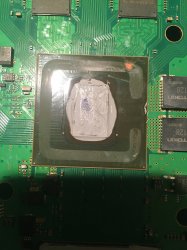
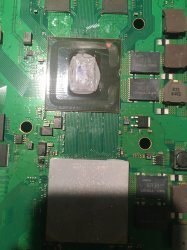
Pac I understand. Thank you for breaking it down. Say it a not the cpu...how do I measure the cpu to see if it alive. Here is a pic.and I'm sorry I don't know how to do the spoiler thing. I need to learn. Is this damage too much? It isn't deep.feels surface like
 

Attachments

  • 4AEA6F67-19ED-4788-9B39-31B8A6044F25.jpeg
    4AEA6F67-19ED-4788-9B39-31B8A6044F25.jpeg
    1.8 MB · Views: 545
  • AF63E02D-55E0-4724-B613-1BF768B73AC7.jpeg
    AF63E02D-55E0-4724-B613-1BF768B73AC7.jpeg
    1.9 MB · Views: 715
here is the pre-delid/reflow original ylod before i delid the cpu unsuccesffuly, appears the error 3034 which i have had before on other consoles multiple times related to bad solder points on gpu. a proper reflow/reball fixed the 3034. I did it here too, but because of the cpu damage i am now getting 2001 which is bad BE. am i right?

Microsoft Windows [Version 6.1.7601]
Copyright (c) 2009 Microsoft Corporation. All rights reserved.
C:\Users\CCCn>cd c:\python27\scripts
c:\Python27\Scripts>python ps3_syscon_uart_script.py COM3 CXRF
>$ AUTH
Auth successful
>$ errlog
errlog
ofst[ 24]:err_code:0xffffffff, clock:0x0bf5ddd0 2006/05/11 11:34:40
ofst[ 28]:err_code:0xa0801001, clock:0x0c1a6727 2006/06/08 04:42:15
ofst[ 32]:err_code:0xa0801001, clock:0x0c23a451 2006/06/15 04:53:37
ofst[ 36]:err_code:0xa0801001, clock:0x0c23a659 2006/06/15 05:02:17
ofst[ 40]:err_code:0xa0801001, clock:0x0c23ae2d 2006/06/15 05:35:41
ofst[ 44]:err_code:0xa0801001, clock:0x0c24a17f 2006/06/15 22:53:51
ofst[ 48]:err_code:0xa0801001, clock:0x0c24c1fa 2006/06/16 01:12:26
ofst[ 52]:err_code:0xa0801001, clock:0x0c267363 2006/06/17 08:01:39
ofst[ 56]:err_code:0xa0801001, clock:0x0c2693ab 2006/06/17 10:19:23
ofst[ 60]:err_code:0xa0902120, clock:0x0c2693ab 2006/06/17 10:19:23
ofst[ 64]:err_code:0xa0801001, clock:0x0c29f1fc 2006/06/19 23:38:36
ofst[ 68]:err_code:0xa0801001, clock:0x0d07f7a8 2006/12/05 09:26:00
ofst[ 72]:err_code:0xa0801001, clock:0x0d666059 2007/02/15 00:05:45
ofst[ 76]:err_code:0xa0801001, clock:0x0e84dfd9 2007/09/20 07:38:01
ofst[ 80]:err_code:0xa0801001, clock:0x0e84e126 2007/09/20 07:43:34
ofst[ 84]:err_code:0xa0801001, clock:0x0e9880f2 2007/10/05 04:58:26
ofst[ 88]:err_code:0xa0802022, clock:0x0ea28ffc 2007/10/12 20:05:16
ofst[ 92]:err_code:0xa0802022, clock:0x0ea29061 2007/10/12 20:06:57
ofst[ 96]:err_code:0xa0801001, clock:0x0ea94507 2007/10/17 22:11:19
ofst[100]:err_code:0xa0801001, clock:0x0eed2b6a 2007/12/08 10:16:10
ofst[104]:err_code:0xa0801001, clock:0x0f089f0d 2007/12/29 06:00:45
ofst[108]:err_code:0xa0801001, clock:0x0f08a1df 2007/12/29 06:12:47
ofst[112]:err_code:0xa0801701, clock:0x0f13322f 2008/01/06 06:31:11
ofst[116]:err_code:0xa0801601, clock:0x0f13322f 2008/01/06 06:31:11
ofst[120]:err_code:0xa0403034, clock:0x0f13324e 2008/01/06 06:31:42
ofst[124]:err_code:0xa0403034, clock:0x0f13334a 2008/01/06 06:35:54
ofst[ 0]:err_code:0xa0403034, clock:0x0f133351 2008/01/06 06:36:01
ofst[ 4]:err_code:0xa0403034, clock:0x0f13440b 2008/01/06 07:47:23
ofst[ 8]:err_code:0xa0403034, clock:0x0f134411 2008/01/06 07:47:29
ofst[ 12]:err_code:0xa0403034, clock:0x0f146e3a 2008/01/07 04:59:38
ofst[ 16]:err_code:0xa0403034, clock:0x0f149dc7 2008/01/07 08:22:31
ofst[ 20]:err_code:0xa0403034, clock:0x0f17f909 2008/01/09 21:28:41
[mullion]$
>$ powerstate
powerstate
ATA Power : OFF
PCI Power : OFF
RSX Power : OFF
XDR Power : OFF
Eurus Power : OFF
SB Power : OFF
RSX Thermal Sensor : UNAVAILABLE
BE Thermal Sensor : UNAVAILABLE
[mullion]$
>$ version
version
v1.0.0_k1
[mullion]$
>$ lasterrlog
lasterrlog
Last Error Code:0xa0403034, Time:0x0f17f909 2008/01/09 21:28:41
[mullion]$
>$ bringup
bringup
[SSM] state: 0000 -> 0101
Bringup Mode #0 (0xFF)
[SSM] ssmCb_OnStartingBePowOn() called.
[SSM] First Boot.
[SSM] Bringup mode : syspm_stat=00000000/00000000
[POWSEQ] PowerSeq_Setup called.
[SSM] state: 0101 -> 0201
[POWSEQ] AV Backend Setup
[SSM] state: 0201 -> 0102
[SSM] state: 0102 -> 0202
[SSM] state: 0202 -> 0103
[SSM] state: 0103 -> 0203
[SSM] ssmCb_BeforeBeOn() called.
[SSM] state: 0203 -> 0104
Psbd_SbTransMode_Half:0x20e2
>$ lasterrlog
[POWERSEQ] Error : BitTraining RSX:RRAC:RX1:GLOBAL1:RX_STATUS
[SSM] state: 0104 -> 0304
[SSM] ssmCb_AfterBeOn2() called.
[SSM] PowSeq Fail : Detected !
[SSM] state: 0304 -> 0700
[POWSEQ] AV Backend Letup
[SSM] Shutdown mode : syspm_stat=00000000/00000000
[ERROR]: 0xa0403034
[POWSEQ] PowerSeq_Letup called.
[SSM] state: 0700 -> 0600
(PowerOff State) (Fatal)
lasterrlog
Last Error Code:0xa0403034, Time:0xffffffff
[mullion]$
>$ powerstate
powerstate
ATA Power : OFF
PCI Power : OFF
RSX Power : OFF
XDR Power : OFF
Eurus Power : OFF
SB Power : OFF
RSX Thermal Sensor : UNAVAILABLE
BE Thermal Sensor : UNAVAILABLE
[mullion]$
>$ syspowdown
syspowdown
*** Invalid Argument ***
[mullion]$
>$ shutdown
shutdown
[SSM] state: 0600 -> 0000
[SSM] Error state is cleared.
(PowerOff State)
>$ errlog
errlog
ofst[ 28]:err_code:0xffffffff, clock:0x0c1a6727 2006/06/08 04:42:15
ofst[ 32]:err_code:0xa0801001, clock:0x0c23a451 2006/06/15 04:53:37
ofst[ 36]:err_code:0xa0801001, clock:0x0c23a659 2006/06/15 05:02:17
ofst[ 40]:err_code:0xa0801001, clock:0x0c23ae2d 2006/06/15 05:35:41
ofst[ 44]:err_code:0xa0801001, clock:0x0c24a17f 2006/06/15 22:53:51
ofst[ 48]:err_code:0xa0801001, clock:0x0c24c1fa 2006/06/16 01:12:26
ofst[ 52]:err_code:0xa0801001, clock:0x0c267363 2006/06/17 08:01:39
ofst[ 56]:err_code:0xa0801001, clock:0x0c2693ab 2006/06/17 10:19:23
ofst[ 60]:err_code:0xa0902120, clock:0x0c2693ab 2006/06/17 10:19:23
ofst[ 64]:err_code:0xa0801001, clock:0x0c29f1fc 2006/06/19 23:38:36
ofst[ 68]:err_code:0xa0801001, clock:0x0d07f7a8 2006/12/05 09:26:00
ofst[ 72]:err_code:0xa0801001, clock:0x0d666059 2007/02/15 00:05:45
ofst[ 76]:err_code:0xa0801001, clock:0x0e84dfd9 2007/09/20 07:38:01
ofst[ 80]:err_code:0xa0801001, clock:0x0e84e126 2007/09/20 07:43:34
ofst[ 84]:err_code:0xa0801001, clock:0x0e9880f2 2007/10/05 04:58:26
ofst[ 88]:err_code:0xa0802022, clock:0x0ea28ffc 2007/10/12 20:05:16
ofst[ 92]:err_code:0xa0802022, clock:0x0ea29061 2007/10/12 20:06:57
ofst[ 96]:err_code:0xa0801001, clock:0x0ea94507 2007/10/17 22:11:19
ofst[100]:err_code:0xa0801001, clock:0x0eed2b6a 2007/12/08 10:16:10
ofst[104]:err_code:0xa0801001, clock:0x0f089f0d 2007/12/29 06:00:45
ofst[108]:err_code:0xa0801001, clock:0x0f08a1df 2007/12/29 06:12:47
ofst[112]:err_code:0xa0801701, clock:0x0f13322f 2008/01/06 06:31:11
ofst[116]:err_code:0xa0801601, clock:0x0f13322f 2008/01/06 06:31:11
ofst[120]:err_code:0xa0403034, clock:0x0f13324e 2008/01/06 06:31:42
ofst[124]:err_code:0xa0403034, clock:0x0f13334a 2008/01/06 06:35:54
ofst[ 0]:err_code:0xa0403034, clock:0x0f133351 2008/01/06 06:36:01
ofst[ 4]:err_code:0xa0403034, clock:0x0f13440b 2008/01/06 07:47:23
ofst[ 8]:err_code:0xa0403034, clock:0x0f134411 2008/01/06 07:47:29
ofst[ 12]:err_code:0xa0403034, clock:0x0f146e3a 2008/01/07 04:59:38
ofst[ 16]:err_code:0xa0403034, clock:0x0f149dc7 2008/01/07 08:22:31
ofst[ 20]:err_code:0xa0403034, clock:0x0f17f909 2008/01/09 21:28:41
ofst[ 24]:err_code:0xa0403034, clock:0xffffffff
[mullion]$
>$ bringup
bringup
[SSM] state: 0000 -> 0101
Bringup Mode #0 (0xFF)
[SSM] ssmCb_OnStartingBePowOn() called.
[SSM] Bringup mode : syspm_stat=00000000/00000000
[POWSEQ] PowerSeq_Setup called.
[SSM] state: 0101 -> 0201
[POWSEQ] AV Backend Setup
[SSM] state: 0201 -> 0102
[SSM] state: 0102 -> 0202
[SSM] state: 0202 -> 0103
[SSM] state: 0103 -> 0203
[SSM] ssmCb_BeforeBeOn() called.
[SSM] state: 0203 -> 0104
Psbd_SbTransMode_Half:0x20e2
>$
[mullion]$ [POWERSEQ] Error : BitTraining RSX:RRAC:RX1:GLOBAL1:RX_STATUS
[SSM] state: 0104 -> 0304
[SSM] ssmCb_AfterBeOn2() called.
[SSM] PowSeq Fail : Detected !
[SSM] state: 0304 -> 0700
[POWSEQ] AV Backend Letup
[SSM] Shutdown mode : syspm_stat=00000000/00000000
[ERROR]: 0xa0403034
[POWSEQ] PowerSeq_Letup called.
[SSM] state: 0700 -> 0600
(PowerOff State) (Fatal)
>$ shutdown
shutdown
[SSM] state: 0600 -> 0000
[SSM] Error state is cleared.
(PowerOff State)
 
At least take few measurements of resistance around cpu power line.
And I assume that corner of cpu beside ram where delid can be started probably some lifted traces on board. I don't fix broken traces more than 3. Is a lucky number. 3 ohms, etc.
Had few boards with rsx traces broken but not more than 3. Those boards acting as glod and never been pushed, sealed 2500 models, probably dropped on floor, boards were quite deformed. After reball both were tested and still working for costumers, at least nobody called for warranty over 2 years now.
Never mind your is a lost case.

what measurements and where should i take them to see if the cpu is dead? thank you
 
also at this point iam getting glod with light being green, nothing on scrreen, and can't boot into safe mode. holding down the power button just turns off the console. if i continue to hold down after i flip the switch off and on and still powers down and no beeps. wouldn't this mean the cpu scratch is causing a dead cput?
 
Most of top surface on cpu is ground line, small lines on top should not be touched in order to get it working.

i put thermal tape on the scratch and still same thing. i figured maybe the metal plate was touching down on the scratch since u mentioned ground but that doesnt seem to change anything. this is what i'm getting.

on last error I'm getting 2203 which according to the chart says SB error. Could my cpu be fine and the problem is something else. How can I check the cpu to see if it's working fine?

upload_2021-5-25_22-24-57.png
 
Last edited:
Back
Top