RIP-Felix
Senior Member
Frequently Asked Questions
What is the YLOD?
It look like this...
What Causes the YLOD?
I wrote a much more in depth post about it here. But to summarize, SONY's official position on the YLOD is that it's a 'general hardware failure that needs to be diagnosed.' That is the truest statement...PERIOD! There are many causes and no single solution. However, there's no shortage of people attempting to simplify the issue down to a single problem.
This is the best video on the subject I've seen and it's well worth a watch. But be sure to come back and read the rest of this post, because it's easy to misunderstand what he means.
Displaced Gamer's video is the best researched IMO. And while is sounds like he's getting caught up in the NEX/TOKIN hype, it only "sounds" like he's against the reballing narrative. That not the case! He was only making the claim that it's not the ONLY solution. That the tokins can also cause it! And that "we shouldn't assume."
People want there to be a simple fix. One that's been hiding under our nose all this time. That's the underdog narrative that sheeple eat up like cake. It's the junk food of human psychology. It tastes good, but the flavor is devoid of nutrients. It's wishful thinking! The tokin narrative that say's "the BGA is fine," that narrative sounds good, but "The cake is a lie!" We will abandon the truth and latch onto any easier explanation. If it seems less expensive, or if it looks easy enough to DIY. It doesen't matter what the truth is, we will perform mental gymnastics to make believe. ANYTHING that allows us to believe something easier.
So what is the truth?
YLOD causes:
The #1 issue on this thread is that Heat causes false positive! That's why it's so confusing for people. It's why using a hair drier works (temprarily). It's why the hot air test on tokins works (temporarily). And it's why replacing tokins works (temporarily). The heat from those processes causes a thermo-mechanical bond that make it appear as thought the console was repaired when it wasn't. A "false positive" or "false repair." The heat warped the board and the microscopic BGA defect or bumps reconnected physically. It's like holding 2 wires together instead of soldering them. That's not repair! When the strain relaxes, the YLOD will come back. Usually in 2 weeks. I performed a statistical analysis, compiling every post on this thread into a spreadsheet, showing that replacing tokins does not fix the YLOD in the majority of consoles. That is backed up by testimonials by professionals that do volume repairs and have a much better feel for the percentage of consoles having bad tokins. People who's opinion's I have come to trust!
I have identified the following categories of YLOD. These can help you identify if your console is likely to have bad tokins. But this is not diagnostic! You still need the SYSCON errorlog to confirm the diagnosis:
#4 can be caused by many things, including physically damaged tokins, like a botched repair attempt or an accident. You need the SYSCON errorlog to narrow down the list. I had a 4.5s YLOD on a COK-001 MB that was struck right on the corner of an RSX tokin by a cylindrical object in shipping. I know for a fact that MB had bad tokins and a good BGA before shipping. It was reballed professionally by @squeept before he sent the MB to me! Before shipping it to me, he was getting an "Intense YLOD" with 1002 SYSCON error codes. He confirmed the bad tokins on an oscilloscope! I did a bunch of testing on that console confirming the error codes associated with bad tokins and characterizing the filter attenuation by removing tokins, testing, adding TaPol capacitor arrays, and retesting. That's how we know what SYSCON error codes indicate bad tokins!
#'s 5-7 rule out alot of thing that cause the YLOD. These may very well be caused by bad tokins. If you have this kind of YLOD and it's not caused by an overheating issue, then the chances of a bad tokin are much higher. Not 100%, however! You still need to dump the SYSCON errorlog and confirm a 1002 to diagnose the problem.
This is the best video on the subject I've seen and it's well worth a watch. But be sure to come back and read the rest of this post, because it's easy to misunderstand what he means.
People want there to be a simple fix. One that's been hiding under our nose all this time. That's the underdog narrative that sheeple eat up like cake. It's the junk food of human psychology. It tastes good, but the flavor is devoid of nutrients. It's wishful thinking! The tokin narrative that say's "the BGA is fine," that narrative sounds good, but "The cake is a lie!" We will abandon the truth and latch onto any easier explanation. If it seems less expensive, or if it looks easy enough to DIY. It doesen't matter what the truth is, we will perform mental gymnastics to make believe. ANYTHING that allows us to believe something easier.
So what is the truth?
YLOD causes:
- ~3% = NEC/TOKINs
- ~7% = Blown fuse, short resistor, diode, bad IC, HDD, LAN adapter and associated SMD's fried by lightning strike, etc.
- <1% = CPU's BGA, usually because of botched repair attempts or a dropped console.
- ~90% = RSX issues
- Most of which are BGA defects requiring a reball!
- Bad bumps, RAM, internal damage, account for a smaller percentage of the RSX issues.
The #1 issue on this thread is that Heat causes false positive! That's why it's so confusing for people. It's why using a hair drier works (temprarily). It's why the hot air test on tokins works (temporarily). And it's why replacing tokins works (temporarily). The heat from those processes causes a thermo-mechanical bond that make it appear as thought the console was repaired when it wasn't. A "false positive" or "false repair." The heat warped the board and the microscopic BGA defect or bumps reconnected physically. It's like holding 2 wires together instead of soldering them. That's not repair! When the strain relaxes, the YLOD will come back. Usually in 2 weeks. I performed a statistical analysis, compiling every post on this thread into a spreadsheet, showing that replacing tokins does not fix the YLOD in the majority of consoles. That is backed up by testimonials by professionals that do volume repairs and have a much better feel for the percentage of consoles having bad tokins. People who's opinion's I have come to trust!
I have identified the following categories of YLOD. These can help you identify if your console is likely to have bad tokins. But this is not diagnostic! You still need the SYSCON errorlog to confirm the diagnosis:
- Warm-Start (Only starts when Warm)
- Cold-Start (Only starts when Cold)
- Instant (<1s)
- Non-Instant (1-10s)
- Delayed (10s - 5min)
- Random (Normal stress)
- Intense (High Stress, same place in certain games)
#4 can be caused by many things, including physically damaged tokins, like a botched repair attempt or an accident. You need the SYSCON errorlog to narrow down the list. I had a 4.5s YLOD on a COK-001 MB that was struck right on the corner of an RSX tokin by a cylindrical object in shipping. I know for a fact that MB had bad tokins and a good BGA before shipping. It was reballed professionally by @squeept before he sent the MB to me! Before shipping it to me, he was getting an "Intense YLOD" with 1002 SYSCON error codes. He confirmed the bad tokins on an oscilloscope! I did a bunch of testing on that console confirming the error codes associated with bad tokins and characterizing the filter attenuation by removing tokins, testing, adding TaPol capacitor arrays, and retesting. That's how we know what SYSCON error codes indicate bad tokins!
#'s 5-7 rule out alot of thing that cause the YLOD. These may very well be caused by bad tokins. If you have this kind of YLOD and it's not caused by an overheating issue, then the chances of a bad tokin are much higher. Not 100%, however! You still need to dump the SYSCON errorlog and confirm a 1002 to diagnose the problem.
Are my NEC/TOKINs are bad?
The difinitive way to know is by using an Oscilloscope. Here is what confirmed bad RSX tokins look like (RSX = Blue, CELL = Yellow).

That console had a 4.5s YLOD and A0801002 SYSCON error codes.
For comparison, this is what working tokins look like...

If you don't have an oscilloscope, that's fine. If the NEC/TOKINs are bad enough to cause a YLOD, the SYSCON will generate a 1002 error code. However, 1002 can be caused by more than just the tokins. There is a PWM Buck Controller and other surface mount devices involved in the filter. Any one of them could cause this code. However, replacing the tokins usually clears up the problem.
That console had a 4.5s YLOD and A0801002 SYSCON error codes.
For comparison, this is what working tokins look like...
If you don't have an oscilloscope, that's fine. If the NEC/TOKINs are bad enough to cause a YLOD, the SYSCON will generate a 1002 error code. However, 1002 can be caused by more than just the tokins. There is a PWM Buck Controller and other surface mount devices involved in the filter. Any one of them could cause this code. However, replacing the tokins usually clears up the problem.
Is my YLOD caused by Overheating? Can I fix it by deliding?
Overheating is a different LED code. Here's what it looks like (volume warning, his intro will blast you)
The fan ramps up and it starts flashing yellow (repeatedly) before it shuts down. A YLOD only flashes once, then flashes red repeatedly thereafter. Even if you were to confuse the two, the SYSCON errorlog can easily diagnose an overheating CPU (1200).
Most PS3's are getting old at this point and their thermal past as well. Most CPU's need to be delidded at this point, because that thermal interface compound (TIC) is worn out by now in the majority of consoles. Even the higest quality TIC's recommend replacement every 5-7 years. SONY wasn't worried about the console beyond the warranty period. So that becomes our problem now.
Be sure you are very carefull about how you delid. There are tiny traces than can be ruined if you use the wrong tool! Please read this post about how to make a CPU Deliding tool.
Most PS3's are getting old at this point and their thermal past as well. Most CPU's need to be delidded at this point, because that thermal interface compound (TIC) is worn out by now in the majority of consoles. Even the higest quality TIC's recommend replacement every 5-7 years. SONY wasn't worried about the console beyond the warranty period. So that becomes our problem now.
Be sure you are very carefull about how you delid. There are tiny traces than can be ruined if you use the wrong tool! Please read this post about how to make a CPU Deliding tool.
What are the SYSCON errorlogs?
"The PS3 syscon is the main power controller chip of the PS3." Among other things, it essentially watches over the PS3 and when something bad happens, such as when a YLOD occurs, it records an error code. The errorlog can hold 32 of these error codes.
Thanks to this thread by @db260179 we now have a method to read the codes! This has become the most important first step to diagnosing what wrong with your PS3! It's by far the cheapest place to start if you plan to attempt to fix your PS3 yourself. I made tutorial for windows that's a bit more friendly (IMO) than the other tutorials. The tutorial linked to in the original post (on github) is for Linux and requires a few steps that weren't very clear.
There is also an executable GUIin the github repository that makes it easier, but it's usefulness is limited. Perhaps in the future it can be expanded to be the de facto way to access the SYSCON, but for now I recommend doing it the manual way using my tutorial.
Thanks to this thread by @db260179 we now have a method to read the codes! This has become the most important first step to diagnosing what wrong with your PS3! It's by far the cheapest place to start if you plan to attempt to fix your PS3 yourself. I made tutorial for windows that's a bit more friendly (IMO) than the other tutorials. The tutorial linked to in the original post (on github) is for Linux and requires a few steps that weren't very clear.
There is also an executable GUIin the github repository that makes it easier, but it's usefulness is limited. Perhaps in the future it can be expanded to be the de facto way to access the SYSCON, but for now I recommend doing it the manual way using my tutorial.
Will the SYSCON error logs dignose my PS3?
We are still learning what each code means and how to use them to diagnose PS3 issues. The best thing to do is ask questions in the SYSCON thread and perhaps someone will be able to help you figure it out.
Having said that we do know 3034 means RSX/CPU issues (almost always RSX) and that 1002 means nec/tokins. That's maybe 93% of the of the issues right there. The other 7% have cryptic codes that give us clues to the issue, but you probably still have to troubleshoot the board to figure out what's wrong (probe voltages and resistance with a multimeter). That can be tedious, but the more time that goes by the better we'll understand the codes. It's still fairly new to us!
Having said that we do know 3034 means RSX/CPU issues (almost always RSX) and that 1002 means nec/tokins. That's maybe 93% of the of the issues right there. The other 7% have cryptic codes that give us clues to the issue, but you probably still have to troubleshoot the board to figure out what's wrong (probe voltages and resistance with a multimeter). That can be tedious, but the more time that goes by the better we'll understand the codes. It's still fairly new to us!
Can the SYSCON errorlogs tell me if reballing is necessary?
3034/4xxx errors indicate CPU/RSX issues that cannont be fixed by any other method we have found. If you have a 3034, with or without the associate data error (4xxx), you need a reball. A reflow can work too, but it wont last as long and both put the chip/MB through heat stress that's hard on them. It's better to reball and make it last, since this heating process can't be repeated very many times before the chips burn out!
On the other hand, if you see a 1002 error that means you have bad nec/tokins and a reball is unnecessary.
On the other hand, if you see a 1002 error that means you have bad nec/tokins and a reball is unnecessary.
I got a 3034 error from the SYSCON. Will reballing fix my console 100%? I want to be sure before doing it!
I have thoroughly read every page of this thread and spoken with professional PS3 repair persons who work on PS3 consoles in volume. The story is the same. The YLOD is primarily an RSX issue! 90% of YLOD's are due to this 3034 error! If you perform the SYSCON and get a 3034, you can be sure it's not in the other 10% of unrelated problems! You need a reball. But, that doesn't always mean there's a BGA defect causing it your issue! And a reball only fixes the BGA!
So no, we can't be 100% sure it'll fix your YLOD. There could be bad bumps, broken traces that the CPU/RSX use to communicate, and the die could just be worn out. However, reballing is the only way to know for sure! Alot of the time it fixes the issue. If you can find a reputable repair shop that knows what they're doing, that is!
So no, we can't be 100% sure it'll fix your YLOD. There could be bad bumps, broken traces that the CPU/RSX use to communicate, and the die could just be worn out. However, reballing is the only way to know for sure! Alot of the time it fixes the issue. If you can find a reputable repair shop that knows what they're doing, that is!
How many times can my console be reflowed/reballed?
The goal of reflowing/reballing should be to get a strong BGA bond the first time! If you are contemplating a reflow because it lookes easy enough to DIY, please manage your expectations!
Leaded solder balls provide more durability and you don't get that from reflowing. Also reflows reuse the same old oxidized lead free solder. The defect could have been exposed to the air, grease, grime, lint, dirt, and hair for many years. The oxidation can be in the cracks and crevasse, often the pad itself. If the pad is oxidize you probably wont even get the solder to stick to it! Or if it does, it'll be brittle and break off easily again.
There are things you can do to improve your reflow, such as pre cleaning the board thoroughly to remove the grime and use good reflowing equipment under inert gas. But oxidized pads are impossible to prep chemically. Flux can help, but you really need to remove the chip and physically clean the pad to get them preped properly. So even the best reflow will not be as good as a reball.
Thermal stress is hard on processors and the fewer times you put the die through reflow temperatures the better. It was already through one reflow at the factory. That's fine, it's designed for it. But each time after that the these temperatures harm the chip and motherboard. If you have to subject the chip to these extreme temperatures is should be done right and not be needed again! A reflow might get you back up for a year, but then you'll need another one. How many times can you do this?
In my experiance, not more that a couple 2-3 times before the chip dies or the BGA pads on the motherboard start lifting off the board. Reflowing is just a bad idea. I have personally practiced reballing on a donor motherboard and after about 3 reflow cycles the BGA pads on the motherboard begin breaking off! Also the layers can start to de-laminate. Clearly, this cannot be repeated indefinitely! Like I said, the goal is to get it repaired once and enjoy it while it lasts. If it dies again, it's better to replace the chip. It could be that the reason it died again is not the BGA, but the die or bumps. Replacing the chip saves the motherboard the stress of another pointless reflow cycle. So my answer to the question of how many times you can reflow/reball is once! After that your best option is to replace the chip! Beyond those 2 thermal cycles, repeated attempts are likely to cause permanent damage to the motherboard. A skilled repair shop might be able to salvage the console another time or 2, but the motherboard is on it's last leg.
And don't be the guy that reflow's a backwards compatible PS3 just to resells it as working! That's such a dick move! First how would you like to buy a DIY reflow for $300 just to have it YLOD a year later? Come on man, pay it forward! There are only about 6 million backwards compatible consoles out there and doing this increases the likelihood that console will not be able to have successful reball in the future. That's if you don't irreparably damage it in the process! It's better to sell it to someone willing to reball it. For the sake of video game preservation! These consoles deserve to be enjoyed for as long as possible.
Leaded solder balls provide more durability and you don't get that from reflowing. Also reflows reuse the same old oxidized lead free solder. The defect could have been exposed to the air, grease, grime, lint, dirt, and hair for many years. The oxidation can be in the cracks and crevasse, often the pad itself. If the pad is oxidize you probably wont even get the solder to stick to it! Or if it does, it'll be brittle and break off easily again.
There are things you can do to improve your reflow, such as pre cleaning the board thoroughly to remove the grime and use good reflowing equipment under inert gas. But oxidized pads are impossible to prep chemically. Flux can help, but you really need to remove the chip and physically clean the pad to get them preped properly. So even the best reflow will not be as good as a reball.
Thermal stress is hard on processors and the fewer times you put the die through reflow temperatures the better. It was already through one reflow at the factory. That's fine, it's designed for it. But each time after that the these temperatures harm the chip and motherboard. If you have to subject the chip to these extreme temperatures is should be done right and not be needed again! A reflow might get you back up for a year, but then you'll need another one. How many times can you do this?
In my experiance, not more that a couple 2-3 times before the chip dies or the BGA pads on the motherboard start lifting off the board. Reflowing is just a bad idea. I have personally practiced reballing on a donor motherboard and after about 3 reflow cycles the BGA pads on the motherboard begin breaking off! Also the layers can start to de-laminate. Clearly, this cannot be repeated indefinitely! Like I said, the goal is to get it repaired once and enjoy it while it lasts. If it dies again, it's better to replace the chip. It could be that the reason it died again is not the BGA, but the die or bumps. Replacing the chip saves the motherboard the stress of another pointless reflow cycle. So my answer to the question of how many times you can reflow/reball is once! After that your best option is to replace the chip! Beyond those 2 thermal cycles, repeated attempts are likely to cause permanent damage to the motherboard. A skilled repair shop might be able to salvage the console another time or 2, but the motherboard is on it's last leg.
And don't be the guy that reflow's a backwards compatible PS3 just to resells it as working! That's such a dick move! First how would you like to buy a DIY reflow for $300 just to have it YLOD a year later? Come on man, pay it forward! There are only about 6 million backwards compatible consoles out there and doing this increases the likelihood that console will not be able to have successful reball in the future. That's if you don't irreparably damage it in the process! It's better to sell it to someone willing to reball it. For the sake of video game preservation! These consoles deserve to be enjoyed for as long as possible.
My YLOD turned into a GLOD! What does that mean?
BGA defects can cause either a GLOD or a YLOD. I have seen a YLOD turn into a GLOD after a tokin replacement, due to thermomechanical false positives. The BGA pad that were causing the YLOD reconnected from thermal warping, but there was still a break that caused the GLOD. Or you could change the mounting ptessure when disassembling or installing fresh thermal paste. The solder cracks are microscopic, so it doesn't take much.
There are other issues that can cause a GLOD, such as GPU/CPU RAM, OS corruption, software problems, and a handfull of power ICs. But usually these would be a GLOD always, not change from a YLOD to a GLOD. However, @botakompong's method of troubleshooting PS3's can help you diagnose that type of ambiguous fault.
There are other issues that can cause a GLOD, such as GPU/CPU RAM, OS corruption, software problems, and a handfull of power ICs. But usually these would be a GLOD always, not change from a YLOD to a GLOD. However, @botakompong's method of troubleshooting PS3's can help you diagnose that type of ambiguous fault.
My console died 1 year after having it reballied? Why?
Many reballers are shady. I've heard of people paying for a leaded reball and only getting a reflow! And some don't even clean the Motherboard afterwards, leaving flux everywhere. Very unprofessional! I'd bet that many of the "reballed" consoles out there weren't actually reballed. And even if they were they may not have been done well.
Is reballing with lead solder balls permanent?
The same problem that caused your solder balls to crack in the first place can cause it again. Anyone telling you otherwise is using "puffery" to sell you on the idea. Yes, leaded solder is more durable than lead-free, but eventually leaded solder will deform and crack too. It's about thermal cycles. Leaded balls can withstand more, that's all.
There are a lot of factors that go into getting a strong bond, such as the condition of the motherboard, drying, prepping the BGA properly, the reflow profile, cleaning, etc. Since SONY is not offering these services anymore, the quality of the reball you will get is inconsistent. That's probably why there are so many complaints that reballs fail.
Let's say I get a good reball from a trusted shop. Will that be permanent?
No! Yes, it'll last longer than it would have otherwise. However, permanent is a relative term. How long is permanent? For the rest of your natural life? If that's how you define "permanent," then no electronic device would qualify. We tend to think of electronics as indestructible, but they are perishable. Capacitors degrade, hard drives fail, SSD's only have so many read/write cycles, processors degrade, solid state laser wear out, disc's rot, cartridges wear out, batteries die, metals rust, etc. But that's probably not what you meant.
You probably mean, "will it remove the defect that cause PS3's to fail prematurely?" That issue is with Modern CPU/GPU's. Namely, that they run hot. The more the temperature swings, the more strain this places on the chip. Eventually the solderballs deform, crack, or pull away from their pads. This is avoidable! FCBGA isn't the only technology that can be used on modern processor. It's the most profitable. Unfortunately, the electronics industry has chosen to use Flip Chip Ball Grid Array (FCBGA) to connect CPU/GPU's in consumer electronics, such as laptops and video game consoles. It's cheaper than using sockets and it prevents you from upgrading/repairing your own device. It's an anti-consumer/anti-competitive practice that should be illegal, because it increases repair costs, puts small 3rd party repair shops out of business, and increases e-waste. Every country NEEDS to stay technologically competitive, so electronics companies have massive leverage and use it to obtain favorable legal decisions. Such as squashing "right to repair" laws, for example. "If you don't like it, fine! No SONY products for you!" That's a bigger social problem.
It's not all the BGA either. A socket provides strain relief. That's why your cpmputers CPU lasts longer than your graphics card's GPU, which is soldered on with a BGA. However, even socketed CPU fail. Again, that's a function of heat. The more of it, the faster it dies. Maybe you get ten years out of it. Cool, just buy another. That only works when it's in a socket and the part is available. We don't have that with a PS3. When the die wears out, that chip has to come off. Inthe case of the PS3's GPU (RSX), it can be replaced. But the Cell cannot (not easily).
There are a lot of factors that go into getting a strong bond, such as the condition of the motherboard, drying, prepping the BGA properly, the reflow profile, cleaning, etc. Since SONY is not offering these services anymore, the quality of the reball you will get is inconsistent. That's probably why there are so many complaints that reballs fail.
Let's say I get a good reball from a trusted shop. Will that be permanent?
No! Yes, it'll last longer than it would have otherwise. However, permanent is a relative term. How long is permanent? For the rest of your natural life? If that's how you define "permanent," then no electronic device would qualify. We tend to think of electronics as indestructible, but they are perishable. Capacitors degrade, hard drives fail, SSD's only have so many read/write cycles, processors degrade, solid state laser wear out, disc's rot, cartridges wear out, batteries die, metals rust, etc. But that's probably not what you meant.
You probably mean, "will it remove the defect that cause PS3's to fail prematurely?" That issue is with Modern CPU/GPU's. Namely, that they run hot. The more the temperature swings, the more strain this places on the chip. Eventually the solderballs deform, crack, or pull away from their pads. This is avoidable! FCBGA isn't the only technology that can be used on modern processor. It's the most profitable. Unfortunately, the electronics industry has chosen to use Flip Chip Ball Grid Array (FCBGA) to connect CPU/GPU's in consumer electronics, such as laptops and video game consoles. It's cheaper than using sockets and it prevents you from upgrading/repairing your own device. It's an anti-consumer/anti-competitive practice that should be illegal, because it increases repair costs, puts small 3rd party repair shops out of business, and increases e-waste. Every country NEEDS to stay technologically competitive, so electronics companies have massive leverage and use it to obtain favorable legal decisions. Such as squashing "right to repair" laws, for example. "If you don't like it, fine! No SONY products for you!" That's a bigger social problem.
It's not all the BGA either. A socket provides strain relief. That's why your cpmputers CPU lasts longer than your graphics card's GPU, which is soldered on with a BGA. However, even socketed CPU fail. Again, that's a function of heat. The more of it, the faster it dies. Maybe you get ten years out of it. Cool, just buy another. That only works when it's in a socket and the part is available. We don't have that with a PS3. When the die wears out, that chip has to come off. Inthe case of the PS3's GPU (RSX), it can be replaced. But the Cell cannot (not easily).
Since a reball is not an option for me (or most of us), is there a guide that shows the proper reflow procedure?
It's probably easier to start with the wrong way to do it:
What she did wrong:
This is the guy/video that inspired my DIY ghetto setup. It's capable with practice...
A reflow is the same procedure, except instead of removing the chip you just begin the cooling cycles after nudging to ensure it has flowed. The setup cost me about $300, but it's not ideal, because I have to manually simulate the reflow profile. I'm currently looking into making my own automated system using an IR6500 top heater, relays, and PID controllers...
However, a complete BGA rework station is probably cheaper overall when I add up all the different pieces. So if you haven't already gone down the path of buying rework equipment, then a dedicated BGA rework station is the easier solution. The reason I've gone this route is that the different pieces in my setup are useful for other electrics projects, besides reballing.
I realize these tools are expensive and that no one wants to spend more on tools than another PS3! This is why reballing services actually aren't asking too high a price at $100-150. The problem is finding one you can trust, if you can find one at all!
Okay, but that sounds expensive! What's the bare minimum I need to spend to do a good enough reflow?
- You want to use AMTEC-NC559 Flux. This is designed with SAC (Lead Free alloy) only! It will not work for lead alloys! The AMTECH flux is to reflow the Lead Free solder or remove the chip only.
- If you are reballing with leaded solder balls, you need a different flux to put the chip back on! I like the KINGBOW BGA flux for that. It came with a cheap BGA reballing kit I bought on ebay. It might be cheap, but it's great flux. However, if you're just doing a reflow, you want the AMTECH flux!
- The MB needs to be thoroughly cleaned before and after the reflow. The area underneath the RSX is especially important to clean, as contamination will get into the BGA and reduce the durability of the reflow!
- Als flux residues can actually be slightly conductive, which reduced resistance between VDD/GND on the BGA. And since thos resistance is alread very small for processors, it can be significant. I've measured 2.4 ohms after a reball, then 3.1 after cleaning the flux off. If your RSX isn't as healthy as mine and is closer to 2, then the flux residue could lower it to 1ish, and that may not be enough separation for it to work!
- Preheating the board as she demonstrates is not going to work. Moisture from humidity in the air has seeped inside. It's trapped microscopic pores between motherboard layers, SMD components, underfill of GPU, CPU, RAM, everywhere. You MUST thorougly dry the motherboard or the steam will force it's way out explosively. This is called popcorning! Ive seen component pop and crack! I've seen streams of bubbling liquid escaping out from the underfill of the the RSX DIE! This can squeeze the solder bumps out!
- The PS3 motherboard needs to be dried at 100C for 2-4 hours before a reflow! NO EXCEPTION!
- A bottom heating element is essential to prevent the motherboard from warping. When you apply heat on one side of the motherboard it bows. In this case the topside expands, and since the bottom side isn't heated, it's cooler and expands less. So the motherboard literally warps! When it cools, it contracts and pulls on the freshly solidified BGA. So even if you achieve a good reflow, the stress of this bowing back can literally rip the BGA pads off the motherboard or break the solder from them! It can delaminate the layers of the board too.
- You need a bottom heater to preheat the entire motherboard and control the cooldown so that both sides heat-up and cool-down together, preventing thermal warping. This will achieve a stress free bond.
- She says to set the heat gun to a certain temperature and to heat for a set period of time. This is a terrible way to estimate temperature. Some boards may flow, some may not! There is no way to know for sure if you even melted the solder. And if you did, there's no way to know if you burned it to a crisp in the process!
- You need temperature probes to help you reach the proper reflowing temperatures to melt SAC lead free alloy (218C). Reflow profiles, like the one pictured below, are designed to have a preheat ramp, reflow, and cooldown period that minimize crystal formation.
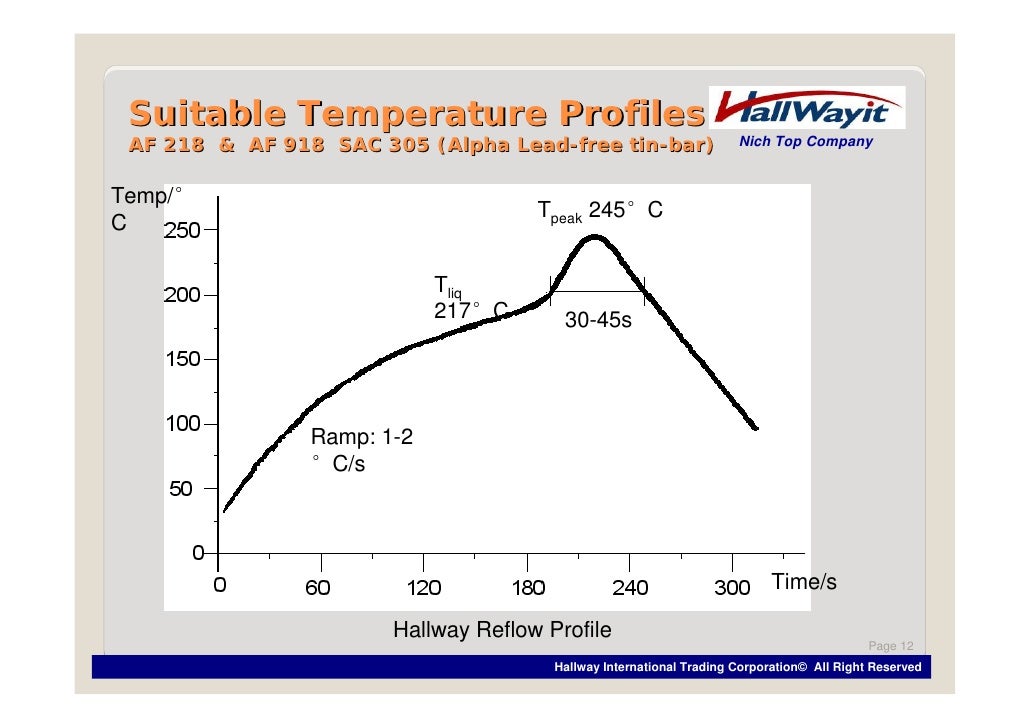
- Profiles control the temperature carefully to achieve a strong joint. The way she did it was THE WORST way you could go about it. Even if it worked, the solder balls that formed will be full of long crystals that make it brittle and prone to cracks! Solder that is shiny has small crystals. If it appears matte, it has long crystals and is hard/brittle. They longer you hold the heat on the solder, the more time they have to grow, and the more time the solder has to oxidize, which further makes it hard/brittle. ESPECIALLY lead Free alowy! IFixIt's method will not last very long before the YLOD will return.
This is the guy/video that inspired my DIY ghetto setup. It's capable with practice...
A reflow is the same procedure, except instead of removing the chip you just begin the cooling cycles after nudging to ensure it has flowed. The setup cost me about $300, but it's not ideal, because I have to manually simulate the reflow profile. I'm currently looking into making my own automated system using an IR6500 top heater, relays, and PID controllers...
However, a complete BGA rework station is probably cheaper overall when I add up all the different pieces. So if you haven't already gone down the path of buying rework equipment, then a dedicated BGA rework station is the easier solution. The reason I've gone this route is that the different pieces in my setup are useful for other electrics projects, besides reballing.
I realize these tools are expensive and that no one wants to spend more on tools than another PS3! This is why reballing services actually aren't asking too high a price at $100-150. The problem is finding one you can trust, if you can find one at all!
Okay, but that sounds expensive! What's the bare minimum I need to spend to do a good enough reflow?
- 99% Isoproply alcohol
- AMTECH FLUX
- A temperature controlled Hot Air wand
- An IR Preheater
- Thermometer with 2 K-type probes.
- Experiance!!!
Why doesn't the CPU (Cell) fail?
It does!
Why does the GPU (RSX) fail more often than the CPU (Cell)?
Only Nvidia and SONY know for sure. They have access to CAD tools that can model and simulate the stresses on the motherboard/CPU/RSX interface. These tools can predict how many thermal cycles it takes to develop a BGA crack, for example. This is rutine work done by enginners during the design process and can be adjusted then. For example, they can increase the fan curve to be more aggressive if more cooling is needed to prevent premature failure. Or they can redesign the heat sink, use more powerful fan, different thermal compound, etc. And they have to weight other considerations. They often prioritize fan noise over thermals, for example. People will just criticize the system for being too loud, instead of thanking them for the extra reliability. This is happening with the PS5 right now.
While we don't have access to the CAD tools SONY and Nvidia do, we speculate that the RSX undergoes more thermal cycles, because of it's workload, than does the Cell. While maximum temperature is important, the change in temperature (Delta T) is even more important! On a well cooled stock backwards compatible PS3, the CPU often runs 69-75C. Yes it changes from 25-70C when you turn it on and from 75C-25C when you turn it off, but that only happen once per session. Most of the time, the CPU is running at a constant temperature in the 70s, not changing up/down all that much.
By contrast, the RSX can run much cooler when it's not being used much and hotter when used heavily. Say, 63-79C with many more swings up and down as you play a game. Because of this, it experiences many more thermal cycles, which over time deform the BGA and bumps. Also, that heat wears the die out faster.
For more information about how SONY knew (or should have known) about these issues, check out this post and this one where I break it down further. The ensuing discussion is also entertaining.
While we don't have access to the CAD tools SONY and Nvidia do, we speculate that the RSX undergoes more thermal cycles, because of it's workload, than does the Cell. While maximum temperature is important, the change in temperature (Delta T) is even more important! On a well cooled stock backwards compatible PS3, the CPU often runs 69-75C. Yes it changes from 25-70C when you turn it on and from 75C-25C when you turn it off, but that only happen once per session. Most of the time, the CPU is running at a constant temperature in the 70s, not changing up/down all that much.
By contrast, the RSX can run much cooler when it's not being used much and hotter when used heavily. Say, 63-79C with many more swings up and down as you play a game. Because of this, it experiences many more thermal cycles, which over time deform the BGA and bumps. Also, that heat wears the die out faster.
For more information about how SONY knew (or should have known) about these issues, check out this post and this one where I break it down further. The ensuing discussion is also entertaining.
What happens when my RSX dies? Can I get a new one installed?
Any RSX can be replaced with the same model, assuming the replacement works. New old stock is the limiting factor. All the NOS RSX's for backwards compatible PS3's were bought up and installed long ago. So you aren't going to get a "new" one installed. You can get a used one, but they are designed to be subjected to reflow temperature only once (when installed at the factory). They can be removed, ohm tested, and reinstalled into another machine. This does work well, however it certainly damages the RSX some. Now, that doesn't mean you can't get another ten years out of it, if done properly, and kept nice an cool afterwards. With leaded solder and fresh high quality thermal paste it can last a long time. Probably longer than it did stock! However, finding "new" old stock would definitely be better, because you're installing it for the first time (how it was designed).
So finding replacements has been the issue. That is until about 5 years ago! See the next question for details...,
So finding replacements has been the issue. That is until about 5 years ago! See the next question for details...,
What's this Frankenstein Mod?
About a year ago we learned about official SONY refurbished consoles that had different model GPU's installed on them. So far 4 console we know about have been found. Apparently, around 2012 SONY repair shops began replacing the stock 90nm RSX on backward compatible PS3's with 65nm and 40nm RSX's. Around that time the slim consoles were being manufactured and sourcing new old stock 90nm RSX's became impossible. So to repre these console's SONY had to figure out a way to install the newer 65nm, and later 40nm, RSX chips. We called this the "Frankenstein Mod" for obvious reasons and have been attempting to replicate it since 2020, without success. It involves replacing/reprograming the SYSCON chip itself (the part we're still figuring out), among other mods. So it's very difficult and time consuming.
However, 4-5 years before we even learned this was possable, @botakompong's brother "Kiaw" made a modchip that allows it! He and @botakompong could interchange 90nm, 65nm, and 40nm RSX's by just installing a chip and moving a few resistors! That wasn't possible before, because the console would recognize there wasn't a 90nm chip and refuse to boot (YLOD). The mod chip spoofs the RSX_ID and tricks the system into booting. An amazing accomplishment!
Unfortunately, Kiaw passed away a few year ago and we never got to pick his talented brain about the modchip. His brother @botakompong has carried on the torch selling the modchip and installing it at his shop in Jakarta, Indonesia. @botakompong had been offering this service for years before we found out about it in the west! We only learned about it last year. The modchip is only available through forwarding services ATM, making it hard to get. On fiverr I used "lusianaliu" who bought the modchip from this listing and shipped them to me. It's a bit inconvenient, but works.
@botakompong has alot of experiance with the mod and repiring consoles in general, so he's a wealth of knowledge, but he's not the engineer Kiaw was. We're still trying to regain the knowledge that was lost when Kiaw died. The specifics about how the mod works are not fully understood (by us at least).
Regardless, this mod chip enables us to replace the 90nm RSX with a much more reliable 65nm or even 40nm model. The 40nm RSX has no trouble staying at 54C in my A model, under intense load (ambient 25C)! So this is the ultimate solution! We can still source NOS 40nm RSX's! And there are many, MANY more Slim PS3's than there are BC models. This modchip makes sourcing replacement RSX's for BC PS3's sustainable. Every single BC model could easily get a 40nm RSX, since there are so many more slims out there! We don't have to throw them away anymore!
However, 4-5 years before we even learned this was possable, @botakompong's brother "Kiaw" made a modchip that allows it! He and @botakompong could interchange 90nm, 65nm, and 40nm RSX's by just installing a chip and moving a few resistors! That wasn't possible before, because the console would recognize there wasn't a 90nm chip and refuse to boot (YLOD). The mod chip spoofs the RSX_ID and tricks the system into booting. An amazing accomplishment!
Unfortunately, Kiaw passed away a few year ago and we never got to pick his talented brain about the modchip. His brother @botakompong has carried on the torch selling the modchip and installing it at his shop in Jakarta, Indonesia. @botakompong had been offering this service for years before we found out about it in the west! We only learned about it last year. The modchip is only available through forwarding services ATM, making it hard to get. On fiverr I used "lusianaliu" who bought the modchip from this listing and shipped them to me. It's a bit inconvenient, but works.
@botakompong has alot of experiance with the mod and repiring consoles in general, so he's a wealth of knowledge, but he's not the engineer Kiaw was. We're still trying to regain the knowledge that was lost when Kiaw died. The specifics about how the mod works are not fully understood (by us at least).
Regardless, this mod chip enables us to replace the 90nm RSX with a much more reliable 65nm or even 40nm model. The 40nm RSX has no trouble staying at 54C in my A model, under intense load (ambient 25C)! So this is the ultimate solution! We can still source NOS 40nm RSX's! And there are many, MANY more Slim PS3's than there are BC models. This modchip makes sourcing replacement RSX's for BC PS3's sustainable. Every single BC model could easily get a 40nm RSX, since there are so many more slims out there! We don't have to throw them away anymore!
Last edited:


 cuz they are kinda hard to delidd the IHS so when t breaks, you have a hard time to repair it, asd far as modding it then and ajust the fan speed goes yeah u gonna have a nice decent quiet system :
 )
)