PS3 (Research/Experimental) - NEC/TOKIN Capacitors Replacement - YLOD

The interest of this thread should be obvious, document the NEC/tokins issue fix, how to diagnose the problem as well as provide the data necessary for users to fix that issue AFTER they diagnosed and confirmed it.

It's not the be all & end all of YLOD fixes, it's just the fix of one common hardware issue leading to YLOD among others.
A quick skimming through this thread's many posts is enough to get a sense of the pertinence of this tutorial & how useful it has been in reviving numerous consoles that users previously assumed to be dead.

Now can we get back on track & keep this thread as clean as possible for other users that will need to read it in the future?

If someone thinks that the tutorial should be amended/improved or some of its data/stats needs tweaked, constructive comments are most definitely welcome HOWEVER if you guys only feel the need to argue further about delidding, dried paste, likelihood of having NEC related problems & whether or not the tokins fix method is exactly what it is touted to be, please create your own thread.
 
Last edited:
It cracks me up that every couple of pages we'll get someone in here that calls the whole effort stupid. Yeah, I've seen a lot of terrible solder around here, and some boards were definitely ruined. But a lot of us have learned a ton, and some real progress has been made, particularly after we started work in the syscon side. I for one can't wait to see what else comes out of these two threads, and I'm excited to be part of it even if my ps3 is still dead and I'm too busy to work on it.
 
@AAces_Wild Remove everything and use proper tools to do the job, use flux, and watch videos about how to solder properly. Clean that tin with soldering wig. You need more tantalums to revive a BC PS3, but that doesn't look good.


The fan goes in full speed at that moment before the YLOD?

Not to grab someone else's response, but this is EXACTLY what mine does.
 
Not to grab someone else's response, but this is EXACTLY what mine does.
Then you should delid at least the CELL and see what happens. That normally is a overheat issue. If you're going in that way, be extremely cautious, see many tutorials and learn how to do it with the correct tools.

After Breakdown 3 each ps3 fat consoles and remove all NEC/TOKIN,my idea is the piggy back methode is better than removing NEC CAPS...
Yeap, but that's gonna work until the NECs say "enough is enough". I replaced only 2 RSX's NECs on a Slim 2001, and fow now it's running just fine. It deppends of how tough was the life of said PS3, but maybe having the NECs there is better than not having them at all? It could be better for stabilize wave signals and avoid too much noise? I don't know, maybe.
 
Hello guys! This is my first post.

I have a CECHC04 (60GB BC European), this console has the short/instantly YLOD, i tried to put 16x tantalum capacitators (470uf) on NEC line CPU and NEC line GPU with their respective cable bridges, and nothing has changed, same short YLOD... I have also changed the thermal paste.

Any ideas? I'm a little desperate...

@LSL I read your first post in February where you said you have the same problems (some consoles with shorts YLOD) Did you get something?

Edit: I tried to change the PSU and power cables too from other console i have. It has not worked...
 
Last edited:
So in order to fix this problem I have, I decided to order this one specifically:

https://www.mouser.ph/ProductDetail/Panasonic/2R5TPE330M9?qs=OE1iw1LrrPHigwp/AIDFFQ==

View attachment 27348


I ordered 40x 2.5V/330uF/9mOhms ESR Panasonic Caps, note I preferably want my voltages close to stock as possible.

These are decent Panasonic caps, which are designed to withstand high temps, this should be useful since the ps3 heatsink and the board are basically hot sandwich.

My chips should arrive on monday, hoping these will be the final fix on my system. Will provide more updates in order to help and guide others to order the right tantalum capacitors.

Did you ever get around to testing your theory to see if the new capacitors fixed your issue? After doing some more research myself I found that it's actually okay for the rated voltage to go higher with tantalum caps because they explode (and would obviously do more damage to surrounding circuitry) if the voltage is too high. However, the cell processor and rsx don't appear to use too much voltage in the first place (under 1.5V) and the NEC TOKIN is already almost double the rated voltage as those chips. Basically if voltage is too high you're boned so might as well use the whatever cap you want.
 
Hello everyone! I am new here, but thanks to everyone, I was able to temporarily fix my CECHA01! So, first and foremost, I want to thank @Naked_Snake1995 for making the guide and everyone else in this thread for the possibility of fixing my PS3 permanently!

The caps that ended up working were the Panasonic 2R5TPE470M9. I originally used another brand that had an ESR of 150mΩ and that only "worked" because I had left the other 3 RSX Tokins in place and heated them up. Eventually it died again and I replaced those with the Panasonic ones. For anyone new looking on here, find replacement tantalum caps that have low ESR as you want that to be as close to the stock Tokins as possible.

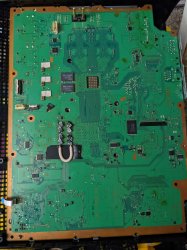
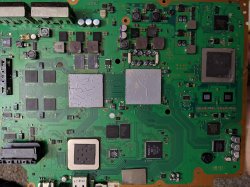
So, the reason I am posting today. I have replaced all 4 tokins on the RSX side only (none on the CELL). As you can see by my pics, I have both sides of the board bridged. On the back, I originally had both bridges, but the bridge wire was too fat for the RSX mounting plate and when I secured that plate all the way down, I got instant YLOD. I believe this to be a short, as when I take the bracket off, it boots for a few seconds (10-15) before turning off.

When it does boot, the fan isn't audible, but it IS spinning. I removed the innards from the chassis of the PS3 and made sure. After the first replacement of the caps, I was able to get into the XMB and replace the HDD with a larger 320GB one, before I got a temperature warning and it shut off. At this time, the PS3 was re-assembled with new thermal paste and proper mount on the RSX and CELL, so heatsink contact should have been adequate. When this happened, the fan didn't ramp up to keep the system from overheating, nor did it give that quick initial burst when booting the system.

Prior to installing the RSX side tantalums, the fan was behaving as expected. It was still YLOD-ing, but I got that initial burst. I replaced the PSU with another PSU from a CECHA01 that I have for parts and got the same results (fan barely spinning/overheating), so I am convinced it's not a PSU issue.

Note that in the pic below where the back group of caps only has 1 bridge, the other side came off and I didn't have the energy to setup my soldering station again to put it back on. I hope to get a thinner gauge wire (these are like 10-12 gauge) to replace these with, should I need to have both sides bridged. I just didn't want a fire haha!

With this information, I have a few questions:
1) Is it possible that my bridges are causing the fan issues I am experiencing?
2) Should I only bridge one side of the board?

Thank you everyone!
 

Attachments

  • ps3_back.jpg
    ps3_back.jpg
    4.2 MB · Views: 236
  • ps3_front.jpg
    ps3_front.jpg
    3.3 MB · Views: 875
Hello everyone! I am new here, but thanks to everyone, I was able to temporarily fix my CECHA01! So, first and foremost, I want to thank @Naked_Snake1995 for making the guide and everyone else in this thread for the possibility of fixing my PS3 permanently!

The caps that ended up working were the Panasonic 2R5TPE470M9. I originally used another brand that had an ESR of 150mΩ and that only "worked" because I had left the other 3 RSX Tokins in place and heated them up. Eventually it died again and I replaced those with the Panasonic ones. For anyone new looking on here, find replacement tantalum caps that have low ESR as you want that to be as close to the stock Tokins as possible.

So, the reason I am posting today. I have replaced all 4 tokins on the RSX side only (none on the CELL). As you can see by my pics, I have both sides of the board bridged. On the back, I originally had both bridges, but the bridge wire was too fat for the RSX mounting plate and when I secured that plate all the way down, I got instant YLOD. I believe this to be a short, as when I take the bracket off, it boots for a few seconds (10-15) before turning off.

When it does boot, the fan isn't audible, but it IS spinning. I removed the innards from the chassis of the PS3 and made sure. After the first replacement of the caps, I was able to get into the XMB and replace the HDD with a larger 320GB one, before I got a temperature warning and it shut off. At this time, the PS3 was re-assembled with new thermal paste and proper mount on the RSX and CELL, so heatsink contact should have been adequate. When this happened, the fan didn't ramp up to keep the system from overheating, nor did it give that quick initial burst when booting the system.

Prior to installing the RSX side tantalums, the fan was behaving as expected. It was still YLOD-ing, but I got that initial burst. I replaced the PSU with another PSU from a CECHA01 that I have for parts and got the same results (fan barely spinning/overheating), so I am convinced it's not a PSU issue.

Note that in the pic below where the back group of caps only has 1 bridge, the other side came off and I didn't have the energy to setup my soldering station again to put it back on. I hope to get a thinner gauge wire (these are like 10-12 gauge) to replace these with, should I need to have both sides bridged. I just didn't want a fire haha!

With this information, I have a few questions:
1) Is it possible that my bridges are causing the fan issues I am experiencing?
2) Should I only bridge one side of the board?

Thank you everyone!
Bridge only one side of the board,no need to bridge three jumpers,just one is sufficient.

I was doing some experiments with installations by scrapping a few points on a COK-002 board for cleaner installation, until i removed all the NECs from the RSX.

Suffice to say two jumpers didn't work,it would YLOD immediately, but one "magically" turned it on without any YLODing.

Remove the other two and leave one, one for the RSX and one for the CELL in the future.


Sent from my POCO F1 using Tapatalk
 
Bridge only one side of the board,no need to bridge three jumpers,just one is sufficient.

I was doing some experiments with installations by scrapping a few points on a COK-002 board for cleaner installation, until i removed all the NECs from the RSX.

Suffice to say two jumpers didn't work,it would YLOD immediately, but one "magically" turned it on without any YLODing.

Remove the other two and leave one, one for the RSX and one for the CELL in the future.

Thank you! So, I was removing one jumper at a time, so now the only 2 jumpers are on the RSX side. Upon power on, the system actually seems to stay on! It's not giving me a YLOD at the moment, so I think removing a single jumper fixed that issue. I am not opposed to removing another one, but I left it since it's currently/reliably booting into XMB.

It seems like there is one last bottleneck before being home-free. The system is overheating because the fan isn't spinning up... It DOES come on, but it's inaudible and doesn't change speeds. Any thoughts on what this might be? I wouldn't suspect it would have anything to do with having 2 instead of 1 jumper, but I can do that if I need to! Again, just didn't want to change it since it was booting haha!
 
Thank you! So, I was removing one jumper at a time, so now the only 2 jumpers are on the RSX side. Upon power on, the system actually seems to stay on! It's not giving me a YLOD at the moment, so I think removing a single jumper fixed that issue. I am not opposed to removing another one, but I left it since it's currently/reliably booting into XMB.

It seems like there is one last bottleneck before being home-free. The system is overheating because the fan isn't spinning up... It DOES come on, but it's inaudible and doesn't change speeds. Any thoughts on what this might be? I wouldn't suspect it would have anything to do with having 2 instead of 1 jumper, but I can do that if I need to! Again, just didn't want to change it since it was booting haha!

If you get into the syscon, you can test the 4 different temperature zones (or maybe it's only 3, I don't remember) and see if any of the sensors are not working correctly. I wonder if one of them is not responding, which is then not triggering the fan to speed up and maintain temperatures.
 
If you get into the syscon, you can test the 4 different temperature zones (or maybe it's only 3, I don't remember) and see if any of the sensors are not working correctly. I wonder if one of them is not responding, which is then not triggering the fan to speed up and maintain temperatures.

That would be great to be able to do that! How do I get to the syscon? I looked on Google and couldn't get an answer as to how to get there. It appeared to be a version of firmware? Is there a physical piece of hardware that I need to take a reading? Thank you!
 
That would be great to be able to do that! How do I get to the syscon? I looked on Google and couldn't get an answer as to how to get there. It appeared to be a version of firmware? Is there a physical piece of hardware that I need to take a reading? Thank you!

We have a whole thread dedicated to just that topic! https://www.psx-place.com/threads/f...syscon-first-steps-and-error-reporting.30100/ There's been some great work done in documenting how to access the syscon and what the different error codes mean and what the internal commands do.
 
We have a whole thread dedicated to just that topic! https://www.psx-place.com/threads/f...syscon-first-steps-and-error-reporting.30100/ There's been some great work done in documenting how to access the syscon and what the different error codes mean and what the internal commands do.

Alright, I finally got everything I needed to get into the syscon on the PS3! Pretty cool stuff in here! So, I am not sure how long these errors have been in here, but the ones that are on the page are:

A0093004 - RSX POW FAIL
A0801200 - CELL OVERHEATING
A0801002 - RSX VRAM POWER FAIL
A0801001 - BE VRAM POWER FAIL

So, if I power the system on, it WILL boot and stay in the XMB. However, since the fan is being weird, it doesn't cool the CELL, thus causing the A0801200 error. If it was able to boot, wouldn't those other 3 errors not be an issue or be old news? At one point, I'm sure those were problems, but for now, it seems to just be overheating and those are lingering? Really not sure on that one...

But to your previous post, I tried to run the commands:

tzone 0xB5E1 0xDD0C0000 - Show thermal zones
trp 0xAB2F 0xDD0C0000 get/set/getini/setini Temperature zones
hyst 0xAEF5 0xDD0C0000 get/set/getini/setini Temperature zones

I used the "get" subcommand for each of them that had it. All responses were "*** Invalid Argument ***"

When I run "lasterrlog" for the last error, it reports the A0801001 (BE VRAM POWER FAIL). Again, the PS3 boots to XMB and just overheats due to the lack of fan...

Any thoughts on this one? I am kinda stumped on this one... Thank you for your help! :)
 
Last edited:
That's very interesting! The fail history isn't kept for very long, and IIRC it's ordered with newest errors at the bottom. I think the internal command lasterrlog (from this page -- https://www.psdevwiki.com/ps3/System_Controller_Firmware) returns the latest error only. EDIT: my bad! I just noticed you ran that command already.

I'd think that the 3004 error is from when you had to replace your tokins -- you weren't getting enough power to the RSX, hence "pow fail". That would go along with the 1002 and 1001 errors -- not enough power to run the in-chip VRAM modules. I also wonder if you're getting 1001 because the overheating is causing other issues.

As for the tzone, unfortunately I don't have any of the temperature commands on my repair journal, but I know i was able to run it before. I don't have my ps3 hooked up my right now (working on different projects ATM), so this is all by memory. I think if you just run "tzone", without any parameters, it returns the zone ids, and then you run tmp [zone id from tzone] to get the temperature from the individual zone. It was either the tmp [zone id] command, or the tsensor [zone id] command.

I guess the bottom line is -- find the command that returns the zones, and then the command that you pass the zone to, to get the temp. I'm pretty sure none of the commands that uses "get" as a parameter is the droid you're looking for. That page I linked above was indispensable in figuring this stuff out.
 
One more thing! I'd love if you would send us the output of your bringup command. I want to see at what point during the start up process you're getting 1001 (if it's there during boot at all... it'll probably just come up later during overheating).
 
One more thing! I'd love if you would send us the output of your bringup command. I want to see at what point during the start up process you're getting 1001 (if it's there during boot at all... it'll probably just come up later during overheating).

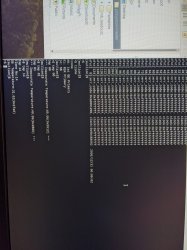
Ahh, great memory! I used those commands and got the temps for the CELL (85.06*C). Definitely overheating... I got the temps for the SB (south bridge?) (31.62*C) and RSX (40.50*C). So only the CELL is of concern.

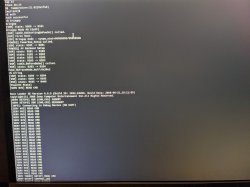
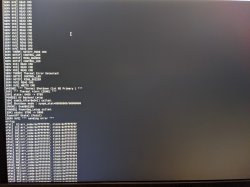
Of course! I used my RasPi as a Linux machine to get the UART process going and so it was much easier to take a pic from my phone. But the reads are very clear in the pics. I posted the pics of the bringup and the temperature readings. I had to have the bringup in 2 parts. It looks like it runs errlog by itself as a part of that? But it looks like the 1200 error is there, not the 1001. I take that as a good thing haha!

Another thing that I have included is the error log. So, I cleared the existing error logs to where everything was 0xffffffff. I assume this is just a placeholder of some sort until an error takes its place. I booted the PS3 until I got the overheat error. Now the only error on that is the CELL overheating one. I had previously done the lasterrlog command, but that only works if you only have a single error. So my test was to ensure/check if I was having multiple for whatever reason.
 

Attachments

  • PXL_20200925_012531676.jpg
    PXL_20200925_012531676.jpg
    5.6 MB · Views: 336
  • bringup1.jpg
    bringup1.jpg
    2.8 MB · Views: 337
  • bringup2.jpg
    bringup2.jpg
    2 MB · Views: 535
I had succeed in changing 3 PS3 (backward compatible) NEC tokin (8x) with 470uf (32x) and 6 wires as bridge. But I couldn't repeat the magic with a CHCEH model. The motherboard is smaller and the NEC tokin point is much shorter so I had to remove some solder mask to place in the capacitor. I still couldn't get solve the ylod issue. Any idea apart from NEC tokin, what else could I try out? I already test out (by taking parts from another working unit) power supply, Blu-ray, fan, HDD and still ylod for this unit.


Just to update, I somehow manage to confirm, capacitor replacement (tantalum) might not work with newer PS3 with 65nm process (eg. CHCEH model). I bought some NEC Token (0E128) from Aliexpress and replace all 8 pcs today and PS3 came back to life (have to remove 32 capacitor and used some solder paste to fix in the NEC token).
Newer process might need "cleaner" current to work thus direct capacitor connection might not work. I had tried 4 difference capacitor combination before deciding to test out replacing NEC Token.
 
Just to update, I somehow manage to confirm, capacitor replacement (tantalum) might not work with newer PS3 with 65nm process (eg. CHCEH model). I bought some NEC Token (0E128) from Aliexpress and replace all 8 pcs today and PS3 came back to life (have to remove 32 capacitor and used some solder paste to fix in the NEC token).
Newer process might need "cleaner" current to work thus direct capacitor connection might not work. I had tried 4 difference capacitor combination before deciding to test out replacing NEC Token.

I also had an experience where my new tantalum caps weren't working to resolve the YLOD. I strongly believe that the issue was the ESR on these caps was 150mΩ, which is WAY higher than the stock NEC caps. The Panasonic 2R5TPE470M9 ones worked/are working to resolve the YLOD for me and they have a ESR of 9mΩ. Much closer to stock. Granted I have a CECHA01, our models both use the NEC Tokin 0E128 which also have a pretty low ESR. Just my experience, but I am happy to hear you got yours working!
 
I also had an experience where my new tantalum caps weren't working to resolve the YLOD. I strongly believe that the issue was the ESR on these caps was 150mΩ, which is WAY higher than the stock NEC caps. The Panasonic 2R5TPE470M9 ones worked/are working to resolve the YLOD for me and they have a ESR of 9mΩ. Much closer to stock. Granted I have a CECHA01, our models both use the NEC Tokin 0E128 which also have a pretty low ESR. Just my experience, but I am happy to hear you got yours working!

I too tired 2R5TPE470M9 before but they didn't work on CHCEH models. But 2R5TPE470M9 worked on my 3 set of backward compatible PS3 (CECHA and CECHE models). So to be safe, I think getting replacement token and some solder paste might be the safest bet to get rid of YLOD since tantalum might be a hit or miss (subjected to the PS3 processors).
I ordered more NEC Token from Aliexpress and plan to change all 3 set back to NEC token when I have the time.
 
Back
Top