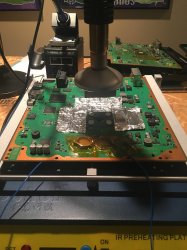
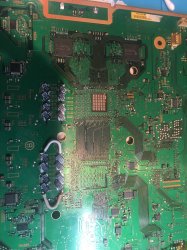
PS3 (Research/Experimental) - NEC/TOKIN Capacitors Replacement - YLOD

I'm going to try attaching these with the larger tantalum caps, just to silence that stupid voice in me whining, "but you didn't use the caps the OP recommended."

I absolutely ran in to a set of caps that had YLOD when I was testing out different capacitance and ESR totals on a reballed system somewhere around a hundred pages ago. And it went away when I switched to the next set. Even getting only trusted name brands from Mouser. All within established specs. So, yeah, there's some weird gremlin yet to be discovered somewhere, even if it's just "sometimes you get shitty caps even from trusted companies and sources."

Also, I just keep putting off experiments this week. Finally able to have some patio parties again and actually hang out with people like covid doesn't exist, and letting the supercharger whine on some twisty back roads during the day. I'll get back to non-money work soon.
 
Last edited:
.........and my car is totalled. Some jackass turned in front of me like I was fucking invisible.

RIP to the greatest car that ever existed. A 1996 Oldsmobile LSS with the supercharged L67 option. Green and ugly, like Grandpa's shit. The perfect sleeper. Torque for days to move sideways instead of forwards. Only 1400 made. Haven't seen another one for sale in over 5 years.

And now his watch is ended.
 
.........and my car is totalled. Some jackass turned in front of me like I was fucking invisible.

RIP to the greatest car that ever existed. A 1996 Oldsmobile LSS with the supercharged L67 option. Green and ugly, like Grandpa's shit. The perfect sleeper. Torque for days to move sideways instead of forwards. Only 1400 made. Haven't seen another one for sale in over 5 years.

And now his watch is ended.

Dude, that stinks. You ok, though?
 
Oh yeah, totally fine. My better half is fine, too, even though my airbags momentarily lit her on fire. Low speed accident. But there ain't no saving my car. It's unbelievably rare, but it's also only worth like $1500.
 
This right? All tokens replaced by one in the cpu. Bridged the gpu on the bottom. Still ylod
PS3#7 Continued...
(Final Results on the Tokin removals and TaPol array)​

I'll skip to the results. From what I can tell, the O-scope is saying everything is fine. That the TaPol array is working well and the noise is well controlled. If I saw this result on a console, I would say it's tokins were fine. But that pesky 80 1002 error is still randomly killing the console for no apparent reason?! I still have some ideas, but let's backup and document the story so far.
results-table-png.31405

View attachment 31681
I'm not going to cover everything or post every picture and SYSCON, just some example to make the points I think are worth mentioning.
Notice that the axis are zoomed in on 20mV/Div in this startup sequence. I started defaulting to 50mV/Div later. Anyway, this would look much thinner at 50mV/Div. Keep that in mind.
View attachment 31712
Here is the 60Hz signal. First notice how little noise there is on the signal. Also, I want you to pay attention to the length of time between signals. This working console has 6-7ms signal followed by 10ms plateau before the next signal. The pulses where the noise is larger I'm calling "during signal" noise and the plateau between signals I'm calling the "between signal" noise. The length of time between the signals is 16.67ms (1/60 of a second or 60Hz). Here's my crackpot assertion, I purpose this "signal" is the current frame being processed (NTSC). The time between signals is just unused idle time. The work is done during the signal. This will become important once you see the other pics. I've noticed the signal length increase with more noise on the RSX. I think that is because the noise is causing data mismatches that the CPU/RSX have to re-process in order to finish each frame. So the more noise the more mismatches, likewise the longer the "during signal" and shorter the idle time "between signal." So the between signals idle time is kinda like a buffer (or life meter). If the noise is too high, there are so many mismatches that it takes too long to process a frame and the next frame needs processed before the last frame was finished. When there is no more idle time between signals = YLOD!
View attachment 31711

Notice how low the noise is. RSX = 10mVpp, Cell = 40mVpp. No bad waveform.
View attachment 31713
You can see there is excessive ripple and noise. The startup sequence has a noticeably fat signal compared to the cpu. Bad wave form on both the CPU (yellow) and GPU (Blue). I couldn't get a pic of the 60Hz signal because it starts after the startup sequence and the console had a 4.5s YLOD. I don't recall if that was long enough for it to show up. Unfortunately in subsequent tests where I could have gotten a pic of it, I was too focused on the target plateau and ripple voltage. There were a number of tests where I could have gotten a pic of the 60Hz signal but didn't. I'm kicking myself now that I've found something interesting in the length of time between signals.
View attachment 31704

Bad wave forms...
View attachment 31702 View attachment 31703
Startup sequence looks much better, albeit a bit noisy...
View attachment 31707

60Hz signal has much more noise than a stock working console and the idle time between signals is about 3-4ms vs 10ms on the stock console. So the signals are taking 14-15ms when they should be taking about 6-7ms. If my crackpot idea is correct, then the noise is causing enough data mismatches to double the processing time of each frame...and that's at idle, not in game. Once you put the console under load and test it's processing ability, I'd expect that's not enough room to prevent a YLOD. And it wasn't. The YLOD occured in the menuu of a game and while rebuilding the HDD from a previous YLOD. So the system was quite unstable like this.
View attachment 31705 View attachment 31706
GPU Noise looks good on startup, best I'd seen yet...
View attachment 31709

Idle time between signals increased to 8ms, but the noise between signals still looks to be significantly higher than the stock working console. The console still YLODs in game, but seems to do better. It's still not stable. View attachment 31708

The target plateau noise is much lower, but still not as good as the stock working console with it's NEC/TOKINs. I'm starting to think that these TaPol caps are just not up to the task. Or that there is something else that's causing a power failure on the RSX that has nothing to do with the bulk filter. Perhaps dodgy VRM or MOSFET. Maybe a Tantalum filtering caps on the memory or VDDIO voltages...IDK. Gremlins, basically!
View attachment 31710
Yes, I'm beginning to think there is something else going on here. Gremlin VRM or leppercons dancing on the die...IDK. What I do know is that the SYSCON says...
Code:
[SSM] *** Power Fail RS ***
[SSM] state: 0400 -> 0700
[POWSEQ] AV Backend Letup
[SSM] ssmCb_AfterBeOn() called.
[SSM] Shutdown mode : syspm_stat=00000000/00000000
Wait WmMcCom_DeadEvent timeout
[ERROR]: 0xa0801002
[POWSEQ] PowerSeq_Letup called.
[SSM] state: 0700 -> 0600
(PowerOff State) (Fatal)
lasterrlog
Last Error Code:0xa0801002, Time:0x0b48a55b  2005/12/31 02:11:39
I would be curious to find out what your 1001 error triggers? I assume that "RS" stands for Reality Synthesizer, but it could be the Reset Signal too. You need internal command access for this and the console needs to be turned on with "bringup" command so the syscon is logging in the backround. Then after the YLOD type "lasterrlog" and it'll give you the full readout like the above.

I still want to try removing all the 270uF TaPol B case caps and using those SoulKilla PCB's with 470uF TaPol caps. These...
However, I noticed that the - rails don't line up perfectly...View attachment 31714 View attachment 31715
...and the + rails don't have plating down the edge.View attachment 31716 I still think I can make them work though. With the 1.9mm height caps I got they are 2.9mm thick, which is perfect to fit under the RF shield without touching. Also, the double thick copper planes are more than enough to handle the current.
I'm going to try attaching these with the larger tantalum caps, just to silence that stupid voice in me whining, "but you didn't use the caps the OP recommended."
 

Attachments

  • CD3A3B83-0288-465F-9974-68E1AAE2EC56.jpeg
    CD3A3B83-0288-465F-9974-68E1AAE2EC56.jpeg
    1.7 MB · Views: 601
  • 826602EC-5B76-4CF6-BC20-1D25984C2F1C.jpeg
    826602EC-5B76-4CF6-BC20-1D25984C2F1C.jpeg
    2.4 MB · Views: 543
No, you gotta bridge the CPU side too. GPU and CPU sides are electrically isolated. So it would Instant YLOD the way you have it.

I would bridge both sides of the board and shorten the bridge wire as much as possible without allowing a short. So 4x bridge wires on CPU and 4x on GPU (2 on each side of both). That will evenly distribute the current across the + rails and make the distance the current has to travel to ground through the caps the same. This mitigates any differences in inductance the bridge wires introduce and spreads the current load across more conductors (reducing heat buildup and resistance). It may not be 100% necessary, but it's good practice.

Be sure there are no shorts and that the TaPol caps are soldered in with good shiny welds. If it looks dull or blobby, use some flux...heat with iron...count to 3...and release. If it takes longer than 3 seconds to heat the area (because of the tip your using or heat, or both) then try a different tip. I like 340C with a T12 C4 (KSGER iron), it has a large surface area to impart its fury. Works better than any other tip I've found for this console. It takes some creative angling to make work, but it does.
 
I'm a little confused. So I need 2 more bridges on bottom and 2 more on top cpu and 2 on top gpu?

No, you gotta bridge the CPU side too. GPU and CPU sides are electrically isolated. So it would Instant YLOD the way you have it.

I would bridge both sides of the board and shorten the bridge wire as much as possible without allowing a short. So 4x bridge wires on CPU and 4x on GPU (2 on each side of both). That will evenly distribute the current across the + rails and make the distance the current has to travel to ground through the caps the same. This mitigates any differences in inductance the bridge wires introduce and spreads the current load across more conductors (reducing heat buildup and resistance). It may not be 100% necessary, but it's good practice.

Be sure there are no shorts and that the TaPol caps are soldered in with good shiny welds. If it looks dull or blobby, use some flux...heat with iron...count to 3...and release. If it takes longer than 3 seconds to heat the area (because of the tip your using or heat, or both) then try a different tip. I like 340C with a T12 C4 (KSGER iron), it has a large surface area to impart its fury. Works better than any other tip I've found for this console. It takes some creative angling to make work, but it does.
 
I'm a little confused. So I need 2 more bridges on bottom and 2 more on top cpu and 2 on top gpu?
You need to see why are you having a YLOD in the first place.

Get 3.3v serial USB adapter which costs 2$ and you will not need to be so blind anymore. The process can be done in 10 minutes and without risk at all. If it looked hard, look again. It's not difficult. I promise.

I write this in addition to main guide (work in progress) by db260179
https://www.psx-place.com/threads/f...syscon-first-steps-and-error-reporting.30100/

I will try explain step by step, as easy as I can explain it.
Really this can be done in 10 minutes.

First of all let's make clear what we are doing:
We are simply running a python script that will let us communicate with the PS3 SYSCON, using a serial (COM) port.

We can thank guys like 'Major' and 'zecoxao' for making this possible in the first place. We are just running their script.

So, what do we need in order to run this script?

Python 2.7.18, with additional modules pycryptodome and pyserial

For Windows users (most people) this is what you can do:

-First install python 2.7.18 (get from python.org)
-When you run the installer, you can check the last box (it will make things easier; lets you run python commands from any location)
Once it's installed, you should already be able to run python commands and scripts. How? Directly from the windows command prompt, you can type: python script.py

But our particular script relies on two additional modules. (If you try without them, it will tell you the problem)
But don't worry,
You can download and install them automatically by typing:
pip install pycryptodome
pip install pyserial

That's it. Now you should be able to run the magic script. Just specify the COM port and the syscon mode at the end.
For example:

python uart_script.py COM4 CXR

What COM port?
This is where the USB to serial 3.3v adapter comes in handy.
When you plug it into your computer, it should show up in device manager as a COM port. If not, you need to install drivers for it.
This will depend on your particular computer and dongle.

What is CXR? This will depend on the syscon you are trying to communicate with. SW is for newer (SherWood) Syscons. CXR(F) for the older BGA models
Further details in the PDF

If all is correct, no errors will come up immediately. Even without any cables connected.
You can then type AUTH, and will get
"Auth1 response invalid"

Of course, to get past this, everything has to be connected properly. Even then it may take a couple tries in a row. Eventually you should get:
Auth successful

(If you are still getting "Auth1 response invalid, first simply try again a couple times, turn the ps3 power off and on, if not, swap Rx and Tx wire around and repeat. Check the connections etc... It should work in the end)


That's it for now

Cheers
 
Last edited:
What's a 3.3v serial usb? Never heard of it. You have a link where to buy?

You need to see why are you having a YLOD in the first place.

Get 3.3v serial USB adapter which costs 2$ and you will not need to be so blind anymore. The process can be done in 10 minutes and without risk at all. If it looked hard, look again. It's not difficult. I promise.

Cheers
 
What's a 3.3v serial usb? Never heard of it. You have a link where to buy?
This is the one I got and it works. 2$ worldwide.

US $1.14 | High Quality FT232RL FT232 FTDI USB 3.3V 5.5V to TTL Serial Adapter Module Mini Port
https://a.aliexpress.com/_vLbCPR

FT232RL is the name of the main IC.
But many others will work too. Get what's most available to you. These are widely used for many other applications. They are COMmon. Just make sure it's 3.3v.
 
Last edited:
I'm a little confused. So I need 2 more bridges on bottom and 2 more on top cpu and 2 on top gpu?
The YLOD is normal if you don't connect the + rails. You only did it on the GPU side. You also have to do it on the CPU side. Preferrably on both sides of the motherboard too. That's what I mean.
 
sounds good. I'll connect and test. Also when I test the mohms it shows like 02.3 on gpu and like 05.9 on cpu. What does this mean. This is for each capacitor on I have soldered.
The YLOD is normal if you don't connect the + rails. You only did it on the GPU side. You also have to do it on the CPU side. Preferrably on both sides of the motherboard too. That's what I mean.
 
I'm sorry, are you talking about ESR or Resistance?

If you're talking about ESR, then there is no easy way for you to accurately measure the ESR of these caps. So whatever reading you get, just ignore it.

Resistance +/GND on the tokins is kinda of like a life meter for the RSX/CPU. Anything over 1 Ohm is okay, less than that means you have a bridge somewhere or the problem lies with the processor. Double check your soldering. Clean off flux residue THOROUGHLY. A resistance reading less than one can sometimes be restored by a reball/reflow, but sometimes the chip is just toast.
 
Are there any good video tutorials you can link to how to do this?

You need to see why are you having a YLOD in the first place.

Get 3.3v serial USB adapter which costs 2$ and you will not need to be so blind anymore. The process can be done in 10 minutes and without risk at all. If it looked hard, look again. It's not difficult. I promise.

I write this in addition to main guide (work in progress) by db260179
https://www.psx-place.com/threads/f...syscon-first-steps-and-error-reporting.30100/

I will try explain step by step, as easy as I can explain it.
Really this can be done in 10 minutes.

First of all let's make clear what we are doing:
We are simply running a python script that will let us communicate with the PS3 SYSCON, using a serial (COM) port.

We can thank guys like 'Major' and 'zecoxao' for making this possible in the first place. We are just running their script.

So, what do we need in order to run this script?

Python 2.7.18, with additional modules pycryptodome and pyserial

For Windows users (most people) this is what you can do:

-First install python 2.7.18 (get from python.org)
-When you run the installer, you can check the last box (it will make things easier; lets you run python commands from any location)
Once it's installed, you should already be able to run python commands and scripts. How? Directly from the windows command prompt, you can type: python script.py

But our particular script relies on two additional modules. (If you try without them, it will tell you the problem)
But don't worry,
You can download and install them automatically by typing:
pip install pycryptodome
pip install pyserial

That's it. Now you should be able to run the magic script. Just specify the COM port and the syscon mode at the end.
For example:

python uart_script.py COM4 CXR

What COM port?
This is where the USB to serial 3.3v adapter comes in handy.
When you plug it into your computer, it should show up in device manager as a COM port. If not, you need to install drivers for it.
This will depend on your particular computer and dongle.

What is CXR? This will depend on the syscon you are trying to communicate with. SW is for newer (SherWood) Syscons. CXR(F) for the older BGA models
Further details in the PDF

If all is correct, no errors will come up immediately. Even without any cables connected.
You can then type AUTH, and will get
"Auth1 response invalid"

Of course, to get past this, everything has to be connected properly. Even then it may take a couple tries in a row. Eventually you should get:
Auth successful

(If you are still getting "Auth1 response invalid, first simply try again a couple times, turn the ps3 power off and on, if not, swap Rx and Tx wire around and repeat. Check the connections etc... It should work in the end)


That's it for now

Cheers
 
So the individual caps are solder on the positive and neg rails. When I touch the positive prong to positive solder joint of the cap and negative to negative solder joint on the rail, I get a reading of about 02.9mohms for gpu caps each. And about 05.9 for cpu caps each. Both sides. What does this mean? My multimeter is set to 200 ohms. When I press the prongs together it reads like 01.0.
I'm sorry, are you talking about ESR or Resistance?

If you're talking about ESR, then there is no easy way for you to accurately measure the ESR of these caps. So whatever reading you get, just ignore it.

Resistance +/GND on the tokins is kinda of like a life meter for the RSX/CPU. Anything over 1 Ohm is okay, less than that means you have a bridge somewhere or the problem lies with the processor. Double check your soldering. Clean off flux residue THOROUGHLY. A resistance reading less than one can sometimes be restored by a reball/reflow, but sometimes the chip is just toast.
 
PS3 #7 - Part 18
(12x 470uF 2.5V 7mOhm 2R5TPE470M7 TaPol Array on the RSX using Soulkilla's PS3 TCIB v1 PCB)
...continued from part 17 here.
Before I get to the new 470uF array, I need to mention that I decided to fix the other damaged inductor...
L6305 1.jpg
L6305 2.jpg
L6305 3.jpg
This inductor looked a little scraped but otherwise undamaged. So I left it alone. However, since I couldn't get the noise on the RSX down as much as I though I should have and was still getting ***Power Fail RS *** 80 1002 SYSCON errors, I thought I might as well try replacing it. You can see that it was kinda pushed into the MOSFET and both have their pins bent. They were still making contact, but I replaced the inductor and reflowed the MOSFET pins with frsh solder/Flux. Long story short the noise was the same afterwards, and it made no difference.

Apparently the damage was just cosmetic after all, like we thought. That's good, because it means the results from before are still valid, but bad because it didn't fix the RSX noise. No, I'm going to have to eat crow and suspect that my B case 270uF TaPol array isn't up to the job. With that in mind I pushed forward and removed the 270uF arrays from the RSX (I left the CPU array in place). Then I installed the 12x 470uF TaPol...
Side A.jpg
Side B.jpg
Side B bad soldering.jpg


So, first let me apologize for the soldering. This is a prototype PCB that needs improvement. Firstly, the - rail are a bit too wide...
tantalum-pcb-rail-misaligned-jpg.31714

tantalum-pcb-rail-vias-plated-jpg.31715

...but the plated VIAs that connect them on the edge wick the solder underneath the edge just fine. With flux I didn't have problems keeping the bead on the - rail. No issues bridging to the + rail. However the + rail was where the prototype needs a design change. The + plane along the edge of the PCB doesn't extend down the side of the PCB...
tantalum-pcb-no-plating-jpg.31716

...that is where I had trouble. Trying to bridge the + rail up to the edge of the pad is difficult, it doesn't want to adhere. I resorted to using a bit of 22AWG solid core wire to bridge the gap and get the solder to adhere to both the rail and edge. I had to really blob it on there and soaked WAY TOO MUCH HEAT into the motherboard to get them installed. It looks pretty bad, but it's electrically sound. The resistance was the same after they were installed as it was with the 270uF arrays I was testing before. So there are no bridges and the area is clean. But the heat needed to install proved to be a problem and I'll get back to that later. This workaround could be solved with plated VIAs along the + rail edge so that the solder has something to wick to like was done for the - rail. Hopefully the maker of the PCB makes those changes, or someone here that's good with eagle/KiCAD can work something up.

What about the results?!
The results were mixed. First the console experienced an instant YLOD (0.5s). However the startup sequence was different than I have ever seen before...
YLOD Startup Sequence 1.png
YLOD Startup Sequence 2.png

...the RSX (Blue) Started fine rising up to it's normal 1.3v, but then staircased down to about 1.1v?! Since I discovered it, I'm going to name it the "Stairway to Hell." The SYSCON complains of a 40 3034 and a 90 2120.
Code:
Microsoft Windows [Version 10.0.18363.1316]
(c) 2019 Microsoft Corporation. All rights reserved.

C:\Users\HTPC>CD C:\Users\HTPC\Desktop\PS3\SYSCON

C:\Users\HTPC\Desktop\PS3\SYSCON>python ps3_syscon_uart_script.py COM4 CXRF
>$ AUTH
Auth successful
>$ bringup
bringup
[SSM] state: 0000 -> 0101
Bringup Mode #0 (0xFF)
[SSM] ssmCb_OnStartingBePowOn() called.
[SSM] First Boot.
[SSM] Bringup mode : syspm_stat=00000000/00000000
[POWSEQ] PowerSeq_Setup called.
[SSM] state: 0101 -> 0201
[POWSEQ] AV Backend Setup
[SSM] state: 0201 -> 0102
[SSM] state: 0102 -> 0202
[SSM] state: 0202 -> 0103
>$ lasterrlog
[SSM] state: 0103 -> 0203
[SSM] ssmCb_BeforeBeOn() called.
[SSM] state: 0203 -> 0104
Psbd_SbTransMode_Half:0x20e2
[POWERSEQ] Error : BitTraining RSX:RRAC:BX0:BX:FLEXIO_ID
[SSM] state: 0104 -> 0304
[SSM] ssmCb_AfterBeOn2() called.
[SSM] PowSeq Fail : Detected !
[SSM] state: 0304 -> 0700
[POWSEQ] AV Backend Letup
[SSM] Shutdown mode : syspm_stat=00000000/00000000
[ERROR]: 0xa0403034
[ERROR]: 0xa0902120
[POWSEQ] PowerSeq_Letup called.
[SSM] state: 0700 -> 0600
(PowerOff State) (Fatal)
lasterrlog
Last Error Code:0xa0902120, Time:0xffffffff
[mullion]$
>$ errlog
errlog
ofst[116]:err_code:0xffffffff, clock:0x0b489140  2005/12/31 00:45:52
ofst[120]:err_code:0xa0801002, clock:0x0b488aec  2005/12/31 00:18:52
ofst[124]:err_code:0xa0801002, clock:0x0b488cec  2005/12/31 00:27:24
ofst[  0]:err_code:0xa0801002, clock:0x0b4930c6  2005/12/31 12:06:30
ofst[  4]:err_code:0xa0801002, clock:0x0b495ad9  2005/12/31 15:06:01
ofst[  8]:err_code:0xa0801002, clock:0x0b489a7f  2005/12/31 01:25:19
ofst[ 12]:err_code:0xa0801002, clock:0x0b48988c  2005/12/31 01:17:00
ofst[ 16]:err_code:0xa0801002, clock:0x0b4894e8  2005/12/31 01:01:28
ofst[ 20]:err_code:0xa0801002, clock:0x0b488bc3  2005/12/31 00:22:27
ofst[ 24]:err_code:0xa0403034, clock:0xffffffff
ofst[ 28]:err_code:0xa0403034, clock:0xffffffff
ofst[ 32]:err_code:0xa0403034, clock:0xffffffff
ofst[ 36]:err_code:0xa0403034, clock:0xffffffff
ofst[ 40]:err_code:0xa0403034, clock:0xffffffff
ofst[ 44]:err_code:0xa0403034, clock:0xffffffff
ofst[ 48]:err_code:0xa0403034, clock:0xffffffff
ofst[ 52]:err_code:0xa0403034, clock:0xffffffff
ofst[ 56]:err_code:0xa0403034, clock:0xffffffff
ofst[ 60]:err_code:0xa0403034, clock:0xffffffff
ofst[ 64]:err_code:0xa0403034, clock:0xffffffff
ofst[ 68]:err_code:0xa0403034, clock:0xffffffff
ofst[ 72]:err_code:0xa0403034, clock:0xffffffff
ofst[ 76]:err_code:0xa0403034, clock:0xffffffff
ofst[ 80]:err_code:0xa0403034, clock:0xffffffff
ofst[ 84]:err_code:0xa0403034, clock:0xffffffff
ofst[ 88]:err_code:0xa0403034, clock:0xffffffff
ofst[ 92]:err_code:0xa0403034, clock:0xffffffff
ofst[ 96]:err_code:0xa0403034, clock:0xffffffff
ofst[100]:err_code:0xa0403034, clock:0xffffffff
ofst[104]:err_code:0xa0403034, clock:0xffffffff
ofst[108]:err_code:0xa0403034, clock:0xffffffff
ofst[112]:err_code:0xa0902120, clock:0xffffffff
[mullion]$
>$
Now the 40 3034 is a tell tale sign that the BGA defect has returned!!! Now we see why all the heat that soaked into the area right next to the RSX BGA is a bad thing! Had there been plated VIAs to allow the solder to wick down to the + rail I wouldn't have needed to soak so much heat into the area to get the PCB installed. So I don't recommend them at this time. It needs a design change to make it safe to install. This is also the reason I don't recommend just installing the TaPol caps directly to the rails. It's hard to do without soaking too much heat into the area.

The 90 2120 is common with BGA defects too. So aparently I caused a BGA to pop...sigh. The syscon confirms that there is an RSX bittraining error that occurs during the startup sequence and that the HDMI error occurs while shutting down. That might make sense if it's expecting some communication that's being disrupted by the broken BGA connection.

There's nothing wrong with the HDMI encoder. I know this because I was playing games on this console before and the video was fine. Also, because I performed the pressure test to confirm a BGA defect and got the console to boot and play games perfectly for hours last night! NBA live for 30minutes and GT6 for 30minutes. I turned it off and let it cool, then repeated the procedure 3 more times. This morning I fired it up again and the YLOD has returned with the same error codes.

So while the defect was deformed by the pressure test and the board was warm, it'll worked flawlessly. This is good because it gave me to oppritunity to get some O-scope picrures of the 60Hz signal and test to see if the new capacitor array did the trick. First here's the before
o-scope-l6202-replaced-4x-tapol-arrays-on-rsx-startup-seq-less-noise-more-stable-png.31707
o-scope-l6202-replaced-4x-tapol-arrays-on-rsx-much-less-noise-noticably-more-stable-png.31706
o-scope-l6202-replaced-4x-arrays-parasite-clock-signal-maybe-png.31705
And here is the 470uF TaPol PCB array...
Working Startup Sequence.png
Working Target Plateau.png
Working 60Hz Signal.png
The improvement to noise is clear. The RSX noise on the target plateau dropped from 30mVpp to 10mVpp. The noise in the 60Hz signal also improved greatly. So I can confirm that the 470uF TaPol 2R5TPE470M7 caps are superior to the 270uF caps I used. In testing the best I could get was a Random YLOD with the 270uF caps and now the console is stable in GT6 with the 470uF. So this data has proven me wrong! I don't understand, they should work fine, but the noise is clearly lower and the console is clearly more stable. I cannot argue with the data. I can no longer recommend the 270uF B case caps. I have no data to suggest they will work. Instead the 470uF are the way to go, just as the OP suggested.

Now there is just the matter of the BGA defect. I know that there is one, because I can use the pressure test to get the console to start and work flawlessly. But once it fully cools overnight, the YLOD returns. I think a reflow is in order. However, since this console has been through so many reflow cycles already, there is a good chance another one will kill it. I don't know what to do.

Continued in part 19 here...
 
Last edited:
So the individual caps are solder on the positive and neg rails. When I touch the positive prong to positive solder joint of the cap and negative to negative solder joint on the rail, I get a reading of about 02.9mohms for gpu caps each. And about 05.9 for cpu caps each. Both sides. What does this mean? My multimeter is set to 200 ohms. When I press the prongs together it reads like 01.0.
Okay, so the resistance +/GND is 0.0029 Ohms? If so that means you have a bridge. Remove the caps and start over, being extra carful not to bridge.

If I may make a suggestion. Try flipping the caps upside down and soldering a restor leg across the tantalum pads. Then bend the resistor legs to make contact with the rails. This reduces the amount of heat you have to dump into the motherboard and makes it MUCH EASIER to install/removed the caps. Also it's easier to prevent bridges and to make the bridge wires fit. Just a better idea all around.

Here's what I mean, only you would do it with 3x470uF instead of the 270uF I used. By the way, to anyone I would reccomend this is the way you should install the caps. This is the safest, easiest, and most reversable way...
c6232-jumper-jpg.31199

Just make sure when you put the RF shield back on that the contacts don't short to it! Electrical tape or low profile caps work.
 
Last edited:
Instead the 470uF are the way to go, just as the OP suggested

lol! what a journey. Good job, though! We definitely have information now than when we began, namely:

* a fool-proof way to identify the problems (via syscon errors)
* a definitive recommendation on caps to use (https://www.digikey.com/en/products/detail/panasonic-electronic-components/2R5TPE470M7/4204355)
* a not-quite-ready-but-almost-good drop-in board to replace the tokins with (IF AND WHEN they're needed!)

It's a shame that the 803034 returned, but the fact that you were able to play for hours at a time (after a pressure tests) confirms the quality of the tokin replacement. Sounds like you didn't even need those additional MLCCs, after all.

What do you think are the next steps, then?
 
I think a reflow is needed. I have BGA flux and a setup that'll work. The temperature for leaded solder is lower, but I don't trust the RSX. If the RSX needs to be replaced, I don't trust myself to reball it. It's been through hell and needs to go through more.
...Thirdly, @RIP-Felix there is a very good chance that the board now has a crack on the CPU considering the damage it took. If it's still unstable after you finish all of the replacement, then send it back and I'll reball the CPU and send it back double boxed. Or if I can fix your board when I get to it, I'll trade you back.
Maybe I can take you up on that offer. It would be nice to know that the CPU has fresh leaded solder too, even if that's not usually an issue. One problem I can foresee is that the solder on the RSX TaPol array is going to flow and have to be reset, which will be a PITA since the + rails are hard to connect without plated vias along those edges.

Also, @squeept I'm glad you're alright. I just read about your accident! Shame about the car.
 
Back
Top