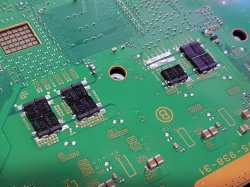
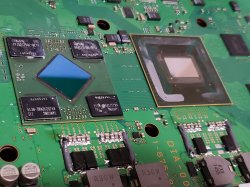
PS3 (Research/Experimental) - NEC/TOKIN Capacitors Replacement - YLOD

I apologize, I have absolutely no excuses for my lack of documentation. I was being lazy in that regard, and I understand how that can be harmful with this kind of research. I promise I have no intention of defending the OP, I am only interested in finding a good replacement for these damn caps. Whether or not they're a common issue is something i'm still unsure of, and would like to find out for myself. When I revive a system, I don't exactly consider that a success, atleast not anymore. All I did was get it to turn on again, what I want to see is these things STAY on well into the future.

When I initially found this repair guide, I got excited and tried doing this repair on a bunch of broken ebay systems i got with any random caps that could meet the capacitance and voltage rating needed. I admit I was sloppy, and a complete amateur. After that backfired, I backed off for over a year and lurked this thread to see what other more knowledgeable people than me had to report on this repair before I touched another system. In February I began doing this repair again with low ESR SP-Caps. I never included MLCC's in any of the recent ones till the last one I did which is what I reported today. I intend on using that same combination of SP-Caps and MLCCs for future systems.

From now on i'll record each console's serial number, prior issue before being worked on, cap details and the end results. I'll also look into that syscon thing for the sake of science, tho I won't be able to get that going till the dongle actually arrives. I'll also back trace my steps and record the details on my non MLCC repairs. I took pictures of each board so i'll know the details behind each one, tho i'll have to give each one a nick name since I never recorded their serial number.

To clarify the issues with the 7 recent consoles i've fixed, they all would YLOD within 2-3 seconds after pressing the power on button. 6 are CECH A's, and 1 is a CECH-E.

The 2 I couldn't fix were both CECH-A's. One would YLOD in less than a second, the other would YLOD in about 2 seconds like the others.

Again, I apologize for my sloppiness. I'd like to actually contribute to the on going research being carried out here and i'd like to thank you for calling me out. I wasn't quite aware of how much I deserved that till I actually got it lol.

Lastly, may I ask for an alternate link to one of those dongles for syscon? I don't like ordering from aliexpress because I always wait 2+ months for my orders to arrive.
Dude, I admire your restraint. Re-reading that post I was being a dick. I must have woke up on the wrong side of the bed. I apologize for the delivery, even if I still agree with the criticism. I needed to get it off my chest, but I didn't need to be a dick about it. Thanks for being gracious about it, that's a credit to your character. I only hope I can be so gracious if someone put's me on blast the same way.

Here's the USB to TTL Serial adapter I use. $7.99 on amazon. Works great.
 
Well, the RSX is lead now and it's fresh, so you can keep the temps safe and low if you want to try to reflow it yourself.
I wanted to see what you had to say before I gave it a try. I'm reasonably sure I can do it, but I'm just worried about the warping. I think the trouble I had last time was due to drafts because of my exhaust system. I don't want to breath the flux fumes (Cancer), but I'd need a tube or something I could position over the top of the motherboard near the chip that doesn't draw air across the bottom heater under the MB. IDK, maybe I've just built it up too much in my head and it'll be fine.
 
Dude, I admire your restraint. Re-reading that post I was being a dick. I must have woke up on the wrong side of the bed. I apologize for the delivery, even if I still agree with the criticism. I needed to get it off my chest, but I didn't need to be a dick about it. Thanks for being gracious about it, that's a credit to your character. I only hope I can be so gracious if someone put's me on blast the same way.

Here's the USB to TTL Serial adapter I use. $7.99 on amazon. Works great.

It's all good, i just hope my future updates will be beneficial to you and the others on here! And i just ordered that dongle with 2 day shipping. I look forward to having fun with it. Thanks!
 
Dude, I admire your restraint. Re-reading that post I was being a dick. I must have woke up on the wrong side of the bed. I apologize for the delivery, even if I still agree with the criticism. I needed to get it off my chest, but I didn't need to be a dick about it. Thanks for being gracious about it, that's a credit to your character. I only hope I can be so gracious if someone put's me on blast the same way.

Here's the USB to TTL Serial adapter I use. $7.99 on amazon. Works great.

Lolz, dont worry I too get frustrated with half arsed comments, but its the nature of beast. And as sampsonay has apologised i think he was happy to get them working.

Re buying stuff, its too expensive buying from aliexpress now due to tax changes in the UK, so i now have to go to ebay or amazon.
 
Okay...lol. That makes perfect sense now. Yeah that's normal behavior. That fuse is placed between the +12V_main and will blow if too much current (>5 Amps) tries to flow to ground, otherwise the PS3 would catch on fire and burn your house down. The schematic warns it's critical for safety /!\. SO ONLY REPLACE WITH THE EXACT PART. It will blow when something down stream has shorted. It is definitely causing your YLOD, it may not be the only thing, but it definitely will cause one. So scrutinize all the capacitors past it (which is basically the entire power circuit) Replace any that are in short. I just had a look at the schematic and it looks like that fuse protects a bank of MOSFETs. So start here:
  1. C6320, C6322, 6326 need to be okay or it will short to ground and trip that fuse, before current gets to the MOSFETs.
  2. Q6305, a SI4392DY-T1-E3 (N-Ch sw MOSFET). Check voltages on pins.
  3. 2x Q6303, a SI4336DY-T1-E3 (N-Ch D-S MOSFET). Check voltages on pins.
My guess is the fault is there. If not keep going:
  1. Check the decoupling caps for the filter after the MOSFETs: C6342, 6344, 6346, 6348, R6374, and R6375. Note, I checked 2x of my boards and I was getting ~16Ohms across these caps. So that appears to be normal. There is an identical set of MOSFETs and caps next to these and it gives about 125Ohms. Just be aware that is normal. Both of my boards have YLOD, but with unrelated issues.
  2. R6338, needs to be good.
  3. Then continue downstream using the schematic to identify the location of each component. Pres CRTL+F to find each part above press next and it'll show you where it is on the MB. Go to town with the Multi meter! This is what troubleshooting means...
:Tupakaveli:
EDIT: Note that's the main power supply to the +1.7v_MISC, IC6602, IC6303-5!!! So every MOSFET and VRM are going to have 0v on a supply voltage pin, like you noted earlier (southbridge, YC_RC_VDDA, VDDIO, EEGS_VDDDIG). So yeah, that fuse and whatever shorted to cause it to blow, may actually be the entire YLOD. This is the area to probe:
Hey man, reporting back after a long time! C6320 caused the short, removed it and now the short is gone. Will try to get my hands on a junk board to steal the caps and fuse from, and I'm still waiting for the HDMI IC to arrive but it will take at least 2 months. Thanks for your help so far!
 
Last edited:
Alright so I finally got into syscon. Today's system was a CECH-H01 MG Edition, it's got a nice limited edition shell so if there's any system id love to bring back to life it's this one. Though things have been a little interesting...

First thing I did before touching anything was reading the initial error codes. The initial YLOD happened within 2 seconds of every bootup and appears to produce two errors, A0403034 and A0404401... "BE Error (IC1001)" and " BE or RSX Error (IC1001 or IC2001)" respectively.

I went ahead and replaced the NEC Tokins on both sides of the board with x10 EEF-GX0E471L SP-Caps and x10 CL21X226MQQNNNG MLCC's on both the GPU and CPU side. I use x4 18 AWG solid wire for bridging. When doing this, I screwed the board to the EMI shield and used a temperature sensor to make sure I wasn't heating anything over 120 C. My goal behind doing this was to not warp the board and potentially mess with the processor's BGA.

Anyways, now the YLOD occurs within less than a second and syscon is throwing a single error... A0093003... "POWER FAIL".

I uploaded some pictures of my work. I redid the farthest to the left bridge wire because it looked a little janky to me. That didn't help. I'm stumped, i'd normally give up at this point, but perhaps you guys will be able to point me in the right direction with this error code.

EDIT: Just wanted to point out, this system was delidded before I got my hands on it.
 

Attachments

  • 20210311_203823.jpg
    20210311_203823.jpg
    2.8 MB · Views: 171
  • 20210311_195845.jpg
    20210311_195845.jpg
    2.7 MB · Views: 173
Last edited:
Hey man, reporting back after a long time! C6320 caused the short, removed it and now the short is gone. Will try to get my hands on a junk board to steal the caps and fuse from, and I'm still waiting for the HDMI IC to arrive but it will take at least 2 months. Thanks for your help so far!
Just try replacing that cap and fuse (if blown), then give it a test. That 2120 HDMI error pops up alot on systems where the HDMI encoder is fine, but the BGA is not. Since our last exchange, I'm getting that 2120 on a reballed system that definitely has a good HDMI encoder. It was working in game before the latest Tantalum installation using the SoulKilla PCB. I had to dump a lot of heat into the area near the RSX (just used an Iron, no hot air or anything crazy), so It could have popped a BGA connection. The BGA is very delicate and the TOKINs are right there next to the BGA with a very thick Copper plane to conduct the heat. It now has a classic BGA defect SYSCON error, a 40 3034. It's associated with a 90 2120 also, but since it's not communicating correctly during bittraining (3034), the system tries to shutdown and is probably expecting some kind of confirmation from the HDMI encoder that it received the shutdown signal, but since the RSX isn't powered on that whole circuit isn't really working. I doubt the 2120 means anything at all. The BGA defects on the RSX causing the 40 3034 is the bigger issue.

You may be able to confirm a BGA defect with the pressure test (doesn't always work, did for me). Press down firmly on the RSX while booting, which hopefully will mechanically reconnect the pad/ball long enough to power up. Note, I assembled my console, but left the top shell and BluRay off. Then I pressed down on the leaf spring over the RSX. That presses the fan assembly into the bottom shell and the compresses the IHS/RSX, but it's not so great for the fan. But it did work for me and allowed me to test the tantalum array and confirm it worked (even though I still had a BGA defect). The heat/pressure keept the connection long enough to post and test the system, but the board relaxed again overnight when it fully cooled, and the YLOD returned the following morning. Anyway, that's the pressure test and it can confirm a BGA defect.
Alright so I finally got into syscon. Today's system was a CECH-H01 MG Edition, it's got a nice limited edition shell so if there's any system id love to bring back to life it's this one. Though things have been a little interesting...

First thing I did before touching anything was reading the initial error codes. The initial YLOD happened within 2 seconds of every bootup and appears to produce two errors, A0403034 and A0404401... "BE Error (IC1001)" and " BE or RSX Error (IC1001 or IC2001)" respectively.

I went ahead and replaced the NEC Tokins on both sides of the board with x10 EEF-GX0E471L SP-Caps and x10 CL21X226MQQNNNG MLCC's on both the GPU and CPU side. I use x4 18 AWG solid wire for bridging. When doing this, I screwed the board to the EMI shield and used a temperature sensor to make sure I wasn't heating anything over 120 C. My goal behind doing this was to not warp the board and potentially mess with the processor's BGA.

Anyways, now the YLOD occurs within less than a second and syscon is throwing a single error... A0093003... "POWER FAIL".

I uploaded some pictures of my work. I redid the farthest to the left bridge wire because it looked a little janky to me. That didn't help. I'm stumped, i'd normally give up at this point, but perhaps you guys will be able to point me in the right direction with this error code.

EDIT: Just wanted to point out, this system was delidded before I got my hands on it.
Yup, classic BGA error codes. 3034 is the dead giveaway. Like with @patricksouza472 and my 2120's above, the other error codes ascociated with the 3034 can vary and might have something to do with whatever circuitry isn't working anymore depending on where the BGA break occurred on the RSX pinout.

Try the pressure test to see what happens.

EDIT: Just had an idea. I wonder if the 2120 only happens when the HDMI cable is plugged into the console while trying to boot. So I just unplugged it and ran the bringup command to capture the YLOD. Only got a 3034, then Plugged the HDMI cable back in and got the 3034 and 2120. So yeah, that's all it is.
Code:
Microsoft Windows [Version 10.0.18363.1379]
(c) 2019 Microsoft Corporation. All rights reserved.

C:\Users\HTPC>CD C:\Users\HTPC\Desktop\PS3\SYSCON

C:\Users\HTPC\Desktop\PS3\SYSCON>python ps3_syscon_uart_script.py COM4 CXRF
>$ AUTH
Auth successful
>$ bringup
bringup
[SSM] state: 0000 -> 0101
Bringup Mode #0 (0xFF)
[SSM] ssmCb_OnStartingBePowOn() called.
[SSM] First Boot.
[SSM] Bringup mode : syspm_stat=00000000/00000000
[POWSEQ] PowerSeq_Setup called.
[SSM] state: 0101 -> 0201
[POWSEQ] AV Backend Setup
[SSM] state: 0201 -> 0102
[SSM] state: 0102 -> 0202
[SSM] state: 0202 -> 0103
[SSM] state: 0103 -> 0203
[SSM] ssmCb_BeforeBeOn() called.
[SSM] stat
>$ lasterrlog
e: 0203 -> 0104
Psbd_SbTransMode_Half:0x20e2
[POWERSEQ] Error : BitTraining RSX:RRAC:BX0:BX:FLEXIO_ID
[SSM] state: 0104 -> 0304
[SSM] ssmCb_AfterBeOn2() called.
[SSM] PowSeq Fail : Detected !
[SSM] state: 0304 -> 0700
[POWSEQ] AV Backend Letup
[SSM] Shutdown mode : syspm_stat=00000000/00000000
[ERROR]: 0xa0403034
[POWSEQ] PowerSeq_Letup called.
[SSM] state: 0700 -> 0600
(PowerOff State) (Fatal)
lasterrlog
Last Error Code:0xa0403034, Time:0x0b569e8e  2006/01/10 16:34:22
[mullion]$
>$ lasterrlog
[SSM] state: 0600 -> 0000
[SSM] Error state is cleared.
(PowerOff State)
[SSM] state: 0000 -> 0101
Bringup Mode #0 (0xFF)
[SSM] ssmCb_OnStartingBePowOn() called.
[SSM] Bringup mode : syspm_stat=00000000/00000000
[POWSEQ] PowerSeq_Setup called.
[SSM] state: 0101 -> 0201
[POWSEQ] AV Backend Setup
[SSM] state: 0201 -> 0102
[SSM] state: 0102 -> 0202
[SSM] state: 0202 -> 0103
[SSM] state: 0103 -> 0203
[SSM] ssmCb_BeforeBeOn() called.
[SSM] state: 0203 -> 0104
Psbd_SbTransMode_Half:0x20e2
[POWERSEQ] Error : BitTraining RSX:RRAC:BX0:BX:FLEXIO_ID
[SSM] state: 0104 -> 0304
[SSM] ssmCb_AfterBeOn2() called.
[SSM] PowSeq Fail : Detected !
[SSM] state: 0304 -> 0700
[POWSEQ] AV Backend Letup
[SSM] Shutdown mode : syspm_stat=00000000/00000000
[ERROR]: 0xa0403034
[ERROR]: 0xa0902120
[POWSEQ] PowerSeq_Letup called.
[SSM] state: 0700 -> 0600
(PowerOff State) (Fatal)
lasterrlog
Last Error Code:0xa0902120, Time:0x0b569ec7  2006/01/10 16:35:19
[mullion]$
>$
 
Last edited:
...now the YLOD occurs within less than a second and syscon is throwing a single error... A0093003... "POWER FAIL".
Yeah, that means you went wrong somewhere with your soldering. You're either not bridging the + rails sufficiently or shorting somewhere. I would remove the Bridge wires and try kinking the wire 90-degrees so you have a bend to solder onto the rail, but the wire doesn't run over the GND rails at all (no chance to short). Like this:
c6232-jumper-jpg.31199


Do four of them for both the CPU (2x side A, 2x side B) and RSX (2x side A, 2x side B). 8 Total.
 
Yeah, that means you went wrong somewhere with your soldering. You're either not bridging the + rails sufficiently or shorting somewhere. I would remove the Bridge wires and try kinking the wire 90-degrees so you have a bend to solder onto the rail, but the wire doesn't run over the GND rails at all (no chance to short). Like this:
c6232-jumper-jpg.31199


Do four of them for both the CPU (2x side A, 2x side B) and RSX (2x side A, 2x side B). 8 Total.

You are spot on, the insulation on my solid core wire has a tendency of falling apart for some reason. I replaced all four wires with my easier to work with stranded wire just to test. YLOD is now back to 2 seconds and my old error codes are back. I'll keep what you said in mind the next time i do this.

Anyways, then I put a thin copper shim in between each processor's die and IHS to apply more pressure against the BGA and the system turned on without YLOD for a few minutes! That definitely confirms a BGA issue. Unfortunately the system YLOD within 2 seconds again so a reball is definitely needed. I'm starting to consider investing in a reballing machine for systems like this. Probably won't make my money back any time soon, but I absolutely hate the feeling of not being able to fix something when the answer is right in my face like this.

EDIT: This Sunday i'll be making some aluminum plates that will fit in between the IHS and heatsink. Hopefully that'll apply more even pressure and keep the system on long enough to atleast backup the save files.
 
Last edited:
Just try replacing that cap and fuse (if blown), then give it a test. That 2120 HDMI error pops up alot on systems where the HDMI encoder is fine, but the BGA is not. Since our last exchange, I'm getting that 2120 on a reballed system that definitely has a good HDMI encoder. It was working in game before the latest Tantalum installation using the SoulKilla PCB. I had to dump a lot of heat into the area near the RSX (just used an Iron, no hot air or anything crazy), so It could have popped a BGA connection. The BGA is very delicate and the TOKINs are right there next to the BGA with a very thick Copper plane to conduct the heat. It now has a classic BGA defect SYSCON error, a 40 3034. It's associated with a 90 2120 also, but since it's not communicating correctly during bittraining (3034), the system tries to shutdown and is probably expecting some kind of confirmation from the HDMI encoder that it received the shutdown signal, but since the RSX isn't powered on that whole circuit isn't really working. I doubt the 2120 means anything at all. The BGA defects on the RSX causing the 40 3034 is the bigger issue.

You may be able to confirm a BGA defect with the pressure test (doesn't always work, did for me). Press down firmly on the RSX while booting, which hopefully will mechanically reconnect the pad/ball long enough to power up. Note, I assembled my console, but left the top shell and BluRay off. Then I pressed down on the leaf spring over the RSX. That presses the fan assembly into the bottom shell and the compresses the IHS/RSX, but it's not so great for the fan. But it did work for me and allowed me to test the tantalum array and confirm it worked (even though I still had a BGA defect). The heat/pressure keept the connection long enough to post and test the system, but the board relaxed again overnight when it fully cooled, and the YLOD returned the following morning. Anyway, that's the pressure test and it can confirm a BGA defect.
Yup, classic BGA error codes. 3034 is the dead giveaway. Like with @patricksouza472 and my 2120's above, the other error codes ascociated with the 3034 can vary and might have something to do with whatever circuitry isn't working anymore depending on where the BGA break occurred on the RSX pinout.

Try the pressure test to see what happens.

EDIT: Just had an idea. I wonder if the 2120 only happens when the HDMI cable is plugged into the console while trying to boot. So I just unplugged it and ran the bringup command to capture the YLOD. Only got a 3034, then Plugged the HDMI cable back in and got the 3034 and 2120. So yeah, that's all it is.
Code:
Microsoft Windows [Version 10.0.18363.1379]
(c) 2019 Microsoft Corporation. All rights reserved.

C:\Users\HTPC>CD C:\Users\HTPC\Desktop\PS3\SYSCON

C:\Users\HTPC\Desktop\PS3\SYSCON>python ps3_syscon_uart_script.py COM4 CXRF
>$ AUTH
Auth successful
>$ bringup
bringup
[SSM] state: 0000 -> 0101
Bringup Mode #0 (0xFF)
[SSM] ssmCb_OnStartingBePowOn() called.
[SSM] First Boot.
[SSM] Bringup mode : syspm_stat=00000000/00000000
[POWSEQ] PowerSeq_Setup called.
[SSM] state: 0101 -> 0201
[POWSEQ] AV Backend Setup
[SSM] state: 0201 -> 0102
[SSM] state: 0102 -> 0202
[SSM] state: 0202 -> 0103
[SSM] state: 0103 -> 0203
[SSM] ssmCb_BeforeBeOn() called.
[SSM] stat
>$ lasterrlog
e: 0203 -> 0104
Psbd_SbTransMode_Half:0x20e2
[POWERSEQ] Error : BitTraining RSX:RRAC:BX0:BX:FLEXIO_ID
[SSM] state: 0104 -> 0304
[SSM] ssmCb_AfterBeOn2() called.
[SSM] PowSeq Fail : Detected !
[SSM] state: 0304 -> 0700
[POWSEQ] AV Backend Letup
[SSM] Shutdown mode : syspm_stat=00000000/00000000
[ERROR]: 0xa0403034
[POWSEQ] PowerSeq_Letup called.
[SSM] state: 0700 -> 0600
(PowerOff State) (Fatal)
lasterrlog
Last Error Code:0xa0403034, Time:0x0b569e8e  2006/01/10 16:34:22
[mullion]$
>$ lasterrlog
[SSM] state: 0600 -> 0000
[SSM] Error state is cleared.
(PowerOff State)
[SSM] state: 0000 -> 0101
Bringup Mode #0 (0xFF)
[SSM] ssmCb_OnStartingBePowOn() called.
[SSM] Bringup mode : syspm_stat=00000000/00000000
[POWSEQ] PowerSeq_Setup called.
[SSM] state: 0101 -> 0201
[POWSEQ] AV Backend Setup
[SSM] state: 0201 -> 0102
[SSM] state: 0102 -> 0202
[SSM] state: 0202 -> 0103
[SSM] state: 0103 -> 0203
[SSM] ssmCb_BeforeBeOn() called.
[SSM] state: 0203 -> 0104
Psbd_SbTransMode_Half:0x20e2
[POWERSEQ] Error : BitTraining RSX:RRAC:BX0:BX:FLEXIO_ID
[SSM] state: 0104 -> 0304
[SSM] ssmCb_AfterBeOn2() called.
[SSM] PowSeq Fail : Detected !
[SSM] state: 0304 -> 0700
[POWSEQ] AV Backend Letup
[SSM] Shutdown mode : syspm_stat=00000000/00000000
[ERROR]: 0xa0403034
[ERROR]: 0xa0902120
[POWSEQ] PowerSeq_Letup called.
[SSM] state: 0700 -> 0600
(PowerOff State) (Fatal)
lasterrlog
Last Error Code:0xa0902120, Time:0x0b569ec7  2006/01/10 16:35:19
[mullion]$
>$
IIRC I didn't have 3034 last time I tested it, but had a couple of 3031 DI/DO SPI. Also, 2120 happened even when the HDMI cable unplugged. A friend have donated me a junk board to salvage parts from, but I had a surgery last week and still can't drive to pick it up.. I may have some more info on next week and then I'll report back
 
Off the spreadsheet update: Just got a customer return for repair on a reballed system from over 2 years ago, and it has my fifth confirmed bad set in... what am I at off the spreadsheet, 150? Absolutely textbook stuttered sawtooth on the RSX. Fella seemed to imply it has been a daily driver this whole time, and it already had to have been pretty high mileage to need a reball previously.

I should be able to finesse the details in to the spreadsheet to give it a decent history, but if nothing else I'll get the error codes for an RSX TOKIN failure in there. Not tonight, though. Tonight.... I must slumber.
 
IIRC I didn't have 3034 last time I tested it, but had a couple of 3031 DI/DO SPI. Also, 2120 happened even when the HDMI cable unplugged. A friend have donated me a junk board to salvage parts from, but I had a surgery last week and still can't drive to pick it up.. I may have some more info on next week and then I'll report back
I have great news you! My A01 had the exact same issue as yours where F6302 was blown and C6320 was shorted. It had errors A0213013 and A0202120. I fixed it by replacing F6302 and C6320.
 
I'm new here and been following this post for some time, all you guys have done some fantastic work on this, so I figured I would finally look at my RLOD PlayStation.

Last summer I picked up a PS3 CECHE01 at the Flea Market for $10, it's never been opened. It'll RLOD in 2 seconds.

When I took it apart to clean all the dust out of it, I noticed this unit got really hot, so much so that the plastic around the fan deformed. Also the outer plastic of the PlayStation is a little deformed from excessive heat. I'm kind of wondering if the fan doesn't work anymore? The fan doesn't seem to turn on, but then maybe with the unit turning off in 2 seconds, it doesn't have time to even start up?

So today I had some free time, and decided to try the Syscon Error Reader version 0.4 on it, I used the new version that doesn't require Python to be installed, it was very simple to use, you guys amaze me with what you are all doing, again, great job to all of you, it's been a fun learning experience for me.

So attached I have the results from my test, does this error look fixable?

Dang it, I can't upload the image..., well the 20 errors are all the same, they are....

00000000 A0003001 FFFFFFFF
 
I'm new here and been following this post for some time, all you guys have done some fantastic work on this, so I figured I would finally look at my RLOD PlayStation.

Last summer I picked up a PS3 CECHE01 at the Flea Market for $10, it's never been opened. It'll RLOD in 2 seconds.

When I took it apart to clean all the dust out of it, I noticed this unit got really hot, so much so that the plastic around the fan deformed. Also the outer plastic of the PlayStation is a little deformed from excessive heat. I'm kind of wondering if the fan doesn't work anymore? The fan doesn't seem to turn on, but then maybe with the unit turning off in 2 seconds, it doesn't have time to even start up?

So today I had some free time, and decided to try the Syscon Error Reader version 0.4 on it, I used the new version that doesn't require Python to be installed, it was very simple to use, you guys amaze me with what you are all doing, again, great job to all of you, it's been a fun learning experience for me.

So attached I have the results from my test, does this error look fixable?

Dang it, I can't upload the image..., well the 20 errors are all the same, they are....

00000000 A0003001 FFFFFFFF
welcome! your image may be too big or unsupported format.
 
I'm new here and been following this post for some time, all you guys have done some fantastic work on this, so I figured I would finally look at my RLOD PlayStation.

Last summer I picked up a PS3 CECHE01 at the Flea Market for $10, it's never been opened. It'll RLOD in 2 seconds.

When I took it apart to clean all the dust out of it, I noticed this unit got really hot, so much so that the plastic around the fan deformed. Also the outer plastic of the PlayStation is a little deformed from excessive heat. I'm kind of wondering if the fan doesn't work anymore? The fan doesn't seem to turn on, but then maybe with the unit turning off in 2 seconds, it doesn't have time to even start up?

So today I had some free time, and decided to try the Syscon Error Reader version 0.4 on it, I used the new version that doesn't require Python to be installed, it was very simple to use, you guys amaze me with what you are all doing, again, great job to all of you, it's been a fun learning experience for me.

So attached I have the results from my test, does this error look fixable?

Dang it, I can't upload the image..., well the 20 errors are all the same, they are....

00000000 A0003001 FFFFFFFF
Wow, that may even be a bad PSU
Error 3001 happens when there is no 12v
Without 12v the fan will not spin either

I'm glad you found it easy and you like the program.
People should learn from your experience

Cheers
 
...When I took it apart to clean all the dust out of it, I noticed this unit got really hot, so much so that the plastic around the fan deformed. Also the outer plastic of the PlayStation is a little deformed from excessive heat. I'm kind of wondering if the fan doesn't work anymore? The fan doesn't seem to turn on, but then maybe with the unit turning off in 2 seconds, it doesn't have time to even start up?
That sounds like someone took a hair drier to the to it. One of the stupid things that went around online was to try and heat the tokins by using a blow drier in the back vent. That will melt the plastic and damage the console. The only reason it worked is because it warped the motherboard, temporarily reconnecting BGA defects. It could work long enough to get a game back, but some people went at their consoles as if they could reflow it or something.

In any case, there's no way for the console to run hot enough to melt the plastic. That could only be done with a hair drier or heat gun by someone following bad advice.

For a 2s YLOD you should hear the fan click and begin to spin-up, before the 3 beeps. For an instant YLOD it doesn't get a chance to start spinning up, but if you listen close you can hear the click as it receives PWR to begin before the console shuts off. So if you hear nothing, then it's not getting PWR. Either the fan is dead, or more likely there is an issue with the PWR supply.
 
That sounds like someone took a hair drier to the to it. One of the stupid things that went around online was to try and heat the tokins by using a blow drier in the back vent. That will melt the plastic and damage the console. The only reason it worked is because it warped the motherboard, temporarily reconnecting BGA defects. It could work long enough to get a game back, but some people went at their consoles as if they could reflow it or something.

In any case, there's no way for the console to run hot enough to melt the plastic. That could only be done with a hair drier or heat gun by someone following bad advice.

For a 2s YLOD you should hear the fan click and begin to spin-up, before the 3 beeps. For an instant YLOD it doesn't get a chance to start spinning up, but if you listen close you can hear the click as it receives PWR to begin before the console shuts off. So if you hear nothing, then it's not getting PWR. Either the fan is dead, or more likely there is an issue with the PWR supply.

Yes, there is a click, like a relay clicking in, it sounds like it is inside the power supply, then the beeps, then red light.

I wish I could get the pictures uploaded (I took them with my camera, can't upload them from the computer, no option to do that), the deformed plastic around the fan is very unusual, but the vents in the back of the PlayStation are fine. The internals otherwise look very good, not burnt, doesn't smell like anything is cooked, the translucent PlayStation cover also is deformed at the edges, was a little difficult sliding it off, might be a bugger trying to get it back on.

I'll have to see if I can check the voltages coming out of the power supply, easy simple thing for me to test.

Thanks

Wow, that may even be a bad PSU
Error 3001 happens when there is no 12v
Without 12v the fan will not spin either

I'm glad you found it easy and you like the program.
People should learn from your experience

Cheers

I just tested the power supply, I shorted the two outside connections (5v and 3v), I hear the relay kick on, but not getting 12v out of the power supply (the (2) 5v is there, couldn't get the 3v to read). Sounds like it could be the power supply, or at least the 1st step to take in trying to resolve it's issue.

I'll see about taking the power supply apart, see if I can see some obvious issue's there.
 
Last edited by a moderator:
PS3#7 Continued...
(RSX Reflow)​

This morning I reflowed the RSX. This attempt went really well, my best yet! I think I finally figured out how to keep the drafts from getting under tho MB while it's heating. I didn't want to allow air from my vent fan to be able to be pulled under the mother board. So I covered the whole board and IR preheater plate with Aluminum foil. Just the top of it, the vents to cool the preheater I left open, so the preheater's electronics can stay cool, but the air could only be pulled over the motherboard, which was covered in aluminum foil. Only the RSX was exposed. That's so I could use the hot air station with a 45x45mm BGA nozzel to heat it. However, while the board was baking and preheating, I used another piece of foil to comp,etely cover the top. That kept the temps on the top and bottom side within 20C of each other throughout the whole process. The idea is to minimize the temp difference, so it doesn't warp.

I spent the first hour at about 95C driving off the water. I know that @squeept likes to bake his boards for 24 hours, but IMO that's not entirely necessary. Moisture in the board boiling off actually takes heat with it and keeps the board cooler than the boiling point. Once the moisture is gone the temps begin to rise. That's when I know the board is dry. I live in a place with high humidity too, although today it's more like 40%. I noticed that after about 45 minutes at 95-100C the temps started to rise. I gave it a full hour just to be safe.

After the bake, I raised the preheater temp to to a setting that brought the bottom side probe to 150C. Once the temps stabilized I added amtech flux around the edges of the RSX, until it was thoroughly wet. Then I turned on the Hot air to begin raising the topside temps. This is where patients and practice come in. I raised both the hot air and preheater together until the board and topside read about 180C. Then I began raising the hot air only. At about 200C the RSX flowed and I confirmed this by nudging it gently with my forceps. Once I confirmed it was flowed I dropped the hot air to 200 which cooled the RSX pretty quickly. I estimate the RSX was above 190 for about 30 seconds to a minute tops. Then I moved the Hot air away and covered the top with aluminum foil again. The board was about 180C at this point.

I began the cooling cycle now by setting the preheater down to 150C and let it cool from 180C to 150C over 5-10 minutes. Then from 150C to 120C over the next 10 to 20 minutes. Basically, I'd set it down about 20-30C from it's previous setting and let it cool as long as it took to reach the set point, then set it down another 20-30C. Once it got below 100C I placed a hand towel over the foil to insulate the topside more and set it down to 50C. I waited until it reached 50 and turned the preheater off. Each time it took about 10-20 minutes to cool and all totaled it took maybe 1hr to1.5hrs to cool to room temp.

To clean the flux residue I used a combination of Acetone, electronic contact cleaner, and 99% IPA. I cleaned off the easy to reach Flux residue with IPA and cotton tipped applicators first. The stubborn burned on flux with acetone (goo gone). To get the flux underneath the BGA I used electronics contact cleaner, some really harsh chemicals in a spray can. But it has a tube and I can place the MB at an angle and run the fluid down the slope behind the RSX to get the flux out. I just placed a Paper towel underneath the bottom edge of the RSX as I did to soak up the solvent and dissolved flux that ran out from underneath. I flipped the board 90 degrees and repeated many times. Then I did the same with acetone. and again with IPA in a spray bottle. Lastly I went back over the whole board with IPA and a tooth brush to get every nook and cranny clean. I placed a paper towel over the board and ran the toothbrush over the top of the towel to soak up the IPA (if you let it dry on the board there will be a white residue from the dissolved flux). I repeated until I was satisfied it was thoroughly clean! Then I used compressed air to blow all the hiddin moisture out from underneath all the chips and caps (there's alot). It dried up pretty quick, but I caught alot of it with a paper towel. I touched up any white residue spots I missed with a cotton tipped applicator and IPA.

I have to say, the cleanup process is the most tedious part. I envy @squeept's ultrasonic IPA bath and drying oven...lol!

I confirmed with a multimeter that my solder was still intact on the Tantalum arrays and they were fine. I did cover these well with aluminum tape and foils to hopefully shield theyr solder from flowing. It seemed to work. Both CPU and RSX had about 3 to 3.5 ohms of resistance +/GND rail. That's healthy.

Results:
The console fired up immediately no problem and has been stress testing while I type this up. About an hour so far. No errors to report. I have not heard the fan ramp up beyond the second step and there are no graphical artifacts. I will continue testing, complete with cool down cycles to allow the board to relax and report back.

Just to remind you. The CPU has an array of 18x 270uF TaPol and the RSX has 12x 470uF TaPol using the SoulKilla PCB. The console is running fine with all Tantalum now. I have not looked at the oscilloscope, but it should be the same as it was in the last test. Nothing has changed, except the BGA defect is gone.

What's next?
First I need to install a larger HDD. Then I need to jail break, so I can set a custom fan curve. I'm working up a custom fan duct to adapt a Noctua 40mm fan over the power supply. It will duct cool air from the front panel multimedia port, which is useless anyway. I already spliced the fan connector into the BR 12V pwr connector. So it automatically starts spinning when the console is powered up. I just need to finalize the 3D model for the duct. It's very alpha ATM.

The reason for the PSU fan/duct is because I intend to cut a hole in the bottom of the shell to allow cool air to be directly pulled in by the heatsink fan. That works great to cool the CPU/GPU, but it causes the PSU to over heat. So the fan is to prevent that.

I gotta say, I have been messing around with the hardware and trying to fix consoles for so long, I never get a chance to actually play games! So now that I FINALLY have a successful Tantalum system, I will be playing a bunch of games on the console over the next few months. I have been preparing for this day for a long time...lol! I purchased some titles I've been eager to play for the first time. I got the Mass effect and Dead Space trilogy's, which I've never played (6 games). Also I have God of War remaster that I need to play. I never played the original! Besides that, there are a few PS1 and 2 titles I'd like to revisit, so that should be a good test for the system and it's tantalum arrays. I hope it holds up!

 
Back
Top